1
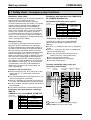
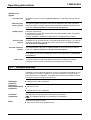
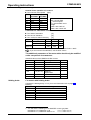
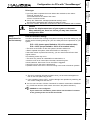
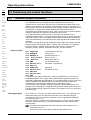
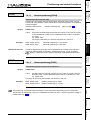
COMPAX-M / COMPAX-S
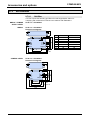
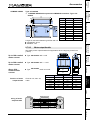
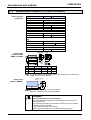
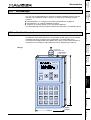
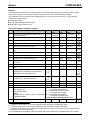
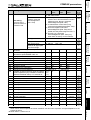
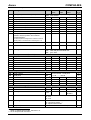
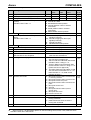
COMPAX User Guide
Compact Servo Controller
May 99
From Software Version V3.74
C
TIFIE
ER
D
DIN EN ISO 9001
U
A
M
Q
We automate motion
LI
TY SYS
T
E
Reg. Nr. 36 38 - 01
Parker Hannifin GmbH
EMD-HAUSER
Postfach: 77607-1720
Robert-Bosch-Str. 22
D-77656 Offenburg
Tel.: +49 (0)781 509-0
Fax: +49 (0)781 509-176
http://www.Parker-EMD.com
Subject to technical change. Data represents the technical status at the time of closing the press.
06.05.99
Parker Hannifin plc
EMD-Digiplan
21 Balena Close
Poole, Dorset
BH17 7DX UK
Phone: +49 (0)1202 69 9000
Fax:
+49 (0)1202 69 5750
http://www.Parker-EMD.com
192-040050 N5
COMPAX-M/S
Contents
1. Contents
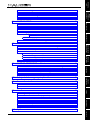
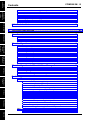
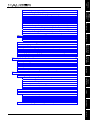
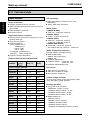
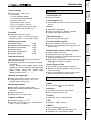
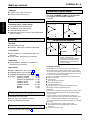
1. Contents.....................................................................................................2
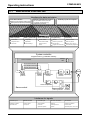
2. Unit assignment: ......................................................................................8
3. Safety instructions...................................................................................9
3.1
General dangers....................................................................................... 9
3.2
Safety conscious working....................................................................... 9
3.3
Special safety instructions ................................................................... 10
3.4
Conditions of warranty.......................................................................... 10
4. Switch on status.....................................................................................11
4.1
Configuration when supplied................................................................ 11
4.2
Start-up ................................................................................................... 11
4.3
Installing new equipment (replacement).............................................. 13
5. Conditions for usage.............................................................................14
6. Start-up manual ......................................................................................15
6.1
6.2
6.3
2
Overview ................................................................................................. 15
6.1.1
Components required .................................................................................... 15
6.1.2
Overview of unit technology.......................................................................... 16
COMPAX-M unit features....................................................................... 17
6.2.1
Connector and connection assignment ........................................................ 17
6.2.2
COMPAX-M system network, NMD10 / NMD20 mains power module.......... 18
6.2.3
COMPAX-M dimensions/installation ............................................................. 20
6.2.4
Connector assignment COMPAX-M (without N1) ......................................... 21
Mains power module NMD10/NMD20 ................................................... 22
Dimensions / installation ............................................................................... 22
6.3.3
NMD connector assignment........................................................................... 22
6.3.4
Technical data / power features..................................................................... 22
Connector
assignment /
Unit
hardware
6.6
6.3.2
Unit features.................................................................................................... 24
6.4.2
Connector and connection assignment ........................................................ 24
6.4.3
Installation and dimensions........................................................................... 25
6.4.4
Wiring up......................................................................................................... 25
6.4.4.1 Wiring up motor, mains power / control voltage and external
ballast resistance ............................................................................... 25
6.4.4.2 Wiring up system network .................................................................. 25
6.4.5
COMPAX 35XXM connector assignment....................................................... 26
Configuration
6.4.1
Technical data
COMPAX 35XXM..................................................................................... 24
6.5.1
COMPAX 25XXS connector and connection assignment ............................ 27
6.5.2
COMPAX 25XXS specific technical data ....................................................... 28
6.5.3
COMPAX 25XXS dimensions / installation.................................................... 29
6.5.3.1 Design can be arranged in rows ......................................................... 29
6.5.3.2 Flat design ......................................................................................... 29
6.5.3.3 Converting the front plates................................................................. 29
6.5.4
COMPAX 25XXS connector assignment ....................................................... 30
Positioning and
control functions
COMPAX 25XXS unit features............................................................... 27
Optimization
functions
6.5
Overview diagram........................................................................................... 22
COMPAX 45XXS/85XXS unit features................................................... 31
6.6.1
COMPAX 45XXS/85XXS connector and connection assignment................. 31
6.6.2
COMPAX 45XXS/85XXS installation / dimensions........................................ 31
6.6.3
COMPAX 45XXS/85XXS specific wiring......................................................... 32
Interfaces
6.4
6.3.1
6.7
Safety chain / emergency stop functions ............................................ 34
6.8
Connections to the motor ..................................................................... 35
Resolver / SinCos ........................................................................................... 35
6.8.2
Additional brake control................................................................................. 35
6.9.1
Digital inputs and outputs ............................................................................. 36
6.9.2
Initiators and D/A monitor (option D1) .......................................................... 37
6.9.3
Service D/A monitor / override....................................................................... 37
6.9.4
Service D/A monitor........................................................................................ 38
6.9.5
D/A monitor option D1.................................................................................... 39
6.9.6
RS232 interface............................................................................................... 39
Status
Interfaces ................................................................................................ 36
Parameters
6.9
6.8.1
Accessories /
options
COMPAX 45XXS/85XXS connector and pin assignment .......................................... 33
3
Error list
6.10 Options ................................................................................................... 40
Unit
hardware
Contents
COMPAX-M / -S
6.10.1 Absolute value sensor (option A1) ................................................................ 40
Connector
assignment /
cable
6.10.2 Incremental encoder....................................................................................... 40
6.10.3 HEDA interface (option A1/A3)....................................................................... 41
6.10.4 Single-phase power supply ........................................................................... 41
6.10.5 Bus connection............................................................................................... 41
Technical data
6.11 Technical data........................................................................................ 42
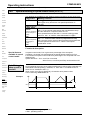
7. Operating instructions.............................................................................45
Configuration
7.1
Positioning and
control
functions
7.2
Optimization
functions
7.3
Overview ................................................................................................. 45
7.1.1
Block structure of the basic unit ................................................................... 46
7.1.2
Password protection ...................................................................................... 48
Configuration ......................................................................................... 49
7.2.1
Front plate operation...................................................................................... 49
7.2.2
Configuration when supplied ........................................................................ 50
7.2.3
Configuration process ................................................................................... 50
7.2.4
Safety instructions for the initial start-up ..................................................... 51
7.2.5
Configuration parameters .............................................................................. 52
7.2.6
Machine zero mode ........................................................................................ 57
7.2.7
Limit switch operation.................................................................................... 65
Configuration via PCs with "ServoManager" ...................................... 66
Interfaces
7.3.1
Installing ServoManager ................................................................................ 66
7.3.2
Configuring COMPAX..................................................................................... 66
7.3.3
Individual configuration of the synchronous motors .................................. 66
Accessories /
options
Positioning and control functions .................................................................. 70
Command / program instructions.................................................................. 70
7.4.1.1 Absolute positioning [POSA] .............................................................. 71
7.4.1.2 Relative positioning [POSR]............................................................... 71
Process velocity [SPEED]................................................................................. 72
7.4.1.4 Acceleration and braking time [ACCEL] ............................................. 72
7.4.1.5 Setting/resettingan output [OUTPUT] ................................................. 72
7.4.1.6 Setting multiple digital outputs [OUTPUT O12=1010]........................ 73
7.4.1.7 Switching off drive unit. [OUTPUT O0]............................................... 73
7.4.1.8 OUTPUT O0=... in program ............................................................... 73
7.4.1.9 Password [GOTO].............................................................................. 73
External velocity specification. [SPEED SYNC] ................................................ 74
7.4.1.11 Mark-related positioning [POSR] ........................................................ 75
Preparatory instructions .................................................................................... 76
7.4.1.13 Changes in speed within a positioning process [POSR SPEED] ......... 76
Comparators during positioning [POSR OUTPUT] ............................................ 78
7.4.2
Controlling programming procedure ............................................................ 79
7.4.2.1 Programmable waiting time [WAIT].................................................... 79
Status
7.4.1
Parameters
Error list
4
Unit
hardware
Idle display...................................................................................................... 91
7.4.6
Speed monitoring in speed control mode (P93="4").................................... 92
7.4.7
SPS sequential step tracking......................................................................... 94
7.4.8
Engaging and disengaging the motor brake and final stage...................... 95
7.4.9
Output of variable voltage.............................................................................. 96
Technical data
Configuration
7.4.5
Positioning and
control functions
Position monitoring (P93=1, 2, 3) .................................................................. 89
Optimization
functions
7.4.4
7.5.1
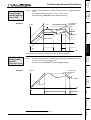
Optimizing controller ..................................................................................... 97
7.5.2
Optimization display .................................................................................... 101
7.5.3
Speed monitor .............................................................................................. 104
7.5.4
External position management with position adjustment ......................... 105
Interfaces
Optimization functions .......................................................................... 97
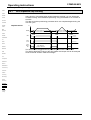
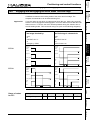
Digital inputs and outputs ........................................................................... 107
7.6.1.1 Free assignment of inputs and outputs............................................. 108
7.6.1.2 I / O assignment of the variants ....................................................... 111
7.6.1.3 Function of inputs ............................................................................ 112
7.6.1.4 Synchronous STOP using I13 .......................................................... 115
7.6.1.5 Function of outputs .......................................................................... 117
7.6.1.6 Diagrams ......................................................................................... 118
7.6.2
SPS data interface ........................................................................................ 120
7.6.3
RS232 interface............................................................................................. 124
7.6.3.1 Interface description......................................................................... 124
7.6.3.2 Interface functions ........................................................................... 126
7.6.3.3 Reading and describing program sets and parameters ..................... 128
7.6.3.4 Binary data transfer using RS232..................................................... 130
7.6.4
Process coupling via HEDA (option A1 / A3) .............................................. 132
Status
7.6.1
Accessories /
options
Interfaces .............................................................................................. 107
Parameters
7.6
Arithmetic........................................................................................................ 85
7.4.3.1 Parameter assignments ..................................................................... 85
Arithmetic and variables ................................................................................... 86
5
Error list
7.5
7.4.3
Connector
assignment /
7.4.2.2 Program jump [GOTO]....................................................................... 79
7.4.2.3 Sub-program jump [GOSUB] ............................................................. 79
7.4.2.4 Instruction to end a sub-program. [RETURN] ..................................... 79
END instruction [END] ...................................................................................... 80
7.4.2.6 Start a program loop [REPEAT] ......................................................... 80
7.4.2.7 Branching related to a control input [IF I7=1]..................................... 80
7.4.2.8 Binary IF query of inputs [IF I12=101-1] ............................................. 80
7.4.2.9 Comparative operations..................................................................... 81
7.4.2.10 Focused processing of data record groups. [WAIT START]................ 81
Jump with data record selection [GOTO EXT]................................................... 82
7.4.2.12 Sub-program jump with data record selection[GOSUB EXT] .............. 82
7.4.2.13 Error handling [IF ERROR GOSUB]................................................... 82
7.4.2.14 STOP / BREAK handling [IF STOP GOSUB xxx]............................... 83
Unit
hardware
Contents
COMPAX-M / -S
Connector
assignment /
cable
8. Accessories and options ....................................................................136
Technical data
8.1
System concept ................................................................................... 136
8.2
Overview ............................................................................................... 137
8.3
HAUSER – Motors with unit assignment ........................................... 139
8.4
HAUSER linear axes ........................................................................... 139
8.5
Data interfaces ..................................................................................... 141
Configuration
Positioning and
control
functions
8.6
Optimization
functions
Interfaces
8.7
Accessories /
options
Status
8.8
8.5.1
RS232 ............................................................................................................ 141
8.5.2
Bus systems ................................................................................................. 141
8.5.2.1 Interbus S / Option F2...................................................................... 141
8.5.2.2 RS485 / option F1/F5....................................................................... 141
8.5.2.3 Profibus / option F3.......................................................................... 141
8.5.2.4 CAN bus / option F4......................................................................... 141
8.5.2.5 CANopen / option F8........................................................................ 141
8.5.2.6 CS31 system bus / option F7 ........................................................... 141
Process interfaces ............................................................................... 142
8.6.1
Encoder interface ......................................................................................... 142
8.6.2
Absolute value sensor (A1) .......................................................................... 145
8.6.3
High-resolution SinCos sensor system (S1/S2).......................................... 145
8.6.4
HEDA interface.............................................................................................. 147
8.6.5
D/A monitor (D1) ........................................................................................... 147
8.6.6
Analogue speed specification (E7).............................................................. 148
Accessories.......................................................................................... 149
8.7.1
External control field .................................................................................... 149
8.7.2
MC measures ................................................................................................ 150
8.7.2.1 Grid filter.......................................................................................... 150
8.7.2.2 Motor output throttle......................................................................... 151
8.7.3
External ballast resistances for COMPAX and NMD20 ............................... 152
8.7.4
ServoManager............................................................................................... 153
8.7.5
Hand-held terminal ....................................................................................... 153
Annex: the COMPAX components...................................................... 159
9. Annex......................................................................................................160
Parameters
Error list
6
9.1
Status values of standard unit (COMPAX XX00) ............................... 160
9.2
Additional COMPAX measured parameters....................................... 163
9.3
COMPAX parameters ........................................................................... 165
Unit
hardware
9.3.3
Special parameters ....................................................................................... 172
9.3.3.1 RS485 interface (option F1/F5) ........................................................ 172
9.3.3.2 CAN bus (option F4) ........................................................................ 172
9.3.3.3 Profibus (option F3) ......................................................................... 172
9.3.3.4 Interbus S (option F2) ...................................................................... 173
9.3.3.5 CANopen (option F8) ....................................................................... 173
9.3.3.6 Option A1 / A3 "HEDA" .................................................................... 174
9.3.3.7 Round table control COMPAX XX30 ................................................ 175
9.3.3.8 Synchronous cycle control COMPAX XX50 ...................................... 175
9.3.3.9 Electronic transmission COMPAX XX60........................................... 176
9.3.3.10 Electronical curve control COMPAX XX70 ....................................... 176
9.3.4
Monitoring and limitation characteristics ................................................... 178
Connector
assignment /
COMPAX standard parameters .................................................................... 165
Technical data
9.3.2
Configuration
VP parameter can be modified "On line" ................................................... 165
Error handling ...................................................................................... 179
9.4.1
General error messages ............................................................................... 179
9.4.2
Special bus options error messages........................................................... 182
10.Application examples..........................................................................183
Positioning and
control functions
9.4
9.3.1
Optimization
functions
10.1.1 Overview ....................................................................................................... 183
10.1.2 External data record selection ..................................................................... 184
10.1.3 Mark-referenced positioning........................................................................ 186
10.1.4 Speed step profiling / comparator switching points .................................. 188
10.1.5 SPEED SYNC ................................................................................................ 190
10.1.8 Implementing a torque converters .............................................................. 194
Glossary ......................................................................................................195
Parameters
7
Error list
Data security
The parameter and program memory are created using ZP-RAM. This memory is
unaffected by mains power failure.
This module is guaranteed a service life of 10 years (calculated from the first startup).
ZP-RAM failure causes data loss; COMPAX contains wild data.
If you encounter problems of this kind, contact HAUSER.
Status
10.1.7 Fast start ....................................................................................................... 193
Accessories /
options
Interfaces
10.1.6 Speed control mode ..................................................................................... 191
COMPAX-M/S
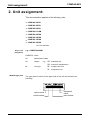
Unit assignment:
2. Unit assignment:
This documentation applies to the following units:
♦ COMPAX 25XXS
♦ COMPAX 45XXS
♦ COMPAX 85XXS
♦ COMPAX P1XXM
♦ COMPAX 02XXM
♦ COMPAX 05XXM
♦ COMPAX 15XXM
♦ COMPAX 35XXM
XX: Unit variants
Key to unit
designation
e.g.: COMPAX 0260M:
COMPAX: name
02:
performance class
60:
variant
e.g. "00": standard unit
"60": electronic transmission
M:
unit type
"M": multiple-axis unit
"S": single-axis unit
...
HAUSER type plate
The type plate is found on the upper side of the unit and contains the
following:
038106 0001 951-160101 Compax 0260M
E2
option name
serial number
8
equipment
name
part number
Unit
hardware
Connector
assignment /
General dangers
3. Safety instructions
9
Configuration
Positioning and
control functions
Optimization
functions
Error list
Parameters
Status
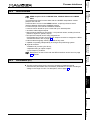
The unit must only be operated by skilled staff.
♦ When used in this manual, the term "trained staff" refers to people who,
• due to their training, experience and knowledge of current standards,
guidelines, accident prevention regulations and operating conditions, have
received authorization from the head of health and safety at the site to perform
the necessary activities, while recognizing and avoiding any associated
dangers (definition of personnel in accordance with VDE105 or IEC364)
• are familiar with first aid and the on-site safety equipment,
• have read and observe the safety instructions
• have read and observe the User Guide (or the section which applies to the
tasks to be performed).
This applies to all tasks relating to set-up, start-up, configuration, programming
and modification of the operating conditions, operating modes and maintenance.
Please note in particular the functions contained in the start-up manual relating to
operational readiness and emergency stop.
The User Guide must be available at the unit whenever it is being operated.
Interfaces
3.2 Safety conscious working
Accessories /
options
General dangers when safety instructions are not complied with
The unit described contains leading edge technology and is operationally reliable.
However, danger is encountered if the unit is employed incorrectly or for improper
use.
Energized, moving or rotating parts can
cause fatal injury to the user
cause material damage.
Proper use
This unit is designed for use in high voltage devices (VDE0160). This unit
automates motion processes. The ability to switch several units at once makes it
possible to combine several motion processes. Reciprocal interlocks must be
installed in such instances.
Technical data
3.1 General dangers
Safety instructions
COMPAX-M/S
3.3 Special safety instructions
Check the arrangement of unit and documentation.
Never disconnect the electrical connections when energized.
Use safety devices to ensure that moving or rotating parts cannot be touched.
Ensure that the unit is in perfect working order before operation.
Implement operational readiness and emergency stop functions of unit (see startup manual) in the safety and emergency stop functions of your machine.
Only operate unit with the front cover attached.
Ensure mains power module has sufficient nominal and peak performance
ratings.
Ensure that unit arrangement enables the units with higher performance ratings
to be fitted more closely to the power unit that the units with lower ratings
(COMPAX-M).
Ensure that motors and linear drive units (if available) are secured sufficiently.
Ensure that all energized connectors cannot be touched. The unit carries
voltages ratings of up to 750V, which could fatally injure the operator.
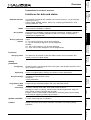
3.4 Conditions of warranty
The unit must not be opened.
Do not make any alterations to the unit, except for those described in the User
Guide.
Only activate inputs, outputs and interfaces in the manner described in the User
Guide.
When installing units, ensure that the cooling bodies receive sufficient
ventilation.
Secure units in accordance with the assembly instructions contained in the startup manual using the securing bores provided for this purpose. We cannot
assume any responsibility for any other methods used for securing the units.
10
Positioning and
control functions
COMPAX wird im unkonfigurierten Zustand ausgeliefert. Dabei steht der
Parameter P149 auf "0":
P149="0": COMPAX ist nicht konfiguriert und geht nach dem Einschalten (24V DC
und Leistungsspannung) in den OFF-Zustand (Motor stromlos).
Außerdem werden beim Einschalten sämtliche Parameter (außer den
Buseinstellungen P194, P195, P196 und P250) auf ihre Standardwerte
gesetzt.
P149="1": COMPAX ist konfiguriert und versucht nach dem Einschalten (24V DC
und Leistungsspannung) den Motor zuzuschalten.
Configuration
4.1 Configuration when supplied
Technical data
Connector
assignment /
4. Switch on status
Unit
hardware
Configuration when supplied
4.2 Start-up
Optimization
functions
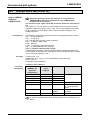
Meaning of LEDs on the front panel
COMPAX-M /-S
LED
Color
Meaning, when switched on
Ready
green
24V DC present and initialization complete
Error
red
COMPAX - fault (E1...E56) present.
In COMPAX-S, also:
mains supply or control voltage absent.
Mains power module
on
on
Possible errors
Interfaces
off
on
LED
green
Ready
on
off
no errors
Cooling body temperature too high or
error in logistics voltage (24V DC too low or unit is
defective)
Emergency stop is activated and ready contact is
released.
Ballast switching device overload or
undervoltage (<100V DC or <80V AC).
Accessories /
options
LED red
Error
Caution
Status
If the unit has no control voltage, no displays will appear
indicating that operating voltage is available.
After 24V DC of control voltage is switched on, COMPAX has two status's
available once the initialization phase has been completed:
11
Error list
Parameters
1. COMPAX is OFF
COMPAX is not configured (P149="0") or
with COMPAX XX70:
E12="0" (final stage blocked).
1
Now configure COMPAX (e.g. using the ServoManager / ParameterEditor).
Set P149="1"
Configuration is accepted with VC and VP of COMPAX.
COMPAX-M/S
Switch on status
2. COMPAX displays error E57
COMPAX is configured (P149="1"). However, the operating voltage is not
supplied.
Check COMPAX configuration 1.
Alterations are transferred with VC and VP of COMPAX.
1)
Configuring
a) Using ServoManager:
P149="1", VP and VC are transferred when being downloaded to COMPAX
from the ServoManager.
b) Using hand-held terminal:
P149="1", VP and VC are generated by the hand-held terminal.
a) Without an auxiliary device e.g. a terminal:
P149="1", VP and VC must be transmitted after COMPAX configuration.
Switch on operating voltage
With E57: acknowledge error by pressing Enter.
When OFF: command: "OUTPUT O0=0" or
switch 24V DC on / off
Motor is powered. COMPAX display shows "RUN".
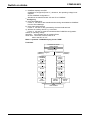
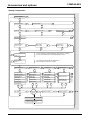
Flowchart:
connection of control
voltage 24 V DC
initializing stage
COMPAX configured
(P149="1")
COMPAX not configured
(P149="0")
error E57
in COMPAX
display
OFF in
Display
check
configuration
execute
configuration
VC, VP
P149="1",
VC, VP
connect
DC bus
voltage
connect
DC bus
voltage
clear
error E57
24V DC
ON / OFF
RUN
motor enabled
12
OUTPUT
O0="0"
Call up ParameterEditor (Menu: PC-Tools: ParameterEditor)
Use "Online: copy" menu to transfer all parameters (including system
parameters) to COMPAX.
Previous software ≤V2.0
Procedure for copying complete COMPAX setting to a new unit.
Start ServoManager.
Connect old COMPAX via RS232.
Use menu "Insert: Axis: New" to set up a new axis.
Use menu "Online: Upload" to load all COMPAX settings (all parameters:
including system parameters, data records, and (in COMPAX XX70) also the
existing curves) into the new axis.
Connect new COMPAX.
Use menu "Online: Download" to transfer the data (without system parameters)
into the new COMPAX.
Transferring system parameters
Accessories /
options
Call up ParameterEditor (Menu: PC-Tools: ParameterEditor)
Use "Online: Copy" menu to transfer all parameters (including system
Configuration
Transferring system parameters
Positioning and
control functions
COMPAX settings (all parameters: including system parameters, data records
and (with COMPAX XX70) existing curves).
Connect new COMPAX.
Use menu "Online: Download" to transfer data (without system parameters) into
the new COMPAX.
Optimization
functions
Procedure for copying the complete COMPAX setting onto a new unit
Start up ServoManager.
Connect old COMPAX via RS232.
Use menu "Insert: Axis: From controller" to set up an axis which contains all
Interfaces
Previous software ≥V2.0
Technical data
Connector
assignment /
4.3 Installing new equipment (replacement)
Unit
hardware
Installing new equipment (replacement)
13
Error list
Parameters
Status
parameters) to COMPAX.
Conditions for usage
COMPAX-M/S
5. Conditions for usage
for CE-compliant operation in
industrial and business sectors
The EU guidelines on electromagnetic compatibility 89/336/EEC and electrical
means of production for use within particular voltage limits 73/23/EEC are
satisfied, if compliance is maintained with the following peripheral conditions.
Only operate the units in the condition in which they are supplied, i.e. with
all housing plates and the front cover.
COMPAX P1XXM (without N1), COMPAX 02XXM, COMPAX 05XXM, and
COMPAX 15XXM may only be operated with HAUSER mains power modules
(NMD10 or NMD20) or on COMPAX 35XXM.
Grid filter:
A grid filter is required in the power line. The filtering can be performed
once for the entire system or as separate process for each unit.
The following grid filters are required for standalone operation:
NMD10 / COMPAX 45XXS / COMPAX 85XXS:
order no.: 073-605206
NMD20:
order no.: 073-605207
COMPAX 35XXM:
order no.: 073-605220
N1-Option / COMPAX 25XXS:
order no.: 073-605201
Length of connection: connection between grid filter and unit:
unsheathed: < 0.5m
sheathed:
< 5m
Motor and
resolver cable:
Only operate the unit with a HAUSER motor and resolver cable (whose
connector contains a special flat sheathing).
In such instances, the following cable lengths are permitted.
< 100m (the cable must not be rolled up)
For motor lines of >20m, a motor output throttle must be used
Up to 16A nominal motor current: type: 048-300010 16A / 2
mH.
Between 16A and 30A: type: 048-300020 30A / 1.1 mH.
Over 30A nominal motor current: type: 048-300030 >30A / 0.64
mH.
Resolver cable < 100m
Motor cable
Motors:
Operate unit with HAUSER motors.
Control:
Only operate with calibrated closed-loop controller (avoid feedback
oscillation).
Earthing:
Connect the filter housing, the mains power module and the COMPAX flat, highly
conductive, low inductivity with cabinet mass.
Never secure the filter housing or the unit to coated surfaces.
Cable laying:
Ensure that you have largest spacing possible between the signal and load lines.
Signal lines must never pass sources of strong interference (motors,
transformers, relays,...).
Accessories:
Only use accessories recommended by HAUSER (absolute value sensor,
encoder,...).
Ensure large contact areas down both sides of all cable sheathing.
14
Components required
Interfaces
Optimization
functions
Positioning and
control functions
Configuration
Technical data
control
Accessories /
options
6.1 Overview
6.1.1 Components required
Status
In addition to a COMPAX itself, you will require the
following components for a COMPAX application:
a motor with or without a transmission.
mains supply.
24V DC control voltage (not required for the
COMPAX 45XXS and COMPAX 85XXS).
actuation of emergency stop circuit.
various cables for connecting the components.
motor cable and resolver cable.
supply line for voltage supply.
supply line for 24V DC control voltage.
hand-held terminal or PC (with RS232 cable)
containing the ServoManager program for
configuring COMPAX.
Parameters
servo
15
Error list
Compact
Connector
assignment /
6. Start-up manual
Unit
hardware
Overview
Start-up manual
COMPAX-M/S
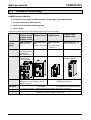
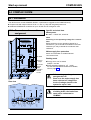
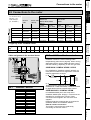
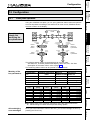
Overview of unit technology
6.1.2
Overview of unit technology
COMPAX-M and COMPAX-S
♦ are based on the same functional scope and the same controller hardware
♦ yet have differences with regard to
♦ housing and assembly technology and
♦ power areas.
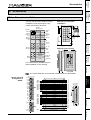
The following table shows the main features of the range of units available.
COMPAX P1XXM
COMPAX 02XXM COMPAX 35XXM COMPAX 25XXS
COMPAX 05XXM
COMPAX 15XXM
Mains supply
module /
supply:
NMD10 / NMD20:
Up to 500V AC
Dimensions:
COMPAX P1XXM: 340*400*220 [mm] 220*240*130 [mm]
340*400*60 [mm]
COMPAX-M:
340*400*85 [mm]
COMPAX-M with
COMPAX 35XXM COMPAX 25XXS
NMD mains
power module
Design:
Integrated power Integrated power
unit
unit
Up to 3 * 500V AC Up to 250V AC or
3 * 230V AC
COMPAX 45XXS
COMPAX 85XXS
Integrated power unit
Up to 3 * 500V AC
275*350*125 [mm]
COMPAX 45XXS /
COMPAX 85XXS
COMPAX-M
COMPAX-S
Power Supply
COMPAX-M
COMPA X-M
DIGITAL
Di g it a l
Au tom a tion
Sta tus
N um ber
Va l u e
DIGITAL
S ta tu s
COMPAX-S
S ta tu s
DIGITAL
Va lu e
Va l u e
-
+
-
En te r
+
+
N um ber
S tatus
R eady
E rro r
R e a dy
E rro r
ENTER
E n te r
Re ady
R ea dy
S ta tu s
Num be r
N um ber
Error
E rro r
Number
X6
X6
X6
X7
RS2 32
IN
Va l u e
R S4 8 5
OU T
R S2 3 2
R S2 3 2
Value
X6
X8
X8
-
+
En t e r
-
+
X8
X1 0
X1 0
Ent er
Input
C o n tro l
R ea d y
Er ro r
X6
R ea d y
X7
Er ro r
Ready
In p u t
In p u t
O u tp u t
O u tp u t
Output
IN
RS 4 8 5
RS 2 3 2
OU T
RS 232
X8
X8
X8
X1 0
X8
Te s t
Te s t
X10
In p u t
Input
Interfaces:
Options:
16
X1 1
X1 1
Control
X1 1
X9
X11
can be arranged in rows
COMPAX-M can be arranged in rows on
COMPAX 35XXM
Connection
with drive:
X9
Test
C o n tro l
Installation:
X1 1
Outpu t
Te s t
X9
Control
Motion & Control
X9
O u tp u t
Output
X1 0
Te st
X9
C o n tr o l
C o n tro l
C o n tro l
Input
Er ror
X6
X6
can be arranged in rows (however not in the
COMPAX-M network)
Resolver and motor cables are the same in all units
Terminals
for COMPAX-S connector terminals
The same for all units: digital inputs/outputs; RS232; test/control connector
The same for all units: absolute value sensor; encoder input; encoder emulation; bus
systems (not with N1 option); D/A monitor
Connector and connection assignment
Connector
assignment /
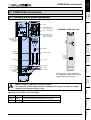
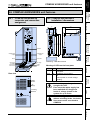
6.2 COMPAX-M unit features
6.2.1 Connector and connection assignment
Technical data
COMPAX-M
X1 motor
X2 intermediate loop
power connections
COMPAX P1XXM plan view
X3 24V control voltage
X19
+
R e ad y
AC/DC
voltage
supply
E n te r
L1
N
PE
+24V
0V
Positioning and
control functions
V a lu e
-
Configuration
X4 control- and status
signals / bus signals
or short circuit plug
Nu m be r
S ta t u s
X5 control- and
status- signal
bus-signals
input
E rro r
X6
X6 RS232
R S 2 32
X8 Input
/ Output
X8
Unit
hardware
COMPAX-M unit features
X10
X10 Input / Output
Input
X11 Control
Te s t
C o n t ro l
X9
X11
X12 resolver
X13 Encoder
X14 HEDA
X16 absolute
encoder
X18 fan
X15 HEDA
X17 initiators
Accessories /
options
Connector X19 is only available in
the COMPAX P1XXM with N1 option
(single-phase power supply).
Interfaces
X9 Test
Optimization
functions
Terminal
for sheetshielding of
motor cable
O utpu t
Before wiring up, always de-energize the unit.
Status
Even once the mains supply has been switched off, dangerous levels of voltage
remain in the system for up to 5 min.
Color
Meaning, is switched on
Ready
green
24V DC available and initialization complete.
Error
red
COMPAX error (E1...E56) is present.
17
Error list
LED
Parameters
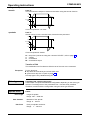
Meaning of the LEDs on the front plate
Start-up manual
COMPAX-M/S
COMPAX-M system network, NMD10 / NMD20 mains power module
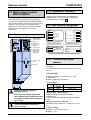
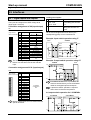
6.2.2 COMPAX-M system network, NMD10 / NMD20 mains power module
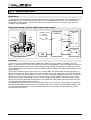
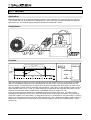
A COMPAX-M drive system consists of one mains
power module and one or more drive controllers.
The units are coupled with one another by means of
a flatband cable (see below). These are arranged
behind the front plate cover of the power unit and
the drive controller.
The power unit converts mains power (up to 3*500V
AC) into DC current for the intermediate circuit.
The two connectors for connection to the bus
systems are located on the front plate of the power
unit. The connection arrangement is oriented to the
specifications of 2-conductor remote bus.
The 24V DC of control voltage which is required in
the system network is powered off the power unit.
A connector terminal on the front of the power unit
is used for connecting the control and status signals
(EMERGENCY STOP, readiness) which you can
incorporate in the control of the entire system.
These signals, and bus lines, are connected
internally via a flatband cable which is sheathed on
both sides. These cables are available within the
scope of supply of the drive controller supplier. The
connectors which receive these connection cables
are housed under the front plate cover of the mains
power module and the drive controller.
Short circuit connectors
Attach a short circuit connector to the outgoing
connector on the drive controller, i.e, the one which
is furthest away from the mains power module. The
short circuit connectors forms part of the scope of
supply of the mains power module supplier.
Installation arrangement
Before wiring up, always de-energize the unit
Even once the mains supply has been switched off, dangerous levels of voltage
remain in the system for up to 5 min.
Wiring up the system network
The wires required for creating
the system network fall within
the scope of supply.
Open the front cover (upper
section of front side) by
loosening the top right knurled
screw and wire up as follows:
24V DC voltage supply.
PE and DC current.
Emergency stop, ready and
bus signals with a terminating
connector on the last unit.
From the mains power module
to the individual COMPAX-M.
When the unit is still in
the original condition in
which it is supplied, the
terminating connector is
located on the mains
power module.
18
power supply module
COMPAX-M COMPAX-M
PE LS+ LS-
cable conduit
main
HAUSER
HAUSER
PO WER SUPPL Y
COMPAX-M
D I GI T AL
-
E r r or
IN
+
R ea dy
X7
R S 48 5
S t at u s
En
ter
Erro
r
X6
OUT
X8
R S 23 2
X8
C o nt r o l
U V W PE brake
U V W PE brake
...
X 10
+ -
N u m be r
PE + -
PE + -
V al ue
-
+
R ea dy
E nt e r
E r r or
X1
X1
X1
X6
PE
X2
+LS
R S 23 2
X8
In
put
X 10
I np u t
O
utp
ut
O u t pu t
T est
T est
Con
trol
X9
L1 L2L3 PE 24V
D I GI T AL
CO M PAX -M
N u m be r
V al ue
R ea dy
motor
HAUSER
Sta
tus
X6
motor
24V
X2
X2
C o nt r o l
X9
X 11
X 11
-LS
voltage supply
24V
{
emergency stop,
stand by and bus
signals
+
24V X3
-
X3
X4
X5
X3
X4
X5
last device
equiped
with
terminal
plug
X4
COMPAX-M system network, NMD10 / NMD20 mains power module
Unit
hardware
COMPAX-M unit features
Unit side
Note the sheath connection of the
motor cable to the upper unit side.
Clamp the motor cable with the
open point of the sheet mesh
under the ground terminal.
MP A X - M
Mo
ti o
n &C
o n
tr o
l
Nu
mb e
r
S ta tu
s
Va
lu e
-
Re
a d
y
+
Re
a d
y
E ro r
X6
X7
RS
4 8
5
-
+
Re
a d
y
X8
X1
0
X8
+
Re
a d
y
X1
0
X8
X9
black 5
free
black 4
green/
yellow
U V W PE brake
+ -
PE+ -
X1
0
In p
u t
X1
Ou
t p
u t
X1
Te
s t
Co
n tr o
l
X1
L1 L2L3 PE 24V
RS
2 3
2
Te
s t
Co
n tr o
l
Shielding of motor cable
En
te r
E ro r
X6
Ou
t p
u t
Te
s t
X9
-
In p
u t
Ou
t p
u t
5
Va
lu e
En
te r
E ro r
RS
2 3
2
In p
u t
Co
n tr o
l
4
Nu
mb e
r
X6
RS
2 3
2
3
Mo
ti o
n &C
o n
tr o
l
S ta tu
s
Va
lu e
En
te r
E ro r
X6
OU
T
X8
Nu
mb e
r
2
X1
D IG IT
AL
Technical data
CO
D IG IT
AL
Co
n tr o
l
X1
X9
PE
X1
X2
+LS
X2
Configuration
SUPPL Y
S ta tu
s
IN
black 3
black 1
CO M PA X- M
1
D IG IT
AL
E R
+ -
HAUSE R
CO M PA X- M
P OW
PE
-LS
+
24V X3
-
X3
X5
X4
Positioning and
control functions
X4
Only wire up brake in motors which have a holding brake. If the motor does not have a
holding brake, do not wire up the brake.
Wiring up mains power / control voltage
L1 L2 L3 PE 24V
cable conduit
Optimization
functions
The mains supply line and the control
voltage line can be found on the mains
power module.
+ HAU SER
1
HAU SER
COMPAX- M
COMPAX- M
2
3
4
5
X1
PO WE R SU PPL Y
DIGT
I AL
S t a t us
Mo ti on & Co ntrol
N u m b er
S t a t us
V al ue
24V DC ±10%
Ripple <1VSS
Fuse protection: 16A
+
R e ad y
X7
En e
t r
-
E rro r
En e
t r
X8
X 10
+
R e ad y
En e
t r
X8
X 10
I np u t
I np u t
Ou tp u t
Ou tp u t
Ou tp u t
T es t
X9
X1
X1
T es t
Co n to
r l
X 11
PE + -
X 10
I np u t
Co n to
r l
+ -
R S 23 2
X8
U V W PE brake
L1 L2 L3 PE 24V
E rro r
X6
R S 23 2
T es t
X9
-
E rro r
X6
R S 23 2
Co n to
r l
N u m b er
V al ue
+
R e ad y
X6
OUT
X8
V al ue
Co n to
r l
X 11
X9
PE
X2
+LS
X 11
X2
-LS
+
24V X3
-
X3
power supply
module
X4
X5
Accessories /
options
Control voltage:
E rro r
R S 48 5
Mo ti on & Co ntrol
S t a t us
X4
Status
20A)
NMD20: 35A
K circuit breaker or suitable Neozed
conventional fuse.
-
R e ad y
X6
IN
N u m b er
Parameters
3*80V AC - 3*500V AC; 45 - 65 Hz
NMD10: 16A (K circuit breaker in
DIGT
I AL
C O M PAX - M
Interfaces
DIGT
I AL
Mains power:
19
Error list
HAUSE R
black 2
U V W PE brake
cable conduit
Connector
assignment /
Wiring up the motor
Start-up manual
COMPAX-M/S
COMPAX-M dimensions/installation
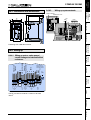
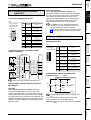
6.2.3 COMPAX-M dimensions/installation
Direct wall installation and dimensions of COMPAX-M and the mains
power modules.
02XXM, 05XXM,
15XXM, NMD10
& NMD20
P1XXM
85
75
50
60
49
65
Direct wall installation:
COMPAX-M
DIG ITAL
S ta t us
DIG IT AL
Nu m be r
St a tu s
Va lue
N um b e r
450
430
364
Valu e
En t er
Re ad y
96
COMPAX-M
450
430
364
The controllers are
fastened to the
installation plate using
the back of the cooling
body.
390
340
10
40
10
40
The specific design of
the COMPAX-M
controller allows for wall
installation (distance of
61mm in COMPAX
P1XXM and 86 mm in
larger units) in two
different ways:
-
Er ro r
+
Re ad y
En te r
Er r or
X6
RS 23 2
X8
RS232
X1 0
X10
X8
Input
Input
O u t pu t
Output
T e st
Test
Control
C on t ro l
X11
65
31
X9
50
Attach with four 6-mm
hex-socket-head-screws
294
244
85
50
96
82
50
mounting
plate
COMPAX-M
DIG IT AL
St a tu s
N um b e r
Valu e
-
+
Re ad y
En te r
424
408
The cooling body is
pushed through a hole in
the installation plate (on
right of figure) to the
rear. A separate heat
chamber is created
between the installation
plate and the rear wall of
the control cabinet. You
should comply with the
angles required under
designation MTS2.
Indirect wall installation of COMPAX 02XXM, COMPAX 05XXM and
COMPAX 15XXM and the mains power modules NMD10 and NMD20.
441,5
424
Indirect wall
installation:
Attach with two 6-mm
hex-socket-head-screws
Er r or
X6
RS2 32
X8
X10
In p u t
O u tp u t
T e st
C on t ro l
X9
Indirect wall
installation is not
possible with the
COMPAX P1XXM.
X11
50
50
mounting
plate
Fan configuration
Units with fan:
Units without fan:
20
COMPAX P1XXM
COMPAX 02XXM
COMPAX 05XXM
NMD10
COMPAX 15XXM
NMD20
I1
I2
I3
I4
I5
I6
I7
I8
O1
O2
O3
O4
O5
O6
O7
O8
I9
I10
I11
I12
I13
I14
I15
I16
O9
O10
O11
O12
O13
O14
O15
O16
+24V
GND
reserviert
reserviert
X8:
input /
output
I1...I8
O1...O8
X10:
input /
output
I9...I16
O9...O16
X9
24V*
15V - 24V emergency
stop*
housing
X1:
motor
brake
X2:
power intermediate loop
-LS
X3:
control
voltage
COMPAX-M unit features
X6:
RS232
X13: encoder
X11
X18: fan
+24V
X11/1
X11/7
X11/6
GND X11/2
X11/3
Override
DA-channel 2 X11/4
X11/5
DA-channel 3
shield
Override (old)
X18/+
0V X18/-
24V
DA-channel 0 X17/1
(option D1)
DA-channel 1 X17/2
shield X17/3
NC X16/4
GND X16/5
T- X16/1
NC X16/2
D- X16/3
TxC/ X14(15)/7
RxD/ X14(15)/8
TxD/ X14(15)/9
TxD X14(15)/5
RxC/ X14(15)/6
TxC X14(15)/3
RxD X14(15)/4
NC X14(15)/1
RxC X14(15)/2
Sig. E2 X17/8
Sig. E1 X17/9
GND X17/6
Sig.MN X17/7
GND 24V X17/4
X17:
DA-monitor
+24V X17/5
initiators
X14/X15:
HEDA
X16:
Absolut
encoder
T+ X16/6
NC X16/7
D+ X16/8
+24V X16/9
21
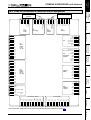
Connector assignment COMPAX-M (without N1)
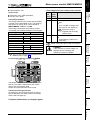
6.2.4 Connector assignment COMPAX-M (without N1)
X8/1
X8/2
X8/3
X8/4
X8/5
X8/6
X8/7
X8/8
X8/9
X8/10
X8/11
X8/12
X8/13
X8/14
X8/15
X8/16
X10/1
X10/2
X10/3
X10/4
X10/5
X10/6
X10/7
X10/8
X10/9
X10/10
X10/11
X10/12
X10/13
X10/14
X10/15
X10/16
X9/1
X9/2
X9/3
X9/4
X9/5
X9/6
X9/7
PE
X12: resolver / SinCos
PE
The bus connections are made via the mains power module.
* can be
parameterized
PE
Unit
hardware
Connector
assignment /
Technical data
Configuration
Positioning and
control functions
Optimization
functions
Interfaces
Accessories /
options
Status
Parameters
Error list
GND
X13/15
A1/
X13/14
B1/
X6/8
CTS
A2/
X6/9
+5V
X13/13
B2/
X13/10
N2/
X13/9
+5V
X13/8
N1/
X13/12
GND X6/5
X6/6
DSR
RTS X6/7
X13/11
X6/3
TxD
X6/2
RxD
X6/4
DTR
A1
X13/7
B1
X13/6
A2
X13/4
N1
X13/5
X3/1
+24 V
X3/2
0V
B2
X13/3
N2
X13/2
housing
X13/1
+LS
SIN+
X12/13
COS+
X12/12
COSX12/11
TEMP
X12/10
STX12/15
X1/4
BrBr+ X1/5
+5 V
X12/9
ST+
X12/8
GND
X12/7
NC
X12/6
SINX12/5
REF+
X12/14
U X1/1
X1/2
V
X1/3
W
REFX12/4
NC
X12/3
+8V
X12/2
housing
X12/1
Start-up manual
COMPAX-M/S
Overview diagram
6.3 Mains power module
NMD10/NMD20
The mains power module ensures the supply of
current to the COMPAX-M (not COMPAX 35XXM)
axis controller and the SV drive connected into the
network. It is connected to the 3-phase power
supply with 3*400V AC and PE. 24V DC voltage
should made be available for the control
electronics.
6.3.2 Dimensions / installation
Dimensions and installation of the NMD10 and
NMD20 power units correspond to the data for
COMPAX-M (refer to page 20).
6.3.3 NMD connector assignment
X1/1
X1/2
X1/3
6.3.1 Overview diagram
X1/4
X1/5
voltage supply
3*(80-500)V AC/
X1 24V CC
Power Supply
L1
L2
L3
PE
24V
PE
+
-
X1/6
+24V
L1
L2
X1:
voltage
supply
L3
PE
GND X8/2
P X8/3
stand by
X8/4
S
+24V X8/5
X8
+24V
15V-24 V emerg. Stop
0V
X8/1
X8/6
housing X8/6
X1
PE
PE
X2
+LS
+LS
-LS
-LS
+
+
24V
24V
X3
-
-
X4
X2 power intermediate loop
X3 control
voltage 24 V
X6: Bussysteme Eingang
X7: Bussysteme Ausgang
Belegung abhängig vom Bussystem
Belegung abhängig vom Bussystem
PF
PE
X2:
+LS power intermediate loop
-LS
X4 control- and
status-signals
Bus signals
continuation
Ready
X6 bussystems IN
Error
X6
IN
X7
RS 485
OUT
X7 bus-systems
OUT
X3:
Control
voltage
+24V
0V
6.3.4 Technical data / power
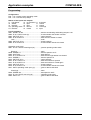
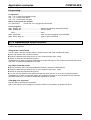
features
X8
X8 Control
Control
Function
Generates DC current when run directly off a mains
source.
CE conformity
EMC susceptibility / emissions in acc. with
X18 fan
EN61800-3.
Safety: VDE 0160 / EN 50178.
Output rating
Before wiring-up, always deenergize the unit.
Even once the mains supply has
been switched off, dangerous levels
of voltage remain in the system for
up to 5 min.
The PE connection should be a
10mm2 version
NMD10:
NMD20:
Nominal
output
10 kW
20 kW
Peak output
20 kW (<3s)
40 kW (<3s)
Mains supply fuse protection
NMD10: 16A (K circuit breaker in 20A)
NMD20: 35A
K circuit breaker or suitable Neozed conventional
fuse.
Mains power up to 3*500V AC
Operating range: 3*80V AC - 3*500V AC; 45 - 65
Hz.
Control voltage
Between 21.6V and 26.4V DC
Ripple: < 1VSS
22
Technical data / power features
Error diagnosis in the mains power module
Power losses
without fan: max. 120W (standard)
with fan: max. 250W.
LED LED
red
green
Error Ready
Lasts for
<50 ms
<1s
on
off
on
on
Technical data
high
or
error in logistics voltage (24V
DC to low or unit defective)
Cooling down time
³ 10s
³ 50s
not limited
not limited
No errors.
Cooling body temperature too
Emergency stop is
triggered and the ready
contact drops.
Ballast switch overloaded
or
undervoltage (<100V DC or
<80V AC).
Configuration
Braking power
NMD10
17 kW
4.0 kW
Without fan: 120W
With fan: 250W
NMD20
9.5 kW
2.5 kW
Without fan: 120W
With fan: 200W
off
on
Possible errors
Ready contact and green LED are coupled.
<50 ms
<1s
³ 10s
³ 50s
not limited
not limited
Caution
If the unit has no control voltage, no
displays will not indicating that
operating voltage is available.
Optimization
functions
You can use external ballast resistances for
NMD20 (refer to page 152).
Connecting the ballast resistance to NMD20
24V
motor
U V W PE brake
L1 L2 L3 PE 24V
+ X1
PE
X2
+LS
X2
-LS
1
X5
2
X3
X4
X3
X5
Accessories /
options
bracking resistance
PE + -
X1
Interfaces
mains
Positioning and
control functions
Overvoltage limitation
The energy returned to the system during braking
is stored in the intermediate circuit. The capacity
and amount of energy which can be stored is:
NMD10/NMD20: 1100mF / 173 Ws
If the energy recuperated from braking causes
overvoltage, then ballast resistances are engaged.
Connector
assignment /
Fuse protection: 16A
Unit
hardware
Mains power module NMD10/NMD20
X4
The ballast resistance is connected to X5/1, X5/2
and PE. The cable is fastened into the tension
relief of the mains power cable.
Output X5 is protected from short circuits.
Status
Thermal monitoring protection
An emergency stop is triggered at 85°C cooling
body temperature, the ready contact is released
and the red LED lights up.
23
Error list
Parameters
If a phase malfunctions, no displays appear
Start-up manual
COMPAX-M/S
Unit features
6.4 COMPAX 35XXM
6.4.1 Unit features
The 35 kW servo control COMPAX 35XXM - a performance upgrade to the COMPAX family.
Compact unit with output currents of 50 Aeff / 100 Aeff (<5s) with integrated power unit.
Additional COMPAX-M controllers of up to 15 KW can be arranged in rows.
Specific technical data
Mains power
6.4.2 Connector and connection
assignment
3*250V - 3*500V AC; 45-65 Hz.
Note!
Switching on the operating voltage for a second
time:
Before switching on the operating voltage for a
second time, you must wait for at least 2.5 minutes
otherwise you may overload the condenser load
resistance.
COMPAX-M
Digital
S t a tu s N u m b e r
Mains supply fuse protection
V alue
Bus
systems:
X7 OUT
X5 IN
-
E n te r
+
H1
Re ad y E rro r
X5
X7
X6
X6 RS232
IN
RS 232
OUT
X19
X19
Control
X8
Braking mode
X 10
In p u t
Control
X9 Test
X8/X10 In-/
Output
Energy which can be stored
X11 Control
External ballast resistance: 10Ω / 2 kW
3450µF / 542 Ws
O ut p u t
Tes t
X13
Encoder
C o n t rol
X9
X14/X15
HEDA
X 11
X12
Resolver
Before wiring up, always deenergize the unit.
Even once the mains supply has
been switched off, dangerous
levels of voltage remain in the
system for up to 5 min.
external
ballast
resistor
AC - voltage
up to 500V AC
motor
brake
24V control
voltage
F1
3.16A
motor
F1
+
+
PE
L2
Mains Input
X 20
24
For the external ballast resistances available,
refer to page 152.
X17 Initiators
X16 Absolute
encoder
Plan view
L1
62A K circuit breaker or suitable Neozed
conventional fuse.
L3
PE
-
PE
DC - In
Braking
24 V
Resistance
X 21
X 22
-
PE
U
V
W
Motor
Motor
Brake
X1
X 23
When working with motors without
a holding brake, the brake lines
must not be connected to
COMPAX
Installation and dimensions
Wiring up system network
COMPAX 35XXM
COMPAX-M / SV-M
390
340
Cable conduit
LSMotor
HAUSER
65
LS+
PE
DIGT
I AL
C OM P AX- M
S ta u
t s
N u m b er
U V W PE Brake
V al ue
COMPAX-M
-
+
PE + -
En e
t r
H1
R e ad y
E r r or
X6
X5
X7
R S 23 2
IN
X1
OUT
X8
X 10
X 19
I np u t
C ont r ol
D ig i ta l
O u t p ut
+
E n te r
H1
R ead y
X5
T es t
X 11
18
17
E rr o r
X6
X7
R S 2 32
O UT
X8
X1 9
X2
C o nt r o l
X9
+
24V
-
X 10
In p u t
Co n tro l
16
15
X3
Last device
equiped with
terminal plug
Configuration
450
430
363
V alue
-
IN
...
N um b er
S ta tu s
O u tp u t
Voltage supply 24V
Emergency stop,
stand by and
bus signals
Te s t
C o n tr o l
X 11
65
X9
190
X5
X4
Positioning and
control functions
Fastening with 4 M6 Allen screws.
6.4.4 Wiring up
+
+
Braking
Mains Input
24 V
Resistance
X 20
X 21
L3
9 10
U
V
X 22
Optimization
functions
Interfaces
-
PE
PE
DC - In
L2
8
W
Motor
Motor
Brake
X1
X 23
Status
6 7
PE
L1
F1
1112 13 14
4 5
1 2 3
F1
3.16A
Accessories /
options
Motor
brake
W
green / yellow
V
black 4
black 5
+ -
U
black 3
PE
black 2
Motor
Connection for
external contact
for brake control
black 1
External
braking resistance
green / yellow
green / yellow
PE PE
L1 L2 L3
24V Control voltage
Supply up to
500V AC
6.4.4.1 Wiring up motor, mains power /
control voltage and external ballast
resistance
Parameters
The PE connection must be a version of at least
2
10mm
25
Error list
190
10
...
218
190
Technical data
86
14
Connector
assignment /
6.4.4.2
6.4.3 Installation and dimensions
Unit
hardware
COMPAX 35XXM
Start-up manual
COMPAX-M/S
COMPAX 35XXM connector assignment
X21:
Control
voltage
X20:
AC Supply
X8/9
X8/10
X8/11
X8/12
X8/13
X8/14
X8/15
X8/16
I6
I7
I8
O1
O3
O4
X10/4
X10/5
X10/6
X10/7
X10/8
X10/9
X10/10
X10/11
X10/12
X10/13
X10/14
X10/15
X10/16
-LS
X12/1
+24V
X12/2
0V
X12/3
X12/4
X12/5
O6
X7: output bus systems
O7
Assignment depends on
the bus system
O8
I9
X5: output bus systems
Assignment depends on
the bus system
I10
X12/6
X12/7
I12
I13
I14
I15
I16
O9
O10
+24V X19/1
GND X19/2
Stand by P X19/3
Stand by S X19/4
+24V X19/5
15-24V Emerg.stop X19/6
O11
O12
24V X19/7
reserved X19/8
+24V X19/9
Enable X19/10
O13
O14
Shield X19/11
O15
X9/4
X9/5
X9/6
X9/7
TxD
+24V
GND
reserved
reserved
X12/12
X12/13
X12/14
X12/15
X13/1
X13/2
X13/3
X13/4
X13/5
X13/6
DTR
GND
DSR
X6/2
X13/8
X6/3
X13/9
X6/4
X13/10
X6/5
X13/11
X6/6
X13/12
X6/7
X13/13
24V
RTS
15-24V Emerg. stop*
CTS
X6/8
X13/14
+5V
X6/9
X13/15
Housing
* can be parameterized
26
X12/10
X13/7
O16
X6:
RS232
X9/3
X12/9
X12/11
I11
X9
X9/2
X23/4
Br+
X23/3
Br'+
X23/2
Br-
X23/1
+LS
RxD
X9/1
Br'+
Shield
X11/1
X11/2
X11/3
X11/4
X11/5
X11/6
X11/7
PE
O5
X19
X10/3
X1/3
X11
O2
X10:
Input / output
I9...I16; O9...O16
X10/2
W
Override (old)
X12/8
X10/1
PE
X1/2
V
X1/1
U
X3/2
PE
DA-channel 3
X18:
Fan
X8/8
I5
DA-channel 2
Housing
24V
X18/+
0V
X18/-
+8V
NC
DA-channel 0 X17/1
DA-channel 1 X17/2
REFSINNC
GND
ST+
+5 V
TEMP
COSCOS+
SIN+
X17: DA-monitor (Option D1)
initiators
X8/7
Override
I4
Shield X17/3
GND 24V X17/4
ST-
Housing
N2
B2
N1
A1
+5V
N2/
B2/
A2/
N1/
B1/
A1/
GND
X17/5
GND X17/6
Sig.MN X17/7
Sig. E2 X17/8
Sig. E1 X17/9
TxC X14(15)/3
RxD X14(15)/4
TxD X14(15)/5
RxC/ X14(15)/6
TxC/ X14(15)/7
RxD/ X14(15)/8
TxD/ X14(15)/9
A2
B1
+24V
NC X14(15)/1
RxC X14(15)/2
REF+
X14/X15:
HEDA
X8/6
GND
I3
T- X16/1
NC X16/2
D- X16/3
X16:
Absolute
encoder
X8/5
+24V
I2
X12: Resolver / SinCos
X8/4
X23:
Motor brake
X1:
Motor
X13: Encoder
X8/3
X22: Braking
resistance
I1
HV dc and 24V
for additional
COMPAX-M
X8/2
X8:
Input / output
I1...I8; O1...O8
X8/1
X3/1
Braking
resistance X3/2
+24 V X21/1
X21/2
0V
PE
PE
X20/3
L3
X20/2
L2
L1
X20/1
6.4.5 COMPAX 35XXM connector assignment
NC X16/4
GND X16/5
T+ X16/6
NC X16/7
D+ X16/8
+24V X16/9
6.5 COMPAX 25XXS unit features
Enter
Error /
red
Error
Ready
Meaning when
switched on
Ready 24V DC available
/ green and initialization
complete.
Value
+
Technical data
LED /
color
Status Number
-
Meaning of the LEDs on the
front plate
COMPAX error
(E1...E56) present.
Configuration
COMPAX-S
6.5.1 COMPAX 25XXS connector and connection
assignment
X6
RS 232
X8
X6 RS232
X10
Positioning and
control functions
X10 digital input
and output
X8 input
/ output
Input
Output
X9 test
Unit
hardware
COMPAX 25XXS connector and connection assignment
Connector
assignment /
COMPAX 25XXS unit features
X11 control
Test
Control
X11
X12 resolver
X13 encoder
X14 HEDA
X15 HEDA
X16 absolute
Optimization
functions
X9
X17 initiatoren
Interfaces
X18 fan
X2
AC
supply
+
X3
24V DC
supply
X3/
2
1
X1/
8
7
6
5
4
3
2
1
+
PE
W
V
U
X4/
3
2
1
PE
BB+
X1 motor and
motor brake
X4
braking
resistance
Accessories /
options
L3
PE PE
L3
L2 N
L1 L
Before wiring up, always deenergize the unit.
Even once the mains supply has
been switched off, dangerous
levels of voltage remain in the
system for up to 5 min.
When working with motors without
a holding brake, the brake lines
must not be connected to
COMPAX
Status
3 x 230V AC
X7 Bus systems
OUT
Parameters
AC
0V
X2/
4
3
2
1
F19
3.16 AT
23
X5 Bus
systems IN
27
Error list
L1
230V AC
AC
L2
230V
23 0V AC +10%
1 x 230V AC max.
line to line voltage
Plan view of COMPAX 25XXS
Start-up manual
COMPAX-M/S
COMPAX 25XXS specific technical data
Wiring up mains power / control voltage
Note the sheath connection of the motor cable
PE PE
L3
L2 N
L1 L
PE
L3
L2
L1
F19 3.16 AT
X3
X1
X4
24V DC
supply
motor and
motor brake
brake
resistance
+
+
PE
W
V
U
PE
BB+
Connections for
1 x 230V AC
PE
N
L
24V control voltage
1
2
on the upper side of the unit.
Clamp the motor cable with the open point of
the sheath mesh under the ground terminal.
Motor side
Via connectors.
AC
supply
4
X2
Connections for
3 x 230V AC
3
L1
X5 RS485 IN
RS485
X7
OUT
2
U
AC
1
V
black 1
0V
4
W
3
braking
resistance
black 2
PE
BB+
23
PE
black 3
X4
brake
+
green/yellow
2
black 4
1
black 5
+
PE
W
V
U
L3
+
230V AC
connection for
external contact
for brake control
L2
X1
max. 230V AC +10%
line to line voltag e
PE PE
L3
L2 N
L1 L
The mains supply line and control voltage line can be
found on the upper side of the unit.
Mains power: you have 2 options (with the same
output rating):
3*80V AC - 3*250V AC • 45-65 Hz • Fuse protection:
10A
1*100V AC - 1*250V AC • 45-65 Hz • Fuse protection:
16A
Control voltage: 24V DC ±10% ripple <1VSS
Fuse protection: 16A
1 x 230V AC
1 x 230V AC
3 x 230V AC
sheetshielding of motor cable
3 x 230V AC
L3
23 0V AC
L2
L1
motor and
motor brake
AC
X1
0V
F19 3.16 AT
24V DC
X3
supply
23
X5 RS485 IN
RS485
OUT
AC
X2
supply
X7
max. 230V AC +10%
line to line voltag e
AC
AC
0V
23
0V
On unit side
23
Wiring up motor
+
Note! Do not apply 3*400V AC.
Only wire up brake in motors which have a holding brake If the motor does
not have a holding brake, do not wire up the brake.
6.5.2 COMPAX 25XXS specific technical data
Overvoltage limitation
The energy recuperated during braking is stored in
the intermediate circuit. The capacity and energy
which can be stored are:
COMPAX 25XXS: 1000 mF / 27 Ws
If the recuperated energy causes overvoltage, then
external ballast resistances can be engaged.
Maximum braking power with external
ballast resistance
Braking power
COMPAX 25XXS: £1.0 kW
When Rext ³ 56W: £2.5 kW
Lasts
for
Cooling
down time
not limited
<2s
³ 10s
We supply an external ballast resistance for
COMPAX 25XXS (refer to page 152).
28
Connecting ballast resistance to COMPAX-S
The ballast resistance is connected to B+, B- and, if
necessary, PE.
Output X4 is protected from short circuits.
Mating connectors X1, X2, X3 and X4
Mating connectors for X1,..X4 are available within
the scope of supply of Phoenix and have the
following type designations:
X1: MSTB2,5/8/STF-5.08 (with screw connection)
X2: MSTB2,5/4/ST-5.08 (without screw connection)
X3: MSTB2,5/2/ST-5.08 (without screw connection)
X4: MSTB2,5/3/STF-5.08 (with screw connection)
You can acquire Phoenix housings for these
connectors and these can be used once adapted to
our cables. Designation: KGG-MSTB2.5/(pin
number).
COMPAX 25XXS dimensions / installation
Connector
assignment /
6.5.3 COMPAX 25XXS dimensions / installation
The two supplied retaining plates can optionally be screwed onto the 2 sides (cooling body side and rear,
left-hand side). Retaining screws: 4 M6 Allen screws.
COMPAX-S
Sta tus
N um be r
221
Va lu e
-
+
271
En ter
R ea d y
Err or
Delivery status
290
R S2 32
X8
Configuration
X6
270
240
The left-hand side of the
cooling body is fastened to the
unit. This is fastened to a metal
wall using 2 retaining plate.
Installation distance: 135 mm
Technical data
98
65
16
30
10
130
6.5.3.1 Design can be
arranged in rows
Unit
hardware
COMPAX 25XXS unit features
X1 0
Inp u t
This is the unit design we
deliver.
Ou tp u t
Te st
220
17
186
30
65
V a lu e
-
Ready
E r ro r
290
RS 232
Install the retaining plate on
X 10
In p u t
Accessories /
options
O u tp u t
T e st
C o n t ro l
X 11
95
Status
186
Parameters
X9
65
270
X6
X8
the desired side.
Unfasten front plate and blind
plate. There are 2 screws on
both the upper and lower
sides of the unit.
Firstly install the front plate and
then the blind plate to the
desired point.
131
181
E nt er
240
Converting the
front plates
+
Interfaces
N um be r
COMPAX-S
S t at us
29
Error list
10
6.5.3.2 Flat design
6.5.3.3
Optimization
functions
65
X1 1
98
The left-hand side of the
cooling body is fastened to the
unit. It is fastened to a metal
wall using 2 retaining plates.
Positioning and
control functions
C on trol
X9
Start-up manual
COMPAX-M/S
COMPAX 25XXS connector assignment
X10/5
X10/6
X10/7
X10/8
X10/9
X10/10
X10/11
X10/12
X10/13
X10/14
X10/15
X10/16
X9/1
X9/2
X9/3
X9/4
X9/5
X9/6
X9/7
X6/9
X6/7
X6/8
+5V
CTS
X6/6
X6/4
X6/5
(Option D1)
DA-channel 0 X17/1
DA-channel 1 X17/2
shield X17/3
GND
24V X17/4
X17:
DA-monitor
+24V X17/5
initiators
GND X17/6
O6
O7
O8
I10
Sig.MN X17/7
Sig. E2 X17/8
I11
Sig. E1 X17/9
I9
I12
I13
NC X14(15)/1
RxC X14(15)/2
TxC X14(15)/3
I14
X10:
input /
output
I9...I16
O9...O16
I15
I16
O9
O10
X14/X15:
HEDA
O11
O12
RxD X14(15)/4
TxD X14(15)/5
RxC/ X14(15)/6
TxC/ X14(15)/7
RxD/ X14(15)/8
TxD/ X14(15)/9
O13
O14
O15
T- X16/1
NC X16/2
O16
D-
+24V
P
S
Stand by
X9
NC X16/7
D+ X16/8
24V
15V - 24V emerg. stop
+24V X16/9
housing
N1
X13/5
B2
N2
housing
A2
X13/4
X13/3
X13/2
X13/1
REF+
STX12/15
SIN+
COS+
COS-
TEMP
X13: encoder
X12/14
X12/13
X12/12
X12/11
X12/10
ST+
+5 V
X12/9
X12/8
NC
GND
X12/7
X12/6
REF-
SINX12/5
X12/4
NC
X12/3
housing
+8V
X12/2
X12/1
X16/3
NC X16/4
GND X16/5
T+ X16/6
X16:
absolute
encoder
GND
X12: resolver / SinCos
You will find the assignment of the connectors X5 and X7 (bus systems) on page 41!
30
RTS
DSR
GND
X6/3
TxD
DTR
X6/2
RxD
X4/2
X4/3
PE
B+
B-
X4/1
X3/2
X3/1
+24 V
0V
X2/4
PE PE
X2/3
X2/2
L2
L3
L1
O5
GND
X10/4
X18/+
0V X18/-
X13/15
X10/3
O4
A1/
X10/2
X11/7
O3
X13/14
X10/1
X11/6
24V
B1/
X8/16
O2
X11/5
X18: fan
X13/13
X8/15
O1
N1/
X8/14
E8
shield
X13/12
X8/13
X8:
input /
output
I1...I8
O1...O8
I7
A2/
X8/12
Override (old)
X13/11
X8/11
DA-channel 3
I6
B2/
X8/10
I5
X13/10
X8/9
X11
I4
N2/
X8/8
I3
+5V
X8/7
I2
X13/9
X8/6
X11/1
+24V
GND X11/2
X11/3
Override
DA-channel 2 X11/4
I1
A1
X8/5
X6:
RS232
X13/8
X8/4
X4:
braking
resistance
X13/7
X8/3
X3:
control
voltage
B1
X8/2
X2:
AC supply
X13/6
X8/1
N
X2/1
X1:
motor
brake
L
Br+ X1/8
X1/7
X1/6
Br-
Br`+
PE X1/4
X1/5
Br`+
V X1/2
X1/3
W
U
X1/1
6.5.4 COMPAX 25XXS connector assignment
COMPAX 45XXS/85XXS connector and connection assignment
6.6.2 COMPAX 45XXS/85XXS
installation / dimensions
325
275
24
Configuration
65
125
77
Technical data
6.6.1 COMPAX 45XXS/85XXS
connector and connection
assignment
Connector
assignment /
6.6 COMPAX 45XXS/85XXS unit features
DIGITA L
Status
Unit
hardware
COMPAX 45XXS/85XXS unit features
Number
DIGITAL
395
Positioning and
control functions
Ready
ENTER
351
+
378
Value
-
Er ror
X6 RS232
RS232
X6
Input
X10
Test
Control
X9
X11 Control
X11
X13 encoder
X12 resolver
X14 HEDA
X16 absolute
X18 reserved
Optimization
functions
Output
X8
X9 test
11
X10 digital input
/ output
Output
65
Input
X8 digital input
/ output
ext. supply
Fastening: 4 M5 Allen screws
X15 HEDA
output
motor
Meaning of LEDs on the front plate
X2
HV
L1
L2
L3
Error
red
green
Meaning when switched on
24V DC available and initialization
complete.
COMPAX error present.
or
mains power or control voltage
missing.
Ballast
resistor
AC
supply
Connexion
PE 10mm 2
Before wiring up, always deenergize the unit.
Even once the mains supply has
been switched off, dangerous
levels of voltage remain in the
system for up to 5 min.
Status
RD
TD
Color
Accessories /
options
Plan view
LED
Ready
Interfaces
X17 initiators
31
Error list
When working with motors
without a holding brake, the brake
lines must not be connected to
COMPAX
Parameters
X7 RS485 OUT
X5 RS485 IN
Start-up manual
COMPAX-M/S
COMPAX 45XXS/85XXS specific wiring
6.6.3 COMPAX 45XXS/85XXS specific wiring
Wiring up mains power / approval of the
internal ballast resistance
Enable
3
24 V In put
24 V GN D
X3
+24V DC
0V
X1
4
PE
ISOL 0V
1
BR1
Motor
Outputs
V
U
X1
black 4
green/yellow
3
black 3
black 2
black 1
1
X7 RS485 OUT
1
Brake
+
PE
4
400V line
2
1
L1
3
2
L3
L2
black 5
W
6
6
5
TD
4
RD
5
7
En abl e +
L2
L3
2
TD
L1
Enable
En abl e -
volHV: High
tage DC
HV
RD
1
X2
X2
Wiring up motor / control voltage / enable
W
V
U
Enable internal ballast resistor
Sheetshielding of
motor cable
Risk of electric shock
If case is not er thed
Connenct ear th
be fore connecting supply
WARNING
X5 RS485 IN
HV: DC current output
3*340V AC - 3*500V AC; 45-65 Hz.
Mains power:
with external 24V DC: 3*80V AC - 3*500V AC; fuse protection: 16A
Control voltage: 24V DC ±10% ripple <1VSS Operation is also possible without control voltage being supplied externally:
COMPAX 45XXS and COMPAX 85XXS then creates the control voltage internally from the mains power.
Limitation: when the mains power is switched off, the saved present position is lost.
Note the sheath connection of the motor cable on the lower side of the unit.
Clamp the motor cable with the open point of the sheath mesh under the ground terminal.
Only wire up brake lines in motors which have a holding brake. If the motor
does not have a holding brake, do not wire up brake.
Enable bridges: X3/1 - X3/2
The final stage is released using a bridge
between X3/1 - X3/1.
If this switch operation is not in place, the final
stage is switched off and error message E40
appears (refer to page 179).
Overvoltage limitation
The energy recuperated during braking is stored
in the intermediate circuit. The capacity and the
energy which can be stored are:
• COMPAX 45XXS: 330µF / 52 Ws
• COMPAX 85XXS: 500µF / 80 Ws
If the recuperated energy causes overvoltage,
then the internal ballast resistance is engaged.
Enable internal ballast resistance: X2/5 - X2/6
The internal ballast resistance is released by a
bridge between X2/5 and X2/6.
If this switch operation is not in place, the
controller operates without ballast resistance; in
braking mode, error message E38 may appear
(refer to page 179).
32
Maximum braking power of the internal
ballast resistance
Braking power
COMPAX 45/85S: 300W
≤1.5 kW
Lasts
for
Cooling
down time
not limited
<10s
³ 10s
We supply an external ballast resistance
for COMPAX 45XXS / 85XXS (refer to page
152).
Connecting a ballast resistance to COMPAX
4500S/ COMPAX 8500S
The ballast resistance is connected to HV, TD and
PE.
The output is protected from short circuits.
Note!
When an external ballast resistance is connected,
the bridge between RD and TD must be removed.
COMPAX 45XXS/85XXS connector and pin assignment
X8/6
X8/7
X8/8
X8/9
X8/10
X8/11
X8/12
X8/13
X8/14
X8/15
X8/16
X10/1
X10/2
X10/3
X10/4
X10/5
X10/6
X10/7
X10/8
X10/9
X10/10
X10/11
X10/12
X10/13
X10/14
Technical data
X6/9
+5V
X6/7
X6/8
CTS
RTS
X6/4
GND X6/5
DSR X6/6
DTR
X6/2
X6/3
TxD
RxD
X3/1
X3/2
X3/3
+24V
0V
Enable power
output stage
X3/4
X2/7
X2/5
X2/6
RD
+direct current
voltage
X2/4
TD
X2/3
L3
PE
+24V
I2
GND
I3
Override
I5
I6
I7
I8
O1
O2
Override (old)
X8:
Input /
Output
I1...I8
O1...O8
X11/1
X11/2
X11/3
DA-channel 2 X11/4
DA-channal 3 X11/5
X11
I4
Configuration
X8/5
I1
shield
X11/6
Positioning and
control functions
X8/4
X6:
RS232
X11/7
DA-channel 0 X17/1
(Option D1)
DA-channel 1 X17/2
shield X17/3
O3
O4
GND 24V X17/4
X17:
DA-monitor
+24V X17/5
Initiators
GND X17/6
O5
O6
O7
O8
Sig.MN X17/7
Sig. E2 X17/8
I9
Sig. E1 X17/9
Optimization
functions
X8/3
X3:
control
voltage
I10
I11
I12
NC X14(15)/1
RxC X14(15)/2
TxC X14(15)/3
I13
I14
I15
I16
O9
O10
X10:
Input /
Output
I9...I16
O9...O16
X14/X15:
HEDA
O11
O12
Interfaces
X8/2
X2:
AC supply
RxD X14(15)/4
TxD X14(15)/5
RxC/ X14(15)/6
X14(15)/7
TxC/
RxD/ X14(15)/8
TxD/ X14(15)/9
Accessories /
options
X8/1
X2/2
X2/1
L1
X1:
motor
brake
Releasing final stage
L2
X1/6
X1/5
brake +
brake -
X1/1
U
V X1/2
X1/3
W
PE X1/4
Releasing internal ballast
resistance
Connector
assignment /
6.6.4 COMPAX 45XXS/85XXS connector and pin assignment
O13
O14
X10/15
O15
X10/16 O16
X9
+24V X16/9
Parameters
GND
X13/15
B1/
N1/
A1/
X13/14
X13/13
X13/12
A2/
X13/11
B2/
X13/10
N2/
N1
X13/5
A2
X13/4
N2
housing
B2
X13/3
X13/2
X13/1
STX12/15
REF+
X13: encoder
X12/14
SIN+
X12/13
COS+
X12/12
COSX12/11
+5 V
ST+
GND
TEMP
X12/10
X12/9
X12/8
X12/7
SIN-
REF-
NC
NC
X12/6
X12/5
X12/4
X12/3
+8V
housing
X12: resolver / SinCos
X12/2
Status
15V - 24V emergency
stop
housing
X12/1
NC X16/4
GND X16/5
T+ X16/6
NC X16/7
D+ X16/8
+5V
X9/7
stand by
24V
X13/9
X9/6
S
A1
X9/5
P
X13/8
X9/4
X16:
absoluteencoder
GND
X13/7
X9/3
+24V
B1
X9/2
T- X16/1
NC X16/2
D- X16/3
X13/6
X9/1
Unit
hardware
COMPAX 45XXS/85XXS unit features
33
Error list
You will find the assignment of the connectors X5 and X7 (bus systems) on page 41!
Start-up manual
COMPAX-M/S
COMPAX 45XXS/85XXS connector and pin assignment
6.7 Safety chain / emergency stop functions
Readiness, safety chain
Emergency stop
The emergency stop input is used to activate or
deactivate all drive controllers or an individual
controller supplied by the mains power module. In
accordance with the safety chain described above,
this input must be activated to power the motors.
This is either down via an external contact between
X8(9)/5 and X8(9)/6 (as is shown in the figure
below) or by attaching voltage of between 15V and
24V to the input X8(9)/6 against GND (X8(9)/2). If
the contact is opened or the voltage is removed
from X8(9)/6 or routed to GND24V, the emergency
stop sequence is processed, e.g. all motors of the
connected drive controller are decelerated and
switched off (no torque on the motor shaft); the
ready contact drops.
Emergency stop characteristics :
After an emergency stop: error E55 (even in OFF
status) and O1="0". The present command is
interrupted.
The controller brakes the motor (braking time: P10
relative to the time set by ACCEL).
When at a standstill, the controller is switched off,
if in place, the standstill retaining brakes is closed.
Once the problem has been rectified, E55 must be
acknowledged.
The present command is continued after START.
Emergency stop and ready on connector:
NMD: X8
COMPAX-S: X9: and COMPAX 35XXM: X19
plug: Phoenix
Pin designation
MC1,5/7-ST-3,81 1
+24V
1 2 3 4 5 6 7
34
2
3
4
5
6
7
GND
P
S
24V
15V - 24V
housing
function
voltage supply
(output)
readiness contact
readiness contact
emergency stop output
emergency stop input
shield connection
Assignment of X9 (without N1 option)
Phoenix
MC1,5/7-ST-3,81
Pin
1
2
3
4
5
6
7
1 2 3 4 5 6 7
Establishing a safety chain for monitoring the drives
and other control components and or a
superordinate control unit usually requires a
connection protected from wire breaks. The contact
outputs (closer) P (X8(9)/3) and S (X8(9)/4) are
used for this purpose. This closer establishes
sequential switching for the mains power module
and the axis controller. When the unit is operating
correctly, the contacts are closed (P and S are
connected) and thereby indicate the readiness of
the unit. If an error occurs or if the drive system is
switched off, the readiness is not displayed and the
chain is interrupted (see below).
Emergency stop input direct on COMPAX-M
X9 (COMPAX-M without N1)
designation
+24V
Masse
24V
15 - 24V
shield
function
voltage supply
(output <50mA)
reserved
reserved
output*
emergency stop*
* Emergency stop input on COMPAX-M
The emergency stop input on COMPAX-M X9
(without N1) is engaged via parameter P219.
Meaning:
P219="0": no emergency stop input on COMPAXM X9
P219="7": emergency stop input on COMPAX-M
X9 with the following data
Stop using P10 as relative ramp time (P10 =
braking time from 100% speed to 0%).
The motor is then switched off.
Error message E56 is then generated.
The ready contact drops.
Principle behind the safety chain and
emergency stop function
control
external
component
readiness
emerg. stop
power supply COMPAX-M COMPAX-M
module
No. 1
No. x
X8/1
+24V
X8/2
GND
X8/3
X8/4
X8/5
X8/6
X8/7
shield
COMPAX-S X9 i.e. COMPAX 35XXM X19
X./1
X./2
X./3
X./4
X./5
X./6
X./7
+24V
GND
shield
Applies to potential - 24V power supply.
Ready contact: max. 0.5A, 60V, 30W
Resolver / SinCos
2.5 mm2
6 mm2
10mm2
up to 13.8A
up to 18.9A
up to 18.9A
up to 32.3A
up to 47.3A
GBK16/..
MOK42/..
MOK43/..
MOK21/..
MOK11/..
MOK46/..
Connector set 085-301312
800-030031
085-301317
800-030031
085-301306
085-301306
125-518162
125-216800
125-518211
125-217000
125-518200
Cable 102-150200
102-150210
102-508896
102-508902
102-508902
102-150030
102-150040
Cable sheathed REK33/..
Connector set 085-301312
800-030031
Cable 102-000030
GBK17/..
MOK44/..
MOK45/..
MOK14/..
MOK11/..
MOK46/..
085-301317
800-030031
085-301306
085-301306
125-518162
125-216800
125-518211
125-217000
125-518200
-
102-000020
102-000010
102-000010
102-150030
102-150040
Length key of the sheathed cables
1.0
2.5
5.0
7.5
10.0 12.5
15.0
20.0
25.0
30.0
35.0
40.0
45.0
50.0
01
02
03
04
05
07
08
09
10
11
12
13
14
06
Example REK32/09: length 25m
6.8.2
Additional brake control
COMPAX controls the motor retaining brake
independently (also refer to page35). When running
applications which require additional brake control,
note the following, depending on the unit type used.
black
PE shield
COMPAX-M / COMPAX 45XXS / 85XXS
black 1
U
black 2
V
black 3
W
Interfaces
green/
yellow
Cable assignment in the terminal boxes
For COMPAX-M / COMPAX 45XXS / 85XXS, you
must perform measures for suppression. Note the
following application example:
black 4
Br.+
contact to external
brake control
brake black 5
0,47uF
33V
33V
stop
brake
within
motor
BR.-
Pin from X12
1
2
3
4
5
6
7
8
9
10
11
12
13
14
15
Assignment
Housing
+8V
NC
REFSINNC
GND
ST+
+5V
TEMP
COSCOS+
SIN+
REF+
ST-
COMPAX 25XXS / COMPAX 35XXM
Status
Resolver / SinCos
In COMPAX 25XXS (X1/7 and X1/8) and in
COMPAX 35XXM (X23: bridge), 2 connections are
available for connecting the contact. These
connections are bridged in the connector when
supplied.
External protective measures are not required for
COMPAX 25XXS and COMPAX 35XXM.
External contact connection:
The bridge is removed and is replaced by
connecting an external contact.
Parameters
6.8.1
These protective measures are available in
COMPAX-M / COMPAX 45XXS / COMPAX 85XXS
for applications without external brake control.
Accessories /
options
Length
[m]
Key
Technical data
2.5 mm2
Configuration
1.5 mm2
35
Error list
Standard
Cable sheathed REK32/..
Sensor cable
(SinCos)
With terminal boxes:
HJ155, HJ190
HDY142
Positioning and
control functions
Resolver
cable
With connectors:
HJ96, HJ116,
HDY55, HDY70, HDY92,
HDY115
Optimization
functions
Motor cable
You will find the wiring
diagrams in the
motor catalogue
(no. 192-060011)
High-flex
Connector
assignment /
6.8 Connections to the motor
Unit
hardware
Connections to the motor
Start-up manual
COMPAX-M/S
Digital inputs and outputs
6.9 Interfaces
6.9.1 Digital inputs and outputs
The inputs and outputs have SPS voltage level
(High signal = 24V DC)
Connection assignment of X8 (input/output)
X8
plug: Phoenix
Pin
MC1,5/16-ST-3,81 X8
1 2 3 4 5 6 7 8 9 1011 121314 15 16
1
2
3
4
5
6
designation
input
input
input
input
input
input
I1
I2
I3
I4
I5
I6
7
8
9
10
11
12
input
input
output
output
output
output
I7
I8
O1
O2
O3
O4
13
14
15
16
output
output
output
output
O5
O6
O7
O8
function
E1 = 0
E1 = 1
SHIFT
hand +
MN search
hand RN search
quit
teach zero
start
Loading the outputs:
1. O1...O16
2. O1...O4, O5...O8,
O9...O12,
O13...O16
3. A
Total of max. 1.6A
Per group of 4, max.
0.8A; taking due account
of 1.
per output max. 0.3A;
taking due account of 1.
and 2.
If overload occurs, an error message appears (E43:
can be acknowledged with Power off/on); the
corresponding group of four is switched off.
Example: Input switch operation using I7
PLC
COMPAX
X3/1
stop
break
in standard configuration
free
X11/7
X9/1
X11/1
no error
no warning
MN reached
22KΩ
X8/7
22KΩ
ready to start
ref. pos. reached
out of action after stop
in standard configuration
free
The "SHIFT signal" (I1) must be assigned
before or at the same time as the relevant
input.
24V
F23
22KΩ
10nF
15KΩ
X3/2
X9/2
X11/2
0V
Example: Output switch operation using O7
PLC
COMPAX
24V
F23
Connection assignmentof X10 (input/output)
X9/1
X11/1
X11/7
X10
plug: Phoenix
pin
MC1,5/16-ST-3,81 X10
1
1 2 3 4 5 6 7 8 9 10 11 1213 14 15 16
2
3
4
5
6
7
8
9
10
11
12
13
14
15
16
X8/15
designation
input I9
input I10
input I11
input I12
input I13
input I14
input I15
input I16
output O9
output O10
output O11
output O12
output O13
output O14
output O15
output O16
function
4.7KΩ
X9/2
X11/2
0V
For reasons of interference protection, we
would recommend that you use a sheathed
cable for the digital inputs and outputs.
in standard
configuration
free
A protective switch operation is required
when there is inductive load present.
In-/output switch operation for 2 COMPAXs
1st COMPAX
24V
F23
2nd COMPAX
X9/1
X11/1
X11/1
X8/15
X8/7
X3/1 24V
F23
Note the assignment for unit variants and for
special functions.
.
Ω
.
Ω
Ω
.
.
0V
36
Ω
X9/2
X11/2
.
Ω
X9/2
X11/2
10nF
X3/2
0V
Extended operation
When operating with three initiators (not
standard), initiators E1 and E2 must be attached to
the outer limits of the stroke range. The machine
zero initiator is fitted between E1 and E2. The
following limitation applies in such instances: the
flank of the machine zero initiator must not be
activated at the same time as a limit switch.
DA-monitor 0 output
Ri = 2,8 k Ω
2
DA1
DA-monitor 1 output
Ri = 2,8 k Ω
3
shield
4
GND 24V
supply initiators
5
+24V
supply initiators
(<50mA)
6
GND
ref. point for
DA0 and DA1
7
Sig. MN
8
Sig.E2
input MN-initiator
input E2-initiator
9
Sig E1
input E1-initiator
6.9.3 Service D/A monitor / override
Assignment of X11
X11
plug: Phoenix
COMPAX
E2
Sig. E1 X3/8
sw
4,75kΩ
X3/9
designation
function
+24V
voltage supply
(output<50mA)
2
GND 24V
voltage supply
(output)
3
Override
speed reduction
external
+24V
br
X17/5
4
DA-channel 2
8 Bit-service-DA-monitor
Ri = 2,8 kΩ
X2/6
X4/15
Sig. E1
ge
X17/9
5
DA-channel 3
8 Bit-service-DA-monitor
Ri = 2,8 kΩ
Sig. MN X2/5
sw
X4/14
Sig. MN
gn
X17/7
6
override
previous input for
existing applications
X4/13
Sig. E2
ws
X17/8
7
shield
X4/10
GND
bl
X17/4
X17/3
X3/7
+24V
br
GND
bl
X2/4
+24V
br
X1/3
Sig. E2 X1/2
sw
GND
bl
X1/1
4,75kΩ
X4/12
GND
bl
4,75kΩ
normally
closed pnp
normally
closed pnp
normally
closed pnp
MN
1
1 2 3 4 5 6 7
E1
+24V
br
pin
X11
MC1,5/7-ST-3,81
Connection plan for the initiators with
initiator connector
initiatorbox
Potentiometer switch operationof the
override input
COMPAX
1KΩ
+5V
X11/6
Ensure that the initiator is rebound-free.
10KΩ
Requirements concerning the position of
the initiators
Standard
When operating with one initiator (machine
zero), this must be attached to one side of the
stroke. When attaching the initiator, ensure that an
initiator attached to the left-hand side can no longer
be cleared to the left. The flank to be analyzed, can
therefore be positioned before the end of the travel
distance. The same applies correspondingly for the
right-hand side.
Unit
hardware
Configuration
5
DA0
Positioning and
control functions
9
1
Optimization
functions
1
6
If COMPAX is only operating as a speed
controller or in the "continuous mode" or in
normal operating mode with a special
machine zero mode (P212="10" refer to page
57 onwards), then no initiators are required.
function
Interfaces
Pin designation
X17
Accessories /
options
9-way. Sub-D-pin
plug housing with
screw connection
UNC4-40
100%
X11/3
0%
10KΩ
10KΩ
overridesignal
100nF
X11/2
GND
The override input is read in a cycle of 100
ms.
You can continue to use the previous override
switch operation for current applications.
Attention: Only wire up the override with sheathed
lines
37
Status
X17
Parameters
Connection assignment on X17
Error list
6.9.2 Initiators and D/A monitor
(option D1)
Connector
assignment /
Initiators and D/A monitor (option D1)
Technical data
Interfaces
Start-up manual
COMPAX-M/S
Service D/A monitor
Measuring
parameter
no.
6.9.4 Service D/A monitor
The service D/A monitor gives you the options of
outputting measuring and intermediate parameters
via X11 from COMPAX in the form of analogue
voltage in the range of ±10V and visualizing these
by means of an oscilloscope. This provides you will
a capable aid for making the unit's function clear
and qualifiable, especially during the start-up.
This function (which is available in all units)
provides you with two analogue output channels
with a resolution of 8 bit and these are updated
every 100 microns.
Using the parameters P76 and P77, you can
selected 2 parameters and adapt them to the
desired measuring range.
Assignment of the channels
Channel 2: X11/4;
Channel 3: X11/5
Meaning and range of values of P76 / P77
No.
P76
Value
before the
decimal
point
P76
Value after
decimal
point1
P77
Value
before
decimal
point
P77
Value after
decimal
point
Parameter
Measuring parameter
of channel 2.
(see below for
meaning).
Range
0...18
Gain factor from
channel 2.
(factor = value x
10 000 000)
Measuring parameter
of channel 3.
(see below for
meaning).
0.1...
10 000 000
Gain factor from
channel 3.
(factor = value x
10 000 000)
0.1...
10 000 000
0...18
0
1
2
3
Measuring parameter
Nominal speed value
sensor
Lag error
Reference
2
value
20 000 rpm
128 motor
revolutions
20 000 rpm
20 000 rpm
Advance speed control
Nominal speed value of
position controller
4
Actual speed value
20 000 rpm
5
Loop difference for speed
20 000 rpm
6
not assigned
7
not assigned
8
Nominal value of
200A
3
transverse current (torque)
9
Intermediate circuit voltage
1000V
10
Sine for co-ordination
transformation
11
Voltage positioning signal
2* ULS
for phase U
12
Voltage positioning signal
2* ULS
for phase V
13
Phase current for phase U
200A
14
Phase current for phase V
200A
15
Actual value of transverse
200A
4
current (torque)
16
Longitudinal current
200A
17
Normalized transverse
2* ULS
voltage
(For amplification of 1 use:
10V = 2* ULS )
18
Standardized longitudinal
2* ULS
voltage
(For amplification of 1 use:
10V = 2* ULS )
You will find additional measuring parameters on
page 163!
The parameter can only be actuated once
you have entered the password. They are
validated using VP.
D/A monitor standard measuring
parameters
Service D/A monitor:
Selection of measuring
parameter using P76 /
P77
D/A monitor (option D1): Selection of measuring
parameter using P73 /
P74
(refer to next page)
1 .0000001=factor 1
.000001=factor 10
.999999=factor 10 000 000
38
2 Physical value with 10V output voltage and an
amplification of 1
3 To determine torque:
torque = 3*transverse current *0.71*torque
constant
4 To determine the torque:
torque = 3*transverse current *0.71*torque
constant
D/A monitor option D1
Example: P76 = 4.000 0010P77 = 13.000 0005
Therefore the following applies:
channel 2: measuring parameter 4 (actual speed
value).
gain factor = 10
channel 3: measuring parameter 13 (phase
current for phase U).
gain factor = 5
measured values:
channel 0:
2,5 ∗ 20000 min −1
=500rpm
MW=2.5V=>PG=
10 ∗ 10 V
3 200A
channel 1: MW = 3V => PG = 5* 10V = 12A
*
The parameters of the D/A monitor can also be set
to status S15 or be viewed via the optimization
display (refer to page101).
0...18
The parameters can only be actuated once
you have entered the password.
The measuring parameters are selected
using P73 or P74
Example:
P71=10
P72=5
P73=4
P74=13
Meaning:
channel 0: measuring parameter 4 (actual speed
value).
gain factor = 10
channel 1: measuring parameter 13 (phase
current for phase U).
gain factor = 5
6.9.6 RS232 interface
D/A monitor option D1
This option provide you with two additional
analogue output channels with a resolution of 12 bit.
These channels are updated every 100 microns.
You can use the parameters P73 and P74 (as you
do with the service D/A monitor) to select 2
quantities and to adapt them to the desired
measuring range using 2 parameters (P71 and
P72).
D/A monitor option D1 must be ordered as a
separate item.
To obtain output from the measured signals, you
will need an externally connected monitor box
(ASS1/01) with 2 BNC bushes for connecting the
measurement instruments. This is connected as
follows:
monitor box is connected to COMPAX connector
X17.
the initiator line is connected from X17 to the
monitor box. The signals are fed through the
monitor box.
Wiring diagram SSK1/...:
PC/terminal
COMPAX -
X6
PC / terminal
6
9-way Sub-D-pin
plug shell with screwed
1
connection UNC4-40
9
5
1
6
5
9
9pol. Sub-D-socket board
n.c.
1
RxD 2
TxD 3
DTR 4
DSR 6
GND 5
RTS 7
CTS 8
+5V 9
housing
2
3
4
6
5
7
8
RxD
TxD
DTR
DSR
GND
RTS
CTS
housing
7 x 0,25mm2 + shield
Parameters
6.9.5
Connector
assignment /
Technical data
gain factor
Configuration
VS:
Positioning and
control functions
reference value from the above table
Optimization
functions
BG:
Range
1...10 000
1...10 000
0...18
Interfaces
voltage on output channel in [V]
Parameter
Gain factor from channel 0.
Gain factor from channel 1.
Measuring parameter of channel
0. (For the meaning, refer to the
table on page 38).
P74 Measuring parameter of channel
1. (For the meaning, refer to the
table on page 38).
Accessories /
options
MW:
No.
P71
P72
P73
Status
PG:
MW *BG
PG = VS 10V
*
physical parameter
Meaning and range of values of P71 - P74
Fit sheath flat to both sides.
39
Error list
Calculation of physical parameter using the
measured value:
Unit
hardware
Interfaces
Start-up manual
COMPAX-M/S
Absolute value sensor (option A1)
6.10 Options
6.10.1 Absolute value sensor (option
A1)
6.10.2 Incremental encoder
Connection assignment on X13
Wiring plan GBK1/..: COMPAX absolute
value sensor
X16
X13
absolute enoder
9
plug :
9-way Sub-D-pin
1 plug housing with
screwed connection
UNC4-40
5
6
9
8
1
12
10
7
2
6
plug :
C12FUR
T+
6
T1
D+
8
D3
+24V 9
GND 5
housing
n.c.
n.c.
2
4
n.c.
7
4 x ( 2 x 0,25mm ) + shield
1
9
8
15
3
5 11 4
3
11
2
10
8
1
housing
2
15-way
Sub-D-pin
screwed connection
UNC4-40
pin
X13
1
2
3
4
5
6
7
8
9
10
11
12
13
14
15
designation
housing
N2
B2
A2
N1
B1
A1
+5V
N2/
B2/
A2/
N1/
B1/
A1/
GND
function
shield-connection
channel 2 zero pulse
channel 2 track B
channel 2 track A
channel 1 zero pulse
channel 1 track B
channel 1 track A
output +5V
channel 2 zero pulse inverted
channel 2 track B inverted
channel 2 track A inverted
channel 1 zero pulse inverted
channel 1 track B inverted
channel 1 track A inverted
ref. point
The "Incremental encoder" function is an
option; if used, you will need additional
boards . If the relevant options are available,
the following applies:
channel 1: encoder input.
channel 2: encoder emulation
We supply the relevant cables and a bus distributor
for wiring up the encoder signals. You can use
these to implement various applications (refer to
Accessories / options).
When working with COMPAX XX6X
(electronic transmission) and COMPAX XX70
(electronical curve control) variants, you can
use option E7 via channel 0 to implement an
analogue speed specification (refer to page
148).
40
6.10.3 HEDA interface (option
A1/A3)
6.10.4 Single-phase power supply
The HEDA interface is available for COMPAX
XX00, COMPAX XX60 and COMPAX XX70.
SSK14 wiring diagram/..: IPM - COMPAX and
COMPAX - COMPAX
Layout:
X14/PC
X15
D-pin 9-way
D-plug shell 9-way
Option N1 single-phase power supply is only
available for COMPAX P1XXM.
Safety chain and emergency stop function
X9
refer to page 34
Mains supply lineto the upper side of the
unit
plug: Phoenix
MSTB2,5/5-ST-5,08
designation
1
2
3
4
L1
N
PE
+24V
5
0 (GND)
1
pin
2
3
4
data from Master
RxD 4
RxD/ 8
TxC 3
4 RxD
8 RxD/
3 TxC
clock from Slave
TxC/ 7
TxD 5
TxD/ 9
7 TxC/
5 TxD
9 TxD/
data from Slave
housing
housing
4 x 2 x 0,25mm + shield
SSK14 must not be used on a COMPAX which is
configured as a master (P243=1).
5
1 NC
2 RxC
6 RxC/
clock from Master
6.10.5 Bus connection
Connection assignment to connector "IN"
NMD / COMPAX 35XXM: X6
COMPAX-S: X5
X6 / X5
Cables for the coupling between COMPAX
master and COMPAX slave:
SSK15/..
Master: X15
D-pin 9-way
D-plug shell 9-way
6
9
TxC
TxC/
TxD
TxD/
1
6
9
5
2 RxC
6 RxC/
4 RxD
8 RxD/
housing
2 x 2 x 0,25mm + shield
The last unit on the HEDA has a terminating
connector (BUS2/01).
Layout:
BUS 2/01
NC
6
9
1
5
1
RxC 2
RxC/ 6
D-pin socket 9-way
D-plug shell 9-way
RxD
RxD/
TxC
TxC/
TxD
TxD/
4
8
3
7
5
9
6
1
9
5
5
3
7
5
9
housing
X15
pin InterbuS-S
9-way Sub-D-pin
X5/6 option F2
plug shell with
screwed connection 1
DO1
UNC4-40
2
DI1
Slave: X14
1
Unit
hardware
Positioning and
control functions
5
Optimization
functions
9
150Ω
150Ω
option F5
Profibus
option F3
CAN Bus
option F4
RxD
n.c.
n.c.
n.c.
TxD
RxD/TxD
Data+
CAN-L
GND1
n.c.
n.c.
3
4
5
GND1
n.c.
n.c.
GND1
n.c.
n.c.
GND1 CANGND
n.c.
n.c.
n.c.
n.c.
6
D01
RxD
n.c.
n.c.
CANGND
7
DI1
TxD
RxD/TxD
Data-
CAN-H
8
n.c.
n.c.
n.c.
n.c.
n.c.
9
n.c.
n.c.
n.c.
n.c.
n.c.
Connection assignment of connector "OUT"
NMD, COMPAX 35XXM and COMPAX-S
X7 / X7
9-way Sub-D-pin
plug shell with
screwed connection
UNC4-40
RS485
Profibus
option F3
CAN Bus
option F4
pin
X7
InterbuS-S
option F2
1
DO2
RxD
n.c.
n.c.
n.c.
2
DI2
TxD
RxD/TxD
Data+
CAN-L
GND2
n.c.
+5V
GND
n.c.
n.c.
GND
n.c.
n.c.
GND1
n.c.
n.c.
GND
n.c.
n.c.
option F1
option F5
1
6
3
4
5
6
D02
RxD
n.c.
n.c.
CANGND
5
9
7
DI2
TxD
RxD/TxD
Data-
CAN-H
8
n.c.
n.c.
n.c.
n.c.
n.c.
9
RBST
n.c.
n.c.
n.c.
n.c.
150Ω
150Ω
RS485
option F1
Interfaces
5
Accessories /
options
9
The bus interfaces are options; they are not
possible on COMPAX P1XXM if you are also
using the N1 option.
Special operating instructions are available for the
bus systems.
41
Status
1
Parameters
6
Error list
1
Configuration
X19
6
NC 1
RxC 2
RxC/ 6
Connector
assignment /
HEDA interface (option A1/A3)
Technical data
Options
COMPAX-M/S
Start-up manual
6.11 Technical data
Technical data
Power features
CE conformity
Scope of function
EMC susceptibility / emissions in acc. with
Position, speed and current controller.
IGBT final stage protected from short circuits and
ground/earth.
Digital positioning controller.
Movement control.
Supported motors / resolvers
Sine-commuted synchronous motors up to a max.
speed of 9000 rpm.
Asynchronous motors.
Supported resolver:
• Litton:JSSBH-15-E-5
JSSBH-21-P4
RE-21-1-A05
RE-15-1-B04
• Tamagawa: 2018N321 E64
• Siemens: 23401-T2509-C202
Support of SinCos (Stegmann).
Nominal
Peak current
current
[Aeff] <5s
COMPAX ..
[Aeff]
at mains supply: 230V AC
Mains power
COMPAX-M (NMD)
3*80V AC - 3*500V AC; 45-65 Hz.
COMPAX 35XXM
3*250V - 3*500V AC; 45-65 Hz.
COMPAX 25XXS
3*80V AC - 3*250V AC; 45-65 Hz
1*100V AC-1*250V AC; 45-65 Hz
COMPAX 45XXS/85XXS
3*340V AC - 3*500V AC; 45-65 Hz.
with external 24V DC: 3*80V AC - 3*500V AC.
Mains supply fuse protection
Output data from the individual units
Unit
EN61800-3.
Safety: VDE 0160 / EN 50178.
Output
[kVA]
External cutout or cartridge fuse-link.
NMD (COMPAX-M)
NMD10: 16A (cutout: 20A)
NMD20: 35A
COMPAX 35XXM: 62A
COMPAX 25XXS: 1*230V AC: 16A
3*230V AC: 10A
COMPAX 45XXS/85XXS: 16A
DC current
25XXS
6.3
12.6
2.5
P1XXM N1
7.0
8.5
2.8
300V DC with 3(1)*230V AC.
560V DC of 3*400V AC supply.
650V DC with 3*460V AC.
at mains supply: 400V AC
45XXS
6.5
13.0
4.5
Output voltage on motor
85XXS
12.5
25.0
8.6
P1XXM
5.5
8.5
3.8
Ignoring power losses, motor output rating is 86%
of the AC supply voltage available
02XXM
6.5
8.5
4.5
Braking operation
05XXM
11.5
17.0
8.0
Energy which can be stored
15XXM
25.0
50.0
17.0
35XXM
50.0
100.0
35.0
at mains supply: 460V AC
45XXS
5.4
13.0
4.5
85XXS
10.5
25.0
8.6
P1XXM
4.5
8.5
3.8
02XXM
5.4
8.5
4.5
05XXM
9.6
17.0
8.0
15XXM
21.0
50.0
17.0
35XXM
42.0
100.0
35.0
42
• NMD10/20: 1100µF / 173 Ws
• COMPAX 25XXS: 1000µF / 27 Ws
• COMPAX 45XXS: 330µF / 52 Ws
• COMPAX 85XXS: 500µF / 80 Ws
Ballast resistances
• NMD10: internal
• NMD20: internal / external
• COMPAX 35XXM: external
• COMPAX 25XXS: external
• COMPAX 45XXS/85XXS: internal / external
Positioning on the motor shaft:
Resolution: 16 bit (= 0.3 minutes of angle)
Absolute precision: +/-15 minutes of angle.
Maximal power losses
COMPAX P1XXM:
COMPAX 02XXM / NMD10/20:
COMPAX 05/10/15XXM:
COMPAX 25XXS:
COMPAX 45XXS/85XXS:
COMPAX 35XXM:
24V DC / 10 kOhm.
active HIGH / protected from short circuits / 24V /
100 mA.
RS 232
9600 Baud or 4800 Baud.
Length of words 8 bit, 1 start bit, 1 stop bit.
Software handshake XON, XOFF.
SPS data interface
Via 5 binary inputs and outputs.
Encoder interface (option)
140W
120W
250W
80W
170W
610W
Data block memory
250 data records, protected from power failure.
Data record functions
Positioning commands, I/O instructions, program
commands:
ACCEL, SPEED, POSA, POSR, WAIT, GOTO,
GOSUB, IF, OUTPUT, REPEAT, RETURN, END,
WAIT START, GOTO EXT, GOSUB EXT,
SPEED SYNC, OUTPUT O0, GOTO, POSR
SPEED, POSR OUTPUT , +, -, *, /.
Technical data
Control outputs: 16
Configuration
Precision
Control inputs: 16
Encoder emulation: (512 /1024 inc./revol.)
Encoder input: RS422 interface; supply: 5V 1205000 inc./revol..
Absolute value sensor interface (option)
Supply voltage: 24V+/-10%.
Sensing code: gray code, single step.
Direction of counting: in clockwise direction when
looking at the shaft: rising.
Data interface: RS422 /24 bit data format (start:
MSB). • Cycle frequency: 100 kHz.
Positioning and
control functions
• 1.3A for COMPAX 35XXM.
• 1A for COMPAX 45XXS/85XXS.
• 0.8A for the other unit.
• digital outputs, each 100 mA.
• if nec, for fan approx. 100 mA.
• for motor retaining brake (0.35A-1.6A).
• if nec., absolute value sensor: 0.3A.
Optimization
functions
Current required:
Connector
assignment /
Interfaces
24V DC ±10%, ripple <1VSS
SinCos (option S1/S2)
High-resolution sensor instead of resolver.
Singleturn or Multiturn (absolute value via 4096
motor revolutions).
Option S2 with Multiturn: absolute value sensor
with programmable transmission factor.
Interfaces
Control voltage
Unit
hardware
Technical data
Nominal value generator
Mains power / auxiliary voltage range.
Motor and final stage temperature / blocking
Accessories /
options
RS485
max. 115k Baud • 2 or 4 wires- RS485
Interbus S
protection.
Lag error monitoring.
Ready contact: 0.5A; 60V; 30W.
2-conductor remote bus • 500 k Baud.
max. 64 participants per ring.
Ambient conditions
1.5M Baud • Sinec L2-DP and FMS.
Temperature range: 0...45 oC.
Max. relative air humidity in acc. with DIN 40040
class F (≤75%); no thawing.
CS31
Status
Monitoring functions
galvanically separated bus link.
Profibus
Parameters
variable using a scaling factor.
Bus connections; optionally
COMPAX – ABB – interface.
CAN bus
up to 1.0M Baud • BasisCAN.
CAN protocol in acc. with specification 1.2.
Hardware in acc. with ISO/DIS 11898
43
Error list
Ramps: linear, quadr., smooth; 10ms...60s.
Travel specified in increment, mm, inch or
COMPAX-M / -S
Start-up manual
CANopen
Protocol in acc. with CiA DS 301.
Profile CiA DS 402 for drives.
Operation
Permissible 3-phase mains
The units (COMPAX or NMD) can be operated
on all types of mains power supplies 1:
Examples:
Technical data
IT mains power supplies
Parameter input / status query
Via COMPAX hand-held terminal.
Via RS232 and via bus interface.
Via the SPS data interface.
Additional status query via the 3 digit LED display
of the front plate.
Housing
TN mains power supplies
Housing
Sealed metal housing.
Insulation: VDE 0160 / protection class IP20.
Connections
Motor, power bus, control inputs/outputs via
terminals.
1
Sensor cables, interfaces via connectors.
Installation
Wall installation, suitable for installation in
When working with Delta mains power
supplies, note that the CE
requirements (low voltage guidelines)
are no longer satisfied if the voltage
between phase and earth >300V AC
(insulation voltage).
industrial control cabinets.
Dimensions
NMD / COMPAX-M: refer to page 20.
COMPAX 25XXS: refer to page 29.
COMPAX 45XXS/85XXS: refer to page 31.
Weights: COMPAX P1XXM:
5.6 kg
COMPAX 25XXS:
4.6 kg
COMPAX 45XXS/85XXS: 6.5 kg
COMPAX 02XX:
7.1 kg
COMPAX 05/15:
7.8 kg
COMPAX 35XXM:
22.5 kg
NMD10:
7.6 kg
NMD20:
8.1 kg
Standard scope of supply
COMPAX with User Guide.
X8, X9, X10, X11 mating connectors.
One ServoManager per order.
Mains power control module
For technical data, refer to page 22.
44
Leakage current
The leakage current (current on the mains power supply PE) is
mainly caused by the capacitive resistance which exists between
the conductor and sheathing of the motor cable. Additional leakage
current arises when using a radio suppresser since the filter circuit
is connected with earth via the condensers.
The size of the leakage current depends on the following factors:
length of motor cable.
cycle frequency.
with or without radio suppresser.
motor cable sheathed or not.
motor earthed at site or not.
The leakage current is very important for the levels of safety
attained when handling and operating the unit.
Please note
The unit must be operated with an effective earth connection which
satisfies the appropriate specifications for high levels of leakage
current (>3.5 mA).
The Servo booster must not be operated with a fault current
protected switch due to the risk of higher levels of leakage current.
If an FI - protected switch is installed, it must not interrupt the
current circuit regardless of the following conditions (e.g. from ABB
series F804):
DC unit in leakage current (3-phase rectifier bridge).
Brief appearance of pulse-shaped leakage currents when
switching on.
High levels of leakage current.
The COMPAX digital positioning system has been
designed for multi-axis applications in handling and
automation technology. COMPAX contains all the
functions required for a compact positioning system.
These functions are:
digital inputs and outputs (SPS interface)
a serial interface (RS232)
a natural language memory
an integrated IGBT final stage.
You will need aids (PC, hand-held terminal) to
configure and program COMPAX.
COMPAX is very flexible and offers all the advantages
of digital control technology thanks to its completely
digital design which encompasses positioning, speed
and current control. The main features of digital
control technology are:
controller parameters which can be reproduced and
are drift-free
simple copying of set values
no offset problems
the implementation of efficient, flexible and
adaptable nominal value generation.
45
Status
7.1 Overview
Accessories /
options
Interfaces
Optimization
functions
Positioning and
control functions
Configuration
Technical data
control
Parameters
Servo
Error list
Compact
Connector
assignment /
7. Operating instructions
Unit
hardware
Overview
COMPAX-M/S
Operating instructions
7.1.1
Block structure of the basic unit
Interfaces for data and status
RS232 / RS485 Bus-Systems
PLC data interface
16 Binary inputs and outputs
for connection of PLC, IPC, PC
or general. control unit /e.g.:
COMTAC from Hauser
Query the most important status values
Setting the most important parameters
Functions
Status queries
Setting parameters Direct commands
Programming
Controlling
Actual values
Configuration
ACCEL, SPEED
250 lines
manual+, manual-
Diagnostic values
Optimization
POSA, POSA HOME,
Positioning commands
Start, Stop, Break
Device IDs
General settings
POSR, OUTPUT,
I/O instructions
Program flow commands
Machine zero, real zero
Teach real zero, program line
GOTO, ...
System controller
Program memory / parameter memory
Settings,
data
Travel commands
current feed forward
acceleration feed forward
speed feed forward
Motor
Setpoint
generator
Position
controller
Rotational speed
controller
Current Output stage
controller
R
Rotational speed filter
Servo control
R
D
Rotational speed and Encoder
position generation simulation
Interfaces for signals
Override input
Absolute encoder
Encoder input
Encoder emulation
D/A monitor
Externally controlled
reference drives
Synchronization
Output of
2 analogue outputs for
speed reduction
not required
to external
actual speed and
internal values
position
(rotational speed, current, etc.)
speeds and position
46
Block structure of the basic unit
Unit
hardware
Overview
Connector
assignment /
Explanations for the block structure
Interfaces for data and status
Technical data
Configuration
Binary inputs and
outputs
All functions are available via the bus interface (Interbus S, Profibus, CAN bus,
CANOpen, CS31 or RS485 (ASCII/binary with 2 or 4 wires). A description is
available as a separate item.
Inputs:
I1...I6: control functions or can be freely assigned.
I7...I16: can be freely assigned or can be programed.
Outputs:
O1...O6: control outputs or can be freely assigned.
O7...O16: can be freely assigned or can be programmed.
Positioning and
control functions
Bus systems
All functions are available via RS232.
Functions
The status can be queried via the SPS date interface, the bus interface and
partially via the front plate display.
Optimization
functions
Querying status
Setting
parameters
Programming data
records
Controlling
Substitute and specification values,
limitations,
control parameters.
Accessories /
options
General settings
Via the uncoupled rigidity, damping and advance control parameters.
Programming a sequential program with up to 250 data records.
Functions: manual mode, start, stop, break, teach functions ....
Messages no fault, no warning, machine zero has been approached, ready for
start, position reached, idle after stop or break, .
Program control: external data record selection, analyzing binary inputs, setting
binary outputs, triggering positioning processes,... .
System controller
Function monitoring and co-ordination
Control
Digital control with robust loops. Automatic calculation from existing design
quantities.
Status
Optimizing
Operating mode, units for travel data, motor types, ramp shapes, directions, drive
types, reference systems, ....
Parameters
Configuring
Interfaces
RS232
The following commands are available via 5 binary inputs (I7...I11) and 5 binary
outputs (O7...O11):
POSA, POSR, SPEED, ACCEL, GOTO, VP, modifying parameters P1..P49,
querying status S1...S12.
47
Error list
SPS data interface
Operating instructions
COMPAX-M/S
Password protection
Interfaces for
signals
Override input
Analogue input (X11.6 refer to start-up manual) for continually reducing the set
speed.
Absolute value
sensor (option)
This option supports an absolute value sensor attached to the motor; reference
travel is therefore no longer required after initialization has been performed once
(refer to the start-up manual and Accessories and options).
HEDA (option)
Real time data channel
For implementing track and contour tasks using the HAUSER "IPM" interpolation
module for PC and IPC or
for direct COMPAX - COMPAX coupling with one COMPAX as the master.
Encoder input
(option)
COMPAX can be synchronized to an external speed (and/or position, e.g. with the
"Electronic transmission unit variant) via this input (refer to the start-up manual
and Accessories and options).
Encoder emulation
(option)
The actual position value can be made available to other units via this channel
(refer to the start-up manual and Accessories and options) .
An encoder bus can also be established. (refer to the description in "Accessories
and options")
D/A monitor
7.1.2
18 internal measuring and intermediate parameters are output as analogue
voltage (+/-10V) via two 8 bit channels (or optionally 12 bit channels).
Password protection
COMPAX contains password protection to prevent undesired manipulation of your
data. Before you configure COMPAX or set your parameters, you must release
these functions with a password. Provided that the axis is at a standstill, proceed
as follows to perform releasing and blocking:
Deactivate
password
protection:
Activate password
protection:
transmit GOTO 302 to COMPAX
switch the unit off
or
transmit GOTO 270 to COMPAX.
Protected
parameters
All parameters, except P40-P49 are protected by password.
Note!
Conditions for password input :
There must not be any programs running.
48
The COMPAX program is not protected by a password.
Front plate operation
Using the COMPAX front plate, you can query particular status values and perform
the most important bus settings. Also whenever an error occurs, COMPAX shows
the error number on the display.
Enter
status
indicator
choose
number of
C-parameter
Enter
decrease
value
without
function
increase
value
Enter
Enter
A
B
change
C-parameter
Optimization
functions
Enter
without
function
call higher
C-parameter
number
call smaller
C-parameter
number
Positioning and
control functions
call higher
Status
number
choose
Status
number
Configuration
Enter
call smaller
Status
number
C parameters
C01
C02
C03
C11
C04 - C10
Display
value
0
1
2
4
9
10
19
20
28
COMPAX parameters
P194
P195
P196
P250
Baud rate
[Baud]
600
1200
2400
4800
9600
10 000
19 200
20 000
28 800
Display
value
31
38
50
57
62
76
100
115
125
Meaning
Address of unit
Baud rate:
Bus protocol
HEDA address
reserved
Baud rate
[Baud]
31 250
38 400
50 000
57 600
62 500
76 800
100 000
115 200
125 000
Display
value
172
187
250
345
375
500
800
999
Valid as of
Power on
Power on
Power on
immediately
Accessories /
options
Meaning of the
bus parameters:
Interfaces
The following status values can be displayed via the front plate:
S03-S08, S11, S19-S26 (hexadecimal display), S27, S30, S31, S37-S39
(description of the status values: refer to page 160).
The remaining status values can be queried via the interfaces.
Baud rate [Baud]
172 800
187 500
250 000
345 600
375 000
500 000
800 000
1 000 000
Please refer to the operating instructions of the bus option used for the
relevant range of values and the precise setting options.
Acknowledging
error messages
Status
Querying status
values and
modifying the
bus parameters.
choice of operation
B
modes
Parameters
A
Technical data
Front plate operation
Once you have rectified the cause of the error, you can acknowledge the error by
pressing the "Enter" key.
49
Error list
7.2.1
Connector
assignment /
7.2 Configuration
Unit
hardware
Configuration
Operating instructions
COMPAX-M/S
Configuration when supplied
7.2.2
Configuration when supplied
When supplied, COMPAX is not configured. When supplied, parameter P149 is
set to "0":
P149="0": COMPAX is not configured and switches to OFF mode when switched
on (24V DC and operating voltage) (motor switched off). In addition to
this, when switched on, all parameters (apart from bus settings P194,
P195, P196 and P250) are set to their standard values.
P149="1": COMPAX is configured and once switched on (24V DC and operating
voltage) tries to engage the motor.
If you are configuring using ServoManager, P149 is automatically set to "1"
once ServoManager has performed successful configuration.
Feedback
controller draft
concept
To operate the COMPAX feedback controller draft concept you must have a
minimum level of technical control knowledge. COMPAX calculates the internal
system and controller parameters required using simple, application-specific
values, which are usually accessible.
A robust feedback controller draft design obviates the need for what used
frequently to be a tedious optimization run. This configuration provides you with a
stable controller.
Power on with
motor switched
off
If the control process is unstable because COMPAX has been incorrectly
configured, you can switch on COMPAX so that the drive remains switched off
even with power on. To do this, when switching on COMPAX simultaneously press
the "-" key. The following will then happen:
the drive is switched off.
the digital outputs O1...O6 are set to "0".
when the SPS data interface is switched on: O7=1, O8..O11=0
the password protected functions are approved.
Once you have correctly configured COMPAX or you have rectified the relevant
parameters, you can engage the drive and outputs again using the command
"OUTPUT O0 = 0".
7.2.3
Configuration process
Switching off
the drive
Modifying the
parameters
50
Before you configure COMPAX or modify the configuration, the drive must
be switched off e.g. using the OUTPUT O0=1 or 2 command (refer to page
73).
The COMPAX configuration is carried out using parameters and the process is
sub-divided as follows:
select operating mode.
specify the units for the travel data.
select the motor from the motor list or configure an external motor.
select the ramp shape.
define the direction of travel.
use the design data to specify the drive type.
define the reference system.
The ParameterEditor (part of the ServoManager) automatically guides you into the "managed
configuration" menu through the input masks using the configuration settings.
From the next page onwards you will find a description of the configuration
process and this is given in a sensible order for anyone performing new
configurations. If you follow this process, you will have all the parameters required
for your application.
In chapter ="0": MN equal to external initiator rounded to resolver zero & machine
zero travel using 2 reversing initiators.", you will find a description of options for
machine zero and limit switch configurations which deviate from the standard.
Using the command OUTPUT O0=0.
Unit
hardware
Optimization
functions
Safety instructions for the initial start-up
In order to avoid the risk of wiring the system incorrectly when initially starting it
up, you should use the following settings for your own safety and for the protection
of your system:
P15 = 10% (motor speed limited to 10% of its nominal value)
Interfaces
Risk of incorrect wiring!
The following faults may occur, as follows.
• The drive remains at a standstill once switched on, or
• the drive runs out of control when the start command is given.
In both instances, either error E10 or error E54 is triggered.
If error E54 occurs, the drive is switched off.
A possible cause of the error is incorrect wiring in the motor or resolver systems.
Status
• The drive must remain at a standstill after the system has been switched on.
• Start to operate the system, either with POSR x or manually +/-.
If this travel motion is performed correctly, then you can reset P15 and P16 to their
original values.
Accessories /
options
P16 = 100% (torque limited to 100% of its nominal value)
Parameters
7.2.4
Positioning and
control functions
Note that once a configuration has been set or modified,
there is a risk because you may have incorrectly
programmed some of the parameters.
You should therefore especially secure the displacement
area of your system by switching on the drive.
51
Error list
Power on for
drive
Configuration
The configuration parameter are not transferred directly once they have
been modified. COMPAX will only transfer the new parameters once the VC
commands (configuration valid) have been issued.
The ServoManager independently sets the parameters after configuration.
Connector
assignment /
Safety instructions for the initial start-up
Technical data
Configuration
Operating instructions
COMPAX-M/S
Configuration parameters
7.2.5
Configuration parameters
Operating mode
Parameter P93: valid as of next move command.
Normal mode:
P93 ="1"
Positioning processes refer to real zero.
To set this as the reference, you have to use the "Find machine zero" function
(input I1="1" and I2="1" refer to page 112) once the system is switched on.
You will find descriptions of the various machine zero modes from page 57
onwards.
Continuous
mode:
P93 ="2"
Positioning processes always refer to the relevant start position.
The "Find machine zero" function is not necessary but possible.
Set P1 (real zero) = 0.
To avoid inaccuracies during conversions, you should use the "Increments"
measurement units when working in continuous mode (see below).
Operation with absolute value sensors is not permitted when working in
continuous mode.
Speed controller
P93="4":
In this operating mode, the drive controller operates as a speed controller, the
position controller is switched off. This means
Commands which are not permitted: POSA, POSR, POSR SPEED, POSR
OUTPUT, POSA HOME, ACCEL-.
The SPEED command contains a prefix for the direction of rotation.
Output O3 is not assigned;
O5 has the "Programmed nominal speed reached" function (refer to page 92).
The data record indicator is set to N001 using "Approach real zero".
The "Find machine zero" function (I1&I2) is not assigned.
Unit for travel
data
Parameter P90
mm
P90 = "1"
Inches
P90 = "2"
Increments
P90="0": accurate increment operation without conversion inaccuracies.
This measuring unit is only useful when using the "General drive" drive type
and especially when in continuous mode. The levels of accuracy are not
increased when working with other drive types.
The "Travel per motor revolution" (P83) is specified in increments.
Meaning: P83 = 2n when n = 4, 5, 6, ...16
This corresponds to a resolution of 16 .... 65 536 increments per motor
revolution.
P83 influences the resolution and also the max. travel distance:
52
Sine-commuted motors (sinusoidal EMC)
Resolver / SinCos (refer to the start-up manual under "Technical data" on page
Unit
hardware
Connector
assignment /
Technical data
42).
Interfaces
Basic conditions
for external
motors:
Parameter P100
The motor parameters are required for COMPAX motor-specific settings.
The motor parameters of the HAUSER motors recommended for COMPAX are
available in a list in ServoManager / ParameterEditor and can be selected from
there.
You can configure additional motors using the "External motor" function.
Ramps
Parameter P94
linear
P94="1"
Simplest, time-oriented function; not smooth
V
Accessories /
options
The nominal currents of the motors and units must be adapted.
If you are using nominal currents which are small in relation to the unit's
nominal currents, the current recording will be less accurate.
0
t
Status
a,M
1,0
0
ta
t
Parameters
Current requirement: single
53
Error list
Motor type
Configuration
The maximum travel distance is limited to ±4 million units. This corresponds to 61
revolutions at a maximum resolution of 65 536 increments per motor revolution.
The maximum travel distance can be increased by reducing P83.
Meaning:
P83
Maximum travel in motor revolutions
16
±250 000
32
±125 000
64
±62 500
128
±31 250
256
±15 625
512
±7812
1024
±3906
2048
±1953
4096
±976
8192
±488
16 384
±244
32 768
±122
65 536
±61
In continuous mode, this limitation always applies to commands.
In normal mode, this limit applies to the entire displacement area.
Positioning and
control functions
Configuration parameters
Optimization
functions
Configuration
COMPAX-M/S
Operating instructions
Configuration parameters
P94="2"
The mechanics are subject to minimum load when using the smooth function.
V
smooth
0
t
a,M
1,9
0
ta
t
Current requirement: 1.9 times
quadratic
P94="3"
Gentle running in to the nominal value; harmonies are prevented.
V
0
t
a,M
2,0
0
ta
t
Current requirement: double
ta:
v:
a:
M:
ramp time (can be set using the command "ACCEL", refer to page 72)
velocity
acceleration
acceleration torque
Transfer of P94
The modifications to P94 become effective as of the next move command.
Exception:
For the functions:
stop after have travel beyond a limit switch and
synchronous stop via I13 (refer to page 115).
the ramp type is only validated using VC
Drive type:
Parameter P80: selecting drive type
Various data is required for additional configuration depending on the drive type
selected. The assignment of the parameters P81 - P85 is thereby modified.
Therefore, continue with the configuration using the drive type selected.
Spindle drive:
P80=2:
P81: length
P82: diameter
P83: Pitch
54
Length of spindle
Range: 300 ... 5000 mm
Diameter of the spindle
Range: 8 ... 80 mm
Pitch per spindle revolution.
Range: 1 ... 400 mm
Configuration parameters
Connector
assignment / cable
Technical data
Configuration
P80= "4" or "8"
P82: Number of
teeth on pinion
Range: see under tooth pitch
P83: tooth pitch
Distance between two teeth
The range of values for the number of teeth and tooth pitch is determined by the
pitch. Meaning:
pitch = number of teeth * tooth pitch.
Range of values of the pitch: 1 ... 410 mm
Moment of inertia of transmission and clutch referenced to motor shaft.
Range: 0...200 kgcm2
P92: minimum
mass
Minimum translated mass moved [kg]. Range: 0...P88
P88: maximum
mass
Maximum translated mass moved in [kg].
Range: 0...500 kg
HLE / HPLA data for
the drive type:
"toothed belt"
General drive
Optimization
functions
P84: moment of
inertia
Ratio from motor to rack-and-pinion/toothed belt.
Range: motor : transmission ≡ 1 (1:1)...100 (100:1)
Number of teeth on
pinion (P82)
Tooth pitch (P83)
HLE80C
HLE100C
HLE150C
HPLAB180
toothed belt
HPLAR180
rack-andpinion
19
17
24
21
28
10 mm
10 mm
10 mm
20 mm
10 mm
Accessories /
options
P85: ratio
P80=16:
P81: Minimum
moment of inertia
Total minimum moment of inertia: motor, transmission and load referenced to the
motor shaft.
Range: 0...P82 [kgmm2]
P82: maximum
moment of inertia
Total maximum moment of inertia: motor, transmission and load referenced to the
motor shaft.
Range: P81...200 000kgmm2
P83: travel per
motor revolution
Positioning and
control functions
Rack-andpinion /toothed
belts
Maximum translated mass moved in [kg].
Range: 0...500 kg
Interfaces
P88: Maximum
mass
Minimum translated mass moved [kg].
Range: 0...P88
Range: 10 ... 4 000 000µm
or 16 ... 65 536 increments.
55
Status
P92: Minimum mass
Moment of inertia of transmission and clutch referenced to the drive side.
Range: 0...200 kgcm2
Parameters
P84: moment of
inertia
Motor / spindle ratio.
Range: 1 (1:1)...100 (100:1) ≡ motor : transmission
Error list
P85: ratio
Unit
hardware
Configuration
Operating instructions
COMPAX-M/S
Configuration parameters
Reference
system
Parameter P213: direction of machine zero
(the description provided here is the standard setting, you will find more
information
as of page 57)
Standard reference system: no end or reversing initiators; one machine zero
initiator at the end of the displacement area
The machine zero initiator must be attached ensuring that it can only cleared in
one direction; i.e. it is attached to one side.
You can use parameter P213 to inform COMPAX of the side on which the MN5
(machine zero) initiator is attached.
P213="0":
The machine zero initiator is driven by the clockwise rotating motor (when facing
the motor shaft).
P213="1":
The machine zero initiator is driven by the motor which turns anti-clockwise.
Setting aid
Set P215="0":
Actuate Hand+; the drive moves in the direction of the MN initiator, then the
following applies: P213="0", if this is not the case, set P213="1".
The following basic setting applies for this standard reference system (≡ no
end or reversing initiators; one machine zero initiator at the end of the
displacement area): P212="1", P217="0", P216="0". You will find other
options for defining a reference system in the next chapter.
Determining
software end
limits
You determine the software end limits of the displacement area using parameters
P11 and P12. Each time a positioning command is issued, COMPAX checks
whether the target is within the travel distance. If this is not the case, error E25 is
reported.
When working in continuous mode, these limits always apply for the present
positioning process.
P11: maximum
position
Range: ±4 000 000 [units corresp. P90]
P12: minimum
position
Range: ±4 000 000 [units corresp. P90]
Determining point
of real zero (RN)
Absolute positioning commands refer to RN.
RN is specified relative to machine zero.
P1 must be set to 0 in continuous mode .
Range: ±4 000 000 [units corresp. P90]
P1: point of real
zero
P215: direction
of rotation
Setting aid:
P215 establishes the positive direction of travel (positive end of displacement
area) referenced to the motor's direction of rotation.
P215="0" the motor is turning to the right and traveling in the positive direction
P215="1" the motor is turning to the left and traveling in the positive direction
Clockwise rotating means to the right when looking at the motor shaft.
Proceed with Hand+; the motor must move in the direction which is defined as
being the positive direction. If this is not the case, then P215 has to be modified.
P215 has no influence on the setting of the machine zero direction (P213);
provided that it has the same mechanical design.
5
56
MZ: machine zero
Machine zero mode
Overview:
Connector
assignment /
Machine zero mode
P212: setting the machine zero mode
Technical data
="0": MN equal to external initiator rounded to resolver zero & machine zero
travel using 2 reversing initiators.
="1": MN equal to external initiator rounded to resolver zero.
="3"*: MN equal to external zero pulse
="4"*: MN equal to external initiator rounded to the external zero pulse.
="5": MN equal to resolver zero
="6": reserved
="7": MN equal to external initiator (without resolver zero).
="8": MN equal to limit switch
="10": MN teach
P212 becomes valid immediately after a modification.
P212=3 & P212=4 is only permitted for COMPAX XX00 and COMPAX XX30.
*
Configuration
7.2.6
Unit
hardware
Configuration
Positioning and
control functions
Function of the machine zero mode
P212="0"
Example of a
reference system
definition
Interfaces
Optimization
functions
Start search direction / initiator side
Application
P213: defines the initiator flank of the machine zero Linear movements
initiator, which is being evaluated; i.e. the
side from which the initiator is approached.
P3: the prefix defines the start search direction.
P215: influences the start search direction during
find machine zero.
P29: shifts the actual machine zero in the direction
of the clockwise rotating motor.
P216: sets the limit switch position
(must also then be set if there are no
configured limit switches (P217=0)
P215="0": the motor rotates clockwise when traveling in the positive direction; i.e.
the positive end in the diagram is on the right-hand side.
P212="0": operating mode with reversing initiators; i.e. with 3 initiators.
P217="0": operating mode without end initiators. E1 and E2 act as reversing
initiators when performing "Find machine zero".
P216="0": the E1 initiator is driven by the clockwise rotating motor.
P3 = positive (when P3 = negative, rotates into start search direction)
direction "clockwise rotating motor"
MN
E1
57
Error list
E2
Parameters
Status
gear doesn`t change
the direction
Accessories /
options
Machine zero
equal to
external initiator
& resolver zero /
2 reversing
initiators.
COMPAX-M/S
Operating instructions
Machine zero mode
Real zero
The position reference for positioning process is real zero; this can be freely
defined over the entire displacement area. Real zero is defined with reference to
machine zero.
value at P1 (real zero)
P12
real zero
P11
machine zero
E2
speed
Movement
process during
find machine
zero, depends on
start point:
E1
reverse initiator/
limit switch
resolver
zero pulse
machine zero
switch
resolver
zero pulse
resolver
zero pulse
reverse initiator/
limit switch
actual machine
zero
shift machine
zero by P29
P29=90°...360°
starting
position 1
starting
position 2
P29=
0...90°
starting
position 3
distance
The speed used for find machine zero is established by P3; the accelerating and
braking time by P7.
58
Machine zero mode
Unit
hardware
Configuration
Find machine zero
Configuration
P212="1"
Application
Standard machine
zero mode for linear
movements
P213="0"
signal of MZ
initiators
resolver zero pulse
Positioning and
control functions
clockwise rotating motor
MN-Ini.
actual machine zero
Optimization
functions
P29 = 0° - 270°
P29 = 270°- 360°
P213="1"
resolver zero pulse
signal of MZ initiators
Accessories /
options
actual machine zero
P29 = 100°- 360°
Status
P29 = 0°-100°
Parameters
MN-Ini
Interfaces
clockwise rotating motor
59
Error list
Machine zero
equal to
external initiator
& resolver zero
Technical data
The machine zero modes described below are all used without reversing initiators.
The search direction and the analyzed initiator side are influenced as follows,
when working in these machine zero modes:
P213: defines the start search direction and (if there is an initiator fitted) the
initiator flank of the machine zero initiator which is being analyzed; i.e. the
side from which the initiator is approached
P3: no influence in the start search direction when finding machine zero.
P215: no influence on find machine zero.
P29: shifts the actual machine zero in the direction of the clockwise rotating
motor (see below).
Connector
assignment /
The additional machine zero modes
COMPAX-M/S
Operating instructions
Machine zero mode
Shifting machine
zero
Explanation for shifting machine zero using P29, taking the example
of P212="1"
initiator edge
signal
MZ-INI
machine zero
initiator active
0
machine zero
initiator disabled
position
mechanical
limit
initiator edge
resolver
zero
pulse
0
machanical
limit
α0
0
mechanical
limit
α0
position
The actual machine zero (MN) results
from the "AND" connection of the
machine zero initiator with the resolver
zero pulse
initiator edge
position of
actual MZ
clockwise
rotating motor
P29 =
0...270°
0
α0
360°
P29 shifts the actual machine zero in
the direction of the clockwise rotating
motor
position
initiator edge
position
of the
actual MZ
clockwise
rotating motor
P29 =
90...360°
0
mechanical
limit
60
position
range within which the position of the
actual MZ can be shifted by P29
mechanical
limit
E.g. 2: α0 = 90°;
clockwise rotating
motor in the
direction of the
mechanical
limitation travel
The resolver zero pulse is a fixed
position of the rotor position
initiator edge
position
of the
actual MZ
E.g. 1: α0 = 90°;
clockwise rotating
motor in direction
of mechanical
limitation
The machine zero initiator (MN-INI) is
low active
α0
360°
position
P29 shifts the actual machine zero in
the direction of the clockwise rotating
motor
Machine zero mode
Unit
hardware
Configuration
P212="3"
external
zero pulse
Connector
assignment /
command
"search MZ"
command
"search MZ"
Technical data
external
zero pulse
Application
General rotational
movements
90°
command
"search MZ"
external
zero pulse
command
"search MZ"
external
zero pulse
Configuration
P213="1"
90°
External encoder; read via an encoder input module (E2, E4)
Encoder input parameters set using: P144 = "6"
Status
Accessories /
options
Interfaces
Optimization
functions
Determine P98 (travel per encoder revolution), P214 (encoder direction) and
P143 (encoder pulse number).
Parameters
Preconditions for
this operating
mode:
Positioning and
control functions
P213="0"
Find machine zero
P29=0°
P29=90°
61
Error list
Machine zero
equal to
external zero
pulse
COMPAX-M/S
Operating instructions
Machine zero mode
Machine zero
equal to
external initiator
& external zero
pulse
P212="4"
Find machine zero
P213="0"
clockwising rotating motor
signal MZ-ini.
encoder zero pulse
MN-Ini
position of the actual MZ
P29 = 0°- 360°
Application
Linear and rotational
movements.
If you have an encoder
on the motor side, with
this setting you obtain
a reproducible
machine zero
response to any
transmission factor
which does not round
to whole digits (i.e. not
precisely displayable).
0° 360°
P213="1"
clockwise rotating motor
MN-Ini
encoder zero pulse
signal MZ-ini.
Example of an
transmission factor
that cannot be
displayed exactly:
17 teeth
11 teeth
position of the actual MZ
P29 = 0°-360°
0° 360°
Note!
If P75≠0 for this setting, external position management is switched on.
Preconditions for
this operating
mode:
62
External encoder; read via an encoder input module (E2, E4)
Encoder input parameter settings made using: P144 = "6"
Determine P98 (travel per encoder revolution), P214 (encoder direction) and
P143 (encoder pulse number).
Machine zero mode
resolver
zero pulse command
"search MZ"
90°
resolver
command MZ pulse
"search MZ"
Configuration
resolver
command zero pulse
"search MZ"
P213="0"
clockwise rotating motor
signal of MZ-ini.
MN-Ini
P29 = 0° - 360°
0°
360°
position of actual MZ
P213="1"
clockwise rotating motor
signal MZ-ini.
MN-Ini
P29 = 0° - 360°
0°
360°
position of actual MZ
Application
Linear and rotational
movements.
If you have an encoder
on the motor side, with
this setting you obtain
a reproducible
machine zero
response to any
transmission factor
which does not round
to whole digits (i.e. not
precisely displayable).
Example of a
transmission factor
which cannot be
displayed exactly:
17 teeth
11 teeth
Accuracy: depends on
P3.
Accuracy in motor
revolutions:
=
P3
• P104
100
60 • 1000
Optimization
functions
Find machine zero
Interfaces
P212="7"
1ms •
Parameters
Machine zero
equal to
external initiator
(without
resolver zero)
Positioning and
control functions
90°
Accessories /
options
P213="1"
Technical data
resolver
zero pulse command
"search MZ"
Application
General rotational
movements.
This is a simple way of
implementing machine
zero, especially if the
transmission runs at
high speeds.
Status
P213="0"
Find machine zero
P29=0°
P29=90°
Connector
assignment /
P212="5"
63
Error list
Machine zero
equal to
resolver zero
Unit
hardware
Configuration
COMPAX-M/S
Operating instructions
Machine zero mode
Machine zero
equal to a limit
switch
P212="8"
Find machine zero
Application
Linear movements.
This saves the need
for a machine zero
initiator.
P213="0"
clockwise rotating motor
resolver zero
pulse
E1
E2
Function
...
Travels during "Find
machine zero":
to the relevant limit
switch.
back to the 3rd
resolver zero pulse.
The 3rd resolver zero
pulse is analyzed as
machine zero.
signal MZ-ini.
position of actual MZ
P29 = 0°- 360°
0°
360°
P213="1"
clockwise rotating motor
resolver zero
pulse
E1
E2
...
signal MZ-ini.
position of actual MZ
P29 = 0°- 360°
0°
360°
Condition:
P217 = "1"
P216 = set correctly.
In the above diagram: P216="1": (limit switch E1 is approached with the anticlockwise rotating motor)
Wiring up:
The input of the machine zero initiator (X17/7) must be wired up with the relevant
limit switch:
P213 = "0": X17/8 must be connected to X17/7.
P213 = "1": X17/9 must be connected to X17/7.
Teaching
machine zero
(chapter 7.2.5)
P212="10": teaching machine zero
Activated via the "Find machine zero" command (input I1&I2 or
"POSA Home" command), the present position of the motor is defined
as machine zero.
Using this method, you no longer need to use a machine zero initiator at all.
Via the parameter P29 the machine zero can be adjusted from the redefined point
by up to one motor revolution. The drive then executes machine zero travel
(starting at the current position) by an angle of P29 in a clockwise direction.
Range of values for P29: 0...360 degrees (other values are considered as 0).
If P29=0, machine zero travel is not performed.
64
Limit switch operation
Limit switch
monitoring
during the
reference travel
Bit 16 (P217) = 0: limit switches are not monitored during reference travel.
= 1: (P217= 3) limit switches are monitored during "Find machine
zero" (provided that P212<>0 and P212<>2).
The operating mode bit 1(P217)=1 assumes that 3 initiators are connected. Here it
is not possible to use one of the two end initiators as a machine zero initiator.
Regardless of the search direction P213, both limit switches are monitored.
Response when the
limit switch is
reached:
When one of the two limit switches is reached, COMPAX responds with an
emergency stop.
Then the following applies: firstly move out of the danger zone using Hand+/-, then
acknowledge.
In such instances, the "MN approached" output is not set.
P216:
determining the
limit switch
position
Initiator E1 is assigned the direction of motor rotation using P216.
P216: ="0": the initiator E1 is approached using the clockwise rotating
motor.
P216: ="1": the initiator E1 is approached using the anti-clockwise rotating
motor.
Configuration
2 initiators are required.
The displacement area is limited by the initiators attached at both ends of it. When
one of the end initiators is activated, an error message appears, the drive is
decelerated using P10; this does not apply to the "Find machine zero" function.
When P212 = 0 (or = "2"), the initiators are used as reversing initiators during
"Find machine zero".
When in other machine zero modes, the initiators can be switched as end initiators
by P217 via bit 1.
Positioning and
control functions
P217 ="1" operating mode with two end initiators
Optimization
functions
P217 ="0" operating mode without end initiators
Technical data
Connector
assignment /
Limit switch operation
Interfaces
7.2.7
Unit
hardware
Configuration
Proceed to a limit switch using Hand+ (when P215="0"); an error message
appears in the COMPAX display:
error 50: E1 has been activated; i.e. P216="0"
error 51: E2 has been activated; i.e. P216="1"
6
Parameters
Status
This allocation only applies if P215="0"; if P215="1" the allocation is
reversed.
When operating with the reversing initiators, yet without limit switches, an error
message will appear. You then have two options:
to set P216, switch on operation with limit switches (P216="1") or
in the status value S24, you can view bits 3 and 4 (from the left) to see which
initiator is active. Meaning:
Bit 3: E2 is activated, i.e. P216="1
Bit 4: E1 is activated, i.e. P216="0"
Counting in bits beginning with bit 0.
65
Error list
Setting aid:
Accessories /
options
Clockwise rotating is to the right when looking at the motor shaft.
Operating instructions
COMPAX-M/S
Installing ServoManager
7.3 Configuration via PCs with "ServoManager"
There is a separate manual available which describes how to work with
ServoManager.
7.3.1
7.3.2
Installing ServoManager
Preparation
Before installation, deactivate the following programs:
any virus detection software.
the Miro Pinboard fitted to Miro graphic cards.
Information concerning these programs.
Following installation, the virus software can be reactivated.
Problems can also occur during program execution with the Miro Pinboard.
Installation
Start the "Setup.exe" program on disk 1. The installation is a menu-guided
process.
Following the installation, a Windows program group will appear containing the
ServoManager and the terminal.
Configuring COMPAX
Create connection to COMPAX: cable SSK1 (refer to page 39).
Call up ServoManager.
Create a new project (Menu: Project: New).
Using the menu" Axis: Insert: From controller", a axis is created which contains
all the COMPAX settings (all parameters: including system parameters and data
records, for COMPAX XX70 curves are also available).
Use the menu "Servo-Tools: to switch over to ParameterEditor.
Call up menu "Configuration: managed configuration".
All the configuration parameters are queried one after another.
7.3.3
Individual configuration of the synchronous motors
In addition to the motors contained in ServoManager / ParameterEditor, you can
configure almost any synchronous motors. The preconditions required of the
motors and resolvers are listed in the start-up manual under "Technical data".
To modify the motor parameters, you must switch off the motor (using OUTPUT
O0=1 or by pressing the "-" - key on the front plate while switching on COMPAX).
You will find the data required for this on the HAUSER motor type plate.
66
Individual configuration of the synchronous motors
Unit
hardware
Configuration via PCs with "ServoManager"
Technical data
Connector
assignment /
Motor type plate
Configuration
Proceed as follows:
The following parameters can be read directly from the motor type plate :
P101 number of motor terminals
P102: EMC
[V/1000 rpm]
These two values are contained within the motor type description (type).
HDY xxx Ax-xxxS
Positioning and
control functions
S: sinusoidal EMF
T: trapezoidal EMF
EMF given in V per 1000 rpm
number of poles of motor
motor length
Optimization
functions
flange size of motor
motor type: HDY,HJ or HBMR
Interfaces
P103: motor moment of inertia (inertia) [kgmm2]
P109: stand inductivity (ind)
[µH]
P113: maximum mechanical speed (max) [rpm]
P116: stand resistance (res)
[W]
P105: effective value of the nominal current IN [mA]
Accessories /
options
HBMR motors:
IN = 0.95*I0
HDY motors:
IN = 0.85*I0
HBMR 55 and 70: IN = 0.85*I0
P106: nominal torque MN
HBMR motors:
MN = 0.92*M0
HDY motors:
MN = 0.82*M0
HBMR 55 and 70: MN = 0.82*M0
when I0= idle current
M0 = idle torque
The other parameters are deduced from the type plate data
with
EMC: counter EMC
nN: nominal speed
UZW : intermediate circuit
voltage
300V: with 230V AC
560V: with 3*400V AC
Parameters
32
44
64
88
130
180
260
360
nN [rpm]
UZW=300V UZW=560V
5000
4000
5000
2600
5000
3500
2400
1700
1250
800
67
Error list
EMC
Status
Nominal motor speed for the HBMR motors
P104: nominal motor speed [rpm]
COMPAX-M/S
Operating instructions
Individual configuration of the synchronous motors
Nominal motor speedfor HDY motors:
P104 nominal motor speed [rpm]
EMC
nN rpm]
UZW=300V UZW=560V
with
32
5000
EMC: counter EMC
44
4400
5000
nN: nominal speed
64
2800
5000
UZW : intermediate circuit
88
2000
3800
voltage
130
1400
2500
300V: with 230V AC
180
1800
560V: with 3*400V AC
Parameter for saturation characteristics curve:
P119 start of saturation
P120: end of saturation
P121: minimum stand inductivity
Flange size
HBMR
P119
[%]
[%]
[%]
P120
P121
<= 115 mm
>= 142 mm
100
280
40
70
240
40
HDY/ HJ
100
400
100
The saturation is switched of when P119 = P121 = 100% and P120 = 400%.
If you do not know the saturation, use the HDY values.
The additional parameters of the motor table should only be modified
under exceptional circumstances.
Standard values of the HBMR and HDY motors:
Parameter STANDARD Meaning
Holding brake
P107
P108
P129
P130
P131
300
3000
0
7
"2" (P1:"1")
"2" (P1:"1")
P132
P133
"2"
65 536
Pulse current
Pulse current time
Resolver offset
Resolver frequency
Resolver
amplification
Position sensor
Sensor dash count
Unit
%
ms
Degree
Increments
For motors with holding brake.
Calculate the braking delay in P17 (for more information refer to page95).
Meaning:
Motor
Shift times when closing the brake
HDY55...
20 ms
HDY70...
10 ms (24 ms with amplified brake)
HDY92...
20 ms
HDY115...
20 ms
HDY142...
40 ms
HBMR190... 40 ms
7 You will find the following on the HAUSER motor type plate:
FEEDBACK 21-B; FEEDBACK 15-B:
P4 ⇒ P130=P131="2"
FEEDBACK 21-A; FEEDBACK SSBH-21-k1:
P1 ⇒ P130=P131="1"
68
Individual configuration of the synchronous motors
Unit
hardware
Configuration via PCs with "ServoManager"
Risk of incorrect wiring!
In order to avoid the risk of wiring the system incorrectly when first starting up, you
should use the following settings for your own safety and for the protection of your
system:
P16 = 100% (torque limited to 100% of its nominal value)
• The drive must remain on after the system has been switched on.
• Start to operate the system, either with POSR x or manually +/-.
If this travel motion is performed correctly, you can reset P15 and P16 to their
original values.
•
•
The servo controller will start to operate once you have acknowledged error
E55 on the front plate using "Enter".
If the controller is set to "OFF", it will be brought into operation by switching the
24V control voltage off and then on.
You can now use menu "Online: Command" to transmit commands to COMPAX
(e.g. POSR 100 and the motor travels 100 units in the positive direction).
Accessories /
options
Interfaces
The following errors may occur
• The drive may remain at a standstill once switched on or
• the drive runs out of control when the start command is given.
In both instances, either error E10 or error E54 is triggered.
If error E54 occurs, the drive is switched off.
A possible cause of the error is incorrect wiring in the motor of resolver systems.
Optimization
functions
Positioning and
control functions
P15 = 10% (motor speed limited to 10% of its nominal value)
COMPAX is now configured.
Parameters
Status
If you want more information, please either use the table of contents
or the glossary at the end of the User Guide.
69
Error list
Safety
instructions for
the first start-up
Technical data
Caution
Secure the displacement area of your system or the motor.
When switching on, there is a risk as you may have incorrect
configuration data.
Configuration
If you firstly want to operate the motor without the mechanics, then select:
• P80=16: general drive.
• P81=P82=moment of inertia of the motor.
• P93=2: continuous mode.
Call up the "Parameter: managed parameter setting" menu.
The remaining parameters are queried one after the other.
Use menu "Online: Download" to transfer the data into COMPAX and to validate.
Connector
assignment /
Drive type
Operating instructions
COMPAX-M/S
Command / program instructions
POSA
7.4 Positioning and control functions
POSR
SPEED
ACCEL
7.4.1
Command / program instructions
OUTPUT
The COMPAX basic unit is totally oriented towards the technical control
requirements of a servo axis. Special control commands are implemented in the
different unit variants for synchronizer or transmission functions. The support of a
superordinate control unit is required for more complex systems, especially for the
co-ordination of several axes. Parker supplies solutions based on PCs or
programmable controllers (SPS) for such cases, as well as the compact industrial
computer COMTAC as a multi-axis simultaneous control unit.
Up to 250 sequentially numbered sets of commands can be stored in the
COMPAX program memory. The program procedure can be controlled using data
interfaces or binary I/Os. It is possible to select addresses (data record selection)
using the interpretation of the adjoining binary input signals (external data record
selection).
The sets of commands have been deliberately kept simple and resemble the wellknown programming language, Basic. Program control instructions, comparator
functions, setting / resetting outputs and the motion-related commands for
specifying velocity, position, acceleration time etc. are also possible.
Password
SPEED
SYNC
Mark
reference
POSR
SPEED
POSROUTP
UT
WAIT
GOTO
GOSUB
RETURN
Sample program:
END
REPEAT
IF E..
Comparison
WAIT Start
GOTO /
GOSUB EXT
IF Error/ Stop
Arithmetic
Position
monitoring
Idle display
Speed
monitoring
Engaging /
disengaged
brake / final
stage
Variable
N001: ACCEL 250
acceleration time 250 ms
N002: SPEED 80
velocity 80%
N003: REPEAT 10
specified wait loop 1s
N004: IF I7=1 GOTO 9
query I7 to log. 1
N005: WAIT 100
waiting time 100 ms
N006: END
end of REPEAT loop
N007: OUTPUT O7=1
sets output; no positioning
N008: GOTO 13
N009: POSA 1250
positioning
OUTPUT
O8=1
N010:
sets O8 for 500 ms
N011: WAIT 500
N012: OUTPUT O8=0
N013: END
The range of commands used with the compact COMPAX servo control unit is
deliberately different to the range used in standard NC programming norms as
described in DIN 66024 and DIN 66025. The commands differ in terms of type and
range. COMPAX is not designed with the control and calculation output of a
complete CNC, even though it realizes many of the CNC functions.
All commands are processed in sequence (sequential step programming). The
program can be interrupted or suspended using a break or stop signal. The axis is
then decelerated using the preset time delay. The program can then be continued
at another point.
voltage
Starting program
Once "Power on" is in place, the data record indicator is at 1. If the program is to
started at another point, the data record indicator can be adjusted using the
command "GOTO xxx" (The direct command is only recognized by COMPAX if
O4 "Ready for start" ="1").
Using the "START" command (via the digital input I5 or using the direct "START"
command via an interface), you can start the program as of the selected data
record number.
The data record indicator is set to 001 using the "Find machine zero" or
"Approach real zero".
This function can be set to binary inputs using parameter P211.
70
Absolute positioning [POSA]
Reference point is real zero (RZ).
Positioning is performed using the acceleration speed set using ACCEL and the
velocity set using SPEED. If these values have not previously been set, substitute
values will apply:
SPEED: Parameter P2;
ACCEL: Parameter P6 (refer to page 165)
POSA value
Value:
Example:
Additional function:
figure with two digits after the decimal point (three in the case of inches)
in the unit defined in P90; a control parameter (P40..P49) or a variable
(V1..V39)
e.g. POSA .P40
The range is defined by the software end limits P11 and P12.
N005: POSA 150.50
N006: POSA -500
Absolute positioning to +150.5 units
Absolute positioning to -500 units
A position approached manually can be transferred as a POSA command into a
previously selected data record using "TEACH data record" (via an interface).
When in continuous mode, relative positioning is also adopted with POSA.
POSR
7.4.1.2
Unit
hardware
Optimization
functions
Syntax:
Connector
assignment /
7.4.1.1
Technical data
POSA
Configuration
Command / program instructions
Positioning and
control functions
Positioning and control functions
Relative positioning [POSR]
two digits after the decimal point (three in the case of inches) in the unit
defined in P90; a control parameter (P40..P49) or a variable (V1..V39)
e.g. POSR .P40
The range is defined by the software end limits P11 and P12.
Example:
N005: POSR 2000
N006: POSR-100.25
Relative positioning by +2000
Relative positioning by -100.25
Parameters
The positioning commands POSR and POSA can be controlled using binary input I15 "Fast start".
This function is switched on using P18. COMPAX then waits until I15="1" before it performs POSR or
POSA (refer to p. 115).
Accessories /
options
Value:
Status
POSR value
71
Error list
Syntax:
Interfaces
The present position is the point of reference.
COMPAX-M/S
Operating instructions
Command / program instructions
POSA
7.4.1.3
SPEED
POSR
Process velocity [SPEED]
Process velocity as % of nominal velocity
(Nominal velocity ≡ nominal speed * travel per motor rotation).
valid until a new value is programmed.
When in speed control mode , direction of rotation is specified by the prefix.
SPEED
ACCEL
OUTPUT
Syntax:
Password
SPEED
SYNC
Mark
Example:
reference
SPEED value
Value: 0.0000001...100%8, a control parameter (P40..P49) or a variable (V1..V39)
e.g. SPEED .P40
N005: SPEED 70 sets velocity to 70% of nominal speed.
The set velocity can be reduced using the analogue overrride input (X11.6)
(refer to starting up manual).
POSR
SPEED
POSROUTP
UT
WAIT
GOTO
GOSUB
ACCEL
ACCEL-
7.4.1.4
Acceleration and braking time [ACCEL]
Specification for acceleration and braking time .
without prefix: time specification for acceleration and decceleration process.
negative prefix: separate time specification for decceleration process.
Valid until a new value is programmed.
Acceleration process can be specified using parameter P94 (refer to page 53).
RETURN
END
REPEAT
IF E..
Compare
Syntax:
WAIT Start
GOTO /
GOSUB EXT
ACCEL value
Value: 10...65 000 ms a control parameter (P40..P49) or a variable (V1..V39) e.g.
ACCEL .P40 (timescale = 10 ms)
The negative prefix for the decceleration time specification must be set
before the control parameters e.g.: ACCEL- .P40 (P40 > 0)
IF Error/ Stop
The time is specified in ms and applies for nominal
velocity (100%). The actual time is proportional to the
SPEED
velocity selected. Meaning: ta = 100% ACCEL
Arithmetic
Position
monitoring
Example:
Speed
monitoring
N005: ACCEL 300
N006: ACCEL -200
Engaging /
sets the acceleration and deceleration ramp to 300 ms
sets the deceleration ramp to 200 (≡200 ms when
SPEED=100%)
disengaging
brake / final
stage
voltage
40%
ta
Idle display
Variable
SPEED
100%
OUTPUT
7.4.1.5
Syntax:
Example:
OUTPUT output = 1/0
Output: O19...O16
N005: OUTPUT O8=1 Sets output 8
N005: OUTPUT O8=0 Resets output 8
8
9
72
Setting/resetting an output [OUTPUT]
For asynchronous motors, up to a max. of 300%.
A1...A6 only if masked via P225.
ACCEL
Syntax:
Note:
OUTPUT O12=1010
OUTPUT O10=01--011 ("-"10 = is not modified)
O10="0"; O11="1"; O12, O13 are not modified; O14="0"; O15=O16="1".
(this is valid for max. 8 outputs)
A maximum of 8 outputs can be processed per OUTPUT command.
The comparator command "POSR .... OUTPUT ...." is still limited to setting one
output.
7.4.1.7
OUTPUT O0 = number
0/3: driver is subject to torque when brake is open.
Number:
1: Drive is switched off when brake is closed.
2: Drive is switched off when brake is open.
OUTPUT O0=1 Drive is switched off when brake closed.
7.4.1.8
Limitation:
Optimization
functions
Example:
Switching off drive unit. [OUTPUT O0]
Interfaces
Syntax:
Positioning and
control functions
OUTPUT O0
OUTPUT O0=... in program
The command OUTPUT O0=0,1,2 can only be programmed on the COMPAX
XX00 and COMPAX XX60 in the program.
No error monitoring is performed when in switched off status. Emergency stops
are the one exception to this (E55/E56).
This means that all errors which can be acknowledged (e.g. lag errors or resolver
errors), which first arise during the switched off status (e.g. by separating the
resolver line) are ignored.
Only errors which are still present after Power On are displayed.
Example:
Password [GOTO]
GOTO number
Number ="302": Deactivates password protection
="270": Activates password protection
Note: You can also use this command in the natural language memory.
Parameters
Syntax:
Status
GOTO
7.4.1.9
GOTO 302 Approves programming levels and parameters.
10
Technical data
Multiple outputs can be set simultaneously.
Configuration
Setting multiple digital outputs [OUTPUT O12=1010]
Accessories /
options
7.4.1.6
Rather than "-", "." is also an option
73
Error list
OUTPUT
O12=1010
Connector
assignment /
Command / program instructions
Unit
hardware
Positioning and control functions
Operating instructions
COMPAX-M/S
Command / program instructions
POSA
POSR
SPEED SYNC
7.4.1.10
SPEED
External velocity specification. [SPEED SYNC]
ACCEL
Entry at BDF2: SPEED Ent
COMPAX synchronizes itself to an external velocity specification.
Attention: function only applies to COMPAX XX00 with options E2 or E4!
SPEED SYNC cannot be used at the same as the external
position adjustment (switched on via P75 ≠ 0)!
Instead of specifying velocity using the SPEED command, when you use SPEED
SYNC, the process command velocity is read externally from the encoder
interface.
Condition for setting: P144="4" and P188="0"
Setting aid: the speed of the motor and sensor can be made the same using
P98=P83 and the correctly set parameter P143 (pulse speed sensor).
No travel synchronization; for this function, use our "Electronic transmission" or
"Electronical curve control" unit variant.
OUTPUT
Password
SPEED
SYNC
Mark
reference
POSR
SPEED
POSROUTP
UT
WAIT
GOTO
GOSUB
RETURN
END
REPEAT
IF E..
Comparison
WAIT Start
GOTO /
GOSUB EXT
IF Error/ Stop
Arithmetic
Position
monitoring
Idle display
Speed
monitoring
Engaging /
disengaging
brake / final
stage
Variable
voltage
74
Command / program instructions
Connector
assignment /
Mark-related positioning [POSR]
You can use this command to perform positioning e.g. a mark to an external
signal.
P38:
P39:
Example:
POSR 100
P35="1"; P37=+300; P38=+600; P39=+800; I14="1".
If the mark is between +300 and +600, in keeping with mark +100, it will be outwith
of the window and so is positioned to 800.
P37 = +300
start point
mark on
I16
100
P38 = +600
Configuration
Positioning and
control functions
P37:
Optimization
functions
P37,P38:
Interfaces
P35:
Activating mark reference . I14 must be present in front of the command.
Mark input The increasing flank is analyzed.
With "0", the mark is missing from the point where travel is completed and
(P38) is reached.
="1": Mark reference switched on;
="0": Mark reference switched off.
A mark window is determined relative to the start position using P37 and
P38.
Minimum travel to mark. (relative to start position).
Range of values for P37: 0.00 ... P38
Maximum travel to mark. (relative to start position).
Range of values for P38: P37 ... 4 000 000
Maximum feed length, if there are no marks in the mark window (relative to
start position).
Range of values for P39: P38 ... P11 or P12
Accessories /
options
I14:
I16:
O16:
When the mark reference is activated, you must not use the POSA
command!
P39 = +800
Driven to
label position
O16
It will go on "0" if no label
come until P38.
Note!
The drive positioning is not limited by P39.
If the mark is within the mark window, COMPAX performs positioning using POSR
value for a value of the corresponding size, even behind P39.
The process range can be limited using P11 and P12.
When the mark reference is switched on, the inputs I14, I15, and I16 are no
longer available for external data record selection (GOTOEXT,
GOSUBEXT).
75
Status
Attention:
Technical data
POSR value
Value: two digits after the decimal point (three in the case of inches) in unit
corresp. to P90; a control parameter (P40..P49) or a variable (V1..V39)
e.g. POSR .P40.
The prefix determines the direction in which the mark is approached.
Note!
POSR 0 is not permitted!
Parameters
Syntax:
Error list
7.4.1.11
POSR
Unit
hardware
Positioning and control functions
COMPAX-M/S
Operating instructions
Command / program instructions
7.4.1.12
POSA
POSR
Preparatory instructions
The following command combinations are preparatory instructions whose purpose
is to create speed step profiles or to set comparator switch points . The prepared
positioning process is started using POSA or POSR. Note the following:
Combined commands can be mixed (POSR SPEED, POSR OUTPUT).
A total of 8 combined commands can be programmed per positioning process.
The positioning values of the command combinations are always positive and
refer to the start point of the positioning process. They represent differences in
travel. The direction is specified by the next positioning command. This can be
relative (POSR) or absolute (POSA) . Meaning:
The positioning values for speed steps, ramp times or comparators always
apply as of the point at which positioning starts (for POSA and for POSR)
The positioning values for speed steps, ramp times or comparators are
numerical amounts:
If the following positioning is positive, then COMPAX calculates them as
positive values.
If the following positioning is negative, then COMPAX calculates them as
negative values.
If a process cycle has been interrupted by "Stop" you can continue and complete
this cycle using "Start".
The preparatory instructions are canceled by the "Hand+/-", "Find machine zero"
and "Approach real zero" commands.
SPEED
ACCEL
OUTPUT
Password
SPEED
SYNC
Mark
reference
POSR
SPEED
POSR
OUTPUT
WAIT
GOTO
GOSUB
RETURN
END
REPEAT
IF E..
POSR SPEED
Comparison
7.4.1.13
WAIT Start
Changes in speed within a positioning process [POSR
SPEED]
GOTO /
Each speed step profile can have a maximum of 8 speed steps. The comparator
value is specified as a relative dimension. It is referenced to the positioning start
point.
GOSUB EXT
IF Error/ Stop
Arithmetic
Syntax:
Position
monitoring
Idle display
Speed
monitoring
POSR value 1 SPEED value 2
Value 1:only positive values are permitted (unit corresponds to P90); two digits
after the decimal point (three in the case of inches), a control parameter
(P40..P49) or a variable V1 ... V39.
Value 2:no digits after the decimal point; numerical value, a control parameter
(P40..P49) or a variable V1 ... V39.
e.g.: POSR .P40 SPEED .P41
Engaging /
Example:
disengaging
brake / final
stage
N001: ACCEL 250
N002: SPEED 20
N003: POSR 150 SPEED 30
Variable
voltage
N004: POSR 300 SPEED 50
N005: POSR 500 SPEED 80
N006: POSR 900 SPEED 60
N007: POSA -1000
N008: POSR 200 SPEED 50
N009: ...
76
Acceleration and braking time = 250 ms
Starting velocity = 20%
1st speed step when starting position ±150, sets velocity to
30%.
2nd speed step when start position ±300, sets velocity to
50%.
3rd speed step when start position ±500, sets velocity to
80%.
4th speed step when start position ±900, sets velocity to
60%.
Positioning command to position -1000 (position -1000 is
approached with all of or one part of the speed step profile,
depending on the start point).
Prepares a new speed step profile.
Command / program instructions
Unit
hardware
Positioning and control functions
speed step profile.
This becomes effective at the transition to the defined velocity, and remains
valid until a new acceleration time is defined.
The braking time is assigned within the speed step profile, however not using
ACCEL-, but rather is defined by the velocity change.
The deceleration ramp for the target position is defined by the previously set
ramp (braking time in effect before the speed step profile).
Note:
PR x SD y AL z
number, parameter .P40 (P40-P49) or variable .V1 (V1-V39)
Configuration
Example:
Abbreviation:
x, y, z:
PR .P40 SD .V31 AL 200
The last ramp time selected using a prepared command from ACCEL remains
valid for future positioning processes.
Generally valid acceleration time
Generally valid braking time
Generally valid velocity
1st speed step at position x
2nd speed step at position y
Start positioning to z
Return with SD 10, AL100 and AL-2000
Optimization
functions
ACCEL 1000
ACCEL -2000
SPEED 25
POSR x SPEED 100 ACCEL 300
POSR y SPEED 10 ACCEL 100
POSA z
POSA 0
100%
Speed
300ms
Interfaces
100ms
1000ms
25%
2000ms
10%
z
10%
Start
x
2000ms
Position
y
100ms
1.
2.
3.
4.
Position x is approached with 25% velocity and 1000 ms acceleration time.
Position y is approached with 100% velocity and 300 ms acceleration time.
Position z is approached with 10% velocity and 100 ms acceleration time.
To move to position z, deceleration is performed in good time using a braking ramp of
2000 ms.
5. After the command POSA 0, the drive returns to the starting point (= position 0). The
drive accelerates for the last set 100 ms to the last set velocity of 10% and returns to
position 0. The braking time of 2000 ms, which was set before the speed step profile, is
used as the braking ramp.
Parameters
Example:
Positioning and
control functions
The situation with SPEED is same.
A braking time previously defined with ACCEL- remains unaffected.
Accessories /
options
POSR x SPEED y
ACCEL z
Technical data
In addition to the new velocity, the acceleration time can be defined for the
Status
Function:
Speed step profiling is still possible in the previous version with no restrictions.
77
Error list
Compatibility:
Connector
assignment /
Speed step profile extended by ramp time
COMPAX-M/S
Operating instructions
Command / program instructions
POSA
POSR
7.4.1.14
POSR
OUTPUT
Comparators during positioning [POSR OUTPUT]
Setting and resetting freely assignable outputs within a positioning process.
A maximum of 8 comparators can be set in one positioning process. The
comparator value is specified as a relative dimension. It is referenced to the
positioning start point.
SPEED
ACCEL
OUTPUT
Syntax:
Password
SPEED
SYNC
Mark
POSR value OUTPUT output = 1/0
Value: only positives value are permitted (unit corresponds to P90); two digits
after the decimal points (three in the case on inches) a control parameter
(P40..P49) or a variable (V1..V39)
e.g. POSR .P40 OUTPUT O7=1.
reference
Examples:
POSR
SPEED
N001: ACCEL 250
N002: SPEED 50
N003: POSR 150 OUTPUT O8=1
Acceleration and braking time = 250 ms
Initial velocity =50%
1st comparator at start position 150, sets output O8 to
1.
2nd comparator at start position 300, sets output O7 to
1.
3rd comparator at start position 500, sets output O7 to
0.
4th comparator at start position ±900, sets output O8
to 0.
Positioning command to 1000 (Position +1000 is
approached; the travel-dependent comparators are set
once the relative positions have been reached).
Prepares new comparators.
POSR
OUTPUT
N004: POSR 300 OUTPUT O7=1
WAIT
N005: POSR 500 OUTPUT O7=0
GOTO
N006: POSR 900 OUTPUT O8=0
GOSUB
RETURN
N007: POSA 1000
END
REPEAT
N008: POSR 200 OUTPUT O7=1
IF E..
Outputs O1 to O6 can also be used as comparators once approval is given
via P225 (refer to page 108).
Comparison
WAIT Start
Diagram of specified example for POSR OUTPUT
GOTO /
starting position
GOSUB EXT
-900
IF Error/ Stop
-500
-300
-150
POSA 1000
150
300
500
900
position relative to starting position
Arithmetic
-1000 -900
-800
-700
-600
-500
-400
-300
-200
-100
0
100
200
300
400
500
600
700
800
900 1000
Position
absolute position
monitoring
Idle display
A8
Speed
monitoring
A7
Engaging /
disengaging
Diagram of example, however with POSA -1000 as positioning
starting position
POSA 1000
brake / final
-900
stage
-500
-300
-150
150
300
500
900
position relative to starting positionen
Variable
voltage
-1000 -900
-800
-700
-600
-500
-400
-300
-200
-100
0
100
absolute position
A8
A7
78
200
300
400
500
600
700
800
900 1000
7.4.2
Controlling programming procedure
7.4.2.1
WAIT
Programmable waiting time [WAIT]
Programmable waiting time in ms before the next data record is processed.
Example:
WAIT value
Value: 10...65 000 [ms] a control parameter (P40..P49) or
a variable (V1..V39)
e.g. WAIT .P40 (timescale 10 ms)
N005: WAIT 500
Sets the waiting time to 500 ms before the next data record is
processed.
GOTO
Program jump [GOTO]
Positioning and
control functions
7.4.2.2
Program jump to specified data record number.
Example:
GOTO data record number
Data record number: 1 ... 250
N045: GOTO 60
Jumps to data record N060
Optimization
functions
Syntax:
GOSUB
7.4.2.3
Unit
hardware
Configuration
Syntax:
Connector
assignment /
Controlling programming procedure
Technical data
Positioning and control functions
Sub-program jump [GOSUB]
Example:
N005: GOSUB 100
Calls up sub-program
N100: ...
N101: ...
...
Nxxx: RETURN
Starts sub-program
Ends sub-program, jumps back to N006
Never use GOTO to jump out of a sub-program or into a sub-program.
Status
Attention:
GOSUB data record number
Data record number: 1 ... 250
Accessories /
options
Syntax:
Interfaces
Jump into a sub-program .
RETURN
Instruction to end a sub-program. [RETURN]
Syntax:
Parameters
This actions a return jump to the main program.
RETURN
79
Error list
7.4.2.4
COMPAX-M/S
Operating instructions
Controlling programming procedure
POSA
7.4.2.5
END
POSR
END instruction [END]
END instruction for a REPEAT loop or for the program.
To end a program, you activate a program stop. The data record indicator is
not modified.
SPEED
ACCEL
OUTPUT
Syntax:
END
Password
SPEED
SYNC
REPEAT
7.4.2.6
Mark
Start a program loop [REPEAT]
reference
The following program sequence is run through the number of times
specified in value until an End instruction appears.
POSR
SPEED
POSR
Syntax:
OUTPUT
WAIT
REPEAT Value
Value: 1...65 000 a control parameter (P40..P49) or a variable (V1..V39)
e.g. REPEAT .P40
GOTO
Example:
GOSUB
RETURN
N005: REPEAT 10
N006: ...
N007: END
Starts a program loop, which is run through 10 times
End of loop
A loop can be prematurely exited using GOTO.
END
REPEAT
IF E..
Comparison
IF I7=1
7.4.2.7
Branching related to a control input [IF I7=1]
WAIT Start
GOTO /
Syntax:
GOSUB EXT
IF Error/ Stop
Examples:
Arithmetic
Position
IF control input=1/0 GOTO/GOSUB data record number
Control input: I111...I16
IF I7=1 GOTO 010
IF I7=1 GOSUB 010
monitoring
If I7 = "1", a jump is made to data record N010
If I7 = "1", a jump is made to the sub-program in data
record N010
Idle display
Speed
monitoring
IF I12=101-1
7.4.2.8
Engaging /
Binary IF query of inputs [IF I12=101-1]
disengaging
Multiple inputs can be queried simultaneously.
brake / final
stage
Variable
voltage
Syntax:
The inputs are compared with a mask. The mask contains individual bits 1 or 0,
and a space marker (-)12 for "not taken into consideration".
IF I12=101-1 GOTO 123
-> I12 = 1, I13=0, I14=1, I15= "not taken into consideration", I16 = 1.
Binary IF querying of status values or outputs is not possible.
A maximum of 8 inputs can be queried per IF instruction.
11
12
80
E1...E6 only if masked via P221.
Rather than "-", "." is also possible
Controlling programming procedure
Connector
assignment /
IF <single Operand> <compare> <Operand> GOTO xxx
or
IF <single Operand> <compare> <Operand> GOSUB xxx
Technical data
• a parameter Pxxx or
• a variable 13 Vxxx or
• a status value Sxxx (S1-S15, S30, S40ff)
• A simple Operand or
• A constant with max. 8 significant digits
Positioning and
control functions
Configuration
• < smaller
• > larger
• = equals
• <> not equal
• <= equal to or less than
• >= equal to or greater than
Comparison:
Depending on the result of the comparison, a GOTO or GOSUB is carried out.
Examples:
IF P40>100 GOTO 234
IF V030<>P49 GOTO 123
Limitation:
Within the IF query, no operations with logical operators (AND, OR) are possible.
Writing convention of variables (V0-V39) and control parameters (P40-P49)
For reasons of compatibility, a preceding point (full stop) is expected in the syntax for motion commands:
e.g.: POSA .P40, ACCEL .V10
The new comparison and arithmetic commands will operate without a preceding point (full stop): e.g.:
P41=V10+S1, IF V20 > S2 GOTO 10
WAIT START
7.4.2.10
Focused processing of data record groups. [WAIT START]
14
WAIT START
Parameters
Syntax:
Status
Entry at BDF2 : WAIT Ent
When this instruction is issued, COMPAX interrupts the programming procedure,
until a external START (I5 or via interface) is issued (reaction time <30 ms). For
shorter reaction times, refer to I15 on page 115.
Optimization
functions
Operand:
Interfaces
Simple Operand:
13
14
for variables, see page 86.
Applies to the manual terminal BDF2/01
81
Error list
Syntax:
Comparative operations
Accessories /
options
7.4.2.9
Unit
hardware
Positioning and control functions
COMPAX-M/S
Operating instructions
Controlling programming procedure
POSA
GOTO EXT
POSR
7.4.2.11
Jump with data record selection [GOTO EXT]
Jump with data record selection via the inputs I9 to I16.
Entry at BDF2: GOTO Ent
Data record selection as for GOSUB EXT (see below).
SPEED
ACCEL
OUTPUT
Password
SPEED
GOSUB EXT
7.4.2.12
SYNC
Mark
Sub-program jump with data record selection [GOSUB
EXT]
reference
Entry at BDF2: GOSUB Ent
Jump into a sub-program with data record selection via the inputs I9 to I16
The bit pattern of inputs I9 to I16 is interpreted as a data record number (binary).
POSR
SPEED
POSROUTP
I16............I9 => 27..............20
UT
e.g.
WAIT
GOTO
00 010 100 = 20
jumps into sub-program at data record 20.
Note!
If inputs have been assigned functions (e.g. fast start I15 or external position
adjustment I11), they are not taken into consideration when using GOSUB
EXT (read logically as "0"):
GOSUB
RETURN
END
The assignments of each the binary inputs I16...I9 must be taken into
consideration for the individual unit variants (COMPAX XX50M,...).
When the SPS data interface is activated, the commands GOTO EXT and GOSUB
EXT are blocked!
REPEAT
IF E..
Comparison
WAIT Start
GOTO /
GOSUB EXT
IF ERROR
GOSUB
7.4.2.13
Error handling [IF ERROR GOSUB]
IF Error/
For influencing the error reactions.
Stop
Arithmetic
Position
monitoring
Syntax:
IF ERROR GOSUB xxx
This instruction can only be programmed as normal IF instructions in the program.
You use this instruction to define the procedure taken in the program when an
error status arises.
Note!
The error sub-program is called up and delayed using P17 (brake delay). When
performing a WAIT START, COMPAX does not branch into the error sub-program
when an error arises!
Idle display
Speed
monitoring
Engaging /
disengaging
brake / final
stage
Function:
Variable
voltage
82
Normally an error in the COMPAX will cause an actively running move to be
broken off. Depending on the type of error, the drive is switched off. The program
is however stopped no matter what the error type.
The instruction 'IF ERROR GOSUB xxx' allows you to e.g. set the outputs to
defined status's when an error occurs.
If such an instruction has been run once in the program and then an error later
arises, the following occurs
the current move is broken off,
if necessary, the axis is (depending on the error) switched off and
finally the 'Error program' which you have programmed as of program number
xxx is run.
Error program:
The error program must not contain
any motion commands (POSA, POSR, POSR ..., WAIT POSA, WAIT POSR,
SPEED in the speed control mode, ),
any sub-program jumps (GOSUB, IF ... GOSUB, ...),
any COMPAX XX70 commands,
or any approach real zero and find machine zero commands,
or contain any speed step commands (POSR ... SPEED ...) and
comparator commands (POSR ... OUTPUT ...)
and is used to bring the individual outputs (e.g. the control output for a pump or a
valve) into a safe status.
N001: IF ERROR GOSUB 200
N002: OUTPUT O9=1
N003: POSA 0
N004: POSA 4000
N005: OUTPUT O9=0
N006: GOTO 002
N200: OUTPUT O9=0
N201: WAIT START
N202: OUTPUT O9=1
N203: RETURN
Status
If the axis is now stopped and switched off, e.g. during the POSA 4000 positioning,
and this is caused by an error, a sub-program jump is then performed to program
line 200 and output O9 is set to zero at this point.
The program then stops in program line 201 and waits until the error has been
acknowledged and, if necessary, a new start is made.
At program line 202, output O9 is switched on again, at program line 203, a jump
is made back to the previously interrupted program line N004.
The axis performs the rest of the travel to position 4000, and the main program is
then continued at program line N005.
If the error program is concluded with END rather than RETURN, the program
indicator remains in the same position. The program stops running at this point.
Machine zero e.g. then has to approached or the program indicator must be reset
explicity.
IF STOP
GOSUB xxx
7.4.2.14
STOP / BREAK handling [IF STOP GOSUB xxx]
Parameters
For influencing the behavior after a STOP or BREAK.
Syntax:
Unit
hardware
Optimization
functions
Error Program
Interfaces
Main Program
Accessories /
options
Example:
Each error program must contain a 'WAIT START' instruction.
The 'WAIT START' instruction causes the programming procedure to stop before
an external QUIT and START may occur.
Then OUTPUT instructions can again be present for resetting the outputs.
There must be a RETURN instruction or an END instruction at the end of the error
program.
The END instruction stops the program.
The RETURN instruction performs a jump back into the program line which was
previously interrupted. If necessary, an interrupted movement is continued
(provided that the error has been acknowledged in the meantime).
IF STOP GOSUB xxx
This instruction, like normal IF instructions, can only be programmed in the
program. It controls the procedure performed in the program when a stop status
rises.
83
Error list
Error program with
WAIT START
Connector
assignment /
The error program has priority over the stop program.
A running stop program is interrupted by the error program and continued after the
error program has run.
Technical data
Priority:
Configuration
Controlling programming procedure
Positioning and
control functions
Positioning and control functions
COMPAX-M/S
Operating instructions
Controlling programming procedure
Normally a STOP / BREAK command in the COMPAX will cause a actively
running move to be broken off; the program is stopped.
The instruction 'IF STOP GOSUB xxx' allows you to set the outputs to defined
status's when the program is stopped.
If such an instruction has already run in the program and a stop command arises
later, the following occurs
the current travel motion is interrupted and then
a 'Stop program' is run and this is stored as of program line number xxx.
POSA
POSR
SPEED
ACCEL
OUTPUT
Password
SPEED
SYNC
Stop program:
Mark
reference
POSR
SPEED
POSROUTP
UT
WAIT
The stop program must not contain
any motion commands (POSA, POSR, POSR ..., WAIT POSA, WAIT POSR,
SPEED in the speed control mode, ),
any sub-program jumps (GOSUB, IF ... GOSUB, ...),
any COMPAX XX70 - commands,
nor any approach real zero or find machine zero commands,
nor contain any speed step commands (POSR ... SPEED ...) or
any comparator commands (POSR ... OUTPUT ...)
and is used to bring individual outputs (e.g. the control output for a pump or a
valve) into a safe status.
GOTO
GOSUB
RETURN
Error program
with WAIT START
END
REPEAT
IF E..
Comparison
WAIT Start
GOTO /
The 'WAIT START' instruction must be contained; it causes the programming
procedure to be stopped before an external START is performed again.
Then OUTPUT instructions can again be present for resetting the outputs.
There must be a RETURN instruction or an END instruction at the end of the stop
program.
The END instruction stops the program.
The RETURN instruction performs a jump back into the previously interrupted
program line, a travel motion which was interrupted by STOP is continued; the
next command is performed after the BREAK.
The error program has priority over the stop program.
A running stop program is interrupted by the error program and continued after the
error program has run.
Priority:
GOSUB EXT
IF Error/ Stop
Main Program
Stop Program
Example:
Arithmetic
N001: IF STOP GOSUB 240
N240: OUTPUT O9=0
N002: OUTPUT O9=1
N241: WAIT START
N003: POSA 0
N242: OUTPUT =9=1
N004: POSA 4000
N243: RETURN
N005: OUTPUT O9=0
N006: GOTO 002
If the axis has been stopped, e.g. during the POSA 4000 positioning, and this was
due to a STOP, a sub-program jump is then made to program line 240 and output
O9 is set to zero at this point.
The program then stops in program line 241 and waits until a new start occurs.
At program line 242, output O9 is switched on again, at program line 243, a jump
is made back to the previously interrupted program line N004.
The axis therefore performs the rest of the travel to position 4000, and the main
program is then continued at program line N005.
If the stop program is concluded using END rather than RETURN, the program
indicator remains in the same position. The program stops running at this point.
Machine zero e.g. then has to be approached or the program indicator must be
explicitly reset.
Position
monitoring
Idle display
Speed
monitoring
Engaging /
disengaging
brake / final
stage
Variable
voltage
84
Arithmetic
What can be right
of the equal sign:
An Operand is:
• a Operand
or
• a simple arithmetic term15
• a parameter Pxxx or
• a variable Vxxx (V1 - V39) or
• a status value Sxxx or
• a constant with max. 8 significant digits + sign + decimal point.
Curve memory
N123: P081=30
N124: VC
(modifies moment of inertia)
N234: P013=10
N235: VP
(modifies lag tolerance)
Accessories /
options
All parameters may be assigned.
The commands "VP" and "VC" (for which you can validate the parameters) can be
programmed in the program.
Example:
COMPAX XX70: the curve memory is also accessible:
N200: F5450=0.5 (modifies idle postion of 1st curve)
N201: I5460=128 (modifies master cycle route of 1st curve)
N202: VF
(validates curve)
For more information, refer to the operating instructions for the electronical
curve control.
Parameters
Example:
Technical data
Configuration
• a parameter Pxxx or
• a variable Vxxx (V0 - V39) or
• a curve point Ixxxx (digital or analogue auxiliary functions when using
COMPAX XX70) or
• a curve point Fxxxx (support points when using COMPAX XX70)
Positioning and
control functions
What can be left of
the equal sign:
The assignment of variables is also possible as a direct command, e.g. from a
terminal.
Optimization
functions
Note:
N001: P40 = 123.456
N002: V19 = P1
The assignments for parameters and variables are defined with an equal sign. The
variables are represented by V0 to V39.
Interfaces
Syntax:
Parameter assignments
Status
7.4.3.1
Connector
assignment /
Arithmetic
15
Curve points can only be modified using an assignment; an arithmetic term
is not allowed.
85
Error list
7.4.3
Unit
hardware
Positioning and control functions
COMPAX-M/S
Operating instructions
Arithmetic
7.4.3.2
POSA
POSR
Arithmetic and variables
Values can be linked with one another using the four basic types of calculation and
the result can be assigned to a parameter or a variable.
SPEED
ACCEL
Syntax:
OUTPUT
Password
A simple arithmetic term is:
<Operand> <Operator> <Operand>
<Command> <Operand>
SPEED
P10+10; V1-S1; 2*P13; P13/P14;
V7\V3; S12%P40
POSA .V10; SPEED .V30; ...
Operations are not allowed after commands; use variables instead for such cases,
e.g..
not allowed: POSA S1 + 100.5
N001: V001= S1 + 100.5
N002: POSA .V001
SYNC
Mark
reference
POSR
SPEED
Operators:
POSROUTP
+
*
/
\
UT
WAIT
GOTO
GOSUB
RETURN
Function
Example:
for addition
P10+10
for subtraction
V1-S1
for multiplication
2*P13
for division
P13/P14
for whole number division
(creation of the whole number
component)
V7\V3: with V7=30 and V3=7 the result is:
V7\V3=4
V7/V3=4.2857...; whole number
component= 4
END
% for the creation of the division
REPEAT
remainder (Modulo)
IF E..
Comparison
WAIT Start
GOTO /
Operands
GOSUB EXT
IF Error/ Stop
Arithmetic
Position
S12%P40 with S12=30 and P40=7 the
result is:
S12%P40=2
S12/P40=4 remainder 2; division remainder
=2
The following operands may be used:
• Constants,
• Parameters,
• Status values, (S1-S15, S30, S40ff)
• Variables (V1-V39); after commands with preceding point (full stop): POSA .V1
monitoring
Idle display
Status values:
Not all status values make sense as operands.
Permitted are the status values S01 to S15, S30, and S40ff.
Variables:
In addition to the 10 user parameters P40 to P49, 39 variables V1-V39 are
available. V0 is used for global assigning of a value to all variables.
The variables are automatically buffer-stored in the ZPRAM, i.e. after Power On
they contain the old value.
Speed
monitoring
Engaging /
disengaging
brake / final
stage
Note:
Variable
voltage
86
After commands, the variables (as is the case for user parameters P40 to
P49) are preceded by a "point" (full stop): POSA .V1, ACCEL .V22
Arithmetic
All computations are done in a 48-bit format (real number), which contains 24 bits
for places before the decimal point and 24 bits for places after the decimal point.
Such a real number can be represented with a maximum of 10 places, incl. prefix
and decimal point.
Up to 7 places can be recorded after the decimal point.
E.g. 1234567.89; -1.2345678
Dealing with
calculation errors:
If a number overrun occurs while an arithmetic term is being calculated (because
the range of values is not sufficient or if divided by 0), COMPAX reacts as follows:
collective error message E07 is activated.
the program is halted for safety reasons.
the drive remains powered.
any travel movements are broken off using the stop ramp.
After Quit and restart, the same command would be processed again and probably
cause another error message.
For this reason appropriate care should be taken when programming.
The causes of the error are stored in the optimization display (P233/P234=39) and
the last calculation error stored is always the first to be displayed.
Accuracy of
calculations:
Errors occur in the arithmetic due to the systematic errors which arise during the
display of figures in the control processor (the smallest number which can be
displayed is 2-24).
The calculation error can usually be ignored for addition, subtraction, and
multiplication.
When dividing, significant discrepancies can result.
Division y = x1 / x2
The "maximum relative input error" for the division y = x1 / x2 is calculated using
the following formula:
δ≤
∆x1 ∆x2
+
x1
x2
x1, x2 ≠ 0
when ∆x1 = ∆x 2 = 2-24
x2 ≠ 0
when ∆x1 = ∆x 2 = 2-24
Status
Note!
Interfaces
Number format:
Example:
x 2 * ∆x 1 + x 1 * ∆x 2
x22
Parameters
or absolutely:
∆y =
x1=12345.6; x2 = 0.0001
Result: y = 123456000
max. relative error:
δ≤
Positioning and
control functions
Only one operation or command is permitted per program line.
Configuration
Technical data
(Multiplication)
(Addition)
(Division)
(Subtraction)
(Whole number division)
(Modulo)
Optimization
functions
N001: P013 = 2 * P013
N002: P010 = P040 + 1000.1234
N003: P005 = P005 / 2
N004: P250 = P250 - 1
N005: V002 = V001 \ 1
N006: V3 = S15 % P12
N007: POSR .V30
Accessories /
options
Arithmetic and
variable
examples:
Connector
assignment /
V0 is used for globally assigning a value to all variables.
Example:
V0=0: V1...V39=0
V0=17: V1...V39=17
2-24
2-24
= 0.000596
+
12345.6 0.0001
87
Error list
Global assignment:
Unit
hardware
Positioning and control functions
COMPAX-M/S
Operating instructions
Arithmetic
POSA
max. absolute error:
POSR
∆y =
0.0001 * 2-24 + 12345.6 * 2-24
= 73585.51
0.00012
SPEED
ACCEL
OUTPUT
Password
Reading status
and assigning
variables
To include the actual position in a calculation, for example, you may assign as
follows:
N100: V030=S1
or
N100: V030= S1 + 10
The variable V030 you have derived in this way can be used later, for example, in
a positioning instruction as a target preset.
Initializing
variables:
After Power On, the variables still hold the old value as before Power Off, since
they are stored in the ZPRAM. The special assignment V000=x sets all variables
to value x.
SPEED
SYNC
Mark
reference
POSR
SPEED
POSROUTP
UT
Writing convention of variables (V0-V39) and control parameters (P40-P49)
WAIT
GOTO
GOSUB
RETURN
For reasons of compatibility, a preceding point (full stop) is expected in the syntax for motion commands:
e.g.: POSA .P40, ACCEL .V10
The new comparison and arithmetic commands can operate without a preceding point (full stop): e.g.:
P41=V10+S1, IF V20 > S2 GOTO 10
END
REPEAT
IF E..
Comparison
WAIT Start
GOTO /
GOSUB EXT
IF Error/ Stop
Arithmetic
Position
monitoring
Idle display
Speed
monitoring
Engaging /
disengaging
brake / final
stage
Variable
voltage
88
Functional description:
O5 is toggled at the end of all positioning processes (nominal value generator has
reached nominal position) (= modified, i.e. when O5="1" modified to O5="0", when
O5="0" modified to O5="1").
When an error arises (Exx is shown), O5 remains at the present value.
Can be adjusted using: P227 bit 4 ="1"
Example:
V
Unit
hardware
Interfaces
Ba1: O5 toggles
when the
position is
reached
Connector
assignment /
Two settings are available for O5 "Position reached" and they are set using P227:
P227 bit 416 ="1" Meaning / function
Ba117
O5 toggles when the position is reached
O5 toggles each time a new positioning process reaches its
position.
P227 bit 4 ="0"
O5 = "1": nominal value reached and lag error < P14
P14>0, small
O5="1" if the nominal value sensor has reached the end of
values
the ramp and the lag error is less than P14.
(small in comparison
with the process travel) If the lag error after O5="1" is again greater than P14, O5 =
"0" until the error falls below P14 again.
Ba2
O5 = "1": nominal value reached (independent of P14)
P14>>0, large
O5 = "1" as soon as the nominal value sensor has finished
value
the ramp descent and remains at "1" until the next positioning
(large in comparison
process is started.
with process travel)
Ba3
Technical data
Position monitoring (P93=1, 2, 3)
Configuration
7.4.4
Positioning and
control functions
Position monitoring (P93=1, 2, 3)
Optimization
functions
Positioning and control functions
t
O5
Status
O5="1": nominal value on nominal value sensor reached and lag error < P14.
If the lag error returns to > P14, then O5="0" is set.
Can be set using: P227 bit 4 ="0" (standard setting)
Parameters
Ba2: O5 = "1":
nominal value
reached and lag
error < P14
With this function you can use a host SPS for precise tracking of the COMPAX
positioning. You will find a description of this as of page 94.
16
Counting in bits beginning with bit 0.
17 Ba: Operating mode
89
Error list
SPS - sequential
step tracking
Accessories /
options
t
COMPAX-M/S
Operating instructions
Position monitoring (P93=1, 2, 3)
Example:
POSA
Position
P14
Target positions
Position 1
POSR
SPEED
ACCEL
Position 2
OUTPUT
Password
Actual value
of position
SPEED
SYNC
Position 0
t
Mark
O5
reference
POSR
SPEED
t
A poor controller setting has been selected by way of illustration.
POSROUTP
UT
WAIT
GOTO
GOSUB
RETURN
Ba3: O5 = "1":
nominal value
reached
O5="1": nominal value on nominal value generator reached (independent of P14,
since P14 is set as very large value)
Can be set using: P227 bit 418 ="0" (standard setting)
(independent of P14)
END
REPEAT
Example:
Position
Target positions
IF E..
Position 1
Comparison
WAIT Start
Position 2
GOTO /
GOSUB EXT
IF Error/ Stop
Actual value
of position
Arithmetic
Position 0
Position
t
monitoring
O5
Idle display
Speed
t
monitoring
A poor controller setting has been selected by way of illustration.
Engaging /
disengaging
brake / final
stage
Variable
voltage
18
90
Counting in bits beginning with bit 0.
Idle display
Display showing whether the axis is at standstill or moving.
The display is set to output O2 using the setting P227 bit 119 ="1" ; the standard
function of O2 "No warning" no longer applies in such instances.
P229 then serves as a switching threshold, from which the O2="1" idle message is
transmitted and is specified in thousandths of the nominal speed (‰ of P104).
Nominal speed < P229:
O2="1"; drive at standstill
Nominal speed ≥ P229:
O2="0"; drive moving
P229 = 0:
O2="0"; no idle display
Range of numbers P229: 0 - 255‰
P227 bit 1 ="0"
Unit
hardware
Configuration
Example:
O2 assigned the "No warning" display (standard value).
V
P229
t
O2
t
To avoid O2 continuously switching over during disturbance to the nominal speed
value (during synchronization applications), a minimum pulse time (≡ minimum
positioning time) is defined.
Once nominal speed < P229 has been detected and P229 has then been
exceeded again, the next nominal speed check is performed after 50 ms.
Disturbance
Interfaces
V
Optimization
functions
Positioning and
control functions
t
O5
Ba1
P229
50ms
t
Accessories /
options
O2
Parameters
Status
t
19
Counting in bits beginning with bit 0.
91
Error list
7.4.5
Connector
assignment /
Idle display
Technical data
Positioning and control functions
Operating instructions
COMPAX-M/S
Speed monitoring in speed control mode (P93="4")
POSA
7.4.6
Speed monitoring in speed control mode (P93="4")
POSR
SPEED
Two settings are available for O5 "Position reached" and they are set using P227:
P227 bit 4=120 Meaning / function
Ba121:
O5 toggles when speed is reached
O5 toggles every time that a new speed specification is
reached.
P227 bit 4 ="0"
P14>0, small
O5 = "1": nominal value reached and < P14
values
O5="1" if the nominal value sensor has completed the ramp
(small in comparison and the difference in speed is less than P14.
with the changes in
If the speed difference after O5="1" returns to being greater
speed)
than P14, O5 = "0" until the value falls below P14 again.
Ba2:
P14>P15
O5 = "1": nominal value reached (independent of P14)
(large in comparison
O5=1 as soon as the nominal value generator has reached the
with changes in
nominal speed and remains at "1" until the next speed
speed)
modification occurs.
Ba3:
ACCEL
OUTPUT
Password
SPEED
SYNC
Mark
reference
POSR
SPEED
POSROUTP
UT
WAIT
GOTO
GOSUB
Functional description:
RETURN
END
REPEAT
IF E..
Special features
available in speed
control mode:
Comparison
WAIT Start
In speed control mode, P14 is given as a percentage of the set speed.
In addition, the speed is checked against the speed tolerance defined in P13.
P13 is defined in speed control mode as a percentage of the set speed and is an
absolute limit.
Speed difference > P13: error E10 is canceled
When P13=0, error E10 (and E49) can be switched off.
GOTO /
GOSUB EXT
IF Error/ Stop
Arithmetic
Ba1: O5 toggles
when speed is
reached
Position
O5 is toggled at the end of every speed modification (nominal value generator has
reached the nominal speed) (= modified, i.e. when O5="1" modified to O5="0",
when O5="0" modified to O5="1").
When errors occur (Exx is displayed), O5 remains at its present value.
Can be set using: P227 bit 4 ="1"
monitoring
Example:
Idle display
V
Speed
monitoring
t
Engaging /
O5
disengaging
brake / final
t
stage
Variable
voltage
20
21
92
Counting in bits beginning with bit 0.
Ba1: operating mode 1
speed
Programmed
demanded
speed
P14
Configuration
P13
Actual value
Positioning and
control functions
t
O5
t
If the actual value moves to outwith of P13, error E10 is triggered.
Ba3: O5 = "1":
nominal value
reached
O5="1": nominal value reached on nominal value generator (independent of P14,
since P14 is set as very large value)
Can be set using: P227 bit22 4 ="0" (standard setting)
Speed
Programmed
demanded
speed
Accessories /
options
Example:
Interfaces
(independent of P14)
Optimization
functions
Example:
Technical data
O5="1": nominal value reached on nominal value generator and speed deviation
<P14.
If the speed deviation returns to > P14, O5="0" is set.
Can be set using: P227 bit 4 ="0" (standard setting)
Actual value
Parameters
Status
O5
22
Counting in bits beginning with bit 0.
93
Error list
Ba2: O5 = "1":
nominal value
reached and lag
error < P14
Unit
hardware
Speed monitoring in speed control mode (P93="4")
Connector
assignment /
Positioning and control functions
COMPAX-M/S
Operating instructions
SPS sequential step tracking
POSA
7.4.7
SPS sequential step tracking
POSR
SPEED
Using function "O5 toggles when position/speed is reached" you can implement
accurate tracking of the COMPAX positioning using the assistance of a marker in
the SPS.
This also recognizes positioning processes which are completed again during the
next PS cycle.
ACCEL
OUTPUT
Password
SPEED
Implementation:
V
SYNC
Mark
P178
reference
POSR
POSR
SPEED
POSA
POSR
O5
POSROUTP
UT
Flag
PLC
WAIT
GOTO
Flag
PLC ⊕
O5
GOSUB
RETURN
PLC internal
position reached
The SPS marker is toggled when a positioning command is transmitted.
The "EXCLUSIVE OR" linking of the SPS marker and output O5 can be analyzed
as SPS internal "Position reached message".
END
REPEAT
IF E..
Comparison
WAIT Start
GOTO /
GOSUB EXT
IF Error/ Stop
Arithmetic
Position
monitoring
Idle display
Speed
monitoring
Engaging /
disengaging
brake / final
stage
Variable
voltage
94
Engaging and disengaging the motor brake and final stage
COMPAX controls the idle holding brake of the motor and final stage. The
temporal characteristics can be selected using P17.
error,
quit,
or
OUTPUT O0="1"
or
emergency STOP
or
OUTPUT O0="0"
or
once Power is on
power output stage
enable
power output stage
enable
disabled
disabled
t
t
de-energised
de-energised
t
t
brake
open
close
close
0,5s
t
t
power output stage
enable
power output stage
enable
disabled
disabled
t
t
de-energised
Accessories /
options
energised
energised
de-energised
t
t
brake
open
brake
open
Range of values
for P17:
Interfaces
brake
open
close
Optimization
functions
energised
energised
P17>0
Configuration
The final stage is released via:
Positioning and
control functions
Final stage blocked by:
close
P17
0,5s
t
Meaning
Unit
Braking delay
ms
Minim. value standard
0
0
P17
t
Maximum value
Applies to ...
500
VP
Status
P17=0
If you are using an axis which is under torque when idle (e.g. when using a z axis),
the drive can be engaged and disengaged in a manner which ensures that the load
does not move. To do this, the drive remains powered during the reaction time of
the idle holding brake. This can be set using P17 (refer to the following diagrams).
Parameters
Application:
Technical data
Connector
assignment /
Engaging and disengaging the motor brake and final stage
95
Error list
7.4.8
Unit
hardware
Positioning and control functions
COMPAX-M/S
Operating instructions
Output of variable voltage
POSA
7.4.9
Output of variable voltage
POSR
The direct output of variable voltage is supported via the D/A monitor channels 0
to 3.
SPEED
ACCEL
OUTPUT
Password
Service D/A
monitor (channels
2 & 3):
SPEED
SYNC
Mark
reference
POSR
SPEED
POSROUTP
UT
Value before
decimal point:
Value after decimal
point:
Accessible using parameters P76 (channel 2) and P77 (channel 3)
P76 Channel 2 X11/4
P77 Channel 3 X11/5
Resolution: 8 bit (incl. sign); corresponds to a resolution of 80 mV
Range: -10V...+10V
The calculation for output on the 8 bit channels 2 & 3 is as follows:
Parameter setting for desired voltage U (-10V ... +10V)
P76 (P77) = 39 + Y (39,Y)
39: selection of voltage output
For positive voltage:
For negative voltage:
Y = U * 0.0101067 / 10V
Y = U * 0.0101067 / 10V + 0.0202134
(Note: sets U negative in the 2nd formula)
Characteristic
curve:
WAIT
GOTO
+9,96V
GOSUB
RETURN
0,0101067
0,0202134
END
REPEAT
IF E..
Comparison
WAIT Start
-10,0V
GOTO /
GOSUB EXT
IF Error/ Stop
Arithmetic
Option D/A
monitor (channels
0 & 1):
Position
monitoring
Idle display
Speed
Accessible using P71 (channel 0) and P72 (channel 1)
P71 Channel 0 X17/1
P72 Channel 1 X17/2
Resolution: 12 bit (incl. sign); corresponds to a resolution of 5 mV
Range: -10V...+10V
The calculation for the output on the 12-bit channels 0 and 1 is as follows:
Parameter setting for desired voltage U (-10V ... +10V)
P71 (P72) = Y
P73 (P74) = 39: selection of voltage output
monitoring
Calculating the
output value:
Engaging /
disengaging
brake / final
Y = U * 101067 / 10V
Characteristics
curve:
stage
+10,0V
Variable
voltage
-0,0101067
0,01010
-10,0V
96
Optimizing controller
Increasing rigidity
The control process is faster. The control circuit starts as of a critical value. Sets
the rigidity in a manner which ensures that there is a sufficiently safe distance to
the critical value.
Reducing rigidity
The control process is slower. This in return increases the lag error. The current
limitation is reached later.
Configuration
The rigidity is proportional to the control responsiveness.
Nominal value: 100%
Range: 10%...5000%
P23=100%
Main effect:
speed
reference
value,
actual
value
Positioning and
control functions
P23>100%
Optimization
functions
P23<100%
t
The dampening influences the height of the harmonies and reduces the
vibrations.
Nominal value: 100%
Range: 0%...500%
Interfaces
P24: dampening
of drive
Increasing
dampening
The harmonies become smaller. The drive vibrates at high frequency as of a
specific value.
Reducing
dampening
The harmonies of the actual value becomes stronger and it vibrates longer by the
nominal value. The drive vibrates permanently as of a specific value.
P24<100%
P24=100%
Status
speed
reference P24>100%
value,
actual
value
t
Parameters
Main effect:
Accessories /
options
P23: rigidity of
drive
Technical data
Optimizing controller
97
Error list
7.5.1
Connector
assignment /
7.5 Optimization functions
Unit
hardware
Optimization functions
COMPAX-M/S
Operating instructions
Optimizing controller
Advance control
measures
Advantages:
Principle:
Advance control of speed, acceleration and power
Minimum lag error
Better attenuation characteristics
Higher levels of dynamism with lower maximum current
The positioning process is calculated in the nominal value setter and is specified to
the position controller as the nominal value. This ensures that the nominal value
setter contains the advance information required for the positioning: speed,
acceleration and power process. The lag error is reduced to a minimum so that
this information can be switched to the controller, the controller has better
attenuation characteristics and the levels of drive dynamism are increased.
Main structure:
current
feed forward
acceleration
feed forward
speed
feed forward
target
position reference point
target
position
control
speed
control
position
integrator
position
actual
value
The stability of the control process is not influenced by the advance control
measures.
Without advance
control measures:
Reference
value,
actual
value
1
2
t
Driving
fault,
current
4
3
t
98
1:
2:
3:
4:
Nominal speed value
Actual speed value
Motor power
Lag error
Optimizing controller
2
t
Driving
fault,
current
1:
2:
3:
4:
Nominal speed value
Actual speed value
Motor power
Lag error
1:
2:
3:
4:
Nominal speed value
Actual speed value
Motor power
Lag error
1:
2:
3:
4:
Nominal speed value
Actual speed value
Motor power
Lag error
3
Configuration
4
t
P26: Advance
acceleration
control
Advance speed and acceleration control
Nominal value: 100% Range: 0%...500%
2
reference
value,
actual
value
1
t
Driving
fault,
current
Technical data
1
3
Positioning and
control functions
reference
value,
actual
value
Connector
assignment /
Advance speed control
Nominal value: 100% Range: 0%...500%
Optimization
functions
P25: Advance
speed control:
Unit
hardware
Optimization functions
Interfaces
4
t
Advance speed, acceleration and power control
Nominal value: 100% Range: 0%...500%
2
reference
value,
actual
value
1
t
Status
Driving
fault,
current
Accessories /
options
P70: Advance
power control
3
Advance reverse
control
The advance reverse control can be engaged to add to the optimization of the
guide characteristics and to thereby reduce the dynamic lag error. This is engaged
using P69. Range: 0 ... 500% Standard value: 0; applies to VP
99
Error list
t
Parameters
4
COMPAX-M/S
Operating instructions
Optimizing controller
P27: moment of
inertia
You can use this parameter to adapt the controller to very large changes in
load.
Nominal value: 100% Range: 10%...500%
COMPAX is informed of the relative change in moment of inertia which occurs
before a change in load when the motor is idle (e.g. via the RS232 interface).
The nominal value (100%) corresponds to the value calculated by parameters P81
to P92.
Control processes for optimization
Targets / problems
Rigidi Dampin
ty
g (P24)
(P23)
Advance
control
factors (P25,
P26, P70)
Acceleration
time (ACCEL)
Ramp
shape
(P94)
Other
measures
Minimizing lag error
increase
-
=100%
optimize if
necessary
increase
-
-
-
increase
decrease
increase
quadratic
(P94="3")
increase max.
torque (P16)
Unusually high
harmonies caused by
power limitation
dedecrease
crease
decrease
increase
linear
(P94="1")
increase max.
torque (P16)
Vibrating at higher
frequencies
(perceptible as noise)
dedecrease
crease
-
-
-
check min.
ground/earth
(P92) and/or
min. moment of
inertia (P81).
No harmonies
Vibrating at lower
frequencies
(perceptible as motion)
High motor or final
stage temperatures
-
increase
-
-
-
check max.
ground/earth
(P88) and/or
max. moment of
inertia (P82).
decrease
-
-
increase
linear
(P94="1")
decrease max.
torque (P16)
Additional technical control optimization functions
Variants of controller structure
The ParameterEditor function enables you to access 2 further variants of the
control structure besides the standard structure. (This is not the case if the system
is operated with an asynchronous motor, since the structural variants make use of
the motor speed monitor; see below).
Depending upon your application and the method used for recording the motor
position (resolver or sincos), you can achieve a substantial increase in controller
efficiency (p23), and consequently in control dynamics, with the extra structural
variants.
The structural variants can be accessed via the menu "Parameters: controller:
control structure" in ParameterEditor.
It is not possible to directly access the structural variants with parameters (via bus
or terminal).
100
Optimization display
The optimization display (status S13 and S14) is an aid for optimizing COMPAX
without the need for an additional visual aid. It provides you with access to the
characteristic parameters of the positioning process (optimization parameters).
From a selection of 14 different parameters for the positioning process, you can
assign 2 parameters to the status values S13 and S14 by using the parameters
P233 (S13) and P234 (S14).
The optimization parameters are reset before each new positioning process and
they are continually updated during the positioning process.
The number corresponding to the first column should be entered in the parameter.
The following applies:
P233 determines status S13
P234 determines status S14
max position overshoot
position
5
Accessories /
options
50
max. 6
position undershoot
25
0
max. 5
position overshoot
time
6
max.
position undershoot
-25
positive sense
of rotation
positive sense
of rotation
negative sense
of rotation
negative sense
of rotation
Parameters
Description of
optimization
parameters
Unit
hardware
Configuration
Positioning and
control functions
Optimization
functions
5
6
7
8
9
10
11
12
13
14
56
Meaning
Positioning time (from start of positioning to "position reached")
max. intermediate circuit voltage in [V]
reserved
max. undershoot referenced to max. position (amount) (only for
highly misadjusted loops)
max. position overshoot [units corresp. P90] (amount)
max. position undershoot [units corresp. P90] (amount)
max. acceleration lag error [units corresp. P90]
max. braking lag error [units corresp. P90]
max. acceleration speed in [%] of motor nominal speed
max. braking speed in [%] of motor nominal speed
max. acceleration current in [%] of motor nominal current
max. braking current in [%] of motor nominal current
max. time in current limit for acceleration, in [ms]
max. time in current limit for braking, in [ms]
2
square root of peak motor current (reference value: 80 000A )
Interfaces
P233/P23423
1
2
3
4
Status
Optimization
parameters:
23
P233/P234 are set as valid with VP
101
Error list
7.5.2
Connector
assignment /
Optimization display
Technical data
Optimization functions
COMPAX-M/S
Operating instructions
Optimization display
x
x
acceleration phase
decerleration phase
b
7
max. acceleration tracking error
speed
set
point
t
max. deceleration tracking error
t
8
x
9
n
max. acceleration speed
actual
value
of
position
P14
time needed for positioning
t
1
max. deceleration speed
I
x
actual
value
of
position
t
10
q
pos. current limit
13
time in neg. current limit
max. backshoot with
ref. to max. position
4
t
time in pos. current limit
14
neg. current limit
t
x
actual
value
of
position
max. position overshoot
5
U
ZW
2
max. intermediate voltage
2 . U main
max. position overshoot
6
t
t
You can find a complete status list on page 160.
Square root of
peak motor
current
Reference value: 80 000A2
The maximum peak current of a motor phase is continually determined once
COMPAX is switched on and this is stored as status S13 or S14 using
P233/234=56.
This display is generated as long as the motor is powered. The value is reset when
COMPAX is switched off (after "OFF").
Obtaining the peak motor current using S13 (P233=56) as an example:
I max = S13 * 80 000 A 2
Via the effective value
I eff =
I max
2
you can calculate the peak load within your motor cycle.
If this value should rises to 1.5 times the peak current of the system, error E41 is
triggered.
You can find more detailed explanations on the limiting characteristics of
COMPAX on page 178.
102
Optimization display
Unit
hardware
Optimization functions
24
Technical data
Counting in bits beginning with bit 0.
103
Positioning and
control functions
Configuration
You can find additional special diagnosis values on page 163.
Optimization
functions
CPX X50 max. pos. synchronous lag error [units corresp. P90]
CPX X50 max. neg. synchronous lag error [units corresp. P90]
Output value of D/A monitor channel 0 (10V corresponds to 1)
Output value of D/A monitor channel 1 (10V corresponds to 1)
Output value of service D/A monitor channel 2 (10V corresp. to 1)
Output value of service – D/A monitor channel 3 (10V corresp. to
1)
27
External encoder position (units corresp. P90)
28
Measuring error (Difference between resolver position and
external encoder position in the unit corresponding to P90)
29
Effective motor load in % of the permitted continuous motor load
(E53 is displayed as of 100%)
30
Effective unit load in % of the permitted continuous unit load (E53
is displayed as of 100%)
31
Label synchronization function indicator (COMPAX XX70)
32
"Standardized correction factor" (COMPAX XX70)
33
"Cycle counter" (COMPAX XX70)
35
Digital inputs I1-I16
36
Status S16 (bits 16...23) and digital outputs O1-O16 (bits 0...15)
37
Encoder frequency channel 4 in incr./ms" (COMPAX XX60,
COMPAX XX7X)
39
Cause of calculation error E07
0
Invalid operator
1
Division by 0
2
Overflow
3
Underflow
The number corresponding to the first column should be entered in the parameter.
The following applies:
P233 determines status S13
& P234 determines status S14
Interfaces
You can find the meanings
of the DA monitor values
on page 39.
21
22
23
24
25
26
Accessories /
options
Standard setting: Bit 0="1", Bit 1="1", Bit 3="0", Bit 8="1", Bit 9="1":
S13/S14=771
Status
20
Parameters
18
19
Meaning
Current number of HEDA transmission errors
Average no. of HEDA transmission errors per second
Total number of HEDA transmission errors since beginning of
synchronization
Process nominal value received via HEDA
HEDA control word
Bit 324: Transmission error COMPAX -> IPM
Bit 8: fast start via HEDA
HEDA status word
Bit 0="1": no errors (corresponds to COMPAX output O1)
Bit 1="1": no warnings (corresponds to COMPAX output O2)
Bit 3="1": transmission error IPM -> COMPAX
Bit 8="1": COMPAX lag warning (="1" - in position, i.e. within
lag warning window)
Bit 9="1": HEDA interface active (COMPAX synchronized)
Error list
P233/P234
15
16
17
Connector
assignment /
Access to additional parameters via S13 and S14:
Operating instructions
COMPAX-M/S
Speed monitor
7.5.3
Speed monitor
Speed
determination
standard:
In COMPAX the drive speed is required as an actual value for speed control (loop
underlying the position control).
The actual speed value is derived by differentiating the position signal.
In certain applications, such as with large ratios Jload/Jmotor, the loop response time
is limited by quantization noise.
Speed monitor:
COMPAX has implemented a speed monitor for determining speed, which can be
turned on using parameter P50.
By using the speed monitor you are able to set a higher level of rigidity which
corresponds to a faster control process.
Function:
Settings:
Using the speed
monitor
The monitor reproduces the dynamic behavior of the drive. It receives the same
input signal as the physical drive. Using an additional loop its output magnitude is
compared with the actual output magnitude of the drive (actual position value from
resolver) and held to the same value. The additional loop makes corrections to the
internal monitor values.
The advantage is that the speed is available directly as an intermediate value of
the monitor and can be used for speed control.
You can use this speed signal to attain a stable control process or to operate the
drive control process with higher levels of rigidity (P23) and the same levels of
damping.
P50=100: without monitor (standard setting and function as before)
P50=101: with monitor
P151: responsiveness of the monitor control (standard 30%)
P151>30%: monitor loop becomes faster
P151<30%: monitor loop becomes slower
• For large ratios Jload/Jmotor.
Attention! You do not have to use the speed monitor when
you are operating asynchronous motors.
104
Meaning
valid
as of..
P75
Maximum permitted measuring error (difference between resolver
position and encoder position)
The external position adjustment is engaged using
measuring error P75 > 0.
When P75 is reached, error E15 is created and the drive is
switched off.
VP
P36
Unit
hardware
Positioning and
control functions
Param
eter
Interfaces
Optimization
functions
Controls the position adjustment via digital input I11
When the external position management with position adjustment
is engaged (P75>0), access to the position adjustment via input
I11 can be engaged and disengaged. For this you must assign I11
with this function via P232=4.
I11="0": External position adjustment disengaged (reaction time
approx. 5 ms).
I11="1": External position adjustment switched on.
P232 becomes effective immediately and has a standard value of
0.
When P232=0, I11 has no effect on the position adjustment; this is
then engaged and disengaged using P75.
Note! When P232=4 (activated I11), I11 can no longer be used for
GOTO / GOSUB EXT.
Limitation of speed correction value for external position
VP
adjustment (only available in COMPAX XX00 and COMPAX XX30)
"0": switched off (standard value)
When P36=0, the speed correction value is not limited.
P36 is specified in % of the nominal speed (P104).
Note! When position management is switched off, P36
must=0!
Accessories /
options
Configuring the
external position
adjustment:
To avoid all inaccuracies during internal calculations, it is important that you use
the measuring unit "Increments".
Status
Recommendation:
The external position management with position adjustment is available in the
following described versions, only in the standard unit (COMPAX XX00). Solutions
adapted to the application in question are realized in the unit variants.
A slip between motor position and the position of the drive (e.g. a material feed) is
not detected. If the slip is too large, you can read the external position (e.g.
recorded by a measuring wheel) using encoder channel 1. In this way, COMPAX
corrects the internal actual position value.
To limit access to the position adjustment, you can use P36 to limit the speed
correction value resulting from the difference in positions.
This can be especially useful in the acceleration phase, if the material is slipping
through because of the higher correction speed.
Parameters
Only available in
COMPAX XX00!
Connector
assignment /
External position management with position adjustment
105
Error list
7.5.4
Technical data
External position management with position adjustment
Configuration
Optimization functions
COMPAX-M/S
Operating instructions
External position management with position adjustment
Param
eter
Meaning
valid
as of..
P144 Sets encoder channel 1
="4": without external position management
="6": external position management switched on via channel 1.
P143 Number of encoder pulses per encoder rotation from channel 1;
range: 120...2 000 000.
P98 Travel of load per encoder rotation units (corresp. to P90).
P214 Encoder direction.
="0": positive direction for encoder rotating clockwise.
="1": positive direction for encoder rotating anti-clockwise.
Setting aid:
VC
VC
VC
VP
Switch of external position adjustment (P44=4) and data record
P214=0.
Note down S42 (position of external sensor).
Proceed with POSR x axis.
S1 and S42 must have been modified by the same value (x).
• If the prefix of the modification are different, data record P214="1".
• If the modification is by different amounts, check P143 and P98.
The command "SPEED SYNC" cannot be used in external position
management!
Limit values of
parameters
Slip filter for
external
position
management
A number overrun is possible in special applications. To rule out the possibility of
this occurring, the following condition must be satisfied: V ≥ 1
Determine V depending on the drive type and the measuring unit:
Drive type
Measuring unit Determining V
V = K • P 85 (•25,4 )
Spindle drive
mm (inch)
Using
Rack-and-pinion/
toothed belt
General drive
mm (inch)
mm (inch)
P85
(•25,4)
P82
V = K • 1000 (•25,4 )
General drive
Incr.
V =K
V =K•
K=
P98 • 16384
.
P83 • P143
A slip filter with a differentiating element (D-element) is provided to optimize
external position adjustment.
Unit
Minimum
Default
Maximum
valid
No.
Meaning
value
value
value
0
P67
D-element slip filter
%
100
500
0
P68
Slip filter delay
%
100
5000
Both parameters are set to 100% as standard. The time constants are then
identical and the filter ineffective. Meaning:
Parameter
Effect
P67 = P68
Filter ineffective (standard)
Low resolution of measuring system
Filter has
delaying effect Interference of measuring signal
P67 < P68 or
P67 = 0
P67 > P68
106
Filter has
differentiating
effect
as
of...
VP
VP
Application
For high dynamic requirements.
Conditions: high-resolution measuring
system and low interference of measuring
signal.
Significance
I1 (X8/1)
I2 (X8/2)
I3 (X8/3)
I4 (X8/4)
I5 (X8/5)
I6 (X8/6)
I7 (X8/7)
I8 (X8/8)
SHIFT I2
SHIFT I3
SHIFT I4
SHIFT I5
SHIFT I6
I9 (X10/1)
I10 (X10/2)
I11 (X10/3)
SHIFT
Hand+
Hand–
Quit
Start
Stop (interrupts data record)
Free for assignment in the standard unit.
Free for assignment in the standard unit.
Find machine zero (MN)
Approach real zero (RZ)
Teach real zero
reserved
Break (breaks off data record)
Free for assignment in the standard unit.
Free for assignment in the standard unit.
Assigned when P232=4 (activates position adjustment); otherwise
free.
Free for assignment in the standard unit.
Free for assignment in the standard unit.
Assigned when mark reference is activated (P35=1) (activates
mark reference); otherwise free.
Fast start (can be activated using P18)
Is assigned if mark reference is activated (P35=1) (mark input);
otherwise free.
I12 (X10/4)
I13 (X10/5)
I14 (X10/6)
I15 (X10/7)
I16 (X10/8)
Unit
hardware
Connector
assignment /
Technical data
Status
Input
Parameter
I/Oassignment of
standard unit
O7-O11 and I7-I11 are assigned when the SPS data interface is switched
on.
Configuration
16 inputs and 16 outputs are available to help you control the programming
procedure.
Positioning and
control functions
Digital inputs and outputs
107
Error list
7.6.1
Optimization
functions
The COMPAX interfaces for data and status are digital inputs with an SPS data
interface, an RS232 interface and optionally a bus interface (interbus S, CAN bus,
CANopen, profibus, CS31 or RS485).
The RS232 interface can be simultaneously operated with other interfaces.
Interfaces
7.6 Interfaces
Accessories /
options
Interfaces
Digital inputs and outputs
COMPAX-M/S
Operating instructions
Digital inputs and outputs
Output
Significance
O1 (X8/9)
="1": no interruption
="0": errors E1 ... E58; the drive does not accept any positioning
commands.
Once "Power on", O1 remains at "0" until the self-test has been
performed.
="1": no warning
="0": error ³ E58
Machine zero has been approached
Ready for start
Programmed nominal position reached
Idle after stop
Free for assignment in the standard unit.
Free for assignment in the standard unit.
Free for assignment in the standard unit.
Free for assignment in the standard unit.
Free for assignment in the standard unit.
Free for assignment in the standard unit.
Free for assignment in the standard unit.
Free for assignment in the standard unit.
Free for assignment in the standard unit.
25
For "0": marker disappears after max. feed length
O2 (X8/10)
O3 (X8/11)
O4 (X8/12)
O5 (X8/13)
O6 (X8/14)
O7 (X8/15)
O8 (X8/16)
O9 (X10/9)
O10 (X10/10)
O11 (X10/11)
O12 (X10/12)
O13 (X10/13)
O14 (X10/14)
O15 (X10/15)
O16 (X10/16)
7.6.1.1
Free assignment
of inputs
You can make the permanently assigned standard inputs I1 to I6 available for
assignment using parameter P221. Meaning:
Input
Function without
Function with SHIFT
Valency
SHIFT
I1 (X8/1) SHIFT
1 (Bit 1)26
I2 (X8/2)
I3 (X8/3)
I4 (X8/4)
I5 (X8/5)
I6 (X8/6)
Setting P221
Example:
Free assignment of inputs and outputs
Hand+
Hand–
Quit
Start
Stop
Find machine zero (MN)
Approach real zero (RZ)
Teach real zero
reserved
Break (breaks off data
record)
2
4
8
16
32
(Bit 2)
(Bit 3)
(Bit 4)
(Bit 5)
(Bit 6)
Each input is assigned a valency. Calculate the sum of the valencies of the inputs
you want free and enter this in parameter P221.
Hand+ and Hand- should be possible via the inputs; I1, I4, I5 and I6 should be
freely available.
1 (I1) + 8 (I4) +16 (I5) +32 (I6) = 57
You will attain this setting using P221 = 57.
Note that when I1 is freely assigned (SHIFT), you can no longer
perform any "Functions with shift" via the inputs!
You can directly cancel all input functions (apart from Hand+ and Hand-) as
commands using interfaces (RS232, bus system).
25
26
108
Only assigned if the mark reference is activated (P35=1).
Counting starts at 1.
Free assignment
of outputs
The status outputs O1 to O6 can be freely assigned using parameter P225.
By using P223 and P224 you can assign the outputs to the OUTPUT WORD
command of the bus systems (interbus S, profibus, CAN – bus, ...).
By using P245 and P246 you can assign the outputs to the HEDA bus (COMPAX
with IPM via the option A1).
Permanently assigned outputs of unit variants (COMPAX XX30, ...) cannot be
Unit
hardware
Connector
assignment /
Interfaces
Digital inputs and outputs
O1 ... O6
P225
0
P223 /
P224
1
Output x=y
RS232
command line
O1 ... O6
≥1
O12 ... O16
or
O7 ... O11
bussystems
PLC data interface
Output WORD
O7 ... O11
O1 ... O16 0
P18
1
0
Configuration
O1 ... O6
status outputs
P245 /
P246
= "1" or "3"
1
towards
outputs
Positioning and
control functions
Structural diagram
Technical data
masked.
O1 ... O16
bussystems
O1 ... O16
HEDA via IPM
Valency
1 (Bit 1)27
(Bit 3)
(Bit 4)
(Bit 5)
(Bit 6)
Accessories /
options
4
8
16
32
Interfaces
2 (Bit 2)
Each output is assigned a valency. Calculate the total of the valencies for the
outputs that you want free and enter this in parameter P225.
"Ready for start" and "Idle after stop" should be possible via the outputs; O1, O2,
O3 and O5 should be freely available.
1 (O1) + 2 (O2) +4 (O3) +16 (O5) = 23
You attain this setting using P225 = 23.
Using the interfaces (RS232, bus systems) and using the data record
program, the outputs can optionally (in parallel) be described using
OUTPUT Ax=y.
SPS data interface
Note!
When the SPS data interface is activated, the outputs must not be addressed
using the interfaces (RS232, bus systems) or using the data record program.
This must not simultaneously be used with the OUTPUT WORD command or with
HEDA !
27
counting starts at 1.
109
Status
Example:
Output
Function
O1 (X8/1) ="1": no interruption
="0": errors E1 ... E58
O2 (X8/2) ="1": no warning
="0": errors ³ E58
O3 (X8/3) Machine zero has been approached
O4 (X8/4) Ready for start
O5 (X8/5) Programmed nominal position reached
O6 (X8/6) Idle after stop
Parameter
Setting P225
The permanently assigned standard outputs O1 to O6 can be made freely
available using parameter P225. Meaning:
Error list
P225: makes
outputs freely
available.
Optimization
functions
Explanation:
COMPAX-M/S
Operating instructions
Digital inputs and outputs
Switching to
OUTPUT WORD
command or to
HEDA bus
P223 / P224: switching to OUTPUT WORD command
P245 / P246: switching to HEDA bus
Access to the outputs can be set as bits to the OUTPUT WORD command or to
HEDA. Only the released outputs are then described by the OUTPUT WORD
command or by HEDA.
Outputs
OUTPUT parallel
P223
O1
1
(Bit 1)28
2
(Bit 2)
4
(Bit 3)
8
(Bit 4)
16 (Bit 5)
32 (Bit 6)
64 (Bit 7)
128 (Bit 8)
P224
1
(Bit 1)
2
(Bit 2)
4
(Bit 3)
8
(Bit 4)
16 (Bit 5)
32 (Bit 6)
64 (Bit 7)
128 (Bit 8)
O2
O3
O4
O5
O6
O7
O8
O9
O10
O11
O12
O13
O14
O15
O16
Setting P223, P224,
P245, P246
Example:
2
(Bit 2)
4
(Bit 3)
8
(Bit 4)
16 (Bit 5)
32 (Bit 6)
64 (Bit 7)
128 (Bit 8)
P246
1
(Bit 1)
2
(Bit 2)
4
(Bit 3)
8
(Bit 4)
16 (Bit 5)
32 (Bit 6)
64 (Bit 7)
128 (Bit 8)
Each output is assigned a valency. Calculate the total of the valencies of the
outputs you want to free and enter this in the relevant parameter.
O4 to O16 should be influenced by the OUTPUT WORD command; O1, O2 and
O3 should be available via OUTPUT Ox=y.
8 (O4) + 16 (O5) +32 (O6) +64 (O7) +128 (O8) = 248
When P223 = 248 and P224 = 255 (total of all valencies), you will attain this
setting.
28
110
HEDA
P245
1
(Bit 1)
Counting starts at 1.
Connector
assignment /
Technical data
releases final stage
compensates for measuring error by external position management
releases brakes
no measuring error
final stage switched off
I6:
STOP is not effective during a synchronization process.
I1&I6: BREAK interrupts the synchronization process.
I12: Material simulation
I13: Manual step
I14: Switches on mark reference
I15: Ends synchronous travel
(The "Fast start" function is not possible)
I16: Mark input
O5:
Position reached at synchronization command (WAIT POSA, WAIT POSR)
="0"; when idling the axis
="1": after return run.
O14: Synchronous comparator
O15: Chaff length
O16: Reject length
COMPAX XX60:
Electronic
transmission
I14:
I15:
I16:
COMPAX XX70:
Curve disc
control
I12: Releases final stage
I13: ="0": Decoupling ="1": Coupling
I14: Mark input.
I15: ="0": Disables auxiliary functions ; ="1": Enables auxiliary functions
I16: Releases master position
O7...O14: Digital auxiliary functions.
O13/O14: Cannot be used via OUTPUT.
O14: Mark not in mark window.
O15: Lag warning
O16: Synchronous run
Accessories /
options
Interfaces
Optimization
functions
Switches over the dimension reference
Transmission factor selection
Releases master nominal value
Configuration
COMPAX XX50:
Synchronous
cycle control
I12:
I13:
I14:
O14:
O16:
Positioning and
control functions
COMPAX XX30:
Round table
control
I / O assignment of the variants
Parameter
Status
Please refer to the instructions for the variant you are
using for up-to-date information!
111
Error list
7.6.1.2
Unit
hardware
Interfaces
Digital inputs and outputs
COMPAX-M/S
Operating instructions
Digital inputs and outputs
7.6.1.3
Function of inputs
When working with pre-assigned inputs, always note the following:
The SHIFT signal (I1) may only change if I2...I5 ="0".
I1
SHIFT
t
I2-I5
> 0,2ms
> 0,2ms
The "STOP" and "BREAK" functions (input I6) have top priority.
For the inputs I1 to I5, only the first input present will be detected and the
relevant function activated. The other functions are then blocked; this means
e.g.:
If Quit (I4) is set during a process involving Hand+ (I2="1"), Quit is not detected
even after I2="0". A new rising flank will be required for Quit (I4).
Exception: START
Length of signal ³
1ms
SHIFT
If a program is interrupted by STOP when START is present (I5), the program is
then continued using I6="0" (STOP is deactivated).
The signals must be present for ³ 1 ms if you are to be sure of detection.
Input I1
Switches to the functions for inputs I2 to I6.
Signal I1 may only change if I2...I6 ="0".
Hand+/Hand–
Input I2/I3
Processes the axis in manual mode (velocity: P5; ramp time: P9).
Conditions for manual procedure:
The axis must be stationary and powered.
No program may run.
When the end limits are reached (P11, P12), the drive is stopped.
The outputs O5 "Nominal position reached" and O4 "Ready for START" are at
"0" during manual mode; O5 remains at "0" even once manual mode has been
completed.
QUIT
Input I4
Acknowledges an error message or warning.
If the error is rectified, O1 "No interruption" or O2 "No warning" is set.
The following functions are possible when there is an error present:
VP, VC, VF
Quit
OUTPUT O0
GOTO data record indicator / password
112
START
Unit
hardware
Interfaces
Digital inputs and outputs
START, once Power is on and after STOP.
Performs the next data records (commands)
before the next WAIT START command, an
END instruction or a STOP or BREAK signal.
O4 "Ready for start" is reset.
Note!
Temporal course of a start sequence:
drive to MN
O4 (ready for start) = "1" ?
no
yes
I5 (start signal) = "1"
Once a positioning process has been
O4 (ready for start) = "0" ?
no
yes
I5 (start signal) = "0"
Configuration
interrupted by STOP (I6="1"), the process can
be continued, when START (I5="1") is present,
using a descending flank at STOP (I6="0").
Technical data
Starts the program data record at WAIT
Connector
assignment /
Input I5
Input I6
The positioning process is interrupted using "1" and the axis is stopped in a
Find MN
Optimization
functions
controlled manner.
O4 "Ready for start" and O6 "Idle after stop" ="1".
You will require another start command if you are to complete the positioning
process. When START is present, the resetting of the STOP signal is sufficient
(I6="0").
Positioning and
control functions
STOP
Input SHIFT I2
Input SHIFT I3
Status
The axis travels to the real zero point (process velocity: P4; ramp time: P8).
O4 "Ready for start" ="0" until RN is reached.
Output O5 "Programmed position reached" ="0", and once real zero is
N001.
113
Parameter
approached ="1".
Data record indicator is reset to N001.
In continuous mode, the axis does not move; the data record indicator is set to
Error list
Approach RN
Accessories /
options
P3 - the direction of the search can be determined using the P3 sign ; ramp time:
P7).
Once the MN is reached, output O3 "Machine zero approached" is set. This
remains set until another "Find MN" order is issued.
Output O5 "Programmed position reached" ="0".
The data record indicator is reset to N001.
Reference travel, prompted by the digital inputs, interrupts a positioning
command specified by the interfaces (POSA, POSR, LOOP).
Interfaces
Finds the machine zero point (when using reversing initiators: process velocity:
COMPAX-M/S
Operating instructions
Digital inputs and outputs
Teach in real
zero (Teach Z)
Input SHIFT I4
The present position of the axis is used as the reference point (real zero) for all
positioning instructions; i.e. P1 is modified.
The data record indicator is set to 1.
The real zero is stored in a manner whereby it is safe should the power supply fail.
O4 "Ready for start" is not modified.
The teach in function can be switched off using P211.
The function does not operate in continuous mode.
Input SHIFT I5
When P211="3", the data record indicator is set to 1 using "Shift I5".
P211: blocking
and modifying the
teach in functions
P211 Function
=0
=1
=2
=3
Break
The functions I1 + I4, Teach N, I1 + I5 and Teach Z are released.
Teach Z is blocked; the data record indicator is set to 1 using I1 + I4 or
"Teach Z".
Teach N is blocked; the data record indicator is set to 1 using I1 + I5 or
"TEACH N" . (Teach Z is released)
The functions Teach N and Teach Z are blocked. The data record indicator
is set to 1 for I1 + I4, Teach N, I1 + I5 or Teach Z.
Input SHIFT I6
The positioning process is broken off, the axis is stopped.
O4 "Ready for start" is set.
The program data record is not ended after a start. The next data record applies.
EMERGENCY
STOP
Mains power module connector X8/6 = 0V
During an EMERGENCY STOP, the data record is interrupted, the drive brakes
with braking time P10; after P10, the motor is switched off.
The interrupted data record is continued to its completion after acknowledgment
and START.
The descriptions are for transition points which trigger functions. All other transition
points and status's do not trigger functions.
Triggering
functions:
114
Function
Hand+ start
Hand+ end
Hand- start
Hand- end
QUIT
START
START
STOP
Find MN
Approach RN
Teach - RN
SHIFT I5
BREAK
I1
0
X
0
X
0
0
0
0
1
1
1
1
1
I2
0
X
0
0
0
X
0
0
0
X
I3
0
X
0
0
0
X
0
0
0
X
I4
0
X
0
X
0
0
X
0
0
0
X
I5
0
X
0
X
0
1
X
0
0
0
X
I6
0
0
0
0
0
0
1
0
0
0
0
1
Input I15
Special START input
Input for fast and defined starting of positioning process.
The "Fast start" function is switched on using P18=2 or 3 (when using P18=3, the
SPS data interface is also switched on).
When I15="0", all positioning processes (POSA, POSR) are blocked.
When I15="1", positioning processes are started. I15 has no influence during a
positioning process.
A positioning process which is interrupted with STOP is continued using START
(I5="1") and "Fast START" (I15="1").
The reaction time of I15 before the start of the positioning process is 1.5 ms.
I15 has no effect in speed control mode.
Note! The START signal (I5) is not replaced by I15; after STOP, a START
signal (I5) is required to start the program and for WAIT START.
7.6.1.4
Synchronous STOP using I13
A stop FUNCTION can be implemented via I13 on standard devices (COMPAX
XX00). This stop gives you the option of stopping several COMPAXs at the same
time and bringing them to idle mode, regardless of the present speed.
Accessories /
options
Interfaces
P219=128 or 135 releases the synchronous stop via I13 (P219 bit 729=1).
I13="1": Normal mode
I13="0": Synchronous STOP is activated.
After I13="0"
the drive is stopped using P10 as the absolute ramp time and
using the ramp type selected via P9430,
error message E08 is output,
O1 is set to 0 and
the ready contact is opened.
For as long as I13=0, all additional attempts at positioning are negatively
acknowledged using E08. No negative acknowledgment comes from HEDA.
Synchronous STOP function using I13 is only available on the standard unit
(COMPAX XX00).
Parameter
Synchronous
STOP:
Configuration
Fast start
External position adjustment switched on.
Positioning and
control functions
ms).
I11="1":
Optimization
functions
Function is switched on by P232="4" (also refer to page 105).
I11="0": External position adjustment switched off (reaction time approx. 5
Technical data
Connector
assignment /
Activating position adjustment
Status
Input I11
29
30
Counting in bits beginning with bit 0.
A modified ramp time is only used for the "Synchronous stop via E13" function
after "VC".
115
Error list
Activating
position
adjustment
Unit
hardware
Interfaces
Digital inputs and outputs
COMPAX-M/S
Operating instructions
Digital inputs and outputs
Diagram:
Stop via I6
Stop via I13
Speed
COMPAX 1
100%
Speed
COMPAX 2
60%
The same
brake ramp
Brake ramp
P10 (absolute)
Speed
COMPAX 1
Speed
COMPAX 2
STOP
(I6)
STOP
(I13)
2...5ms
<1,1ms
P10
t
P10
t
When stopping using I13, the axes all come to standstill at the same time.
Note for MN travel:
Additional
assignment of
P219:
116
If MN travel is interrupted by the synchronous stop, then O3 "Machine zero
approached" is not released.
P219 = xx000000=0: COMPAX-M does not evaluate the additional emergency
stop input.
(Additional emergency stop input: X9/5-X9/6 (front plate);
only in COMPAX-M)
P219 = xx000111=7: Emergency stop with P10 as relative ramp time, then switch
off, message E56, display E56, output O1 = 0, ready contact
removed.
Also effective in programming mode!
O1
Technical data
O1="1" if there is no error for group E1 ... E57.
O1="0" there is an error for group E1 ... E57; the drive does not accept
positioning commands.
O2
Machine zero
has been
approached
O3
When "1" is displayed, this indicates that a reference system has been defined,
i.e. there is information about the position of machine zero.
When in "Normal mode", positioning is only possible when O3="1".
By using an absolute value sensor and the relevant option (A1), O3="1" remains
as such even if the unit has been switched off in the meantime.
Once the "Find machine zero" function has been activated (I1&I2="1"), O3="0"
until machine zero is found.
Ready for start
O4
"Ready for START" is used for program control.
O4 is set,
if the program is at a WAIT START instruction and waiting for the START signal,
after an interruption with STOP or BREAK and these signals are no longer
Status
present,
after a corrected error condition and
after Power On.
at program end with the END command.
O4 has no significance as a direct command specification.
Optimization
functions
O2 is assigned the "Idle display" function via P227 bit 1="1" (refer to page 91).
Positioning and
control functions
Configuration
O2="1" if there are no errors ³E58.
O2="0" if there is an error ³E58.
Interfaces
No warning
Accessories /
options
No interruption
Function of outputs
Connector
assignment /
7.6.1.5
Unit
hardware
Interfaces
Digital inputs and outputs
O5
POSR, WAIT POSA, WAIT POSR, approach real zero, approach machine zero,
Hand+, Hand-.
O5 is set once the positioning has been completed in the correct manner. This
applies for POSA, POSR, WAIT POSA, WAIT POSR, Approach real zero.
POSR 0 causes the brief resetting of O5.
Conditions for O5="1":
The actual position value is in the positioning window (+/-P14) and
117
Parameter
O5 is set to "0" when starting a positioning process; this applies for POSA,
Error list
Position
reached
COMPAX-M/S
Operating instructions
Digital inputs and outputs
the nominal value sensor has reached the target point of the nominal value
specification.
O5 is set in speed control mode, if the nominal value generator has processed
the speed ramp.
Idle after stop
or break
O6
O6="1" indicates that the axis is at a standstill due to a STOP (I6) or BREAK
(I1&I6).
O6 is reset if the axis moves again.
Mark missing
after maximum
feed length
O16
Only assigned if mark reference is activated (P35=1).
For "0", the mark is missing once the maximum feed length has been reached
(refer to page 75).
7.6.1.6
In data record
memory mode
Diagrams
I3
Jogt
I5
Start
t
I6
Stop
t
V
0
t
O4
Ready
to Start
t
O5
Progr. target
pos. reached
t
O6
Out of action
after stop
0 1
Key:
118
2 3
4
5
6
7 8 t
0 COMPAX is ready for new start.
1 When using START at input I5, the outputs O4 and O5 are reset. The axis moves.
2 Interruption using STOP at input I6. After idle, message at output O6 (3).
4 START using I5. Positioning process is continued.
5 Positioning process ended. Message via O4 and O5="1".
6 Manual processing of axis. O5 and O4 ="0".
7 Specification for manual processing ended. Drive decelerates.
8 Manual process ended. Drive at standstill. Ready message for output O4 is set.
Connector
assignment /
CR
t
I5
Start *
Technical data
t
I6
Stop
t
V
0
t
t
O5
Progr. target
pos. reached
t
O6
Out of action
after stop
0 1
2 3
4
5
6
7 8 t
When using this START, a processing command, which has been interrupted
by STOP and specified by a interface, is restarted.
I1
SHIFT
t
V
Before the
1st machine
zero travel,
A3="0"
Optimization
functions
t
I2
Drive to MN
t
O3
Machine zero
reached
Interfaces
Finding machine
zero in normal
mode
t
O4
Ready
to start
t
O5
Progr. target
pos. reached
Accessories /
options
*
Configuration
O4
Ready
to start
t
I1
SHIFT
Status
t
I3
Drive to RN
t
V
0
t
O3
Machine zero
reached
O4
Ready
to start
t
O5
Progr. target
pos. reached
t
Parameter
Approaching real
zero
Positioning and
control functions
POSA 100
t
119
Error list
Interface
Direct command
specification
Unit
hardware
Interfaces
Digital inputs and outputs
COMPAX-M/S
Operating instructions
SPS data interface
7.6.2
SPS data interface
This universal data interface allows data to be exchanged with all SPS types,
regardless of who manufactured them and which country they are located in. You
will need five binary inputs and outputs for this process. These can be divided into
four data lines (BCD format) and one control line.
Direct commands
Absolute and relative positioning commands (POSA, POSR)
Specification of acceleration time and velocity (ACCEL, SPEED)
Adjusting password approval or data record indicator (GOTO)
Queries of status S1...S12 (actual values).
Modifying the parameters P1...P49 with defined parameter transfer (VP).
Functions
available:
Activating:
The SPS data interface is activated by setting P18 (P18="1" or "3". When it is "3",
the "Fast start" function I15 is also switched on) and by switching off and on. The
following binary inputs and outputs are assigned:
Input/output
I7 (X8/7)
I8 (X8/8)
I9 (X10/1)
I10 (X10/2)
I11 (X10/3)
Meaning
Control line "UBN"
Data bit 20
Data bit 21
Data bit 22
Data bit 23
O7 (X8/15)
O8 (X8/16)
O9 (X10/9)
O10 (X10/10)
O11 (X10/11)
Control line "RDY"
Data bit 20
Data bit 21
Data bit 22
Data bit 23
O7...O11 are no longer available for the OUTPUT command. The GOSUB
EXT and GOTO EXT commands are no longer permitted when P18="1".
Instead use the GOTO command.
Each transfer begins with the start letter "E" and ends with the end letter "F". In
between them is the command. This consists of two BCD numbers (called function
code) for the mode type and of numerical values for position, velocity, acceleration
time, etc. The numerical values can contain special figures:
Figure
Meaning
BCD encoded
negative prefix
"D" ≡ "1101"
positive prefix
"0" ≡ "0000"
decimal point
"C" ≡ "1100"
assignment "="
"A" ≡ "1010"
Using status S29, you can e.g. track the interface data via the front plate
display.
120
Connector
assignment / cable
Syntax of the individual commands:
Acceleration time
ACCEL
Start sign
Function code 1:
Function code 2:
Prefix
Adjusting data
record indicator /
approving
password: GOTO
Start sign
"E" ≡ "1110"
Function code 1: "0" ≡ "0000"
Function code 2: "6" ≡ "0110"
Numerical value 102
Numerical value 101
Numerical value 100
End sign
"F" ≡ "1111"
Configuration
Start sign
Function code 1:
Function code 2:
Prefix
Positioning and
control functions
Velocity
specification
SPEED
Interfaces
Optimization
functions
"E" ≡ "1110"
"0" ≡ "0000"
"4" ≡ "0100"
"0" ≡ "0000": positive
"D" ≡"1101": negative
Numerical value 101
Numerical value 100
Decimal point
"C" ≡ "1100"
Numerical value 10-1
Numerical value 10-2
Numerical value 10-3
End sign
"F" ≡ "1111"
Parameter
Status
Accessories /
options
"E" ≡ "1110"
"0" ≡ "0000"
"5" ≡ "0101"
"0" ≡ "0000": positive
"D" ≡ "1101":negative
Numerical value 104
Numerical value 103
Numerical value 102
Numerical value 101
Numerical value 100
End sign
"F" ≡ "1111"
121
Error list
Start sign
Function code 1:
Function code 2:
Technical data
"E" ≡ "1110"
"0" ≡ "0000"
"1" ≡ "0001": POSA
"2" ≡ "0010": POSR
Prefix
"0" ≡ "0000": positive
"D" ≡"1101": negative
Numerical value 106
Numerical value 105
Numerical value 104
Numerical value 103
Numerical value 102
Numerical value 101
Numerical value 100
Decimal point
"C" ≡ "1100"
Numerical value 10-1
Numerical value 10-2
Numerical value 10-3
End sign
"F" ≡ "1111"
Positioning
commands POSA,
POSR
Unit
hardware
Interfaces
SPS data interface
COMPAX-M/S
Operating instructions
SPS data interface
Modifying the
parameters
P1...P49
Start sign
"E" º "1110"
Function code 1: "1" ≡ "0001"
Function code 2: "3" ≡ "0011"
Parameter no. tens column
Parameter no. digits column
Assignment code: "A" ≡ "1010"
Prefix
"0" ≡ "0000": positive
"D" ≡"1101": negative
Numerical value 106
Numerical value 105
Numerical value 104
Numerical value 103
Numerical value 102
Numerical value 101
Numerical value 100
Decimal point
"C" ≡ "1100"
Numerical value 10-1
Numerical value 10-2
End sign
"F" ≡ "1111"
Transfer of VP
parameter
Start sign
Function code 1:
Function code 2:
End sign
Status query
S1...S12 (actual
values)
Start sign
"E" ≡ "1110"
Function code 1: "1" ≡ "0001"
Function code 2: "6" ≡ "0110"
Numerical value 101
Numerical value 100
End sign
"F" ≡ "1111"
Status response
S1...S12 (actual
values)
Start sign
Prefix
122
"E" ≡ "1110"
"1" ≡ "0001"
"4" ≡ "0100"
"F" ≡ "1111"
"E" ≡ "1110"
"0" ≡ "0000": positive
"D" ≡"1101": negative
Numerical value 106
Numerical value 105
Numerical value 104
Numerical value 103
Numerical value 102
Numerical value 101
Numerical value 100
Decimal point
"C" ≡ "1100"
Numerical value 10-1
Numerical value 10-2
Numerical value 10-3
End sign
"F" ≡ "1111"
The following signs are not necessary when transferring:
Positive prefixes and initial zeros.
For whole number values: the decimal point and the figures after the decimal
point.
1
2
4
5
6
3
4
6
Connector
assignment /
0
0
0
0
0
1
1
1
POSA
POSR
SPEED
ACCEL
GOTO
Modify parameters (P1-P49)
VP (valid parameter)
Query status (S1-S12)
Technical data
F-code2
Configuration
F-code1
Command
SPS assigns the sign (4 bit) to I8...I11.
Once the data is stable, the SPS sets the UBN to "1".
COMPAX reads the sign and sets RDY to "0".
SPS sets UBN to "0".
COMPAX sets RDY to high.
Procedure for
transmitting a
sign
Exception:
Process for
receiving a sign
Exception:
If the data direction is then reversed, COMPAX can set the RDY line to "0". This is
the case for the last sign of a status query.
SPS sets UBN to "1".
COMPAX assigns the sign (4 bit) to O8...O11.
COMPAX sets RDY to "1"
SPS reads the sign and sets UBN to "0".
COMPAX sets RDY to "0".
If the data direction is then reversed, COMPAX can set the RDY line to "1". This is
the case for the last sign of a status response.
valid
COMPAX
Data
4 Bit
COMPAX
valid
COMPAX
PLC
PLC
valid
valid
valid
valid
COMPAX
valid
valid
Accessories /
options
PLC
PLC
Data
4 Bit
Interfaces
Signal procedure using the example of a status query
Positioning and
control functions
Function code
BCD encoded
Optimization
functions
Function codes of
commands
Unit
hardware
Interfaces
SPS data interface
PLC
UBN
COMPAX
RDY
It is important that the data ready message in question is only assigned after
the data (when using SPS, one cycle later); i.e. once the data has been
safely assigned.
Parameter
If interruptions have caused the signal "RDY" to not be in place, the interface can
be reset to its initial status using signal "E" (start sign). The next "UBN" is then
detected despite the fact that there is not a "RDY".
123
Error list
Resetting
interface
Status
t
COMPAX-M/S
Operating instructions
RS232 interface
7.6.3
RS232 interface
You can communicate with COMPAX via an RS232 interface on a PC. The
following functions are available.
Direct command input and performance in on-line mode.
Reading the status values.
Reading and describing the program data records (in such instances the
complete stock of commands is available).
Reading and describing (password protected) parameters.
Transmitting control instructions.
7.6.3.1
Interface description
Interface
parameters
Interface
Baud rate:
Word length:
Stop bit:
Parity:
Hardware handshake:
Software handshake:
Entry buffer:
Output buffer:
Data format:
End sign:
COMPAX receives
all ASCII characters which can be displayed
any spaces inserted
a function sign, if nec. ($, ?, !)
CR (carriage return) for storing the command in the intermediate memory. If no
RS232
9600* or 4800 (can be selected using P19)
8 Bit
1
none
yes (RTS,CTS)
XON, XOFF (can be selected using P20)
an error string of max. 30 characters
a status string of max. 30 characters
ASCII
CR (carriage return) or CR LF (carriage return, line
feed)
* Standard setting; by simultaneously pressing the three front plate buttons while
switching on, you can set COMPAX to 9600 Baud.
function signs have been transmitted, the command is transferred and
performed, if necessary (refer to the next page).
LF (line feed) has no meaning to COMPAX
COMPAX only receives a command, if a command was previously
transmitted using CR LF > and a response was given.
COMPAX replies
if the syntax is perfect, and does so using CR LF > or using the desired response
and CR LF >
if there are errors, depending on the contents of P20
Meaning of the
function signs
$ Automatic "position reached" message
only applies to POSA and POSR
COMPAX transmits: $CRLF> when the position is reached.
, Interpreting and storing commands
COMPAX stores the instruction in the intermediate memory (size: can hold
one instruction) without performing it.
? Echo
COMPAX returns the data received with CRLF>.
! Performing commands
Whenever a "!" occurs, the instruction is performed from the intermediate
memory.
These function signs can be attached to any instruction.
POSA 100 $ CR LF
Example:
124
Unit
hardware
Interfaces
RS232 interface
Valid
as of
Power
on
Software
"0": without
handshake
"1": with XON, XOFF
Error transmission "0": Error only when there is activity at the interface
immed
and if the transmitted command triggers an error.
iately
No negative command acknowledgement (E90
...E94).
"2": No transmission of the error and no negative
command acknowledgments (E90 ...E94).
"4": Messages are provided for all errors and negative
command acknowledgments (E90 ...E94) as soon
as they arise and this is done with Exx CR LF >.
"6": Error and negative command acknowledgement
(E90 ...E94) only when there is activity at the
interface.
C
Power
End sign selection "0": R LF >
"8": CR
on
Binary transfer
"0": without
"16": with
immed
iately
Power
BCC: Block check "0": without "128": with
on
(EXOR via all signs apart from the end sign)
Optimization
functions
Perform the setting you want by entering the sum of the set values in P20.
The text string "text$" is defined and has a length of 30.
a$="com1:9600,N,8,1"
´
The interface parameters are assigned to the "a$" string. Meaning:
´
com1: the com1 serial interface is used.
´
9600: sets Baud rate to 9600
´
N:
no parity
´
8:
8 bit word length
´
1:
one stop bit
OPEN a$ for RANDOM AS #1
´
The interface is initialized and marked with #1 (channel 0).
text$="S1"
´
Status S1 should be queried.
PRINT #1,text$
´
text$ is output on channel 1.
text$=""
´
text$ is deleted so that the response can be accepted.
INPUT #1, text$
´
S1 is read by channel 1 in text$
PRINT text$
´
S1 is output on the screen
Accessories /
options
´
Interfaces
Example in Quick-Basic of how to transmit and receive COMPAX data via the RS232
interface.
DIM text$(30)
Technical data
Activation using P20
Configuration
Function
Positioning and
control functions
P20: Software
handshake (SH) /
error
transmission
Connector
assignment /
COMPAX moves and responds once position 100 is reached using: $ CR LF >
125
Error list
Parameter
Status
END
COMPAX-M/S
Operating instructions
RS232 interface
7.6.3.2
Interface functions
Direct
command entry
When making direct command entries via RS232, you can use the abbreviated
form for most instructions (two letters).
Commands
permitted for the
various modes of
operation
Refer to table on page 129!
When using "Direct command entry", write an "END" instruction in natural
language memory no. 1 because the start command refers to the program
memory if the unit contains no direct commands.
Preparatory positioning commands
These commands can be transmitted to COMPAX when idle and during a
positioning process.
The commands are transferred with the next positioning command
Abbreviated Meaning
Instruction
form
ACCEL
ACCELSPEED
POSR value1
SPEED value2
POSR value1
OUTPUT Axx=y
Example 1:
Example 2:
Positioning
commands
AL
ALSD
PR SD
Accelerating and braking time in ms
Separate specification of braking time.
Velocity in %
Preparation for speed step profiling.
PR OT
Sets comparator function.
The comparators are also reported using
"CRLF> comparator no." via RS232 (refer to
Example 2).
POSR 100 SPEED 50 CR LF or
PR 100 SD 50 CR LF
Prepares a speed step.
PR 200 OT O9=1 1st comparator
PR 100 OT O10=1 2nd comparator
POSA1000$
The following signs are returned:
2 CRLF > after 100 units
1 CRLF > after 200 units
$ CRLF > after 1000 units
Positioning commands can be transmitted to COMPAX when idle and during a
positioning process.
If the axis is moving, the command is acknowledged negatively.
The present setting (ACCEL, SPEED, ...) applies to the positioning command;
i.e. these settings can still be modified before the positioning command is
transmitted.
A positioning command specified by the interfaces is interrupted by a reference
journey prompted by the digital inputs. (POSA, POSR, LOOP).
126
Absolute position
Find machine zero
Relative position
Switches off drive
Connector
assignment /
PA
PH
PR
OT O0
or
PA 2500CRLF
POSA
2500CRLF
Proceeds to position 2500
This command is only permitted provided that COMPAX has not received
any more commands since the positioning command currently being
processed (the exceptions to this being commands which are not position
dependent, such as OUTPUT, GOTO and ACCEL, ACCEL-).
Directly modifies the velocity of an active positioning process.
The type of speed transfer and the ensuing braking ramp can be influenced by
previously modified acceleration times (ACCEL, ACCEL-).
Abbreviated Meaning
Instruction
form
POSR 0 SPEED value PR 0 SD
These commands are processed regardless of a positioning process specified by
the interface (not during an internal data record procedure).
Abbreviated Meaning
Instruction
form
OUTPUT
GOTO
Commands which
are only permitted
when drive is idle
Optimization
functions
Commands which
are not positiondependent
Direct speed modification.
OT
GO
Sets output
Adjusts data record indicator
and/or approves / blocks password.
The axis must be at a standstill if modified VP parameters are to be transferred.
The axis must be switched off if modified VP parameters are to be transferred
(e.g. via OUTPUT O0=1).
Abbreviated
Instruction
Technical data
POSA
POSA HOME
POSR
OUTPUT O0
Configuration
Meaning
Positioning and
control functions
Influencing the
active positioning
process
Abbreviated
form
Meaning
Interfaces
Example 1:
Instruction
Unit
hardware
Interfaces
RS232 interface
VC
Modified parameter transferred (not the
configuration parameter).
All parameters are transferred using VC.
Status
You can use the serial interface to query all status values, even during a
positioning process.
Sxx transmitting, xx = number of the status value.
COMPAX returns the present value.
Example: S1 CR LF
Respons S001:xxxxxxxx,xxxmm CR LF
>
e:
Parameter
Reading the
status values
VP
The decimal point for S1 - S12 is always the ninth digit after the ":".
127
Error list
VALID
PARAMETER
VALID
CONFIGURATION
Accessories /
options
form
COMPAX-M/S
Operating instructions
RS232 interface
7.6.3.3
Reading and describing program sets and parameters
Even possible during a positioning process.
Download:
describing the
sets and
parameters
Instruction
Nxxx: instruction
Pxxx=value
Pxxx="name"
Meaning
Describes set xxx with instruction .
Describes parameter xxx with value.
Provides parameter xxx with name.
(Only for P40-P49)
Example:
N005: POSA 100 CR LF or N005: PA 100 CR LF
The POSA 100 instruction is written in data record 5.
Upload: reading
the sets and
parameter
Instruction
Transmitting
control
instructions
Instruction
Abbreviat
ed form
Meaning
START Nxxx
START
STOP
SNxxx
ST
SP
QUIT
TEACH Z
QT
TZ
TEACH Nxxx
TNxxx
BREAK
BK
Performs program set xxx (only this set).
Starts program.
Stops program/positioning.
SP corresponds to a STOP pulse
Acknowledges error.
Transfers current position as real zero point. (P1
is modified).
The set indicator is set to 1.
Present position is written into set xxx using
POSA command.
Not possible in "Reset mode".
Interrupts positioning or program step.
Meaning
Reads data record xxx.
Nxxx
Reads parameter xxx.
Pxxx
Example: P40 CR LF
COMPAX transmits the contents of P40: P40=value name CR LF>
START N010 CR LF or SN 010 CR LF
Set 10 is performed
Example:
P211:Blocking
and modifying the
teach in functions
P211 Function
=0
=1
=2
=3
128
The functions I1 + I4, Teach N, I1 + I5 and Teach Z are approved.
Teach Z is blocked; the set indicator is set to 1 using I1 + I4 or "Teach Z".
Teach N is blocked; the set indicator is set to 1 using I1 + I5 or "TEACH
N". (Teach Z is approved)
The functions Teach N and Teach Z are blocked. The set indicator is set to
1 using I1 + I4, Teach N, I1 + I5 or Teach Z.
These warnings are not entered in status S18 (error history).
Commands available in
all operating modes /
status's
Status query (Sxx)
Parameter query and parameter assignment
(Pxxx, Pxxx=value)
Set query and data record assignment (Nxxx,
When in data record
VP, VC, VF
Quit
OUTPUT O0
GOTO data record indicator / password
Optimization
functions
off)
Error present
Positioning and
control functions
Nxxx=value)
Set / reset outputs (OUTPUT Ax=y); Not
OUTPUT O0!
Stop
Emergency stop
OFF (motor switched
VP
mode
(as preparation for the
next command)
VP
SPEED31 / ACCEL
POSR value SPEED value / POSR value
Interfaces
process
OUTPUT Ax=y
No program
processing.
Find machine zero
Approach real null
Hand +/-
GOTO data record indicator / password
During RUN (motor
All commands and functions are available.
No other commands are available.
Accessories /
options
During a positioning
Unit
hardware
Commands available
Configuration
Operating status
under torque)
Status
No positioning.
No stops present.
No errors present.
Parameter
Authorization of
commands in
different modes
of operation
Connector
assignment /
If commands are issued using RS232 and they cannot be performed (invalid
commands, if the password is not specified or if COMPAX is busy), a warning is
sent back. Meaning:
E90 Syntax error; command invalid
E91 Command cannot be performed in this COMPAX operating mode.
E92 Function running, command cannot be performed
E93 Set memory active, command cannot be performed
E94 Password not specified
31
SPEED is not available here in speed control mode.
129
Error list
Negative
command acknowledgement
Technical data
Interfaces
RS232 interface
COMPAX-M/S
Operating instructions
RS232 interface
7.6.3.4
Binary data transfer using RS232
A series of commands can be transferred in the COMPAX internal binary format
for applications for which time is critical. This saves times as the format no longer
needs to be changed from ASCII into the COMPAX internal binary format. You
can however still transfer data in the normal ASCII format (mixed mode).
P20: switching on
binary data
transfer
Example:
P20 = P20 + 16
Adds 16 to the P20 setting that you want (refer to the interface parameters section
in the User Guide). This ensures that binary data transfer is available in addition to
normal transfer (ASCII).
P20="3":
with XON, XOFF; no error response message; without binary data
transfer.
P20="19": with XON, XOFF; no error response message; with binary data transfer.
♦
♦
♦
COMPAX response
The end sign must not be transmitted.
The entire length of the binary format must always be transferred.
Function signs ("$" "," "?" "!") are not available when using binary
transfer.
the same as that for ASCII transfer:
without errors: using "CR LF >".
with errors: depending on the value of P20
(refer to "Error transmission" in the User Guide).
Meanings of the
binary command
codes
Command
Binary format (hexadecimal)
POSA value
88 41 xx xx xx xx xx xx
POSR value
88 52 xx xx xx xx xx xx
SPEED value
88 53 xx xx xx xx xx xx
LSB
MSB
LSB
MSB
LSB
MSB
value
84 4C yy yy
ACCEL- value
84 44 yy yy
OUTPUT Ayy=0
85 4F yy yy 30
ACCEL
MSB
MSB
MSB
OUTPUT Ayy=1
LSB
LSB
LSB
85 4F yy yy 31
MSB
LSB
POSR value OUTPUT Ayy=0
8C 52 xx xx xx xx xx xx 4F yy yy 30
POSR value OUTPUT Ayy=1
8C 52 xx xx xx xx xx xx 4F yy yy 31
POSR value1 SPEED value2
8F 52 xx xx xx xx xx xx 53 xx xx xx xx xx xx
LSB
LSB
LSB
MSB
MSB
MSB
MSB LSB
MSB LSB
LSB
Numerical formats
Numerical formats of "xx xx xx xx xx xx" *2
3 bytes after the decimal point, 3 bytes before the decimal point.
Valency:
2-24 2-23 ... 2-2 2-1 , 20 21 22 ... 222 223
Transmission sequence e. g.: "88 41 LSB....MSB"
Numerical formats
of "yy yy"
2 bytes before the decimal point.
no digits after the decimal point.
Valency: *1
215 214 ... 22 21 20.
Transmission sequence e.g.: "84 4C MSB LSB".
130
MSB
Connector
assignment / cable
Number = 450.5
1. Multiply number by 224.
450.5*224 = 7 558 135 808.
2. Change 7 558 135 808 into a hexadecimal number (if nec., first into an integer)
=>0x00 01 C2 80 00 00 ≡ before the decimal point, after the decimal point ≡
MSB,.... LSB, MSB,.... LSB.
3. These bytes must now be entered into the commands in the sequence
specified. The sequence of the bytes is reversed. Do not alter the sequence of
the bits.
This conversion also applies to negative numbers.
Positioning and
control functions
Examples of the number format of "xx xx xx xx xx xx"
MSB
LSB
00
00
0A
00
00
00
00
01
68
00
00
00
00
01
C2
80
00
00
FF
FF
FF
00
00
00
whole numbers
decimal places
In this way, you will attain the following string e.g. for POSA 360.0:
"88 41 00 00 00 68 01 00"
Attention: transfer all digits.
Optimization
functions
Number
10
360
450.5
-1
Status
Accessories /
options
Interfaces
Note: when binary transfer is switched on, note the following.
♦Only create RS232 connection when participants are switched on or
♦when participants are switched off, the RS232 is initialized again by COMPAX
using Power on.
Parameter
Starting up during
binary transfer
Technical data
Example
You can generate this format from any number (as long as it has digits after the
decimal place) as follows.
Configuration
2
* Format change
Negative numbers are represented in binary complement format. Creating the
binary complement format.
♦ Determine the bit combination of the positive numerical value.
♦ Negate the binary value.
♦ Add 1.
131
Error list
1
* Negative numbers
Unit
hardware
Interfaces
RS232 interface
COMPAX-M/S
Operating instructions
Process coupling via HEDA (option A1 / A3)
7.6.4
Process coupling via HEDA (option A1 / A3)
Synchronization
and fast start via
HEDA:
HEDA (SSI interface) can be used to initiate synchronization of several axes. The
accuracy of the synchronization is ±2.5 microns of the individual controller timer
discs.
The master (operating mode 1) transmits 2 synchronization words to the slave
axes, enabling them to synchronize. The slave axes (operating mode 2) control
their own synchronicity. No response is transmitted from the slave axes to the
master.
The master only transmits to axis address 1. Therefore, all slaves must also be set
to address 1 (P250=1).
Acyclic communication between master and slave is not possible.
Variants support:
COMPAX XX00 as slave to transmit the "Fast start" or as master
COMPAX XX60 as master or slave not when P212=3 and P212=4
COMPAX XX70 as master or slave only when P31=9
Physical limits:
Max. 16 participants in the master/passive slave operating mode and max. 50m
cable length.
Hardware
requirements:
The units must be fitted with the A1 / A3 option. There must be a terminating
connector bus 2/01 on the last slave.
HEDA
parameters:
Parameter
no.
P243
P245*
Operating modes:
Meaning
When Default
valid
value
HEDA operating mode
VP
0
Assigns the outputs O1 ... O8 to a HEDA bus
immed 0
iately
P246*
Assigns the outputs O9 ... O16 to a HEDA bus immed 0
iately
P247
Max. average transmission error
VP
5
P248
Max. transmission error
VP
15
P249
Synchronization monitoring
VP
10
P250
Unit addresses (in master – slave mode =1)
VP
0
*In the HEDA master - HEDA slave operating mode (passive slave to COMPAX
master), P245=P246=0 is set.
No P243
P250
.
0
Not
=0
relevant
0
0
= 1 ... 9
1
Bit
0="1"
=1
Operating
mode
Independent
single axis
Slave to IPM
on HEDA
COMPAX as
Master
Description
No coupling, no synchronization
Coupled operation and acyclic
communication over HEDA possible
Master axis transmits synchronous
word and 7 words to address 1
(P243=1)
2
Bit
1="1"
(P243=2)
=1
Passive slave Slave receives at address 1 (P250=1),
to COMPAX
but does not send back
master
Attention!
If HEDA coupling is activated and the master performs "Find machine zero",
this will result in a positional offset between master and slave.
You should therefore, perform the machine zero travel when the HEDA
coupling is deactivated.
132
• Encoder position (COMPAX XX70) +
master channel duration period
• Internal time base / encoder velocity before P35*
(COMPAX XX70)
P184 = 42
• Normalized master position before P35* (COMPAX XX70)
P184 = 43
• Nominal position value in resolver increments
[65536 increments/revolution]
P184 = 44
• Actual position value in resolver increments
[65536 increments/revolution]
P184 = 45
P184 = 46
Accessories /
options
• Differentiated resolver position [increments/ms]
* The parameter is unaffected by P35.
Slave input
parameters:
Master
P184=40
Coupling the slave to the transmitted parameter is done using P188.
Input parameters
Slave
• Encoder coupling (P184 in master =40)
P188=40
The input signal is used as an encoder signal.
• Internal time base / encoder velocity before P35* (COMPAX
XX70)
The input signal is used as a master velocity.
Application: coupling several axes to one master signal (e.g. an
internal time base)
P188 = 42
• Normalized master position before P35* (COMPAX XX70)
The input signal is used as a master position.
Application: coupling several axes to one master signal (e.g. an
internal time base)
P188 = 43
Status
Master output
parameters:
XX00, COMPAX XX60, COMPAX XX70) between:
Output parameters
Optimization
functions
generated from I15 "fast start").
process value, selected with parameter P184 depending on family (COMPAX
Interfaces
The master transmits one data block per ms to address 1, consisting of
HEDA control word incl. fast start in response to bit 8 (Bit 8 is automatically
• Input parameter is interpreted as an encoder signal even though P188=140
it is not an encoder signal (P184 in master ≠ 40) see below for
more information.
* The parameter can be influenced by P35.
133
Parameter
Transmittable
parameters:
Positioning and
control functions
Operation is not permitted if P18=8.
Configuration
Reference: The fast start has for master and slave an additional delay time of
1ms; the whole delay time amount 2,5ms.
The fast start is synchronized using P18 bit 3 for HEDA with master and slave, i.e.
not only must input 15 be on the slave but the master fast start (triggered by I15
for master) must also be on HEDA so that it can be performed.
This operating mode is also set with P18=10.
If I15 is not required on the slave, then set I15="1".
Technical data
Connector
assignment /
P18 has the following bits added:
P18
Meaning
Bit 0
=0 without SPS data interface
=1 with SPS data interface
Bit 1
=0 fast start on I15 not active
=1 fast start on I15 active
Bit 2
reserved
Bit 3
=0 fast start on HEDA bit 8 not active
=1 fast start on HEDA bit 8 active
only permitted when P18: bit 1=1 (see below).
Error list
Fast start
Unit
hardware
Interfaces
Process coupling via HEDA (option A1 / A3)
COMPAX-M/S
Operating instructions
Process coupling via HEDA (option A1 / A3)
Permissible
combinations and
the required
parameter
settings:
Master output
parameters:
P184=
40
(CPX 00 CPX 60, CPX 70)
42
Slave
Can be used in
input
slave unit
paramete versions:
rs:
P188=
CPX 60, CPX 70
40
CPX 70
43
CPX 70
42
(CPX 70)
43
140*
43
140*
43
140*
43
42
(CPX 70)
44
(CPX 00 CPX 60, CPX 70)
45
(CPX 00 CPX 60, CPX 70)
46
CPX 60, CPX 70
CPX 70
CPX 60, CPX 70
CPX 70
CPX 60, CPX 70
CPX 70
CPX 70
Settings in master and slave for
adapting the process parameters:
P98 is identical in all units,
P143s=P14332M
P143s=P143M
P143s=P143M
14
P143s = 2 = 16384
14
P143s = 2 = 16384
P143s=P143M
(CPX 00 CPX 60, CPX 70)
∗ When the encoder position P184=40 is transferred, the encoder position is
transferred into high word and the duration period of the pulses is transferred into
low word to support a duration period measurement in the slave.
If a mixture of usage purposes is undertaken, e.g. master P184=44 (nominal
value) and slave with encoder coupling, then the slave must be notified of this
using P188=140 (in such instances, only the high word is processed).
Application
examples:
Coupling of several axes to one
encoder; using HEDA to distribute the
signals
Master
I2
Slave 1
O1/O3
Slave 2
O1/O3
SSK14
BUS2/01
O1/O3
SSK15
(P31=9)
P188=40
(Encoder input;
duration period
available)
P98 and P143 must have the same
values for master and slave.
Replacing the encoder emulation using COMPAX XX00
HEDA bus
COMPAX XX60
COMPAX XX70
Master
Slave 1
Slave 2
O1/O3
Slave
COMPAX XX60
COMPAX XX70
O1/O3
GBK11
SSK15
1st unit: master
COMPAX XX60
COMPAX XX70 (P31=1)
Encoder input
P184=40 (encoder
position+duration
period)
P188 = 40
O1/O3
SSK14
P184=44 (nominal
position value) or
P184=45 (actual
position value)
P188 = 0
COMPAX XX60
COMPAX XX70
P188 = 140
Setting: P143 =
16384
(¼ of the increments
are always in P143
since a quadrupling
occurs during
encoder inputs)
BUS2/01
Reference: There is a delay time of 2ms between
Master and Slave. Way out: work with "fast start"
and the same program.
Coupling of several curve discs with
the same time base and separate
master or slave oriented label
synchronization (see above)
Linking of several curve discs with the
same time base and absolute zero drift
between the axes due to the transfer
of a position value (see above)
32
134
COMPAX XX70
P184=42 (time base)
P188 = 42
COMPAX XX70
P188=42
P143s=P143M
COMPAX XX70
P184=43 (normalized
master position)
P188 = 43
COMPAX XX70
P188=43
P143s=P143M
P143s: parameter P143 of the slave
P143M: parameter P143 of the master
Only position signals can be completely restored following HEDA transmission
errors . When transmitting velocities, transmission errors can lead to drift
tendencies between the axis positions. For this reason use of the position
values is preferred.
Error messages:
HEDA transmission or synchronization errors are errors E76, E77 and E78 (see
the Error list in the User Guide).
Synchronization is interrupted with E76, therefore an alignment is implemented
whereby the process position value is aligned in such a manner that a position
leap does not occur.
With E77/E78, the slave attempts to reach the new undisturbed process position
value in order to maintain the reference system.
Note:
No other I/Os are transferred apart from the fast start.
There can be only one master on the bus.
Note:
The position values for P184=44 and P184=45 are derived regardless of the
Technical data
Configuration
In instances when P188>0 on the master side, a specified delay of the associated
process value is implemented and amounts to a total of 2 ms. This ensures that
the master waits until all axes have received the process value. This in turn
ensures that all axes, including the master, continue to process the new nominal
values at the same time.
present positioning operating mode (normal, continuous, reset). They are
attained from the nominal position value and the actual position value and made
available unsolicited in 24-bit format, just as if one were dealing with counter
channels. This avoids jerky changes in the starting torque (in continuous mode)
or when reading the end of the curve (in reset mode). Only the lower 24 bits of
these values are transmitted, consisting of the resolver value and maximum 256
motor revolutions.
Positioning and
control functions
Synchronizing
process values:
Optimization
functions
Velocity values / frequencies (P184=42/46):
linear interpolation using old
values
keeps old value
Interfaces
Position values / position (P184=40/43/44/45):
Accessories /
options
Transmission error
procedure:
Transmitting "VC" interrupts the synchronization.
Only activate "VC" when the unit is switched off.
When working with the user terminal BDF2, "VC" is transmitted when the
"Parameter edit" menu is exited.
You will find the cable types required on page 41.
Status
Attention!
Parameter
E77/E78:
135
Error list
E76:
Connector
assignment /
Error handling
Unit
hardware
Interfaces
Process coupling via HEDA (option A1 / A3)
COMPAX-M / -S
Accessories and options
8. Accessories and options
Compact
servo
control
8.1 System concept
The COMPAX system concept is based on a basic
unit which contains the important function
components and other system components. You
can use these to extend a system to meet your
specific requirements.
The system consists of the following components:
COMPAX
This contains:
• digital inputs and outputs (SPS interface)
• serial interface (RS232)
• front plate with status and error display
• natural language memory
• integrated IGBT final stage
mains power module to create the power voltage
(without transformer); with emergency stop
function.
a single-phase option is available for COMPAX
P1XXM and you can use this to drive the unit
directly off a 230V AC source without a mains
power module.
drive unit (motor, transmission and cable).
aids for controlling COMPAX using the digital
inputs and outputs.
interface cable for operating COMPAX via the
serial interface RS232.
options which support other areas of usage.
a hand-held terminal for menu-guided
configuration and programming of COMPAX.
PC software for supported parameter
specification and for creating programs.
136
8.2 Overview
E ro r
E ro r
X7
Co
n tro l
Co
n tr o
l
OU
T
-
D ig ta
l
+
En
t e
r
X1
X1
0
RS
2 32
E ro r
X6
Co
n tr o
l
Te
s t
O u tp
ut
In p u
t
Re
a d
y
Va
lu e
S ta tu s N u
m be
r
X8
X9
-
X8
En
te r
X1
X1
0
RS
2 3
2
E ro r
Nu
mb
er
D IG IT
AL
+
Va
lu e
X6
Co
n tro l
Te
s t
Ou
tp u
t
In p
u t
Re
a d
y
S ta u
s
C OM P AX - M
C OM P A X- S
X1
Co
n tro l
MOK 42 / MOK43
REK 32
MOK 21 / MOK11 / MOK46
REK 32
CS31-System bus
Option F7
CAN open
Option F8
CAN Bus
Option F4
Profibus
Option F3
Interbus-S
Option F2
RS 485 ASCII / binary
Option F1: 4-Wire
Option F5: 2-Wire
handheld terminal BDF 2/01
SSK 1/..
initiator set IVD 1/.. for 3 initiators
The RS232 interface is
available in the
standard device
as plug-in option
as plug-in option
HEDA
Option A3
HDY055..
HDY070..
HDY092..
HDY115..
HJ96..
HJ116..
HDY142..
HJ155
HJ190..
Other motor types
Overview
to an IPC with Hauser
plug-in board "IPM" for
contouring
Iinitiators: IN HE 521506
To PC or Terminal
SSK13/...
SSK14/...
BUS 2/01: bus termination
at last
COMPAX
to further bus
subscribers
The following table shows the COMPAX system components and the relevant associated cables.
X8
RS
4 85
X7
COMPAX 35XXM
X6
Re
a d
y
C OM PA X- M
IN
Re
a d
y
X8
RS
4 8
5
OU
T
COMPAX-M with
power mo dule NMD
X6
Po w erS up pl y
IN
X9
COMPAX P1XXM
C OM P AX - M
DG
I I
T
L
A
X1
X0
1
R2
S32
Cn
or
t lo
Ts
et
O
ut
pt
u
npu
I
t
X6
Er
or
Vlu
ae
+
Et
nr
e
Sa
t u
t sNu
m
ber
-
Ra
ey
d
X8
X9
COMPAX 25XXS
X1
X1
0
RS
2 32
E ro r
En
t e
r
Nu
m be r
+
Va
lu e
X6
In p u
t
Co
n tr o
l
Te
s t
O u tp u
t
Re
a d
y
S ta tu s
-
X8
X9
COMPAX 45XXS
COMPAX 85XXS
E ro r
Va
lu e
+
EN
TE
R
Nu
mb
er
D IG IT A
L
COMPAX-S
S ta u
s
Re
a d
y
In p
ut
RS
2 3
2
-
In p
ut
X6
Ou
t p
ut
Te
s t
X9
X1
0
Ou
t p
ut
X8
137
Unit
hardware
Connector
assignment /
Technical data
Configuration
Positioning and
control functions
Optimization
functions
Interfaces
Accessories /
options
Status
Parameters
Error list
Synchronous motor
RS232
bus systems
HEDA
Drives
Interfaces
COMPAX-M/S
COMPAX 35XXM
C OM PA X- M
Interfaces
Accessories and options
Op erating pan el
Op erating pan el
BDF 1 /02
BDF 1 /02
SSK 6/..
D ig ta
l
Absol ute en co der
S ta tu s N u
m be
r
Absolute encoder
Va
lu e
-
Re
a d
y
+
Re
a d
y
E ro r
X6
X6
RS
4 85
STEGMANN
AA100
interface A1
X7
IN
GB K 1/..
En
t e
r
E ro r
RS
2 32
OU
T
X8
X8
X1
0
Co
n tr o
l
In p u
t
O u tp
ut
Te
s t
Co
n tr o
l
X9
X1
COMPAX-M with
Power mo dule NMD
SinCos
option S1/S2
GBK 15/..
Encoder
input E2
GBK 11/..
SinCos installed in the motor
(S1 is not combinable with A1 and E3)
Encoder
Litton
G71SSLDBI4096-151-050BX
Po w erS up pl y
C OM P AX - M
SSK 7/..
channel 1
S ta u
s
Nu
mb
er
Va
lu e
-
E ro r
X6
+
Re
a d
y
X7
IN
RS
4 8
5
En
te r
E ro r
X6
OU
T
RS
2 3
2
X8
X8
COMPAX or S V Drive
X1
0
Co
n tro l
encoder-
In p
u t
Ou
tp u
t
Te
s t
X1
COMPAX P1XXM
Options
Co
n tro l
X9
Encoder
Re
a d
y
Direct to encode r simulation of
(with cab le
connection )
D IG IT
AL
Enco der
inp ut E4
distributor
to the en co der
distributors
EAM 4/01
SSK 7/..
SSK 4/..
(without cab leconnection )
channel 1 incoming
SSK 7/..
C OM P AX - M
channel 1 r elaying
channel 2
DG
I I
T
L
A
Sa
t u
t sNu
m
ber
Vlu
ae
-
+
Ra
ey
d
Et
nr
e
Er
or
X6
R2
S32
X8
X0
1
npu
I
t
O
ut
pt
u
Ts
et
Bus termination
BUS 1/01
en coder
simulation
op tion E3
i.e. by Sin Co s S1
op tion E8
SSK 7/..
Cn
or
t lo
X9
X1
channel 2 output
SSK 7/..
Direct to an encode r input
COMPAX 25XXS
e.g. zu COMPAX-M
D/A - monitor D1 (12 Bit)
C OM P A X- S
S ta tu s
ASS 1/01
to Oscilloscope
Nu
m be r
Va
lu e
-
+
Re
a d
y
En
t e
r
E ro r
Analogue outp ut of
intermed iate values
X6
RS
2 32
X8
X1
0
COM PA X
M onit or
DA 0
DA 1
In p u
t
O u tp u
t
ball ast resistors
COMPAX 45XXS
COMPAX 85XXS
COMPAX-S
Nu
mb
er
Va
lu e
-
+
Re
a d
y
ballast resistor B RM 4/.. with 1,5 m cable
optainable in 3 ratings for con nection to
the Power modu le NMD20
ballast resistor B RM 7/01 with 1 .5m cable
for co nnection to COMP AX 35X XM
COMPAX
2500S
D IG IT A
L
S ta u
s
NMD20
X1
COMPAX
45XXS/
85XXS
Co
n tr o
l
X9
COMPAX
35XXM
Te
s t
EN
TE
R
ballast resistor B RM 6/01 with 1 .5m cable
for co nnection to COMP AX 45X XS / COMPA X 8 5XX S
ballast resistor B RM 5/01 with 1 .5m cable
for co nnection to COMP AX 25X XS
E ro r
RS
2 3
2
In p
ut
Ou
t p
ut
X8
Te
s t
X9
138
In p
ut
Ou
t p
ut
X1
0
Co
n tro l
X1
PCTools
X6
COMPAX ServoMana ger with :
Par ameterEditor and
Pro grammEditor
CamEdi tor for COMPAX X X70
The following are features common to all motors:
sinusoidal EMC
standard flanges
IP 65 type of protection (shaft
IP 64)
insulation class F
integrated resolver
treble nominal torque is possible at treble nominal current for up to 3s.
Determined by: British Standard BS4999 and/or intern. standard IEC34 . excess
temperature: 110K . tolerance: +/-10%
The HAUSER "HLEc" linear unit is available with various cross sections:
♦ HLE80C
♦ HLE100C
♦ HLE150C
cross section: 80 mm x 80 mm up to length of 6m
cross section: 100 mm x 100 mm up to length of 7m
cross section: 150 mm x 150 mm up to length of 10m
Highly dynamic, modular linear axis "HPLA" with toothed belt drive or rackand-pinion drive:
♦ HPLA180: cross section: 180 mm x 180 mm
up to 50m for rack-and-pinion, up to 20m for toothed belt
Electric cylinder ET: of 50 - 1500 mm stroke.
Unit
hardware
Optimization
functions
8.4 HAUSER linear axes
Positioning and
control functions
Configuration
You will find a table of motors with unit assignment on the next page.
Connector
assignment /
1.3 HAUSER – Motors with unit assignment
Technical data
HAUSER – Motors with unit assignment
Parameters
Status
Accessories /
options
If you are using e.g. a rack-and-pinion drive, toothed belt drive or spindle drive,
you can acquire the necessary initiators and initiator connectors and cable from
us. We can also supply you with retaining material on request.
139
Error list
Initiator set
Interfaces
The attached transmissions are available with ratios of 3:1, 5:1, 7:1, 10:1 and 25:1.
Please contact us if you require more information.
COMPAX-M/S
Accessories and options
Motor
selection
table:
Unit
Nominal current
[Aeff] for 460V AC
Nom. current [Aeff]
for up to 400V AC
Peak current [Aeff]
COMPAX 35XXM
42.0
50
100
COMPAX 15XXM
21.0
25.0
50.0
COMPAX 85XXS
10.5
12.5
25.0
COMPAX 05XXM
9.6
11.5
17.0
COMPAX 45XXS
5.4
6.5
13.0
COMPAX 02XXM
5.4
6.5
8.5
COMPAX P1XXM
4.5
5.5
COMPAX 25XXS
-
Motor type
[rpm]
nNom
HDY55C4-32S/230V
HDY70C4-44S/230V
HDY70E4-44S/230V
HDY92C4-44S/230V
HDY92E4-44S/230V
HJ96C6-44S/230V
HDY115A6-64S/230V
HJ116C6-64S/230V
HDY115C6-88S/230V
HJ116E6-88S/230V
230
230
230
230
230
230
230
230
230
230
HDY55C4-32S
HDY70C4-44S
HDY70E4-44S
HDY92C4-44S
HDY92E4-44S
HJ96C6-44S
HDY115A6-88S
HJ116C6-64S
HDY115C6-88S
HJ116E6-88S
HDY115E6-88S
HDY115G6-88S
HJ155A8-88S
HDY142C6-88S
HDY142G6-88S
HJ155D8-130S
HJ155F8-130S
HJ190J8-150S34
35
17.0
8.5
8.0
4.5
4.5
8.5
6.333
Mains
power [V]
Power [kVA]
unit allocation
3.8
12.6
2.5
5000
4400
4400
4400
4400
4500
2800
3000
2000
2200
M Nom
[Nm]
0.35
1.15
1.75
1.20
1.85
2.6
3.40
4.6
6.0
6.5
INom
[Aeff]
1.04
2.30
3.4
2.40
3.70
5.1
4.30
6.0
5.8
6.2
PNom
[kW]
0.18
0.53
0.81
0.55
0.85
1.2
1.00
1.4
1.25
1.5
J
400
400
400
400
400
400
400
400
400
400
400
400
400
400
400
400
400
400
5000
5000
5000
5000
5000
5000
3800
5000
3800
4000
3800
3800
4000
3800
3800
2800
2800
2400
0.35
1.10
1.7
1.16
1.8
2.5
3.2
4.0
5.2
5.4
7.5
10.0
8.3
8.6
16.0
21.5
26.0
46.0
1.04
2.30
2.3
2.35
3.6
4.9
3.0
5.0
5.1
5.3
7.3
9.4
8.3
8.50
15.60
13.7
17.3
27.0
0.18
0.58
0.89
0.61
0.94
1.3
1.27
2.1
2.07
2.3
2.98
4.00
3.5
3.42
6.36
6.3
7.6
11.6
24
60
80
85
118
330
240
750
460
990
680
900
2200
1150
2200
5400
7500
21000
HJ190J8-150S/F*(with fan)
400
2400
80.0
46.0
20.1
21000
HDY115A6-88S
HJ116C6-64S
HDY115C6-88S
HJ116E6-88S
HDY115E6-88S
HDY115G6-88S
HDY142C6-88S
HDY142G6-88S
HJ155A8-88S
HJ155D8-130S
HJ155F8-130S
HJ190J8-150S*
HJ190J8-150S/F*(with fan)
460
460
460
460
460
460
460
460
460
460
460
460
460
4400
5000
4400
4600
4400
4400
4400
4400
4600
3200
3200
2700
2700
3.2
4.0
4.9
5.0
7.0
9.3
8.3
15.5
7.2
20.2
24.0
42.0
79.0
3.0
5.0
4.9
4.7
6.9
9.3
8.3
15.0
7.1
13.1
16.1
24.0
44.0
1.47
2.1
2.26
2.4
3.23
4.29
3.82
7.14
3.5
6.8
8.0
12.3
22.3
240
750
460
990
680
900
1150
2200
2200
5400
7500
21000
21000
2
[kgmm ]
24
60
80
85
118
330
240
750
460
990
The specified unit allocation reflects the typical applications for which they are used;
depending on the application, other unit – motor – allocations may also be useful.
Please contact us if you require more information about our motors.
33 The nominal current for 230V AC applies to the COMPAX 2500S
*34
The HJ190J8 – nominal data is only temporary; note the motor description.
140
RS232
You use the RS232 interface, fitted as standard in COMPAX, to connect COMPAX
with a PC or terminal. You can then use this other device to operate COMPAX.
The SSK1/.. interface cable is available as a connecting cable (for lengths
available, refer to page 159).
Interbus S / Option F2
You will find an object directory in the special documentation. The connection
assignment is arranged in the specifications for the 2-conductor remote buses.
8.5.2.2
RS485 / option F1/F5
The RS485 interface is described in the special documentation. 2 different options
are available:
F1: 4 wire RS485 F5: 2 wire RS485
Profibus / option F3
Interfaces
8.5.2.3
Accessories /
options
The Profibus is described in the special documentation. Functions:
Sinec L2-DP and FMS
1.5M Baud
8.5.2.4
CAN bus / option F4
Status
The Profibus is described in the special documentation. Functions:
BasicCAN
up to 1M Baud
CAN protocol in accordance with specification 1.2
hardware in acc. with ISO/DIS 11898.
8.5.2.5
CANopen / option F8
Protocol in accordance with CiA DS 301
Profile CiA DS 402 for drives.
8.5.2.6
Optimization
functions
8.5.2.1
Positioning and
control functions
The bus systems are options which you can select to use or not. They require an
additional board to be fitted in COMPAX. The connection is located on the mains
power module or, in COMPAX-S and COMPAX 35XXM, directly on the unit.
The controllers, connected to the mains power module or COMPAX 35XXM, are
already connected via the flatband cable available in the system network.
Configuration
Bus systems
Parameters
8.5.2
Technical data
RS232
CS31 system bus / option F7
COMPAX – ABB – interface.
141
Error list
8.5.1
Connector
assignment /
8.5 Data interfaces
Unit
hardware
Data interfaces
COMPAX-M/S
Accessories and options
8.6 Process interfaces
8.6.1
Encoder interface
The encoder interface option E2 (E4) enables the connection of an external incremental encoder (of the
type Litton encoder G71SSLDBI-4096-151-05BX). You can use this to synchronize COMPAX to an external
speed using the "SPEED SYNC" command. The encoder pulses per revolution and the translated travel per
encoder revolution are set via the COMPAX parameters P143 and P98.
No.
Meaning
Unit
P98
P143
P146
Travel of axis per encoder revolution
Encoder pulses per revolution (channel 1)
Resolution of encoder emulation (channel
2)
corresp. P90
=0: 1024
Minimum Default
value
value
0
120
=8: 512
0
4096
Maximum
value
valid as
of...
4 000 000
2 000 000
VC
VC
VC
(for the permanent SinCos setting, refer to page 145)
Dimensional
diagram:
RS422 interface
5V supply;
120-10 000 increments/revolution (fmin: 4 kHz; fmax: 500 kHz).
Dimensional diagram for Litton encoder G71SSLDBI-4096-151-05BX:
63,5±0,1
47,625
68 max
46,35±0,2
7,5+0,25
2,65-0,25
2,65-0,25
Shaft seal
∅ 58,87-0,25
∅ 31,75 -0,01
∅ 9,52-0,008
22,2±0,5
26
Technical data:
12
0°
∅0,2
Encoder module
and accessories:
E2
E3 / E8
Encoder input module with terminator for individual connections; not
for creating an encoder bus.
E3: encoder emulation for motor with resolver.
E8: encoder emulation for motor with SinCos (refer to page 145)
Encoder input module without terminator for creating an encoder bus.
Encoder distributor for creating an encoder bus.
80mm
E4
EAM4/01
Design:
for screw:
10-32 UNF-2B
thread 4,8 deep
Depth: 40 mm without mating connector
The module is engaged on the terminal
bus bar.
70mm
BUS1/01
GBK11/..
SSK7/..
SSK4/..
142
Bus terminator.
Encoder cablefor connecting COMPAX with an encoder.
Connector cable between encoder distributors or from encoder emulation.
Connector cable between COMPAX and encoder distributor.
Encoder interface
X2: OUT
X3: IN
X4: OUT
1
2
3
4
5
6
7
8
9
10
11
12
13
14
15
Screen
NC
NC
NC
N1
B1
A1
+5V
NC
NC
NC
N1/
B1/
A1/
GND
Screen
N1
B1
A1
NC
NC
NC
NC
N1/
B1/
A1/
NC
NC
NC
NC
Screen
NC
NC
NC
N2
B2
A2
+5V
NC
NC
NC
N2/
B2/
A2/
GND
Screen
N2
B2
A2
NC
NC
NC
NC
N2/
B2/
A2/
NC
NC
NC
NC
Connector
assignment /
Channel 2
X1: IN
Technical data
Channel 1
Pin
Configuration
Assignment of
EAM4/01
(corresp. X13)
Unit
hardware
Process interfaces
Encoder COMPAX
Cable: GBK 11/..
Encoder input module E2 with terminator
Optimization
functions
SV drive COMPAX
Cable: SSK 7/..
Attention! Note direction.
cable in: SV drive cable out: COMPAX
Encoder input module E2 with terminator
Slave n
SSK4
IN OUT IN OUT
X1 X2 X3 X4
Other
encoder
distributors
cable in
SSK7
EAM4/01 X5
Channel 1Channel 2
IN OUT IN OUT
X1 X2 X3 X4
cable out
IN OUT IN OUT
X1 X2 X3 X4
SSK4
cable out
EAM4/01 X5
Channel 1Channel 2
cable out
EAM4/01 X5
Channel 1 Channel 2
SSK7
X13 E4
cable in
SSK4
Accessories /
options
Other
slaves
X13 E4
cable in
SSK7
BUS1/01
Bus termination
The following are required:
per COMPAX
• one encoder distributor.............................................................. EAM 4/01
• one cable for the COMPAX and encoder distributor connection SSK 4/..
• one bus cable for connecting the encoder distributors ............... SSK 7/..
encoder emulation in the master .................................................. E3
encoder input module in each slave............................................. E4
bus terminator.............................................................................. BUS 1/01
Parameters
Encoder bus
with COMPAX
X13 E4
Status
Slave 1
Master
Interfaces
COMPAX COMPAX
Cable: SSK 7/..
Attention! Note direction
cable in: COMPAX with encoder emulation
cable out: COMPAX with encoder input
Encoder emulation E3 for COMPAX (master)
Encoder input module E2 for COMPAX (slave)
143
Error list
Individual
connections
Positioning and
control functions
Applications with encoder:
COMPAX-M/S
Accessories and options
COMPAX
X13 E4
COMPAX
X13 E4
SSK4
X1 X2 X3 X4
cable in
SSK7
EAM4/01 X5
Channel 1 Channel 2
IN OUT IN OUT
cable out
X1 X2 X3 X4
Other
encoder
distributors
cable in
X1 X2 X3 X4
SSK4
cable out
EAM4/01 X5
Channel 1 Channel 2
IN OUT IN OUT
cable out
EAM4/01 X5
Channel 1 Channel 2
IN OUT IN OUT
cable in
COMPAX
Other
X13 E4
SSK4
cable out
Encoder bus
with encoder or
encoder
emulation in SV
drive
COMPAX
SSK7
SSK7
BUS1/01
Bus termination
From encoder (GBK11) or SV drive encoder emulation (SSK7)
The following are required:
per COMPAX
• one encoder distributor ............................................................. EAM4/01
• one cable for the COMPAX and encoder distributor connection SSK4/..
• one bus cable for the connection between the encoder distributors SSK7/..
encoder input module ................................................................. E4
bus terminator ............................................................................. BUS1/01
For the encoder: encoder cable ................................................ GBK11/..
For the SV drive: cable: .............................................................. SSK7/..
COMPAX
Encoder bus
mixed
COMPAX
COMPAX
No. 1
No. 2
No. 3
E3&
X13 E4
X13 E4
X13 E4
SSK4
SSK4
SSK4
X1 X2 X3 X4
BUS1/01
Bus termination
X1 X2 X3 X4
BUS1/01
Bus termination
cable in
cable out
X1 X2 X3 X4
cable out
EAM4/01 X5
Channel 1 Channel 2
IN OUT IN OUT
cable in
EAM4/01 X5
Channel 1 Channel 2
IN OUT IN OUT
cable out
EAM4/01 X5
Channel 1 Channel 2
IN OUT IN OUT
SSK7
SSK7
From encoder (GBK11) or SV drive encoder emulation (SSK7)
COMPAX 1 and COMPAX 2 receive the signals from one encoder.
COMPAX 3 receives the actual COMPAX 1 value concerning its emulation.
The following are required:
per COMPAX
• one encoder distributor.............................................................. EAM4/01
• one cable for the COMPAX encoder distributor connection ....... SSK4/..
3 bus cables ................................................................................ SSK 7/..
2 bus terminators ........................................................................ BUS1/01
Encoder module:
COMPAX 1:
• encoder input module ............................................................... E4
• encoder emulation .................................................................... E3
COMPAX 2, 3:
• encoder input module ............................................................... E4
• encoder cable: .......................................................................... GBK11/..
144
Absolute value sensor (A1)
When using option A1 (the absolute value sensor interface), reference travel (Find
machine zero) is not required as it usually always is in normal mode once the
mans power supply has been switched on. The reference travel is then only
required during start-up.
The following are supported:
Stegmann - absolute value sensors of the types
AG100MS/GRAY 4096/4096
or
AG626XSR 4096/4096.
Approval of absolute value sensor input
When using equipped A1 option (if this is not already being performed by
HAUSER), the absolute value sensor input is approved using parameter P206.
Meaning:
P206 ="1" absolute value sensor input approved.
Note!
Only activate the absolute value sensor input, if an absolute value sensor has
Optimization
functions
been connected correctly and physically.
Continuous mode is not permitted when the absolute value sensor is active.
Note:
Option A1 also contains the HEDA interface (as is described below).
Accessories /
options
COMPAX uses option S1 to support the high-resolution, optical motor position
recording process via the Stegmann SinCos sensor system (as a substitute for the
motor position recording via resolver).
SinCos Singleturn: Type SCS60 or SRS60
SinCos Multiturn: Type SCM60 or SRM60
Status
A SinCos sensor provides the following improvements.
• Better concentricity.
• Position recorded with greater absolute accuracy:
Resolver: ± 0.25°
SinCos: ± 0.005°
• Resolution of motor speed:
Resolver: 16/12 bit (speed-dependent ; 12 bit at higher speeds)
SinCos: 19 bit over the whole range of motor speeds.
• Less noise at a higher dynamic level via the motor speed resolution.
• With the SinCos Multiturn you also get an economical absolute value sensor
function.
4096 motor revolutions detected absolutely.
Attention!
The S1/S2 options cannot be combined with:
• the option A1 (absolute value sensor/HEDA) and
• option E3 (encoder emulation).
Interfaces
High-resolution SinCos sensor system (S1/S2)
Cannot be combined:
S1 - A1
S1 - E3
145
Parameters
8.6.3
Unit
hardware
Configuration
Voltage supply: 24V ±10%.
Sensing code: Gray code, single-step
Direction of counting: clockwise, when looking at the shaft: rising.
Data interface: RS422 /24 bit data format (starting with: MSB).
Cycle frequency: 100 kHz.
Positioning and
control functions
Technical data
Error list
8.6.2
Connector
assignment /
Absolute value sensor (A1)
Technical data
Process interfaces
COMPAX-M/S
Accessories and options
SinCos with HEDA and/or encoder emulation
We are now supplying 2 new options for SinCos applications using HEDA and / or
encoder emulation:
HEDA option A3
HEDA option without the support of an external absolute value sensor (AG...).
Option A3 can be used independently of option S1.
Encoder emulation option E8: encoder emulation with SinCos support
Option E8 is an encoder emulation (on connector X13: channel 2) with a resolution
of
512 bit / motor revolution for SCS60 and SCM60
1024 bit / motor revolution for SRS60 and SRM60;
however, neither have encoder zero pulses.
S2 – option:
SinCos Multiturn with programmable transmission factor
When using a SinCos Multiturn, you can use the S2 option to adapt the range of
the absolute position S12 to your application via a transmission factor. S12 then
always contains the position value referenced to the reset route P96.
Standard:
SinCos Multiturn records an absolute position of 4096 revolutions.
In applications such as controlling a round table via a transmission, the position of
the table cannot be determined very accurately because 4096 rotations usually
signifies several rotations of the table.
By specifying the transmission factor P96 (ratio of motor : table), the absolute
position S12 is reset to 0 after a table rotation. After "Power on" and after an error
has occurred, S12 is transferred as the actual value (S1=S12).
The function is switched on via P206="1".
No.
Meaning
Unit
Minimum Default
value
value
Maximum
value
P96
Transmission factor for the reset route of the
S2 – option ("0": no reset function)
Approval of the absolute value sensor input
or the reset functions of the S2 option
-
0
4095
P206
0
="1": absolute value sensor input approved or
reset function switched on.
valid
as
of...
VC
VP
Please note
Option S2 cannot be combined with A1 or E3 (also refer to page 145)
Set P1=0. Using P212=10 (refer to page 57), you can, nevertheless, select the
machine zero point any way you wish.
Note!
146
This function does not affect the actual positioning process.
Example: P96=10 (revolutions); P83=400 000 mm (400 mm)
After POSA 450 and an ensuing POSA 0, the drive reverses by 450 mm
(and not only by 50 mm).
If you want to perform a positioning process within the reset route and
you have been traveling in one direction for a long time, you can do this
by evaluating S12.
E.g.: desired position within the reset route = 10 mm
V1=10-S12
POSR .V1
D/A monitor (D1)
Unit
hardware
Status
Accessories /
options
measurement parameters and intermediate parameters in the form of analogue
voltage in the range of ±10V. For description, refer to page 39.
Interfaces
The D/A monitor offers you the chance of outputting COMPAX internal
Parameters
8.6.5
Optimization
functions
Descriptions of how to work with the HEDA interface can be found on page
132 onwards.
Connector
assignment /
HEDA at option A3 for COMPAX XX00, COMPAX XX60 and COMPAX
XX70.
To implement track and contour tasks with the HAUSER interpolation module
(IPM) for PC and IPC.
Communication occurs via the HEDA interface; a rapid synchronous serial
interface between IPM and the COMPAX network.
Functional scope of the IPM and COMPAX network:
u contours can be stored for up to 9 axes with up to 100 000 points.
u 16 datum-related digital outputs.
u data exchange between 9 axes within 1 ms (nominal values, auxiliary functions,
positions, lag errors, speeds, torque).
u all inputs and outputs can be freely programmed.
(Once approved via P221 and P225, the outputs can also be assigned to HEDA
via P245 and P245; refer to page 108).
u internal natural language memory can still be fully used.
u capable of operating independently as a single axis positioning system.
physical transfers:
• RS485 level (counter-cycle driver);
• separated using an optical coupler;
• cycle frequency: 5 Mbit/s.
Technical data
HEDA interface
147
Error list
8.6.4
Configuration
HEDA interface
Positioning and
control functions
Process interfaces
COMPAX-M/S
Accessories and options
8.6.6
Analogue speed specification (E7)
Only in COMPAX
XX6X and
COMPAX XX70
Configuration:
Accuracy
Connection
arrangement
Option E7 "Analogue speed specification" is only available in
COMPAX XX6X "Electronic transmission" and COMPAX XX70
"Electronical curve control".
The "Encoder input" option (E2 or E4) cannot be used at the same time as
E7.
Using option E7, you can specify a nominal speed value via connector X13 as
analogue voltage in the range -10V to +10V. You can use 2 digital inputs (SPS
level), to define a nominal speed value of 0 and to initiate a change in the
rotational direction.
The following configuration data must therefore be assigned permanent values:
P80 = "16" (general drive).
P90 = "1" (mm unit).
P83 = 100 000 mm (travel per motor revolution).
P93 = "4" (speed control mode).
P143 = 600 000
P144 = "7" (analogue speed specification).
P35 = "1" (transmission factor 1) (I15="0")
I16 = "1" (external nominal value is valid)
These parameters influence the interrelation between voltage and speed; they
must therefore be specified and fixed. Specify the desired speed directly via P98
in rpm when input voltage is +10V .
Linearity error: <1%
Amplification error: <5% (you can compensate for these with P98).
Offset: <15 mV
Temperature drift: 100 ppm/K
Connector X13: channel 0
Pin X13 and
COMPAX
EAM4/01: X1
input I
(previous
output O
arrangement)
6 (B1)
7 (A1)
13 (B1\)
15 (GND)
14 (A1\)
5 (N1)
O
I
O
O
I
I
12 (N1\)
I
Signal
+15V <10 mA
UE
-15V <10 mA
GND
UE\
Release
Circuit proposal
Bridge to 15 (GND)
"1" for release
"0" ≡ nominal digital
value 0
"1" for positive direction
of rotation
Direction of
rotation
1
Screen
Level on the "release" and "direction of rotation" inputs: 5.5V...30V = "1".
UE and UE\ are differential inputs. Actively assign UE\ to a potential (e.g. to
GND).
148
External control field
External control field
You can use the control fields to control
COMPAX via the digital inputs. They
contain the following functions:
86,0
12,34
19,5
TEACH
real zero point
HOME
QUIT
QUIT
Error/
warning/
quit
OK
NO
WARNING
NO
ERROR
No error
74,16
Configuration
Move to
machine
zero
TEACH
TEACH
block
15
134,0
Search
machine
zero
TEACH
ZERO
173
Release
TEACH
Technical data
BDF1/02: for front plate
installation
No
warning
O7
O8
JOG+
JOG-
I7 / I8
Positioning and
control functions
I8
14,32
I7
57,80
READY
Break
block
BREAK
STOP
BDF1/03: with housing
44
JOG-
101
START
TEACH
ZERO
Ready for
START
TEACH
HOME
QUIT
QUIT
OK
NO
WARNING
NO
ERROR
Optimization
functions
START
14,10
Stop block
ZERO
The control field is available for front
plate installation or with housing.
I7
I8
O7
O8
JOG+
JOG-
START
READY
BREAK
STOP
Interfaces
ZERO
O7 / O8
JOG+
195
Move to
real zero
8,36
35
The control fields are connected with COMPAX via the cable SSK6/..
Accessories /
options
MC1.5/16-ST-3.81
16 (O8)
13(O9)
12(O8)
11(O3)
10(O2)
9(O1)
X8
8(I8)
7(I7)
X8/9
X8/10
X8/11
X8/12
X8/13
X8/14
X815
X8/16
X9/2
brown
green
yellow
grey
pink
blue
red
black
violet
grey/pink
6(I6)
red/blue
5(I5)
white/green
4(I4)
3(I3)
2(I2)
1(I1)
MC1.5/7-ST-3.81
7(Shield)
6
X9/1
X8/1
X8/2
X8/3
X8/4
X8/5
X8/6
X8/7
X8/8
5
4
brown/green
white/yellow
yellow/brown
white/grey
grey/brown
white/pink
pink/brown
white/blue
brown/blue
white/red
brown/red
X9
white/black
3
2(GND)
1(+24V)
1
2
3
4
5
6
7
8
9
10
11
12
13
14
15
16
17
18
19
20
21
22
23
24
25
D-socked board
DB25 S 0671
1
14
Status
14(O6)
Parameters
white
15(O7)
BDF1
Wiring plan and
arrangement of
SSK6/..
25
13
X9/7
Cable KiYCY 25x0,14
149
Error list
8.7.1
Connector
assignment /
8.7 Accessories
Unit
hardware
Accessories
COMPAX-M/S
Accessories and options
MC measures
8.7.2
MC measures
8.7.2.1
NMD10 / COMPAX
45XXS / 85XXS:
You can acquire the following grid filters for radio suppression and/or for
complying with emission limit values in accordance with EN61800-3.
Order no.: 073-605206
Order no.: 073-605207
Dimensional diagram:
G
NMD20:
Grid filter
6,6
L
I
N
E
Input
F
E
D
L
O
A
D
Output
C
B
A
COMPAX 25XXS:
Ø4
Order no.: 073-605201
Output
Input
50,8±0,3
Ø4
85,4
116
139
150
5,2 x 4
101
L
O
A
D
88,9±0,4
L
I
N
E
79,5
55,5
Dimensional diagram:
A
B
C
D
I
F
G
073-605206
177
151
70±0.3
140
125
111
65
073-605207
240
217
115±0.3
159
145±0.5
129
64
Type: 073-605220
♦ COMPAX 35XXM with sequential COMPAX-M controllers: Type: 073605225
D
E
302
Output
Input
L
I
N
E
C
H
S
L
O
A
D
L
P
B [mm]
61
81
C [mm]
152
187
D [mm]
337
331
E [mm]
320
314
F [mm]
35
55
G [mm]
25
39
H [mm]
400
500
L
M5
M6
P [mm]
347
356
S [mm2]
10
25
Configuration
A
Technical data
073-605225
307
8.7.2.2
Positioning and
control functions
Length of connection between grid filter and unit:
unsheathed: <0.5m
sheathed: <5m
Motor output throttle
We supply motor output throttles for suppression when using long motor lines
(>20m):
Up to 30A nominal
motor current:
Type: 048-300020 30A / 1.1 mH
Above 30A –
nominal motor
current:
Type: 048-300030 >30A / 0.64 mH.
U 2 V 2 W2
+
-
F
E
B
I
D
A
Close to unit; max. 3m
cable.
A [mm]
B [mm]
D [mm]
E [mm]
F [mm]
H [mm]
I [mm]
048-300010
150
67
113
50
6
195
95
048-300020
180
76
136
57
6
195
110
048-300030
205
107
157
83
7
260
150
Status
Position of motor
output throttle
-
Interfaces
Type: 048-300010 16A / 2 mH
H
U 1 V1 W1 +
Up to 16A nominal
motor current:
Optimization
functions
F
G
B
073-605220
A [mm]
Accessories /
options
6.5
COMPAX 35XXM:
Unit
hardware
MC measures
Connector
assignment /
Accessories
motor exit coil
U1
V1
W1
+
-
U2
V2
W2
+
-
motor
Parameters
device
PE
PE
U
V
W
Br+
Br-
M
151
Error list
wiring of motor
output throttle
COMPAX-M/S
Accessories and options
External ballast resistances for COMPAX and NMD20
8.7.3
External ballast resistances for COMPAX and NMD20
External ballast
resistances:
Brake performance
Lasts for
Cooling down time
NMD20 with external ballast resistance of 15W
BRM4/01: 0.57 kW
Dynamic 37 kW
BRM4/02: 0.74 kW
Dynamic 37 kW
BRM4/03: 1.50 kW
Dynamic 37 kW
unlimited
<0.4s
unlimited
<0.6s
unlimited
<1.2s
>120s
>120s
>120s
COMPAX 25XXS with external ballast resistance of 56Ω
BRM5/01: 250W
Dynamic 2.5 kW
unlimited
³25s
<2s
COMPAX 4500S/8500S with external ballast resistance of
22Ω
BRM6/01: 450W
Dynamic 37 kW
unlimited
≥120s
<0.4s
COMPAX 35XXM with external ballast resistance of 10W
BRM7/01: 2.00 kW
unlimited
Dynamic 37 kW <0.4s
BRM4 / BRM6
92
BRM7
150
C
C
12
C
6,5
A
B
120
120
Dimensional
diagram: BRM4,
BRM6 and BRM7
>120s
Overloading
protection
switch
95 97
96
98
BRM4/01
BRM4/02
A
250
300
BRM4/03 BRM6 BRM7
540
250
B
330
380
620
330
640
C
64
64
64
64
150
560
The ballast resistances are fitted with a 1.5m connection line. Note that a
length of >2m is not permissible.
101
protection against
contact
Dimensional
diagram: BRM5/01
∅5,8
222
239
71
BRM5/01 is fitted with a 0.3m connection line.
Note that a length of >2m is not permissible.
Danger!
Housing temperature may reach 200°C.
The external ballast resistances should be fitted so that it ensures
contact protection.
The housing temperature of the ballast resistance may rise to 200°C
depending on the application.
Fit the connection lines at the bottom.
Observe the information on the resistances (warning signs).
152
ServoManager
You can use the ServoManager to process complete COMPAX projects; this part
falls within the COMPAX scope of delivery. It contains the following program
modules:
ParameterEditor: for configuring and setting parameters for COMPAX.
ProgramEditor: for creating COMPAX programs
Terminal: for working directly on the connected COMPAX.
The ServoManager and the program modules are described in a separate manual.
Unit
hardware
Positioning and
control functions
The BDF2/01 hand-held terminal is a comfortable aid with which you can operate
COMPAX and easily configure menu-guided tasks. The hand-held unit is
connected with COMPAX X6 and supplied with energy via the RS232 interface. It
is therefore very suitable for rapid diagnosis and for supporting the start-up.
Design:
5V-plug for
RS232-cable >5m.
Optimization
functions
HB-plug 1,95/5,5mm
control knob 6mm
polarity: + outside
OK
SH
P
DELETE
SHIFT
INSERT
Accessories /
options
H2
Interfaces
COMPAX
H1
Configuration
Hand-held terminal
N
8
9
NO
IF
OUTPUT
F1
4
5
6
YES
GOTO
GOSUB
RETURN
F2
1
2
3
Esc
POSA
SPEED
ACCEL
F3
+/-
0
.
Ent
POSR
WAIT
END
F4
100mm
Parameters
7
REPEAT
Status
180mm
8.7.5
depth:
45mm
153
Error list
8.7.4
Connector
assignment /
ServoManager
Technical data
Accessories
COMPAX-M/S
Accessories and options
Hand-held terminal
Functions
Key functions
The hand-held terminal contains the following functions:
displays any status value.
menu-guided configuration.
viewing and editing of programs.
viewing and editing of parameters.
direct entry of commands.
The keys are all assigned two functions. First press the SHIFT key if you wish to
activate the second function of a key. The second function is in the lower section
of the key and is turquoise-colored.
Keys
Function
NO
YES
ESC
ENT
SHIFT
DELETE
Answers a question negatively
Answers a question positively
Escape
Confirms and transfers
Selects second function of the key: press once: on; press again: off
Deletes program data records, all jumps to addresses are
automatically corrected
INSERT
Inserts program data records, all jumps to addresses are
automatically corrected
P
Directly selects the parameter entry
N
Directly selects the program memory
F3
Quit
Special functions
WAIT Ent
WAIT START
GOTO Ent GOTO EXT
GOSUB
GOSUB EXT
Ent
SPEED Ent SPEED SYNC
Special COMPAX XX70 commands
F1
SETC x
F2
SETM x
F3
SETS
F4
LOOP x
POSR Ent POSR CAM
Supply
Error handling
154
Lit-up
display
Function
dark
H1 (red)
H2 (amber)
OK (green)
SH (amber)
No error
No warning
Unit not ready
First key function
All
No voltage
bright
Error
Warning: cooling body temperature >70°C
Unit ready for operation
Second key function (SHIFT key has been
pressed)
Unit not ready for operation
The cable is 1.5 m long. The hand-held terminal is also supplied by this cable. If
the distances involved are longer (>5m), the hand-held terminal will require a
direct supply if it is to operate without the risk of interruptions.
When an error message is present, you can modify the parameter and/or the
configuration. To do this, press ESC; the error display goes out and the menu
appears. The H1 LED indicates that the error is still present. Once you have
modified the parameter, you can acknowledge the error using F3.
Hand-held terminal
Unit
hardware
Accessories
Menu:
Connector
assignment /
COMPAX Typ Version
P20= value
Status Level
I1 - I8
I9 - I16
O1 - O8
O9 - O16
Status Motor
Status Switches
Status Limits
Status Output stage
Current Command
RS232 Data
Bus Data
Last Error
Special Status Value
Software Version
Release Date
Commission
Part
Version
Language
Power Stage
Device Family
Device no.
S40: number
S41
S42
S43
S44
S45
S46
S47
Positioning and
control functions
Actual Position
Target Position
Tracking Error
Speed
Torque
Temperature
Control Voltage
Power Voltage
Position Cycles
Operationg Hours
Repeat Counter
Encoder Position
optimization dispaly P233
optimization display P234
status-monitor P182
standard config. A1-A6
enlarged status info.
error history
Identification
Technical data
Diagnosis Values
Configuration
Actual Values
Esc
Optimization
functions
Esc
Function Level
YES
Esc
see, edit, delete
program
NO
Parameter Mode ?
YES
Esc
Setting Level
Enter commands
NO
Set Up Mode ?
NO
YES
Esc
see, edit, delete
parameters
Interfaces
Command Mode ?
Esc
see, set up
configuration
When the hand-held terminal is connected to COMPAX, the password
remains the same.
Accessories /
options
NO
The menu items of the setting levels are described below.
Status
YES
Parameters
Program Mode?
155
Error list
BDF2/01 Version
Date
COMPAX-M/S
Accessories and options
Hand-held terminal
Viewing,
editing, deleting
program
Program Mode ?
Command Mode?
NO
YES
Esc
Enter block no.
YES
View
Program ?
Ent
NO
Select other blocks
using or .
YES
Edit
Program?
Enter block no.
Ent
NO
Edit block
Ent
Select other blocks
using or .
YES
Delete
Program?
Are You sure
YES
NO
NO
Program is deleted
Commands or numerical values are modified by overwriting them.
Direct
command entry
NO
Command Mode ?
NO
YES
Esc
Enter command
Ent
Command is transferred
by COMPAX
Once you have transmitted the command using "Ent", this command reappears in
the display and it can be modified and transmitted again.
Special control
function
156
When OUTPUT A.="X", the cursor is below "X" once the command has been
transmitted. The value can be modified and transmitted.
NO
Parameter Mode ?
Set up Mode ?
NO
YES
"VC" is created when
you exit the menu.
Esc
View
Parameters?
Exits the menu
without "VC".
No
YES
Technical data
Viewing, editing
and resetting
parameter
Connector
assignment /
Hand-held terminal
Enter Parameter no.
Ent
NO
YES
Configuration
Select other parameters using or or
edit parameter no.
Edit
parameters?
Unit
hardware
Accessories
Enter Parameter no.
Ent
NO
Edit Parameter no.
Positioning and
control functions
Ent
Select other parameters using or
edit parameter no.
YES
Are You sure ?
YES
NO
Optimization
functions
NO
Parameters are set
to defaults;
reconfigure the device
When you exit the "Parameter edit" menu using "Esc", the "VC" command
(transfer configuration) is transmitted to COMPAX. The configuration parameters
are therefore only valid as of this moment in time.
When exiting the "Parameter edit" menu using "NO", the "VC" command is not
transmitted.
NO
Accessories /
options
Set Up Mode ?
YES
Esc
YES
Operating Mode
Continue
Measurement unit with
Ramp shape
NO
Status
View
Set up?
Drive type
Drive type
Parameter of
Drive type
Update
Set Up ?
YES
Update Set
Up
(see below)
Parameters
NO
NO
157
Error list
Viewing, setting
configuration
Interfaces
Reset
Parameters?
COMPAX-M/S
Accessories and options
Hand-held terminal
Setting configuration
Switch off Motor ?
NO
YES
Mode: Normal ?
NO
Mode: Endless ?
YES
NO
YES
Input unit: mm ?
Input unit: inch ?
NO
YES
Input unit: incr
NO
YES
NO
YES
Accel: linear ?
NO
YES
Selected motor?
P100 = XXX
Motor type 1
P100 = XXX
NO
YES
YES
Motor type n
P100 = XXX
NO
YES
NO
YES
You can configure a motor individually by setting P100=0. Therefore
fill in the motor data and the motor parameters (from P101)
HDX/Individual motor
P100 = 0
NO
Inertia gear
Minimal load
Maximal load
Inertia gear
Minimal load
Maximal load
YES
YES
Ent
Inertia gear
Minimal load
Maximal load
Ent
Inertia maximum
Travel path per
motor revolution
Ent
or
Ent
YES
YES
Gear ratio
Inertia minimum
or
Pitch in teeth
Ent
Ent
All correct ?
YES
HDX/
Individual
motor
NO
NO
Switch on motor ?
YES
Switch off motor ?
YES
enter motor parameter from P100
enable drive by power off/on or by
command output O0=0
158
Teeth in pinion
YES
NO
YES
YES
Gear ratio
or
Pitch if teeth
YES
or
Teeth in pinion
continue with
Gear ratio
YES
Spindle Slope
continue with
Spindle Diameter
Changes values and
Spindle Length
Universal Drive ?
NO
YES
Ent
YES
Ent
YES
Timing belt ?
NO
continue with
Rack and pinion ?
continue with
NO
Changes values and
Spindle Drive ?
The standart motors (HBMR- and HDS-Motors)
can be configured via the motor number.
Changes values and
Motor number
P100 = ...
Changes values and
Ent
NO
Hand-held terminal
Annex: the COMPAX components
8.8 Annex: the COMPAX components
As NMD10, however 20 kW continuous output; external ballast resistance possible in 3 sizes.
Up to 3x500 V AC mains supply connection; direct mains supply operation 10 kW continuous output
Mains power module for COMPAX-M (not for COMPAX 35XXM)
NMD10
NMD20
HDY and HJ motors
You will find information about our range of motors in the motor documentation.
Motor and resolver cable for HDY and HJ motors
You will find the motor and resolver cables on page Fehler! Textmarke nicht definiert..
HLE150
HLE100 (A)
HLE80
IVD1/..
Initiator distributor connector with cables of the following lengths [m]:2.5; 5; 7.5; 10; 12.5; 15; 20; 25; 30;
35; 40; 45; 50
150 mm edge length and up to 10m length
100 mm edge length and up to 7m length
80 mm edge length and up to 6m length
HAUSER linear unit and initiator equipment
Initiator equipment
PNP induction proximity switch: IN HE 521 506 with 6m cable.
BDF2/01
External control field for front plate installation without cable
External control field with housing and without cable
Hand-held terminal for configuring and operating COMPAX
2.5; 5; 7.5; 10; 12.5; in [m]
Initiator
BDF1/03
Accessories
BDF1/02
Interface cable between control field and COMPAX available in the following lengths:
Encoder cable for connecting COMPAX with an encoder.
RS232 - RS485 converters used in conjunction with option F1
Encoder distributor for creating an encoder bus.
SSK6/..
GBK11/..
Bus terminator
SSU1/01
EAM4/01
Connection cable for COMPAX encoder distributor.
COMPAX – motor cable for disposing of SinCos.
BUS1/01
GBK16
Encoder:
SSK4/..
Connection cable between encoder distributors or from an encoder emulation.
BRM4: 0.57 kW-1.5 kW (15W)
COMPAX 25XXS:
BRM5/01: 250W (56W )
Monitor box for drawing out internal measurement signals with D1 option.
SSK7/..
RS232
ASS1/01
NMD20:
BRM7/01: 2 kW (10W )
2.5; 5; 7.5; 10; in [m]
SSK1/..
COMPAX 35XXM:
Interface cable for PC COMPAX, available in the following lengths:
Ballast resistances
BRM6/01: 450W (22W )
NMD10 / COMPAX 45XXS / COMPAX 85XXS: 073-605206
COMPAX 35XXM: 073-605220 or 073-605225 (with additional COMPAX-M)
COMPAX45XXS/85XXS:
For motor lines >20m: no.: 048-300010 (16A/2 mH)• 048-300020 (30A/1.1 mH) • 048-300030 (>30A/0,64mH)
NMD20: 073-605207
COMPAX 25XXS: 073-605201
Grid filter
MTS2: for indirect wall installation (cooling body in separate heat chamber) of COMPAX 02/05/15XXM
Fan set for NMD10 and NMD20 to increase the max. brake performance
Motor output throttle
For reading and describing COMPAX parameters and programs
Assembly angle plate
Fan set for NMD
4-wire RS485 interface
2-wire RS485 interface
F5
Interbus S interface
Profibus
CS31
CANopen
CAN bus
F3
F7
F8
F4
Encoder interface with terminator for individual connections.
Encoder emulation for resolver (cannot be combined with S1)
Encoder interface without terminator for creating an encoder bus.
Analogue speed specification
only available for COMPAX XX6X and COMPAX XX70.
Encoder emulation for SinCos
Absolute value sensor
Cable to COMPAX: GBK1/.. lengths: 2.5; 5; 7.5; 10; 12.5; 15; 20; 25; 30; 35; 40; 45; 50 [m]
HEDA interface
Cable COMPAX/COMPAX: SSK14/.. lengths :2.5; 5; 7.5; 10; 12.5; 15; 20; 25; 30; 35; 40; 45; 50 [m]
D/A monitor
To perform the measurement signals, you will need monitor box ASS1/01.
Sensor interface for SinCos, Singleturn or Multiturn
S2 Programmable sensor interface for SinCos Multiturn
ServoManager
Options
F1
F2
E2
E3
E4
E7
E8
A1
A3
D1
S1
159
Unit
hardware
Connector
assignment /
Technical data
Configuration
Positioning and
control functions
Optimization
functions
Interfaces
Accessories /
options
Status
Parameters
Error list
COMPAX-M/S
Annex
9. Annex
9.1 Status values of standard unit (COMPAX XX00)
Actual values
Designation
Status
no.
Unit
Actual position
Target position
S01
S02
Lag error
S03
Velocity
Torque
S04
S05
Temperature
S06
corresp. P90 Current position based on real zero.
corresp. P90 End position of the current or last positioning cycle
implemented.
0.1
Difference between nominal and actual position during a
[corresp.
positioning cycle.
P90]
[%]
Present processing velocity of the axis.
[%]
Present torque as a percentage of the nominal motor
torque.
Temperature of output end stage (£ 85°C)
[°C]
Meaning
C is transmitted
Control voltage
Mains power
Travel cycle
Operating hours
Repeat counter
Sensor position
S07
S08
S09
S10
S11
S12
Optimization display
Optimization display
Status monitor
Status bits 1
S13
S14
S15
S16
Status bits 2
Error history
S17
S18
[V]
[V]
[h]
corresp. P90
Value of control voltage
Value of power or intermediate circuit voltage
Number of axis motional cycles.
COMPAX controller operating hours
Loop counter of an active REPEAT loop.
Position of absolute value sensor (option A1) not available
in COMPAX XX10 and COMPAX XX30.
With optimization parameter selected using P233.
With optimization parameter selected using P234.
D/A monitor value selected using P182.
Information on the status outputs O1...O6 & the last OUTPUT O0
command
Information about COMPAX status.
The last 4 errors and type of acknowledgement. Refer to below.
(only errors E1 ... E56)
Diagnosis values
Designation
Status
no.
Meaning
I1-I8
I9-I16
O1-O8
O9-O16
Drive status
Switch status
Limits status
Final stage status
Present data
record
RS232 data
Bus data
Last error
S19
S20
S21
S22
S23
S24
S25
S26
S27
Logical signal level of inputs 1...8
Logical signal level of inputs 9...16
Logical signal level of outputs 1...8
Logical signal level of outputs 9...16
Diagnosis values for the status of the drive. (see below for meaning)
Diagnosis values for the status of the switch. (see below for meaning)
Diagnosis values for the limit value monitoring . (see below for meaning)
Diagnosis value for the status of the final stage.
Display of the data record currently being performed.
S28
S29
S30
reserved
Interbus S data / SPS data interface / RS485
Error number of the last error to occur (only errors E1 ... E56).
160
Unit
hardware
Status values of standard unit (COMPAX XX00)
Software version
Software date
Order
Part
Version
IFM identification
Unit designation
S31
S32
S33
S34
S35
S36
S37
Designation of software version.
Date when program was created.
Order number (6 digits)
Order&part (10 digits) is
Serial four-digit number
an unambiguous unit no.
Not assigned.
Date, version and designation of the bus option (hardware module)
COMPAX P1XXM N1: 90
COMPAX 15XXM: 500
COMPAX 02XXM: 85
COMPAX 35XXM:
COMPAX 45XXS: 6
COMPAX 85XXS: 5
e.g. "00": COMPAX XX00 "30": COMPAX XX30 ...
"0": COMPAX E
"1": COMPAX-M "2": COMPAX-S
Number of the status value present
Configuration
S38
S39
S40
Unit family
Unit
Status values
COMPAX P1XXM: 80
COMPAX 05XXM: 170
1000
COMPAX 25XXS: 4
"9": SV drive
Special COMPAX XX00 status values
Designation
Status
no.
Unit
Meaning
Velocity
Encoder position
Measuring error
S41
S42
S47
%
P90
P90
Present nominal
value
S49
P90
External velocity when using the SPEED SYNC command.
External position when using external position management.
During external position management: difference between resolver
position and encoder position.
Present internal nominal value (output of nominal value setter
and/or track nominal value directly specified by HEDA).
Meaning of status bits
The status bits are not relevant for normal operation; they must not be used for control purposes. They do
however allow for an accurate error analysis if you contact HAUSER should problems occur. - The bits are
counted from the left to the right.
Limits status (S25)
-11--11--11--11-
not assigned
not assigned
not assigned
Drive not at standstill
Override function
reserved
Deceleration phase
Limit switch 2 (-) activated
reserved
Acceleration phase
Limit switch 1 (+) activated
not assigned
Speed reached (speed regulation)
not assigned
not assigned
not assigned
not assigned
No motor current
not assigned
Zero initiator activated
not assigned
reserved
not assigned
not assigned
reserved
not assigned
not assigned
not assigned
Position not OK.
not assigned
not assigned
Lag error
Speed reached (positioning)
reserved
not assigned
Positioning process complete
Do not change data record (emergency stop)
not assigned
Drive blocked
reserved
Speed limit reached
Machine zero reference available
not assigned
Current limit reached
not assigned
not assigned
not assigned
Accessories /
options
-111--111--11035--
Status
Switch status (S24)
-1111------1111-
Parameters
1 (left)
2
3
4
5
6
7
8
9
10
11
12
13
14
15
16 (right)
Drive status (S23)
Interfaces
S23, S24, S25
Bit
Technical data
Meaning
Positioning and
control functions
Status
no.
Optimization
functions
Designation
Connector
assignment /
Unit designations
Output of status bits via the front plate
161
Error list
The status bits are output via the front plate using the 2 hex values.
COMPAX-M/S
Annex
S16, S17
S16:
Bit Meaning
1
="1": no interruption
="0": errors E1 ... E58; drive does not accept any positioning commands.
After "Power on", bit 1 remains at "0" until the self-test has been performed.
2
="1": no warning
="0" errors ³ E58
3
Machine zero has been approached
4
Ready for start
5
Programmed nominal position reached
6
Idle after stop
7, 8 Bit 7 Bit 8
0
0
after OUTPUT O0 = "0"
1
0
after OUTPUT O0 = "1"
0
1
after OUTPUT O0 = "2"
S17:
Bit Meaning when "1"
1
Password 302 active
2
Service password active
3
Command active; move commands (POSA, POSR; speed in speed control mode) are rejected using
E92.
4
Program memory running
5
Stop via input I6
6
reserved
7
RUN ("0" = OFF or switched off when error occurs)
8
--Bit sequence during transmission of S16 / S17:
Bit 1 is at the left (the transmission starts with bit 1)
E.g.: S17= "1000 0000" during ASCII transfer.
Bit 1
COMPAX front plate: display "01"
E.g.: password 302 active S17 = 0x80 (if all other bits ="0").
Explanation of error history S18
The errors which occur are recorded by COMPAX in an 8-stage sliding scale. The entire contents of this
memory can be read using a status query. Once the error has been acknowledged, an "99" is inserted. Once
a new error occurs, this is inserted in the sliding memory.
When querying using S18, the contents of the sliding scale are output and separated by spaces.
Once the unit is switched off, S18 is retained. If the unit is switched off while an error is present, a Power On
acknowledgement is created when the unit is switched on, i.e. a "98" is inserted in the sliding memory.
Example:
S18CRLF
Response: S018: 99 55 10 99 53 98 10 99CRLR>
The last error, an emergency stop (E55) has been acknowledged.
E10 occurred before this (E10 has not been acknowledged).
E53 has been acknowledged.
E10 has been acknowledged by Power on.
The error memory is completely reset to "00" by the reset parameter, i.e. "00" means no errors.
35
The "0" is not shown in the front plate.
162
Unit
hardware
Additional COMPAX measured parameters
Connector
assignment /
Status monitor S15
You can assign the values of the service D/A monitor to status S15 using parameter P182.
Selection of status value using P182
Reference
parameter
Technical data
Configuration
A200
1000V
Positioning and
control functions
Advance speed control
Nominal speed value of position controller
Actual speed value
Loop difference for speed
not assigned
not assigned
36
Nominal value of transverse current (torque)
Intermediate circuit voltage
Sine for the co-ordination transformation
Voltage positioning signal for phase U
Voltage positioning signal for phase V
Phase current for phase U
Phase current for phase V
37
Actual value of transverse current (torque)
Longitudinal current
Standardized transverse voltgage (For amplification of 1 use: 10V = 2* ULS )
Standardized longitudinal voltage (For amplification of 1 use: 10V = 2* ULS )
A200
A200
A200
A200
2* ULS
2* ULS
Optimization
functions
2
3
4
5
6
7
8
9
10
11
12
13
14
15
16
17
18
20 000 rpm
128 motor
revolutions
20 000 rpm
20 000 rpm
20 000 rpm
20 000 rpm
The reference parameter corresponds to value 1.
Note concerning status monitor S15
Interfaces
Normalizing status monitor S15:
S15 does not have the same standardization as S13/S14.
For S15 use: S15=1 for the reference value which is given for the D/A monitor.
D/A monitor channels 0 ... 3
Status monitor S15 (P182)
Signal indicators (optimization display) S13 / S14
(P233/P234)
Selecti Measuring parameter
on
Ref. value
0
1
Speed nominal value sensor
Lag error
2
3
4
Advance speed control
Speed nominal value of position controller
Actual speed value
20 000 rpm
128 motor
revolutions
20 000 rpm
20 000 rpm
20 000 rpm
5
6
7
8
9
10
11
Loop difference for speed
not assigned
Speed controller output (nominal current value)
Nominal value of of transverse current (torque)
Intermediate circuit voltage
Sine for the coordinate transformation
Voltage positioning signal for phase U
36
37
Accessories /
options
9.2 Additional COMPAX measured parameters
20 000 rpm
A200
A200
1000V
2* ULS
Selec Meaning
tion
1
Positioning time (from start of positioning to "position reached")
2
3
4
Max. intermediate circuit voltage in [V]
reserved
Max. undershoot referenced to max. position (amount) (only for highly
misadjusted loops)
Max. position overshoot [units corresp. P90] (amount)
Max. position undershoot [units corresp. P90] (amount)
Max. acceleration lag error [units corresp. P90]
Max. braking lag error [units corresp. P90]
Max. acceleration speed in [%] of the nominal motor speed
Max. braking speed in [%] of nominal motor speed
Max. acceleration current in [%] of nominal motor current
5
6
7
8
9
10
11
to determine the torque: torque = 3*transverse current *0.71*torque constants
to determine the torque: torque= 3*transverse current *0.71*torque constants
163
Status
Speed nominal value sensor
Lag error
Parameters
0
1
Error list
P182 Measuring parameter
Annex
COMPAX-M/S
Hand-held terminal
Signal indicators (optimization display) S13 / S14
(P233/P234)
D/A monitor channels 0 ... 3
Status monitor S15 (P182)
Selecti Measuring parameter
on
17
Ref. value
Selec Meaning
tion
19
20
Normalized transverse voltage
(For amplification of 1 use: 10V = 2* ULS )
Standardized longitudinal voltage
(For amplification of 1 use: 10V = 2* ULS )
Host frequency 12/18 Mhz
Analogue HF1 CPX 70 / IPM
21
Analogue HF2 CPX 70 / IPM
100%≡0.1V
21
CPX X50 max. pos. synchronous lag error [units corresp. P90]
22
Master position (CPX 70)
MT≡0.1 V
22
CPX X50 max. neg. synchronous lag error [units corresp. P90]
23
Slave nominal position (CPX 70)
ST≡0.1 V
23
Output value of D/A monitor channel 1 (10V corresponds to 1)
24
Master speed (CPX 60, CPX 70)
2000 rpm≡1
V
24
Output value of D/A monitor channel 2 (10V corresponds to 1)
25
26
27
28
25
26
27
28
29
29
30
30
Output value of service D/A monitor channel 3 (10V corresponds to 1)
Output value of service D/A monitor channel 4 (10V corresponds to 1)
External encoder position (units corresp. P90)
Measuring error (difference between resolver position and external
encoder position in the unit corresp. to P90)
Effective motor load in % of the permitted continuous motor load
(error message E53 is reported as of 100%)
Effective unit load in % of permitted continuous unit load (error
message E53 is reported as of 100%)
18
31
32
33
34
35
36
37
38
17
Total number of HEDA transmission errors since beginning of
synchronization
2* ULS
18
Process nominal value HEDA
19
20
HEDA control word
HEDA status word
-23
2
100%≡0.1V
Meaning
Function pointer marker synchronization (range 0-7)
Normalized correction factor 0 ... 1000 per mil
Cycle counter X70
DSP wait time [ms]
16
Digital inputs I1-I16 (range of values 0-2 )
Status S16 (Bit 16...23) & digital outputs O1-O16 (Bit 0...15)
Frequency encoder channel 4 [inc/ms]
Frequency encoder channel 5 [Inc/ms] (reserved)
39
Constant value 0.00001
40
41
42
43
44
45
46
Meaning
Encoder position master channel
Encoder velocity (reserved)
Internal time base of P35
Normalized master position
Nominal position value in resolver increments
Actual position value in resolver increments
Differentiated resolver position
47
48
49
50
51
52
53
44
55
56
57
58
2* ULS
Variants
7x
7x
7x
00,60,7x
00,60,7x
00,60,7x
60,7x
39
63
64
65
66
67
68
164
Cause for calculation error E07
60,7x
60,7x
7x
7x
00,60,7x
00,60,7x
00,60,7x
47
48
49
50
51
52
53
54
55
56
57
58
59
60
61
62
Reference values
23
10V = 2
23
10V = 2 per mil
23
10V = 2 cycles
23
10V = 2 ms
23
10V = 2
23
10V = 2
23
10V = 2 encoder increments/ms
23
10V = 2 encoder increments/ms
23
10V = 2 encoder increments
23
10V = 2 encoder increments/ms
23
10V = 2 encoder increments/ms
23
10V = 2 encoder increments
10V = 128 motor revolutions
10V = 128 motor revolutions
22
10V = 2 increments/ms
Mark position (units corresp. P90) (COMPAX XX70)
P-component position loop (reserved)
P-component speed loop (reserved)
I-component speed loop (reserved)
D-component speed loop (reserved)
P-component current loop (reserved)
I-component current loop (reserved)
2
Square of motor – peak current (reference value: 80 000A )
Display of status monitor
Sensor designation SinCos
Value read acyclically by S1 option
-24
1st cyclic channel of S1 = position (100 microns) (reference: 2
revolutions)
2nd cyclic channel of S1 (1 ms)
3rd cyclic channel of S1 (1 ms)
Absolute value from S2 option in format 12:12, limited by 0 ... P96
(reference: 1 revolution = 4096)
-12
Absolute value from S1 option, not limited (reference: 2 revolutions)
Additional error numbers in E42
Option designation / SW version number (S1 / S2 option)
9.3.2 COMPAX standard parameters
Parameter sub-division:
Control parameters
Limitations
Bus parameters
D/A monitor, status monitor S15
Inputs/outputs: assignment / meaning
Defining encoder interfaces(option)
Subsititue and specification values:
HEDA
Configuration parameters
Mark reference
Defining mechanical reference system
Motor parameters
Optimization parameters, optimization display
Parameters of software variants
RS232
Other parameters
SPS data interface
Parameters not described here are reserved.
38
P40 ... P49
P11 ... P16
P135 ... P142; P190 ... P196
P71 ... P74, P76, P77, P182
P18, P211, P221, P223, P224, P225, P227, P245, P246
P75, P98, P143, P144, P146, P232
P1 ... P10
P181, P184 ... P188, P243, P247 ... P250
P80 ... P85, P88, P90, P92, P93, P98
P35, P37, P38, P39
P29, P206, P212 ... P217,
P100 ... P133
P21 ... P27, P50, P67 ... P70, P94, P151, P233, P234
P30 ... P39
P19, P20
P17, P218, P219, P229
P18
VP means "Valid Parameter" and is a COMPAX command with which COMPAX transfers the modified
parameter of a particular parameter group. The VP parameters are marked in the following parameter
lists in the column "Valid as of...".
165
Configuration
Positioning and
control functions
Optimization
functions
Interfaces
Please note: the axis must be switched off when you transfer modified VC parameters
(e.g. via OUTPUT O0=1)!
Accessories /
options
Note the following points.
1. Processor load
When parameters are being validated using the "VP" command, the response time and/or
time required to perform commands is temporarily extended due to the burden on computing
time.
e.g. at the time the parameters are transferred, a "Stop signal" is recognized after a short
delay.
Typical delay times would be:
range of parameters:
P1 ... P79: approx. 0.5 ms per parameter.
>P79:
approx. 20 ms.
2. Modifying the controller setting
When modifying the controller setting via parameters P23, P24, P25, P26, P27 or P70,
comparison processes may arise. These can then be recognized as brief axis feedback
control operations. Therefore: only modify parameters in small steps when the axis is active.
3. Area of application
This extension to the function is used for the start-up and for optimizing the axis.
It is not intended for the implementation of control tasks.
Status
Note!
Parameters
VP parameters can be modified and transferred and the password can be specified no matter which
operating mode COMPAX is using.
Error list
9.3.1 VP parameter can be modified 38 "On line"
Technical data
Connector
assignment /
9.3 COMPAX parameters
Unit
hardware
COMPAX parameters
Annex
COMPAX-M/S
COMPAX standard parameters
Remark
The specified limit values refer to all parameters. Theoretical combinations are, however, possible within
these limits, yet they could cause an internal number overrun. The following limitation applies.
The travel per motor revolution must be greater than 0.01 mm or with increment unit: > 10 increments.
Travel per motor revolution:
spindle drive: P83;
rack-and-pinion/toothed belt P82*P83;
general drive: P83 (/1000 in mm)
List of parameters, sorted by number
No.
Meaning
Unit
Minimum Default
value
value
Maximum
value
Valid
as of..
P1
corresp.P90
0.00
1 000 000
+1 000 000
immedi
ately
P2
Point of real zero (distance between real zero
and machine zero).
Substitute for non-programmed velocity.
%
1.00
10.00
100.00
P3
Velocity for find machine zero.
%
-100.00
10.00
100.00
P4
Velocity for approach real zero.
%
1.00
10.00
100.00
P5
Velocity for processing by hand.
%
1.00
10.00
100.00
P6
ms
1
1000
60 000
P7
Substitute value for non-programmed ramp
time.
Ramp time for approach machine zero.
immedi
ately
immedi
ately
immedi
ately
immedi
ately
immedi
ately
ms
1
1000
60 000
P8
Ramp time for approach point of real zero.
ms
1
1000
60 000
P9
Ramp time for processing by hand.
ms
1
1000
60 000
P10
Ramp time once limit switch has been
activated.
ms
1
250
60 000
P11
P12
Max. positive position referenced to machine zero.
corresp.P90
P12
+4 000 000.00
+4 000 000.00
VP
Max. negative position referenced to machine
zero.
corresp.P90
-4 000 000.00
-
P11
VP
P13
Max. permitted lag tolerance (error E10 is
triggered when exceeded); E10 & E49 are
switched off with specification "0".
corresp.P90
or % of
39
P104
0
10.00
4 000 000,00
P14
Max. permitted positioning zone (applies for
message O5 : "position reached")
corresp.P90
or % of
40
P104
0.00
1.00
4 000.00
VP
P15
P16
P17
P18
Max. permitted velocity
Max. permitted torque
Engine brake delay
SPS data interface
Fast start via I15
Fast start via HEDA
Note!
Settings with bit 1 and bit 3 are only permitted
in COMPAX XX00.
VP
P19
RS232 Baud rate
0.00
100.00
100.0041
0
200
300
% of P105
ms
0
0
4000
42
Bit 0
=0 without SPS data interface
=1 with SPS data interface
Bit 1 =0 fast start on I15 not active
=1 fast start on I15 active
Bit 3 =0 no fast start on HEDA
=1 fast start on HEDA active
only permitted on P18 when bit 1=1.
43
Bit/s
4800
9600
9600
39
40
41
42
43
immedi
ately
immedi
ately
immedi
ately
immedi
ately
4 000 000.00
%
VP
"0"
immedi
ately
VP
VP
VP
Power
on
In speed control mode in % of nominal speed (P104), otherwise corresponds to P90
In speed control mode in % of nominal speed (P104), otherwise corresponds to P90
For asynchronous motors, the maximum permitted velocity may be up to 300% of the nominal velocity.
Counting in bits, staring with bit 0.
By simultaneously pressing the three front plate keys when switching on, the Baud rate is set to 9600.
166
BCC: block check
EXOR of all signs apart
from the end sign
Factor for influencing the travel per motor
revolution
Factor for modifying the speed which is
allocated to speed SPEED 100%.44
"0": without
"128": with
P23
P24
P25
Rigidity of drive
Speed controller damping
Advance control speed value
%
%
%
P26
P27
P29
P35
P36
%
0
%
10
Degree 0
"0": switched off
% of
0
P37
P38
P39
P40
Advance control acceleration value
Moment of inertia
–Machine zero comparison
Switching on mark reference
Limitation of speed correction value for external
position adjustment (only available in COMPAX
XX00 and COMPAX XX30) ="0": switched off
Minimum travel to mark
Maximum travel to mark
Maximum feed length
Control parameter
P41
P21
P22
corresp.P90
corresp.P90
Power
on
immedi
ately
Power
on
0.1000
1.0000
10.0000
VP&VC
0.5000
1.0000
2.0000
VP&VC
10
0
100
100
100
5000
500
500
045
nominal
speed
(P104)
corresp.P90
0.00
>P37
≥P38
100
500
100
500
0
360
"1": switched on
0
100
0.00
0.00
0.00
VP
VP
VP
VP
VP
VP
VP
VP
<P38
VP
4 000 000,00
VP
<P11 or P12
VP
immedia
tely
immedia
tely
immedia
tely
immedia
tely
immedia
tely
immedia
tely
immedia
tely
immedia
tely
immedia
tely
immedia
tely
-4 000 000
0
+4 000 000
Control parameter
-4 000 000
0
+4 000 000
P42
Control parameter
-4 000 000
0
+4 000 000
P43
Control parameter
-4 000 000
0
+4 000 000
P44
Control parameter
-4 000 000
0
+4 000 000
P45
Control parameter
-4 000 000
0
+4 000 000
P46
Control parameter
-4 000 000
0
+4 000 000
P47
Control parameter
-4 000 000
0
+4 000 000
P48
Control parameter
-4 000 000
0
+4 000 000
P49
Control parameter
-4 000 000
0
+4 000 000
Unit
hardware
Technical data
"16": with
immedi
ately
Configuration
"0": without
Power
on
Positioning and
control functions
Binary transfer
Error transmission /
negative command
acknowledgement
(E90 - E94)
Valid
as of..
Optimization
functions
End sign selection
"0": without
"1": with XON, XOFF
"0": error only when there is activity on the
interface and if the transmitted command
triggers an error. No neg. command
acknowledgement (E90 - E94).
"2": no transmission of error and no neg.
command acknowledgments (E90 - E94).
"4": errors and negative command
acknowledgments (E90 - E94) are reported once they arise using Exx CR LF >.
"6": errors & neg. command
acknowledgement (E90 - E94) only
when there is activity on the interface.
C
"0": R LF >
"8": CR
P20 setting.
The sum of the
specified values is
entered in P20.
Software handshake
Maximum
value
Interfaces
RS232 handshake
Minimum Default
value
value
Accessories /
options
P20
Unit
Status
Meaning
Parameters
No.
Connector
assignment /
COMPAX parameters
When motor nominal speeds have been modified, use this factor to perform a simple adaptation to the
present program.
45 When P93 = 4, P25 must >0.
167
Error list
44
Annex
COMPAX-M/S
COMPAX standard parameters
No.
Meaning
Unit
Minimum Default
value
value
Maximum
value
P50
Turning on speed monitor (=101)
P67
P68
P69
P70
P71
P72
P73
P74
P75
D-element slip filter
Delay slip filter
Advance control ("0" : without advance control)
Advance control current value
D/A monitor 1 amplification
D/A monitor 2 amplification
Address of D/A monitor 1
Address of D/A monitor 2
Max. permitted measuring error (difference
between resolver position and external
encoder position).
=100: without monitor (standard setting)
=101: with monitor
%
100
500
0
%
100
5000
0
%
0
500
0
%
0
0
500
1
5
4 000 000
1
10
4 000 000
0
4
18
0
15
18
P90
0
0
4 000 000
Valid
as of..
VP
VP
VP
VP
VP
VP
VP
VP
VP
VP
The external position management is switched on and the
internal position is corrected with a measuring error ≠ 0.
P76
Address of D/A monitor 3 (decimal place =0 ≡ amplification
0
4 000 000 1
20 000
VP
0
15 000 000 1
20 000
VP
1)
P77
Address of D/A monitor 4 (decimal place =0 ≡ amplification
1)
P80
Drive type
"2":
spindle drive
"4/8": rack-and-pinion/toothed belt
"16": gen. drive
Drive type "Spindle drive" (P80="2")
P81 Length
mm
P82 Diameter
mm
P83 Pitch
mm
2
P84 Moment of inertia for transmission and coupling kgcm
P85 Ratio
P88 Max. translated mass moved
kg
P92 Min. translated mass moved
kg
"Rack-and-pinion/toothed belt" drive type (P80="4/8")
P82 Tooth number
P83 Tooth pitch
mm
P84 Moment of inertia of transmission and coupling kgcm2
P85 Ratio
P88 max. translated mass moved
kg
P92 min. translated mass moved
kg
"General drive" drive type (P80="16")
P81 Min. total moment of inertia
kgmm2
P82 Max. total moment of inertia
kgmm2
P83 Travel per motor revolution
mm or
300
8.00
1.00
0.00
0.00
0.00
0.00
0.00
10 000 000
10 000 000
0
0
10 000 000
10 000 000
0
0
0.00
0
10
0.00
0.00
0.00
Unit for travel
P93
Operating mode
P94
Ramp shape
46
47
When in speed control mode, P25 must > 0.
As of next process command
168
"0": increments
"1": mm
"2": inch
"1": normal mode
"2": continuous mode
46
"4": speed control mode
"1": linear
"2": smooth
VC
VC
VC
VC
1000 000 000
VC
500
P88
VC
Tooth number * tooth pitch
= 1.00 ........ 410.00
0.00
0.00
200.00
increm.
P90
5000.00
80.00
400.00
200.00
VC
VC
VC
VC
VC
1000 000 000
VC
500
P88
VC
Jmax.(82)
200 000
4 000 000 mm
65 536 incr.
VC
VC
VC
VC
VC
47
"3": quadratic.
48
Meaning
Unit
Minimum Default
value
value
Maximum
value
P96
Transmission factor for the reset route of S2
option. ="0": no reset function.
Axis travel per encoder revolution
-
0
0
4095
VC
corresp.P90
0
0
4 000 000
VC
Valid
for49
P129 Resolver offset
A,S
P130 Resolver frequency
A,S
P131 Resolver transformation ratio
A,S
P132 Position sensor
A,S
P133 Sensor dash count
A,S
P135 - P142 Bus parameter
P143 Encoder pulses per revolution (channel 1)
P144 Setting encoder channel 1
P146 Resolution of encoder emulation (channel 2)
P148 End stage designation
P149 Configuration
48
49
% of P104
mOhm
%
%
% of P109
µH
µH
mOhm
V
Ohm
100
100
400
100
0
200 000
9000
100 000
100 000
400
5000
200 000
0.7*P105
2000
20 000
9000
200
150 000
< P120
400
100
2 000 000
200 000
10 000
400
20 000
VC
"0":
HDX / HDY – motors
"1270": HJ – motors
Degree 0
0
360
"1":3 kHz(P1) "2":5 kHz(P4)
"1":(P1) "2":0.5 (P4)
"2": 2-pin resolver (P1,P4)
65 536
128
4096
2 000 000
="4": without external position management
="6": external position management
switched on via channel 1.
=0: 1024 =8: 512 (fixed for SinCos)
"Read only" – parameter ≡ S37
"0": not valid
"1": valid50
Unit
hardware
VC
VC
VC
VC
VC
Configuration
0
500
200
0
100
1000
0
100
5
100
0
50
0
70
> P119
10
0
0
0
10
0
VC
VC
VC
VC
VC
VC
VC
Positioning and
control functions
kgmm2
rpm
mA
mNm
%
ms
µH
mA
ms
mHz
rpm
VC
VC
VC
VC
VC
VC
Optimization
functions
1000
12
400
VC
VC
VC
VC
VC
VC
VC
VC
Interfaces
A,S
A,S
A,S
A,S
A,S
A,S
A,S
A
A
A
A,S
A
A,S
S
S
S
A
A
A
A
A,S
Moment of inertia
Nominal speed
Nominal current
Nominal torque
Pulse current
Max. time in current limit (P16)
Stand inductivity
Magnetization current
Rotor time constants
Slip frequency
Maximum speed
Angular speed
Stand resistance
Start of saturation
End of saturation
Minimum stand inductivity
Main inductivity
Rotor scatter inductivity
Rotor resistance
Nominal voltage
Cut-off value of temperature sensor for
E48
2
Accessories /
options
P103
P104
P105
P106
P107
P108
P109
P110
P111
P112
P113
P115
P116
P119
P120
P121
P122
P123
P124
P125
P128
VC
VC
VC
VC
Status
A,S
S
Motor selection
2
V*min/
10
VC
VC
as of next process command
A: parameter for asynchronous motors
S: parameter for synchronous motors
169
Parameters
P100 Motor number
P101 Number of terminals
P102 EMC
Error list
P98
No.
Valid
as of..
Connector
assignment /
No.
Technical data
COMPAX parameters
Annex
COMPAX-M/S
COMPAX standard parameters
No.
Meaning
Unit
Minimum Default
value
value
P151 Responsiveness of the monitor control
%
P181 HEDA parameter: coupling window (µm or increments)
P182 Setting status monitor S15
P184 Selection parameter for HEDA process value
(master)
Standard value: P184 = 0
40:
42:
43:
44:
45:
46:
P185 - P187 HEDA parameter
P188 Selection parameter for HEDA process value
(slave)
Standard value: P188 = 0
Maximum
value
500
4 000 000
VP
0
0
532 767
encoder position
internal time base
standardized master position
nominal position value in resolver
increments
actual position value in resolver
increments
differentiated resolver position
VP
0
0
30
10
40:
encoder coupling for encoder input
signals (P184=40)
140: encoder coupling for other input
signals (P184≠40)
42: internal time base
43: standardized master position
P191 - P196 Bus parameter
P197 Order (status S33)
"Read only" parameter
P198 Part (status S34)
"Read only" parameter
P199 Serial number (status S35)
"Read only" parameter
P206 Approval of absolute value sensor input or the ="1": absolute value sensor input approved or
reset function for the S2 option
reset function switched on.
P211 Blocking and modifying the teach in function "0" The teach data record and teach real
zero functions are approved.
"1" Teach in real zero is blocked, data record
indicator is set to 1 using I1 + I4 .
"2" Teach in data record is blocked, data
record indicator is set to 1 using I1 + I5.
(Teach real zero is approved)
"3" The teach data record and teach in real
zero functions are blocked. For I1 + I4 ,
teach N and/or I1 + I5, data record
indicator is set to 1.
"0": MN equals external initiator & resolver zero
P212 Machine zero mode
/ 2 reversing initiators.
"1": MN equals external initiator & resolver zero.
"3": MN equals external zero pulse
"4": MN equals external initiator & external zero
pulse.
"5": MN equals resolver zero
"6": reserved
"7": MN equals external initiator (without
resolver zero).
"8": MN equals limit switch
"10": teaches machine zero
P213 Machine zero direction
P214 Encoder direction
P215 Direction of rotation
50
"0": to the right "1": to the left
"0": positive direction when encoder is
turning clockwise.
"1": positive direction when encoder is
turning anti-clockwise.
"0": motor to the right "1": motor to the left
When P149="0", all parameters apart from the bus settings P194, P195, P196, P250 are set to
standard values when switched on.
170
Valid
as of..
VP
VP
VP
VP
immedi
ately
immedi
ately
VP
VP
VP
immedi
ately
VP
immedi
ately
immedi
ately
immedi
ately
immedi
ately
immedi
ately
VP
I11="1": switched on)
P233 Setting the optimization display S13
1...255
immedi
ately
P234 Setting the optimization display S14
1...255
immedi
ately
="0": single axis (when P250=0) or slave on IPM (P250=1 ... 9)
="1": COMPAX as master ="2": COMPAX as slave on a COMPAX master
VP
P243 HEDA operation
mode
P245 Allocating outputs
O1 - O8 to the
HEDA bus
P246 Allocating outputs
O9 - O16 to the
HEDA bus
P247 - P250
51
O1 (1) [1] • O2 (2) [2] • O3 (4) [3] • O4 (8) [4]
O5 (16) [5] • O6 (32) [6] • O7 (64) [7] • O8 (128) [8]
P245 = sum of valencies of the outputs allocated to the HEDA bus
immedi
ately
O9 (1) [1] • O10 (2) [2] •O11 (4) [3]
O13 (16)[5] •O14 (32)[6] •O15 (64)[7]
P246 = sum of valencies allocated to the HEDA bus
immedi
ately
Output (valency) [bit no.]:
Output (valency) [bit no.]:
HEDA parameter
•O12 (8) [4]
• O16 (128) [8]
VP
Counting in bits starting with bit 0.
171
Unit
hardware
Connector
assignment /
P218 Error cutout
Bit 0 ="0" E57 active ="1" E57 switched off
Standard value: P218=0 (E57 active and E65 Bit 1 ="0" E65 switched off ="1" E65 active
not active)
P219 Emergency stop
=0 no evaluation of emergency stop input on COMPAX-M
input on COMPAX- =7 emergency stop input on COMPAX-M active
M/
=128 synchronous STOP on COMPAX XX0X and no evaluation of
Synchronous STOP
emergency stop input on COMPAX-M
on COMPAX XX00 =135 synchronous STOP on COMPAX XX0X with evaluation of
emergency stop input on COMPAX-M
Input (valency) [bit no.]:
I1 (1) [1] • I2 (2) [2] • I3 (4) [3]
P221 Freely assigning
I4 (8) [4] • I5 (16) [5] • I6 (32) [6]
standard inputs
P221 = sum of valencies of all free inputs you want.
with a "1"
Output (valency) [bit no.]:
O1 (1) [1] • O2 (2) [2] • O3 (4) [3] • O4 (8) [4]
P223 Assigning outputs
O5 (16) [5] • O6 (32) [6] • O7 (64) [7] • O8 (128) [8]
O1 - O8 to the
P223 = sum of valencies of the OUTPUT WORD outputs
OUTPUT WORD
command with a "1"
Output (valency) [bit no.]:
O9 (1) [1] • O10 (2) [2] • O11 (4) [3] • O12 (8) [4]
P224 Assigning outputs
O13 (16)[5] • O14 (32)[6] • O15 (64)[7] • O16 (128) [8]
O9 - O16 to the
P224 = sum of valencies of OUTPUT WORD outputs
OUTPUT WORD
command with a "1"
Output (valency) [bit no.]:
O1 (1) [1] • O2 (2) [2] • O3 (4) [3]
P225 Freely assigning
O4 (8) [4] • O5 (16) [5] • O6 (32) [6]
standard outputs
P225 = sum of valencies of all free outputs you want.
with a "1"
P227 Assigning special Bit 151="0": O2 is assigned standard function (=no warning).
functions to
Bit 1="1": O2 is assigned with "Idle display" function.
outputs
Bit 4="0": O5 is assigned standard function (position reached with
evaluation of P14)
Bit 4="1": O5 is assigned function O5, toggles when position reached.
P229 Speed threshold for "idle indicator" function (only
0
0
255
switched on if P227 bit 1="1")
P232 Controlling external position adjustment using
=0: I11 can be freely assigned
I11
=4: I11 switches the external position
adjustment (I11="0": switched off and
immedi
ately
Technical data
immedi
ately
Configuration
P216 Limit switch position E1 is approached when "0": motor turning clockwise
...
"1": motor turning anti-clockwise
P217 Limit switch mode
"0": without "1": with limit switch
Positioning and
control functions
Valid
as of..
Optimization
functions
Maximum
value
Interfaces
Minimum Default
value
value
Accessories /
options
Unit
Status
Meaning
Parameters
No.
Error list
COMPAX parameters
Annex
COMPAX-M/S
Special parameters
9.3.3 Special parameters
1.1.1.1
No.
RS485 interface (option F1/F5)
Meaning
Unit
P194 Address of unit
P195 Baud rate:
for field bus protocol (P196 = 164)
P196 Operating mode
Bit/s
Bit/s
Minimum
value
0
150
Default
value
99
9600
Maximum
value
31
115 200
Valid
as of...
Power on
Power on
28 800 . 57 600 . 172 800 . 345 600
0
Minimum
value
Default
value
Maximum
value
Valid
as of.
0x000 000
0xFFCF4C
= -12 468
0xFFFFFF
VP
P193 Reporting events automatically.
0
0
255
immedi
ately
P194 Address of unit
P195 Baud rate. Possible settings (in Baud):
0
0
99
9600
99
VP
1 000 000
Power
on
192
192
192
Power
on
Minimum
value
Default
value
9.3.3.2
No.
255
Power on
0
CAN bus (option F4)
Meaning
P192 Realigning priority
20 000 • 50 000 • 100 000 • 125 000 • 250 000 • 500 000 • 800 000 • 1 000 000
P196 Permanent setting: ="192"
9.3.3.3 Profibus (option F3)
No.
Meaning
Maximum
value
P191 Bus time-out
="0": no response when a time-out occurs (E73 is reported)
="1": stop with E73 and shut down with activation of holding brake.
P193 Pop-up messages
=1: automatic error message
=2: automatic "position reached" message
=4: automatic reporting of comparator shift points
P194 Address of units
P196 Operating mode
P135 Index and subindex of object which occupies the 1st PE data byte after
Valid
as of...
VP
immediatel
y
0
0
0
99
0
0
126
255
Power on
16 777 215
Power on
Power on
power on. Value: Index • 256 + Subindex
P136
Index and subindex of object which occupies the 2nd PE data byte after
power on. Value: Index • 256 + Subindex
0
0
16 777 215
Power on
P137
Index and subindex of object which occupies the 3rd PE data byte after
power on. Value: Index • 256 + Subindex
0
0
16 777 215
Power on
P138
Index and subindex of object which occupies the 5th PE data byte after
power on. Value: Index • 256 + Subindex
0
0
16 777 215
Power on
P139
Index and subindex of object which occupies the 1st PA data byte after
power on. Value: Index • 256 + Subindex
0
0
16 777 215
Power on
P140
Index and subindex of object which occupies the 2nd PA data byte after
power on. Value: Index • 256 + Subindex
0
0
16 777 215
Power on
P141
Index and subindex of object which occupies the 3rd PA data byte after
power on. Value: Index • 256 + Subindex
0
0
16 777 215
Power on
P142
Index and subindex of object which occupies the 5th PA data byte after
power on. Value: Index • 256 + Subindex
0
0
16 777 215
Power on
P203
Assigning status S16 and S17 to CPX_ZSW
172
Bit 0 ="0" CPX_ZSW (standard
assignment)
Bit 0 ="1" S16, S17 to CPX_ZSW
immediately
Unit
hardware
COMPAX parameters
Minimum
value
Meaning
P190 Sets "DRIVECOM profile 22" operating
mode
P191 Bus time-out
Default
value
Maximum Valid
value
as of ...
="0": "DRIVECOM profile 22" operating mode is inactive
Power on
="22": "DRIVECOM profile 22" operating mode is active
="0": no response, except error message E73, during a timeout
VP
="1": stop with E73 and shut down during activation of holding
brake
P193 Pop-up messages
="1": automatic error message
immediate
ly
="2": automatic "Position reached" message
Technical data
No.
Connector
assignment /
9.3.3.4 Interbus S (option F2)
Index and subindex of object which occupies the 1st PE data byte after
power on. Value: Index • 256 + Subindex
0
0
16777215
Power on
P136
Index and subindex of object which occupies the 2nd PE data byte after
power on. Value: Index • 256 + Subindex
0
0
16777215
Power on
P137
Index and subindex of object which occupies the 3rd PE data byte after
power on. Value: Index • 256 + Subindex
0
0
16777215
Power on
P138
Index and subindex of object which occupies the 5th PE data byte after
power on. Value: Index • 256 + Subindex
0
0
16777215
Power on
P139
Index and subindex of object which occupies the 1st PA data byte after
power on. Value: Index • 256 + Subindex
0
0
16777215
Power on
P140
Index and subindex of object which occupies the 2nd PA data byte after
power on. Value: Index • 256 + Subindex
0
0
16777215
Power on
P141
Index and subindex of object which occupies the 3rd PA data byte after
power on. Value: Index • 256 + Subindex
0
0
16777215
Power on
P142
Index and subindex of object which occupies the 5th PA data byte after
power on. Value: Index • 256 + Subindex
0
0
16777215
Power on
CANopen (option F8)
No.
Meaning
P190
Sets "Device profile DSP 402"
operating mode
P191 Bus time-out
Minimum
value
Default
value
Maximum Valid
value
as of ...
="0": "DSP402 " operating mode inactive
Power on
="22": "DSP402 " operating mode active
="0": no response, except error message E73, during a time-out
VP
="1": stop with E73 and shut down during activation of holding brake
P193 Pop-up messages
="1": automatic error message
immediate
ly
="2": automatic "Position reached" message
Accessories /
options
9.3.3.5
Positioning and
control functions
= "3": 6 bytes (3 words)
P135
Optimization
functions
= "2": 4 bytes (2 words)
Interfaces
Power on
= "0" or "1": 2 bytes (1 word)
Configuration
="4": automatic reporting of comparator shift points
P196 Process data length
0
0
99
9600
99
VP
1 000 000
Power on
20 000 • 50 000 • 100 000 • 125 000 • 250 000 • 500 000 • 800 000 • 1 000 000
Power on
pop-up messages are reported with EMCY
Bit 0 = 1 pop-up messages are displayed in the status word
Bit 1 = 0 boot-up object with 0 data byte
Bit 1 = 1 boot-up object structure as EMCY; data=0
Bit 2 = 0 boot-up object only transmitted after Power on
Bit 2 = 1 boot-up object also transmitted after a START message
Index and subindex of 2nd object on the TPDO1 after power on*.
0
0
Index and subindex of 3rd object on the TPDO1 after power on*.
Index and subindex of 1st object on the TPDO2 after power on*.
0
0
0
0
16777215
16777215
16777215
Power on
Power on
Parameters
P135
P136
P137
Bit 0 = 0
Power on
*value to be entered=index*256+subindex
173
Error list
P196 Protocol
Status
="4": automatic reporting of comparator shift points
P194 Address of unit
P195 Baud rate. possible settings (in Baud):
Annex
COMPAX-M/S
Special parameters
No.
Meaning
Minimum
value
P138
P139
P140
P141
P142
P203
Index and subindex of 2nd object on the TPDO2 after power on*.
0
0
0
0
0
Index and subindex of 2nd object on the RPDO1 after power on*.
Index and subindex of 3rd object on the RPDO1 after power on*.
Index and subindex of 1st object on the RPDO2 after power on*.
Index and subindex of 2nd object on the RPDO2 after power on*.
Assigning status S16 and S17 to CPX_ZSW
Default
value
0
0
0
0
0
Maximum Valid
value
as of ...
Power
on
16777215
16777215 Power on
16777215 Power on
16777215 Power on
16777215 Power on
Bit 0 ="0" CPX_ZSW (standard
assignment)
Bit 0 ="1" S16, S17 to CPX_ZSW
immediatel
y
Minimum
value
Valid
as of...
9.3.3.6 Option A1 / A3 "HEDA"
No.
Meaning
P181 Coupling window (in microns or increments)
P184 Selection parameter for HEDA process value
(master)
Standard value: P184 = 0
P185
P186
P187
P188
HEDA number channel 1 low
HEDA number channel 2 high
HEDA number channel 2 low
Selection parameter for HEDA process value
(slave)
Standard value: P188 = 0
P247
P248
P249
P250
Max. average transmission error
Maximum transmission error
Synchronization monitoring
Address of unit
174
Default
value
Maximum
value
0
10
4 000 000
40: encoder position
42: internal time base
43: standardized master position
44: nominal position value in resolver
increments
45: actual position value in resolver
increments
46: differentiated resolver position
100 000 100 183
332 767
100 000 100 183
332 767
100 000 100 183
332 767
40: encoder coupling at encoder input
signals (P184=40)
140: encoder coupling at other input
signals (P184≠40)
42: internal time base
43: standardized master position
0
5
255
0
15
255
0
10
50
0
0
255
VP
VP
VP
VP
VP
VP
VP
VP
VP
VP
Unit
hardware
COMPAX parameters
Maximum
value
Valid as
of...
Point of real zero
Degree -360.000
0
360.000
52
P75
Maximum measuring error
Degree
0.01
1.00
360.00
VP
P68
Measuring filter: <100%: upstream >100%
downstream (filtering)
%
10
100
5000
VP
P80
Drive type
P81
Minimum moment of inertia
kgmm2
0
0
P82
VC
Maximum moment of inertia
kgmm2
0
0
200 000
VC
Grad
1000
0
0
360 000
VC
-
1000 000
1000 000 000
VC
="16": general drive
="64": round table control
VC
P83
Travel per motor revolution for general drives
P85
Transmission ratio for round table control
drive type
P90
Units for distance indication (supplemented)
"0": increments
"1": mm
"2": inches
"3": degree (supplement); given in
millidegrees (1/1000 degree) for
"general drives"
P93
Operating mode
"1":
"2":
"3":
"4":
P98
Travel per encoder revolution
Degree
normal operation
continuous operation
reset mode (supplement)
speed control mode
360
360
360
VC
0
0
2 000 000
VC
="6"
VC
9.3.3.8 Synchronous cycle control COMPAX XX50
No.
Meaning
P30
P31
Minimum travel to mark
Position of mark sensor referenced to
machine zero initiator
Relative target position*
Synchronous comparator
Synchronous brake travel*
Synchronous start travel
Material simulation
Reject length
Sawblade correction
Beam angle
Default
value
Maximum
value
Valid
as of...
corresp.P90
0.00
-10 000.00
0.00
0.00
100 000.00
100 000.00
VP
corresp.P90
corresp.P90
corresp.P90
-100 000.00
P12
100 000.00
100 000.00
corresp.P90
0.00
0.00
0.00
0.00
0.00
VP
corresp.P90
P11
0.00
256 motor
revolutions
VP
%
0.00
0.00
0.00
0.00
0.00
0.00
0.00
0.00
100.00
100 000.00
100 000.00
80.00
VP
corresp.P90
corresp.P90
Old degree
VP
VP
VP
VP
VP
VP
52 As of the next POSA or POSR positioning process.
When the pitch calculator is active, any modified real zeros will not be transferred. If you are using a new
pitch calculator, you will require POSA or POSR.
175
Error list
Parameters
P32
P33
P34
P35
P36
P37
P38
P39
Minimum
value
Unit
Interfaces
P144 Channel 1 = external sensor
immedi
ately
Accessories /
options
P143 Number of dashes of the external position
measuring system
VC
Technical data
Default
value
Status
Minimum
value
Configuration
P1
P82
Unit
Positioning and
control functions
Meaning
Optimization
functions
No.
Connector
assignment /
9.3.3.7 Round table control COMPAX XX30
Annex
COMPAX-M/S
Special parameters
9.3.3.9 Electronic transmission COMPAX XX60
No.
Meaning
Unit
P035 Transmission factor 1 (I15=0)
P036 Transmission factor 2 (I15=1)
P037 Speed ("1") angle - angle synchronicity ("0")
When P37=0, P38 must be set to 1.
P038 Synchronous time for speed changeover
When P37=0, P38 must be set to 1.
P68
53
Filter for external advance speed control
0: filter switched off
9.3.3.10
Minimum
value
Default
value
Maximum
value
Valid as
of...
-200 000 000
0
200 000 000
VP
-200 000 000
0
200 000 000
VP
0
0
1
VP
ms
1
1
60 000
VP
%
0
0
550
VP
Electronical curve control COMPAX XX70
No.
Meaning
P30
Selecting master input
="0": coupled to master by means of an encoder
="1": not coupled to a master; simulation of master speed
by an internal time base
≥10: the tens column specifies whether P35 is transferred as
triggered
P31
Operating mode I16 "Master
position approval" (markreferenced starting of counter)
VP
="0": approval of master signals, statistically via I16.
="1": approval of master signals via I16 and flank-triggered
with the encoder zero pulse.54
="2": approval of master signals via a pulse on I16. Block
with SETC n and I16="0".
= "3": approval of master signals via a pulse on I16, only for
a master cycle. Block at the end of the master cycle
route when I16="0" (is triggered again when I16="1").
="4": approval of master signals flank-triggered via I16.
Block with SETC n
="5": approval of master signals flank-triggered via I16,
only for a master cycle.
="9": static master position approval with I16 for HEDA
coupling.
HEDA coupling is also possible with P31="0".
Unit of the
VP &
10*MT
0.000000
0.000000
corresp.
at
the
end of the
10*S
T
cycle route
The operating mode
P31="2" is treated as
P31="0" when operating
with internal time base
(P30="1").
P32
Distance of mark sensor
Unit
Minimum
value
Default
value
Maximum
value
Valid
as of
VP
active curve cycle
P33
Operating mode of mark
synchronization
="0": no mark synchronization
="1": master-related mark synchronization
="2": slave-related mark synchronization
="11": master-related mark synchronization;
="12": slave-related mark synchronization
53
54
VP & next curve
VP &
at end of active
curve cycle
Attention: Only use filter P68, if quantization noises can be heard due to the low resolution in the master
channel. Otherwise, set to 0 to reduce the lag error to a minimum.
Operating mode not possible with HEDA coupling since the encoder zero pulse is not transferred.
176
VP &
SETC
P35
Factor in master input channel
P36
Transmission factor
P37
Reset value for digital auxiliary functions
(Standard: 00000000)
Mask for digital auxiliary functions
(Standard: 00000000)
Ramp time of internal time base
P38
P39
P68
56
Filter for external speed feed forward
0: filter switched off
P79
Lag zone (displayed via O15)
P90
Units for distance indication (supplemented)
P93
Operation mode
VP
VP
and
refer
55
to
O7
O8
O9
O10
O11
O12
O13
O14
VP
26
27
28
29
210
211
212
213
VP
ms
0
0
4 000 000
VP
%
0
0
550
VP
corresp. to
P90
0
1
<P13
VP
"0": increments (supplement)
"1": mm
"2": inches
"3": Degree (supplement); given in
millidegrees for "General drive"
(1/1000 degree)
"1": normal operation
"2": continuous operation
"3": reset mode (supplement)
"4": speed control mode
P179 Ramp for P35
ms
0
0
P210 Parallel mode "0": linear processing of the program memory (previous settings)
VC
imm
edia
tely
4 mil.
"1": the program continues to run during a positioning process and remains at
a standstill during the next positioning command
Only the next but one positioning command is acknowledged negatively.
VP
imm
edia
tely
The following parameters P80 to P88 apply for the "Roller feed" drive type
Drive type
P82
Moment of inertia of dressing rollers
P83
Circumference of the slave feed rollers
P84
Moment of inertia of transmission and clutch with
reference to the drive axis.
P85
Transmission ratio
P88
Translated mass moved
55
56
"32":
Roller feed (supplement)
VC
kgcm2
0
0
70 000
VC
mm
30
30
3000
VC
kgcm2
0.00
0
200.00
VC
10 000 000
10 000 000
1000 000 000
VC
0
0
500
VC
kg
Unit
hardware
Parameters
P80
Connector
assignment /
without coupling and decoupling positions (bit 0="0").
with coupling and decoupling positions (bit 0="1").
exits curve mode after decoupling (bit 1="1")
exits curve when loop counter terminates (LOOP n) at
the end of the master cycle (bit 2="1").
The settings can be combined; the sum is then entered in
P34.
1000 000 000
1 000 000
-1000 000
000
1000 000 000
1 000 000
-1000 000
000
="0":
="1":
="2":
="4":
Technical data
Valid
as of
Configuration
(Note: MS and MB are taken into
consideration regardless of P34; if
you do not want this to be the
case, set MS = MB = 0;)
Maximum
value
Optimization
functions
Connection mode
Default
value
Interfaces
P34
Minimum
value
Accessories /
options
Unit
Status
Meaning
P36, after VP, is only accepted at the next curve zero point or with SETC, and this ensures that no
sporadic modification is made to the nominal position value. Curves with a slave value of ≠ 0 at the
curve zero point cannot prevent any sporadic modifications to the nominal position value.
Attention: only use filter P68, if quantization noises can be heard due to low resolution in the master
channel. Otherwise, set to 0 to reduce the tracking error to a minimum.
177
Error list
No.
Positioning and
control functions
COMPAX parameters
Annex
COMPAX-M/S
Monitoring and limitation characteristics
9.3.4 Monitoring and limitation characteristics
We want to use this section to provide you with more detailed explanations about the COMPAX monitoring
and limitation characteristics.
current limit
Structural
diagram:
speed control
current control with
min [IGS, P107*P105,P16*P105] power output stage
...
motor
current reference value
current actual value
rate determination
device supervision
E53
TG
IGnenn
Software
E53
Motor supervision
TM
1,1*IMnenn
Software
E41
power output stage supervision
1,5*IGS
Hardware
IGnom: unit nominal current
IGS: unit peak current IMnom: motor nominal current
Dynamic monitoring:
In COMPAX the nominal current value is limited to the smallest value of the following 3 parameters.
IGS:
P105*P107:
P105*P16:
unit peak current
nominal motor current (P105) * maximum pulse current permitted for the motor (P107)
nominal motor current (P105) * maximum permitted (user-set) torque (P16)
Static monitoring
This contains three different types of monitoring
Unit monitoring
Using the unit-specific time constant TG, a current greater than
IGnom is permitted; after that E53 shuts the unit down.
Motor monitoring
Using the time constant TM, a current greater than 1.1*IMnom is
permitted for a defined time; after that E53 shuts the unit down.
TM is set to ensure that the pulse current P107 is able to flow for
the time set in P108.
Final stage / short circuit monitoring Absolute monitoring to 1.3* IGS.
178
9.4 Error handling
Messages are reported for all errors using the LED error on the front plate.
An error message EXX appears in the display. You can modify the parameters when an error message is
Unit
hardware
Connector
assignment /
Error handling
present.
E50, E51 and E55 using ramp time P10) and, if specified in the error table, the unit is switched off after
this time.
Errors ³ E57 are also reported with the binary output O2="0". These errors cannot be acknowledged during
a program procedure and when STOP is present.
9.4.1 General error messages
If the measures specified here do not successfully rectify the problem, there is presumably an
electrical defect. Please send the unit and an error description to HAUSER.
Acknowle
No. Cause
Action
Not
necessary
yes
Quit
no
Quit
no
Check P219
Remove mechanical blockade (tools, foreign
bodies).
Check mechanics for smooth operation, reduce
load or feed force or increase P13.
This error message can be turned off by setting
P13="0".
Remove mech. obstacles or increase P14.
Quit
no
Quit
no
Quit
see below
Quit
no
Check configuration and wiring.
Quit
yes
Select data record number between 1...250.
Quit
no
Select data record number between 1...250.
Quit
no
Free up data record 250.
Quit
no
Delete data records or entire natural language
memory.
Quit
no
Interfaces
Quit
E10 Lag error too large.
or
speed difference too great
E11 Programmed position not
reached.
E15 Error in 2nd position measuring
system.
E16 The data record number selected
does not exist.
E17 The data record number selected
is too large.57
E18 The maximum data record 250 is
already assigned.
E19 No space available in natural
language memory.
Parameters
E08 Synchronous STOP in place
E09 Drive not running.
Status
(for a more accurate cause in the optimization
display P233/243=39; refer to page 101)
Accessories /
options
E00 Interruption of a positioning command using STOP / BREAK; is only reported via
RS232.
E01 Not configured.
Perform configuration.
E05 Machine zero initiator not found. Check initiator.
Error is only generated when
using reversing initiators.
E07 Calculation error
Check programmed arithmetic.
Drive
switched
off
no
57 for COMPAX 70: curve number not available.
179
Error list
dge with
Positioning and
control functions
positioning commands and the ready contact is opened.
If COMPAX performs a travel motion, the drive is then decelerated using the programmed ramp time (for
Optimization
functions
switching the unit on again (Power on).
It is only once the LED (error) has gone out that COMPAX is ready for operation again.
Switch off COMPAX if you are experiencing hardware errors (e.g. short circuit to outputs).
The errors E1...E56 are also reported with the binary output O1="0"; the drive does not accept any
Configuration
Technical data
When you have rectified the cause of the error, you can acknowledge the error using Enter, Quit or by
Annex
COMPAX-M/S
General error messages
No. Cause
Action
E20 Target position beyond positive
end limit.
E21 Target position beyond negative
end limit.
E22 Machine zero is not approached.
Correct target position.
Quit
Drive
switched
off
no
Correct target position.
Quit
no
Quit
no
Quit
no
Quit
no
Quit
no
Quit
no
Quit
no
Quit
yes
Quit
yes
Quit
no
Quit
no
Quit
no
Quit
no
E23
E24
E25
E26
E27
E29
E30
E31
E32
E33
E34
E35
E36
E37
E38
Find machine zero. This must be found after
power on.
The present command issued is Positioning command in speed control mode.
not permissible.
Approach MN in speed control mode.
Travel command when drive is switched off.
Hand +/- when an error is present.
More than 8 comparator commands one after
another (for preparatory commands, refer to
page) in the natural language memory.
The speed selected is not valid. Enter speed between 0...100%.
The position selected is not valid. Note end limits and/or note "Software end limit
monitoring" chapter in variant documentation.
REPEAT without END or
Insert END / RETURN command.
RETURN without GOSUB.
Parameter must not be
Check parameter.
described.
Motor values missing.
Send unit to HAUSER.
Hardware fault.
Remove extreme external sources of fault.
Error in parameters.
Check parameters.
Error in the parameters.
Check parameters.
Error in program memory.
Check natural language memory.
Error in program memory.
Check natural language memory.
Hardware fault.
Remove extreme external sources of fault.
Hardware fault.
Faulty or incorrect unit hardware.
Auxiliary voltage +15 V missing. Switch on again.
Voltage in Intermediate circuit
Increase braking and idle times / check mains
too high; e.g. if braking output is power.
too high. Limits:
COMPAX 25XXS: external ballast resistance not in
place.
COMPAX 25XXS: >400V
COMPAX 45XXS / 85XXS: bridges X2/5 - X2/6 not
otherwise: >800V
Acknowle
dge with
Quit
no
Power on
yes
Power on
yes
Quit
yes
Quit
yes
Quit
yes
Quit
yes
Quit
yes
Power on
yes
Power on
yes
Power on
yes
Power on
yes
Power on
yes
in place.
E39 Temperature too high (>85°),
Increase acceleration times.
cycle too hard.
E40 Input "Enable final stage" (X3/1-X3/2) not assigned
E41
E42
E43
E44
E45
E46
E47
180
Only for COMPAX 45XXS and COMPAX 85XXS.
Final stage reports error.
Check motor and cable for ground connection,
short circuit connection and function; remove
For COMPAX 35XXM: short
extreme external sources of fault.
circuit of ballast resistance or
undervoltage 24V
Resolver / sensor error.
Check resolver cable and connector for correct
connections and faults.
Output overloaded.
I/O check cable, connector and external circuit.
Note the load limits (refer to start-up manual).
Pos. auxiliary voltage outside
Switch unit on again.
tolerances.
Neg. auxiliary voltage outside
Switch unit on again.
tolerances.
Supply voltage +24V is too great. Check +24V DC power unit.
Supply voltage +24V is too low.
Check +24V DC power unit.
E48 Motor thermal switch reports
error.
E49 Motor or drive reports blockage.
Drive remaining in the current
limit for longer than P108 (P16)
COMPAX-S: speed controller
oscillates
E50 Limit switch 1 activated.
E51 Limit switch 2 activated.
E52 Error in emergency stop circuit.
E53 Motor overloaded.
E54 Speed higher than the maximum
motor speed or higher than
P15*1,21
E55 External emergency stop.
Intermediate circuit not
approved.
Excess temperature.
E56 Emergency stop available
directly on COMPAX-M via X9/6
(switched on using P219=7)
E57 Voltage in intermediate circuit
too low (<70V).
E58 Temperature is too high. (>75°)
Check resolver cable, motor type and motor /
remove external sources of heat.
Free mechanics. This error message can be
turned off by setting P13="0".
Check motor cable.
Optimize controller (reduce P23 stiffness).
Power on
Drive
switched
off
yes
Quit
yes
Operate by hand from limit switch.
Operate by hand from limit switch.
Check emergency stop switch, contacts relay.
Check dimensions.
Reduce nominal speed or, if speed is too high,
use harmonies; optimize controller.
Quit
no
no
Quit
yes
Quit
yes
Quit
yes
Check system, then switch unit on again.
Voltage must be at least 2s >320V.
External load too great.
Quit
yes
Check system, then switch on again.
Quit
yes
Check mains supply connection.
You can switch off E57 using P218 ="1".
Increase acceleration times.
Quit
yes
Quit
no
Check encoder cable.
Quit
no
*
no
*
no
*
no
E92 Function running, command
cannot be performed
*
no
E93 Natural language memory active,
command cannot be performed
*
no
E94 Password not in place
* no Quit is required.
*
no
E65 Encoder error
Unit
hardware
Optimization
functions
Quit
Connector
assignment /
Acknowle
dge with
Technical data
Action
Configuration
No. Cause
Positioning and
control functions
Error handling
Axis is brought to a stop through speed control.
(switch off using P218)
Accessories /
options
Response to lag error (error E10)
Position controller
COMPAX is switched over from position control mode to speed control mode and speed 0 is specified. The
drive remains powered.
The next move command after the error acknowledgement brings the system back to position control.
Status
E72 Block check character error or
Resend the characters
gen. fault.
E90 Syntax error; command not valid Check command structure.
E91 Command cannot be performed Check COMPAX status
in this COMPAX operating mode
Interfaces
Negative command acknowledgement (only for warnings)
COMPAX is switched over from position control mode to speed control mode and speed 0 is specified. The
drive remains powered.
Speed controller
Parameters
Response to E15
181
Error list
In speed control mode, control is referenced to speed 0.
Annex
COMPAX-M/S
Special bus options error messages
9.4.2 Special bus options error messages
No. Cause
Remedy / Causes
Acknowl
edge
with
Drive
switched
off
*
*
no
no
*
*58
no
no
no
RS485 interface (option F1/F5)
E70 Parity error
E71 Overflow of COMPAX
intermediate memory; more
than 40 characters have been
transmitted.
E72 Block check character error
E73 Time-out error
E74 Busy error
Resend the characters
Transfer again with fewer characters
Resend the characters
Resend the characters
Power on
CAN bus (option F4)
E70 CAN bus transmission error
E75 CAN bus inactive
Check physical connection
Check physical connection
Quit59
Power on
no
no
60
no61
Resend the characters
*
no
Resend the characters
*
no
Check physical connection or P249.
Quit
no
Check physical connection or P247.
Check physical connection or P248.
Quit
no
Quit
no
Check nominal value specification via HEDA or
P181
Quit
no
CANopen (option F8)
E73 Node monitoring error
The error response is
influenced with P191.
No longer connection with master
Monitoring time and/or lifetime factor not set
correctly
Profibus (option F3)
E73 Time-out error
Interbus S (option F2)
E73 Time-out error
*
HEDA (option A1 / A3)
E76 Synchronization error during
HEDA transmission
E77 HEDA transmission error
E78 HEDA transmission errors one
after another
E79 Coupling error
58 *error E 73: no Quit required; the error message is deleted when the next transfer occurs without
incurring any problems. Behavior independent of P191.
59
Error E70 can be acknowledged if a successful transfer is then made.
60
Start_Remote_Node indication.
COMPAX automatically goes into pre-operational state due to the emergence of a node monitoring error.
61 dependent on P191.
182
Overview
10. Application examples
10.1.1 Overview
External data record selection................................................................................................. 184
Application:
One of eight various workpieces should be made available at a data collection station. The number of
the desired workpiece is set using a BCD selector switch. The transportation process is then triggered by
a starting pulse.
Mark-referenced positioning .................................................................................................... 186
Application:
Pieces with lengths of between 100 mm and 500 mm should be cut from a plate roller. The cut-off
positions are specified by marks on the plate. If two marks are separated by more than 500 mm, the
plate should be pulled back to the last cut-off position.
Speed step profiling / comparator switching points............................................................... 188
Application:
A bore spindle should be guided to the surface of the workpiece using a rapid feed movement. The bore
is then bored to a defined depth using a considerably longer feed. When reversing the bore spindle, the
unit should travel at a slow velocity while the drill is still in the bore. The remaining travel to the idle
position is performed at a rapid speed.
The bore spindle should be switched on just before the boring process commences and should be
switched off immediately after it has been removed from the bore. Movement of the conveyor belt
should be blocked for as long as there is a risk of collision between the workpiece and drill.
SPEED SYNC............................................................................................................................. 190
Application:
Cartons should be transferred from one conveyor belt (conveyor belt A), a belt operating at a very
variable belt speed, to another conveyor belt (conveyor belt C), a belt which has a constant belt speed.
This task should be performed using a transfer belt (conveyor belt B) installed between the two other
belts. This belt receives cartons from conveyor belt A and, when triggered by a pulse, passes them on to
conveyor belt B. In addition to this, when conveyor belt B is assigned, conveyor belt A should be
blocked. Conveyor belt B is controlled by COMPAX.
Speed control mode ................................................................................................................. 191
Application:
A centrifuge for manual operation should be operated by an operating mode switch. The centrifugal
process should either be run at a permanently set speed or the test tubes should be removed, one after
another, through the removal aperture. The shutter on the removal aperture must only be able to open
when the centrifuge is at a standstill.
Fast start.................................................................................................................................... 193
Application:
Material should be fed to an extender stamping machine which operates at a maximum speed of 150
rpm. The material may only be supplied if the stamping tool is open and if the workpiece (already
stamped) has been thrown up. The material supply should be released or blocked via a switch.
Implementing a torque converters........................................................................................... 194
2 options are available for implementing a torque converters.
183
Application examples
COMPAX-M/S
External data record selection
10.1.2 External data record selection
Application:
One of eight various workpieces should be made available at a data collection station. The number of the
desired workpiece is set using a BCD selector switch. The transportation process is then triggered by a
starting pulse.
Assignments:
station station station station station station station station
7
6
5
4
3
2
1
0
removal
station
workpiece pick-up
+960
+840
+720
+600
+480
+360
+240
+120
0 -60
The horizontal movement is implemented using an NC axis controlled by COMPAX. A pneumatic cylinder,
which is controlled by COMPAX using a double solenoid valve, raises and lowers the workpiece pick-up.
COMPAX performs all the functions required without superordinate control.
Wiring up the digital inputs and outputs:
pick-up lifted
search MZ
+24V
I1
I2
I5
I6
start
stop
BCD-switch
1
2
BCD
4
+24V
I9
I10
I11
I12
I13
I14
I15
I16
COMPAX
I7
+24V
pick-up lowered
I8
+24V
O7
evaluation by
external calling
of command lines
O8
removal
station empty
lower
pick-up
lift
pick-up
Comments:
The inputs I9, I14, I15 and I16 have to be placed on GND or left open.
The BCD switch has eight settings. The outputs are encoded with binary.
The "Data collection station empty" switch is closed when the data collection station is closed. The switch
operation prevents the workpiece pick-up being lowered for as long as there is a workpiece in the data
collection station.
Function:
The first event after COMPAX has been started is the approaching of the data collection station. If the
workpiece pick-up is not lowered, the assumption is made that there is still a workpiece in the workpiece
pick-up. This is deposited in the data collection station by lowering the workpiece pick-up. The system is
now ready for the first transportation process.
184
External data record selection
To move one particular workpiece to the data collection station, the number of the station in question is first
set on the BCD switch. The process is then triggered by a start pulse. To do this, the BCD switch setting
must remain the same until the start of the first axis movement. The lowered workpiece pick-up is
positioned under the station which is specified by the BCD switch. When the workpiece pick-up is raised, the
front workpiece is taken out of the station. The axis returns to the data collection station. The workpiece
pick-up is lowered there. The workpiece is thereby deposited in the data collection station. COMPAX now
waits for the next transportation process.
Programming:
Configuration:
P93 = +1 i.e. normal operating mode (absolute and relative positioning)
Names of inputs and outputs:
I7 pick-up raised
0 no
I8 pick-up lowered
0 no
O7 raise pick-up
0 off
O8 lower pick-up
0 off
Ö
Ö
Ö
Ö
1
1
1
1
Ö yes
Ö yes
Ö on
Ö on
List of programs:
N001: SPEED 50 .............................................. ;sets the speed
N002: ACCEL 500 ............................................ ;sets the acceleration and braking ramps
N003: OUTPUT O7=0....................................... ;pick-up raise function = off
N004: OUTPUT O8=0....................................... ;pick-up lowering function = off
N005: POSA -60............................................... ;moves to data collection station
N006: IF I8=0 GOSUB deposits workpiece (36) ;if pick-up is not lowered: deposits workpiece
Wait for START: ......................................... ;mark
N007: WAIT START ......................................... ;waits for the start pulse
N008: GOSUB EXT .......................................... ;calls up the corresponding inputs I9-I16 for the sub-program
N009: GOSUB raises workpiece (32) ................ ;calls "Raise workpiece" sub-program
N010: POSA -60............................................... ;proceeds to data collection station
N011: GOSUB deposits workpiece (36) ............ ;calls up "Deposit workpiece" sub-program
N012: GOTO waits for START (7) .................... ;goes to data record N007
......................................................................... ;Link table for external data record selection
N016: POSA 120 .............................................. ;proceeds to station 0
N017: RETURN ................................................ ;returns to main program
N018: POSA 240 .............................................. ;proceeds to station 1
N019: RETURN ................................................ ;returns to main program
N020: POSA 360 .............................................. ;proceeds to station 2
N021: RETURN ................................................ ;returns to main program
N022: POSA 480 .............................................. ;proceeds to station 3
N023: RETURN ................................................ ;returns to main program
N024: POSA 600 .............................................. ;proceeds to station 4
N025: RETURN ................................................ ;returns to main program
N026: POSA 720 .............................................. ;proceeds to station 5
N027: RETURN ................................................ ;returns to main program
N028: POSA 840 .............................................. ;proceeds to station 6
N029: RETURN ................................................ ;returns to main program
N030: POSA 960 .............................................. ;proceeds to station 7
N031: RETURN ................................................ ;returns to main program
Raise workpiece : ....................................... ;mark
N032: OUTPUT O7=1....................................... ;activates "Raise" solenoid valve
N033: IF I7=0 GOTO 33 ................................... ;waits until workpiece pick-up is raised
N034: OUTPUT O7=0....................................... ;deactivates "Raise" solenoid valve
N035: RETURN ................................................ ;returns to main program
Deposit workpiece :..................................... ;mark
N036: OUTPUT O8=1....................................... ;activates "Lower" solenoid valve
N037: IF I8=0 GOTO 37 ................................... ;waits until the workpiece pick-up is lowered
N038: OUTPUT O8=0....................................... ;deactivates "Lower" solenoid valve
N039: RETURN ................................................ ;returns to main program
185
Application examples
COMPAX-M/S
Mark-referenced positioning
10.1.3 Mark-referenced positioning
Application:
Pieces with lengths of between 100 mm and 500 mm should be cut from a plate roller. The cut-off positions
are specified by marks on the plate. If two marks are separated by more than 500 mm, the plate should be
pulled back to the last cut-off position.
Assignments:
label window: range within which labels are detected
POSR
50mm
light
barrier
label
shears
POSR
50mm
A
P37 = +50
initial position
P38 = +650
P39 = +680
P37: minimum distance to label.
P38: maximum distance to label.
P39: maximum feed if no label appears
within the window.
A : position if label
appears at 50mm.
B : position if label
appears at 650mm.
B
The plate is fed by a roller feed controlled by COMPAX. A reflex light barrier detects the marks on the plate
and reports this to COMPAX. The distance between the light barrier and the shears is 50 mm. The shears
are controlled and monitored by COMPAX.
Wiring up the digital inputs and outputs:
start
+24V
I5
COMPAX
detected
massage 01 == label
label missing
0 = block
1 = activate
shears
0 = block
1 = open
label input
0 = no label
1 = label
O7
stop
I6
O16
I15
O15
shears
I7
O14
I14
I16
shears
light
barrier
Function:
The first event after COMPAX has been started is a rest of the control outputs. Once assurance has been
received that the blades of the shears are open, COMPAX is ready for the initial cutting to length.
The cutting to length process is triggered by a start pulse. COMPAX firstly activates the mark reference
(I14) using O14. After a waiting time of 10 ms (which is used to compensate for any possible COMPAX
timing offset), the mark-referenced positioning process is started using the "POSR 50 mm" command. The
mark input (I16) is approved after a travel distance of 50 mm (P37). If the light barrier now detects a mark,
COMPAX pushes the plate another 50 mm. This distance corresponds to the distance between the light
barrier and the shears and is programmed using "POSR 50 mm". If no mark has been detected after a
travel distance of 650 mm (P38), COMPAX stops the feed movement after a total of 680 mm (P39).
At the end of the positioning process, output O16 indicates whether a mark has been detected within the
mark window or not. This output is queried using I15.
If I15 is at 1 (i.e. mark found), COMPAX sets the message output O15 to 0 and activates the shears. Once
the blades have opened, COMPAX waits for the next start pulse. If I15 is 0 (i.e. no mark found), COMPAX
sets the message output O15 to 1, blocks the mark reference (I14) via O14, pulls the plate back by 680 mm
to the last cut-off position and waits for the next start pulse.
186
Mark-referenced positioning
Programming:
Configuration:
P93 = +2 i.e. continuous operating mode
P35 = +1 i.e. mark reference switched on
P37 = +50 i.e. minimum travel to mark = 50 mm
P38 = +650 i.e. maximum travel to mark = 650 mm
P39 = +680 i.e. maximum feed length, if no marks appear in the mark window = 680 mm
Names of inputs and outputs:
I7 shears
0 closed
I15 mark
0 missing
O7 shears
0 block
O14 mark reference 0 block
O15 message
0 mark found
Ö
Ö
Ö
Ö
Ö
1
1
1
1
1
Ö open
Ö found
Ö activate
Ö activate
Ö mark missing
List of programs:
N001: SPEED 50 .............................................. ;sets the speed
N002: ACCEL 250 ............................................ ;sets the acceleration and braking ramp
N003: OUTPUT O7=0....................................... ;shears = block
N004: OUTPUT O14=0..................................... ;mark reference = block
N005: OUTPUT O15=0..................................... ;message = mark found
Wait for start:.............................................. ;mark
N006: IF I7=0 GOTO 6 ..................................... ;waits until shears are open
N007: WAIT START ......................................... ;waits for start pulse
N008: OUTPUT O14=1..................................... ;activates mark reference
N009: WAIT 10................................................. ;waits until mark reference is activated
N010: POSR 50................................................ ;mark-referenced positioning
N011: WAIT 10................................................. ;waits until mark is missing or set
N012: IF I15=0 GOTO reverses (18)................. ;if mark is missing, reverses plate
N013: OUTPUT O15=0..................................... ;sets "Mark found" message
N014: OUTPUT O7=1....................................... ;activates shears
N015: IF I7=1 GOTO 15 ................................... ;waits until shears are closed
N016: OUTPUT O7=0....................................... ;blocks shears
N017: GOTO waits for start (6) ......................... ;goes to data record N006
Reverse: ..................................................... ;mark
N018: OUTPUT O15=1..................................... ;sets "Mark missing" message
N019: OUTPUT O14=0..................................... ;blocks mark reference
N020: WAIT 10................................................. ;waits until mark reference is blocked
N021: POSR -680............................................. ;returns to start point
N022: GOTO waits for start (6) ......................... ;goes to data record N006
187
Application examples
COMPAX-M/S
Speed step profiling / comparator switching points
10.1.4 Speed step profiling / comparator switching points
Application:
A bore spindle should be guided to the surface of the workpiece using a rapid feed movement. The bore is
then bored to a defined depth using a considerably longer feed. When reversing the bore spindle, the unit
should travel at a slow velocity while the drill is still in the bore. The remaining travel to the idle position is
performed at a rapid speed.
The bore spindle should be switched on just before the boring process commences and should be switched
off immediately after it has been removed from the bore. Movement of the conveyor belt should be blocked
for as long as there is a risk of collision between the workpiece and drill.
Assignments:
course command line N011: POSA 200mm
O7 10
O8 10
100
speed
mm/s
0
0
100
position/mm
200
course command line N016: POSA 0mm
O7 10
O8 10
100
speed
mm/s
0
200
100
position/mm
0
Function:
The feed movement is implemented using speed step profiling. The initial speed is first set to 100 mm/s
using the "SPEED 100%" command (N007). This speed can be used until the start of the boring process.
After a travel distance of 120 mm, the boring begins and the speed should then be 10 mm/s. The "POSR
120 mm SPEED 10%" command (N011) ensures that the speed is reduced from 100 mm/s to 10 mm/s for
the following positioning after a distance of 120 mm. The position as of which the speed is then 10 mm/s
depends on the set braking ramp (N001) and the output speed (N007). This means that braking is initiated
from an appropriate stopping distance from the position where the bore starts.
When returning, the initial speed is set to 50 mm/s (N012) and, as of a travel distance of 70 mm, is
accelerated to 100 mm/s (N013).
The bore spindle is switched on and off with the aid of the comparator switching points. During the feed
movement, the spindle is switched on after a travel distance of 100 mm (N009). By the time the boring
process begins after 130 mm, the spindle must have reached its operating speed. The spindle is switched
off again when returning once the drill has left the bore (N014).
The conveyor belt is blocked for as long as the axis is located at a position of between 25 mm and 200 mm
(N008 and N015).
188
Speed step profiling / comparator switching points
Programming:
Configuration:
P93 = +1 i.e. normal operating mode (absolute and relative positioning)
P94 = +1 i.e. linear ramp shape
SPEED 100% corresponds to 100 mm/s
Names of the inputs and outputs:
O7 bore spindle
0 off
O8 conveyor belt 0 block
Ö
Ö
1
1
Ö on
Ö release
List of programs:
N001: ACCEL 200 ....................................... ;sets the acceleration and braking ramps
N002: SPEED 100 ....................................... ;sets the speed
N003: POSA 0 ............................................. ;approaches idle position
N004: OUTPUT O7=0.................................. ;bore spindle = off
N005: OUTPUT O8=1.................................. ;conveyor belt = release
Wait for start:......................................... ;mark
N006: WAIT START .................................... ;waits for start pulse
N007: SPEED 100 ....................................... ;sets starts speed to 100%
N008: POSR 25 OUTPUT O8=0.................. ;sets the comparator point of the "Block conveyor belt"
N009: POSR 100 OUTPUT O7=1................ ;sets the comparator point of the "Switch on bore spindle"
N010: POSR 120 SPEED 10 ....................... ;sets the speed steps
N011: POSA 200 ......................................... ;performs the positioning command with the set procedure
N012: SPEED 50 ......................................... ;sets starts speed to 50%
N013: POSR 70 SPEED 100 ....................... ;sets speed step
N014: POSR 80 OUTPUT O7=0.................. ;sets the comparator point of the "Switch off bore spindle"
N015: POSR 175 OUTPUT O8=1................ ;sets the comparator point of the "Release conveyor belt"
N016: POSA 0 ............................................. ;performs the positioning command with the set procedure
N017: GOTO waits for start (6) .................... ;goes to data record N006
189
Application examples
COMPAX-M/S
SPEED SYNC
10.1.5 SPEED SYNC
Application:
Cartons should be transferred from one conveyor belt (conveyor belt A), a belt operating at a very variable
belt speed, to another conveyor belt (conveyor belt C), a belt which has a constant belt speed. This task
should be performed using a transfer belt (conveyor belt B) installed between the two other belts. This belt
receives cartons from conveyor belt A and, when triggered by a pulse, passes them on to conveyor belt B.
In addition to this, when conveyor belt B is assigned, conveyor belt A should be blocked. Conveyor belt B is
activated using COMPAX.
Assignments:
light barrier
conveyor belt A
conveyor belt B
encoder
conveyor belt C
Function:
The first event after COMPAX has been started is the release of conveyor belt A. The system then waits
until the reflex light barrier (on I7) detects a carton (N003). Should a carton be received, the speed of
conveyor belt B is set to that of conveyor belt A (N004). This speed is recorded using an encoder on
conveyor belt A transmitting via the COMPAX encoder interface (channel 1). The positioning command
(N005) now starts a feed movement using the distance which is required to transfer the whole carton onto
conveyor belt B. Since the feed time is always the same as the speed of conveyor belt A, no errors occur
due to slip between the carton and one of the conveyor belts. Once the whole carton has been received, the
system waits until I8 reports that the carton has been passed to conveyor belt C (N008). If, during this
waiting time, another carton arrives via conveyor belt A, this is blocked via O7. When the carton is passed
on and conveyor belt A is blocked, the speed of conveyor belt B is set to that of conveyor belt C (N010).
The carton is transferred to conveyor belt C at this constant speed using N011. Conveyor belt A is then
released again (N002).
Programming:
Configuration:
Encoder input E2 option
P93 = +2
i.e. continuous operating mode
P98 = 314
i.e. travel per axis per encoder revolution = 314 mm
P143 = 4096 i.e. encoder pulse number = 4096
Names of the inputs and outputs:
I7 receive carton
0 no
1 yes
I8 deposit carton
0 no
1 yes
O7 conveyor belt A 0 block
1 release
List of programs:
N001: ACCEL 200 ............................................ ;sets the acceleration and braking ramps
Transfer carton: .......................................... ;mark
N002: OUTPUT O7=1....................................... ;releases conveyor belt A
N003: IF I7=0 GOTO 3 ..................................... ;waits until carton is to be received
N004: SPEED SYNC ........................................ ;sets the speed to that on conveyor belt A
N005: POSR 360 .............................................. ;transfers the carton
N006: IF I7=0 GOTO 8 ..................................... ;queries whether carton is to be received
N007: OUTPUT O7=0....................................... ;blocks conveyor belt A
N008: IF I8=0 GOTO 6 ..................................... ;waits until carton is to be deposited
N009: OUTPUT O7=0....................................... ;blocks conveyor belt A
N010: SPEED 85 .............................................. ;sets the speed to that on conveyor belt C
N011: POSR 350 .............................................. ;deposits the carton
N012: GOTO transfers carton (2)...................... ;goes to data record N002
Ö
Ö
Ö
190
Ö
Ö
Ö
Speed control mode
10.1.6 Speed control mode
Application:
A centrifuge for manual operation should be operated by an operating mode switch. The centrifugal process
should either be run at a permanently set speed or the test tubes should be removed, one after another,
through the removal aperture. The shutter on the removal aperture must only be able to open when the
centrifuge is at a standstill.
Design and wiring up of the digital inputs and outputs:
operating mode:
0 = remove
1 = centrifuge
shutter
light
barrier
+24V
locking
COMPAX
+24V
I10
opening
I9
O7
+24V
test tube
light
barrier
I7
shutter
I8
Function:
The first event after COMPAX has been started is the setting of the accelerating and braking time 10s
(N001). A check is then run to find out whether the shutter is closed (N002). If it is not closed, the interlock is
opened (N003) and the system waits until the shutter is closed (N004). If the shutter is closed, the interlock
is also closed (N005). The interlock is checked for safety reasons (N006). The operating mode switch is then
queried (N007).
If this is set to "Removal", the speed is set to 0.1 % using N008. The system waits until the light barrier is
activated by a test tube (N010). When this occurs, the speed is set to 0 (N011) and the interlock is opened
(N012). The shutter can now be opened to insert or remove a test tube. COMPAX monitors the opening and
closing of the shutter (N013 / N014) to lock this again after the closing (N015 / N016) and to return to the
operating mode query. If "Removal" is still set, the centrifuge is turned further to the next test tube. (N009
ensures that once the speed has accelerated to 0.1% (N008), the system waits until the previous test tube
no longer activates the photoelectric barrier.)
If the operating mode switch is set in the "Centrifuge" position, the centrifuge is accelerated to 100% within
10s (N018). This speed is retained until the operating mode switch is set to "Removal" (N019 / N020). Then,
the centrifuge is decelerated to 0.1% (N008) and stops at the next test tube. The test tubes can then be
removed one after another.
191
Application examples
COMPAX-M/S
Speed control mode
Programming:
Configuration:
P93 = +4 i.e. speed control operating mode
P94 = +2 i.e. smooth ramp shape
Names of the inputs and outputs:
I7 light barrier
0 not activated
I8 shutter
0 open
I9 interlock
0 open
I10 operating mode 0 remove
O7 interlock
0 closed
Ö
Ö
Ö
Ö
Ö
1
1
1
1
1
Ö activated
Ö closed
Ö closed
Ö centrifuge
Ö open
List of programs:
N001: ACCEL 10 000 ....................................... ;sets the accelerating and braking ramps to 10s
N002: IF I8=1 GOTO locks (5) .......................... ;checks whether the shutter is closed
N003: OUTPUT O7=1....................................... ;opens interlock
N004: IF I8=0 GOTO 4 ..................................... ;waits until the shutter is closed
Lock:........................................................... ;mark
N005: OUTPUT O7=0....................................... ;closes interlock
N006: IF I9=0 GOTO 6 ..................................... ;checks whether interlock is closed
Operating mode query:
N007: IF I10=1 GOTO centrifuges (18) ............. ;queries operating mode switch
Remove:..................................................... ;mark
N008: SPEED 0.1 ............................................. ;sets the speed to 0.1%
N009: WAIT 500............................................... ;waits 500 ms
N010: IF I7=0 GOTO 10 ................................... ;waits until the light barrier is activated
N011: SPEED 0................................................ ;sets the speed to 0
N012: OUTPUT O7=1....................................... ;opens interlock
N013: IF I8=1 GOTO 13 ................................... ;waits until shutter is opened
N014: IF I8=0 GOTO 14 ................................... ;waits until shutter is closed again
N015: OUTPUT O7=0....................................... ;closes interlock
N016: IF I9=0 GOTO 16 ................................... ;checks whether interlock is closed
N017: GOTO operating mode query (7) ............ ;goes to data record N007
Centrifuge:.................................................. ;mark
N018: SPEED 100 ............................................ ;sets speed to 100%
N019: IF I10=0 GOTO removing (8) ................. ;operating mode query
N020: GOTO 19 ............................................... ;goes to data record N019
192
Fast start
10.1.7 Fast start
Application:
Material should be fed to an extender stamping machine which operates at a maximum speed of 150 rpm.
The material may only be supplied if the stamping tool is open and if the workpiece (already stamped) has
been thrown up. The material supply should be released or blocked via a switch.
Assignments:
Function:
range within which positioning can be carried out
210° = 233ms
COMPAX
initiator
1
0
100%
I15
+24V
I5
1,5ms
rotational
speed
disable
0
0°
90°
180°
270°
360° j
0
100
200
300
400 t / ms
enable
I15
When the stamping machine runs at an operating speed of 150 strokes a minute, an operating cycle lasts
400 ms. The operating angle (at which the material can be fed) is 210º. 233 ms therefore remain for the
feed movement. To ensure that the necessary drive dynamics are kept within these limits, as much of this
time as possible must be used for the actual feed movement. This is why, the fast START is used here as it
has a response time of only 1.5 ms. The feed movement is triggered by the signal that the initiator (on the
eccentric axis) transfers via the release switch to COMPAX (I15) at an angle of ϕ = 90º.
Once the system has been switched on, COMPAX is started via a start pulse on I5. The values for the
accelerating and braking time are set in N001 and N002, as are those for the feed speed. The positioning
command in N003 is only performed, if a rising flank (from 0 to 1) is detected on I15 (fast START). The time
between the rising flank and the start of the feed movement is 1.5 ms. Data record N004 is used to return to
N003 which ensures that the next positioning command is prepared. This is then performed after a rising
flank on I15.
193
Application examples
COMPAX-M/S
Implementing a torque converters
Programming:
Configuration:
P93 = +2 i.e. continuous operating mode
P94 = +1 i.e. linear ramp shape
P18 = +2 i.e. fast START activated
Names of the inputs and outputs:
I15 fast START
a flank from 0 to 1 triggers the fast START
List of programs:
N001: ACCEL 100 ............................................ ;sets the accelerating and braking ramps
N002: SPEED 100 ............................................ ;sets the speed
Feed: .......................................................... ;mark
N003: POSR 225 .............................................. ;feed movement (triggered by fast START)
N004: GOTO feed (3) ...................................... ;goes to data record N003
10.1.8 Implementing a torque converters
2 options are available:
Using speed control mode
You can attain a defined constant torque in speed control mode using the following setting.
Set a high speed which cannot be reached.
Define the desired torque using P16 in % of the nominal torque (max. 100%).
Switch off errors E10 and E49 using P13=0.
COMPAX tries to reach the specified speed and increases the torque to the maximum permitted torque P16.
This value is maintained regardless of the load.
In position controller mode
Specify a position which cannot be approached (which is beyond the load position).
Define the desired torque using P16 in % of the nominal torque (max. 100%).
Switch off errors E10 and E49 using P13=0.
You can now use SPEED to also define the speed at which you can run up to the load (block position).
COMPAX tries to reach the specified postion and increases the torque in the load position to the maximum
permitted torque P16. This value is maintained regardless of the load.
Changing error response:
E49 can also be switched off individually:
E49 occurs when the current (and/or the torque) remains in the limitation for longer than P108.
194
195
Interfaces
Optimization
functions
Positioning and
control functions
Configuration
Technical data
Connector
assignment /
cable
Unit
hardware
Cable ................................. 159
Cable laying ......................... 14
Cable length key .................. 35
Cable lengths ..................... 159
Calculation errors ................. 87
CAN bus............................. 141
CAN bus parameter / option
F4 ................................... 172
CAN-Bus ............................ 141
CANopen ........................... 141
CE-compliant ....................... 14
Accessories /
options
Ballast resistance ........... 28, 32
Ballast resistances.............. 152
connection NMD ............... 23
Baud rate ........................... 124
BDF1/02............................. 149
BDF2/01............................. 153
Binary data transfer using
RS232 ............................ 130
Block check........................ 125
Block structure of the basic
unit ................................... 46
Blocking and modifying the
teach in functions P211114, 128
Brake control ........................ 35
Braking delay ....................... 68
Braking operation ................. 42
Braking power
NMD ................................. 23
Branching............................. 80
BREAK handling .................. 83
BRM4................................. 152
BRM6................................. 152
BRM7................................. 152
Bus connection..................... 41
Bus data............................. 160
Bus parameters
setting............................... 49
Bus systems....................... 141
Bus terminator.................... 142
Changes in speed within a
positioning process........... 76
Command combinations ...... 76
Command variants............... 81
Comparative operations....... 81
comparator switch points...... 76
COMPAX 25XXS
converting the front plates 29
COMPAX 25XXS
specific technical data ...... 28
COMPAX 25XXS delivery
status ............................... 29
COMPAX 25XXS design can
be arranged in rows .......... 29
COMPAX 25XXS flat design 29
COMPAX 25XXS unit
features ............................ 27
COMPAX 35XXM................. 24
COMPAX 45XXS/85XXS
connector assignment....... 33
COMPAX 45XXS/85XXS
unit features ..................... 31
COMPAX components ........159
COMPAX parameters .........173
COMPAX XX30...................111
COMPAX XX50...................111
COMPAX XX60...................111
COMPAX XX70...................111
COMPAX-25XXS
plan view.......................... 27
COMPAX-M / NMD direct
wall installation ................. 20
COMPAX-M / NMD indirect
wall installation ................. 20
COMPAX-M system
network, mains power
module ............................. 18
COMPAX-M unit features..... 17
Components required........... 15
Conditions for usage ......... 14
Conditions of warranty ......... 10
Configuration ....................... 50
Configuration data ............... 52
Configuration process .......... 50
Configuration via PCs .......... 66
Configuration when supplied 50
Connections to the drive ...... 35
Connector and connection
assignment
COMPAX 35XXM ............. 24
COMPAX 45XXS/85XXS .. 31
Connector and connection
assignment
COMPAX 25XXS.............. 27
Connector assignment
COMPAX 25XXS.............. 30
Status
X17 ................................... 37
X19 ................................... 41
X6..................................... 41
X6..................................... 39
X6/NMD ............................ 41
X7..................................... 41
Assignment
X8..................................... 36
X9..................................... 34
Authorization of commands
in RS232......................... 129
Automatic "position
reached" message .......... 124
Avoiding harmonies............ 100
Parameters
A5 toggles when speed .........92
ABB – interface ..................141
Absolute positioning..............71
ACCEL .................................72
Acceleration and braking
time...................................72
Accessories and options..136
overview .........................137
Accuracy of calculations .......87
Acknowledging error
messages..........................49
Activating mark reference.....75
Activating position
adjustment ......................115
Actual position ....................160
Actual values Status values 160
Addition ................................86
Advance acceleration
control P26........................99
Advance control measures....98
Advance power control P70 ..99
Advance reverse control .......99
Advance speed control P25 ..99
Ambient conditions ...............43
Analogue speed
specification (E7).............148
Application example
external data record
selection..........................184
fast start ..........................193
mark-referenced
positioning.......................186
speed control mode.........191
speed step profiling /
comparator switching
points ..............................188
SPEED SYNC .................190
Applications examples.....183
Applications with encoder ...143
Arithmetic .............................86
Assignment
"IN" ...................................41
"OUT"................................41
absolute value sensor........40
EAM4/01 .........................143
HEDA................................41
incremental encoder..........40
inputs/outputs....................36
RS232 interface ................39
single-phase power supply.41
X10 ...................................36
X11 ...................................37
X13 ........................... 40, 148
X14 ...................................41
X16 ...................................40
Error list
11. Glossary
Glossary
COMPAX-M (without N1)...21
NMD..................................22
Continuous mode..................52
point of real zero ...............56
Control................................111
Control voltage ............. 43, 160
Controller structure .............100
CS31 ..................................141
Current requirement..............53
Curve memory......................85
D/A monitor ..........................38
D/A monitor ..........................37
D/A monitor (D1)........... 39, 147
Dampening P24....................97
Data format ........................124
Data security...........................7
Defining encoder interfaces 165
Delta mains power supplies ..44
Determining point of real
zero P1 (RN) .....................56
Determining software end
limits .................................56
Determining the limit switch
position P216 ....................65
Diagnosis values.................160
Digital inputs
Triggering functions.........114
Digital inputs and outputs
Assignment .....................107
Dimensions/installation
COMPAX 25XXS...............29
COMPAX-M ......................20
NMD..................................22
Direct command entry
conditions........................126
Direction of rotation ..............56
Division ................................86
Division remainder................86
Drive status ........................161
Drive type .............................54
E10.....................................181
E11.....................................105
E15.....................................181
E49.....................................194
E54.....................................181
E76.....................................135
E77.....................................135
E78.....................................135
EAM4/01..................... 142, 143
Earthing................................14
Echo ...................................124
Effective motor load ... 103, 164
Effective unit load....... 103, 164
Electronic transmission .......111
Electronic transmission
parameters......................176
Electronical curve control
parameters......................176
196
COMPAX-M/S
EMC measures................... 150
Emergency stop ................... 34
Emergency stop
characteristics................... 34
Emergency stop input on
COMPAX-M...................... 34
Encoder.............................. 142
Encoder bus ....................... 144
Encoder cable .................... 142
encoder distributor.............. 142
Encoder distributor ............. 142
Encoder emulation ............. 142
Encoder input module ........ 142
Encoder interface ............... 142
Encoder module ................. 142
Encoder position................. 161
END ..................................... 80
End sign ............................. 124
Engaging and disengaging
final stage ......................... 95
Entry buffer ........................ 124
Error diagnosis in the mains
power module ................... 23
Error handling............... 82, 179
Error history ....................... 162
Error messages
F1,F5/RS485 .................. 182
HEDA ............................. 182
Error program....................... 83
Error transmission .............. 125
EU guidelines....................... 14
External contact for brake
control............................... 35
External control field .......... 149
External motor
conditions ......................... 53
External position
management................... 105
Fan configuration
COMPAX-M...................... 20
Fast start ............................ 132
Find machine zero.............. 113
movement process ........... 58
Free assignment of inputs
and outputs..................... 108
Front plate operation ............ 49
Function codes of
commands...................... 123
Function of digital inputs..... 112
Function of outputs............. 117
Function signs .................... 124
Functional overview ............. 47
GBK ..................................... 35
GBK1 ................................... 40
General drive ....................... 55
Global assignment................ 87
GOSUB................................ 79
GOSUB EXT ........................ 82
GOTO.............................73, 79
GOTO EXT .......................... 82
Grid filter.............................150
Hand-held terminal .............153
Hardware handshake ..........124
HAUSER synchronous
motors.............................139
HEDA .........................132, 145
HEDA address ..................... 49
HEDA interface...................147
HEDA parameter / option A1174
HEDA parameters...............132
HEDA terminating connector 41
HEDA transmission errors...135
Higher level of rigidity .........104
High-flex cable..................... 35
HJ motor.............................. 68
HLE data.............................. 55
Housing ............................... 44
HPLA data ........................... 55
I / O assignment of the
variants ...........................111
Idle display........................... 91
IF E12=101-1....................... 80
IF E7=1................................ 80
IF ERROR ........................... 82
IF ERROR GOSUB.............. 82
IF query ............................... 80
IF STOP .............................. 83
IFM identification ................161
Increments........................... 52
Individual configuration of
the synchronous motors
using Servo-Manager ....... 66
Initial start-up ....................... 51
Initializing variables ............. 88
Initiator set ..........................139
initiators
connection plan ................ 37
Initiators
position............................. 37
Initiators............................... 37
Input E14 ............................. 75
Input E16 ......................75, 148
Input switch operation .......... 36
Installation / dimensions
COMPAX 45XXS/85XXS .. 31
Installation arrangement of
the COMPAX-M mains
power module................... 18
Installing new equipment
(replacement) ................... 13
Interbus S ...........................141
Interfaces............................107
Interpreting and storing
commands.......................124
IT mains power supplies....... 44
Lag error..................... 160, 181
Last error ............................160
Leakage current....................44
LEDs ....................................11
Limit switch monitoring .........65
Limit switch operation ...........65
Limit values ........................166
Limitation functions.............178
Limits status .......................161
Machine zero comparison .....60
Machine zero mode ..............57
Mains power .......................160
Mains power module
NMD10 / NMD20 ...............22
Mains power supplies............44
Mains supply fuse protection24, 42
Mains supply line COMPAX
P1XXM N1 ........................41
Mark input.............................75
Mark-related positioning........75
Master output parameters ...133
Maximum feed length ...........75
Maximum mass ....................55
Maximum position P11 .........56
Maximum travel to mark .......75
Measuring error .. 103, 161, 164
Minimizing lag error ............100
Minimum mass .....................55
Minimum position P12 ..........56
Minimum travel to mark ........75
Modifying VP parameter on
line ..................................165
Modulo .................................86
MOK.....................................35
Moment of inertia..................55
Monitoring...........................178
Monitoring functions..............43
Motor brake ..........................95
Motor cable...........................35
Motor monitoring.................178
Motor or final stage
temperature too high .......100
Motor output throttle............151
Motor selection table...........140
Motor throttle ......................159
Motor type ............................53
Motor type plate....................67
Multiplication ........................86
Multiturn .............................146
Negative command
acknowledgement ... 129, 181
NMD output rating.................22
Nominal current ....................67
Nominal motor speed............68
Nominal torque .....................67
Normal mode........................52
Number format .....................87
Number of teeth on pinion.....55
Operating hours.................. 160
Operating mode ................... 52
Operating mode with two
end initiators ..................... 65
Operators ............................. 86
Optimization
control............................. 100
Optimization display ... 101, 160
Optimizing controller ............ 97
Option E7........................... 148
Order.................................. 161
OUTPUT .............................. 72
OUTPUT A0......................... 73
OUTPUT A0=... in program .. 73
OUTPUT A12=1010 ............. 73
Output A16........................... 75
output A5.............................. 89
Output buffer...................... 124
Output data .......................... 42
Output switch operation........ 36
Outputs
loading.............................. 36
Override............................... 37
Override input ...................... 72
P1 ........................................ 56
P100 .................................... 53
P11 ...................................... 56
P12 ...................................... 56
P14 ...................................... 89
P143 .................................. 106
P144 .................................. 106
P151 .................................. 104
P17 ...................................... 95
P18 .................................... 133
P182 .................................. 163
P184 .................................. 133
P188 .................................. 133
P206 .................................. 146
P213 .................................... 56
P214 .................................. 106
P215 .................................... 56
P217 .................................... 65
P219 .................................. 116
P223 .................................. 110
P224 .................................. 110
P227 .............................. 89, 91
P229 .................................... 91
P23 ...................................... 97
P233 .................................. 101
P234 .................................. 101
P24 ...................................... 97
P243 .................................. 132
P245 .................................. 110
P246 .................................. 110
P25 ...................................... 99
P250 .................................. 132
P26 ...................................... 99
P27 .................................... 100
P35...................................... 75
P36.............................105, 177
P37...................................... 75
P38...................................... 75
P39...................................... 75
P40-P49............................... 81
P50.....................................104
P69...................................... 99
P70...................................... 99
P71...................................... 39
P72...................................... 39
P73...................................... 39
P74...................................... 39
P75.....................................105
P80...................................... 54
P81...................................... 55
P81 - P85............................. 54
P82...................................... 55
P83...................................... 55
P88...................................... 55
P90...................................... 52
P92...................................... 55
P93...................................... 52
P94...................................... 53
P96.....................................146
P98.....................................106
Parameter assignments ....... 85
Parameter sub-division .......165
Parity ..................................124
Part.....................................161
Password ............................. 73
Password input .................... 48
Password protection............. 48
Peak current .......................102
Performing commands........124
POSA .................................. 71
Position monitoring .............. 89
Position of machine zero...... 60
POSR .............................71, 75
POSR OUTPUT................... 78
POSR SPEED ..................... 76
Potentiometer switch
operation .......................... 37
Power losses........................ 43
Power on ............................. 51
Power on with motor
switched off ...................... 50
Precision.............................. 43
Present data record.............160
Present nominal value ........161
Priority ................................. 83
Process coupling.................132
Process velocity................... 72
Profibus ..............................141
Profibus parameter / option
F3....................................172
Program control
data record selection ........ 82
Data record selection........ 82
WAIT START ................... 81
197
Glossary
Program jump.......................79
Program loop........................80
Programming
commands ........................70
Proper use ..............................9
Pulse current ........................68
Pulse current time.................68
Querying status values via
the front plate ....................49
Ramp shape .........................53
linear.................................54
quadratic ...........................54
smooth ..............................54
Ramp time............................77
Readiness.............................34
Reading and describing
program sets and
parameters using RS232 .128
Reading the status values
via RS232 .......................127
Ready contact.......................34
Real zero ..............................58
Reduction of dynamic lag
error ..................................99
Reference systems
example ............................57
REK......................................35
Relative positioning ..............71
REPEAT ...............................80
Repeat counter ...................160
Resolver / SinCos
assignment........................35
Resolver cable......................35
Resolver type .......................68
RETURN ..............................79
Return jump to main
program ............................79
Rigidity P23 ..........................97
Round table control.............111
Round table parameters......175
RS232 ................................124
Example in Quick-Basic ..125
RS232 data.........................160
RS232 interface parameters124
RS485 ................................141
RS485 parameter / option
F1/F5 ..............................172
S1.......................................145
S13.....................................101
S14.....................................101
S15.....................................162
S16.....................................162
S17.....................................162
S18.....................................162
S2.......................................146
Safety chain..........................34
198
COMPAX-M/S
Safety chain and emergency
stop functions.................... 34
Safety conscious working ....... 9
Safety instructions............... 9
Saturation characteristics
curve ................................ 68
Sensor cable ........................ 35
Sensor position................... 160
Sequential step tracking ....... 94
Service D/A monitor ............. 96
Service D/A monitor (D1) ..... 38
Servo manager .................. 153
Setting multiple digital
outputs.............................. 73
Setting/resetting outputs
within positioning .............. 78
Setting/resetting the outputs . 72
Sheath connection of motor
cable
COMPAX 25XXS .............. 28
COMPAX-M...................... 19
SHIFT ................................ 112
SHIFT ................................ 112
Short circuit monitoring ...... 178
Signal procedure during
status query via SPS
interf. .............................. 123
SinCos ............................... 145
Slave input parameters ...... 133
Software date ..................... 161
Software handshake........... 124
Software handshake........... 125
Software version ............ 1, 161
SPEED................................. 72
Speed control mode ............. 52
direction of rotation ........... 72
Speed control mode, special
features ............................ 92
Speed monitor.................... 104
Speed monitoring in speed
control mode..................... 92
Speed step profile ................ 77
Speed step profiles............... 76
SPEED SYNC ...................... 74
SPS data interface ............. 120
SPS sequential step tracking 94
SSK1.................................... 39
SSK14.................................. 41
SSK15.................................. 41
SSK6.................................. 149
Standard commands ............ 71
Standard parameters.......... 165
Standard scope of supply ..... 44
Start-up
flow chart .......................... 12
Status bits .......................... 161
Status bits 1 ....................... 160
Status monitor............ 160, 162
Status values ..................... 160
Stop bit............................... 124
STOP handling .................... 83
Stop program ....................... 84
Sub-program........................ 79
Subtraction .......................... 86
Supply status ....................... 11
Supported resolver............... 42
Switch on status ................ 11
Switch status.......................161
Switching off ........................ 50
Switching off drive unit......... 73
Synchronization errors ........135
Synchronizing to external
velocity............................. 74
Synchronous cycle control ..111
Synchronous cycle
parameters ......................175
Synchronous STOP using
E13 .................................115
System concept ..................136
Table of contents ................ 2
Target position ....................160
Teach in real zero ...............114
TEACH position ..................128
Technical data ..................... 42
Technical data / power
features
NMD................................. 22
Temperature .......................160
Terminal boxes .................... 35
Test / control........................ 37
TN mains power supplies ..... 44
Toggling when position is
reached ............................ 89
Tooth pitch........................... 55
Torque ................................160
Torque converter ........183, 194
Transmission errors ............135
Transmitting control
instructions via RS232.....128
Travel cycle ........................160
Travel per motor revolution.. 55
Type plate.............................. 8
Unit.....................................161
increments........................ 52
Unit...................................... 52
Unit assignment ..................... 8
Unit designation ..................161
Unit designations ................161
Unit family ..........................161
Unit monitoring ...................178
Unit technology .................... 16
V0-V39 ................................ 81
Variable voltage................... 96
Variables.............................. 86
Velocity.......................160, 161
Version ...............................161
Vibrating at higher
frequencies .....................100
Voltage .................................96
WAIT ....................................79
WAIT START .......................81
Waiting time .........................79
Weights ................................44
Whole number division .........86
Wiring diagrams ...................35
Wiring up mains power /
control voltage
COMPAX 25XXS...............28
COMPAX 45/85S ..............32
COMPAX-M ......................19
Wiring up motor
COMPAX 25XXS...............28
COMPAX 45/85S ..............32
Wiring up the motor
COMPAX-M ......................19
Wiring up the system
network .............................18
Word length........................124
X12.......................................35
Zero point shifting .................60
199
User Guide
200
COMPAX-M/S