1
Troubleshooting
Page 2 of 187
Error 1607 or 1628
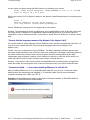
On the Appeon installation menu, when clicking a component installation link that will launch
InstallShield, the following error may occur: "1607: Unable to install InstallShield Scripting Runtime"
or "1628: Failed to complete installation".
Cause A: This error often occurs if you click "Install Appeon for PowerBuilder" on the Appeon
installation menu twice when the Appeon component installation program is already running.
Solution A: Follow the steps below to fix the problem.
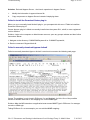
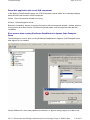
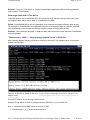
Step 1 - Check how many installation processes are running. To do this, press Ctrl+Alt+Del and
select Task Manager. Go to the Processes tab in Windows Task Manager. Check whether
setup.exe is running and how many setup.exe processes are running.
Step 2 - End all setup.exe processes and restart setup.exe. Do not run the Appeon component
installation program when the component installation program is already running.
Cause B: This error may also occur if previously the Setup program has exited with exception.
Solution B: Restart your computer and attempt to install again.
For more causes and solutions, please refer to http://consumer.installshield.com.
Error 1155
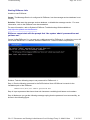
During Setup, the error 1155 occurs, "1155: File ...\Appeon\appeon5.0 not found".
Cause: This error occurs because Appeon Setup failed to detect the ISScript8.msi file that is used
to install the InstallScript engine.
Solution: Find the ISScript8.msi file in the directory \Install\AppeonComponent\ (for example,
\Install\ADT\) and double-click it to run the InstallScript engine installer.
"DLL function call crashed" error when launching an Appeon setup program
Cause: This error is not caused by an Appeon installation program. It is often system-related.
Solution: Please go to the following Website and search for the error message. Detailed
information and solutions are provided: http://consumer.installshield.com/default.asp.
Install Appeon Server to .NET IIS
The Appeon Server setup program automatically configure the .NET IIS server etc. so they will work
smoothly with each other. Most of the time, the automatic configuration is successful and Appeon
Server works well with IIS. In very few occasions, the automatic configuration may fail due to
intricate reasons such as environmental issues, user privilege, configuration changes etc., therefore
you may need to check or make the following configuration manually to fix any problem.
z
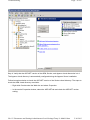
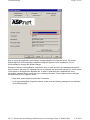
IIS configuration
z
Full access rights to IIS Web root
file://C:\Documents and Settings\Administrator\Local Settings\Temp\1\~hh6081.htm
5/16/2013