1
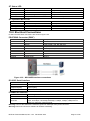
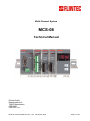
Multi-Channel System
MCS-08
Technical Manual
Flintec GmbH
Bemannsbruch 9
74909 Meckesheim
GERMANY
www.flintec.com
MCS-08 Technical Manual, Rev. 1.04 December 2012
Page 1 of 52
Table of Contents:
1.
SAFETY INSTRUCTIONS ...........................................................................................................................4
2.
DECLARATION OF CONFORMITY ...........................................................................................................5
3.
3.1.
3.2.
3.3.
3.4.
INTRODUCTION .........................................................................................................................................6
Overview ......................................................................................................................................................6
Specifications ...............................................................................................................................................7
Housing ........................................................................................................................................................9
Accessories................................................................................................................................................10
4.
4.1.
INSTALLATION.........................................................................................................................................11
Recommendations .....................................................................................................................................11
4.1.1.
4.1.2.
4.1.3.
4.2.
Control Cabinet Design ................................................................................................................................ 11
Cabling......................................................................................................................................................... 11
Mechanical Installation................................................................................................................................. 11
Electrical Connections ...............................................................................................................................12
4.2.1.
4.2.2.
4.2.3.
4.2.4.
Power Supply and Grounding ...................................................................................................................... 12
Load Cell Connection................................................................................................................................... 12
Digital I/O Connection .................................................................................................................................. 13
Communication Interfaces ........................................................................................................................... 13
4.3.
Commissioning ..........................................................................................................................................13
5.
5.1.
5.2.
5.3.
5.4.
5.5.
SETUP .......................................................................................................................................................14
Installation of the xFace Software..............................................................................................................14
Connection to the xFace Software.............................................................................................................14
N-Bus Addressing ......................................................................................................................................15
Gateway Setup ..........................................................................................................................................16
A/D Converter Setup and Calibration ........................................................................................................16
5.5.1.
5.5.2.
Scale Parameters ........................................................................................................................................ 17
Scale Build and Calibration .......................................................................................................................... 18
5.6.
5.7.
5.8.
5.9.
5.10.
5.11.
A/D Converter Performance Test ..............................................................................................................20
Digital I/O Test ...........................................................................................................................................21
N-Bus Addressing via Setup Switch ..........................................................................................................21
Back up Settings and Calibration Data ......................................................................................................22
Modbus Data Structure (for MCS-08MB + MCS-08EN only) .................................................................23
Profibus and ProfiNet Data Structure (for MCS-08Px only) ...................................................................29
6.
6.1.
6.2.
6.3.
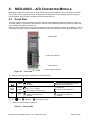
MCS-08AD – A/D CONVERTER MODULE ..............................................................................................33
Front View ..................................................................................................................................................33
Electrical Connections ...............................................................................................................................34
Setup and Calibration ................................................................................................................................34
7.
7.1.
7.2.
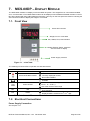
MCS-08DP – DISPLAY MODULE ............................................................................................................35
Front View ..................................................................................................................................................35
Electrical Connections ...............................................................................................................................35
8.
8.1.
8.2.
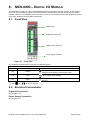
MCS-08IO – DIGITAL I/O MODULE .........................................................................................................36
Front View ..................................................................................................................................................36
Electrical Connections ...............................................................................................................................36
9.
9.1.
9.2.
9.3.
9.4.
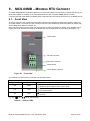
MCS-08MB – MODBUS RTU GATEWAY ................................................................................................37
Front View ..................................................................................................................................................37
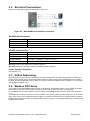
Electrical Connections ...............................................................................................................................38
N-Bus Addressing ......................................................................................................................................38
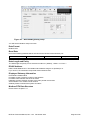
Modbus RTU Setup ...................................................................................................................................38
10.
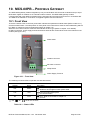
MCS-08PB – PROFIBUS GATEWAY ......................................................................................................40
10.1.
Front View ..............................................................................................................................................40
10.2.
Electrical Connections ............................................................................................................................41
10.3.
N-Bus Addressing ..................................................................................................................................42
10.4.
Profibus Setup ........................................................................................................................................42
11.
MCS-08PN – PROFINET GATEWAY .......................................................................................................43
11.1.
Front View ..............................................................................................................................................43
11.2.
Electrical Connections ............................................................................................................................44
11.3.
N-Bus Addressing ..................................................................................................................................45
11.4.
ProfiNet Setup ........................................................................................................................................45
MCS-08 Technical Manual, Rev. 1.04 December 2012
Page 2 of 52
12.
MCS-08EN – ETHERNET GATEWAY ......................................................................................................46
12.1.
Front View ..............................................................................................................................................46
12.2.
Electrical Connections ............................................................................................................................47
12.3.
N-Bus Addressing ..................................................................................................................................48
12.4.
Ethernet Setup .......................................................................................................................................48
13.
ERROR TABLE .........................................................................................................................................49
14.
DIAGNOSTICS ..........................................................................................................................................50
15.
FREQUENTLY ASKED QUESTIONS ......................................................................................................51
RIGHTS AND LIABILITIES
All rights reserved.
No part of this publication may be reproduced, stored in a retrieval system, or transmitted in any form or by any
means, mechanical, photocopying, recording, or otherwise, without the prior written permission of Flintec
GmbH
No patent liability is assumed with respect to the use of the information contained herein. While every
precaution has been taken in the preparation of this book, FLINTEC assumes no responsibility for errors or
omissions. Neither is any liability assumed for damages resulting from the use of the information contained
herein.
The information herein is believed to be both accurate and reliable. FLINTEC, however, would be obliged to be
informed if any errors occur. FLINTEC cannot accept any liability for direct or indirect damages resulting from
the use of this manual.
FLINTEC reserves the right to revise this manual and alter its content without notification at any time.
Neither FLINTEC nor its affiliates shall be liable to the purchaser of this product or third parties for damages,
losses, costs, or expenses incurred by purchaser or third parties as a result of: accident, misuse, or abuse of
this product or unauthorized modifications, repairs, or alterations to this product, or failure to strictly comply with
FLINTEC operating and maintenance instructions.
FLINTEC shall not be liable against any damages or problems arising from the use of any options or any
consumable products other than those designated as Original FLINTEC Products.
NOTICE: The contents of this manual are subject to change without notice.
Copyright © 2010 – 2012 by Flintec GmbH, 74909 Meckesheim, Bemannsbruch 9, Germany
MCS-08 Technical Manual, Rev. 1.04 December 2012
Page 3 of 52
1. SAFETY INSTRUCTIONS
CAUTION READ this manual BEFORE operating or servicing this equipment. FOLLOW
these instructions carefully. SAVE this manual for future reference. DO NOT allow untrained
personnel to operate, clean, inspect, maintain, service, or tamper with this equipment.
ALWAYS DISCONNECT this equipment from the power source before cleaning or performing
maintenance. CALL FLINTEC ENGINEERING for parts, information, and service.
WARNING ONLY PERMIT QUALIFIED PERSONNEL TO SERVICE THIS EQUIPMENT.
EXERCISE CARE WHEN MAKING CHECKS, TESTS AND ADJUSTMENTS THAT MUST BE
MADE WITH POWER ON. FAILING TO OBSERVE THESE PRECAUTIONS CAN RESULT
IN BODILY HARM.
WARNING FOR CONTINUED PROTECTION AGAINST SHOCK HAZARD CONNECT TO
PROPERLY GROUNDED OUTLET ONLY. DO NOT REMOVE THE GROUND PRONG.
WARNING DISCONNECT ALL POWER TO THIS UNIT BEFORE REMOVING THE FUSE
OR SERVICING.
WARNING BEFORE CONNECTING/DISCONNECTING ANY INTERNAL ELECTRONIC
COMPONENTS OR INTERCONNECTING WIRING BETWEEN ELECTRONIC EQUIPMENT
ALWAYS REMOVE POWER AND WAIT AT LEAST THIRTY (30) SECONDS BEFORE ANY
CONNECTIONS OR DISCONNECTIONS ARE MADE. FAILURE TO OBSERVE THESE
PRECAUTIONS COULD RESULT IN DAMAGE TO OR DESTRUCTION OF THE
EQUIPMENT OR BODILY HARM.
CAUTION OBSERVE PRECAUTIONS FOR HANDLING ELECTROSTATIC SENSITIVE
DEVICES.
MCS-08 Technical Manual, Rev. 1.04 December 2012
Page 4 of 52
2. DECLARATION OF CONFORMITY
EG-Konformitätserklärung
EC-Declaration of Conformity
Monat/Jahr: month/year:
06/2010
Hersteller: Manufacturer:
Flintec GmbH
Anschrift: Address:
Bemannsbruch 9
D-74909 Meckesheim
Deutschland / Germany
Produktbezeichnung: Product name:
MCS-08 Multi Channel System
Das bezeichnete Produkt stimmt mit folgenden Vorschriften der Europäischen Richtlinien überein:
This product confirms with the following regulations of the Directives of the European Community
Richtlinie 2004/108/EG des Europäischen
Parlaments und des Rates vom 15. Dezember 2004
zur Angleichung der Rechtsvorschriften der
Mitgliedstaaten über die elektromagnetische
Verträglichkeit und zur Aufhebung der Richtlinie
89/336/EWG
Directive 2004/108/EC of the European Parliament and of the
Council of 15th December 2004 on the approximation of the
laws of the Member States relating to electromagnetic
compatibility and repealing Directive 89/336/EEC
Richtlinie 2006/95/EG Niederspannungs-Richtlinie
Directive 2006/95/EC Low Voltage Directive
All product-related features are assured by a quality
Die Absicherung aller produktspezifischen
Qualitätsmerkmale erfolgt auf Basis eines zertifizierten system in accordance with ISO 9001.
Qualitätsmanagement-Systems nach DIN ISO 9001.
Diese Erklärung bescheinigt die Übereinstimmung mit
den genannten Richtlinien, beinhaltet jedoch keine
Zusicherung von Eigenschaften.
This declaration certifies the conformity with the listed
directives, but it is no promise of characteristics.
Folgende Normen werden zum Nachweis der Übereinstimmung mit den Richtlinien eingehalten:
As a proof of conformity with the directives following standards are fulfilled:
EN 61326-1
EN 60950-1
Elektrische Mess-, Steuer-, Regel- und Laborgeräte - EMV-Anforderungen - Teil 1: Allgemeine
Anforderungen (IEC 61326-1:2005)
Electrical equipment for measurement, control and laboratory use - EMC requirements - Part 1: General
requirements (IEC 61326-1:2005)
Einrichtungen der Informationstechnik - Sicherheit - Teil 1: Allgemeine Anforderungen (IEC 609501:2005, modifiziert);
Information technology equipment - Safety - Part 1: General requirements (IEC 60950-1:2005 modified)
MCS-08 Technical Manual, Rev. 1.04 December 2012
Page 5 of 52
3. INTRODUCTION
3.1. Overview
Type MCS-08 is a powerful and economic state-of-the-art multi channel system for static and dynamic weighing
applications plus force and torque measurements.
The basic measurement module is the 1-channel type MCS-08AD A/D converter which converts the analogue
low level signal from a load cell or a strain gauge sensor to a digital high-resolution and high-accuracy signal.
All standard weighing functions are available on this A/D converter.
For bus connections, gateways such as Profibus DP, ProfiNet, Modbus RTU and Ethernet TCP/IP are
available. The gateway can communicate via the internal system bus (named N-bus) with up to 8 type MCS08AD A/D converters.
For local display purposes the internal system bus can be extended with one optional type MCS-08DP Display
module. The system can be extended with optional control signals located on the type MCS-08IO Digital I/O
module. The gateway can communicate via the internal system bus with up to eight type MCS-08IO modules.
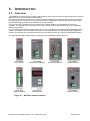
The type MCS-08 Multi-Channel System comprises various hardware modules which are
MCS-08AD
A/D Converter
MCS-08MB
Modbus RTU Gateway
MCS-08IO
Digital I/O Module
MCS-08DP
Display Module
MCS-08PB
Profibus DP Gateway
MCS-08PN
ProfiNet Gateway
MCS-08EN
Ethernet Gateway
Figure 3.1 – MCS-08 hardware modules
MCS-08 Technical Manual, Rev. 1.04 December 2012
Page 6 of 52
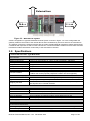
E xte rn a l b u s
N -b u s
N -b u s
Figure 3.2 – MCS-08 bus system
A basic configuration of type MCS-08 Mult Channel System is shown in Figure 3.2. In this configuration the
gateway module is the master of the internal N-bus and it simultaneously acts as a slave for the external bus.
The gateway connects the external network with the locally installed MCS-08 hardware modules and transmits
commands and responses to and from the external bus. It scans all hardware modules for their status and then
transmits this status information continuously to the external bus controller.
3.2. Specifications
1-channel A/D Converter: Type MCS-08AD
A/D Converter
Type
Analogue input range
Linearity
Temperature coefficient
Min. input sensitivity
Conversion rate
Internal resolution
External resolution
24-bit Delta-Sigma ratiometric with integral analogue and digital filter
0 mV to 18 mV (unipolar) or -18 mV to +18 mV (bipolar), switchable
< 0.0015 % FS
< 2 ppm/°C
0.1 µV/d
Up to 800 measurement values per second
Up to 8 million counts
Up to 100000 counts (weight value, force, torque) respective
1 million raw counts (unipolar) respective 2 million raw counts (bipolar)
Calibration and Weighing Functions:
Calibration
Digital filter
Weighing functions
Electronic calibration without test weights (eCal) or calibration by test weights
10 step adjustable digital adaptive filter
Tare, zero, auto zero tracking, motion detection, auto-zero at power-up, save
tare at power-off, increased resolution
Load cells:
Excitation:
Number of load cells:
Connection:
5 V DC at 58...1200 Ω, max. 100 mA
Up to 6 load cells à 350 Ω or 18 load cells à 1100 Ω in parallel
4- or 6-wire technique, cable length 250 m/mm² for 6-wire connection
Communication and Setup:
Setup & calibration
Response time
By PC software via gateway module, backup data stored on PC
< 4 ms (delay after each read or write command)
Power supply:
DC power supply
10 to 28 VDC, < 200 mA, not galvanically isolated
Environment and Enclosure:
Operating temperature
Between -10 °C and +40 °C at maximum 85% RH, non-condensing
Enclosure & protection class Polyamide, for DIN-rail mounting, protection class IP20
Dimensions & weight
99 x 22.5 x 114.5 mm (L x W x H), weighs approx. 100 g
MCS-08 Technical Manual, Rev. 1.04 December 2012
Page 7 of 52
Gateway Modules
General
Internal bus system
Serial interface RS232C
Response time
Communication with up to
8x type MCS-08AD and up to 8x type MCS-08IO and 1x type MCS-08DP
9600 baud (8, N, 1), used as service interface, communication to each
connected type MCS-08AD respective
type
MCS-08IO
respective
type
< 4 ms
(delay after
each read
orMCS-08DP
write command)
Power supply:
DC power supply
10 to 28 VDC, < 100 mA, not galvanically isolated
Environment and Enclosure:
Operating temperature
Between -10 °C and +40 °C at maximum 85% RH, non-condensing
Enclosure & protection class Polyamide, for DIN-rail mounting, protection class IP20
Dimensions & weight
99 x 45 x 114.5 mm (L x W x H), weighs appr. 150 g
Profibus DP Gateway Module: Type MCS-08PB
Communication:
Profibus DP-V0 + DP-V1
Address range
9.6 kbit/s to 12 Mbit/s (automatic), galvanically isolated interface
1...126
ProfiNet Gateway Module: Type MCS-08PN
Communication:
ProfiNet
IP settings
100 Mbit/s (full duplex), galvanically isolated interface
DHCP or manual setup by PC software
Modbus RTU Gateway Module: Type MCS-08MB
Communication:
Serial interface RS485A
Address range
Serial interfac RS485, 1200 to 57600 baud (8N1, 7E1, 7O1),
bus capability up to 31 units
1...31
Ethernet TCP/IP Gateway Module: Type MCS-08EN
Communication:
Ethernet TCP/IP
IP settings
Other
10 Mbit/s (full duplex), galvanically isolated interface
Manual setup by PC software
Web client interface
Digital I/O Module: Type MCS-08IO
Digital I/O:
Inputs
Outputs
Input function
Output function
4 opto-isolated inputs (12...30 V DC)
4 potential-free NO relays, 1A @ 250 V AC, 30 V DC
Control input to communication interface
Control output from communication interface
Communication and Setup:
Setup & calibration
Response time
By PC software via gateway module, backup data stored on PC
< 4 ms (delay after each read or write command)
Power supply:
DC power supply
10 to 28 VDC, < 100 mA, not galvanically isolated
Environment and Enclosure:
Operating temperature
Between -10 °C and +40 °C at maximum 85% RH, non-condensing
Enclosure & protection class Polyamide, for DIN-rail mounting, protection class IP20
Dimensions & weight
99 x 22.5 x 114.5 mm (L x W x H), weighs appr. 100 g
MCS-08 Technical Manual, Rev. 1.04 December 2012
Page 8 of 52
Display Module: Type MCS-08DP
Local Display:
Display
Status LEDs
LED red, 10.2 mm high, 5 digits, with overflow indication
Selected channel; net, no motion, zero and power-on state of the selected
channel
2-key membrane with tactile feedback
250 ms
Keyboard
Refresh time
Power supply:
DC power supply
10 to 28 VDC, < 100 mA, not galvanically isolated
Environment and Enclosure:
Operating temperature
Between -10 °C and +40 °C at maximum 85% RH, non-condensing
Enclosure & protection class Polyamide, for DIN-rail mounting, protection class IP20
Dimensions & weight
99 x 45 x 114.5 mm (L x W x H), weighs appr. 140 g
3.3. Housing
MCS-08 modules come within a polyamide housing sealed to IP20. They are prepared for mounting on NS 37/7
or NS 35/15 standard DIN rails (see drawings).
45 mm
99 mm
View A
View B
Side view
114,5 mm
22,5 mm
View A: MCS-08AD, MCS-08IO
View B: MCS-08PB, MCS-08PN, MCS-08MB, MCS-08EN
Figure 3.3 – Dimensions
MCS-08 Technical Manual, Rev. 1.04 December 2012
Page 9 of 52
3.4. Accessories
MCS-08DP
MCS-08PB
MCS-08PN
MCS-08MB
MCS-08EN
1
1
1
1
1
2
1
2
1
1
2
1
1
2
2
1
2
1
1
1
1
1
1
MCS-08PN
MCS-08MB
MCS-08EN
1
1
MCS-08PB
4-pin and 5 mm pitch plug, light gray, power connector
5-pin and 3.81 mm pitch plug, light gray, N-bus connector
3-pin and 3.81 mm pitch plug, green, RS232C or RS485
7-pin and 3.81 mm pitch plug, black, for load cell cable
5-pin and 3.81 mm pitch plug, green, for digital inputs
8-pin and 3.81 mm pitch plug, green, for digital outputs
Installation CD (xFace software, technical documentation)
Table 3.1 – Accessories supplied with instrument
MCS-08IO
The following accessories are supplied together with the modules.
If any part is missing, please contact your supplier.
MCS-08AD
Accessories supplied with the modules
1
1 1
Refer to Flintec catalog
Max. 200 meter length
1
RS-232C cable (3 m long) for connection with PC
Junction box for load cell connection
2
Open end load cell cable, 6 wire ( 0.22 cm each )
Table 3.2 – Accessories supplied separately
MCS-08 Technical Manual, Rev. 1.04 December 2012
MCS-08DP
MCS-08IO
The following accessories are available from Flintec.
MCS-08AD
Accessories sold separately
Page 10 of 52
4. INSTALLATION
PRECAUTION: Please read this manual carefully before you install the instrument. If you apply all
recommendations in this chapter you will increase the reliability and long term performance of your system.
4.1. Recommendations
4.1.1. Control Cabinet Design
Warning: Please follow the following warnings for designing the control cabinet which will increase the
reliability of your system.
The control cabinet should be designed therefor the MCS-08AD modules can operate safely. The panel should
be placed in a clean area, without getting direct sun light if possible, with a temperature between -10 ºC and
+40 ºC, humidity not exceeding 85% non-condensing. All external cables should be installed safely to avoid
mechanical damages.
MCS-08 modules are very low level signal measuring instruments. To avoid electrical noise, the instruments
should be separated from equipment that produces electrical noise. Preferably use a metal cabinet against
radio frequency interference, to protect against electromagnetic disturbance the cabinet shall be connected to
ground. Keep the load cell cable trays separated from others, if possible. If there is noise-generating equipment
such as heavy load switches, motor control equipment, inductive loads etc., please be careful against the EMC
interference in the cabinet. If possible protect MCS-08 modules by a Faraday cage or install them in a separate
section or install them far a way from this kind of equipment. Install parallel reverse diodes to the DC inductive
loads like relays, solenoids etc. to minimize voltage peaks on the DC power lines.
4.1.2. Cabling
All cables coming to the control cabinet shall be shielded. Please use separate cable trays for these low signal
level cables. Distance from load cell cables, interface cables and DC power supply cables to power line cables
shall be 50 cm at minimum.
4.1.3. Mechanical Installation
After designing the control panel and installing DIN rails according to the recommendation in this chapter, install
the N-bus connectors on the DIN rail as shown in figure 4.1.
Figure 4.1 – N-bus connectors installed on DIN-rail
Place the modules on the DIN rail for making the connection between the N-bus and the MCS-08 modules as
shown on figure 4.2. Be sure that the mechanical installation and the N-Bus connection of the modules are
done properly.
Figure 4.2 – Installation on DIN-rail
MCS-08 Technical Manual, Rev. 1.04 December 2012
Page 11 of 52
4.2. Electrical Connections
Warning: Please always remember that MCS-08AD modules are very low voltage measuring instruments.
Your control cabinet design and proper installation increases the reliability and the performance of the
instrument. Please do not forget that the instrument must be powered off before inserting or removing any
peripheral connector. All required electrical connections should be done as described below.
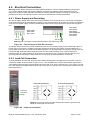
4.2.1. Power Supply and Grounding
The power supply voltage of the instrument shall be between 12 V DC and 28 V DC. The current consumption
of the power supply will be calculated by multiplying 0.2 A and the quantity of instruments. The pin configuration
of the 24 V DC power supply connector located at the bottom front of the instrument is shown below in figure
4.3.
MCS-08DP,
MCS-08PB,
MCS-08PN,
MCS-08MB and
MCS-08EN
(front view)
MCS-08AD
MCS-08IO
(front view)
24V 0V
24V 0V
Warning: Do not forget to connect the Shield pin to the reference ground.
Figure 4.3 – The pin layout of 24 V DC connector
The quality of the instrument‟s ground will determine the accuracy and the safety of your measuring system. A
proper ground connection is needed to minimize extraneous electrical noise effects on the measurement. A
poor ground can result in an unsafe and unstable operation. It is important that the instrument should not share
power lines with noise-generating equipment such as heavy load switching, motor control equipments,
inductive loads, etc. If the condition of the power line in the plant is poor, prepare a special power line and
grounding. Before interfering the instrument, turn off the power and wait at least for 30 seconds.
4.2.2. Load Cell Connection
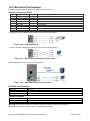
To avoid damages, the load cell wiring should be made carefully before energizing the instrument. Load cell
connection details are shown below in figure 4.4. In 4-wire installations the sense and excitation pins with the
same polarity should be short circuited at the connector side. If you have a junction box in your system, use a 6
wire cable between the MCS-08AD moduler and the junction box, and short circuit these pins at junction box for
better performance.
4 wire LC connection
6 wire LC connection
Load Cell
Connector
Warning: Connect the load cell cable shield to the reference ground or the
shield pin of the load cell connector.
Figure 4.4 – Load cell connection
MCS-08 Technical Manual, Rev. 1.04 December 2012
Page 12 of 52
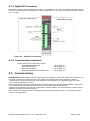
4.2.3. Digital I/O Connection
MCS-08IO modules have the digital I/O connectors on the module‟s front. The I/O connection diagram is shown
in figure 4.5. The outputs are potential-free contacts (1A @ 250 VAC, 30 V DC) and the inputs are opto-isolated
(12…30 V DC).
M C S -0 8 IO m o d u le
Figure 4.5 – Digital I/O connection
4.2.4. Communication Interfaces
Please refer to the corresponding chapter:
MCS-08MB (Modbus RTU)
MCS-08PB (Profibus)
MCS-08PN (ProfiNet)
MCS-08EN (Ethernet and Modbus TCP)
see chapter 9.2
see chapter 10.2
see chapter 11.2
see chapter 12.2
4.3. Commissioning
PRECAUTION: Please read this manual carefully before energizing the instrument. Perform the commissioning
operation according the procedure given in this chapter. Only trained persons are allowed for cleaning,
commissioning, checking and servicing of the instrument. The interference of untrained person may cause
some unwanted damages or injuries.
Before energizing the instrument, please make the required mechanical and electrical installations. After power
on, you have to setup your MCS-08 system before you can start to use the bus interface.
Install the xFace software onto your PC as described in chapter 5 Setup. The xFace software is used for setup,
calibration and testing of MCS-08 systems.
After you have successfully checked the performance of the instrument with xFace, you can begin to use the
system in your application.
MCS-08 Technical Manual, Rev. 1.04 December 2012
Page 13 of 52
5. SETUP
PRECAUTION: Please read this manual carefully before energizing the system. Perform the commissioning
according the procedure given in chapter 4.3. Only trained person are allowed for commissioning, checking,
cleaning and servicing of the instrument. The interference of untrained person may cause some unwanted
damages or injures.
MCS-08 systems are setup and calibrated by the xFace software supplied with the instrument.
The instruments shall be setup in the sequence described below before you can use the bus interface.
Install the xFace software onto your PC
Connect your PC with the gateway over the serial interface (RS232 respective RS485)
Set up the N-bus addresses and the gateway module
Set up and calibrate the A/D Converters
Check the performance of the A/D Converters
Check the performance of the Digital I/Os
5.1. Installation of the xFace Software
Please follow following steps to install the xFace software:
Close all applications on your PC
Insert the CD that contains the xFace software into the CD-ROM drive
Double click “Setup.exe” to start the installation. The setup Wizard is displayed.
Follow the menus in the setup wizard step by step.
After finishing the installation, the Setup Wizard will inform you about the success of the software
installation. Click the OK button.
After closing the Setup Wizard you can start to use the xFace software.
Typ FAD-30
Typ FAD-40
Typ MCS-08 Select one of the MCS-08
gateways and press OK button.
Figure 5.1 – xFace Type Selector Window
5.2. Connection to the xFace Software
The connection between the MCS-08 gateway module and the xFace software is done via the RS232C service
port for all gateway modules. Alternatively Ethernet (for MCS-08EN only) or RS-485 (for MCS-08MB only) can
be used for this connection. You can purchase a suitable PC connection cable as an accessory from Flintec
(Refer to chapter 3.4.2).
After running the xFace software select the gateway model you use (see figure 5.1.). Select the PC‟s
communication port within the Connection settings menu in the tools tab (see figure 5.2) and click the connect
icon. After the communication between the MCS-08 gateway module and your PC has successfully started the
traffic light of the connect icon turns from red to green.
Protocol: Select the setup port of the instrument. MCS-08MB modules can
be setup over RS485 or RS232C. Other models can be setup over RS232C.
Com Port: Select the communication port of the PC
Address: Select the RS-485 address, if RS-485 is selected
Baud rate: Select the RS-485 baud rate, if RS-485 is selected
Setting: Select the RS-485 communication port setting, if RS-485 is selected
Figure 5.2 – xFace Connection Settings
MCS-08 Technical Manual, Rev. 1.04 December 2012
Page 14 of 52
5.3. N-Bus Addressing
First define the number of MCS-08AD
modules and MCS-08IO modules in the
GSD configuration.
Figure 5.3 – xFace GSD configuration
Figure 5.4 – xFace N-bus Addressing Tab
Address: Addresses of the MCS-08AD modules
Read button: Reads the N-address and the serial number of the MCS-08AD module
Write button: Writes the N-address to the MCS-08AD module with the corresponding serial number
Auto Address: Fills the address fields with values 0 to 7
Address: Addresses of the MCS-08IO modules
Read button: Reads the N-address and the serial number of the MCS-08IO module
Write button: Writes the N-address to the MCS-08IO module with the corresponding serial number
Auto Address: Fills the address fields with values 0 to 7
For the first time connection to a MCS-08 system only the gateway and the addressing tabs become active.
First address the modules to the N-Bus to activate the modules within the MCS-08 system.
Addressing MCS-08AD modules to the N-Bus: First click the „Read‟ button to read the serial numbers and
the addresses. Then define an address for each MCS-08AD module within the system. Then click the „Write‟
button to save the address settings. If the addressing of the MCS-08AD modules to the N-Bus is successfully
completed, then the Setup, the Calibration and the Converter Status tabs as well as the Scale Address and the
Visual Weight Display will be activated.
Addressing Input/Output Instruments to N-Bus: First, click the „Read‟ button to read serial numbers and the
addresses. Then define an address for each MCS-08IO module within the system. Then click the „Write‟ button
to save the address settings. If the addressing of the MCS-08IO modules to the N-Bus is successfully
completed, then the I/O Status tab will be activated.
MCS-08 Technical Manual, Rev. 1.04 December 2012
Page 15 of 52
5.4. Gateway Setup
Depending on their interface structure gateways have an interface parameter which has to be set up BEFORE
the external communication bus can be started. The gateway setup is done in the gateway tab. Details on the
gateway parameters and their descriptions can be found in the corresponding gateway chapter.
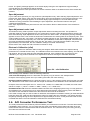
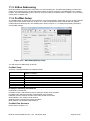
Figure 5.5 – xFace Gateway Tab
Gateway Information: Indicates the bus type, the firmware and hardware version numbers and the
serial number of the gateway module
Active A/D Converter: Indicates the active MCS-08AD module and the N-Bus address within the
system. For more information refer to chapter 6
Active Digital I/O: Indicates the active MCS-08IO module and the N-Bus address within the system.
For more information refer to chapter 8
External Bus Setup: This block allows the user to set up the external bus parameters. Each
gateway type has its own parameter set corresponding to the bus type.
5.5. A/D Converter Setup and Calibration
PROPOSAL: Read the chapter about MCS-08AD modules carefully before you set up and calibrate a module.
This will increase the performance of your weighing system by applying a proper setup and calibration.
When you set up a MCS-08AD module, if there is any within the system, then first select the scale number by
pressing the scale selection button.
Figure 5.6 – xFace A/D Converter Setup
MCS-08 Technical Manual, Rev. 1.04 December 2012
Page 16 of 52
Scale Selection: Click the „Left‟ or „Right‟ arrow to select the current MCS-08AD module
A/D Converter Parameters: This block allows the user to setup the A/D Converter‟s parameter
related to the operation mode. Refer to chapter 5.5.1
Description: This block provides some clear-text explanations
Read from A/D Converter: Click this button to read the parameter settings from the module
Write to A/D Converter: Click this button to save the parameter settings to the module
Default: Click this button to load the factory default settings
Clear: Empties the parameter settings
For entering the parameter settings go to the setup tab, adjust the parameter values and then write these data
to the module. After writing the parameter settings to the module, calibrate the module. You can find the
parameter descriptions in the next chapter.
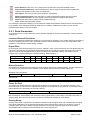
5.5.1. Scale Parameters
In the setup menu the scale parameters can be viewed, changed or saved to the instrument. These parameter
settings are:
Increased External Resolution
For service purposes this parameter enables the 10 times higher resolution of the weight value than the defined
interval in weighing and force mode. Increased resolution must be disabled for use in normal operation (Not
available in Count Mode). Default setting: „Disable‟.
Digital Filter
Environmental noise like bounding forces, air flow, vibration, motor control instruments etc. may disturb the load
cell signal. The selection of proper filter settings determines how quickly the system will react to the load cell
signal.**Load cell signal digital filtering is done according to this parameter settings. The settings can be
changed from 0 (fastest settling) to 9 (slowest settling). Default setting: „7‟.
Setting
Values/s
Settling time [ms]
0
1600
80
1
800
140
2
400
250
3
200
180
4
100
300
5
100
420
6
100
380
7
50
620
8
50
720
9
50
1800
Motion Detection
This parameter defines the motion detection window which determines a stable weighing. If motion detection is
not required, this parameter can be disabled. The available motion detection window values are:
Weighing and Force Mode:
Disable
± 0.3e
± 0.5e (default setting)
± 1e
± 2e
± 60
± 100 (default setting)
± 200
± 400
Count Mode:
Disable
Power On Zero
This parameter enables automatic zeroing after powering on the instrument. The automatic zeroing is only
done if the total zero drift from the calibrated zero signal is in the defined zeroing window. This zeroing window
will be defined in the percentage of the scale capacity.
Disable (default setting)
± 2%
± 10%
To avoid unwanted zeroing at power on this parameter should be disabled or carefully set up in applications
like silo weighing, tank weighing and automatic weighing applications. If the weight is not within the power on
zeroing range, the instrument is powered on without zeroing (Not available in Count Mode).
Zeroing Range
Zeroing of the scale is performed if the difference between load cell signal value and unloaded load cell signal
value at the calibration is in the selected percentage of the scale capacity. Zeroing can be done by zeroing
command when the scale is stable. Zeroing can be done by zeroing command when the scale is stable.
The available zeroing ranges in the percentage of the scale capacity are:
Disable
± 2% (default setting)
MCS-08 Technical Manual, Rev. 1.04 December 2012
± 20%
± 40%
Page 17 of 52
Auto Zero Tracking
AZT automatically re-adjusts the scale to zero for compensating defined small deviations around the center of
zero. AZT only works within the defined zeroing range and stops working if this range is left.To avoid unwanted
zeroing this parameter should be disabled or carefully set up in applications like silo weighing, tank weighing
and automatic weighing applications (Not available in Count Mode). The available AZT window values are;
Disable (default setting)
± 0,5e
± 1e
± 3e
Tare
If this function is enabled, the weight is tared when the tare command is received. Additional conditions for
taring are positive gross weight and no motion. Multi-taring is possible (Not available in Count Mode). Default
setting: „Enable‟.
Save Tare at Power Off
If this function is enabled, the tare value is stored at power off and the instrument starts up in Net mode at
power on (Not available in Count Mode). Default setting: „Enable‟.
5.5.2. Scale Build and Calibration
Scale build, operation mode selection and scale calibration is performed in the calibration tab of xFace as
shown in figure 5.7. Please follow the procedure in the sequence as described in the following chapters.
Figure 5.7 – MCS-08AD Setup Parameters
Mode: This block allows the user to select the operation mode and polarity.
Write to Instrument: Click this button to save the operation mode and the polarity.
Scale Build: Here you define the capacity, the increment and the unit of the scale
Calibration with Test Weight: This block allows the user to calibrate with test weights.
ECal Calibration: This block allows the user to calibrate without test weights.
Calibration Coefficients: This function allows the user to restore a calibration if the calibration
coefficients have been noted before.
For entering the parameter values enter the setup tab, adjust the parameter settings and then write this data to
the A/D Converter. After changing parameter settings the instrument always requires a re-calibration.
Mode selection
MCS-08AD modules have three operation modes which are:
Count Mode:
Filtered and normalized ADC count data will be transmitted in this mode. The
calibration is performed at the PLC, if any.
MCS-08 Technical Manual, Rev. 1.04 December 2012
Page 18 of 52
Weighing Mode:
Force Mode:
Unipolar weight data in calibrated weighing unit will be transmitted. This mode is
compatible to OIML R76 and EN 45501.
Bipolar or unipolar force measurement data in calibrated force unit will be transmitted.
Select the scale operation mode and the polarity. Then click the “Write to Instrument” button to save your mode
selection. The default calibration of MCS-08AD modules is Count Mode and 10 mV unipolar input signal range.
If you select the Count Mode, there is no scale build and instrument calibration. Each MCS-08AD module is
adjusted for high accuracy during the production. The MCS-08AD input signal ranges and their external
resolutions are shown in Table 5.1.
Input signal range
0 to 5 mV
-5 to 5 mV
0 to 10 mV
-10 to 10 mV
0 to 15 mV
-15 to 15 mV
0 to 18 mV
-18 to 18 mV
Input Signal level
5 mV
10 mV
15 mV
18 mV
Polarity
Unipolar
Bipolar
Unipolar
Bipolar
Unipolar
Bipolar
Unipolar
Bipolar
External resolution
1 million counts
2 million counts
1 million counts
2 million counts
1 million counts
2 million counts
1 million counts
2 million counts
Table 5.1 - Count Mode, Input Signal Ranges and External Resolution
Select the input signal level and polarity for high external resolution. Write your mode selection to the
instrument by clicking “Write to Instrument” button. Jump to the chapter 5.6.
Scale Build
The scale capacity, the increment and the unit have to be introduced to the MCS-08AD module before you can
perform a calibration in Weighing or Force mode.
Capacity:
To select a new value for the scale capacity, click in the text box.
Use the keyboard to enter a new value, or use the drop-down menu.
Increment:
Use the drop-down menu to select the increment.
Unit:
Select the unit
The scale calibration can be performed by using test weights or by electronic calibration (eCal).
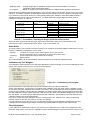
Calibration by Test Weights
This calibration method performs zero and span calibrations using test weights. For accurate calibration the test
weight value should not be less than 1/10 of the scale capacity.
Figure 5.8 – Calibration by test weights
Please note that the scale build values should be entered before you start the calibration.
Select “Full Calibration” for performing a complete scale calibration. Click the “Start” button. Unload the scale
for performing the zero calibration and click the “Yes” button. The virtual display will show the [WAIT] message
during the zero calibration. During the zero calibration the scale must be stable. Approximately 5 seconds later
the span calibration window will be displayed. Load the scale and enter the loaded test weight value, then click
the “OK” button. The scale must be stable during the span calibration. Approximately 5 seconds later the new
calibration settings are saved automatically.
If any error occurs during the calibration an error message warns you. Click the “Yes” button to reload the
previous values or click the “No” button to use the new settings.
You can adjust the zero or the span of your scale without performing a full calibration. Additionally the “span
calibration to the unloaded scale” feature is another tool of MCS-08AD modules for after-sale services.
Zero Adjustment
If your scale has a residual zero drift you may perform a zero adjustment only. Select “Zero Adjustment” and
press the “Start” button. Then the zero calibration window will be displayed. Unload the scale and click the “OK”
MCS-08 Technical Manual, Rev. 1.04 December 2012
Page 19 of 52
button. The [WAIT] message appears on the virtual display during the zero adjustment. Approximately 5
seconds later the zero adjustment will be finalized.
Note: Zero adjustment is also performed over the bus interface. Refer to the data structure of the related bus
interface.
Span Adjustment
If your scale has a span drift, you may perform a span adjustment only. After selecting “Span Adjustment” and
pressing the “Start” button, enter the test weight value; place the test weights on the scale and press the “Yes”
button. The [WAIT] message appears on the virtual display approximately for 5 seconds while the span
calibration is being performed. After finalizing the span adjustment, the instrument will save the span
coefficients automatically.
Note: Span adjustment is also performed over the bus interface. Refer to data structure of the related bus
interface.
Span Adjustment under Load
This feature is being used to perform a span adjustment without unloading the scale. This operation is
especially used for the span adjustment for non-empty tanks to make a span adjustment without emptying the
tank. After selecting “Span Adjustment under Load” press the “Start” button. The temporary zeroing message
appears on the monitor. This means the instrument will determine the existing load as the temporary zero. If the
scale is stable press the “Yes” button. The [WAIT] message appears on the virtual display approximately for 5
seconds to determine the temporary zero. Then the span calibration window will be displayed. Load the scale
and enter the loaded test weight value, then click the “OK” button. The scale must be stable in this period.
Approximately 5 seconds later, the new calibration settings are saved automatically.
Please refer to the chapter 5.6 A/D Converter Performance Test).
Electronic Calibration (eCal)
eCal allows to perform a calibration without using test weights. MCS-08AD modules are adjusted during
production for increased eCal accuracy. The calibration will be done based on the scale capacity, the total load
cell capacity, the load cell output and the estimated dead load. If the conditions are convenient for zero
calibration, you may perform automatic zero adjustment instead of entering an estimated dead load.
Figure 5.9 – eCal Calibration
After selecting eCal calibration enter the following values as:
Total Load Cell Capacity: Enter the total load cell capacity in kg as shown in the example below.
Example: If the weighing system has 4 pcs 1000 kg load cells, then enter 4000 kg.
Average Load Cell Output: Enter the load cell output in mV/V. If the weighing system has more than one load
cell, calculate the mean value of the load cells output as indicated in the certificates of the individual load cells.
Example: If the load cell outputs are LC1: 2.0010, LC2: 1.9998, LC3:1.9986 and LC4:2.0002, the mean value
will be LC output = ( 2.0010 + 1.9998 + 1.9986 + 2.0002 ) ÷ 4 = 1.9999 mV/V.
Estimated Dead Load: Enter the estimated dead load value of the weighing system in kg. You may perform a
zero adjustment in convenient time for an exact dead load compensation. After pressing “Save eCal Data to
Converter” these data will be transferred to the instrument and eCal will be finalized.
If the scale is empty and you want to make an automatic zero adjustment instead of entering an estimated dead
load, then press the “eCal with Zero Adjustment” button for starting the zero calibration. The display will show
the [WAIT] message during the zero adjustment for approximately 5 seconds. In this period the scale must be
unloaded and stable. The eCal calibration coefficients are saved automatically.
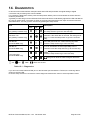
5.6. A/D Converter Performance Test
The scale performance test should be performed before you install the bus connection. The tests are linearity,
repeatability and eccentricity. You can follow the test at the virtual display and/or status tab which show the
measurement data, the instrument data and the software version. For convenience keys for Taring, Zeroing
and Clear are located in this tab.
MCS-08 Technical Manual, Rev. 1.04 December 2012
Page 20 of 52
5.7. Digital I/O Test
Figure 5.10 – MCS-08IO
Status
Input / Output Test: This block allows the user to check I/O status. The I/O test button is used to
test outputs as seen in this figure.
The active MCS-08IO modules are shown with their own N-Bus address block. You can follow the input and the
output status and you can switch the outputs. The I/O test property is very useful for checking the output states.
Warning: Please be careful to avoid damaging your process during the output test.
5.8. N-Bus Addressing via Setup Switch
MCS-08 systems which are energized for the first time require the N-bus addressing for each A/D Converter
module and each Digital I/O module. One way is the addressing by the xFace which is described above.
Another way is the addressing (up to address 7) via the setup switch.
Figure 5.11 – Example
Step by step manual procedure:
1. Unplug all communication cables from the Gateway Module (RS232 and BUS plug; See GREEN).
2. First energize the modules installed on the N-Bus.
3. Press the setup switch of the gateway module for 5 seconds. (The switch is behind the hole in the front; see
YELLOW). The three LEDs of the gateway module (RED) will flash 4 times and then indicate an N-Bus
address number. You can change the address number by pressing the setup switch (YELLOW) slowly.
While changing the address in the Gateway module, the LEDs in the other modules (PINK) will change
sometimes.
MCS-08 Technical Manual, Rev. 1.04 December 2012
Page 21 of 52
4. Now change the address number on the Gateway Module by pressing the gateway switch (YELLOW) until it
reached an address you want to use for an MCS08AD or MCS08IO module.
5. To assign the selected address number to an A/D Converter or Digital I/O module press the setup switch on
the selected module (BLUE).
Please note: The MCS08 allows up to 8 A/D and 8 I/O in one system. A/Ds and I/Os
use the same address range (0 to 7). In consequence the same address can be
assigned to one A/D Converter AND one Digital I/O Module.
6. After assigning all modules to a defined address, press and hold the gateways switch for 5 seconds. The
system will close the addressing mode and change to normal mode
Note: Do not de-energise MCS-08 while the system is in the addressing mode. If a power failure has
happened, restart the system and repeat the whole addressing.
LED and Setup Switch Descriptions in the N-Bus Addressing Mode:
Gateway module
Pwr
Lnk
Err
MCS-08AD or MCS-08IO
Err
Off
On
Description of LED
Description of Setup Switch
Address number is [0]
Address number is [1]
Address number is [2]
Address number is [3]
Address number is [4]
Address number is [5]
Address number is [6]
Address number is [7]
Address number is higher than [7]
Increase to address number [1]
Increase to address number [2]
Increase to address number [3]
Increase to address number [4]
Increase to address number [4]
Increase to address number [6]
Increase to address number [7]
Jump to address number [0]
Description of LED
Description of Setup Switch
Defined N-bus address number and
gateway‟s selected address number
are identical
Defined N-bus address number and
gateway‟s selected address number
are different
Assigns the gateway‟s selected address
number to its N-bus address number.
Increase to address number [2]
Flash
Table 5.2 – N-bus addressing via setup switch
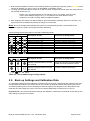
5.9. Back up Settings and Calibration Data
The parameter settings and the calibration coefficients can be saved to a backup file after reading these data
from the MCS-08 modules. This backup file can be re-written to MCS-08 modules after opening it by xFace.
The backup feature gives a service advantage to MCS-08 systems. We propose to burn these files to CD /
DVD and save this backup CD / DVD in the control cabinet additionally to a backup file on your PC.
Important note: The previous parameter settings and calibration coefficients in a MCS-08 module will get lost
after loading a backup to this module.
MCS-08 Technical Manual, Rev. 1.04 December 2012
Page 22 of 52
5.10. Modbus Data Structure (for MCS-08MB + MCS-08EN only)
EXPLANATION
Attention: For hardware connection details, please refer to the related hardware descriptions in chapter 9
(respective chapter 12 for MCS-08EN gateway). The Modbus slave address is defined in the Modbus RTU
Setup in chapter 9.4. Function code „0x03‟ and function code „0x10‟ are supported.
In the two word registers the data is stored to the registers in big-endian format. The least significant word is
stored to the highest register address; and the most significant word is stored to the lowest register address.
Write operations can only be done to the allowed registers. These registers are indicated as W or W/R in the
tables. Do not try to write „only read‟ registers indicated as R.
The Modbus data structure tables identify the N-bus address of MCS-08AD and MCS-08IO modules as [X].
Please find Modbus information on the web site of http://www.modbus.org
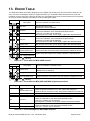
Exception codes
1:
Function code is not supported.
2:
Out of address range
3:
Invalid value or wrong byte number
4:
Operation error
Examples:
Perform Read and Write operations according to the hex system with the MCS-08MB set to address „0x01‟.
Indicated value of MCS-08AD [0] at register start address 41006
Request:
01, 03, 03, ED, 00, 02, 54, 7A
Answer:
01, 03, 04, 00, 00, 27, 10, E0, 0F
Indicated:
2710 hex (10000 dec)
Status, Indicated, Gross and Tare values of MCS-08AD [0] at register 41005...41011.
Request:
01, 03, 03, EC, 00, 07, C5, B9
Answer:
01, 03, 0E, 01, 0A, 00, 00, 10, E2, 00, 00, 14, CA, 00, 00, 03, E8, BD, 55
Status:
010A hex
Indicated:
000010E2 hex (4322 dec)
Gross:
000014CA hex (5322 dec)
Tare:
000003E8 hex (1000 dec)
Indicated value of MCS-08AD [5] at register start address 41041
Request:
01, 03, 04, 10, 00, 02, C4, FE
Answer:
01, 03, 04, 00, 04, BF, 21, 0B, DA
Indicated:
0004BF21 hex (311073 dec)
Status, Indicated, Gross and Tare values of MCS-08AD [5] at register 41040...41046.
Request:
01, 03, 04, 0F, 00, 07, 35, 3B
Answer:
01, 03, 0E, 04, 22, 00, 04, BF, 38, 00, 04, BF, 38, 00, 00, 00, 00, 7D, EF
Status:
0422 hex
Indicated:
0004BF38 hex (311096 dec)
Gross:
0004BF38 hex (311096 dec)
Tare:
00000000 hex (0 dec)
Read inputs of MCS-08IO [0] at register 41071.
Request:
01, 03, 04, 2E, 00, 01, E5, 33
Answer:
01, 03, 02, 05, 0D, 7A, D1
Inputs:
0D hex (1011 binary)
Outputs:
05 hex (0101 binary)
Set all outputs of MCS-08IO [0] at register 41071.
Request:
01, 10, 04, 2E, 00, 01, 02, 00, 0F, A5, DA
Answer:
01, 10, 04, 2E, 00, 01, 60, F0
Outputs activated.
Zeroing MCS-08AD [0] at register 41062.
Request:
01, 10, 04, 25, 00, 01, 02, 00, 01, 25, 65
Answer:
01, 10, 04, 25, 00, 01, 11, 32
MCS-08AD [0] is zeroed.
MCS-08 Technical Manual, Rev. 1.04 December 2012
Page 23 of 52
Zeroing MCS-08AD [1] at register 41063.
Request:
01, 10, 04, 26, 00, 01, 02, 00, 01, 25, 56
Answer:
01, 10, 04, 26, 00, 01, E1, 32
MCS-08AD [1] is zeroed.
Taring MCS-08AD [0] at register 41062.
Request:
01, 10, 04, 25, 00, 01, 02, 00, 02, 65, 64
Answer:
01, 10, 04, 25, 00, 01, 11, 32
MCS-08AD [0] is tared.
Taring MCS-08AD [1] at register 41063.
Request:
01, 10, 04, 26, 00, 01, 02, 00, 02, 65, 57
Answer:
01, 10, 04, 26, 00, 01, E1, 32
MCS-08AD [1] is tared.
Zero Calibration of MX08 AD [0].
Request:
01, 03, 04, 66, 00, 01, 65, 25 (Read status; Ready status is mandatory)
Answer:
01, 03, 02, 00, 01, 79, 84 (MCS-08AD [0] is in ready status; zero calibration
can be performed)
Request:
01, 10, 04, 63, 00, 01, 02, 00, BC, EB, B2 (Zero calibration command)
Answer:
01, 10, 00, 6D, 00, 01, 90, 14
Request:
01, 03, 04, 66, 00, 01, 65, 25 (Read status and wait for ready status)
Answer:
01, 03, 02, 00, 01, 79, 84 (If “zeroing” changed to “ready” status, zero
calibration was performed successfully.)
Span Calibration of MCS-08AD [0].
Request:
01, 03, 04, 66, 00, 01, 65, 25 (Read status; Ready status is mandatory)
Answer:
01, 03, 02, 00, 01, 79, 84 (MCS-08AD [0] is in ready status; span calibration
can be performed)
Request:
01, 10, 04, 63, 00, 03, 06, 00, DC, 00, 00, 0B, B8, D6, 90 (Span calibration
command with 3000 (0x0BB8 hex) span value)
Answer:
01, 10, 00, 6D, 00, 03, 11, D5
Request:
01, 03, 04, 66, 00, 01, 65, 25 (Read status and wait for ready status)
Answer:
01, 03, 02, 00, 01, 79, 84 (If “span calibr.” changed to ready status, span
calibration was performed successfully.)
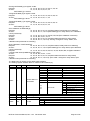
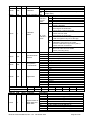
The table below is used to access MCS-08AD modules.
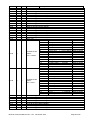
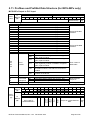
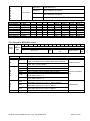
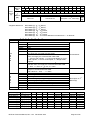
The starting register address 40001 is valid for N-bus address [0].
Address R/W
40001*
R
40003*
R
Word Command
Definition
2
Weight / Force / Count Data
D0
D1
D2
D3
D4
D5
D6…D11
Module Status of D12
1
MCS-08AD
D13
D14
D15
40004*
40006*
40008*
R
R
R
2
2
1
Tare weight
Gross weight
Status
40009*
R/W
1
Control
0 – System Ready
0 – Error
0 – Weight Stable
0 – Gross Mode
0
0 – Weight / Force
Not used
0 – Out of zero range
Error Code
1 – System Busy
1 – Data ok
1 – Weight unstable
1 – Net mode
Not used
1 – Count Mode
1 – Weight is in zero range
0
No Errors
1
ADC out of range
2
ADC over range
3
ADC under range
4
System error
5
In setup mode
6
Low/High voltage det.
Motion, Net mode, Data ok, (image of register 40003)
0
None
1
Zero
2
Tare
3
Clear
MCS-08 Technical Manual, Rev. 1.04 December 2012
Page 24 of 52
Address R/W
Word Command
40010*
R/W
1
40011*
R/W
2
40013*
R
1
40014*
R/W
1
40015*
R/W
1
40016*
R/W
1
N-bus address
*Starting register address
Definition
0
None
188
Adjust Zero Calibration
Calibration
Adjust Span Calibration (First load 40011 with span test
220
weight value)
Span Calibration Value
1
Ready for calibration
D0 .. D7
3
Zero calibration in process
Calibration
Process
4
Span calibration in process
Status
9
Error (Refer to D8 ... D15 )
Calibration Timeout
1
- Restart calibration
ADC Error
2
- Re-energize the instrument
- If seen again, change the board.
Instrument can not be calibrated
Calibration
3
- Check load cell cable
Status
- Re-energize the instrument
D8 .. D15
Instrument can not be calibrating
Calibration
34
- Load cell signal is very low or too high
Errors
Calibration Error
- Calibration test weight is too small
35
- Increase calibration weight value (40011)
- Check load cell connections
Scale unstable
37 - Wait until scale becomes stable
- Check grounding wiring
0
Count Mode Unipolar
1
Count Mode Bipolar
Operation Mode
2
Force Mode Unipolar
Selector
3
Force Mode Bipolar
4
Weight Mode Unipolar
0
5 mV
1
10 mV
mV operation
in Count Mode
2
15 mV
3
18 mV
0
Fast
1
2
3
4
Digital filters
5
Medium
6
7
Default
8
9
Slow
0
40001
Address R/W
Word Command
41001
1
R
1
40101
2
40201
3
40301
4
40401
5
40501
6
40601
7
40701
Description
D0
00: No module found at address [0]
D1
01: Module at address [0] is active
D2
00: No module found at address [1]
D3
01: Module at address [1] is active
System Status of
D4
00: No module found at address [2]
MCS-08AD and
D5
01: Module at address [2] is active
MCS-08DP
D6
00: No module found at address [3]
D7
01: Module at address [3] is active
D8
00: No module found at address [4]
D9
01: Module at address [4] is active
MCS-08 Technical Manual, Rev. 1.04 December 2012
Page 25 of 52
Address R/W
Word Command
41001
R
1
41002
R
1
41003
R
1
41004
41005
1
R
1
Description
D10
00: No module found at address [5]
D11
01: Module at address [5] is active
System Status of
D12
00: No module found at address [6]
MCS-08AD and
D13
01: Module at address [6] is active
MCS-08DP
D14
00: No module found at address [7]
D15
01: Module at address [7] is active
00 = Module at address [0] not found
D0
01 = Module at address [0] is active
IO [0]
10 = reserved
D1
11 = reserved
00 = Module at address [0] not found
D2
01 = Module at address [0] is active
IO [1]
10 = reserved
D3
11 = reserved
00 = Module at address [0] not found
D4
01 = Module at address [0] is active
IO [2]
10 = reserved
D5
11 = reserved
00 = Module at address [0] not found
D6
01 = Module at address [0] is active
IO [3]
10 = reserved
D7
11 = reserved
System Status of
MCS-08IO
00 = Module at address [0] not found
D8
01 = Module at address [0] is active
IO [4]
10 = reserved
D9
11 = reserved
00 = Module at address [0] not found
D10
01 = Module at address [0] is active
IO [5]
10 = reserved
D11
11 = reserved
00 = Module at address [0] not found
D12
01 = Module at address [0] is active
IO [6]
10 = reserved
D13
11 = reserved
00 = Module at address [0] not found
D14
01 = Module at address [0] is active
IO [7]
10 = reserved
D15
11 = reserved
D0
System failure
D1
EEPROM failure
Status of
D2
External bus communication error
MCS-08MB
D3
A module was installed / removed
Gateway
D4
No module found within the system
D5…D15 Not in use
Not in use
D0
0 – System Ready
1 – System Busy
D1
0 – Error
1 – Data ok
D2
0 – Weight Stable
1 – Weight unstable
D3
0 – Gross Mode
1 – Net mode
D4
0
Not used
D5
0 – Weight / Force
1 – Count Mode
D6…D11 Not in use
Status of
D12
0 – Out of zero range 1 – Weight is in zero range
MCS-08AD [0]
0 No Errors
1 ADC out of range
2 ADC over range
D13
3 ADC under range
D14
Error Code
D15
4 System error
5 In setup mode
6 Low/High voltage det.
MCS-08 Technical Manual, Rev. 1.04 December 2012
Page 26 of 52
Address
41006
41008
41010
41012
41013
41015
41017
41019
41020
41022
41024
41026
41027
41029
41031
41033
41034
41036
41038
41040
41041
41043
41045
41047
41048
41050
41052
41054
41055
41057
41059
41061
R/W
R
R
R
R
R
R
R
R
R
R
R
R
R
R
R
R
R
R
R
R
R
R
R
R
R
R
R
R
R
R
R
Word
2
2
2
1
2
2
2
1
2
2
2
1
2
2
2
1
2
2
2
1
2
2
2
1
2
2
2
1
2
2
2
1
41062
R/W
1
41063
41064
41065
41066
41067
41068
41069
41070
R/W
R/W
R/W
R/W
R/W
R/W
R/W
1
1
1
1
1
1
1
1
41071
R/W
1
41072
41073
41074
41075
41076
41077
R/W
R/W
R/W
R/W
R/W
R/W
1
1
1
1
1
1
Command
Description
MCS-08AD [0]: Indicated weight
MCS-08AD [0]: Gross weight
MCS-08AD [0]: Tare weight
MCS-08AD [1]: Status
MCS-08AD [1]: Indicated weight
MCS-08AD [1]: Gross weight
MCS-08AD [1]: Tare weight
MCS-08AD [2]: Status
MCS-08AD [2]: Indicated weight
MCS-08AD [2]: Gross weight
MCS-08AD [2]: Tare weight
MCS-08AD [3]: Status
MCS-08AD [3]: Indicated weight
MCS-08AD [3]: Gross weight
MCS-08AD [3]: Tare weight
MCS-08AD [4]: Status
MCS-08AD [4]: Indicated weight
MCS-08AD [4]: Gross weight
MCS-08AD [4]: Tare weight
MCS-08AD [5]: Status
MCS-08AD [5]: Indicated weight
MCS-08AD [5]: Gross weight
MCS-08AD [5]: Tare weight
MCS-08AD [6]: Status
MCS-08AD [6]: Indicated weight
MCS-08AD [6]: Gross weight
MCS-08AD [6]: Tare weight
MCS-08AD [7]: Status
MCS-08AD [7]: Indicated weight
MCS-08AD [7]: Gross weight
MCS-08AD [7]: Tare weight
Not in use
00
None
01
Zero
MCS-08AD [0]
02
Tare
Commands
03
Clear
04…07
Not in use
MCS-08 AD [1] Commands
MCS-08 AD [2] Commands
MCS-08 AD [3] Commands
MCS-08 AD [4] Commands
MCS-08 AD [5] Commands
MCS-08 AD [6] Commands
MCS-08 AD [7] Commands
Not in use
D0
Input 1
D1
Input 2
D2
Input 3
D3
Input 4
D4…D7
Reserved
MCS-08 IO [0]
I/O Control
D8
Output 1
D9
Output 2
D10
Output 3
D11
Output 4
D12…D15 Reserved
MCS-08 IO [1] I/O Control
MCS-08 IO [2] I/O Control
MCS-08 IO [3] I/O Control
MCS-08 IO [4] I/O Control
MCS-08 IO [5] I/O Control
MCS-08 IO [6] I/O Control
MCS-08 Technical Manual, Rev. 1.04 December 2012
Page 27 of 52
Address
41078
41079
41080
41081
41083
41084
41086
41087
41089
41090
41092
41093
41095
41096
41098
41099
41101
41102
41104
R/W
R/W
R
R
R
R
R
R
R
R
R
R
R
R
R
R
R
R
Word
1
1
1
2
1
2
1
2
1
2
1
2
1
2
1
2
1
2
1
41105
R
1
41106
R
1
41107
41109
41111
41113
41115
41117
41119
41121
R
R
R
R
R
R
R
R
2
2
2
2
2
2
2
2
Command
Description
MCS-08 IO [7] I/O Control
Not in use
MCS-08 AD [0] Status
MCS-08 AD [0] Indicated Weight
MCS-08 AD [1] Status
MCS-08 AD [1] Indicated Weight
MCS-08 AD [2] Status
MCS-08 AD [2] Indicated Weight
MCS-08 AD [3] Status
MCS-08 AD [3] Indicated Weight
MCS-08 AD [4] Status
MCS-08 AD [4] Indicated Weight
MCS-08 AD [5] Status
MCS-08 AD [5] Indicated Weight
MCS-08 AD [6] Status
MCS-08 AD [6] Indicated Weight
MCS-08 AD [7] Status
MCS-08 AD [7] Indicated Weight
Not in use
D0
0 Out of Zero
D1
0 Weight stable
D2
0 Out of Zero
D3
0 Weight stable
D4
0 Out of Zero
D5
0 Weight stable
D6
0 Out of Zero
All MCS-08 AD
D7
0 Weight stable
Status:
D8
0 Out of Zero
Zero + Motion
D9
0 Weight stable
D10
0 Out of Zero
D11
0 Weight stable
D12
0 Out of Zero
D13
0 Weight stable
D14
0 Out of Zero
D15
0 Weight stable
D0
0 Error
D1
0 Not in system
D2
0 Error
D3
0 Not in system
D4
0 Error
D5
0 Not in system
D6
0 Error
All MCS-08 AD
D7
0 Not in system
Status:
D8
0 Error
OK + Active
D9
0 Not in system
D10
0 Error
D11
0 Not in system
D12
0 Error
D13
0 Not in system
D14
0 Error
D15
0 Not in system
MCS-08 AD [0] Indicated Weight
MCS-08 AD [1] Indicated Weight
MCS-08 AD [2] Indicated Weight
MCS-08 AD [3] Indicated Weight
MCS-08 AD [4] Indicated Weight
MCS-08 AD [5] Indicated Weight
MCS-08 AD [6] Indicated Weight
MCS-08 AD [7] Indicated Weight
MCS-08 Technical Manual, Rev. 1.04 December 2012
1 – In Zero Range
1 – Unstable
1 – In Zero Range
1 – Unstable
1 – In Zero Range
1 – Unstable
1 – In Zero Range
1 – Unstable
1 – In Zero Range
1 – Unstable
1 – In Zero Range
1 – Unstable
1 – In Zero Range
1 – Unstable
1 – In Zero Range
1 – Unstable
1 – Data OK
1 – Active
1 – Data OK
1 – Active
1 – Data OK
1 – Active
1 – Data OK
1 – Active
1 – Data OK
1 – Active
1 – Data OK
1 – Active
1 – Data OK
1 – Active
1 – Data OK
1 – Active
MCS-08 AD [0]
MCS-08 AD [0]
MCS-08 AD [1]
MCS-08 AD [1]
MCS-08 AD [2]
MCS-08 AD [2]
MCS-08 AD [3]
MCS-08 AD [3]
MCS-08 AD [4]
MCS-08 AD [4]
MCS-08 AD [5]
MCS-08 AD [5]
MCS-08 AD [6]
MCS-08 AD [6]
MCS-08 AD [7]
MCS-08 AD [7]
MCS-08 AD [0]
MCS-08 AD [0]
MCS-08 AD [1]
MCS-08 AD [1]
MCS-08 AD [2]
MCS-08 AD [2]
MCS-08 AD [3]
MCS-08 AD [3]
MCS-08 AD [4]
MCS-08 AD [4]
MCS-08 AD [5]
MCS-08 AD [5]
MCS-08 AD [6]
MCS-08 AD [6]
MCS-08 AD [7]
MCS-08 AD [7]
Page 28 of 52
5.11. Profibus and ProfiNet Data Structure (for MCS-08Px only)
MCS-08Px Output to PLC Input
D31 D30
st
Bit no.
D31
D30
D29
D28
D27
D26
D25
D24
D23
D22
D21
D20
D19
D18
D17
D16
D15
D14
D13
D12
D11…D4
D3
D2
D1
D0
1 Dword Description
0: No module found
1: MCS-08IO at address [7] is active
0: No module found
1: MCS-08IO at address [6] is active
0: No module found
1: MCS-08IO at address [5] is active
0: No module found
1: MCS-08IO at address [4] is active
0: No module found
1: MCS-08IO at address [3] is active
0: No module found
1: MCS-08IO at address [2] is active
0: No module found
1: MCS-08IO at address [1] is active
0: No module found
1: MCS-08IO at address [0] is active
0: No module found
1: MCS-08AD at address [7] is active
0: No module found
1: MCS-08AD at address [6] is active
0: No module found
1: MCS-08AD at address [5] is active
0: No module found
1: MCS-08AD at address [4] is active
0: No module found
1: MCS-08AD at address [3] is active
0: No module found
1: MCS-08AD at address [2] is active
0: No module found
1: MCS-08AD at address [1] is active
0: No module found
1: MCS-08AD at address [0] is active
0000
No error found
System failure. Re-energize module. If happens
0001
again, replace module.
EEPROM failure. Re-energize module. If happens
0010
again, replace module.
Gateway module error. Re-energize module.
Error
0011
Check if gateway module is installed. If happens
Codes
again, replace module.
No module found on N-bus. Install MCS-08AD or
0100
MCS-08IO modules. Check N-bus connectors if
installed.
A module was installed/removed. Re-address the
0101
modules on the N-bus.
Not in use
010
All active MCS-08AD modules refer to D16…D31
Read
Command 001
Active MCS-08IO modules refer to D16…D31
Response
000
All active modules refer to D16…D31 (default)
Toggles
The command is applied successfully
2nd
Dword
(R)
D31 D30 D29 D28 D27 D27 D25 D24 D23 D22 D21
D15 D14 D13 D12 D11 D10 D9 D8 D7 D6 D5
Active MCS-08AD
modules
Error Codes of
MCS-08Px
Read selected
response
CMD flag
D19 D18 D17
D3 D2 D1
D29 D28 D27 D27 D25 D24 D23 D22 D21
D16
D0
D20
D19 D18 D17
D16
D4
D3
D0
3st
Dword
(R)
D15 D14 D13 D12 D11 D10
Error Table Of
MCS-08AD Modul
D9
D8
MCS-08 Technical Manual, Rev. 1.04 December 2012
D7
D6
D5
Motion
Not In Use
Net
MCS08 AD
[0]*
D20
D4
Active MCS-08IO
modules
Indicated weight value will be shown in this Dword
D31 D30
Count
mode
Zero
range
MCS08Px
D29 D28 D27 D27 D25 D24 D23 D22 D21 D20 D19 D18 D17 D16
Active MCS-08IO modules
Active MCS-08AD modules
D15 D14 D13 D12 D11 D10 D9 D8 D7 D6 D5
D4
D3 D2 D1
D0
Read Data
CMD
Error Table
Not in use
Selected Resp. flag
1st
Dword
(R)
D2
D1
Response of Read Selected
Data.
CMD
flag
Page 29 of 52
th
Bit no.
D31…D16
D15…D12
D11…D10
D9
D8
D7
D6
D5
D4
D3
D2
D1
D0
rd
th
D31…D16
D15
D14
D13
D12
D11
D10
D9
D8
D11…D10
th
th
th
th
th
th
3 , 5 , 7 , 9 , 11 , 13 , 15 , 17 Dword Description
Not in use
0111
Module not found
0110
Low/High voltage detetction error
0101
In setup mode
0100
System error
Error
Codes
0011
ADC underrange
0010
ADC overload
0001
ADC out
0000
No error found
Not in use
Weight / Force mode
Operation 0
Mode
1
Count mode
0
Out of zero range
Zero
Range
1
In zero range
0
Gross
Indication
1
Net
0
Stable
Motion
Detection 1
Unstable
00000
Indicated weight
00001
Gross weight
00010
Tare weight
00011
Indicated weight (floating point type)
00100
Gross weight (floating point type
00101
Tare weight (floating point type)
00110
Increased resolution for indicated weight
10000
Calibration status (refer to table below
Toggles
The command is applied successfully
th
Bit no.
th
MCS-08AD [1]: 4 …5 Dword,
th
th
MCS-08AD [2]: 6 …7 Dword,
th
th
MCS-08AD [3]: 8 …9 Dword,
th
th
MCS-08AD [4]: 10 …11 Dword,
th
th
MCS-08AD [5]: 12 …13 Dword,
th
th
MCS-08AD [6]: 14 …15 Dword,
th
th
MCS-08AD [7]: 16 …17 Dword
*Register address for
th
th
th
th
th
Error Codes of
MCS-08AD
Status of
MCS-08AD
nd
Response of 2
Dword description
CMD flag
th
2nd, 4 , 6 , 8 , 10 , 12 , 14 , 16 Dword Description when Read Command is
rd
‘Calibration Status’. Refer to PLC output to MCS-08Px input for 3 Dword
Not in use
Calibration timeout
0000 0001
- Restart calibration
ADC error
0000 0010
- Re-energize the module
0000 0011 Module can not be calibrated
- Load cell signal is very low or too high
0010 0010 Module cannot be calibrated. Load cell signal
is very low or too high.
Error
Calibration Status
0010
0011
Calibration Error
Codes
of MCS-08AD
- Calibration test weight is too small
- Increase calibration weight value (Write test
weight value from PLC Output to MCS-08Px
nd
Input 2 Dword then restart the calibration)
- Check load cell connections
0010 0101 Scale unstable
- Wait until scale becomes stable
- Check ground wiring
Not in use
MCS-08 Technical Manual, Rev. 1.04 December 2012
Page 30 of 52
D7
D6
D5
D4
D3
D2
D1
D0
Error Codes
0000 1001
Calibration Errors
0000 0010
Span calibration in progress
0000 0011
0010 0010
MCS-08IO [x]
MCS-08IO [0]
MCS-08IO [1]
MCS-08IO [2]
MCS-08IO [3]
MCS-08IO [4]
MCS-08IO [5]
MCS-08IO [6]
MCS-08IO [7]
Byte
st
+1 Byte
nd
+2 Byte
rd
+3 Byte
th
+4 Byte
th
+5 Byte
th
+6 Byte
th
+7 Byte
th
+8 Byte
D7
D6
Zero calibration in progress
System ready for calibration
D5
D4
D3
Input 4
Input 4
Input 4
Input 4
Input 4
Input 4
Input 4
Input 4
D2
Input 3
Input 3
Input 3
Input 3
Input 3
Input 3
Input 3
Input 3
D1
Input 2
Input 2
Input 2
Input 2
Input 2
Input 2
Input 2
Input 2
D0
Input 1
Input 1
Input 1
Input 1
Input 1
Input 1
Input 1
Input 1
PLC Output to MCS-08Px Input
D31 D30
MCS08Px
Bit no.
D31…D9
D8
D7
D6
D5
D4
D3
D2
D1
D0
D29 D28 D27 D27 D25 D24 D23 D22 D21 D20
Not in use
D15 D14 D13 D12 D11 D10 D9 D8 D7 D6 D5
D4
Common Command
I/O
Not in use
Write
List
1st
Dword
(W)
D19 D18 D17
D16
D3
D0
CMD
flag
D2
D1
Data Selection
st
1 Dword Description
Not in use
I/Os are changed by PLC output to MCS-08Px input I/O
0
bytes. This flag does not need the New CMD command
I/Os are changed by Common Command List below:
1
1000- SET or 1001- RESET
0000
No error found
0001
Zeroing command sent to all MCS-08AD modules
0010
Tare command sent to all MCS-08AD modules
0011
Clear command sent to all MCS-08AD modules
SET all outputs of all MCS-08IO modules
1000
(if I/O Write Control = 1)
RESET all outputs of all MCS-08IO modules
1001
(if I/O Write Control = 1)
All active MCS-08xx modules refer to D16…D31 of
000
st
MCS-08Px output to PLC input 1 Dword (default)
All active MCS-08IO modules refer to D16…D31 of
001
st
MCS-08Px output to PLC input 1 Dword
All active MCS-08AD modules refer to D16…D31 of
010
st
MCS-08Px output to PLC input 1 Dword
Toggles
Apply commands which are listed in this table
MCS-08 Technical Manual, Rev. 1.04 December 2012
I/O Write Control
Common Command
List
Data Selection
New CMD
Page 31 of 52
2nd
Dword
(W)
MCS08 AD
[0]*
D31 D30 D29 D28 D27 D27 D25 D24 D23 D22 D21
D15 D14 D13 D12 D11 D10 D9 D8 D7 D6 D5
D29 D28 D27 D27 D25 D24 D23 D22 D21
3
Dword
(W)
D15 D14 D13 D12 D11 D10
Not in use
*Register address for
D5
D4
D3
D2
D1
D0
MCS-08IO [x]
MCS-08IO [0]
MCS-08IO [1]
MCS-08IO [2]
MCS-08IO [3]
MCS-08IO [4]
MCS-08IO [5]
MCS-08IO [6]
MCS-08IO [7]
D16
D0
D20
D19 D18 D17
D16
D4
D3
D0
Not In Use
st
D10
D9
D8
D7
D6
D19 D18 D17
D3 D2 D1
Next Dword defines the usage of this Dword
D31 D30
Bit no.
D31…D11
D20
D4
rd
th
D9
D8
D7
D6
Command List
th
D5
D2
D1
Description of 2nd Dword (R)
CMD
flag
th
MCS-08AD [1]: 4 …5 Dword,
th
th
MCS-08AD [2]: 6 …7 Dword,
th
th
MCS-08AD [3]: 8 …9 Dword,
th
th
MCS-08AD [4]: 10 …11 Dword,
th
th
MCS-08AD [5]: 12 …13 Dword,
th
th
MCS-08AD [6]: 14 …15 Dword,
th
th
nd
rd
MCS-08AD [7]: 16 …17 Dword definitions are same as 2 – 3 Dwords
th
th
th
th
th
th
3 , 5 , 7 , 9 , 11 , 13 , 15 , 17 Dword Description
Not in use
00000
No command selected
00001
Zero
00010
Tare
00011
Clear
00101
Start zero calibration
nd
00110
Start span calibration. First load 2 Dword with test weight,
then apply this command with New CMD.
nd
01000
Operation mode selection. First load 2 Dword with selected
value, then apply this command with New CMD.
0 = Count mode unipolar, 1 = Count mode bipolar, 2 Force
mode unipolar, 3 = Force mode bipolar, 4 = Weight mode
unipolar
nd
01001
mV operation in Count Mode. First load 2 Dword with
selected value, then apply this command with New CMD.
0 = 5mV, 1 = 10mV, 2 = 15 mV, 3 = 18mV
nd
01010
Digital filter. First load 2 Dword with selected value, then
apply this command with New CMD.
Filter values: 0 = Fast,….., 9 = Slow
00000
Indicated weight
00001
Gross weight
00010
Tare weight
00011
Indicated weight (floating point type)
00100
Gross weight (floating point type)
00101
Tare weight (floating point type)
00110
Increased resolution for indicated weight
10000
Calibration status
Toggle
Apply command (of the commands listed in this table)
Byte (W)
st
+1 Byte (W)
nd
+2 Byte (W)
rd
+3 Byte (W)
th
+4 Byte (W)
th
+5 Byte (W)
th
+6 Byte (W)
th
+7 Byte (W)
th
+8 Byte (W)
D7
D6
D5
MCS-08 Technical Manual, Rev. 1.04 December 2012
D4
D3
Output 4
Output 4
Output 4
Output 4
Output 4
Output 4
Output 4
Output 4
D2
Output 3
Output 3
Output 3
Output 3
Output 3
Output 3
Output 3
Output 3
Command list
Description of 2
Dword (R)
nd
New CMD
D1
Output 2
Output 2
Output 2
Output 2
Output 2
Output 2
Output 2
Output 2
D0
Output 1
Output 1
Output 1
Output 1
Output 1
Output 1
Output 1
Output 1
Page 32 of 52
6. MCS-08AD – A/D CONVERTER MODULE
MCS-08AD modules are state-of-the-art strain gauge load cell signal digitizers. These modules are used for
any type of process weighing and force measurement including tank and silo weighing, dynamic weighing,
check weighing, filling, tension /compression force measurement etc.
6.1. Front View
There are 3 status LEDs on the front panel which indicate the operational module status (Refer to table 6.1).
The setup switch on front panel of the module is used for N-bus addressing without PC (Refer to chapter 5.6)
and for diagnostics (Refer to chapter 15).
When the error LED is ON, the other two LED indicate the error type (Refer to chapter 14 for details). Load cell
connection and power supply terminals are located at the front of the DIN rail mount module (See figure 6.1).
Status LEDs
Load Cell Connector
Setup Switch
Power Supply Terminal
Figure 6.1 – Front view
The meanings of these LEDs in operation are described below.
LED
Symbol
Name
Stable
Centre
of Zero
Err
Off
Error
(*)
On
Operational Mode
Weight / Force
Stable
Unstable
in the centre of zero range
( -0.25 e < w < 0.25 e )
Out of centre of zero range
ADC conversion error
Digital processing error
No error
Flashing
Count
Off for 0.3 seconds in 2 seconds
period (No stable indication)
Always off
( No centre of zero indication )
ADC conversion error
Digital processing error
No error
Off for 0.3 seconds
( * ) : Refer to the error table in chapter 14
Table 6.1 – Status LEDs
MCS-08 Technical Manual, Rev. 1.04 December 2012
Page 33 of 52
6.2. Electrical Connections
Load Cell Connection
See chapter 4.2.2
Power Supply Connection
See chapter 4.2.1
6.3. Setup and Calibration
MCS-08AD modules are set up and calibrated by xFace. The A/D Converter settings are very important for a
good weighing performance. Please refer to chapter 5.3.
MCS-08 Technical Manual, Rev. 1.04 December 2012
Page 34 of 52
7. MCS-08DP – DISPLAY MODULE
The MCS-08DP module is a display unit for the MCS-08 system. The weight/force or count data and stable,
zero, net information of one MCS-08AD module can be displayed. All installed MCS-08AD modules on the NBus are indicated with their N-Bus address information. Two keys on the front panel are used for selecting the
A/D Converter module to display the weight or count data.
7.1. Front View
Active A/D Converter
Weight, force or count data
Pwr, Stable, Zero, Net indication
Module Selector Switch: select the
A/D Converter to display
Power Supply Terminal
Figure 7.1 – Front view
The meanings of these LEDs in operation are described below.
LED
Symbol
Name
Active MCS-08AD module
Stable
Centre of Zero
Net
Net
Pwr
Power
Description
Module is active
Currently displayed module
No module installed
Stable
Unstable
In the centre of zero range
( -0.25 e < w < 0.25 e )
Out of the centre of zero range
Net indication
Gros indication
Power indication
th
th
Displayed data is overflown to 6 or 7 digit
Table 7.1 – Status LEDs
7.2. Electrical Connections
Power Supply Connection
See chapter 4.2.1
MCS-08 Technical Manual, Rev. 1.04 December 2012
Page 35 of 52
8. MCS-08IO – DIGITAL I/O MODULE
The MCS-08IO module has 4 opto-isolated digital inputs and 4 potential-free relay outputs. All I/O control is
done over the external bus system or the xFace software. Please refer to the data structure of the related
gateway module for the available input and output commands. For example, with a Profibus gateway all input
and output conditions are by Profibus commands.
8.1. Front View
Status LEDs
Digital input connector
Digital output connector
Power Supply Terminal
Figure 8.1 – Front view
The meanings of these LEDs in operation are described below.
LED
Symbol
Name
Description
Module is energized
Pwr
Power
Module is de-energized. Check power cable
Lnk
Link
Err
Error
Off
On
Input / output state changed
Error. Refer to error table in chapter 14
No error
Off for 0.3 seconds
8.2. Electrical Connections
Digital I/O Connection
See chapter 4.2.3
Power Supply Connection
See chapter 4.2.1
MCS-08 Technical Manual, Rev. 1.04 December 2012
Page 36 of 52
9. MCS-08MB – MODBUS RTU GATEWAY
The MCS-08MB gateway module integrates up to 8 pcs. MCS-08AD A/D Converter modules and up to 8 pcs.
MCS-08IO Digital I/O modules to an external Modbus RTU bus. The MCS-08MB gateway module
communicates with other MCS-08 modules via the internal N-bus and responses to the PLC via Modbus RTU.
9.1. Front View
There are 3 status LEDs on the front panel which indicate the operational module status (Refer to table 9.1).
The setup switch on front panel of the module is used for N-bus addressing without PC (Refer to chapter 5.6)
and for diagnostics (Refer to chapter 15).
When the error LED is ON, the other two LED indicate the error type (Refer to chapter 14 for details). Power
supply and serial interface terminals are located at the front of the DIN rail mount module (See figure 9.1).
Status LEDs
RS-485 connector
RS-232C connector
Setup Switch
Power Supply Terminal
Figure 9.1 – Front view
The meanings of these LEDs in operation are described below.
Status LEDs
Symbol
Name
Pwr
Power
Lnk
Link
Err
Error
Off
On
Description
Module is energized
Module is de-energized. Check power cable
Communication takes place
No communication
Error. Refer to error table in chapter 14
No error
Off for 0.3 seconds
Table 9.1 – Status LEDs
MCS-08 Technical Manual, Rev. 1.04 December 2012
Page 37 of 52
9.2. Electrical Connections
RS232C and RS-485 connections are shown in figure 9.2.
Figure 9.2 – MCS-08MB serial interface connection
RS-232C Serial Interface
Use
Baud rate
Length and parity
Start / Stop bits
Setup via xFace
9600 (Default)
8 bit, no parity
1 start bit and 1stop bit
RS-485 Serial Interface
Use
Data format
Baud rate
Length and parity
Start / Stop bits
Interfacing with PC or PLC
Modbus RTU
1200 / 2400 / 4800 / 9600 (Default) / 19200 / 38400 / 57600 bps
8, no parity, 1 (Default) / 7, Odd, 1 / 7, Even, 1
1 start bit and 1stop bit
Warning: Connect the shield to the reference ground.
Warning: Disconnect xFace PC software for Modbus-RTU interfacing
Power Supply Connection
See chapter 4.2.1
9.3. N-Bus Addressing
MCS-08 modules communicate to each other over the internal N-bus. The MCS-08xx gateway module is the
master of the internal N-bus. All other MCS-08 modules are slaves and have to be addressed to the gateway
module. The N-bus addressing can be done by using the xFace PC software (refer to chapter 5.3) or via setup
switch (refer to chapter 5.8).
9.4. Modbus RTU Setup
If the gateway is a MCS-08MB module and set up for Modbus, the MCS-08 system can be used as a Modbus
RTU slave in a RS-485 communication network. Function codes „0x03‟ and „0x10‟ are supported.
For the Modbus RTU setup please refer to this chapter, for the Modbus data structure please refer to chapter
5.11.
The Modbus RTU setup is done by the xFace software. Connect the gateway module with your PC via the RS232C service port on the module as shown in figure 9.2. After connecting the xFace software with the gateway
module select the Gateway tab. The Gateway tab is shown in figure 9.3. It displays all gateway information and
Modbus-RTU settings.
MCS-08 Technical Manual, Rev. 1.04 December 2012
Page 38 of 52
Figure 9.3 – MCS-08MB gateway setup
You will see the Modbus setup in this tab.
Data Format
Modbus RTU
Baud Rate
One of the following baudrate will be selected for the RS-485 communication port.
1200
19200
2400
38400
4800
57600
9600 (default setting)
Data Length and Parity
The data length and parity can be selected as 8 None 1 (default), 7 Odd 1 or 7 Even 1.
RS485 Address
Data Format Modbus RTU: The Modbus slave address range is 01 (default) to 31.
If you enter 0, the instrument will operate without address data.
Displayed Gateway Information
External Bus: Modbus RTU
Firmware Version: Revision number of the firmware
Firmware Date: Release date of the firmware
Hardware Version: Revision number of the main printed circuit board
Serial Number: The module‟s serial number
Gateway Status: Indicates the system OK status
Modbus RTU Data Structure
Please refer to chapter 5.11
MCS-08 Technical Manual, Rev. 1.04 December 2012
Page 39 of 52
10. MCS-08PB – PROFIBUS GATEWAY
The MCS-08PB gateway module integrates up to 8 pcs. MCS-08AD A/D Converter modules and up to 8 pcs.
MCS-08IO Digital I/O modules to an external Profibus network. The MCS-08PB gateway module
communicates with other MCS-08 modules via the internal N-bus and responses to the PLC via Profibus DP.
The GSD file is available on a CD which is supplied together with the instrument.
10.1. Front View
There are 5 status LEDs on the front panel which indicate the operational module status (Refer to table 10.1)
and the Profibus status. The setup switch on front panel of the instrument is used for N-bus addressing without
PC (Refer to chapter 5.6) and for diagnostics (Refer to chapter 15).
When the error LED is ON, the other two LED indicate the error type (Refer to chapter 14 for details).
Profibus connection, power supply and serial interface terminals are located at the front of the DIN rail mount
module (See figure 10.1).
Status LEDs
Profibus connector
RS-232C connector
Setup Switch
Power Supply Terminal
Figure 10.1 – Front view
The meanings of these LEDs in operation are described below.
Status LEDs
Symbol
Name
Pwr
Power
Lnk
Link
Err
Error
Off
On
Description
Module is energized
Module is de-energized. Check power cable
Communication takes place
No communication
Error. Refer to error table in chapter 14
No error
Off for 0.3 seconds
Table 10.1 – Status LEDs
MCS-08 Technical Manual, Rev. 1.04 December 2012
Page 40 of 52
ST Status LED
State
Off
Green
Flashing Green
Red
Indication
No power or not initialized
Initialized
Initialized, diagnostic event(s) present
Exception error
Comment
No power or profibus module is in initializing
Diagnostic is active
There is an exception error
OP Operation Mode LED
State
Off
Green
Flashing Green
Flashing Red (2x)
Indication
Not on-line / No power
On-line, data exchange
On-line, clear
PROFIBUS configuration error
Comment
Check power and cable
Check GSD file configuration.
10.2. Electrical Connections
Profibus and RS-232C connections are shown in figure 10.2.
PROFIBUS Connector (DB9F)
Pin
1
2
3
4
5
6
7
8
9
Housing
Signal
B Line
RTS
GND Bus
+5V Bus output
A Line
Cable shield
Description
Positive RxD / TxD, RS-485 level
Request to send
Ground (isolated)
+5V termination power (isolated)
Negative RxD / TxD, RS-485 level
Ground
Figure 10.2 – MCS-08PB interface connections
RS-232C Serial Interface
Use
Baud rate
Length and parity
Start / Stop bits
Setup via xFace
9600 bps
8 bit no parity
1 start bit and 1stop bit
Profibus-DP Interface
Use
Data format
Baud rate
Interfacing with PC or PLC
Profibus
Automatically detected and supported baud rates are 9.6 kbps, 19.2 kbps, 45.45
kbps, 93.75 kbps, 187.5 kbps, 500 kbps, 1.5Mbps, 3 Mbps, 6 Mbps and 12
Mbps. No „baud rate‟ instance exists.
Warning: Connect the shield to the reference ground or shield pin of the power connector.
Warning: Disconnect xFace PC software for Profibus interfacing.
MCS-08 Technical Manual, Rev. 1.04 December 2012
Page 41 of 52
Power Supply Connection:
See chapter 4.2.1
10.3. N-Bus Addressing
MCS-08 modules communicate to each other over the internal N-bus. The MCS-08xx gateway module is the
master of the internal N-bus. All other MCS-08 modules are slaves and have to be addressed to the gateway
module. The N-bus addressing can be done by using the xFace PC software (refer to chapter 5.3) or via setup
switch (refer to chapter 5.8).
10.4. Profibus Setup
The Profibus setup is done by the xFace software. Connect the gateway module with your PC via the RS-232C
service port on the module as shown in figure 10.2. After connecting the xFace software with the gateway
module select the Gateway tab. The Gateway tab is shown in figure 10.3. It displays all gateway information
and Profibus settings.
Figure 10.3 – MCS-08PB gateway setup
You will see the Profibus setup in this tab.
Profibus Rack Address
The Profibus rack address range is 01 (default) to 126.
Displayed Gateway Information
External Bus: Profibus DP
Firmware Version: Revision number of the firmware
Firmware Date: Release date of the firmware
Hardware Version: Revision number of the main printed circuit board
Serial Number: The module‟s serial number
Gateway Status: Indicates the system OK status
Profibus DP Data Structure
Please refer to chapter 5.12
MCS-08 Technical Manual, Rev. 1.04 December 2012
Page 42 of 52
11. MCS-08PN – PROFINET GATEWAY
The MCS-08PN gateway module integrates up to 8 pcs. MCS-08AD A/D Converter modules and up to 8 pcs.
MCS-08IO Digital I/O modules to an external ProfiNet network. The MCS-08PN gateway module
communicates with other MCS-08 modules via the internal N-bus and responses to the PLC via ProfiNet.
The GSD file is available on a CD which is supplied together with the instrument.
11.1. Front View
There are 6 status LEDs on the front panel which indicate the operational module status (Refer to table 11.1)
and the ProfiNet status. The setup switch on front panel of the module is used for N-bus addressing without PC
(Refer to chapter 5.6) and for diagnostics (Refer to chapter 15).
When the error LED is ON, the other two LED indicate the error type (Refer to chapter 14 for details).
ProfiNet connection, power supply and serial interface terminals are located at the front of the DIN rail mount
module (See figure 11.1).
Status LEDs
ProfiNet connector
RS-232C connector
Setup Switch
Power Supply Terminal
Figure 11.1 – Front view
The meanings of these LEDs in operation are described below.
Status LEDs
Symbol
Name
Pwr
Power
Lnk
Link
Err
Error
Off
On
Description
Module is energized
Module is de-energized. Check power cable
Communication takes place
No communication
Error. Refer to error table in chapter 14
No error
Off for 0.3 seconds
Table 11.1 – Status LEDs
MCS-08 Technical Manual, Rev. 1.04 December 2012
Page 43 of 52
MS Module Status LED
LED State
Description
Off
No power or not initialized
Green
Green, 1 flash
Initialized
Initialized, diagnostic event(s) present
Green, 2 flashes
Blink
Red
Red, 1 flash
Red, 2 flashes
Red, 3 flashes
Exception error
Configuration error
IP address error
Station name error
Red, 4 flashes
Internal module error
Comment
No power or ProfiNet module is in
initialization state
Diagnostic is active
Used by engineering tools to identify the
node on the network
There is an exception error
Check EDS configuration
IP address not set
Station name not set
Re-energize the instrument.
If seen again, change the module.
LINK/Activity LED
LED State
Off
Description
No Link
Green
Link
Green, flickering
Activity
Comment
No link, no communication present
Ethernet link established,
no communication present
Ethernet link established,
communication present
NS Network Status LED
LED State
Off
Green
Green, flashing
Description
Not online /No power
On-line (RUN)
On-line (STOP)
Comment
Check power and cable
-
11.2. Electrical Connections
ProfiNet and RS-232C connections are shown in figure 11.2.
Figure 11.2 – MCS-08PN interface connections
RS-232C Serial Interface
Use
Baud rate
Length and parity
Start / Stop bits
Setup via xFace
9600 bps
8 bit no parity
1 start bit and 1stop bit
ProfiNet Interface
Use
Data format
Ethernet
ProfiNet interface with PC or PLC
ProfiNet
The Ethernet interface operates at 100Mbit, full duplex, as required by ProfiNet.
Warning: Connect the shield to the reference ground or the shield pin of the power connector.
Warning: Disconnect xFace PC software for ProfiNet interfacing.
Power Supply Connection
See chapter 4.2.1
MCS-08 Technical Manual, Rev. 1.04 December 2012
Page 44 of 52
11.3. N-Bus Addressing
MCS-08 modules communicate to each other over the internal N-bus. The MCS-08xx gateway module is the
master of the internal N-bus. All other MCS-08 modules are slaves and have to be addressed to the gateway
module. The N-bus addressing can be done by using the xFace PC software (refer to chapter 5.3) or via setup
switch (refer to chapter 5.8).
11.4. ProfiNet Setup
The ProfiNet setup is done by the xFace software. Connect the gateway module with your PC via the RS-232C
service port on the module as shown in figure 11.2. After connecting the xFace software with the gateway
module select the Gateway tab. The Gateway tab is shown in figure 11.3. It displays all gateway information
and ProfiNet settings.
Figure 10.3 – MCS-08PN gateway setup
You will see the ProfiNet setup in this tab.
ProfiNet Setup
There are 7 setup parameters for ProfiNet network.
DHCP
Host Name
IP Address
Default Gateway
Subnet Mask
Primary DNS
Secondary DNS
Default password
Dynamic Host Configuration Protocol automates network parameters if it is enabled.
Default is „Disable‟.
Enter a unique host name to the instrument. Default is „ ‟
If DHCP is disabled, define IP address manually. Default is „192.168.16.250‟
If DHCP is disabled, define default gateway manually. Default is „192.168.16.254‟.
If DHCP is disabled, define subnet mask manually. Default is „255.255.255.0‟.
If DHCP is disabled, define primary DNS manually. Default is „208.67.222.222‟..
If DHCP is disabled, define secondary DNS manually. Default is „208.67.220.220‟.
“123456”
Displayed Gateway Information
External Bus: Profibus DP
Firmware Version / PN Firmware Version: Revision number of the firmware
Firmware Date / PN Firmware Date: Release date of the firmware
Hardware Version: Revision number of the main printed circuit board
Serial Number: The module‟s serial number
Gateway Status: Indicates the system OK status
MAC Address: The module‟s MAC address.
ProfiNet Data Structure
Please refer to chapter 5.12
MCS-08 Technical Manual, Rev. 1.04 December 2012
Page 45 of 52
12. MCS-08EN – ETHERNET GATEWAY
The MCS-08EN gateway module integrates up to 8 pcs. MCS-08AD A/D Converter modules and up to 8 pcs.
MCS-08IO Digital I/O modules to an external Ethernet network. The MCS-08EN gateway module
communicates with other MCS-08 modules via the internal N-bus and responses to the PLC via Ehernet.
12.1. Front View
There are 3 status LEDs on the front panel which indicate the operational module status (Refer to table 12.1).
The setup switch on front panel of the module is used for N-bus addressing without PC (Refer to chapter 5.6)
and for diagnostics (Refer to chapter 15).
When the error LED is ON, the other two LED indicate the error type (Refer to chapter 14 for details).
Ethernet connection, power supply and serial interface terminals are located at the front of the DIN rail mount
module (See figure 12.1).
Status LEDs
Ethernet connector
RS-232C connector
Setup Switch
Power Supply Terminal
Figure 12.1 – Front view
The meanings of these LEDs in operation are described below.
Status LEDs
Symbol
Name
Pwr
Power
Lnk
Link
Err
Error
Off
On
Description
Module is energized
Module is de-energized. Check power cable
Communication takes place
No communication
Error. Refer to error table in chapter 14
No error
Off for 0.3 seconds
Table 12.1 – Status LEDs
MCS-08 Technical Manual, Rev. 1.04 December 2012
Page 46 of 52
12.2. Electrical Connections
Ethernet and RS-232C connections are shown in figure 12.2 to 12.4.
Ethernet Connector (RJ45)
Pin
1
2
3
6
4
5
7
8
Signal
TX+
TX−
RX+
RX−
Not used
Not used
Not used
Not used
Shield
DIR
Out
Out
In
In
Description
Differential Ethernet transmit data +
Differential Ethernet transmit data −
Differential Ethernet receive data +
Differential Ethernet receive data −
Terminated
Terminated
Terminated
Terminated
Chassis ground
The HUB connection cabling will be a direct connection as shown below:
Figure 12.2 – HUB connection
The PC connection cabling will be done via cross cable as shown below:
Figure 12.3 – Direct PC connection with cross cable
MCS-08EN interface connections are shown below:
Figure 12.4 – MCS-08EN interface connections
RS-232C Serial Interface
Use
Baud rate
Length and parity
Start / Stop bits
Setup via xFace
9600 bps
8 bit, no parity
1 start bit and 1stop bit
Ethernet Interface
Use
Data format
Ethernet
Ethernet interface with PC or PLC
Modbus TCP/IP
The Ethernet interface operates at 10Mbit, half duplex
Warning: Connect the shield to the reference ground or shield pin of the power connector.
Warning: Disconnect xFace PC software for Ethernet interfacing.
MCS-08 Technical Manual, Rev. 1.04 December 2012
Page 47 of 52
Power Supply Connection
See chapter 4.2.1
12.3. N-Bus Addressing
MCS-08 modules communicate to each other over the internal N-bus. The MCS-08xx gateway module is the
master of the internal N-bus. All other MCS-08 modules are slaves and have to be addressed to the gateway
module. The N-bus addressing can be done by using the xFace PC software (refer to chapter 5.3) or via setup
switch (refer to chapter 5.8).
12.4. Ethernet Setup
The Ethernet setup is done by the xFace software. Connect the gateway module with your PC via the RS-232C
service port on the module as shown in figure 12.2 to 12.4. After connecting the xFace software with the
gateway module select the Gateway tab. The Gateway tab is shown in figure 12.5. It displays all gateway
information and TCP/IP Ethernet settings.
Figure 12.5 – MCS-08EN gateway setup
You will see the Ethernet setup in this tab.
Host Name
IP Address
Local Port
Gateway
Subnet Mask
Primary DNS
Secondary DNS
Default password
Device name of the instrument. Default is „ ‟.
Define IP address manually. Default is „192.168.16.250‟
Ethernet connection port of the instrument. Default is „10001.
Network point that acts as an entrance to another networks. Default is
„192.168.16.254‟.
Defines IP addresses which can be used in network. Default is „255.255.255.0‟.
Define primary DNS manually. Default is „208.67.222.222‟.
Define secondary DNS manually. Default is „208.67.220.220‟.
“123456”
Displayed Gateway Information
External Bus: Ethernet (Modbus TCP/IP)
Firmware Version / PN Firmware Version: Revision number of the firmware
Firmware Date / PN Firmware Date: Release date of the firmware
Hardware Version: Revision number of the main printed circuit board
Serial Number: The module‟s serial number
Gateway Status: Indicates the system OK status
MAC Address: The module‟s MAC address.
Modbus TCP Data Structure
The MCS-08EN gateway module can be used as a Modbus slave in a TCP/IP Ethernet network. Function
codes „0x03‟ and „0x10‟ are supported. For the Modbus data structure please refer to chapter 5.11.
MCS-08 Technical Manual, Rev. 1.04 December 2012
Page 48 of 52
13. ERROR TABLE
The MCS-08 modules have been designed as very reliable and virtually error free instruments. However if an
error occurs do not attempt to repair the equipment before you understand what caused the error. Note the
problems you have with your instrument and the error messages shown by the LEDs located on the front panel.
Then try to solve the problem according to the error tables given below.
Error Code
Description
Err
Actions to undertake / Possible cause
− Re-energize the module
− Instrument could be defective
− Check the load on the affected MCS-08AD module
− Check the calibration of the affected MCS-08AD module
− Load cell or module may be defective
− Re-energize the module. If seen again, replace the affected module
ADC error
Overload
Underrange
ADC out
− Check the load on the affected MCS-08AD module
− Check the calibration of the affected MCS-08AD module
− Load cell or module may be defective
− Re-energize the module. If seen again, replace the affected module
System error
− Re-energize the module. If seen again, replace the affected module
Configuration error
N-bus
communication error
− Re-address the module on the N-Bus (Refer to chapter 5.3 or 5.8)
− Check the gateway module if it is in the system and energized
− Check the N-bus connectors if they are properly installed on the rail
High voltage detected
− Check the power supply if the voltage is within the required range
Low voltage detected
Off
On
Flashing
Table 14.1 – Error table for MCS-08AD module
Error Code
Pwr Lnk Err
Off
Description
Actions to undertake / Possible cause
System error
− Re-energize the instrument.
− Module may be defective.
Configuration error
− Re-address the module on the N-Bus (Refer to chapter 5.3 or 5.8)
N-bus
communication error
− Check the gateway module if it is in the system and energized
− Check the N-bus connectors if they are properly installed on the rail
On
Flashing
Table 14.2 – Error table for MCS-08IO and MCS-08 gateway modules
Message
----PROG
SYS
ADC
OVER
UNDER
Description
Actions to undertake / Possible cause
− Re-address the instruments on the N-Bus (Refer to chapter 5.3 or 5.8)
N-bus
− Check the gateway module if it is in the system and energized
communication error
− Check the N-bus connectors if they are properly installed on the DIN-rail
Programming
− MCS-08 is in setup mode
System error
− Re-energize the module. If seen again, replace the affected module
− Check the load on the affected MCS-08AD module
− Check the calibration of the affected MCS-08AD module
ADC error
− Load cell or module may be defective
− Re-energize the module. If seen again, replace the affected module
− Check the load on the affected MCS-08AD module
Overload
− Check the calibration of the affected MCS-08AD module
Underrange
− Load cell or module may be defective
Table 14.3 – Error messages for MCS-08DP modules
MCS-08 Technical Manual, Rev. 1.04 December 2012
Page 49 of 52
14. DIAGNOSTICS
In this test menu serial interface tests (RC-232C and/or RS-485) and load cell signal analog to digital
conversion and processing tests can be initiated.
For entering the diagnostics mode, press the setup switch before power on and release the switch after the
module is powered on.
A gateway module will go into the RS-232C RXD test mode which is indicated by lighted Pwr LED and flashed
Err LED as shown below. The status of LEDs on the front panel indicate the test steps and the test result as
described below. You can go to the next test by pressing the setup switch.
LED Status
Test
Pwr
Lnk
Err
Description
RS-232C RxD
(for gateway modules only)
Pwr LED gets off 0.3 s after receiving any data. Press
the setup switch to go to the next test step.
RS-232C TxD
(for gateway modules only)
„A‟ to „Z‟ characters are sent sequentially in 0.8 s
intervals. If the same data is received, Pwr LED gets off
for 0.3 s. Press the setup switch to go to the next test
step.
RS-485 RD
(for MCS-08MB only)
Pwr LED gets off for 0.3 s after receiving any data.
Press the setup switch to go to the next step.
RS-485 TD
(for MCS-08MB only)
„A‟ to „Z‟ characters are sent sequentially in 0.8 s
intervals. Press the setup switch to go to the next step.
LED gets off while the load cell signal increases.
Press the setup switch to go to the next step.
Load cell signal
(for MCS-08AD only)
LED gets off while the load cell signal decreases.
Off
On
Flash
Off for 0.3 second
Table 15.1 – Diagnostics
If you short circuit the RXD and TXD pins on the RS-232C port and start the TxD test, the receiving data is
shown by the Pwr LED.
Press the setup switch for 5 seconds to exit the diagnostic mode and to return to normal operation mode.
MCS-08 Technical Manual, Rev. 1.04 December 2012
Page 50 of 52
15. FREQUENTLY ASKED QUESTIONS
Question
:
Answer
:
Question
:
Answer
:
Question
:
Answer
:
Question
:
Answer
:
Question
:
My PC has a COM port but I cannot see any COM port in the Connection Setting menu.
How can I solve that problem?
Answer
:
Another software may be connected to that COM port. Close all applications before you
start xFace.
Question
:
Answer
:
My PC cannot interface with the MCS-08 system. How can I check the COM ports?
Short circuit the RXD and TXD pins of your COM port. Use any terminal software to check
if the sent data will be received or not. You may also test the MCS-08 COM ports as
described in chapter 12 by short circuiting the RXD and TXD terminals.
Question
:
I need very fast communication. What is the response delay time of MCS-08?
Answer
:
MCS-08 response delay is max. 4 ms for weight data.
My PC cannot communicate with the MCS-08 system. How can I check the COM port?
− Connect the instrument to the PC and run Hyper Terminal.
− Check the COM ports as described in chapter 12.
xFace installation needs to restart every time. How can I install it?
− Read and follow the installation notes in the installation directory.
− Update your computer (visit http://update.microsoft.com).
xFace cannot communicate with the MCS-08 system. What can I do?
− Check the power, data cabling and LED status of the MCS-08 system
− Check the PC port settings
− Remove other connections
– Re-energize the MCS-08 system and re-start the communication
My PC doesn‟t have any COM port. How can I connect it with the MCS-08 system?
You can use a RS-232 / USB converter for serial interfacing via USB port. Select the COM
port within the Connection Settings menu.
Table 16.1 – FAQ
MCS-08 Technical Manual, Rev. 1.04 December 2012
Page 51 of 52
www.flintec.com
MCS-08 Technical Manual, Rev. 1.04 December 2012
Page 52 of 52