1
8
Inserting PC Storage Cards
Inserting PC Storage Cards
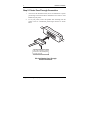
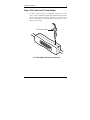
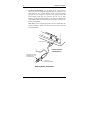
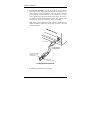
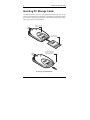
The illustrations below show the proper method of inserting Type II PC storage
cards into your Kingston PC Card Reader. As indicated, you must always insert
the card with its logo facing up. When the card is fully inserted, the eject button
will pop up as shown in the illustration.
Type II PC Card
Adapter
T
E
C
H
N
O
L
O
G
Y
PC Card Logo
Must Face Up
T
E
C
H
N
O
L
O
G
Y
T
E
C
H
N
O
L
O
G
Y
The card eject button
will pop up when the
card is fully inserted.
PC Storage Card Installation
Kingston Technology Company
PC Card Reader User’s Guide - Rev. A00