1
6
Hardware Installation
2.
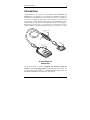
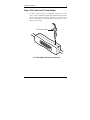
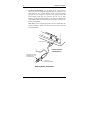
For PS/2 style keyboards, you will attach the DC power cable as
shown below. First, unplug the keyboard from your computer’s rear
panel. Plug the “AT to PS/2 adapter” directly into the keyboard
connector on your computer’s rear panel. Next, plug the end of the
power adapter cable with AT connector into the “AT to PS/2
adapter” extending from the computer’s rear panel. The opposite end
of the adapter cable with the PS/2 connector is where you must now
plug in your keyboard.
Note: When power is applied, the LED on the PC Card Reader will
remain constantly lit. When a PC storage card is inserted or accessed
the LED will blink.
PS/2 Connector
PS/2 Keyboard
Configuration
Plugs into the Cable
extending from your
PS/2 Keyboard
PS/2 to AT
Keyboard Adapter
PS/2 Keyboard Connection
Kingston Technology Company
PC Card Reader User’s Guide - Rev. A00