1
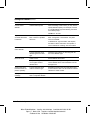
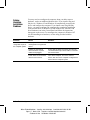
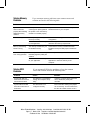
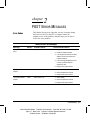
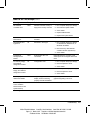
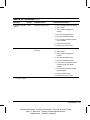
Power-On Self-Test Messages Continued
Message
Beeps*
Probable Cause
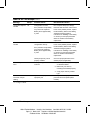
201-Memory Error
None
RAM failure.
Recommended Action
1. Run Computer Setup (F10 Setup)
or Windows utilities.
2. Ensure memory and continuity
modules are installed correctly.
3. Verify proper memory module
type.
4. Remove and replace the memory
module(s) one at a time to isolate
faulty module.
5. Replace faulty memory module(s).
6. If error persists after replacing
memory modules, replace the
system board.
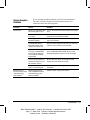
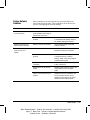
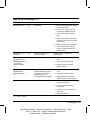
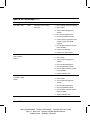
202-Memory Type
Mismatch
None
Memory modules do not
match each other.
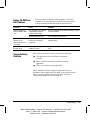
207-ECC Corrected
Single Bit Errors in
DIMM/SIMM Pair(s)
x,x in Memory
Module Socket(s)
y,y,…
2S
Single Bit ECC error.
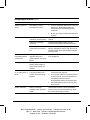
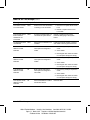
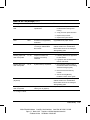
213-Incompatible
DIMM Module in
DIMM Socket(s) X,
X, …
2S
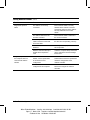
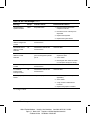
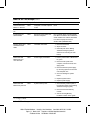
301-Keyboard Error
None
Replace memory modules with
matched sets.
1. Verify proper memory module
type.
2. Try another memory socket.
3. Replace memory module if
problem persists.
A DIMM module in DIMM
socket identified in the error
message is missing critical
SPD information, or is
incompatible with the chipset.
Keyboard failure.
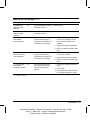
1. Verify proper memory module
type.
2. Try another memory socket.
3. Replace DIMM with a module
conforming to the SPD standard.
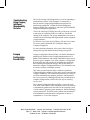
1. Reconnect keyboard with
computer turned off.
2. Check connector for bent or
missing pins.
3. Ensure that none of the keys are
depressed.
4. Replace keyboard.
Continued
* L = Long, S = Short
Troubleshooting
Writer: Elizabeth Hedstrom Saved By: Jake Schulzinger Saved Date: 06/14/99 11:24 AM
Pages: 13 Words: 2422 Template: c:\msoffice\templates\comm.dot
File Name ch2.doc Part Number 122838-002
2-3