1
Chapter 3
Functional Overview
Operating Instructions
IVC-3D
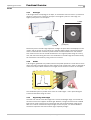
When the development of a program is finished and it is ready to be used, the program
(and table) is downloaded to the device and started.
After this it is not necessary to use IVC Studio any more. It may be used to display the
results from the program, for example to signal when faults occur. But the device can also
be used as a stand-alone unit, where other equipment is used for controlling the device
and displaying the output. For example, you could set up a web page on the camera and
then monitor the camera from a web browser on any computer on the network.
Programs
Tables
Input
Output
3.2.2
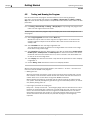
Saving Programs
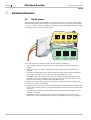
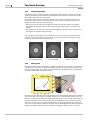
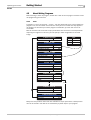
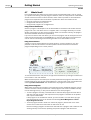
When you save a product in IVC Studio, the included programs and tables are saved with
the product on the computer. Nothing is saved on the device when you save the product.
This is not a problem since the program associated with the device is automatically loaded
into the device as soon as the program is started or edited in IVC Studio.
Product
Copied
automatically
Devices
Camera 1
Associated
Program
Working
Memory
Flash
Memory
Active
Program
1
2
3
4
5
...
Camera 2
Associated
Table
Copy values
manually
Active
Table
Save in
Flash
Program
Banks
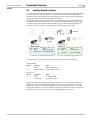
The programs and tables may be stored manually on the device as well. The flash memory
in the device contains a number of program banks, each of which can contain a program
and a table.
When you store a program in the flash memory, you always store the active program and
table, which are currently in the working memory of the device.
A program stored in program bank 0 will automatically be started when the device is
powered up.
14
SICK IVP • Industrial Sensors • www.sickivp.com • All rights reserved
8011007