1
Operating Instructions
Functional Overview
Chapter 3
IVC-3D
3.3
Handling Multiple Products
A device may be used in several products, using different programs and tables depending
on the product. This makes it easy to use the same camera for performing different inspections. Just create one product for each inspection, and in each product associate the
program and table to be used for the specific inspection.
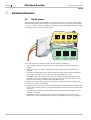
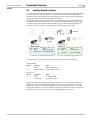
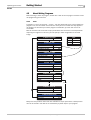
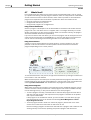
For example, there are three cameras set up by a production line, and we are producing
two different items on this production line – a transparent bottle and an opaque jar. For
the bottle we can use IVC-2D cameras to inspect both the label on the front and the fill
level, but for the jar we need to use an IVC-3D camera to inspect the fill level.
Device 3
Device 2
Device 1
Device 1
Product: Bottle
Dev Program
1 Label
2 Bottle_FillLevel
Product: Jar
Table
Bottle_Label_Table
Bottle_FillLevel_Table
Dev Program
1 Label
3
Jar_FillLevel
Table
Jar_Label_Table
Jar_FillLevel_Table
To achieve this we create two products in IVC Studio with the following contents:
Product: Bottle
Device
Program
1
Label
2
Bottle_FillLevel
Table
Bottle_Label_Table
Bottle_FillLevel_Table
Product: Jar
Device
Program
1
Label
3
Jar_FillLevel
Table
Jar_Label_Table
Jar_FillLevel_Table
When switching between producing the two products, we can simply open the product in
IVC Studio to load the corresponding programs and tables into the devices. If we would
change the design of the label for the bottle, we can just change the values in the table
Bottle_Label_Table to suit the new design. If necessary we could also make a copy of the
program Label, modify it, and associate the modified program with device 1.
8011007
SICK IVP • Industrial Sensors • www.sickivp.com • All rights reserved
15