1
Easylon USB Socket Interface User Manual
Installation
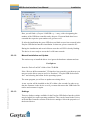
turn on special debug features. In the current driver versions bits 0, 1 and 3 are
used.
Note
Bit 0:
LON telegrams at the interface from and to the application are
shown in debug output.
Bit 1:
LON telegrams at the interface from and to the USB bus are
shown in debug output.
Bit 3:
CREATE and CLOSE) of the driver are displayed in the debug
output.
The debug output for instance can be displayed using the DebugView program,
which is freely available at www.sysinternals.com.
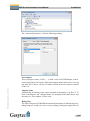
Permitted Power Saving
Usually the LON USB adapter allows a standby mode with applications running
(Standby). At certain conditions however, (e.g. LON USB using an external hub
under Windows 2000) the current supply to the LON USB adapter will be shortly interrupted during return from the standby mode by the external hub. Under
such conditions a standby mode must be turned off (None).
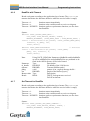
2.2.2
Windows and 16 Bit Applications
The Windows driver for the 32 bit Windows versions also provides a 16 bit interface. (Unfortunately Microsoft does not support this in the 64 bit versions.) To
use it, the following entry has to be made in the file „config.nt“, usually found in
the windows\system32 directory:
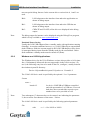
Device=%SystemRoot%\system32\ lpxdos.exe –Llonusb1-2
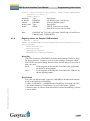
The 32 bit LON device used is specified by the optional –L or /L parameter:
/Lname
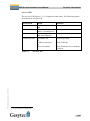
name =
LPM3/UserDoc/LPM3_Manual-EN.docx, v2.2, 06/30/2014
lonusb1-2
Note:
for device LONUSB at USB host controller 1
and with port number 2 at USB root. If several
hubs have been cascaded the respective port
numbers have to be provided as well.
Two subsequent “l” characters have to be entered, one indicating the parameter L, the second as first character of the name: –Llxxxx
The 16 bit LON device used is specified by the following optional parameter:
/Dn
with
n = 1...9 for LON1 to LON9
12/23