1
Contents
Important user information ........................................................................................ v
Safety Precautions ............................................................................................... v
Document conventions ....................................................................................... vi
1 Introduction ............................................................................................................. 1
Features ............................................................................................................... 2
Quick start checklist ............................................................................................ 2
2 Description .............................................................................................................. 3
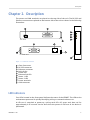
LED indicators ..................................................................................................... 3
Principles of operation ........................................................................................ 5
3 Installation ............................................................................................................... 7
Regulatory notes ................................................................................................. 7
Unpacking, handling and storage ....................................................................... 7
Before connecting anything ................................................................................ 7
DIN rail mounting and removal .......................................................................... 8
Mounting rules .................................................................................................... 8
Powering the ESENET .......................................................................................... 9
Wiring the CAN interface .................................................................................... 9
Connecting Ethernet ......................................................................................... 10
Connecting to the diagnostic port .................................................................... 10
4 Ethernet & IP configuration ................................................................................... 13
IP setup using a web browser and a cross-over network cable .......................... 13
IP setup using a terminal program like HyperTerminal ....................................... 14
Temporarily changing the IP settings on your PC .............................................. 15
5 Web browser based management ......................................................................... 17
Connecting to the ESENET ................................................................................ 17
Monitoring and diagnostic ................................................................................ 18
Device status .............................................................................................. 18
Modbus connection status ........................................................................ 19
CAN communication status ....................................................................... 20
Finding the firmware version and serial number ........................................ 21
Configuring and commissioning ........................................................................ 22
Configuring Ethernet and IP ...................................................................... 22
Configuring CAN and CANopen ................................................................. 23
Remote restarting the device ..................................................................... 23
6 Configuration of connected Woodward controls ................................................... 25
Specific information for Easygen-3000 series controls ....................................... 26
CAN interface ............................................................................................ 26
Transmit PDOs ........................................................................................... 27
Specific information for DTSC-200 controls ....................................................... 28
CAN interfaces ........................................................................................... 29
Transmit PDOs ........................................................................................... 30
7 Modbus data reference ......................................................................................... 33
Modbus Slave IDs .............................................................................................. 33
Visualisation Data Table ..................................................................................... 34
Easygen-3000 ............................................................................................. 35
DTSC-200 ................................................................................................... 35
Modbus function codes .................................................................................... 35
Modbus exception codes ................................................................................... 36
UMESENET-1101
iii