1
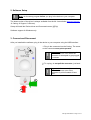
2. Software Setup ! Note: run the setup program before you plug in the device to your computer. The latest version of the driver is always available from the Mr. Lee website (www.mr-lee.com CatLog Support Drivers). Setup will install the Device driver and Command center (@Trip) Software support for Windows only. 3. Connect and Disconnect After you installed the software, plug in the device to your computer using the USB interface. 1: Plug in the connector into the CatLog. The arrow on the connector must point upwards. ! Important: An unwanted destruction of the device can occur when the connector is attempted to get plugged in reverse. 2: To unplug, do not pull the connector, just bend it. ! Important: An unwanted destruction of the device can occur if the connector is pulled instead of bent over. 2 1 CatLog User Manual - Page 4 of 14