1
4. Control Elements and Status Lights
The GPS logger has basically 3 elements to interact: one button (used for on/off and manual
position logging) and two lights which show the device status. All functions are set up using the
control center.
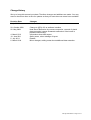
Mode
Charging
Power on
Power off
Satellite tracking mode
Data logged
Memory low
Memory full
Battery low
Data Transfer
Battery damaged
LED signal
The red light stays on during charging and goes off when
charging is completed.
Button is pressed for 2 seconds. The blue light blinks once.
Button is pressed for 2 seconds. The red light blinks once.
The blue light blinks every 8 seconds
Both lights blink simultaneously twice
The blue lights blinks three times every 8 seconds
The red light blinks twice every 3 seconds
The red light blinks once every 5 seconds.
The blue light blinks randomly.
Red light blinks rapidly
The table does not apply for the silent mode, no status LED is activated in that mode.
CatLog User Manual - Page 5 of 14