1
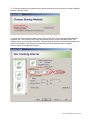
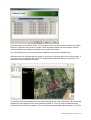
5. Other features of the device are silent mode (no status lights) and scheduled recording. For
both features the Scheduled Control mode has to be selected (see bullet 3, select “Scheduled
Control”). Make sure your GPS acquired a position and date before selecting this mode.
To disable the lights remove the checkmark at “Enable LED”. Additionally you have to select all
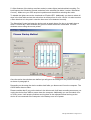
days in the time table and set the active time on all days from 0 to 24 o’clock. It is wise to select
a start date that is in the past in case the time zone is not detected correctly.
The Scheduled Control activates the device only at certain times of a day or at certain days a
week. For each day 2 time windows can get set in which the device is activated. The time
windows are set using the mouse pointer.
Once the active time windows are defined you will get to the settings for the position recordings
as shown in paragraph 4.
Depending on the setup the device enables itself after you disconnect it from the computer. The
On/Off button has no effect.
Please consider that if you put the device in the silent mode it will start recording as soon as you
unplug the device from USB or power down the computer. Additionally you can not switch it on
or off any more. It will acquire positions and log them in the adjusted interval as long as the
device is not connected to the computer or the battery runs out of power.
CatLog User Manual - Page 8 of 14