1
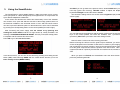
upper right) by selecting START. The two graphs allow real-time monitoring of
guiding corrections issued to the mount. You can interrupt the autoguiding
process by pressing STOP at any time, while EXIT will take you back to the basic
settings screen.
At times the guide star may be lost (1 beep per second and STAR LOST): this
can be due to a number of different reasons, e.g. because the sky has clouded
over, the optics have dewed up, or the star has been thrown off the field of view
by a wind gust or even because the telescope has been touched. If the star
remains invisible for up to 30 seconds, the camera will still be able to resume
autoguiding; otherwise, the current session is aborted and the execution flow
goes back to the MENU BASIC screen to search for a new guide star.
urge the camera to immediately correct for the slightest displacement, whereas a
low value will yield a much smoother behavior. .
4. Tips and Tricks
The SmartGuider is very simple and intuitive to use. However there are some
phases, namely selection of a suitable guide star, focusing and calibration, which
are critical in maximizing the performance of your SmartGuider and therefore
deserve special attention. For further details, please check out our website:
www.lvi-cameras.com.
Error messages
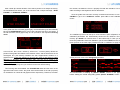
From the autoguiding screen, pressing the ADVAN menu item brings up the
advanced settings screen:
If for any reason the guide star has been lost, the SmartGuider warns the user
with both an error message (“STAR LOST!”) and an audible signal (one beep per
second until the star becomes visible again, for up to 30 seconds).
If the cable connecting the CPU and the camera head gets accidentally
disconnected, or in case of problems with the electrical connections or the power
supply, the following message is displayed: “COMMUNICATION ERROR!”.
EXIT will take us back to the previous menu, while by pressing AGGRESS X we
come to the following screens:
With the two triangular arrows (UP and DOWN), you can adjust the
aggressiveness in the X axis (upper left) and in the Y axis (upper right).
The aggressiveness in both axes can range from 1 to 6 (1-2=LOW, 3-4=MILD, 56=HIGH) and expresses the degree of reactivity of corrections: a high value will
7
Choosing a suitable guide scope
Thanks to its features, the SmartGuider does not call for telescopes with very
long focal length or particularly wide aperture. As a rule of thumb, when imaging
with digital SLRs or CCDs (pixel size between 5 and 8 microns), the guide scope
should have about the same focal length as that of the main instrument; for
bigger-sized pixels, shorter focal lengths are equally suitable. In any case, it is
advisable to use refractors instead of slow catadioptric reflectors (e.g. Maksutovs
with f/ratio of 10 and upwards), since focusing by movable primary mirror can
easily lead to exposure trailing even if the tracking performance looks apparently
good. Moreover, there are cases where high magnification is not always an
advantage, due to lower brightness and increased sensitivity to atmospheric
turbulence (seeing).
8