1
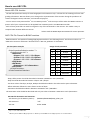
- Usable characters as file name:
Following characters and symbols within total of 20 letters.
(1) Alphanumeric characters:
A~Z a~z 0~9
(2) Symbol characters:
!#$%&'()+-=~^`@[]{}._
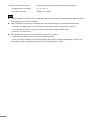
NOTE
Contrast/Brightness of the monitor is fixed to the default value (Contrast: 1000, Brightness: 000) and cannot
be changed when a ASC CDL is applied.
When parameters are missing or exceeding the range, the following error message will be displayed.
- "Shortage / Overage of CDL": if any parameter of Slop, Offset, Power, of Saturation is missing
- "Unacceptable CDL value": if any of the parameter exceeds the range of table above
- “File Error”: for other errors
It is still possible to perform auto white balance operations, however;
- It may take more time or may error with certain ASC CDL data.
- It may cause large changes to the color temperature when used in "ASC CDL: Not applied" mode. In this
case, please perform auto adjustment again in "ASC CDL: Not applied" mode..
3