1
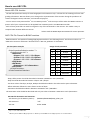
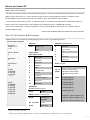
The User LUT file consists of six portions.
# Version: is to identify the file as a User LUT that can be read by the BVM-E monitor. Please describe in the above
table with a fixed string (including line feed). The LUT will not be read other than this description.
# Color Space: describes the color gamut which the User LUT data is limited within. Select one using the number 0
to 10 from the items in the Color Space table above. Do not select items that are “Reserved” (0,1,2, 9,or 10)as they
may be used in future enhancements. This color space will be displayed in the menu when the User LUT is applied to
the monitor. If the color space is different from the monitor’s configured color space, (set in Channel Configuration)
a message "Wrong Color Space" will appear.
# Gamma: describes the gamma which the User LUT data is based on. Please select using numbers of 0 to 5 in the
Gamma table. For example, if the User LUT was made with a 2.2 video gamma, please select 2. Do not select items
that are “Reserved” as it may be used for future enhancement.
# Grid Num: describes the number of lattice points in the User LUT data. Please describe the number of lattice
points common to each R, G, B. LUT data set as 8 to 33 lattice points. The data will not be read if the number range is
other than 8 to 33.
# Grid: describes the position of each lattice point in the User LUT data. Please use a fixed length of six digits after
the decimal point. Separate each lattice value with line feed (newline) and align them in ascending order. Please
make sure the total number of lattice point entries match with # Grid Num.
#LUT: describes the LUT value corresponding to the lattice point specified in the #Grid. Please use a fixed length of
six digits after the decimal point. Separate each lattice point with line feed (newline) and align them in ascending
order. Please refer to the LUT Data table above for the order of each description. Please make sure the total
numbers of LUT data values match the number set in #Grid Num (cube of # Grid Num) × 3.
Please describe the each segment (#Version:, #Color Space:, #Gamma:, #Grid Num:, #Grid:, #LUT:) in this order, or
else the monitor will not read the LUT properly. Comments are allowed to be described anywhere, but please be
sure to write “#” at the line head of the comments.
User LUT file destination and extension.
- File directory (in the Memory Stick™):
/MSSONY/MONITOR/BVM_E/USER_LUT
- File extension:
“.lut”
- File size:
Under 4MB
- Usable characters as file name:
Following characters and symbols within total of 20 letters.
(1) Alphanumeric characters:
A~Z a~z 0~9
(2) Symbol characters:
!#$%&'()+-=~^`@[]{}._
NOTE
Contrast/Brightness of the monitor is fixed to the default value (Contrast: 1000, Brightness: 000) and cannot
be changed when a User LUT is applied.
Parameters that are missing or exceeding the range will result in an error. Files that cannot be read (e.g.
files that are broken) will also result in an error.
It is still possible to perform auto white balance operation by internal sensor (BVM-E170) or by external
probe, however;
- It may take more time or may error with certain User LUT data.
5