1
Destinator ND User Guide
88
Favorites & Speed Camera Alerts
8.1
Introduction
A Favorites Alert refers to an item that you can configure so
that Destinator ND will alert you when you are within a
certain distance of the item’s location. You can configure two
distances for the Automatic Alert. Destinator ND will first
alert you when you are within the first distance and then alert
you when you are within the second distance.
8.2
Configuring Favorites Alerts Category
Note that this configuration is applied to all items in the
category.
1.
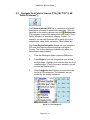
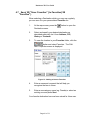
From the Destination screen, select Favorites.
2.
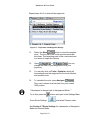
Highlight the folder you want to configure and select
Edit… from the Tools menu at the top.
3.
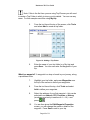
To enable both alerts, check both boxes. Or, you can
disable one of the alerts by clearing the box next to it.
If you configure two alerts, the first one must have a
greater distance than the second one.
4.
From the pull-down menus, select a distance for each
enabled alert. Destinator ND will alert you when the
distance between your current traveling position and
the location of the alert equals the distance you enter
here.
5.
Close the Edit menu.
Page 62 of 73