1
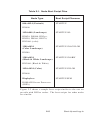
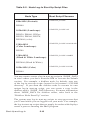
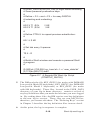
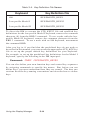
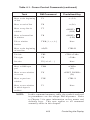
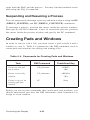
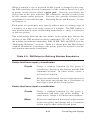
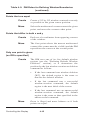
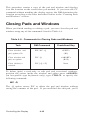
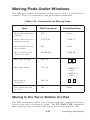
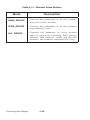
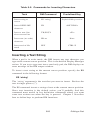
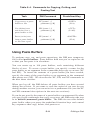
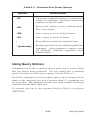
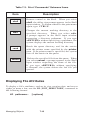
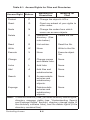
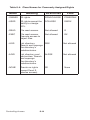
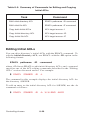
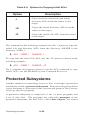
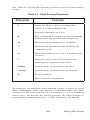
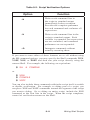
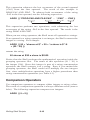
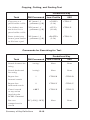
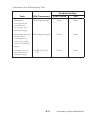
Table 5-4. Commands for Copying, Cutting, and
Pasting Text
Task
DM Command
Predefined Key
Copy text to a paste
buffer or file
XC [name | -f
pathname] [-R]
<COPY>
(L1A)
Cut (delete) text
and write it to a
paste buffer or file
XD [name | -f
pathname] [-R]
<CUT>
(L1AS)
Paste (write) text
from a paste buffer
or file into a pad
XP [name | -f
pathname] [-R]
<PASTE>
(L2A)
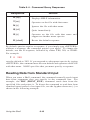
Using Paste Buffers
To perform copy, cut, and paste operations, the DM uses temporary
files called paste buffers. Paste buffers hold text you’ve copied or cut
so that you can paste it in elsewhere.
You can create up to 100 paste buffers, each containing different
blocks of text. To create a paste buffer, you specify a name for the
paste buffer as an argument to the commands that copy or cut text (XC
and XD). To insert the contents of a paste buffer you have created,
specify the name of the paste buffer as an argument to the command
that pastes text (XP). We describe the XC, XD, and XP commands in
the next three sections.
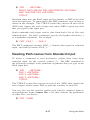
When you log off, the DM deletes all paste buffers you have created
during the session. If you want to save the copied or cut text for use
during another session, you can write it to a permanent file (see the XC
and XD command descriptions in the next two sections).
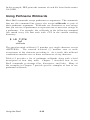
If you do not specify the name of a paste buffer or permanent file when
you specify the commands that copy or cut text, the DM writes the text
to its default (unnamed) paste buffer. The DM also uses this default
paste buffer when you press the predefined function keys and control
key sequences that copy, delete, and paste text.
5-11
Editing a Pad