1
Page 2 of 24
Table of Contents
1
1.1
1.2
1.3
Introduction
Capacity Service
German - Danish Border
Traders
6
6
6
6
2
2.1
2.2
Functional Overview
Principles of Capacity Allocation
Set-up Parameters for the Danish Border
7
7
7
3
Preconditions for Accessing the Intraday Capacity Platform
8
4
Login Portal
10
5
5.1
5.1.1
5.1.2
5.1.3
5.1.4
5.1.5
5.1.6
5.2
5.2.1
5.2.1.1
5.2.1.1.1
5.2.1.2
5.2.1.3
5.2.1.4
5.2.1.5
5.2.2
5.2.2.1
5.2.2.2
5.2.2.3
5.2.2.4
5.2.2.5
5.2.2.6
5.3
5.3.1
5.3.2
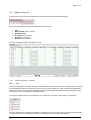
Traders GUI
Menu Bar
File
Product
TSO
Help
Reload
Trader’s Balancing Group
Capacity Overview
Capacity Overview - Columns
Time
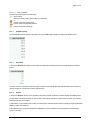
Status Symbols
Available Capacity
Actual RCA
Request
New RCA
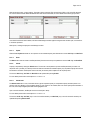
Capacity Overview - Buttons
Import
Export
Update
Reset
Submit
Submit AON
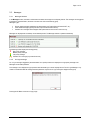
Messages
Messages Window
On Login Message
11
12
12
12
12
12
12
12
13
13
13
14
14
14
14
15
15
15
15
16
16
16
16
17
17
17
6
Use-Case - Entering a Capacity Request
18
7
7.1
7.1.1
7.1.2
7.1.2.1
7.1.2.1.1
7.1.2.2
7.1.3
7.1.3.1
7.1.3.2
7.1.3.3
File Specification
BG Allocation File Specification
General
CSV
Header Area
Sender-, Receiver Identification
Time Series Area
XML
Product
Area and Party Codes
Schedules, Capacity Allocation Periods (Contracts)
20
20
20
20
20
20
20
20
21
21
21