1
Contents
Page
Quick Start Guide . . . . . . . . . . . . . . . . . . . . . . . . . . . . . . . . . . . . . . . . . . . . . . . 1
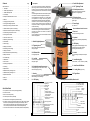
1. Description . . . . . . . . . . . . . . . . . . . . . . . . . . . . . . . . . . . . . . . . . . . . . . . . . 2
2. Parallel Height Adjustment . . . . . . . . . . . . . . . . . . . . . . . . . . . . . . . . . . . . . 2
4. Parallel Side Adjustment . . . . . . . . . . . . . . . . . . . . . . . . . . . . . . . . . . . . . . 3
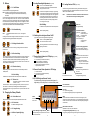
9.1 LCD Display . . . . . . . . . . . . . . . . . . . . . . . . . . . . . . . . . . . . . . . . . . . . . . . . 2
9.2 Adjustment Possibilities, Menu Level 2 . . . . . . . . . . . . . . . . . . . . . . . . . . . 3
13. Buttons . . . . . . . . . . . . . . . . . . . . . . . . . . . . . . . . . . . . . . . . . . . . . . . . . . . . 4
14. Changing the Factory Defaults . . . . . . . . . . . . . . . . . . . . . . . . . . . . . . . . . . 4
15. Locking Beam Height Adjustment . . . . . . . . . . . . . . . . . . . . . . . . . . . . . . . 5
16. Switching the Locking Laser Beam On/Off. . . . . . . . . . . . . . . . . . . . . . . . . 5
17. Receiver Status Symbols in LCD Display. . . . . . . . . . . . . . . . . . . . . . . . . . 5
18. Remote Control Status Symbols in LCD Display . . . . . . . . . . . . . . . . . . . . 5
19. VF-80 Drifting Laser Remote Control . . . . . . . . . . . . . . . . . . . . . . . . . . . . . 5
20. Locking Receiver FE-80 . . . . . . . . . . . . . . . . . . . . . . . . . . . . . . . . . . . . . . . 6
21. Automatic Laser Cut-Out . . . . . . . . . . . . . . . . . . . . . . . . . . . . . . . . . . . . . . 7
1.
4. Parallel Side Adjustment
Description
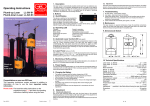
The VL-80 is a special laser especially developed for
pipe driving, but which can also be used for many other
purposes. It emits an automatically levelled or defined
inclined target beam and a second beam for direction
locking.
The advantageous diode laser beam features low power
consumption with immense target beam laser power.
It can be adjusted in five steps from 1 to < 5 mW for different requirements. The clearly visible locking beam is
equipped with automatic laser output power optimisation.
The laser has control indicators with blinking warning
system for levelling, direction locking, low battery and
end positions as well as a shift guard for the inclination
and direction setting.
The values that have been set remain stored in the laser
even after switching off or in the case of a low battery.
The name of the owner can be saved in the device to
protect against theft.
The VL-70 differs from the VL-80 in that it does not have a
direction locking feature.
4.2 Side Adjustment Screw
Note: Loosen the fastening srew before
adjustment, then tighten again.
4.3 Fastening Screw
Note: Loosen before side adjustment, then
tighten again.
5. Power Supply
12 V DC/ 0.4 A
6. Receiver/Remote Control Connector
7. Box Level
Set up aid, for viewing from above.
8. Keyboard
Clear layout, big, user-friendly, self-explanatory
keys.
22. Monitoring of Self-Levelling . . . . . . . . . . . . . . . . . . . . . . . . . . . . . . . . . . . . 7
23. Flicker Mode . . . . . . . . . . . . . . . . . . . . . . . . . . . . . . . . . . . . . . . . . . . . . . . . 7
4.1 5/8" Tightening Thread
2. Parallel Height Adjustment
9. LCD-Display
24. Power Supply . . . . . . . . . . . . . . . . . . . . . . . . . . . . . . . . . . . . . . . . . . . . . . . 7
2.1 Tightening Screw
Note: Loosen before height adjustment,
then tighten again.
Clearly legible, illuminated display for on/off,
company data, device data, inclination,
operating status and battery level.
28. Automatic Direction Adjustment/Locking . . . . . . . . . . . . . . . . . . . . . . . . . . . 8
2.2 Millimetre Rule
10. Handle
29. Safety Instructions . . . . . . . . . . . . . . . . . . . . . . . . . . . . . . . . . . . . . . . . . . . . 8
For height adjustment.
25. Setting the Inclination . . . . . . . . . . . . . . . . . . . . . . . . . . . . . . . . . . . . . . . . . 7
26. Calculating the Percentage . . . . . . . . . . . . . . . . . . . . . . . . . . . . . . . . . . . . . 7
27. Setting the Direction . . . . . . . . . . . . . . . . . . . . . . . . . . . . . . . . . . . . . . . . . . 8
30. Troubleshooting. . . . . . . . . . . . . . . . . . . . . . . . . . . . . . . . . . . . . . . . . . . . . . 8
31. Maintenance . . . . . . . . . . . . . . . . . . . . . . . . . . . . . . . . . . . . . . . . . . . . . . . . 8
32. Axis Transfer . . . . . . . . . . . . . . . . . . . . . . . . . . . . . . . . . . . . . . . . . . . . . . . . 9
for easy handling, safe transport and simple
set-up.
2.3 Lock Nut
11. Laser Warning Sign
Loosen before height adjustment,
then tighten again.
Laser class 3R, £ 5 mW, ³ 25 W/m² (see 29.)
33. Checking and Adjustment . . . . . . . . . . . . . . . . . . . . . . . . . . . . . . . . . . . . . 10
34. Checking . . . . . . . . . . . . . . . . . . . . . . . . . . . . . . . . . . . . . . . . . . . . . . . . . . 10
2.4 Height Adjustment Screw
12. Laser Beam Exit Window
35. Specifications. . . . . . . . . . . . . . . . . . . . . . . . . . . . . . . . . . . . . . . . . . . . . . . 11
Loosen tightening screw 2.1 and lock nut 2.3,
then set the height by turning.
12.1 Locking Beam (only VL-80)
3. Housing
12.2 Target Beam
36. Standard Delivery Package VL-80. . . . . . . . . . . . . . . . . . . . . . . . . . . . . . . 11
37. Standard Delivery Package VL-70. . . . . . . . . . . . . . . . . . . . . . . . . . . . . . . 11
38. Optional Accessories . . . . . . . . . . . . . . . . . . . . . . . . . . . . . . . . . . . . . . . . . 11
39. Service. . . . . . . . . . . . . . . . . . . . . . . . . . . . . . . . . . . . . . . . . . . . . . . . . . . . 11
Robust light-metal housing, plastic-coated, swept and
filled with nitrogen, 100 % watertight.
40. Disposal . . . . . . . . . . . . . . . . . . . . . . . . . . . . . . . . . . . . . . . . . . . . . . . . . . . 11
9.1 LCD Display
Quick Start Guide
1 Set up the laser on line at the required height (see 32.).
2. Connect the cables.
3. Switch on the laser (see 13.1).
4. Set the required inclination (see 13.2).
5. Set the direction of the target beam (see 13.4 and 27.).
6. If necessary, switch on the locking laser beam (only VL-80). Press the button
Menu/OK. The pointer appears in the display. Press Arrow Up / Down to
switch on the locking laser beam and to set the height (see 15. und 16.)
Then, for example, lock the beam with the receiver FE-80 (see 20.).
7. The remote control VF-80 can be connected for operation if wanted (see 19.).
1
9.2 Adjustment Possibilities, Menu Level 2
Lock symbol open / closed
Algebraic sign
Inclination value
Percent sign
Status symbols
Initialising
Adjusting inclination
Inclination adjustment finished
Power saving mode
Kick guard active
Blinks after jerky movement.
laser beam off
E = Sensitivity (see 23.)
T = Kick guard (see 21.)
(siehe 21.)
P = Percent/ Per mil
V = Lock
(see 13.7)
(siehe 13.7.)
F = Flicker
(see 23.)
(siehe 22.)
L = Laser power
W = Factory defaults
S = Service / Workshop information
Factory defaults
On
1 = Laser class 2
1 - 5:
2 - 5 = Laser class 3R
off
| Inclination or
+ Inclination and direction
% or ‰
Power supply indicator
Receiver status symbol (see
17.)
(siehe
17.)
Direction limitation
Centring indicator
Direction arrow
Centre indicator
Laser beam symbol
Remote control status symbol(siehe
(see 18.)
2
Off
1 -3 approx. 5 - 15 mm/100m
3