1
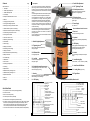
13. Buttons
15. Locking Beam Height Adjustment (only VL-80)
Menu
OK
= 13.1 On/Off Button
The device is switched on by pressing this button.
Note: If the laser is to be used with direction locking, the device must be
connected to the locking receiver and remote control before being
swiched on.
The device and company data are then shown, followed by the operating display
with the last settings without button lock. The device is then levelled and
referenced on the zero point automatically. After the levelling phase the laser
beam and laser beam symbol stop blinking. If this does not happen, the device
must be moved into the levelling range by tilting it forwards. To switch off the
device, press the On/Off button until "Auf Wiedersehen!" appears.
A direction arrow appears in the display. Long pressing
changes the locking beam height with increasing speed
until the direction arrow begins to blink. The height then
changes without the button having to be pressed until
the locking beam hits the receiver, a direction arrow is
pressed or end position is reached (blinking direction
arrow changes to a square).
or
Automatik-Kanalbau-Laser
KL-80/-81
= 13.2 Inclination Setting
or
The gradient/inclination is shown in % or ‰ , not in degrees
or gon.
Pressing the arrow button changes the inclination value by 0.001 %. The value is
changed with increasing speed if the button is kept pressed.
Press 1 x until the "Pointer" appears.
The external remote control and automatic direction
setting function do not work!
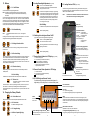
20. Locking Receiver FE-80 (only VL-80)
The FE-80 locking receiver makes monitoring and automatic locking of the
target beam possible. The integrated LED indicators are used for set-up and
status control. Installation see 27.
Note:
The FE-80 is not intended for calibration of the direction axis.
This must be done directly with the target beam!
Quick Setting
Spirit Level
for upright assembly
In addition to the respective arrow button also press the
Menu
OK
Back to operating display.
LED Position Indicator
green LED: centre posititon,
direction locking OK
red LED:
off-centre position
running light: no reception
2 LEDs constantly on:
measuring range
exceeded
Note:
16. Switching the Locking Laser Beam On/Off
(only VL-80) (only when working without locking receiver)
Menu
OK
+
= 13.3 Setting Inclination on Zero
The inclination value is set on 0.000 % by pressing the two arrow buttons at
the same time.
= 13.4 Direction Setting
or
After setting one of the two arrow buttons the laser beam symbol changes to an
arrow. It indicates the direction of movement and the current position. When
end position is reached, the laser beam and limitation symbol begin to blink.
The setting must then be moved back within 2.5 minutes. If this is not done, the
laser is switched off automatically.
= 13.5 Direction Centring
+
After pressing the two arrow buttons the device is automatically centred in
middle position.
13.6 Quick Setting
Press 1 x until the "pointer" appears.
The remote control does not work!
The locking laser beam can be switched on/off by long
pressing of the button.
Menu
OK
Back to operating display.
= 13.7 Button Lock
(alternatively inclination or inclination + direction
see 9.2; V = Lock)
ü = direction locking OK
E = no connection (check cable connections)
= not run in (refraction or oscillations)
? = no reception (obstacle in beam path)
| = direction locking switched off on receiver
= operation without receiver
ü = remote control OK
E = no connection (check cable connection)
= when button is pressed.
Keep the button pressed until the adjustment possibilities shown in 9.2
or
Solar Cell Cover
with target marking for set-up
Socket
for connection to the VL-80.
19. VF-80 Drifting Laser Remote Control
For direction setting of the target beam and locking beam, for
height setting of the locking beam, for visual and auditory status.
Laser Control LED
blinks in time with the target beam
Error LED
off: system working properly
on: direction locking faulty (see 17.) Kick guard actuated
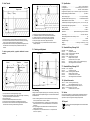
14. Changing the Factory Defaults
= 14.1. Select Menu Level
Solar Cell Square
receives the locking laser beam from
the VL-80.
18. Remote Control Status Symbols in LCD Display
Press the button 2 x: the lock symbol begins to blink, press arrow up or arrow
down button. The buttons are protected against accidential adjustment.
Press the Menu button 2 x again, press the arrow up or arrow down button. The
lock is lifted.
Menu
OK
Knob
To move the solar cells for transfer of
the direction axis to the centre of the
solar cells.
Note: When automatic direction
setting is on, the direction axis
of the main beam is changed!
17. Receiver Status Symbols in LCD Display (only VL-80)
In addition to the respective arrow buttons also press the On/Off button.
Menu
OK
Direction Locking Toggle Switch
up: automatic direction setting off
down: automatic direction setting on
Socket
for connection
to the VL-80.
= 14.2 Select Letter
Alarm
An intermittent alarm is emitted 5 sec. after the error LED lights up. This
changes to a continuous alarm after 2 min. The intermittent alarm stops when
the error is corrected. The continuous alarm must be stopped by pressing the
volume button.
The selected letter begins to blink.
or
Alarm Volume / Clear Alarm
Adjustable in 4 steps: off, quiet, middle, loud
= 14.3 Change Settings
= 14.4 Back to Operating Display
4
Direction Setting for Target and Locking Beaml
To avoid operating errors, press the arrow and lock
button at the same time.
5
Locking Beam Height Adjustment (only VL-70)
Long pressing changes the locking beam height with increasing speed.
6