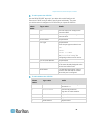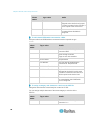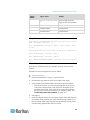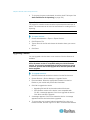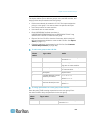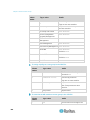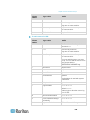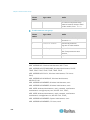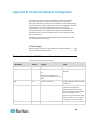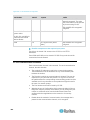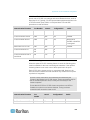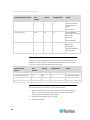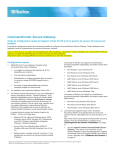
1
CommandCenter Secure Gateway Administrators Guide Release 5.1 Copyright © 2011 Raritan, Inc. CCA-0N-v5.1-E February 2011 255-80-5140-00-0N This document contains proprietary information that is protected by copyright. All rights reserved. No part of this document may be photocopied, reproduced, or translated into another language without express prior written consent of Raritan, Inc. © Copyright 2011 Raritan, Inc. All third-party software and hardware mentioned in this document are registered trademarks or trademarks of and are the property of their respective holders. FCC Information This equipment has been tested and found to comply with the limits for a Class A digital device, pursuant to Part 15 of the FCC Rules. These limits are designed to provide reasonable protection against harmful interference in a commercial installation. This equipment generates, uses, and can radiate radio frequency energy and if not installed and used in accordance with the instructions, may cause harmful interference to radio communications. Operation of this equipment in a residential environment may cause harmful interference. VCCI Information (Japan) Raritan is not responsible for damage to this product resulting from accident, disaster, misuse, abuse, non-Raritan modification of the product, or other events outside of Raritan's reasonable control or not arising under normal operating conditions. Contents What's New in the CC-SG Administrators Guide Chapter 1 Introduction xvii 1 Prerequisites .................................................................................................................................. 1 Terminology/Acronyms .................................................................................................................. 2 Client Browser Requirements ........................................................................................................ 4 Chapter 2 Accessing CC-SG 5 Browser-Based Access via the CC-SG Admin Client .................................................................... 5 JRE Incompatibility .............................................................................................................. 6 Thick Client Access........................................................................................................................ 6 Install the Thick Client ......................................................................................................... 6 Use the Thick Client ............................................................................................................ 7 CC-SG Admin Client ...................................................................................................................... 8 Chapter 3 Getting Started 10 Licensing - Getting Started - New and Existing Customers......................................................... 10 Licensing - Basic License Information ......................................................................................... 11 Available Licenses ............................................................................................................. 11 Find Your Physical Appliance Host ID and Check Number of Nodes In Database .......... 12 Licensing - New Customers - Physical Appliance ....................................................................... 14 Licensing - Clusters - New Customers .............................................................................. 16 Licensing - Virtual Appliance with License Server ....................................................................... 17 Virtual Appliance Installation Requirements ...................................................................... 17 Download Installation Files ................................................................................................ 18 Install License Server Software on a Linux or Windows Server ........................................ 18 Get Your License ............................................................................................................... 19 Copy the License File to the License Server ..................................................................... 21 Start the License Server .................................................................................................... 21 Install CommandCenter Secure Gateway on VMware ESX Server 4.0 ............................ 22 Log in to Diagnostic Console to Set CC-SG IP Address ................................................... 22 Log in to CC-SG ................................................................................................................ 23 Install and Check Out Your License .................................................................................. 23 License Server Communication ......................................................................................... 24 Command Line Utilities for Managing License Server ...................................................... 25 Install or Upgrade VMware Tools ...................................................................................... 27 Configure Backups and Snapshots of Virtual Appliance and Storage Servers ................. 27 Virtual Appliances with Remote Storage Servers .............................................................. 27 iii Contents Licensing - Limited Operation Before License Install .................................................................. 28 Licensing - Existing Customers ................................................................................................... 29 Licensing - Rehosting .................................................................................................................. 29 Add a License .............................................................................................................................. 30 Confirming IP Address ................................................................................................................. 30 Setting CC-SG Server Time ........................................................................................................ 30 Checking the Compatibility Matrix ............................................................................................... 31 Checking and Upgrading Application Versions ........................................................................... 32 Chapter 4 Configuring CC-SG with Guided Setup 33 Before You Use Guided Setup .................................................................................................... 33 Associations in Guided Setup ...................................................................................................... 34 Create Categories and Elements ...................................................................................... 34 Device Setup ................................................................................................................................ 34 Discover and Add Devices ................................................................................................ 35 Creating Groups ........................................................................................................................... 36 Add Device Groups and Node Groups .............................................................................. 36 User Management ....................................................................................................................... 38 Add User Groups and Users ............................................................................................. 39 Chapter 5 Associations, Categories, and Elements 41 About Associations ...................................................................................................................... 41 Association Terminology ................................................................................................... 41 Associations - Defining Categories and Elements ............................................................ 41 How to Create Associations .............................................................................................. 42 Adding, Editing, and Deleting Categories and Elements ............................................................. 42 Add a Category .................................................................................................................. 42 Delete a Category .............................................................................................................. 43 Add an Element ................................................................................................................. 43 Adding Categories and Elements with CSV File Import .............................................................. 43 Categories and Elements CSV File Requirements ........................................................... 44 Sample Categories and Elements CSV File ...................................................................... 45 Import Categories and Elements ....................................................................................... 45 Export Categories and Elements ....................................................................................... 46 Chapter 6 Devices, Device Groups, and Ports 47 Viewing Devices ........................................................................................................................... 48 The Devices Tab................................................................................................................ 48 Device and Port Icons ....................................................................................................... 48 Port Sorting Options .......................................................................................................... 49 Device Profile Screen ........................................................................................................ 50 Topology View ................................................................................................................... 51 Right Click Options in the Devices Tab ............................................................................. 52 Searching for Devices .................................................................................................................. 52 Wildcards for Search ......................................................................................................... 52 Wildcard Examples ............................................................................................................ 52 iv Contents Discovering Devices .................................................................................................................... 53 Adding a Device ........................................................................................................................... 54 Add a KVM or Serial Device .............................................................................................. 54 Add a PowerStrip Device ................................................................................................... 56 Add a Dominion PX Device ............................................................................................... 56 Editing a Device ........................................................................................................................... 57 Change the HTTP and HTTPS Ports for a KX2 Device .............................................................. 57 Editing a PowerStrip Device or a Dominion PX Device ............................................................... 57 Adding Notes to a Device Profile ................................................................................................. 58 Adding Location and Contacts to a Device Profile ...................................................................... 59 Deleting a Device ......................................................................................................................... 59 Configuring Ports ......................................................................................................................... 60 Configure a Serial Port ...................................................................................................... 60 Configure a KVM Port ........................................................................................................ 60 Nodes Created by Configuring Ports ................................................................................. 61 Editing a Port ............................................................................................................................... 61 Deleting a Port ............................................................................................................................. 62 Configuring a Blade Chassis Device Connected to KX2 ............................................................. 63 Blade Chassis Overview .................................................................................................... 63 Add a Blade Chassis Device ............................................................................................. 64 Edit a Blade Chassis Device ............................................................................................. 67 Delete a Blade Chassis Device ......................................................................................... 67 Move a Blade Chassis Device to a Different Port ............................................................. 68 Restore Blade Servers Ports to Normal KX2 Ports ..................................................................... 68 Bulk Copying for Device Associations, Location and Contacts ................................................... 69 Configuring Analog KVM Switches Connected to KX2 2.3 or Higher .......................................... 70 Add a KVM Switch Connected to KX2............................................................................... 70 Configuring Ports on an Analog KVM Switch Device Connected to KX2.......................... 70 Device Group Manager ................................................................................................................ 71 Device Groups Overview ................................................................................................... 72 Add a Device Group .......................................................................................................... 72 Edit a Device Group .......................................................................................................... 76 Delete a Device Group ...................................................................................................... 76 Adding Devices with CSV File Import .......................................................................................... 77 Devices CSV File Requirements ....................................................................................... 77 Sample Devices CSV File ................................................................................................. 81 Import Devices ................................................................................................................... 81 Export Devices................................................................................................................... 82 Upgrading a Device ..................................................................................................................... 82 Backing Up a Device Configuration ............................................................................................. 83 Restoring Device Configurations ................................................................................................. 84 Restore a Device Configuration (KX, KSX, KX101, SX, IP-Reach) .................................. 84 Restore All Configuration Data Except Network Settings to a KX2, KSX2, or KX2-101 Device ................................................................................................................................ 85 Restore Only Device Settings or User and User Group Data to a KX2, KSX2, or KX2-101 Device ................................................................................................................................ 85 Restore All Configuration Data to a KX2, KSX2, or KX2-101 Device ............................... 86 Save, Upload, and Delete Device Backup Files ................................................................ 86 v Contents Copying Device Configuration ..................................................................................................... 87 Restarting a Device...................................................................................................................... 88 Pinging the Device ....................................................................................................................... 88 Pausing CC-SG's Management of a Device ................................................................................ 88 Resuming Management of a Device ............................................................................................ 89 Pause and Resume Management of Devices Using a Scheduled Task ..................................... 89 Device Power Manager................................................................................................................ 90 Launching a Device's Administrative Page .................................................................................. 90 Disconnecting Users .................................................................................................................... 91 Special Access to Paragon II System Devices ............................................................................ 91 Paragon II System Controller (P2-SC) .............................................................................. 91 IP-Reach and UST-IP Administration ................................................................................ 92 Chapter 7 Managed Powerstrips 93 Configuring Powerstrips that are Managed by Another Device in CC-SG .................................. 94 Configuring PowerStrips Connected to KX, KX2, KX2-101, KSX2, and P2SC ........................... 95 Add a PowerStrip Device Connected to a KX, KX2, KX2-101, KSX2, or P2SC Device ... 95 Move a KX, KX2, KX2-101, KSX2, or P2SC's PowerStrip to a Different Port ................... 95 Delete a PowerStrip Connected to a KX, KX2, KX2-101, KSX2, or P2SC Device ........... 96 Configuring PowerStrips Connected to SX 3.0 and KSX ............................................................ 96 Add a PowerStrip Connected to an SX 3.0 or KSX device ............................................... 96 Delete a PowerStrip Connected to an SX 3.0 or KSX Device ........................................... 97 Change a PowerStrip's Device or Port Association (SX 3.0, KSX) ................................... 97 Configuring Powerstrips Connected to SX 3.1 ............................................................................ 98 Add a Powerstrip Connected to an SX 3.1 Device ............................................................ 98 Move an SX 3.1's Powerstrip to a Different Port ............................................................... 99 Delete a Powerstrip Connected to an SX 3.1 Device ........................................................ 99 Configuring Outlets on a Powerstrip ............................................................................................ 99 Chapter 8 Nodes, Node Groups, and Interfaces 101 Nodes and Interfaces Overview ................................................................................................. 101 About Nodes .................................................................................................................... 101 Node Names .................................................................................................................... 102 About Interfaces............................................................................................................... 102 Viewing Nodes ........................................................................................................................... 102 Nodes Tab ....................................................................................................................... 102 Node Profile ..................................................................................................................... 103 Node and Interface Icons ................................................................................................ 105 Service Accounts ....................................................................................................................... 106 Service Accounts Overview ............................................................................................. 106 Add, Edit, and Delete Service Accounts .......................................................................... 107 Change the Password for a Service Account .................................................................. 107 Assign Service Accounts to Interfaces ............................................................................ 108 Adding, Editing, and Deleting Nodes ......................................................................................... 109 Add a Node ...................................................................................................................... 109 Nodes Created by Configuring Ports ............................................................................... 110 Edit a Node ...................................................................................................................... 110 Delete a Node .................................................................................................................. 110 vi Contents Adding Location and Contacts to a Node Profile ....................................................................... 111 Adding Notes to a Node Profile ................................................................................................. 111 Configuring the Virtual Infrastructure in CC-SG ........................................................................ 112 Terminology for Virtual Infrastructure .............................................................................. 112 Virtual Nodes Overview ................................................................................................... 113 Add a Control System with Virtual Hosts and Virtual Machines ...................................... 113 Add a Virtual Host with Virtual Machines ........................................................................ 116 Edit Control Systems, Virtual Hosts, and Virtual Machines ............................................. 118 Delete Control Systems and Virtual Hosts ...................................................................... 120 Delete a Virtual Machine Node ........................................................................................ 120 Delete a Virtual Infrastructure .......................................................................................... 120 vSphere 4 Users Must Install New Plug-In ...................................................................... 121 Synchronizing the Virtual Infrastructure with CC-SG ................................................................. 121 Synchronize the Virtual Infrastructure ............................................................................. 122 Enable or Disable Daily Synchronization of the Virtual Infrastructure ............................. 122 Reboot or Force Reboot a Virtual Host Node ............................................................................ 123 Accessing the Virtual Topology View ......................................................................................... 123 Connecting to a Node ................................................................................................................ 124 Firefox Users of the Access Client Must Download JNLP File ........................................ 124 Pinging a Node .......................................................................................................................... 124 Adding, Editing, and Deleting Interfaces.................................................................................... 125 Add an Interface .............................................................................................................. 125 Edit an Interface............................................................................................................... 135 Delete an Interface .......................................................................................................... 135 Bookmarking an Interface .......................................................................................................... 136 Configuring Direct Port Access to a Node ................................................................................. 137 Bulk Copying for Node Associations, Location and Contacts.................................................... 137 Using Chat ................................................................................................................................. 138 Adding Nodes with CSV File Import .......................................................................................... 138 Nodes CSV File Requirements ........................................................................................ 139 Sample Nodes CSV File .................................................................................................. 148 Import Nodes ................................................................................................................... 148 Export Nodes ................................................................................................................... 149 Editing IP Addresses with CSV File Import................................................................................ 149 Adding, Editing, and Deleting Node Groups .............................................................................. 150 Node Groups Overview ................................................................................................... 150 Add a Node Group ........................................................................................................... 151 Edit a Node Group ........................................................................................................... 154 Delete a Node Group ....................................................................................................... 154 Chapter 9 Users and User Groups 156 The Users Tab ........................................................................................................................... 157 Default User Groups .................................................................................................................. 158 CC Super-User Group ..................................................................................................... 158 System Administrators Group .......................................................................................... 158 CC Users Group .............................................................................................................. 158 Adding, Editing, and Deleting User Groups ............................................................................... 159 Add a User Group ............................................................................................................ 159 Edit a User Group ............................................................................................................ 160 Delete a User Group ........................................................................................................ 161 vii Contents Limit the Number of KVM Sessions per User ............................................................................ 162 Configuring Access Auditing for User Groups ........................................................................... 162 Adding, Editing, and Deleting Users .......................................................................................... 163 Add a User ....................................................................................................................... 163 Edit a User ....................................................................................................................... 164 Delete a User ................................................................................................................... 165 Assigning a User to a Group ...................................................................................................... 165 Deleting a User From a Group ................................................................................................... 166 Adding Users with CSV File Import ........................................................................................... 166 Users CSV File Requirements ......................................................................................... 167 Sample Users CSV File ................................................................................................... 170 Import Users .................................................................................................................... 171 Export Users .................................................................................................................... 171 Your User Profile ........................................................................................................................ 172 Change your password .................................................................................................... 172 Change your name .......................................................................................................... 172 Change your default search preference .......................................................................... 172 Change the CC-SG default font size ............................................................................... 173 Change your email address ............................................................................................. 173 Change the CC-SG Super User's Username .................................................................. 173 Logging Users Out ..................................................................................................................... 173 Bulk Copying Users ................................................................................................................... 174 Chapter 10 Policies for Access Control 175 Adding a Policy .......................................................................................................................... 176 Editing a Policy .......................................................................................................................... 177 Deleting a Policy ........................................................................................................................ 178 Support for Virtual Media ........................................................................................................... 179 Assigning Policies To User Groups ........................................................................................... 179 Chapter 11 Custom Views for Devices and Nodes 180 Types of Custom Views ............................................................................................................. 180 View by Category............................................................................................................. 180 Filter by Node Group ....................................................................................................... 180 Filter by Device Group ..................................................................................................... 180 Using Custom Views in the Admin Client .................................................................................. 181 Custom Views for Nodes ................................................................................................. 181 Custom Views for Devices ............................................................................................... 183 Chapter 12 Remote Authentication 187 Authentication and Authorization (AA) Overview ....................................................................... 187 Flow for Authentication .................................................................................................... 187 User Accounts ................................................................................................................. 188 Distinguished Names for LDAP and AD .................................................................................... 188 Specify a Distinguished Name for AD ............................................................................. 188 Specify a Distinguished Name for LDAP ......................................................................... 189 Specify a Username for AD ............................................................................................. 189 viii Contents Specify a Base DN........................................................................................................... 189 Specifying Modules for Authentication and Authorization ......................................................... 189 Establishing Order of External AA Servers ................................................................................ 190 AD and CC-SG Overview .......................................................................................................... 190 Adding an AD Module to CC-SG ............................................................................................... 190 AD General Settings ........................................................................................................ 191 AD Advanced Settings ..................................................................................................... 192 AD Group Settings ........................................................................................................... 193 AD Trust Settings............................................................................................................. 194 Editing an AD Module ................................................................................................................ 195 Importing AD User Groups ........................................................................................................ 195 Synchronizing AD with CC-SG .................................................................................................. 197 Synchronize All User Groups with AD ............................................................................. 198 Synchronize All AD Modules ........................................................................................... 199 Enable or Disable Daily Synchronization of All AD Modules ........................................... 199 Change the Daily AD Synchronization Time ................................................................... 200 Renaming and Moving AD Groups ............................................................................................ 201 About LDAP and CC-SG............................................................................................................ 201 Add an LDAP (Netscape) Module to CC-SG ............................................................................. 201 LDAP General Settings ................................................................................................... 202 LDAP Advanced Settings ................................................................................................ 202 Sun One LDAP (iPlanet) Configuration Settings ............................................................. 203 OpenLDAP (eDirectory) Configuration Settings .............................................................. 204 IBM LDAP Configuration Settings ................................................................................... 204 About TACACS+ and CC-SG .................................................................................................... 205 Add a TACACS+ Module ........................................................................................................... 205 TACACS+ General Settings ............................................................................................ 205 About RADIUS and CC-SG ....................................................................................................... 206 Add a RADIUS Module .............................................................................................................. 206 RADIUS General Settings ............................................................................................... 206 Two-Factor Authentication Using RADIUS ...................................................................... 207 Chapter 13 Reports 208 Using Reports ............................................................................................................................ 208 Sort Report Data .............................................................................................................. 208 Resize Report Column Width .......................................................................................... 208 View Report Details ......................................................................................................... 209 Navigate Multiple Page Reports ...................................................................................... 209 Print a Report................................................................................................................... 209 Save a Report to a File .................................................................................................... 209 Purge a Report's Data From CC-SG ............................................................................... 210 Hide or Show Report Filters ............................................................................................ 210 ix Contents Audit Trail Report ....................................................................................................................... 210 Error Log Report ........................................................................................................................ 211 Access Report ............................................................................................................................ 212 Availability Report ...................................................................................................................... 212 Active Users Report ................................................................................................................... 213 Locked Out Users Report .......................................................................................................... 213 All Users Data Report ................................................................................................................ 213 User Group Data Report ............................................................................................................ 214 Device Asset Report .................................................................................................................. 214 Device Group Data Report ........................................................................................................ 215 Query Port Report ...................................................................................................................... 215 Node Asset Report..................................................................................................................... 216 Active Nodes Report .................................................................................................................. 217 Node Creation Report ................................................................................................................ 217 Node Group Data Report ........................................................................................................... 218 AD User Group Report............................................................................................................... 218 Scheduled Reports .................................................................................................................... 219 Upgrade Device Firmware Report ............................................................................................. 220 Chapter 14 System Maintenance 221 Maintenance Mode .................................................................................................................... 221 Scheduled Tasks and Maintenance Mode ...................................................................... 221 Entering Maintenance Mode ...................................................................................................... 222 Exiting Maintenance Mode ........................................................................................................ 222 Backing Up CC-SG .................................................................................................................... 222 What is the difference between Full backup and Standard backup? .............................. 224 Saving and Deleting Backup Files ............................................................................................. 224 Save a Backup File .......................................................................................................... 224 Delete a Backup File ....................................................................................................... 224 Restoring CC-SG ....................................................................................................................... 225 Resetting CC-SG ....................................................................................................................... 226 Restarting CC-SG ...................................................................................................................... 229 Upgrading CC-SG ...................................................................................................................... 229 Clear the Browser's Cache .............................................................................................. 231 Clear the Java Cache ...................................................................................................... 231 Upgrading a Cluster ................................................................................................................... 232 Primary Node Upgrade Failure ........................................................................................ 233 Migrating a CC-SG Database .................................................................................................... 233 Requirements for Migration ............................................................................................. 233 Migrate a CC-SG Database ............................................................................................. 233 CC-SG Shutdown ...................................................................................................................... 234 Restarting CC-SG after Shutdown ............................................................................................. 235 Powering Down CC-SG ............................................................................................................. 235 Ending CC-SG Session ............................................................................................................. 235 Log Out of CC-SG ........................................................................................................... 235 Exit CC-SG ...................................................................................................................... 236 x Contents Chapter 15 Advanced Administration 237 Configuring a Message of the Day ............................................................................................ 237 Configuring Applications for Accessing Nodes .......................................................................... 238 About Applications for Accessing Nodes ......................................................................... 238 Checking and Upgrading Application Versions ............................................................... 238 Older Version of Application Opens After Upgrading ...................................................... 239 Add an Application ........................................................................................................... 239 Delete an Application ....................................................................................................... 240 Prerequisites for Using AKC ............................................................................................ 240 Configuring Default Applications ................................................................................................ 240 About Default Applications .............................................................................................. 240 View the Default Application Assignments ...................................................................... 241 Set the Default Application for an Interface or Port Type ................................................ 241 Managing Device Firmware ....................................................................................................... 241 Upload Firmware ............................................................................................................. 241 Delete Firmware .............................................................................................................. 242 Configuring the CC-SG Network ................................................................................................ 242 About Network Setup ....................................................................................................... 242 About CC-SG LAN Ports ................................................................................................. 242 What is IP Failover mode? .............................................................................................. 243 What is IP Isolation mode? .............................................................................................. 246 Recommended DHCP Configurations for CC-SG ........................................................... 248 Configuring Logging Activity ...................................................................................................... 248 Purge CC-SG's Internal Log ............................................................................................ 249 Configuring the CC-SG Server Time and Date ......................................................................... 249 Connection Modes: Direct and Proxy ........................................................................................ 250 About Connection Modes ................................................................................................ 250 Configure Direct Mode for All Client Connections ........................................................... 251 Configure Proxy Mode for All Client Connections ........................................................... 251 Configure a Combination of Direct Mode and Proxy Mode ............................................. 251 Device Settings .......................................................................................................................... 251 Enabling the AKC Download Server Certificate Validation ............................................. 253 Configuring Custom JRE Settings ............................................................................................. 254 Configuring SNMP ..................................................................................................................... 255 MIB Files .......................................................................................................................... 256 Configuring CC-SG Clusters ...................................................................................................... 256 Requirements for CC-SG Clusters .................................................................................. 257 Access a CC-SG Cluster ................................................................................................. 257 Create a Cluster............................................................................................................... 257 Configure Cluster Settings ............................................................................................... 258 Switch the Primary and Secondary Node Status ............................................................ 259 Recover a Cluster ............................................................................................................ 259 Delete a Cluster ............................................................................................................... 260 Upgrade a Cluster............................................................................................................ 260 Cluster Licenses .............................................................................................................. 261 Configuring a Neighborhood ...................................................................................................... 262 What is a Neighborhood? ................................................................................................ 262 Create a Neighborhood ................................................................................................... 262 Edit a Neighborhood ........................................................................................................ 263 xi Contents Refresh a Neighborhood ................................................................................................. 266 Delete a Neighborhood .................................................................................................... 266 Security Manager ....................................................................................................................... 266 Remote Authentication .................................................................................................... 266 AES Encryption................................................................................................................ 266 Configure Browser Connection Protocol: HTTP or HTTPS/SSL ..................................... 268 Set the Port Number for SSH Access to CC-SG ............................................................. 268 Login Settings .................................................................................................................. 268 Configure the Inactivity Timer .......................................................................................... 271 Portal ............................................................................................................................... 271 Certificates ....................................................................................................................... 273 Access Control List .......................................................................................................... 276 Notification Manager .................................................................................................................. 277 Configure an External SMTP Server ............................................................................... 277 Task Manager ............................................................................................................................ 278 Task Types ...................................................................................................................... 278 Schedule Sequential Tasks ............................................................................................. 279 Email Notifications for Tasks ........................................................................................... 279 Scheduled Reports .......................................................................................................... 279 Find and View Tasks ....................................................................................................... 279 Schedule a Task .............................................................................................................. 280 Schedule a Device Firmware Upgrade ............................................................................ 282 Change a Scheduled Task .............................................................................................. 284 Reschedule a Task .......................................................................................................... 284 Schedule a Task that is Similar to Another Task ............................................................. 284 Delete a Task................................................................................................................... 285 SSH Access to CC-SG .............................................................................................................. 285 Get Help for SSH Commands ......................................................................................... 286 SSH Commands and Parameters ................................................................................... 287 Command Tips ................................................................................................................ 289 Create an SSH Connection to a Serial-Enabled Device ................................................. 290 Use SSH to Connect to a Node via a Serial Out-of-Band Interface ................................ 291 End SSH Connections ..................................................................................................... 292 Serial Admin Port ....................................................................................................................... 293 About Terminal Emulation Programs............................................................................... 293 Finding Your CC-SG Serial Number................................................................................ 294 Web Services API ...................................................................................................................... 294 CC-NOC ..................................................................................................................................... 295 Chapter 16 Diagnostic Console 296 Accessing Diagnostic Console .................................................................................................. 296 Access Diagnostic Console via VGA/Keyboard/Mouse Port ........................................... 296 Access Diagnostic Console via SSH ............................................................................... 296 Status Console ........................................................................................................................... 297 About Status Console ...................................................................................................... 297 Access Status Console .................................................................................................... 297 Status Console Information ............................................................................................. 298 Administrator Console................................................................................................................ 303 About Administrator Console ........................................................................................... 303 Access Administrator Console ......................................................................................... 303 xii Contents Navigate Administrator Console ...................................................................................... 305 Edit Diagnostic Console Configuration ............................................................................ 306 Edit Network Interfaces Configuration (Network Interfaces) ........................................... 307 Ping an IP Address .......................................................................................................... 308 Use Traceroute ................................................................................................................ 309 Edit Static Routes ............................................................................................................ 310 View Log Files in Diagnostic Console ............................................................................. 312 Restart CC-SG with Diagnostic Console ......................................................................... 315 Reboot CC-SG with Diagnostic Console ......................................................................... 316 Power Off CC-SG System from Diagnostic Console....................................................... 317 Reset CC Super-User Password with Diagnostic Console ............................................. 318 Reset CC-SG Factory Configuration ............................................................................... 319 Diagnostic Console Password Settings ........................................................................... 321 Diagnostic Console Account Configuration ..................................................................... 323 Configure Remote System Monitoring............................................................................. 325 Display Historical Data Trending Reports ....................................................................... 326 Display RAID Status and Disk Utilization ........................................................................ 327 Perform Disk or RAID Tests ............................................................................................ 328 Schedule Disk Tests ........................................................................................................ 330 Repair or Rebuild RAID Disks ......................................................................................... 331 View Top Display with Diagnostic Console ..................................................................... 333 Display NTP Status.......................................................................................................... 333 Take a System Snapshot ................................................................................................ 335 Change the Video Resolution for Diagnostic Console .................................................... 336 Chapter 17 Power IQ Integration 337 Power Control of Power IQ IT Devices ...................................................................................... 337 Configuring Power IQ Services ....................................................................................... 338 Configuring Power Control of Power IQ IT Devices ........................................................ 339 Configuring Synchronization of Power IQ and CC-SG .............................................................. 340 Synchronize Power IQ and CC-SG ................................................................................. 341 Power IQ Synchronization Policies.................................................................................. 342 Importing and Exporting Dominion PX Data from Power IQ ...................................................... 342 Import Power Strips from Power IQ ................................................................................. 343 Export Dominion PX Data to Use in Power IQ ................................................................ 344 Appendix A Specifications for V1 and E1 346 V1 Model .................................................................................................................................... 346 V1 General Specifications ............................................................................................... 346 V1 Environmental Requirements ..................................................................................... 346 E1 Model .................................................................................................................................... 347 E1 General Specifications ............................................................................................... 347 E1 Environmental Requirements ..................................................................................... 347 xiii Contents Appendix B CC-SG and Network Configuration 349 Required Open Ports for CC-SG Networks: Executive Summary ............................................. 349 CC-SG Communication Channels ............................................................................................. 350 CC-SG and Raritan Devices ............................................................................................ 351 CC-SG Clustering ............................................................................................................ 351 Access to Infrastructure Services .................................................................................... 352 PC Clients to CC-SG ....................................................................................................... 352 PC Clients to Nodes ........................................................................................................ 353 CC-SG and Client for IPMI, iLO/RILOE, DRAC, RSA ..................................................... 354 CC-SG and SNMP ........................................................................................................... 354 CC-SG Internal Ports ....................................................................................................... 355 CC-SG Access via NAT-enabled Firewall ....................................................................... 355 RDP Access to Nodes ..................................................................................................... 355 VNC Access to Nodes ..................................................................................................... 356 SSH Access to Nodes ..................................................................................................... 356 Remote System Monitoring Port ...................................................................................... 356 xiv Contents Appendix C User Group Privileges 357 Appendix D SNMP Traps 366 Appendix E CSV File Imports 368 Common CSV File Requirements .............................................................................................. 369 Audit Trail Entries for Importing ................................................................................................. 370 Troubleshoot CSV File Problems .............................................................................................. 371 Appendix F Troubleshooting 372 Appendix G Diagnostic Utilities 374 Memory Diagnostic .................................................................................................................... 374 Debug Mode .............................................................................................................................. 375 CC-SG Disk Monitoring.............................................................................................................. 376 Appendix H Two-Factor Authentication 379 Supported Environments for Two-Factor Authentication ........................................................... 379 Two-Factor Authentication Setup Requirements ....................................................................... 379 Two-Factor Authentication Known Issues ................................................................................. 379 Appendix I FAQs 380 General FAQs ............................................................................................................................ 380 Authentication FAQs .................................................................................................................. 382 Security FAQs ............................................................................................................................ 383 Accounting FAQs ....................................................................................................................... 384 Performance FAQs .................................................................................................................... 384 Grouping FAQs .......................................................................................................................... 385 Interoperability FAQs ................................................................................................................. 386 Authorization FAQs .................................................................................................................... 386 User Experience FAQs .............................................................................................................. 386 Licensing FAQs .......................................................................................................................... 387 Appendix J Keyboard Shortcuts 388 Appendix K Naming Conventions 389 xv Contents User Information ........................................................................................................................ 389 Node Information ....................................................................................................................... 389 Location Information .................................................................................................................. 390 Contact Information.................................................................................................................... 390 Service Accounts ....................................................................................................................... 390 Device Information ..................................................................................................................... 390 Port Information ......................................................................................................................... 391 Associations ............................................................................................................................... 391 Administration ............................................................................................................................ 391 Appendix L Index xvi Diagnostic Console Bootup Messages 392 393 What's New in the CC-SG Administrators Guide The following sections have changed or information has been added to the CommandCenter Secure Gateway Administrators Guide based on enhancements and changes to the equipment and/or documentation. Add a License (on page 30) Pause and Resume Management of Devices Using a Scheduled Task (on page 89) IBM IMM Module Connection Details (on page 131) Assigning Policies To User Groups (on page 179) Upgrading a Cluster (on page 232) Primary Node Upgrade Failure (on page 233) Migrating a CC-SG Database Requirements for Migration (on page 233) Migrate a CC-SG Database (on page 233) Cluster Licenses (on page 261) Licensing FAQs (on page 387) (on page 233) See the Release Notes for a more detailed explanation of the changes applied to this version of the CommandCenter Secure Gateway. xvii Chapter 1 Introduction The CommandCenter Secure Gateway (CC-SG) Administrators Guide offers instructions for administering and maintaining your CC-SG. This guide is intended for administrators who typically have all available privileges. Users who are not administrators should see Raritan's CommandCenter Secure Gateway User Guide. In This Chapter Prerequisites ..............................................................................................1 Terminology/Acronyms ..............................................................................2 Client Browser Requirements ....................................................................4 Prerequisites Before configuring a CC-SG according to the procedures in this document, see Raritan's CommandCenter Secure Gateway Deployment Guide for more comprehensive instructions on deploying Raritan devices that are managed by CC-SG. 1 Chapter 1: Introduction Terminology/Acronyms Terms and acronyms found in this document include: Access Client - HTML-based client intended for use by normal access users who need to access a node managed by CC-SG. The Access Client does not allow the use of administration functions. Admin Client - Java-based client for CC-SG useable by both normal access users and administrators. It is the only client that permits administration. Associations - relationships between categories, elements of a category, and ports or devices or both. For example, if you want to associate the “Location” category with a device, create associations before adding devices and ports in CC-SG. Category - a variable that contains a set of values or elements. An example of a Category is Location, which may have elements such as “New York City,” “Philadelphia,” or “Data Center 1.” When you add devices and ports to CC-SG, you will associate this information with them. It is easier if you set up associations correctly first, before adding devices and ports to them. Another example of a Category is “OS Type,” which may have elements such as “Windows” or “Unix” or “Linux.” CIM (Computer Interface Module) - hardware used to connect a target server and a Raritan device. Each target requires a CIM, except for the Dominion KX101, which is attached directly to one target and therefore does not require a CIM. Target servers should be powered on and connected to CIMs, and CIMs should be connected to the Raritan device BEFORE adding the device and configuring ports in CC-SG. Otherwise, a blank CIM name will overwrite the CC-SG port name. Servers must be rebooted after connecting to a CIM. Device Group - defined group of devices that are accessible to a user. Device groups are used when creating a policy to control access to the devices in the group. Devices - Raritan products such as Dominion KX, Dominion KX II, Dominion SX, Dominion KSX, IP-Reach, Paragon II System Controller, and Paragon II UMT832 with USTIP that are managed by CC-SG. These devices control the target servers and systems, or "nodes" that are connected to them. Check the CC-SG Compatibility Matrix on the Raritan Support web site for a list of supported devices. Elements - values of a category. For example, the “New York City” element belongs to the “Location” category, and the “Windows” element belongs to the “OS Type” category. 2 Chapter 1: Introduction Ghosted Ports - when managing Paragon devices, a ghosted port can occur when a CIM or target server is removed from the system or powered off (manually or accidentally). See Raritan's Paragon II User Guide. Hostname - can be used if DNS server support is enabled. See About Network Setup (on page 242). The hostname and its Fully-Qualified Domain Name (FQDN = Hostname + Suffix) cannot exceed 257 characters. It can consist of any number of components, as long as they are separated by “.”. Each component has a maximum size of 63 characters and the first character must be alphabetic. The remaining characters can be alphabetic, numeric, or “-” (hyphen or minus). The last character of a component may not be “-”. While the system preserves the case of the characters entered into the system, the FQDN is case-insensitive when used. iLO/RILOE and iLO2/RILOE2 - Hewlett Packard's Integrated Lights Out/Remote Insight Lights Out servers that can be managed by CC-SG. Targets of an iLO/RILOE device are powered on/off and recycled directly. iLO/RILOE devices cannot be discovered by CC-SG; they have to be manually added as nodes. In this guide, the term iLO/RILOE includes both iLO/RILOE and iLO2/RILOE2. In-band Access - going through the TCP/IP network to correct or troubleshoot a target in your network. KVM and Serial devices can be accessed via these in-band applications: RemoteDesktop Viewer, SSH Client, RSA Client, VNC Viewer. IPMI Servers (Intelligent Platform Management Interface) - servers that can be controlled by CC-SG. IPMI are discovered automatically but can be added manually as well. Out-of-Band Access - using applications such as Raritan Remote Console (RRC), Raritan Console (RC), Multi-Platform Client (MPC), Virtual KVM Client (VKC) or Active KVM Client (AKC) to correct or troubleshoot a KVM or serial managed node in your network. Policies - define a user group's access within the CC-SG network. Policies are applied to a user group and have several control parameters to determine the level of control, such as date and time of access. Nodes - target systems, such as servers, desktop PCs, and other networked equipment, that CC-SG users can access. Interfaces - the different ways a Node can be accessed, whether through an out-of-band solution such as a Dominion KX2 connection, or through an in-band solution, such as a VNC server. 3 Chapter 1: Introduction Node Groups - a defined group of nodes that are accessible to a user. Node groups are used when creating a policy to control access to the nodes in the group. Ports - connection points between a Raritan device and a node. Ports exist only on Raritan devices, and they identify a pathway from that device to a node. SASL (Simple Authentication and Security Layer) - method for adding authentication support to connection-based protocols. SSH - clients, such as PuTTY or OpenSSH, that provide a command line interface to CC-SG. Only a subset of CC-SG commands is provided via SSH to administer devices and CC-SG itself. User Groups - sets of users that share the same level of access and privileges. Client Browser Requirements For a complete list of supported browsers, see the Compatibility Matrix on the Raritan Support web site. 4 Chapter 2 Accessing CC-SG You can access CC-SG in several ways: Browser: CC-SG supports numerous web browsers (for a complete list of supported browsers, see the Compatibility Matrix on the Raritan Support website). Thick Client: You can install a Java Web Start thick client on your client computer. The thick client functions exactly like the browser-based client. SSH: Remote devices connected via the serial port can be accessed using SSH. Diagnostic Console: Provides emergency repair and diagnostics only and is not a replacement for the browser-based GUI to configure and operate CC-SG. See Diagnostic Console (on page 296). Note: Users can be connected simultaneously, using the browser, thick client, and SSH while accessing CC-SG. In This Chapter Browser-Based Access via the CC-SG Admin Client ...............................5 Thick Client Access ...................................................................................6 CC-SG Admin Client ..................................................................................8 Browser-Based Access via the CC-SG Admin Client The CC-SG Admin client is a Java-based client that provides a GUI for both administrative and access tasks, depending on your permissions. 1. Using a supported Internet browser, type the URL of the CC-SG and then type /admin: http(s)://IP address/admin, for example, http://10.0.3.30/admin (https://10.0.3.30/admin) or https://10.0.3.30/admin. If you see the JRE Incompatibility Warning window, select the JRE version that is appropriate for your client computer and install it. Once JRE is installed, try this procedure again. See JRE Incompatibility (on page 6). Or, you can continue without installing a new JRE version. 2. If you see a Restricted Service Agreement, read the agreement text and select the I Understand and Accept the Restricted Service Agreement checkbox. 3. Type your Username and Password and click Log In. 4. Upon valid login, the CC-SG Admin Client opens. 5 Chapter 2: Accessing CC-SG JRE Incompatibility If you do not have the minimum required version of JRE installed on your client computer, you will see a warning message before you can access the CC-SG Admin Client. The JRE Incompatibility Warning window opens when CC-SG cannot find the required JRE file on your client computer. If you see the JRE Incompatibility Warning window, select the JRE version that is appropriate for your client computer and install it, or you can continue without installing a new JRE version. You must launch CC-SG again once JRE is installed. Administrators can configure the JRE minimum version that is recommended and the message that appears in the JRE Incompatibility Warning window. See Configuring Custom JRE Settings (on page 254). Thick Client Access The CC-SG thick client allows you to connect to CC-SG by launching a Java Web Start application instead of running an applet through a web browser. The thick client can be faster than a browser. The minimum Java version required for running the thick client is 1.6.0.10. Install the Thick Client To download the thick client from CC-SG: Note: If you are using JRE version 1.6.0_20, ensure that "Keep temporary files on my computer" is selected in the Temporary Internet Files tab in the Java Control panel. Without this setting, the thick client cannot launch and displays the following message: "Unable to launch application." 1. Launch a web browser and type this URL: http(s)://<IP_address>/install where <IP_address> is the IP address of the CC-SG. If a security warning message appears, click Start to continue the download. 2. When the download is complete, a new window in which you can specify the CC-SG IP address opens. 3. Type the IP address of the CC-SG unit you want to access in the IP to Connect field. Once you have connected, this address will be available from the IP to Connect drop-down list. The IP addresses are stored in a properties file that is saved to your desktop. 6 Chapter 2: Accessing CC-SG 4. If the CC-SG is configured for secure browser connections, you must select the Secure Socket Layer (SSL) checkbox. If the CC-SG is not configured for secure browser connections, you must deselect the Secure Socket Layer (SSL) checkbox. This setting must be correct or the thick client will not be able to connect to CC-SG. To check the setting in CC-SG: Choose Administration > Security. In the Encryption tab, look at the Browser Connection Protocol option. If the HTTPS/SSL option is selected, then you must select the Secure Socket Layer SSL checkbox in the thick client's IP address specification window. If the HTTP option is selected, deselect the Secure Socket Layer SSL checkbox in the thick client's IP address specification window. 5. Click Start. A warning message appears if you are using an unsupported Java Runtime Environment version on your machine. Follow the prompts to either download a supported Java version, or continue with the currently installed version. 6. The login screen appears. 7. If the Restricted Service Agreement is enabled, read the agreement text, and then select the I Understand and Accept the Restricted Service Agreement checkbox. 8. Type your Username and Password in the corresponding fields, and then click Login to continue. Use the Thick Client The minimum Java version required for running the thick client is 1.6.0.10. Once the thick client is installed, there are two ways to access it on your client computer. To access the thick client: Launch the thick client from the Java Control Panel's Java Application Cache Viewer. Use the Java Control Panel's Java Application Cache Viewer to install a shortcut icon on your desktop for the thick client. 7 Chapter 2: Accessing CC-SG CC-SG Admin Client Upon valid login, the CC-SG Admin Client appears. 8 Chapter 2: Accessing CC-SG Nodes tab: Click the Nodes tab to display all known target nodes in a tree view. Click a node to view the Node Profile. Interfaces are grouped under their parent nodes. Click the + and - signs to expand or collapse the tree. Right-click an interface and select Connect to connect to that interface. You can sort the nodes by Node Name (alphabetically) or Node Status (Available, Busy, Unavailable). Right-click the tree view, select Node Sorting Options, and then select By Node Name or By Node Status. Users tab: Click the Users tab to display all registered Users and Groups in a tree view. Click the + and - signs to expand or collapse the tree. Devices tab: Click the Devices tab to display all known Raritan devices in a tree view. Different device types have different icons. Ports are grouped under their parent devices. Click the + and - signs to expand or collapse the tree. Click a port to view the Port Profile. Right-click a port and select Connect to connect to that port. You can sort the ports by Port Name (alphabetical), Port Status (Available, Busy, Unavailable) or Port Number (numerical). Right-click the tree view, select Port Sorting Options, and then select By Node Name or By Node Status. Quick Commands toolbar: This toolbar offers shortcut buttons for executing common commands. Operation and Configuration menu bar: These menus contain commands to operate and configure CC-SG. You can access some of these commands by right-clicking on the icons in the Nodes, Users, and Devices Selection tabs. The menus and menu items you see are based on your user access privileges. Server time: The current time and time zone as configured on CC-SG in Configuration Manager. This time is used when scheduling tasks in Task Manager. See Task Manager (on page 278). This time may be different than the time your client PC uses. 9 Chapter 3 Getting Started Before you can begin configuring and working in CC-SG, you must have valid licenses installed. Then, upon first login, you should confirm the IP address, set the CC-SG server time, and check the firmware and application versions installed. You may need to upgrade the firmware and applications. Once you have completed your initial configurations, proceed to Guided Setup. See Configuring CC-SG with Guided Setup (on page 33). In This Chapter Licensing - Getting Started - New and Existing Customers ....................10 Licensing - Basic License Information .....................................................11 Licensing - New Customers - Physical Appliance ...................................14 Licensing - Virtual Appliance with License Server ..................................17 Licensing - Limited Operation Before License Install ..............................28 Licensing - Existing Customers ...............................................................29 Licensing - Rehosting ..............................................................................29 Add a License ..........................................................................................30 Confirming IP Address .............................................................................30 Setting CC-SG Server Time ....................................................................30 Checking the Compatibility Matrix ...........................................................31 Checking and Upgrading Application Versions .......................................32 Licensing - Getting Started - New and Existing Customers In CC-SG 5.0, Raritan introduces a new licensing technology. You must have valid licenses installed before you can begin using CC-SG 5.0. Until the licenses are installed, your CC-SG only allows access to limited functions. See Licensing - Limited Operation Before License Install (on page 28). To get started with licensing: If you're a new customer to CC-SG with a physical appliance, see Licensing - New Customers - Physical Appliance (on page 14). If you're a new customer to CC-SG with a virtual appliance, see Licensing - Virtual Appliance with License Server (on page 17). If you're an existing customer who is upgrading to CC-SG 5.0, see Licensing - Existing Customers (on page 29). 10 Chapter 3: Getting Started Licensing - Basic License Information Licenses are based on the number of nodes configured in CC-SG. Your purchase of a physical or virtual appliance includes a license to use a specific number of nodes. This "base license" enables CC-SG functionality and includes licensing for up to the set number of nodes. If you need more nodes, you will also purchase an Add-On license for additional nodes. If you want to use the WS-API feature, you must also purchase an Add-On license for WS-API access. License files for physical appliances are associated with a specific CC-SG unit's Host ID. License files for virtual appliances are associated with a specific license server's Host ID. This means that license files are not transferable. If you are a new customer with a physical appliance, you will download your license files from the Raritan Licensing Page website. See Licensing - New Customers - Physical Appliance (on page 14). If you are an existing pre-5.0 customer, you do not need to download license files. When a pre-5.0 CC-SG unit is upgraded to 5.0 or higher, the licenses are converted to the new format. A new base license and any applicable Add-On licenses are created and automatically installed and checked out as needed to accommodate your current configuration. See Licensing - Existing Customers (on page 29) If you are a virtual appliance customer, you must deploy a license server. See Licensing - Virtual Appliance with License Server (on page 17). Available Licenses CC-SG product Description Information needed to create license for first time CC-E1-128 CC-SG E1 Appliance, Host ID of the CC-SG unit includes 128 Node License CC-E1-256 CC-SG E1 Appliance, Host ID of the CC-SG unit includes 256 Node License CC-E1-512 CC-SG E1 Appliance, Host ID of the CC-SG unit includes 512 Node License CC-V1-128 CC-SG V1 Appliance, Host ID of the CC-SG unit includes 128 Node License 11 Chapter 3: Getting Started CC-SG product Description Information needed to create license for first time CC-V1-256 CC-SG V1 Appliance, Host ID of the CC-SG unit includes 256 Node License CCSG128-VA CC-SG Virtual Appliance, includes 128 Node License Host ID of the Windows or Linux license server Hostname or IP address of the Windows or Linux license server CC-2XE1-512 Cluster Kit: 2 CC-SG E1 Appliances, includes 512 Node License Host IDs of each CC-SG unit in the cluster CC-2XE1-1024 Cluster Kit: 2 CC-SG E1 Appliances, includes 1024 Node License Host IDs of each CC-SG unit in the cluster CC-2XV1-256 Cluster Kit: 2 CC-SG V1 Appliances, includes 256 Node License Host IDs of each CC-SG unit in the cluster Add-on Licenses Licenses for additional nodes and value added services, such as WS-API. Host ID of the CC-SG unit Find Your Physical Appliance Host ID and Check Number of Nodes In Database The License Manager page contains information about your licenses, including the number of licensed nodes currently in your database. You can retrieve the physical appliance Host ID from the License Management page. You will need to enter your CommandCenter Secure Gateway's Host ID when creating a license file on the Raritan Licensing portal. See Licensing - New Customers - Physical Appliance (on page 14) for details on getting your new license files. If you have a virtual appliance, see Get Your License (on page 19) for details on retrieving your license server Host ID. To view your Host ID and check number of nodes in database: 1. Choose Administration > License Management. 2. The Host ID of the CommandCenter Secure Gateway unit you are logged into displays in the License Management page. You can copy and paste the Host ID. For virtual CC-SG, the Host ID displays in the License Summary section after you have installed the license server. The License Manager page is slightly different for physical and virtual appliances. 12 Chapter 3: Getting Started 3. Check the number of nodes in your database on this page. You can determine how many more nodes you can add up to your licensed limit. 13 Chapter 3: Getting Started Licensing - New Customers - Physical Appliance If you are a new customer who has just purchased a physical CC-SG 5.0 appliance, follow these instructions to ensure that you have valid licenses installed and activated. Step 1 - Get your license: 1. The license administrator designated at time of purchase will receive an email from Raritan Licensing Portal from the email address [email protected], with the subject line Thank You for Registering. 2. Click the link in the email to go to the Software License Key Login page on Raritan's website. Create a user account and login. The username is your email address. The licensing account information page opens. Your license files will be available shortly. 3. Check your email for another message from Raritan Licensing Portal from the email address [email protected], with the subject line Your Raritan Commandcenter SG Software License Key is Available. 14 Chapter 3: Getting Started 4. Click the link in the email to go to the Software License Key Login page on Raritan's website and login with the user account just created. 5. Click the Product License tab. The licenses you purchased display in a list. You may have only 1 license, or multiple licenses. See Available Licenses (on page 11). 6. To get each license, click Create next to the item in the list, then enter the CommandCenter Secure Gateway Host ID. You can copy and paste the Host ID from the License Management page. See Find Your Host ID and Check Number of Nodes In Database (see "Find Your Physical Appliance Host ID and Check Number of Nodes In Database" on page 12). 7. Click Create License. The details you entered display in a pop-up. Verify that your Host ID is correct. Warning: Make sure the Host ID is correct! A license created with an incorrect Host ID is not valid and requires Raritan Technical Support's help to fix. 8. Click OK. The license file is created. 9. Click Download Now and save the license file. Step 2: Install your license 1. Choose Administration > License Management. 2. Click Add License. 3. Read the license agreement and scroll down the whole text area, then select the I Agree checkbox. 15 Chapter 3: Getting Started Step 3: Check out the licenses you want to activate: You must check out licenses to activate the features. Select a license from the list then click Check Out. Check out all the licenses you want to activate. Licensing - Clusters - New Customers A Cluster Kit license enables 2 CC-SG physical units operating as a cluster to share licenses. The system will allow limited operations until the cluster is created and actively operating, and the license is installed and checked out on the primary cluster node. The CC-SG units in the cluster can temporarily operate as standalone units to allow for independent maintenance of each unit. The 2 CC-SG units must be re-joined for continuous full functionality. Clustering is not supported for virtual appliances. Note: If the standalone grace period expires, CC-SG operations are limited until the cluster is joined. See Licensing - Limited Operation Before License Install (on page 28). When creating your cluster license file on the Raritan Licensing Portal, you must enter the Host IDs for each CC-SG unit. Find these numbers on the Administration > License Management page of each CC-SG unit. To deploy a CC-SG cluster with a Cluster Kit license: See Configuring CC-SG Clusters (on page 256) for full details on CC-SG clusters. 1. Deploy both CC-SG units to be clustered. See the CC-SG Quick Setup Guide for deployment details. 2. Find the Host IDs for each CC-SG unit. See Find Your Host ID and Check Number of Nodes In Database (see "Find Your Physical Appliance Host ID and Check Number of Nodes In Database" on page 12). 3. Get the Cluster Kit license file. See Licensing - New Customers Physical Appliance (on page 14). 4. Create the cluster. See Create a Cluster (on page 257). 5. Install the license file on the primary node in the cluster.The file will be copied to the secondary node when the cluster is created. See Licensing - New Customers - Physical Appliance (on page 14) for details on installing a license file. 6. Check out the licenses you want to activate. Make sure to check out the Cluster Kit license. See Licensing - New Customers - Physical Appliance (on page 14). 16 Chapter 3: Getting Started Licensing - Virtual Appliance with License Server The CC-SG virtual appliance requires you to install a license server to host your license. Raritan provides the license server software and tools and a vendor daemon, which you install on a physical server. See Virtual Appliance Installation Requirements (on page 17). If you are a new customer who has just purchased a virtual CC-SG appliance, follow these instructions to ensure that you have your license server installed and valid licenses activated. Virtual Appliance Installation Requirements ESX 4.0 to deploy the CommandCenter Secure Gateway virtual appliance Must have a datastore with 40GB minimum available Must have 2GB memory available 2 virtual NICs A high availability cluster with shared storage is recommended Client computer running vSphere Client 4.0 A physical Windows or Linux server, to host the Flexera™ FlexNet Publisher® license server, and a supported OS Flexera's lmgrd utility is supported on: Windows 32-bit, x86 on Windows Server 2008, Windows Server 2003, Windows XP Professional with SP3, Windows Vista (Ultimate), Windows 7 (Ultimate) Linux 32-bit Linux Standard Base (LSB) 3.0 Certified, x86 on Red Hat Enterprise Linux 4.0 and 5.0 The following files, which are available at http://www.raritan.com/support/commandcenter-secure-gateway. See Download Installation Files (on page 18) for details. CommandCenter Secure Gateway Virtual Appliance .OVF file Raritan vendor daemon file Flexera FlexNet Publisher license server 17 Chapter 3: Getting Started Download Installation Files The complete set of installation files is available at http://www.raritan.com/support/CommandCenter-Secure-Gateway/. You must log in to the Raritan Licensing Portal to access these files at this link. See Get Your License (on page 19). If you prefer not to download the .OVF file due to its size, the .OVF file is also shipped to customers on the product DVD. The DVD does not include the Flexera or vendor daemon files, so you must download them from the website. The installation files are packaged in two .ZIP files. The <release number> part of the filename will contain the actual CC-SG release number. The vccsg_rel_<release number>_ovf.ZIP file contains: .OVF file used to deploy the virtual appliance The flexserver-11.8-raritan.ZIP file contains: Raritan vendor daemons for Linux and Windows Flexera™ FlexNet Publisher® license server tool kit for Linux and Windows Install License Server Software on a Linux or Windows Server CommandCenter Secure Gateway virtual appliance requires the Flexera™ FlexNet Publisher® license server software to be installed on a physical server. See Requirements for supported servers. Linux Server 1. Log in to the Linux server. 2. Add a user called flex to the system. 3. Log in as flex and open the terminal. 4. Copy the flexserverv11.8-linux.tar.gz file you downloaded to home/flex. Unzip the contents to the same location. 5. Type the command: tar -xvzf flexserverv11.8.tar.gz The files are unpacked. The following directories are created: flexserverv11.8 i86_lsb is created under flexserverv11.8 6. Unzip the 5-1-0-raritan-daemon/raritan-linux32-1.1.zip file to home/flex. 18 Chapter 3: Getting Started 7. Move the Raritan vendor daemon file using this command: cp raritan /home/flex/flexserverv11.8/i86_lsb/ 8. Enter this command: chmod +x raritan 9. Make sure you have the redhat-lsb package installed. To install it, run yum install redhat-lsb as root. Windows Server 1. Unpack the flexserverv11.8-win.zip file to C:\ on the Windows server. This will create a folder called flexnet-win. 2. Unpack the raritan-win32-1.0.zip to C:\flexnet-win\i86_n3\. Get Your License 1. The license administrator designated at time of purchase will receive an email from Raritan Licensing Portal from the email address [email protected], with the subject line Thank You for Registering. 2. Click the link in the email to go to the Software License Key Login page on Raritan's website. Create a user account and login. The username is your email address. The licensing account information page opens. Your license files will be available shortly. 19 Chapter 3: Getting Started 3. Check your email for another message from Raritan Licensing Portal from the email address [email protected], with the subject line Your Raritan Commandcenter SG Software License Key is Available. 4. Click the link in the email to go to the Software License Key Login page on Raritan's website and login with the user account just created. 5. Click the Product License tab. The licenses you purchased display in a list. You may have only 1 license, or multiple licenses. 6. To get each license, click Create next to the item in the list. If you have more than 1 license, create the base license first. 7. Select New License Server Deployment if this is the first time you are creating a license. If you have multiple CC-SG deployments with more than 1 license server, select Add to an Existing License Server Deployment, then select the license server you want to add this license to. 8. Select Single as the Deployment Mode and Path. Leave Vendor Daemon Path blank then click Next. 9. Select Hostname or Host IP, then enter either the hostname or IP address of the license server. 10. Enter the Host ID of the license server, using these instructions to retrieve it. The Host ID is a long string of letters and numbers, such as: A005B983-8DFE-D511-A510-00112FCB87F6. 20 To retrieve the Host ID of your license server, run the dmidecode program on the license server from the directory. Chapter 3: Getting Started Linux: su - root; dmidecode -s system-uuid Windows: Use cd to change to the /flexnet-win/i86_n3 directory, then run dmidecode -s system-uuid Enter the TCP port number that CC-SG will use to communicate with the license server. The default port is 27000. If the license server is behind a firewall, make sure the port number you enter is open 11. Click Create License. The details you entered display in a pop-up. Verify that your Host ID is correct. Warning: Make sure the Host ID is correct! A license created with an incorrect Host ID is not valid and requires Raritan Technical Support's help to fix. 12. Click OK. The license file is created. 13. Click Download Now and save the license file. Copy the License File to the License Server License files must be added to the license server. If you have more than 1 license file, you can copy and paste the full contents of each file into one file and save it using a text editor on your license server. Make sure that you save the file with the .LIC extension. Linux Server Copy the license file to /home/flex/flexserverv11.8/i86_lsb/ Windows Server Copy the license file to c:\flexnet-win\i86_n3\ Start the License Server Linux Server 1. cd /home/flex/flexserverv11.8/i86_lsb/ 2. Run lmgrd to start the server. In the sample commands, "license-file.lic" is the file name of the .LIC file. If you have more than 1 license file, you must specify each file name in the command, separating the file names by a colon. See examples. /lmgrd -c ./license-file.lic /lmgrd -c ./license-file1.lic:license-file2.lic Windows Server 1. Launch the Windows cmd.exe shell. 21 Chapter 3: Getting Started 2. Enter this command to change to the directory. cd c:\flexnet-win\i86_n3\ 3. Run lmgrd to start the server. In the sample commands, "license-file.lic" is the file name of the .LIC file. If you have more than 1 license file, you must specify each file name in the command, separating the file names by a semicolon. See examples. lmgrd -z -c license-file.lic lmgrd -z -c license-file1.lic;license-file2.lic Install CommandCenter Secure Gateway on VMware ESX Server 4.0 1. Connect to the ESX 4.0 from your client computer using vSphere 4.0. 2. Log in as a user that has permission to create, start, and stop virtual machines. 3. Choose File > Deploy OVF Template. 4. Select Deploy From File then click Browse to go to the directory where you unzipped the files. Select the .OVF file. Click Next. 5. Details about the virtual machine that will be created display. You can change the default name of the virtual machine. Click Next. 6. Select the inventory location. Click Next. 7. Select the Host where you want to deploy the CommandCenter Secure Gateway. A host that is part of a high availability cluster is recommended for failover protection. Click Next. 8. If you selected a cluster, select the specific host. Click Next. 9. Choose the datastore where all files will be stored. Make sure the datastore has 40GB free. Click Next. 10. Choose the network your CC-SG is being deployed on. Click Next. 11. View the summary then click Finish. Wait several minutes while the virtual machine is created. 12. Power on the virtual machine. 13. Open the Console tab to access the Diagnostic Console of CC-SG. Log in to Diagnostic Console to Set CC-SG IP Address 1. Log in as admin/raritan. Usernames and passwords are case-sensitive. 2. You will be prompted to change the local console password. a. Type the default password (raritan) again. 22 Chapter 3: Getting Started b. Type and then confirm the new password. The new password must be a strong password consisting of at least eight characters that are a combination of letters and numbers. 3. Press CTRL+X when you see the Welcome screen. 4. Choose Operation > Network Interfaces > Network Interface Config. The Administrator Console appears. 5. In the Configuration field, select DHCP or Static. If you select Static, type a static IP address. If needed, specify DNS servers, netmask, and gateway address. 6. Select Save. Wait a few minutes as CC-SG restarts. Default CC-SG Settings IP Address: 192.168.0.192 Subnet Mask: 255.255.255.0 Username/Password: admin/raritan Log in to CC-SG 1. Launch a supported browser and type the URL of the CC-SG: https://<IP address>/admin. For example, https://192.168.0.192/admin. Note: The default setting for browser connections is HTTPS/SSL encrypted. 2. When the security alert window appears, accept the connection. 3. You will be warned if you are using an unsupported Java Runtime Environment version. Follow the prompts to either download the correct version, or continue. The Login window appears. 4. Type the default username (admin) and password (raritan) and click Login. The CC-SG Admin Client opens. Install and Check Out Your License 1. Choose Administration > License Management. 2. Click Add License. 3. Read the license agreement and scroll down the whole text area, then select the I Agree checkbox. 4. Click Browse, then select the base virtual appliance license file. 5. Click Open. CC-SG connects with the license server and retrieves a list of licensed features. The features display in a list. 23 Chapter 3: Getting Started 6. Select the CCSG128-VA base license then click Check-Out to activate it. 7. To activate Add-On licenses, select each license then click Check-Out. See the CC-SG Administrators Guide for more details about licenses. See the Flexera™ FlexNet Publisher® documentation for more details about managing your license server. You can download the FlexNet Publisher License Administration Guide for FlexNet Publisher Licensing Toolkit 11.8 from www.flexera.com, under Support > Documentation Center. License Server Communication The connection between the CC-SG virtual appliance and the license server must be maintained. CC-SG uses this connection to make sure the license server is up, to determine which license files are available, and when checking in and checking out licenses. Access to Licenses All licenses that are checked out must be available on the license server at all times. If a license file is moved or deleted from the license server, CC-SG will not be able to verify the license when it polls the license server. If a license that is checked out cannot be found on the license server, CC-SG terminates access. To prevent loss of access, always check in a license before moving or deleting it from the license server. License Server Outages If CC-SG cannot connect with the license server, your licenses will remain valid for a grace period of 7 days. Each time you login to CC-SG, a message displays to remind you of the last day that access will be allowed unless the connection with the license server resumes. If the 7-day grace period ends without restoring the connection to the license server, your checked-out licenses will be checked in. CC-SG terminates access. You will be able to access limited options in CC-SG. See Licensing - Limited Operation Before License Install (on page 28). When the license server is up again, you must check out each license again to resume normal operation. See Install and Check Out Your License (on page 23). 24 Chapter 3: Getting Started Restart License Servers After an Outage If the license server goes down, and then resumes operation, or if you move, add or delete license files, you should restart the license server. Restarting the license server ensures that CC-SG is synchronized with the most current information. Note: A Windows license server will synchronize automatically after an outage. A Linux license server will synchronize after a 2-hour timeout, but restarting it will synchronize it immediately after an outage. To restart a license server: Run the command lmdown for graceful shutdown of the license server. Command Line Utilities for Managing License Server The following utilities are installed when you install your license server software. You can execute each from the command line to manage the license server. For the examples, use these values for the items in brackets. <feature name> is the value in the Feature column on the Administration > License Manager page in the Admin Client. For example, "CCSG128-VA" is the feature name of the virtual appliance base license. <license file name> is the file name of the license file installed, as saved on your license server. See the Flexera™ FlexNet Publisher® documentation for more details about managing your license server. You can download the FlexNet Publisher License Administration Guide for FlexNet Publisher Licensing Toolkit 11.8 from www.flexera.com, under Support > Documentation Center. Command Description lmborrow Allows a user to check out a feature and borrow it for a specified period although disconnected from the network. lmdiag Allows user to diagnose problems when they cannot checkout a feature. Will attempt feature check out and indicates success/failure of the attempt. lmdiag -c <license file name> <feature name> -n 25 Chapter 3: Getting Started lmdown Allows for the graceful shutdown of selected license daemons. lmdown -vendor raritan is used to shut down the Raritan vendor daemon lmhostid Allows the user to retrieve the host ID of the current platform. Includes the –uuid, and, –hostdomain or –internet arguments lminstall Allows conversion of licenses between readable text format and decimal format. lmnewlog Move the existing Report log information to a new file and start a new report with original report log file name. lmpath Add to, override, or get the current license path settings. lmremove Remove a single user’s license for a specified feature. The license server manager can be configured to prevent unauthorized execution of lmremove. lmreread lmreread – vendor raritan is used to cause the Raritan vendor daemon to re-read the license and options files lmswitchr Closes the existing report log and starting a new report log with a new file name. It can also be used to start a new report log file if one does not already exist. lmswitch Closes the existing debug log for a vendor daemon and starts a new debug log for that vendor daemon with a new file name. It can also be used to start a new debug log file written by the vendor daemon if one does not already exist. lmstat Retrieves and displays license file status, feature availability and usage information that it receives from the license server. lmstat -c <license file name> -f <feature name> 26 Chapter 3: Getting Started lmver Reports the version of a FLEXnet Publisher library or binary file, such as lmgrd, lmadmin, lmdown, vendor daemon. Install or Upgrade VMware Tools VMware Tools is recommended by VMware for all virtual machine deployments. Once you install VMware Tools on your CommandCenter Secure Gateway virtual appliance, you can follow this process to upgrade it when VMware makes a new release. The virtual CC-SG OVF package has a version of VMware Tools installed by default. To install or upgrade VMware Tools: 1. Login to the vSphere client and connect to the ESX host that is hosting the CC-SG virtual appliance. 2. Select the virtual machine then click the Console tab. The Diagnostic Console displays. 3. Right-click the virtual machine, then choose Guest > Install/Upgrade VMware Tools. This mounts the files onto the virtual machine so that CC-SG can do the installation. 4. Open a browser and login to the Admin Client. 5. Choose System Maintenance > Install / Upgrade VMware Tools. When the installation is complete, a success message displays. Configure Backups and Snapshots of Virtual Appliance and Storage Servers Once the CC-SG virtual appliance is deployed, make sure to configure backups of the virtual appliance through VMware®, and of the storage servers used by the virtual appliance. You should also enable snapshots through VMware. See the VMware documentation at http://www.vmware.com/support/pubs/vs_pubs.html for details on configuring these features. Virtual Appliances with Remote Storage Servers If your CC-SG virtual appliance uses a remote server for file storage, and access to that storage is lost, you may experience an interruption in accessing CC-SG until the storage server has completely booted up. You may see a Problems Retrieving Configuration Data message. 27 Chapter 3: Getting Started Licensing - Limited Operation Before License Install Until you have installed and checked out the proper licenses, CC-SG operations are limited. Only the following menu choices are enabled. Diagnostic Console: To retrieve necessary information and logs, configure network interfaces. Note: You can access both the Administrator Console and Status Console interfaces via VGA/Keyboard/Mouse Port (if applicable), serial port (if applicable) or SSH. Status Console interface is also available from a Web interface when enabled. 28 Change Password Secure Gateway: To view Message Of The Day, Print, Print Screen, Logout, and Exit. Administration > Cluster Configuration: To configure the cluster and assign roles to the cluster nodes. Building the cluster is a pre-requisite for operating with a cluster-based license. Clusters are available on physical appliances only. Administration > License Manager: To allow uploading and removing license files, and license check-out and check-in. System Maintenance: The following menu choices are enabled. Restore: To allow restore of licenses to CC-SG, in case you do a full reset and remove the licenses by mistake. Maintenance Mode: To enter and exit Maintenance Mode as needed to create cluster or perform upgrades. Restart Upgrade Shutdown View Help: To view online help documentation. Chapter 3: Getting Started Licensing - Existing Customers If you are an existing CC-SG customer, with a physical CC-SG appliance, when you upgrade your CC-SG unit to 5.0 or higher, a license file is created and installed that allows you to continue using CC-SG with the number of nodes configured at the time of upgrade. All existing customers must upgrade to 5.0 before upgrading to any release higher than 5.0. Follow the steps in this topic to confirm your license files are in place after upgrade to 5.0. Step 1: Upgrade to 5.0: See Upgrading CC-SG (on page 229). Step 2: View your license files: 1. In the Admin Client, choose Administration > License Management. The License Manager page opens. The License Summary section shows high-level information about your license or licenses. You can view the CC-SG Host ID associated with the license file. The number of nodes in use and number of nodes allowed is listed in the center of the page. Note: If you discover that the number of nodes allowed is fewer than the number you originally purchased a license for, contact your Raritan Sales person. Licensing - Rehosting Physical appliance licenses are associated with one specific CC-SG unit. Virtual appliance licenses are associated with one specific license server. If these items change, your license file is assigned the wrong Host ID, or anything happens that would result in a mismatch between the license file and your CC-SG system, you must obtain a new license file with the correct Host ID. To get a new license file with a different Host ID: Contact Raritan Technical Support. See Technical Support Contacts (on page 2). 29 Chapter 3: Getting Started Add a License You can add a license to CC-SG if you purchase a new add-on license, or need to replace your licenses. When replacing licenses, add the base license first. Add-on licenses associated with the previous base license will be deleted automatically if they are not valid with the new base license, either because they are of a different type, such as standalone or cluster, or if the host IDs are different. See Licensing FAQs (on page 387) for complete rules for license replacement. To add a license: 1. Choose Administration > License Management. 2. Click Add License. 3. Read the license agreement and scroll down the whole text area, then select the I Agree checkbox. 4. Click Browse, then select the license file. 5. Click Open. Note: If you are using a license server, CC-SG will contact the license server and display the full list of features found on the server. 6. Select the features you want to activate, then click Check Out. Confirming IP Address 1. Choose Administration > Configuration. 2. Click the Network Setup tab. 3. Check that the network settings are correct, and make changes if needed. See About Network Setup (on page 242). Optional. 4. Click Update Configuration to submit your changes. 5. Click Restart Now to confirm your settings and restart CC-SG. Setting CC-SG Server Time CC-SG's time and date must be accurately maintained to provide credibility for its device-management capabilities. Important: The Time/Date configuration is used when scheduling tasks in Task Manager. See Task Manager (on page 278). The time set on your client PC may be different than the time set on CC-SG. 30 Chapter 3: Getting Started Only the CC Super-User and users with similar privileges can configure Time and Date. Changing the time zone is disabled in a cluster configuration. To configure the CC-SG server time and date: 1. Choose Administration > Configuration. 2. Click the Time/Date tab. a. To set the date and time manually: Date - click the drop-down arrow to select the Month, use the up and down arrows to select the Year, and then click the Day in the calendar area. Time - use the up and down arrows to set the Hour, Minutes, and Seconds, and then click the Time zone drop-down arrow to select the time zone in which you are operating CC-SG. a. To set the date and time via NTP: Select the Enable Network Time Protocol checkbox at the bottom of the window, and then type the IP addresses for the Primary NTP server and the Secondary NTP server in the corresponding fields. Note: Network Time Protocol (NTP) is the protocol used to synchronize the attached computer's date and time data with a referenced NTP server. When CC-SG is configured with NTP, it can synchronize its clock time with the publicly available NTP reference server to maintain correct and consistent time. 3. Click Update Configuration to apply the time and date changes to CC-SG. 4. Click Refresh to reload the new server time in the Current Time field. Choose System Maintenance > Restart to restart CC-SG. Checking the Compatibility Matrix The Compatibility Matrix lists the firmware versions of Raritan devices and software versions of applications that are compatible with the current version of CC-SG. CC-SG checks against this data when you add a device, upgrade device firmware, or select an application for use. If the firmware or software version is incompatible, CC-SG displays a message to warn you before you continue. Each version of CC-SG will support only the current and previous firmware versions for Raritan devices at the time of release. You can view the compatibility matrix on the Raritan Support web site. To check the Compatibility Matrix: Choose Administration > Compatibility Matrix. 31 Chapter 3: Getting Started Checking and Upgrading Application Versions Check and upgrade the CC-SG applications, including Raritan Console (RC) and Raritan Remote Client (RRC). To check an application version: 1. Choose Administration > Applications. 2. Select an Application name from the list. Note the number in the Version field. Some applications do not automatically show a version number. To upgrade an application: If the application version is not current, you must upgrade the application. You can download the application upgrade file from the Raritan website. For a complete list of supported application versions, see the Compatibility Matrix on the Raritan Support website. The best practice is to enter Maintenance Mode before upgrading applications. See Entering Maintenance Mode (on page 222). 1. Save the application file to your client PC. 2. Click the Application name drop-down arrow and select the application that must be upgraded from the list. If you do not see the application, you must add it first. See Add an Application (on page 239). 3. Click Browse, locate and select the application upgrade file from the dialog that appears then click Open. 4. The application name appears in the New Application File field in the Application Manager screen. 5. Click Upload. A progress window indicates that the new application is being uploaded. When complete, a new window will indicate that the application has been added to the CC-SG database and is available to use. 6. If the Version field does not automatically update, type the new version number in the Version field. The Version field will automatically update for some applications. 7. Click Update. Note: Users who were logged in during the upgrade must log out of CC-SG then log in again to ensure that the new version of the application is launched. Also, see Older Version of Application Opens After Upgrading (on page 239). 32 Chapter 4 Configuring CC-SG with Guided Setup Guided Setup offers a simple way to complete initial CC-SG configuration tasks once the network configuration is complete. The Guided Setup interface leads you through the process of defining Associations, discovering and adding devices to CC-SG, creating device groups and node groups, creating user groups, assigning policies and privileges to user groups, and adding users. Once you have completed Guided Setup, you can always edit your configurations individually. Guided Setup is divided into four tasks: Associations - Define the categories and elements that you use to organize your equipment. See Associations in Guided Setup (on page 34). Device Setup - Discover devices in your network and add them to CC-SG. Configure device ports. See Device Setup (on page 34). Create Groups - Categorize the devices and nodes that CC-SG manages into groups and create full access policies for each group. See Creating Groups (on page 36). User Management - Add users and user groups to CC-SG, and select the policies and privileges that govern user access within CC-SG and to devices and nodes. See User Management (on page 38). See Naming Conventions (on page 389) for details on CC-SG's rules for name lengths. In This Chapter Before You Use Guided Setup ................................................................33 Associations in Guided Setup .................................................................34 Device Setup ...........................................................................................34 Creating Groups ......................................................................................36 User Management ...................................................................................38 Before You Use Guided Setup Before proceeding with CC-SG configuration, you must complete system configuration. Configure and install Dominion series and IP-Reach appliances (both serial and KVM devices), including assigning an IP address. 33 Chapter 4: Configuring CC-SG with Guided Setup Associations in Guided Setup Create Categories and Elements To create categories and elements in Guided Setup: 1. In the Guided Setup window, click Associations, and then click Create Categories in the left panel to open the Create Categories panel. 2. In the Category Name field, type the name of a category into which you want to organize your equipment, such as “Location.” 3. In the Applicable for field, indicate whether you want the category to be available for devices, nodes, or both. Click the Applicable for drop-down menu and select a value from the list. 4. In the Elements table, type the name of an element within the category, such as “Raritan US.” Click the Add New Row icon Elements table. To delete an element, select its row, and then click the Delete Row icon to add more rows to the . 5. Repeat these steps until you have added all the elements within the category to the Elements table. 6. To create another category, click Apply to save this category, and then repeat the steps in this section to add additional categories. Optional 7. When you have finished creating categories and elements, click OK. The Association Summary panel displays a list of the categories and elements that you created. 8. Click Continue to start the next task, Device Setup. Follow the steps in the next section. Device Setup The second task of Guided Setup is Device Setup. Device Setup allows you to search for and discover devices in your network, and add those devices to CC-SG. When adding devices, you may select one element per category to be associated with the device. Important: Ensure that no other users are logged on to the device during CC-SG configuration. 34 Chapter 4: Configuring CC-SG with Guided Setup Discover and Add Devices The Discover Devices panel opens when you click Continue at the end of the Associations task. You can also click Device Setup, and then click Discover Devices in the Guided Tasks tree view in the left panel to open the Discover Devices panel. To discover and add devices in Guided Setup: 1. Type the IP address range in which you want to search for devices in the From address and To address fields. 2. Type the subnet mask in which you want to search for devices in the Mask field. 3. In the Device types list, select the type of device you want to search for in the range specified. Press and hold down the Ctrl key while you click device types to select multiple device types. 4. Select the Broadcast discovery checkbox if searching for devices on the same subnet on which CC-SG resides. Deselect the Broadcast discovery checkbox to discover devices across all subnets. 5. Click Discover. 6. If CC-SG has discovered devices of the specified type and in the specified address range, the devices appear in a table in the bottom section of the Discover Devices panel. Click the black arrow at the top of the panel to hide the top section, expanding your view of the discovery results in the bottom section of the panel. 7. In the table of discovered devices, select the device you want to add to CC-SG, and then click Add. The Add Device panel opens. The Add Device panel is slightly different, depending on the type of device you are adding. 8. You can change the Device name and Description by typing new information in the corresponding fields. 9. Confirm that the IP address you assigned when you prepared the device to be added to CC-SG displays in the Device IP or Hostname field, or type the correct address in the field if necessary. 10. The TCP Port Number field will be populated automatically based on the device type. 11. Type the Username and Password you created when you prepared the device to be added to CC-SG in the corresponding fields. 12. In the Heartbeat timeout field, type the number of seconds that should elapse before timeout between the device and CC-SG. 13. If you are adding a Dominion SX or Dominion KXII version 2.2 or later device, select the Allow Direct Device Access checkbox if you want to allow local access to the device. Deselect the Local access: Allowed checkbox if you do not want to allow local access to the device. 35 Chapter 4: Configuring CC-SG with Guided Setup 14. If you are manually adding a PowerStrip device, click the Number of ports drop-down arrow and select the number of outlets the PowerStrip contains. 15. If you are adding an IPMI Server, type an Interval, used to check for availability, and an Authentication Method, which needs to match what has been configured on the IPMI Server, in the corresponding fields. 16. If you want to configure all available ports on the device, select the Configure all ports checkbox. CC-SG will add all ports on the device to CC-SG and create a node for each port. 17. In the Device Associations section at the bottom of the panel, click the drop-down arrow in the Element column that corresponds to each Category you want to assign to the device, and then select the element you want to associate with the device from the list. Note: A node or device that has more than one element of the same category assigned to it will appear more than once in a Custom View based on categories and elements. 18. If you want the Element to apply to the device and to the nodes connected to the device, select the Apply to Nodes checkbox. 19. If you want to add another device, click Apply to save this device, and repeat these steps. Optional. 20. When you have finished adding devices, click OK. The Device Summary panel displays a list of the devices that you added. 21. Click Continue to start the next task, Create Groups. Follow the steps in the next section. Creating Groups The third task of Guided Setup is Create Groups. Create Groups allows you to define groups of devices and groups of nodes and specify the set of devices or nodes included in each group. Administrators can save time by managing groups of similar devices and nodes, rather than managing each device or node individually. Add Device Groups and Node Groups To add device groups and node groups in Guided Setup: 1. The Device Group: New panel opens when you click Continue at the end of the Device Setup task. You can also click Create Groups, and then click Add Device Groups in the Guided Tasks tree view in the left panel to open the Device Group: New panel. 2. In the Group Name field, type a name for a device group you want to create. 36 Chapter 4: Configuring CC-SG with Guided Setup 3. There are two ways to add devices to a group, Select Devices and Describe Devices. The Select Devices tab allows you to select which devices you want to assign to the group by selecting them from the list of available devices. The Describe Devices tab allows you to specify rules that describe devices, and the devices whose parameters follow those rules will be added to the group. Select Devices a. Click the Select Devices tab in the Device Group: New panel. b. In the Available list, select the device you want to add to the group, and then click Add to move the device into the Selected list. Devices in the Selected list will be added to the group. c. To remove a device from the group, select the device name in the Selected list, and then click Remove. d. You can search for a device in either the Available or Selected list. Type the search terms in the field below the list, and then click Go. Describe Devices a. Click the Describe Devices tab in the Device Group: New panel. In the Describe Devices tab, you create a table of rules that describe the devices you want to assign to the group. b. Click the Add New Row icon c. to add a row to the table. Double-click the cell created for each column to activate a drop-down menu. Select the rule components you want to use from each list. 4. Select the Create Full Access Policy for Group checkbox if you want to create a policy for this device group that allows access to all nodes and devices in the group at all times with control permission. 5. To add another device group, click Apply to save this group and repeat these steps. Optional. 6. When you have finished adding device groups, click OK. The Node Group: New panel opens. You can also click Create Groups, and then click Add Node Groups in the Guided Tasks tree view in the left panel to open the Node Group: New panel. 7. In the Group Name field, type a name for a node group you want to create. 8. There are two ways to add nodes to a group, Select Nodes and Describe Nodes. The Select Nodes section allows you to select which nodes you want to assign to the group by selecting them from the list of available nodes. The Describe Nodes section allows you to specify rules that describe nodes, and the nodes whose parameters follow those rules will be added to the group. 37 Chapter 4: Configuring CC-SG with Guided Setup Select Nodes a. Click the Select Nodes tab in the Node Group: New panel. b. In the Available list, select the node you want to add to the group, and then click Add to move the node into the Selected list. Nodes in the Selected list will be added to the group. c. To remove a node from the group, select the node name in the Selected list and click Remove. d. You can search for a node in either the Available or Selected list. Type the search terms in the field below the list, and then click Go. Describe Nodes a. Click the Describe Nodes tab in the Node Group: New panel. In the Describe Nodes tab, you create a table of rules that describe the nodes you want to assign to the group. b. Click the Add New Row icon c. to add a row to the table. Double-click the cell created for each column to activate a drop-down menu. Select the rule components you want to use from each list. See Policies for Access Control (on page 175). 9. Select the Create Full Access Policy for Group checkbox if you want to create a policy for this node group that allows access to all nodes in the group at all times with control permission. 10. To add another node group, click Apply to save this group and repeat these steps. Optional. 11. When you have finished adding node groups, click OK. The Groups Summary panel displays a list of the groups that you added. 12. Click Continue to start the next task, User Management. Follow the steps in the next section. User Management The fourth task of Guided Setup is User Management. User Management allows you to select the Privileges and Policies that govern the access and activities of groups of users. Privileges specify which activities the members of the user group can perform in CC-SG. Policies specify which devices and nodes the members of the user group can view and modify. Policies are based on Categories and Elements. When you have created the user groups, you can define individual users and add them to the user groups. 38 Chapter 4: Configuring CC-SG with Guided Setup Add User Groups and Users The Add User Group panel opens when you click Continue at the end of the Create Groups task. You can also click User Management, and then click Add User Group in the Guided Tasks tree view in the left panel to open the Add User Group panel. To add user groups and users in Guided Setup: 1. In the User Group Name field, type a name for the user group you want to create. User group names can contain up to 64 characters. 2. In the Description field, type a description of the user group. 3. To set a maximum number of KVM sessions per user in this user group when accessing devices that have this feature enabled, select the Limit Number of KVM Sessions per Device checkbox, and select the number of sessions allowed in the Max KVM Sessions (1-8) field. Optional. See Limit the Number of KVM Sessions per User (on page 162) for details. 4. Click the Privileges tab, and then select the checkboxes that correspond to the Privileges, or types of CC-SG activities, that you want to assign to the user group. 5. In the Node Access section, you can specify whether you want the user group to have access to In band and Out of band nodes, and to Power Management functions. Select the checkboxes that correspond to the types of access you want to assign to the group. 6. Click the Policies tab. 7. In the All Policies list, select the Policy that you want to assign to the user group and click Add to move the Policy to the Selected Policies list. Policies in the Selected Policies list will be assigned to the user group. Repeat this step to add additional policies to the user group. 8. To remove a policy from the user group, select the policy name in the Selected Policies list, and then click Remove. 9. If you want to associate remotely authenticated users with Active Directory modules, click the Active Directory Associations tab when the AD-configured Active Directory Associations tab is not hidden. Select the checkbox that corresponds with each Active Directory module you want to associate with the user group. 10. To add another user group, click Apply to save this group and repeat these steps. Optional. 11. When you have finished adding user groups, click OK. The Add User panel opens. You can also click User Management, and then click Add User in the Guided Tasks tree view in the left panel to open the Add User panel. 12. In the Username field, type the name that the user you want to add will use to log in to CC-SG. 39 Chapter 4: Configuring CC-SG with Guided Setup 13. Select the Login Enabled checkbox if you want the user to be able to log in to CC-SG. 14. Select the Remote Authentication checkbox only if you want the user to be authenticated by an outside server, such as TACACS+, RADIUS, LDAP, or AD. If you are using remote authentication, a password is not required. The New Password and Retype New Password fields will be disabled when Remote Authentication is checked. 15. In the New Password and Retype New Password fields, type the password that the user will use to log in to CC-SG. 16. Check the Force Password Change on Next Login if you want the user to be forced to change the assigned password the next time the user logs in. 17. Select the Force Password Change Periodically checkbox if you want to specify how often the user will be forced to change the password. 18. In the Expiration Period (Days) field, type the number of days that the user will be able to use the same password before being forced to change it. 19. In the Email address field, type the user's email address. 20. Click the User Group drop-down arrow and select the user group to which you want to assign the user from the list. 21. If you want to add another user, click Apply to save this user, and then repeat the steps in this section to add additional users. 22. When you have finished adding users, click OK. The User Summary panel displays a list of the user groups and users that you added. Optional. 40 Chapter 5 Associations, Categories, and Elements In This Chapter About Associations ..................................................................................41 Adding, Editing, and Deleting Categories and Elements ........................42 Adding Categories and Elements with CSV File Import ..........................43 About Associations You can set up Associations to help organize the equipment that CC-SG manages. Each Association includes a Category, which is the top-level organizational group, and its related Elements, which are subsets of a Category. For example, you may have Raritan devices that manage target servers in data centers in America, Asia Pacific, and Europe. You could set up an Association that organizes this equipment by location. Then, you can customize the CC-SG to display your Raritan devices and nodes according to your chosen Category-Location, and its associated Elements - America, Asia Pacific, and Europe, in the CC-SG interface. You can customize the CC-SG to organize and display your servers however you like. Association Terminology Associations - the relationships between categories, elements of a category, and nodes and devices. Category - a variable that contains a set of values called elements. An example of a category is Location, which may have elements such as “America” and “Asia Pacific.” Another example of a category is “OS Type,” which may have elements such as “Windows” or “Unix” or “Linux.” Elements - the values of a category. For example, the “America” element belongs to the “Location” category. Associations - Defining Categories and Elements Raritan devices and nodes are organized by categories and elements. Each category/element pair is assigned to a device, a node, or both. A category is a group of similar elements. Category Elements OS Type Unix, Windows, Linux Department Sales, IT, Engineering 41 Chapter 5: Associations, Categories, and Elements Policies also use categories and elements to control user access to servers. For example, the category/element pair Location/America can be used to create a Policy to control user access to servers in America. See Policies for Access Control (on page 175). You can assign more than one element of a category to a node or device via CSV file import. As you add devices and nodes to CC-SG, you will link them to your predefined categories and elements. When you create node and device groups and assign policies to them, you will use your categories and elements to define which nodes and devices belong in each group. How to Create Associations There are two ways to create associations, Guided Setup and Association Manager. Guided Setup combines many configuration tasks into an automated interface. Guided Setup is recommended for your initial CC-SG configuration. Once you have completed Guided Setup, you can always edit your configurations individually. See Configuring CC-SG with Guided Setup (on page 33). Association Manager allows you to work only with associations, and does not automate any configuration tasks. You can use Association Manager to edit your Associations after using Guided Setup, too. See Adding, Editing, and Deleting Categories and Elements (on page 42). Adding, Editing, and Deleting Categories and Elements Association Manager allows you to add, edit, or delete Categories and Elements. Note: By default, CC-SG keeps default category names "System Type" and "US States and territories" in English. Add a Category To add a category: 1. Choose Associations > Association. 2. Click Add. The Add Category window opens. 3. Type a category name in the Category Name field. See Naming Conventions (on page 389) for details on CC-SG's rules for name lengths. 4. Select the Data Type for Elements. 42 Select String if the value is read as text. Chapter 5: Associations, Categories, and Elements Select Integer if the value is a number. 5. In the Applicable For field, select whether this category applies to: Devices, Nodes, or Device and Nodes. 6. Click OK to create the new category. The new category name appears in the Category Name field. Delete a Category Deleting a category deletes all of the elements created within that category. The deleted category will no longer appear in the Nodes or Devices trees once the screen refreshes or the user logs out and then logs back into CC-SG. To delete a category: 1. Choose Associations > Association. 2. Click the Category Name drop-down arrow and select the category you want to delete. 3. Click Delete in the Category panel of the screen to delete the category. The Delete Category window opens. 4. Click Yes to delete the category. Add an Element To add an element: 1. Choose Associations > Association. 2. Click the Category Name drop-down arrow and select the category to which you want to add a new element. 3. Click the Add a new row icon. 4. Type the new element name in the blank row. See Naming Conventions (on page 389) for details on CC-SG's rules for name lengths. Element names are case-sensitive. 5. Click OK to save your changes. Adding Categories and Elements with CSV File Import You can add categories and elements to CC-SG by importing a CSV file that contains the values. You must have the User Security Management and CC Setup and Control privileges to import and export categories and elements. 43 Chapter 5: Associations, Categories, and Elements Categories and Elements CSV File Requirements The categories and elements CSV file defines the categories, their associated elements, their type, and whether they apply to devices, nodes or both. All CATEGORY and CATEGORYELEMENT records are related. A CATEGORY record must have one or more CATEGORYELEMENT records. CATEGORYELEMENT records can be present without a corresponding CATEGORY record if that CATEGORY already exists in CC-SG. For example, if you are adding more elements to an existing category, then you do not have to include a row to redefine the category that the new elements belong to. Export a file from CC-SG to view the Comments, which include all tags and parameters needed to create a valid CSV file. See Export Categories and Elements (on page 46). Follow the additional requirements for all CSV files. See Common CSV File Requirements (on page 369). To add a category to the CSV file: Column 1 ADD Column 2 CATEGORY Column 3 Column 4 Column 5 Category Name Type Apply Values: Values: Integer Nodes String Devices Default is String. Both Default is Both. To add an element to the CSV file: Column 1 ADD 44 Column 2 CATEGORYELEMENT Column 3 Column 4 Category Name Element Name Chapter 5: Associations, Categories, and Elements Sample Categories and Elements CSV File ADD, CATEGORY, OS, String, Node ADD, CATEGORYELEMENT, OS, UNIX ADD, CATEGORYELEMENT, OS, WINDOWS ADD, CATEGORYELEMENT, OS, LINUX ADD, CATEGORY, Location, String, Device ADD, CATEGORYELEMENT, Location, Aisle 1 ADD, CATEGORYELEMENT, Location, Aisle 2 ADD, CATEGORYELEMENT, Location, Aisle 3 Import Categories and Elements Once you've created the CSV file, validate it to check for errors then import it. Duplicate records are skipped and are not added. To import the CSV file: 1. Choose Administration > Import >Import Categories. 2. Click Browse and select the CSV file to import. Click Open. 3. Click Validate. The Analysis Report area shows the file contents. If the file is not valid, an error message appears. Click OK and look at the Problems area of the page for a description of the problems with the file. Click Save to File to save the problems list. Correct your CSV file and then try to validate it again. See Troubleshoot CSV File Problems (on page 371). 4. Click Import. 5. Check the Actions area to see the import results. Items that imported successfully show in green text. Items that failed import show in red text. Items that failed import because a duplicate item already exists or was already imported also show in red text. 6. To view more import results details, check the Audit Trail report. See Audit Trail Entries for Importing (on page 370). 45 Chapter 5: Associations, Categories, and Elements Export Categories and Elements The export file contains comments at the top that describe each item in the file. The comments can be used as instructions for creating a file for importing. To export categories and elements: 1. Choose Administration > Export > Export Categories. 2. Click Export to File. 3. Type a name for the file and choose the location where you want to save it 4. Click Save. The first time you save the file in Excel, you must choose Save As and MAKE SURE to select CSV as the file type. After that, Excel will continue to save the file as CSV. If you don't set the file type correctly, the file will corrupt and cannot be used to import. 46 Chapter 6 Devices, Device Groups, and Ports To add Raritan PowerStrip Devices that are connected to other Raritan devices to CC-SG, see Managed PowerStrips (on page 93). Note: To configure iLO/RILOE devices, IPMI devices, Dell DRAC devices, IBM RSA devices, or other non-Raritan devices, use the Add Node menu and add these items as an interface. See Nodes, Node Groups, and Interfaces (on page 101). In This Chapter Viewing Devices ......................................................................................48 Searching for Devices .............................................................................52 Discovering Devices ................................................................................53 Adding a Device ......................................................................................54 Editing a Device .......................................................................................57 Change the HTTP and HTTPS Ports for a KX2 Device ..........................57 Editing a PowerStrip Device or a Dominion PX Device ..........................57 Adding Notes to a Device Profile .............................................................58 Adding Location and Contacts to a Device Profile ..................................59 Deleting a Device ....................................................................................59 Configuring Ports .....................................................................................60 Editing a Port ...........................................................................................61 Deleting a Port .........................................................................................62 Configuring a Blade Chassis Device Connected to KX2 .........................63 Restore Blade Servers Ports to Normal KX2 Ports .................................68 Bulk Copying for Device Associations, Location and Contacts ...............69 Configuring Analog KVM Switches Connected to KX2 2.3 or Higher .....70 Device Group Manager ...........................................................................71 Adding Devices with CSV File Import ......................................................77 Upgrading a Device .................................................................................82 Backing Up a Device Configuration .........................................................83 Restoring Device Configurations .............................................................84 Copying Device Configuration .................................................................87 Restarting a Device .................................................................................88 Pinging the Device ...................................................................................88 Pausing CC-SG's Management of a Device ...........................................88 Resuming Management of a Device .......................................................89 Pause and Resume Management of Devices Using a Scheduled Task .89 Device Power Manager ...........................................................................90 Launching a Device's Administrative Page .............................................90 Disconnecting Users ................................................................................91 Special Access to Paragon II System Devices........................................91 47 Chapter 6: Devices, Device Groups, and Ports Viewing Devices The Devices Tab Click the Devices tab to display all devices under CC-SG management. Each device's configured ports are nested under the devices they belong to. Devices with configured ports appear in the list with a + symbol. Click the + or - to expand or collapse the list of ports. Device and Port Icons For easier identification, KVM, Serial, and Power devices and ports have different icons in the Devices tree. Hold the mouse pointer over an icon in the Devices tree to view a tool tip containing information about the device or port. Icon Meaning Device available KVM port available or connected KVM port inactive Serial port available 48 Chapter 6: Devices, Device Groups, and Ports Icon Meaning Serial port unavailable Ghosted port (See Raritan's Paragon II User Guide for details on Ghosting Mode.) Device paused Device unavailable Power strip Outlet port Blade chassis available Blade chassis unavailable Blade server available Blade server unavailable Port Sorting Options Configured ports are nested under their parent devices in the Devices tab. You can change the way ports are sorted. Ports arranged by status are sorted alphabetically within their connection status grouping. Devices will also be sorted accordingly. To sort the ports in the Devices tab: 1. Choose Devices > Port Sorting Options. 2. Select By Port Name, By Port Status or By Port Number to arrange the ports within their devices alphabetically by name or by availability status or numerically by port number. 49 Chapter 6: Devices, Device Groups, and Ports Note: For blade servers without an integrated KVM switch, such as HP BladeSystem servers, their parent device is the virtual blade chassis that CC-SG creates, not the KX2 device. These servers will be sorted only within the virtual blade chassis device so they will not appear in order with the other KX2 ports unless you restore these blade servers ports to normal KX2 ports. See Restore Blade Servers Ports to Normal KX2 Ports (on page 68). Device Profile Screen When you select a device in the Devices tab, the Device Profile screen appears, displaying information about the selected device. When a device is down, the information in the Device Profile screen is read-only. You can delete a device that is down. See Deleting a Device (on page 59). 50 Chapter 6: Devices, Device Groups, and Ports The Device Profile includes tabs that contain information about the device. Associations tab The Associations tab contains all categories and elements assigned to the node. You can change the associations by making different selections. See Associations, Categories, and Elements (on page 41). Location & Contacts tab The Location & Contacts tab contains information about a device's location and contact information, such as phone numbers, that you may need when working on a device. You can change the information in the fields by typing in new information. See Adding Location and Contacts to a Device Profile (on page 59). Notes tab The Notes tab contains a tool that enables users to leave notes about a device for other users to read. All notes display in the tab with the date, username, and IP address of the user who added the note. If you have the Device, Port, and Node Management privilege, you can clear all notes from the node profile by clicking Clear. See Adding Notes to a Device Profile (on page 58). Blades tab Blade chassis nodes, such as IBM BladeCenter, include the Blades tab. The Blades tab contains information about the blade servers residing in the blade chassis. In addition to viewing the blade information, you can configure the unconfigured blade servers by selecting the checkboxes that correspond to them in this tab. See Configuring Slots on a Blade Chassis Device (on page 65). Topology View Topology View displays the structural setup of all connected appliances in your configuration. Until you close the Topology View, this view replaces the Device Profile screen that normally appears when a device is selected. To open the topology view: 1. Click the Devices tab and select the device whose topological view you want to see. 51 Chapter 6: Devices, Device Groups, and Ports 2. Choose Devices > Device Manager > Topology View. The Topology View for the selected device appears. Click + or - to expand or collapse the view. Right Click Options in the Devices Tab You can right-click a device or port in the Devices tab to display a menu of commands available for the selected device or port. Searching for Devices The Devices tab provides the ability to search for devices within the tree. Searching will only return devices as results and will not include port names. The method of searching can be configured in My Profile. See Change your default search preference (on page 172). To search for a device: At the bottom of the Devices Tab, type a search string in Search For Device field, then press the Enter key. Wildcards are supported in the search string. See Wildcards for Search (on page 52). Wildcards for Search Wildcard Description ? Indicates any character. [-] Indicates a character in range. * Indicates zero or more characters. Wildcard Examples Example Description KX? Locates KX1, and KXZ, but not KX1Z. KX* Locates KX1, KX, KX1, and KX1Z. KX[0-9][0-9]T Locates KX95T, KX66T, but not KXZ and KX5PT. 52 Chapter 6: Devices, Device Groups, and Ports Discovering Devices Discover Devices initiates a search for all devices on your network. After discovering the devices, you may add them to CC-SG if they are not already managed. To discover devices: 1. Choose Devices > Discover Devices. 2. Type the range of IP addresses where you expect to find the devices in the From Address and To Address fields. The To Address should be larger than the From Address. Specify a mask to apply to the range. If a mask is not specified, then a broadcast address of 255.255.255.255 is sent, which broadcasts to all local networks. To discover devices across subnets, you must specify a mask. 3. Check Broadcast discovery if searching for devices on the same subnet on which CC-SG resides. Clear Broadcast Discovery to discover devices across different subnets. 4. To search for a particular type of device, select it in the list of Device types. By default, all device types are selected. Use CTRL+click to select more than one device type. 5. Select the Include IPMI Agents checkbox to find targets that provide IPMI power control. 6. Click Discover to start the search. At any time during the discovery, you can click Stop to discontinue the discovery process. Discovered devices appear in a list. 7. To add one or more discovered devices to CC-SG, select the devices from the list and click Add. The Add Device screen appears with some of the data already populated. If you selected more than one device to add, you can click Previous and Skip at the bottom of the screen to navigate through the Add Device screens for the devices you want to add. 8. The Add Device page is different for different device types. See the instructions on adding each device type CC-SG discovered. For KVM or Serial devices, see Add a KVM or Serial Device (on page 54). For Powerstrips, see Add a PowerStrip Device (on page 56). For Dominion PX powerstrips on the IP network, see Add a Dominion PX Device (on page 56). 9. Click Apply to add a discovered device and continue to the next discovered device. Click OK to add the current discovered device and stop the process of adding the discovered devices. 53 Chapter 6: Devices, Device Groups, and Ports Adding a Device Devices must be added to CC-SG before you can configure ports or add interfaces that provide access to the nodes connected to ports. The Add Device screen is used to add devices whose properties you know and can provide to CC-SG. To search for devices to add, use the Discover Devices option. See Discovering Devices (on page 53). To add Raritan PowerStrip Devices that are connected to other Raritan devices to CC-SG, see Managed Powerstrips (on page 93). To add a device to CC-SG: 1. Choose Devices > Device Manager > Add Device. 2. Click the Device Type drop-down arrow and then select the type of device you are adding from the list. Depending on the device type you select, you will see a slightly different Add Device page. For instructions on adding KVM or serial devices, see Add a KVM or Serial Device (on page 54). For instructions on adding Powerstrip devices, see Add a PowerStrip Device (on page 56). For instructions on adding Dominion PX devices, see Add a Dominion PX Device (on page 56). Add a KVM or Serial Device KVM and serial devices may support 256-bit AES encryption, which CC-SG also supports as of release 4.1. If the device is set to the default encryption mode "auto-negotiate", the device will negotiate with CC-SG to select an appropriate encryption level to function with CC-SG. 1. Type a name for the device in the Device name field. See Naming Conventions (on page 389) for details on CC-SG's rules for name lengths. 2. Type the IP Address or Hostname of the device in the Device IP or Hostname field. See Terminology/Acronyms (on page 2) for hostname rules. 3. Type the number of the TCP communication port used to communicate with the device in the Discovery Port field. The maximum is five numeric characters, from 1 to 65535. The default port number for most Raritan devices is 5000. 4. Type the name used to log into this device in the Username field. The user must have administrative access. 5. Type the password needed to access this device in the Password field. The user must have administrative access. 54 Chapter 6: Devices, Device Groups, and Ports 6. Type the time (in seconds) that should elapse before timeout between the new device and CC-SG in the Heartbeat timeout (sec) field. 7. When adding a Dominion SX or Dominion KX2 version 2.2 or later device, the Allow Direct Device Access checkbox enables access to targets directly through the device even while it is under CC-SG management. 8. Type a short description of this device in the Description field. Optional. 9. Select the Configure all ports checkbox to automatically add all ports on this device to the Devices tab and to create a Node for each port on this device in the Nodes tab. Corresponding nodes and ports will be configured with matching names. A new node will be created for each port and an out-of-band interface will be created for that node except for a blade chassis node or a generic analog KVM Switch node. A node may or may not be created for a blade chassis appliance or generic analog KVM switch connected to a KX2 port, depending on whether an IP address or hostname for the blade chassis or generic analog KVM switch has been entered in KX2. See the KX II User Guide. A Web Browser interface is assigned to a blade chassis node in CC-SG by default. A virtual blade chassis device will be created in the Devices tab for blade servers that are directly connected to KX2 ports, if blade port groups have been configured properly for these blade servers in KX2. See the KX II User Guide. 10. A list of Categories and Elements can be configured to better describe and organize this device and the nodes connected to it. See Associations, Categories, and Elements (on page 41). 11. For each Category listed, click the Element drop-down menu, and then select the element you want to apply to the device from the list. Select the blank item in the Element field for each Category you do not want to use. If you want to assign the Element to the related nodes as well as the device, select the Apply to Nodes checkbox. 12. If you do not see the Category or Element values you want to use, you can add more through the Associations menu. See Associations, Categories, and Elements (on page 41). 13. When you are done configuring this device, click Apply to add this device and open a new blank Add Device screen that allows you to continue adding devices, or click OK to add this device without continuing to a new Add Device screen. 55 Chapter 6: Devices, Device Groups, and Ports 14. If the firmware version of the device is not compatible with CC-SG, a message appears. Click Yes to add the device to CC-SG. You can upgrade the device firmware after adding it to CC-SG. See Upgrading a Device (on page 82). Add a PowerStrip Device The process of adding a PowerStrip Device to CC-SG varies, based on which Raritan device the powerstrip is connected to physically. See Managed PowerStrips (on page 93). To add a Dominion PX that is not connected to another Raritan device, see Add a Dominion PX Device (on page 56). Add a Dominion PX Device Dominion PX devices are powerstrips that are connected only to your IP network. A Dominion PX device is not managed by another Raritan device. If you want to add a powerstrip that is managed by another Raritan device, there is a different procedure. See Managed PowerStrips (on page 93). 1. Type a name for the device in the Device Name field. See Naming Conventions (on page 389) for details on CC-SG's rules for name lengths. 2. Type the IP Address or Hostname of the device in the IP Address/Hostname field. See Terminology/Acronyms (on page 2) for hostname rules. 3. Type the name used to log into this device in the Username field. The user must have administrative access. 4. Type the password needed to access this device in the Password field. The user must have administrative access. Warning: CC-SG will lose connectivity with the Dominion PX device if the username or password changes. If you change the password on the PX, you must modify the password for the PX device in CC-SG. See Editing a Device (on page 57). 5. Type a short description of this device in the Description field. Optional. 6. Select the Configure All Outlets checkbox to automatically add all outlets on this Dominion PX to the Devices tab. 7. A list of Categories and Elements can be configured to better describe and organize this device. 56 For each Category listed, select the element you want to apply to the device from the list. Select the blank item in the Element field for each Category you do not want to use. Chapter 6: Devices, Device Groups, and Ports If you do not see the Category or Element values you want to use, you can add others. See Associations, Categories, and Elements (on page 41). 8. When you are done configuring this device, click Apply to add this device and open a new blank Add Device screen that allows you to continue adding devices, or click OK to add this device without continuing to a new Add Device screen. Editing a Device You can edit a device to rename it and modify its properties, including the change of a PX device's username and password. To edit a device: 1. Click the Devices tab and select the device you want to edit. 2. In the Device Profile page, change the parameters as needed. 3. Click OK to save your changes. Change the HTTP and HTTPS Ports for a KX2 Device Change the HTTP and HTTPS ports for a KX2 device, version 2.3 or later by editing the device profile. CC-SG propagates the new port numbers to the KX2 device. The new ports will be used for communication between CC-SG and the KX2 devices, or for communication by client applications, such as AKC and VKC, directly with the KX2 devices. The new port numbers are not used for communication between the user's client computer and CC-SG. To change the HTTP and HTTPS ports for a KX2 Device: Note: Only for KX2 versions 2.3 and later. 1. Click the Devices tab and select the device you want to edit. 2. In the Device Profile page, port. enter new values for HTTP and HTTPS 3. Click OK. Editing a PowerStrip Device or a Dominion PX Device You can edit a Managed PowerStrip device or a Dominion PX device to rename it, modify its properties, and view outlet configuration status. To edit a powerstrip device: 1. Click the Devices tab and select the PowerStrip device you want to edit. 57 Chapter 6: Devices, Device Groups, and Ports 2. Type the new device properties in the appropriate fields on this screen. If necessary, edit the Categories and Elements associated with this device. 3. Click the Outlet tab to view all outlets of this PowerStrip. 4. If an outlet is associated with a node, click the Node hyperlink to open the Node Profile. 5. If an outlet is associated with a node, select the outlet, and then click Power Control to open the Power Control screen for the associated node. 6. To delete an outlet, deselect the checkbox next to the outlet name. 7. To configure an outlet, select the checkbox next to the outlet name. 8. Click OK to save your changes. A message appears when the device has been modified. Adding Notes to a Device Profile You can use the Notes tab to add notes about a device for other users to read. All notes display in the tab with the date, username, and IP address of the user who added the note. If you have the Device, Port, and Node Management privilege, you can clear all notes that display in the Notes tab. To add notes to the device profile: 1. Select a device in the Devices tab. The Device Profile page opens. 2. Click the Notes tab. 3. Type your note in the New Note field. 4. Click Add. Your note appears in the Notes list. To clear all notes: 1. Click the Notes tab. 2. Click Clear Notes. 3. Click Yes to confirm. All notes are deleted from the Notes tab. 58 Chapter 6: Devices, Device Groups, and Ports Adding Location and Contacts to a Device Profile Enter details about the location of the device and contact information for the people who administer or use the device. To add location and contacts to a device profile: 1. Select a device in the Devices tab. The Device Profile page opens. 2. Click the Location & Contacts tab. 3. Enter Location information. Department: Maximum 64 characters. Site: Maximum 64 characters. Location: Maximum 128 characters. 4. Enter Contacts information. Primary Contact Name and Secondary Contact Name: Maximum 64 characters. Telephone Number and Cell Phone: Maximum 32 characters. 5. Click OK to save your changes. Deleting a Device You can delete a device to remove it from CC-SG management. Important: Deleting a device will remove all ports configured for that device. All interfaces associated with those ports will be removed from the nodes. If no other interface exists for these nodes, the nodes will also be removed from CC-SG. To delete a device: 1. Click the Devices tab and select the device you want to delete. 2. Choose Devices > Device Manager > Delete Device. 3. Click OK to delete the device. A message appears when the device has been deleted. 59 Chapter 6: Devices, Device Groups, and Ports Configuring Ports If all ports of a device were not automatically added by selecting Configure all ports when you added the device, use the Configure Ports screen to add individual ports or a set of ports on the device to CC-SG. Once you configure ports, a node is created in CC-SG for each port, and the default interface is also created. See Nodes Created by Configuring Ports (on page 61). Configure a Serial Port To configure a serial port: 1. Click the Devices tab and select a serial device. 2. Choose Devices > Port Manager > Configure Ports. Click a column header to sort the ports by that attribute in ascending order. Click the header again to sort the ports in descending order. 3. Click the Configure button that corresponds to the serial port you want to configure. 4. Type a name in the Port Name field. For ease of use, name the port after the target that is connected to the port. See Naming Conventions (on page 389) for details on CC-SG's rules for name lengths. 5. Type a node name in the Node Name field to create a new node with an Out-of-Band interface from this port. For ease of use, name the node after the target that is connected to the port. This means that you will type the same name in the Port name and Node Name fields. 6. Click the Access Application drop-down menu and select the application you want to use when you connect to this port from the list. To allow CC-SG to automatically select the correct application based on your browser, select Auto-Detect. 7. Click OK to add the port. Configure a KVM Port To configure a KVM port: 1. Click the Devices tab and select a KVM device. 2. Choose Devices > Port Manager > Configure Ports. 60 Click a column header to sort the ports by that attribute in ascending order. Click the header again to sort the ports in descending order. Chapter 6: Devices, Device Groups, and Ports 3. Click the Configure button that corresponds to the KVM port you want to configure. 4. Type a port name in the Port Name field. For ease of use, name the port after the target that is connected to the port. See Naming Conventions (on page 389) for details on CC-SG's rules for name lengths. 5. Type a node name in the Node Name field to create a new node with an Out-of-Band interface from this port. For ease of use, name the node after the target that is connected to the port. This means that you will type the same name in the Port name and Node Name fields. 6. Click the Access Application drop-down menu and select the application you want to use when you connect to this port from the list. To allow CC-SG to automatically select the correct application based on your browser, select Auto-Detect. 7. Click OK to add the port. Nodes Created by Configuring Ports When you configure the ports of a device, a node is created automatically for each port. An interface is also created for each node. When a node is automatically created, it is given the same name as the port to which it is associated. If this node name already exists, an extension is added to the node name. For example, Channel1(1). The extension is the number in parentheses. This extension is not included as part of the character count for the node name. If you edit the node name, the new name will be restricted to the maximum number of characters. See Naming Conventions (on page 389). Editing a Port You can edit ports to change various parameters, such as port name, access application, and serial port settings. The changes you can make vary, based on port type and device type. Note: You can also edit Dominion KX2 port settings by using Launch Admin and using the KX2's web interface. To edit a KVM or serial port name or access application: Some ports support only one access application, so you cannot change the access application preference. 1. Click the Devices tab and select a port you want to edit. 2. Type a new name for the port in the Port Name field, if necessary. 61 Chapter 6: Devices, Device Groups, and Ports 3. Click the Access Application drop-down menu and select the application you want to use when you connect to this port from the list. To allow CC-SG to automatically select the correct application based on your browser, select Auto-Detect. 4. Click OK to save your changes. To edit a KSX2 or KSX serial port's settings, such as baud rate, flow control, or parity/data bits: 1. Click the Devices tab and select the serial port you want to edit, or just select the device that contains the port you want to edit. 2. Choose Devices > Device Manager > Launch Admin. The device's administrative page opens. 3. Click Port Configuration. 4. Click the serial port you want to edit. 5. Edit the port settings. 6. Click OK to save your changes. Close the administrative page and return to CC-SG. To edit an SX serial port's settings, such as baud rate, flow control, or parity/data bits: 1. Click the Devices tab and select a port you want to edit. The Port Profile page opens. 2. Edit the port settings. 3. Click OK to save your changes. Deleting a Port Delete a port to remove the port entry from a Device. When a port is down, the information in the Port Profile screen is read-only. You can delete a port that is down. Important: If you delete a port that is associated with a node, the associated out-of-band KVM or Serial interface provided by the port will be removed from the node. If the node has no other interfaces, the node will also be removed from CC-SG. To delete a port: 1. Click the Devices tab and select a device whose ports you want to delete. 2. Choose Devices > Port Manager > Delete Ports. 62 Chapter 6: Devices, Device Groups, and Ports 3. Select the checkbox of the port you want to delete. 4. Click OK to delete the selected port. A message appears when the port has been deleted. Configuring a Blade Chassis Device Connected to KX2 Blade Chassis Overview There are two types of blade chassis devices: one is with an integrated KVM switch, which can function as an IP-enabled KVM switch, and the other is without. Blade Chassis with an Integrated KVM Switch A blade chassis with an integrated KVM switch, such as Dell PowerEdge and IBM BladeCenter series, is connected to KX2 via a CIM. As only one CIM is available to access all blade servers in that chassis, when a user accesses one blade server, there are no paths left to the others. When configuring all KX2 ports in CC-SG, the blade chassis connected to the KX2 device is configured. See Add a Blade Chassis Device (on page 64). The blade servers in this type of blade chassis are not configured yet, so you must configure the blade servers later. See Configuring Slots on a Blade Chassis Device (on page 65). Blade Chassis without an Integrated KVM Switch A blade chassis without an integrated KVM switch, such as HP BladeSystem series, allows each blade server to connect to KX2 respectively via a CIM. As each blade server in that chassis has a CIM for access, when a user accesses one blade server, others still can access the other blade servers. When configuring all KX2 ports in CC-SG, the blade servers connected to the KX2 device are configured. If you have properly configured a blade port group for these blade servers on the KX2 device, CC-SG then creates a virtual blade chassis at the KX2 port level as the container for these blade servers. See Add a Blade Chassis Device (on page 64). Otherwise, these blade servers appear as normal KX2 ports in the Devices tab of CC-SG. 63 Chapter 6: Devices, Device Groups, and Ports Add a Blade Chassis Device The procedure to add a blade chassis device varies depending on the blade chassis type. A blade chassis device always show two names in the Devices tab: the name without the parentheses is retrieved from the KX2 device, and the name within the parentheses is the chassis name saved on CC-SG. To add a blade chassis device with an integrated KVM switch: 1. Configure the blade chassis in KX2 properly. See the KX II User Guide. 2. Configure the KX2 device in CC-SG properly. See Add a KVM or Serial Device (on page 54). 3. CC-SG detects the blade chassis device and adds the blade chassis icon in one or two tabs: In the Devices tab, the blade chassis device appears beneath the KX2 device to which it is connected. In the Nodes tab, if you have entered the IP address or hostname for the blade chassis on the KX2 device, the blade chassis appears as a node with a Web Browser interface added to it. Note: For this type of blade chassis, you must configure blade servers later. See Configuring Slots on a Blade Chassis Device (on page 65). To add a blade chassis device without an integrated KVM switch: 1. Configure a blade port group for the blade servers in KX2 properly. See the KX II User Guide. 2. Configure the KX2 device in CC-SG properly. See Add a KVM or Serial Device (on page 54). 3. CC-SG automatically creates a virtual blade chassis and adds the blade chassis icon in one tab. Note that a virtual blade chassis never appears as a node in the Nodes tab. In the Devices tab, the virtual blade chassis device appears beneath the KX2 device, as a virtual container to the blade servers, which appear beneath the virtual blade chassis. Note: If you did not configure a blade port group for the blade servers before configuring the KX2 ports in CC-SG, you can choose Devices > Device Manager > Launch Admin to set the blade port group. Then configure the blade servers in CC-SG. See Configuring Slots on a Blade Chassis Device (on page 65). 64 Chapter 6: Devices, Device Groups, and Ports Configuring Slots on a Blade Chassis Device If the blade servers or slots are not configured yet in CC-SG. you must configure them by following the procedure in this section, or the blade servers do not appear in the Devices and Nodes tabs. An Out-of-Band KVM interface is automatically added to a blade server node. To configure slots from the blade chassis profile: 1. In the Devices tab, click the + next to the KX2 device that is connected to the blade chassis device. 2. Select the blade chassis device whose slots you want to configure. 3. In the Device Profile screen, select the Blades tab. 4. Select the checkbox for each slot you want to configure, and then click OK. To configure slots from the Configure Ports screen: 1. In the Devices tab, click the + next to the KX2 device that is connected to the blade chassis device. 2. Select the blade chassis device whose slots you want to configure. 3. Choose Devices > Port Manager > Configure Ports. To configure multiple slots with the default names shown on the screen, select the checkbox for each slot you want to configure, and then click OK to configure each slot with the default name. To configure each slot individually, click the Configure button next to the slot. Then type a name for the slot in the Port Name field, and type a node name in the Node Name field. The default Access Application is set according to the default application selected for "Blade Chassis: KVM" in the Application Manager. To change it, click the Access Application drop-down menu to select the one you prefer from the list. Click OK to configure the slot. To configure slots using the Configure Blades command: 1. In the Devices tab, click the + next to the KX2 device that is connected to the blade chassis device. 2. Select the blade chassis device whose slots you want to configure. 3. Choose Nodes > Configure Blades. To configure multiple slots with the default names shown in the screen, select the checkbox for each slot you want to configure, and then click OK to configure each slot with the default name. 65 Chapter 6: Devices, Device Groups, and Ports To configure each slot individually, click the Configure button next to the slot. Then type a name for the slot in the Port Name field, and type a node name in the Node Name field. The default Access Application is set according to the default application selected for "Blade Chassis: KVM" in the Application Manager. To change it, click the Access Application drop-down menu to select the one you prefer from the list. Click OK to configure the slot. Changing the Blade Server Status This section applies only to the blade chassis with an integrated KVM switch, such as Dell PowerEdge and IBM BladeCenter series. If the "Installed" status for the corresponding blade server or slot is not enabled on the KX2 device, CC-SG always shows "Down" as the port status of the blade server. When you are sure some blade slots are live with blade servers installed, you should change their status on the KX2 device to make CC-SG reflect the status properly. To change the blade server status: 1. Click the Devices tab and select the KX2 device whose blade slot status you want to change. 2. Choose Devices > Device Manager > Launch Admin. The KX2 Admin Client opens. 3. Choose Device Settings > Port Configuration. 4. Click the blade chassis port that you want to configure. 5. Scroll down the page until you see the blade slots section. Select the Installed checkbox next to the blade slots that are live with blade servers installed. 6. Click OK to save the changes. Deleting Slots on a Blade Chassis Device You can delete unused blade servers or slots so they do not appear in the Devices and Nodes tabs. To delete a slot from the Delete Ports screen: 1. In the Devices tab, click the + next to the KX2 device that is connected to the blade chassis device. 2. Select the blade chassis device whose slots you want to delete. 3. Choose Devices > Port Manager > Delete Ports. 4. Select the checkbox for each slot you want to delete, and then click OK to delete the slot. 66 Chapter 6: Devices, Device Groups, and Ports To delete a slot using the Delete Blade command: 1. In the Devices tab, click the + next to the KX2 device that is connected to the blade chassis device. 2. Click the + next to the blade chassis device whose slots you want to delete. 3. Right-click the blade slot that you want to delete. 4. Select Delete Blade, and then click OK to delete the slot. Edit a Blade Chassis Device You can edit a blade chassis device to rename it, modify its properties, and view slot configuration status. To edit a blade chassis: 1. In the Devices tab, click the + next to the KX2 device that is connected to the blade chassis device. 2. Select the blade chassis device you want to edit. 3. Type the new device properties in the appropriate fields on this screen. If necessary, edit the Categories and Elements associated with this device. 4. Click the Blades tab to view all slots of this blade chassis device. 5. If a slot has been configured as a node, you can click the Node hyperlink to open the Node Profile. Optional. 6. Click OK to save your changes. A message appears when the device has been modified. Delete a Blade Chassis Device You can delete a blade chassis device connected to a KX2 device from CC-SG. When you delete the blade chassis device from the KX2 device, the blade chassis device and all configured blade servers or slots disappear from the Devices tab as well as from the Nodes tab. To delete a blade chassis device: 1. Click the Devices tab and select a KX2 device whose blade chassis device you want to delete. 2. Choose Devices > Port Manager > Delete Ports. 3. Select the checkbox of the blade chassis port you want to delete. 4. Click OK to delete the selected blade chassis port. A message appears asking you to confirm the deletion of the blade chassis device along with all of its blade servers. 67 Chapter 6: Devices, Device Groups, and Ports Move a Blade Chassis Device to a Different Port When physically moving a blade chassis device from one KX2 device or port to another KX2 device or port, CC-SG cannot detect and automatically update the configuration data of the blade chassis device to the new port. You must configure the blade chassis device on CC-SG once again. To move a blade chassis device to a different KX2 device or port: 1. Delete the blade chassis device from CC-SG. See Delete a Blade Chassis Device (on page 67). 2. Disconnect and reconnect the blade chassis to another KX2 device or port. 3. Add the blade chassis device in CC-SG. See Add a Blade Chassis Device (on page 64). Restore Blade Servers Ports to Normal KX2 Ports This section applies only to the blade chassis without an integrated KVM switch, such as HP BladeSystem series. You may re-configure blade servers beneath the virtual blade chassis as normal KX2 ports in the Devices tab. To restore blade servers to normal KX2 ports: 1. In the Devices tab, select the KX2 device whose blade servers you want to re-configure as normal KVM ports. 2. Change the blade port group for these blade servers to a non-blade port group. a. In CC-SG, choose Devices > Device Manager > Launch Admin. The KX2 Admin Client opens. b. Click Port Group Management. c. Click the blade port group whose group property you want to change. d. Deselect the Blade Server Group checkbox. e. Click OK. f. Exit the KX2 Admin Client. 3. The virtual blade chassis disappears in the Devices tab. Now you can re-configure the blade server ports as normal KX2 ports in CC-SG. See Configure a KVM Port (on page 60). 68 Chapter 6: Devices, Device Groups, and Ports Bulk Copying for Device Associations, Location and Contacts The Bulk Copy command allows you to copy categories, elements, location and contact information from one device to multiple other devices. Note that the selected information is the only property copied in this process. If you have the same type of information existing on any selected devices, performing the Bulk Copy command will REPLACE the existing data with newly assigned information. To bulk copy device associations, location, and contact information: 1. Click the Devices tab and select a device from Devices tree. 2. Choose Devices > Device Manager > Bulk Copy. 3. In the Available Devices list, select the devices to which you are copying the associations, location, and contact information of the device in the Device Name field. 4. Click > to add a device to the Selected Devices list. 5. Select the device and click < to remove it from the Selected Devices list. 6. In the Associations tab, select the Copy Associations checkbox to copy all categories and elements of the device. You may change, add or delete any data in this tab. The modified data will be copied to multiple devices in the Selected Devices list as well as the current device displayed in the Device Name field. Optional. 7. In the Location and Contacts tab, select the checkbox for the information you want to copy: Select the Copy Location Information checkbox to copy the location information displayed in the Location section. Select the Copy Contact Information checkbox to copy the contact information displayed in the Contacts section. You may change, add or delete any data in these tabs. The modified data will be copied to multiple devices in the Selected Devices list as well as the current device displayed in the Device Name field. Optional. 8. Click OK to bulk copy. A message appears when the selected information has been copied. 69 Chapter 6: Devices, Device Groups, and Ports Configuring Analog KVM Switches Connected to KX2 2.3 or Higher KX2 version 2.3 enables you to connect a generic analog KVM switch to a target port. The generic analog KVM switch and its ports will be available as nodes to CC-SG. You must configure this first in the KX2 web interface, and then add the KX2 to CC-SG. Add a KVM Switch Connected to KX2 This procedure adds a KVM switch connected to KX2 via the Admin Client. You can also add KVM switches via CSV import. See Devices CSV File Requirements (on page 77). To add a KVM switch connected to KX2: 1. Configure the KVM switch in KX2 properly. See Configuring and Enabling Tiering, and Configuring KVM Switches in the Dominion KX II User Guide. You can access the Dominion KX II online help at http://www.raritan.com/support/online-help/ 2. Configure the KX2 device in CC-SG properly. See Add a KVM or Serial Device (on page 54). 3. CC-SG detects the KVM switch on the KX2's port and adds the device icon in one or two tabs: In the Devices tab, the KVM switch device appears beneath the KX2 device to which it is connected. In the Nodes tab, if you have entered a URL for accessing the KVM switch on the KX2 device, the KVM switch appears as a node with a Web Browser interface added to it. Configuring Ports on an Analog KVM Switch Device Connected to KX2 If the analog KVM switch device ports are not configured yet in CC-SG. you must configure them by following the procedure in this section, or the analog KVM switch and its ports do not appear in the Devices and Nodes tabs. An Out-of-Band KVM interface is automatically added to a KVM Switch node. To configure ports from the KVM switch device profile: 1. In the Devices tab, click the + next to the KX2 device that is connected to the KVM switch device. 2. Select the KVM switch whose ports you want to configure. 3. In the Device Profile screen, select the KVM Switch Ports tab. 70 Chapter 6: Devices, Device Groups, and Ports 4. Select the checkbox for each slot you want to configure, then click OK. To configure slots from the Configure Ports screen: 1. In the Devices tab, click the + next to the KX2 device that is connected to the KVM switch device. 2. Select the KVM switch device whose ports you want to configure. 3. Choose Devices > Port Manager > Configure Ports. To configure multiple ports with the default names shown on the page, select the checkbox for each port you want to configure, and then click OK to configure each port with the default name. To configure each port individually, click the Configure button next to the port. Then type a name for the port in the Port Name field, and type a node name in the Node Name field. The default Access Application is set according to the default application selected for "KVM Switch: KVM" in the Application Manager. To change it, click the Access Application drop-down menu to select the one you prefer from the list. Click OK to configure the port. To configure slots using the Configure Blades command: 1. In the Devices tab, click the + next to the KX2 device that is connected to the KVM switch device. 2. Select the KVM switch device whose ports you want to configure. 3. Choose Nodes > Configure Ports. To configure multiple ports with the default names shown on the page, select the checkbox for each port you want to configure, and then click OK to configure each port with the default name. To configure each port individually, click the Configure button next to the port. Then type a name for the port in the Port Name field, and type a node name in the Node Name field. The default Access Application is set according to the default application selected for "KVM Switch: KVM" in the Application Manager. To change it, click the Access Application drop-down menu to select the one you prefer from the list. Click OK to configure the port. Device Group Manager Use the Device Groups Manager to add device groups, edit device groups, and remove device groups. When you add a new device group, you can create a full access policy for the group. See Policies for Access Control (on page 175). 71 Chapter 6: Devices, Device Groups, and Ports Device Groups Overview Device groups are used to organize devices into a set. The device group will become the basis for a policy either allowing or denying access to this particular set of devices. See Adding a Policy (on page 176). Devices can be grouped manually, using the Select method, or by creating a Boolean expression that describes a set of common attributes, using the Describe method. If you used Guided Setup to create categories and elements for nodes, some means to organize devices along common attributes have already been created. CC-SG automatically creates default access policies based on these elements. See Associations, Categories, and Elements (on page 41) for details on creating categories and elements. To view device groups: Choose Associations > Device Groups. The Device Groups Manager window appears. A list of existing device groups is displayed on the left, while details about the selected device group appear in the main panel. A list of existing device groups is displayed on the left. Click a device group to view the details of the group in the device group manager. If the group was formed arbitrarily, the Select Devices tab will be displayed showing a list of devices in the group and a list of devices not in the group. If the group was formed based on common attributes, the Describe Devices tab will appear, showing the rules that govern selection of the devices for the group. To search for a device in the device group list, type a string in the Search field at the bottom of the list, and then click Search. The method of searching is configured through the My Profile screen. See Users and User Groups (on page 156). If viewing a group based on attributes, click View Devices to display a list of devices currently in the Device Group. A Devices in Device Group window opens, displaying the devices and all their attributes. Choose Reports > Devices > Device Group Data. A list of existing device groups is displayed. Double-click a row to view devices for any device group. Add a Device Group To add a device group: 1. Choose Associations > Device Groups. The Device Groups Manager window opens. Existing device groups appear in the left panel. 72 Chapter 6: Devices, Device Groups, and Ports 2. Click the New Group icon New panel appears. in the toolbar. The Device Group: 3. In the Group Name field, type a name for a device group you want to create. See Naming Conventions (on page 389) for details on CC-SG's rules for name lengths. 4. There are two ways to add devices to a group, Select Devices and Describe Devices. The Select Devices tab allows you to choose which devices you want to assign to the group by selecting them from the list of available devices. The Describe Devices tab allows you to specify rules that describe devices, and the devices whose parameters follow those rules will be added to the group. To add a device group with the Select Devices option: 1. Click the Select Devices tab in the Device Group: New panel. 2. In the Available list, select the device you want to add to the group, then click Add to move the device into the Selected list. Devices in the Selected list will be added to the group. To remove a device from the group, select the device name in the Selected list and click Remove. You can search for a device in either the Available or Selected list. Type the search terms in the field below the list, and then click Go. 3. Select the Create Full Access Policy for Group checkbox to create a policy for this device group that allows access to all devices in the group at all times with control permission. 4. To add another device group, click Apply to save this group, then repeat these steps. Optional. 5. If you have finished adding device groups, click OK to save your changes. To add a device group with the Describe Devices option: 1. Click the Describe Devices tab in the Device Group: New panel. In the Describe Devices tab, you can create a table of rules that describe the devices you want to assign to the group. 2. Click the Add New Row icon to add a row to the table. 3. Double-click the cell created for each column to activate a drop-down menu. Select the rule components you want to use from each list. Prefix - Leave this blank or select NOT. If NOT is selected, this rule will filter for values opposite of the rest of the expression. 73 Chapter 6: Devices, Device Groups, and Ports Category - Select an attribute that will be evaluated in the rule. All categories you created in the Association Manager are available here. If any blade chassis has been configured in the system, a Blade Chassis category is available by default. Operator - Select a comparison operation to be performed between the Category and Element items. Three operators are available: = (is equal to), LIKE (used for find the Element in a name) and <> (is not equal to). Element - Select a value for the Category attribute to be compared against. Only elements associated with the selected category will appear here (for example: if evaluating a “Department” category, “Location” elements will not appear here). Rule Name - This is a name assigned to the rule in this row. It is not editable; it is used for writing descriptions in the Short Expression field. 4. To add another rule, click the Add New Row icon , and then make the necessary configurations. Configuring multiple rules will allow more precise descriptions by providing multiple criteria for evaluating devices. 5. The table of rules only makes available criteria for evaluating nodes. To write a description for the device group, add the rules by Rule Name to the Short Expression field. If the description requires only a single rule, type that rule's name in the field. If multiple rules are being evaluated, type the rules into the field using a set of logical operators to describe the rules in relation to each other: & - the AND operator. A node must satisfy rules on both sides of this operator for the description (or that section of a description) to be evaluated as true. | - the OR operator. A device needs to satisfy only one rule on either side of this operator for the description (or that section of a description) to be evaluated as true. ( and ) - grouping operators. This breaks the description into a subsection contained within the parentheses. The section within the parentheses is evaluated before the rest of the description is compared to the node. Parenthetical groups can be nested inside other parenthetical groups. Example1: If you want to describe devices that belong to the engineering department, create a rule that says Department = Engineering. This will become Rule0. Type Rule0 in the Short Expression field. 74 Chapter 6: Devices, Device Groups, and Ports Example 2: If you want to describe a group of devices that belong to the engineering department or are located in Philadelphia, and specify that all of the machines must have 1 GB of memory, you must create three rules. Department = Engineering (Rule0) Location = Philadelphia (Rule1) Memory = 1GB (Rule2).These rules must be arranged in relation to each other. Since the device can either belong to the engineering department or be located in Philadelphia, use the OR operator, |, to join the two: Rule0 | Rule1. Make this comparison first by enclosing it parentheses: (Rule0 | Rule1). Since the devices must both satisfy this comparison AND contain 1GB of memory, use the AND connector, &, to join this section with Rule2: (Rule0 | Rule1) & Rule2. Type this final expression in the Short Expression field. Note: You should have a space before and after operators & and |. Otherwise, the Short Expression field may return to the default expression, that is, Rule0 & Rule1 & Rule2 and so on, when you delete any rule from the table. To remove a row from the table, select the row, and then click the Remove Row icon . To see the list of devices whose parameters follow the rules you have defined, click View Devices. 6. Click Validate when a description has been written in the Short Expression field. If the description is formed incorrectly, you will receive a warning. If the description is formed correctly, a normalized form of the expression appears in the Normalized Expression field. 7. Click View Devices to see what nodes satisfy this expression. A Devices in Device Group Results window opens, displaying the devices that will be grouped by the current expression. This can be used to check if the description was correctly written. If not, you can return to the rules table or the Short Expression field to make adjustments. 8. Select the Create Full Access Policy for Group checkbox to create a policy for this device group that allows access to all devices in the group at all times with control permission. 9. To add another device group, click Apply to save this group, then repeat these steps. Optional. 10. If you have finished adding device groups, click OK to save your changes. 75 Chapter 6: Devices, Device Groups, and Ports Describe Method versus Select Method Use the describe method when you want your group to be based on some attribute of the node or devices, such as the categories and elements. The advantage of the describe method is that when you add more devices or nodes with the same attributes as described, they will be pulled into the group automatically. Use the select method when you just want to create a group of specific nodes manually. New nodes and devices added to CC-SG are not pulled into these groups automatically. You must manually add the new nodes or devices to the group after you add them to CC-SG. These two methods cannot be combined. Once a group is created with one method, you must edit it using the same method. Switching methods will overwrite the current group settings. Edit a Device Group To edit a device group: 1. Choose Associations > Device Groups. The Device Groups Manager window opens. 2. Existing device groups appear in the left panel. Select the Device Group whose name you want to edit. The Device Group Details panel appears. 3. Type a new name for the device group in the Group Name field. Optional. 4. Edit the device group's included devices using the Select Device or Describe Devices tabs. See Add a Device Group (on page 72). 5. Click OK to save your changes. Delete a Device Group To delete a device group: 1. Choose Associations > Device Groups. The Device Groups Manager window opens. 2. Existing device groups appear in the left panel. Select the device group you want to delete. The Device Group Details panel appears. 3. Choose Groups > Delete. 4. The Delete Device Group panel appears. Click Delete. 5. Click Yes in the confirmation message that appears. 76 Chapter 6: Devices, Device Groups, and Ports Adding Devices with CSV File Import You can add devices to CC-SG by importing a CSV file that contains the values. You must have the Device, Port, and Node Management and CC Setup and Control privileges to import and export devices. You must be assigned a policy that gives you access to all relevant devices and nodes. A full access policy for All Nodes and All Devices is recommended. Note: You cannot add P2SC devices with CSV file import. Devices CSV File Requirements The devices CSV file defines the devices, ports, and their details required to add them to CC-SG. For devices that support power strips connected to a port (SX, KX, KX2, KSX2), configuring the port will configure the power strip. If device ports are configured, CC-SG also adds a node with out-of-band KVM or out-of-band Serial interface for each port. To add blades, the blade server must be connected to a KX2 device via a CIM. The KX2 device must either already be added to CC-SG, or be included in the same CSV file. Export a file from CC-SG to view the Comments, which include all tags and parameters needed to create a valid CSV file. See Export Devices (on page 82). Follow the additional requirements for all CSV files. See Common CSV File Requirements (on page 369). To add a device to the CSV file: Column number Tag or value Details 1 ADD The first column for all tags is the command ADD. 2 DEVICE Enter the tag as shown. Tags are not case sensitive. 3 Device Type Required field. Enter the device type as shown here: KX, KX2, KSX, KSX2, KX101, KX2-101, IP-Reach, SX, or PX 4 Device Name Required field. Device names cannot contain 77 Chapter 6: Devices, Device Groups, and Ports Column number Tag or value Details spaces or certain special characters. Dominion PX device names cannot include periods. Upon import, periods are converted to hyphens. 5 IP Address or Hostname Required field. 6 Username Required field. 7 Password Required field. 8 Heartbeat Default is configured in the Admin Client in Administration > Configuration > Device Settings tab. 9 TCP Port Default is configured in the Admin Client in Administration > Configuration > Device Settings tab. 10 Configure All Ports TRUE or FALSE Default is TRUE for Dominion PX devices. Default is FALSE for all other device types. When set to TRUE, all ports are configured and nodes with the appropriate out-of-band interface are created. When set to FALSE, only ports that have a corresponding ADD DEVICE-PORT record in the CSV file are configured. 11 Allow Direct Access TRUE or FALSE Default is FALSE. This setting is for SX and KX2 version 2.2 or later devices only. 12 78 Description Optional. Chapter 6: Devices, Device Groups, and Ports To add a port to the CSV file: Use the DEVICE-PORT tag only if you add a device with Configure All Ports set to FALSE, and you want to specify ports individually. The ports you add must be un-configured in CC-SG when you import the CSV file. Column number Tag or value Details 1 ADD The first column for all tags is the command ADD. 2 DEVICE-PORT Enter the tag as shown. Tags are not case sensitive. 3 Device Name Required field. 4 Port Type Required field. Enter the port type as shown here: KVM SERIAL OUTLET or POWER Use "OUTLET" or "POWER" for configuring outlets on a PX device. 5 Port or Outlet Number Required field. 6 Port or Outlet Name Optional. If left blank, a default name or the name already assigned at the device level will be used. 7 Node Name For KVM and Serial ports, enter a name for the node that is created when this port is configured. To add a blade to the CSV file: Column number Tag or value Details 1 ADD The first column for all tags is the command ADD. 2 DEVICE-BLADE Enter the tag as shown. Tags are not case sensitive. 3 Device Name Required field. 4 Port Number Required field. 5 Blade Number Required field. 79 Chapter 6: Devices, Device Groups, and Ports Column number Tag or value Details 6 Blade Name Optional. If left blank, the name assigned at the device level is used. If a name is entered in the CSV file, it will be copied to the device level. 7 Node Name Enter a name for the node that will be created when this blade is configured. To add a tiered KVM switch connected to a KX2: KX2 ports with tiered KVM switches connected must be imported as type "KVM". Column number Tag or value Details 1 ADD The first column for all tags is the command ADD. 2 DEVICE-KVMSWITCHPORT Enter the tag as shown. Tags are not case sensitive. 3 Device Name Required field. 4 Port Number The port that the KVM Switch is connected to. Required field. 5 KVM Switch Port Number Required field. 6 KVM Switch Port Name Optional. If left blank, the name assigned at the device level is used. If a name is entered in the CSV file, it will be copied to the device level. 7 Node Name Enter a name for the node that will be created when this KVM Switch port is configured. To assign a category and element to a device to the CSV file: Categories and elements must already be created in CC-SG. You can assign multiple elements of the same category to a device in the CSV file. 80 Column number Tag or value Details 1 ADD The first column for all tags is the command ADD. Chapter 6: Devices, Device Groups, and Ports Column number Tag or value Details 2 DEVICE-CATEGORYELEME Enter the tag as shown. NT Tags are not case sensitive. 3 Device Name Required field. 4 Category Name Required field. 5 Element Name Required field. Sample Devices CSV File ADD, DEVICE, DOMINION KX2, Lab-Test,192.168.50.123,ST Lab KVM, username, password,,,, ADD, DEVICE-PORT, Lab-Test, KVM, 1, Mail Server, Mail Server ADD, DEVICE-PORT, Lab-Test, KVM, 2, DNS Server, DNS Server ADD, DEVICE-PORT, Lab-Test, KVM, 3 ADD, DEVICE-PORT, Lab-Test, KVM, 4 ADD, DEVICE-CATEGORYELEMENT, Lab-Test, Location, Rack17 Import Devices Once you've created the CSV file, validate it to check for errors then import it. Duplicate records are skipped and are not added. To import devices: 1. Choose Administration > Import > Import Devices. 2. Click Browse and select the CSV file to import. Click Open. 3. Click Validate. The Analysis Report area shows the file contents. If the file is not valid, an error message appears. Click OK and look at the Problems area of the page for a description of the problems with the file. Click Save to File to save the problems list. Correct your CSV file and then try to validate it again. See Troubleshoot CSV File Problems (on page 371). 4. Click Import. 5. Check the Actions area to see the import results. Items that imported successfully show in green text. Items that failed import show in red text. Items that failed import because a duplicate item already exists or was already imported also show in red text. 81 Chapter 6: Devices, Device Groups, and Ports 6. To view more import results details, check the Audit Trail report. See Audit Trail Entries for Importing (on page 370). Export Devices The export file contains comments at the top that describe each item in the file. The comments can be used as instructions for creating a file for importing. Note: P2SC devices are not exported. To export devices: 1. Choose Administration > Export > Export Devices. 2. Click Export to File. 3. Type a name for the file and choose the location where you want to save it 4. Click Save. Upgrading a Device You can upgrade a device when a new versions of device firmware is available. Important: Check the Compatibility Matrix to make sure the new device firmware version is compatible with your CC-SG firmware version. If you need to upgrade both CC-SG and a device or group of devices, perform the CC-SG upgrade first, and then perform the device upgrade. To upgrade a device: 1. Click the Devices tab and select a device from the Devices tree. 2. Choose Devices > Device Manager > Upgrade Device. 3. Firmware Name: Select the appropriate firmware from the list. Raritan or your reseller will provide this information. 4. Click OK to upgrade the device. Upgrading SX and KX devices takes about 20 minutes. If the firmware version of the device is not compatible with CC-SG, a message appears. Click Yes to upgrade the device. Click No to cancel the upgrade. 5. A message appears. Click Yes to restart the device. A message appears when the device has been upgraded. 6. To ensure that your browser loads all upgraded files, close your browser window, and then login to CC-SG in a new browser window. 82 Chapter 6: Devices, Device Groups, and Ports Backing Up a Device Configuration You can back up all user configuration and system configuration files for a selected device. If anything happens to the device, you can restore the previous configurations from CC-SG using the backup file created. The maximum number of backup files that can be stored on CC-SG is 3 per device. If you need more backups, you can save a backup file to your network then delete it from CC-SG. Or, you can opt to allow CC-SG to delete the oldest backup file for you. This option will appear as an alert when you attempt to do a fourth backup. See Restore All Configuration Data to a KX2, KSX2, or KX2-101 Device (on page 86). Each device may back up different components of the configuration. See the User Guide for the device you want to back up for details. Note: When you back up an SX 3.0.1 device, attached PowerStrip configurations are not backed up. If you restore the SX 3.0.1 device from the backup, you must reconfigure the PowerStrips. To backup a device configuration: 1. Click the Devices tab and select the device you want to back up. 2. Choose Devices > Device Manager > Configuration > Backup. 3. Type a name in the Backup name field to identify this backup. 4. Type a short description of the backup in the Description field. Optional. 5. Click OK to back up the device configuration. A message appears when the device configuration has been backed up. 83 Chapter 6: Devices, Device Groups, and Ports Restoring Device Configurations The following device types allow you to restore a full backup of the device configuration. KX KSX KX101 SX IP-Reach KX2, KSX2, and KX2-101 devices allow you to choose which components of a backup you want to restore to the device. Protected: The entire content of the selected backup file, except the network settings (personality package) and, for KX2 devices, the port configuration settings, will be restored to the device. You can use the Protected option to restore a backup of one device to another device of the same model (KX2, KSX2, and KX2-101 only). Full: The entire content of the selected backup file will be restored to the device. Custom: Allows you to restore Device Setting, User and User Group Data Settings, or both. Restore a Device Configuration (KX, KSX, KX101, SX, IP-Reach) You can restore a full backup configuration to KX, KSX, KX101, SX, and IP-Reach devices. To restore a full backup device configuration: 1. Click the Devices tab and select the device you want to restore to a backup configuration. 2. Choose Devices > Device Manager > Configuration > Restore. 3. In the Available Backups table, select the backup configuration you want to restore to the device. 4. Click OK. 5. Click Yes to restart the device. A message appears when all data has been restored. 84 Chapter 6: Devices, Device Groups, and Ports Restore All Configuration Data Except Network Settings to a KX2, KSX2, or KX2-101 Device The Protected restore option allows you to restore all configuration data in a backup file, except network settings, to a KX2, KSX2, or KX2-101 device. You can use the Protected option to restore a backup of one device to another device of the same model (KX2, KSX2, and KX2-101 only). To restore all configuration data except network settings to a KX2, KSX2, or KX2-101 device: 1. Click the Devices tab and select the device you want to restore to a backup configuration. 2. Choose Devices > Device Manager > Configuration > Restore. 3. In the Available Backups table, select the backup configuration you want to restore to the device. 4. Restore Type: select Protected. 5. Click OK. 6. Click Yes to restart the device. A message appears when all user and system configuration data has been restored. Restore Only Device Settings or User and User Group Data to a KX2, KSX2, or KX2-101 Device The Custom restore option allows you restore Device Settings, User and User Group Data, or both. To restore only device settings or user and user group data to a KX2, KSX2, or KX2-101 device: 1. Click the Devices tab and select the device you want to restore to a backup configuration. 2. Choose Devices > Device Manager > Configuration > Restore. 3. In the Available Backups table, select the backup configuration you want to restore to the device. 4. Restore Type: select Custom. 5. Restore Options: select the components you want to restore to the device: Device Settings, User and User Group Data. 6. Click OK. 7. Click Yes to restart the device. A message appears when data has been restored. 85 Chapter 6: Devices, Device Groups, and Ports Restore All Configuration Data to a KX2, KSX2, or KX2-101 Device The Full restore option allows you to restore all configuration data in a backup file to a KX2, KSX2, or KX2-101 device. To restore all configuration data to a KX2, KSX2, or KX2-101 device: 1. Click the Devices tab and select the device you want to restore to a backup configuration. 2. Choose Devices > Device Manager > Configuration > Restore. 3. In the Available Backups table, select the backup configuration you want to restore to the device. 4. Restore Type: select Full. 5. Click OK. 6. Click Yes to restart the device. A message appears when all user and system configuration data has been restored. Save, Upload, and Delete Device Backup Files You can save the device backup files in the Restore Device Configuration page to a location on your network or local machine. If you need to make space for new backups to be stored on CC-SG, you can delete device backup files. You can also upload device backup files saved on your network back to CC-SG to use them to restore a device configuration. Save a device backup file from CC-SG: 1. Click the Devices tab and select a device. 2. Choose Devices > Device Manager > Configuration > Restore. 3. Select the device backup file you want to save. Click Save to File. 4. Navigate to the location where you want to save the file. Click Save. Delete a device backup file from CC-SG: 1. Click the Devices tab and select a device. 2. Choose Devices > Device Manager > Configuration > Restore. 3. Select the device backup file you want to delete. Click Delete. 4. Click Yes to confirm. Upload a device backup file to CC-SG: 1. Click the Devices tab and select a device. 2. Choose Devices > Device Manager > Configuration > Restore. 86 Chapter 6: Devices, Device Groups, and Ports 3. Click Upload. Navigate to and select the device backup file. The file type is .rfp. Click Open. The device backup file uploads to CC-SG and appears in the page. Copying Device Configuration The following device types allow you to copy configurations from one device to one or more other devices. SX KX2 KSX2 KX2-101 Configuration can be copied only between the same models with the same number of ports. For example, you can copy configuration from one KX2-864 device to other KX2-864 devices only. The Copy Configuration command copies all configuration data except for network settings (personality package), and for KX2 devices, the port configuration settings. Device Settings, and User and User Group Data are all copied in this process. To copy a device configuration: 1. Click the Devices tab and select the device whose configuration you wish to copy to other devices from the Devices tree. 2. Choose Devices > Device Manager > Configuration > Copy Configuration. 3. Select the configuration-copying method. To copy current configuration data, select Copy From Device. To copy the configuration data in a backup file previously saved on CC-SG, select Copy From Backup File and then select the file from the drop-down list. If no backup file is available, this option is disabled. 4. Click the Device Group drop-down arrow and select a device group from the list. All devices of the selected device group display in the Available column. 5. Highlight the devices to which you want to copy this configuration in the Available column, and then click the right arrow to move them to the Selected column. The left arrow moves selected devices out of the Selected column. 6. Click OK to copy the configuration to the devices in the Selected column. 7. When the Restart message appears, click Yes to restart the device. A message appears when the device configuration has been copied. 87 Chapter 6: Devices, Device Groups, and Ports Restarting a Device Use the Restart Device function to restart a device. To restart a device 1. Click the Devices tab and select the device you want to restart. 2. Choose Devices > Device Manager > Restart Device. 3. Click OK to restart the device. 4. Click Yes to confirm that all users accessing the device will be logged off. Pinging the Device You can ping a device to determine if the device is available in your network. To ping a device: 1. Click the Devices tab and select the device you want to ping. 2. Choose Devices > Device Manager > Ping Device. The Ping Device screen appears, showing the result of the ping. Pausing CC-SG's Management of a Device You can pause a device to temporarily suspend CC-SG control of it without losing any of the configuration data stored within CC-SG. To schedule a task that pauses or resumes devices, see Schedule a Task (on page 280). To pause CC-SG management of a device: 1. Click the Devices tab and select the device for which you want to pause CC-SG management. 2. Choose Devices > Device Manager > Pause Management. The device's icon in the Device Tree will indicate the device's paused state. 88 Chapter 6: Devices, Device Groups, and Ports Resuming Management of a Device You can resume CC-SG management of a paused device to bring it back under CC-SG control. To resume CC-SG's management of a paused device: 1. Click the Devices tab and select the paused device from the Devices tree. 2. Choose Devices > Device Manager > Resume Management. The device icon in the Device Tree will indicate the device's active state. Pause and Resume Management of Devices Using a Scheduled Task To pause or resume multiple devices or device groups at once, schedule a task to perform the operation on the group of devices sequentially. The Pause/Resume Device Management task does not apply to blade chassis attached to managed devices, power strips attached to managed devices, and managed power strips. When the task runs, it will be logged as successful if all device operations succeed. The task is logged as successful with exceptions if the task completes, but some device operations fail even after the allowed number of retries are attempted. The task is logged as failed if all device operations fail. To bulk pause and resume devices using a scheduled task: 1. Choose Administration > Tasks. See Schedule a Task (on page 280) for details on creating a new task, and completing the Main, Recurrence, Retry, and Notification tabs. Recurrence: The recurrence intervals are limited to hours and days. Retry: CC-SG will only retry the operation on devices that fail to pause or resume. 2. In the Task Data tab, select Pause/Resume Device Management in the Task Operation field. 3. Select Pause Management or Resume Management. If you need to perform both tasks, schedule a task for each, and coordinate the timing between the 2 tasks. 4. In the Interval (seconds) field, select the number of seconds you want CC-SG to delay after completing one operation before starting the next operation. 5. Select the Skip Device if Restart Required checkbox if you want CC-SG to skip the pause or resume operation for any devices selected that would require a restart. 89 Chapter 6: Devices, Device Groups, and Ports 6. Select the devices to include in the task by selecting a device group from the Device Group drop-down list. Select the devices to include in the Available list, then use the arrow buttons to move the devices to the Selected list. Devices in the Selected list will be included in the pause or resume operation. Any devices selected that would require a restart will be skipped when the task runs, if you have selected the Skip Device if Restart Required checkbox. 7. Click OK. Device Power Manager Use the Device Power Manager to view the status of a PowerStrip device (including voltage, current, and temperature) and to manage all power outlets on the PowerStrip device. Device Power Manager provides a PowerStrip-centric view of its outlets. Before using the Device Power Manager, a physical connection must be made between a PowerStrip and a Dominion SX or Dominion KSX unit. When you add the PowerStrip device, you must define which Raritan device is providing the connection. This will associate it with the SX serial port or the KSX dedicated power port that is providing management of the PowerStrip. To view the device power manager: 1. In the Devices tab, select a PowerStrip device. 2. Choose Devices > Device Power Manager. 3. The outlets are listed in the Outlets Status panel. You may have to scroll to view all outlets. Select On or Off from the drop-down list for each outlet to power ON or power OFF the outlet. Select Recycle from the drop-down list to restart the device connected to the outlet. Launching a Device's Administrative Page If available for the device selected, the Launch Admin command provides access to the device's administrator interface. To launch a device's administrative page: 1. Click the Devices tab and select the device whose administrator interface you want to launch. 2. Choose Devices > Device Manager > Launch Admin. The administrator interface for the selected device appears. 90 Chapter 6: Devices, Device Groups, and Ports Disconnecting Users Administrators can terminate any user's session on a device. This includes users who are performing any kind of operation on a device, such as connecting to ports, backing up the configuration of a device, restoring a device's configuration, or upgrading the firmware of a device. Firmware upgrades and device configuration backups and restores are allowed to complete before the user's session with the device is terminated. All other operations will be terminated immediately. For Dominion SX devices only, you can disconnect users who are directly logged into the device as well as those who are connected to the device via CC-SG. To disconnect users from a device: 1. Click the Devices tab and select the device from which you want to disconnect users. 2. Choose Devices > Device Manager > Disconnect Users. 3. Select the users whose session you want to disconnect in the Disconnect users table. 4. Click Disconnect to disconnect the users from the device. Special Access to Paragon II System Devices Paragon II System Controller (P2-SC) Paragon II System Integration users can add their P2-SC devices to the CC-SG Devices tree and configure them via the P2-SC Admin application from within CC-SG. See Raritan's Paragon II System Controller User Guide for details on using P2-SC Admin. After adding the Paragon System device (the Paragon System includes the P2-SC device, connected UMT units, and connected IP-Reach units) to CC-SG, it appears in the Devices tree. To access Paragon II System Controller from CC-SG: 1. Click the Device tab, and then select the Paragon II System Controller. 2. Choose Devices > Device Manager > Launch Admin to launch the Paragon II System Controller application in a new browser window. You can configure the PII UMT units. 91 Chapter 6: Devices, Device Groups, and Ports IP-Reach and UST-IP Administration You can perform administrative diagnostics on IP-Reach and UST-IP devices connected to your Paragon System setup directly from the CC-SG interface. After adding the Paragon System device to CC-SG, it appears in the Devices tree. To access Remote User Station Administration: 1. Click the Devices tab, and then select the Paragon II System Controller. 2. Choose Devices > Device Manager > Launch User Station Admin. 92 Chapter 7 Managed Powerstrips There are three ways to configure power control using powerstrips in CC-SG. 1. All supported Raritan-brand powerstrips can be connected to another Raritan device and added to CC-SG as a Powerstrip device. Raritan-brand powerstrips include Dominion PX and RPC powerstrips. Check the Compatibility Matrix for supported versions. To configure this type of managed powerstrip in CC-SG, you must know to which Raritan device the powerstrip is physically connected. See Configuring Powerstrips That Are Managed by Another Device in CC-SG (on page 94). 2. Dominion PX powerstrips can be connected directly to the IP network and added to CC-SG as a PX device. If you have PX powerstrips connected directly to the IP network, they do not need to be connected to another Raritan device. 3. Multi-vendor support of PDUs is available by configuration of a Raritan’s Power IQ service interface. See Power Control of Power IQ IT Devices (on page 337). With all methods, you must add Managed Powerstrip interfaces to nodes to create power associations between the outlets and the nodes they power. See Interfaces for Managed Powerstrip Connections (on page 130). Special Note about Dominion PX Regardless of which method you choose to configure a PX, you should configure all power associations using a single method, that is, as a powerstrip of the managed device or as a PX device, but not both. If the Dominion PX is managed by Power IQ, you can create a Power Control Managed Power Strip interface or a Power Control – Power IQ Proxy interface for a node but not both. In addition, you can connect the PX to a managing device and configure power associations, and also connect the same PX device to the IP network so that you can use the PX web client to view and collect power data. See the Raritan Dominion PX User Guide, located in the Support section of the Raritan website under Firmware and Documentation. In This Chapter Configuring Powerstrips that are Managed by Another Device in CC-SG94 Configuring PowerStrips Connected to KX, KX2, KX2-101, KSX2, and P2SC .......................................................................................................95 Configuring PowerStrips Connected to SX 3.0 and KSX ........................96 Configuring Powerstrips Connected to SX 3.1 ........................................98 Configuring Outlets on a Powerstrip ........................................................99 93 Chapter 7: Managed Powerstrips Configuring Powerstrips that are Managed by Another Device in CC-SG In CC-SG, managed powerstrips can be connected to one of the following devices: Dominion KX Dominion KX2 Dominion KX2-101 Dominion SX 3.0 Dominion SX 3.1 Dominion KSX Dominion KSX2 Paragon II/Paragon II System Controller (P2SC) Power IQ - See Power Control of Power IQ IT Devices (on page 337) You must know which Raritan device the managed powerstrip is connected to physically. Note: You can also have a Dominion PX powerstrip that is connected to your IP network, but not connected to any other Raritan device. See Managed PowerStrips (on page 93) for details on configuring power control for these powerstrips. To configure managed powerstrips in CC-SG: 1. Complete all physical connections between the device, the powerstrip, and the nodes that are powered by the powerstrip. See the RPC Quick Setup Guide, Dominion PX Quick Setup Guide, and CC-SG Deployment Guide for details on physical connections between powerstrips, devices, and nodes. 2. Add the managing device to CC-SG. The procedure varies for different Raritan devices. See the section that corresponds to the device the powerstrip is connected to: Configuring PowerStrips Connected to KX, KX2, KX2-101, KSX2, and P2SC (on page 95) Configuring PowerStrips Connected to SX 3.0 and KSX (on page 96) Configuring PowerStrips Connected to SX 3.1 (on page 98). 3. Configure outlets. See Configuring Outlets on a PowerStrip (on page 99). 4. Associate each outlet with the node that it powers. See Interfaces for Managed Powerstrip Connections (on page 130). 94 Chapter 7: Managed Powerstrips Configuring PowerStrips Connected to KX, KX2, KX2-101, KSX2, and P2SC CC-SG automatically detects PowerStrips connected to KX, KX2, KX2-101, KSX2, and P2SC devices. You can perform the following tasks in CC-SG to configure and manage PowerStrips connected to these devices. Add a PowerStrip Device Connected to a KX, KX2, KX2-101, KSX2, or P2SC Device (on page 95) Move a KX, KX2, KX2-101, KSX2, or P2SC's PowerStrip to a Different Port (on page 95) Delete a PowerStrip Connected to a KX, KX2, KX2-101, KSX2, or P2SC Device (on page 96) Add a PowerStrip Device Connected to a KX, KX2, KX2-101, KSX2, or P2SC Device When you add a KX, KX2, KX2-101, KSX2, or P2SC device that is connected to a PowerStrip to CC-SG, the PowerStrip is added automatically. The PowerStrip will appear in the Devices tab, beneath the device to which it is connected. Next Steps: 1. Configure outlets. See Configuring Outlets on a PowerStrip (on page 99). 2. Associate each outlet with the node that it powers. See Interfaces for Managed Powerstrip Connections (on page 130). Move a KX, KX2, KX2-101, KSX2, or P2SC's PowerStrip to a Different Port When you physically move a PowerStrip from one KX, KX2, KX2-101, KSX2, or P2SC device or port to another KX, KX2, KX2-101, KSX2, or P2SC device or port, CC-SG automatically detects the PowerStrip and updates its association to the correct device. You do not have to add the PowerStrip to CC-SG separately. Note: When you physically remove a PowerStrip from a P2SC port but do not connect it to another port, CC-SG does not remove the PowerStrip from the old port. You must perform a partial or full database reset of the UMT to which the PowerStrip is connected to remove the PowerStrip from the Devices tab. See the Raritan P2SC User Guide. 95 Chapter 7: Managed Powerstrips Delete a PowerStrip Connected to a KX, KX2, KX2-101, KSX2, or P2SC Device You cannot delete a PowerStrip connected to a KX, KX2, KX2-101, KSX2, or P2SC device from CC-SG. You must physically disconnect the PowerStrip from the device to delete the PowerStrip from CC-SG. When you physically disconnect the PowerStrip from the device, the PowerStrip and all configured outlets disappear from the Devices tab. Configuring PowerStrips Connected to SX 3.0 and KSX You can perform the following tasks in CC-SG to configure and manage PowerStrips connected to SX 3.0 or KSX devices. Note: PowerStrips must be physically connected to the Power Port of a KSX device. Add a PowerStrip Connected to an SX 3.0 or KSX device (on page 96) Delete a PowerStrip Connected to an SX 3.0 or KSX Device (on page 97) Change a PowerStrip's Device or Port Association (SX 3.0, KSX) (on page 97) Add a PowerStrip Connected to an SX 3.0 or KSX device 1. Add the SX 3.0 or KSX device to CC-SG. See Add a KVM or Serial Device (on page 54). 2. Choose Devices > Device Manager > Add Device. 3. Click the Device type drop-down menu and select PowerStrip. 4. Type a name for the PowerStrip in the Power Strip Name field. Hold your cursor over the field to see the number of characters allowed in the name. Spaces are not permitted. 5. Click the Number of Outlets drop-down menu and select the number of outlets this PowerStrip contains. 6. Click the Managing Device drop-down menu and select the SX 3.0 or KSX device that is connected to this power strip. 7. Click the Managing Port drop-down menu and select the port on the SX 3.0 or KSX device to which this power strip is connected. 8. Type a short description of this PowerStrip in the Description field. Optional. 9. Select Configure All Outlets if you want to automatically add each outlet on this PowerStrip device to the Devices tab. If you don't configure all outlets now, you can configure them later. See Configuring Outlets on a Powerstrip (on page 99). Optional. 96 Chapter 7: Managed Powerstrips 10. For each Category listed, click the Element drop-down menu and select the element you want to apply to the device. Select the blank item in the Element field for each Category you do not want to use. See Associations, Categories, and Elements (on page 41). Optional. 11. When you are done configuring this PowerStrip, click Apply to add this device and open a new blank Add Device screen that allows you to continue adding devices, or click OK to add this Power Strip without continuing to a new Add Device screen. Next Steps: 1. Configure outlets. See Configuring Outlets on a PowerStrip (on page 99). 2. Associate each outlet with the node that it powers. See Interfaces for Managed Powerstrip Connections (on page 130). Delete a PowerStrip Connected to an SX 3.0 or KSX Device You can visually delete a powerstrip connected to an SX 3.0, KSX, or P2SC device even if the powerstrip is still physically connected. If you physically disconnect a powerstrip from the SX 3.0, KSX, or P2SC device with which it is associated, the powerstrip still appears in the Devices tab beneath that device. To remove it from display, you must delete the powerstrip. 1. In the Devices tab, select the PowerStrip you want to delete. 2. Choose Devices > Device Manager > Delete Device. 3. Click OK to delete the PowerStrip. A message appears when the PowerStrip has been deleted. The PowerStrip icon is removed from the Devices tab. Change a PowerStrip's Device or Port Association (SX 3.0, KSX) If a PowerStrip is physically moved from one SX 3.0 or KSX device or port to another SX 3.0 or KSX device or port, you must change the association in the PowerStrip Profile in CC-SG. 1. In the Devices tab, select the PowerStrip that has been moved. 2. Click the Managing Device drop-down menu, and then select the SX 3.0 or KSX device that is connected to this powerstrip. 3. Click the Managing Port drop-down menu, and then select the port on the SX 3.0 or KSX device to which this powerstrip is connected. 4. Click OK. 97 Chapter 7: Managed Powerstrips Configuring Powerstrips Connected to SX 3.1 You can perform the following tasks in CC-SG to configure and manage Powerstrips connected to SX 3.1 devices. Add a Powerstrip Connected to an SX 3.1 Device (on page 98) Move an SX 3.1's Powerstrip to a Different Port (on page 99) Delete a Powerstrip Connected to an SX 3.1 Device (on page 99) Add a Powerstrip Connected to an SX 3.1 Device The procedure for adding a powerstrip connected to an SX 3.1 device varies, based on whether the SX 3.1 device has been added to CC-SG. If the PowerStrip is connected to the SX 3.1 device and the device has not yet been added to CC-SG: 1. Add the SX 3.1 device to CC-SG. See Add a KVM or Serial Device (on page 54). 2. CCSG detects the PowerStrip and adds it automatically. The PowerStrip will appear in the Devices tab beneath the SX 3.1 device to which it is connected. If the SX 3.1 device has already been added to CC-SG and the PowerStrip is connected to the device later: 1. Add the SX 3.1 device to CC-SG. See Add a KVM or Serial Device (on page 54). 2. Configure the ports of the SX 3.1 device. See Configuring Ports (on page 60). 3. In the Devices tab, select the SX 3.1 device to which the PowerStrip is connected. 4. Click the + next to the device icon to expand the list of ports. 5. Right-click the SX 3.1 port to which the PowerStrip is connected, and select Add Powerstrip from the pop-up menu. 6. Enter the number of outlets that the PowerStrip contains, and then click OK. Next Steps: 1. Configure outlets. See Configuring Outlets on a PowerStrip (on page 99). 2. Associate each outlet with the node that it powers. See Interfaces for Managed Powerstrip Connections (on page 130). 98 Chapter 7: Managed Powerstrips Move an SX 3.1's Powerstrip to a Different Port When you physically move a Powerstrip from one SX 3.1 device or port to another SX 3.1 device or port, you must delete the Powerstrip from the old SX 3.1 port and add it to the new SX 3.1 port. See Delete a Powerstrip Connected to an SX 3.1 Device (on page 99) and Add a Powerstrip Connected to an SX 3.1 Device (on page 98). Delete a Powerstrip Connected to an SX 3.1 Device You can visually delete a powerstrip connected to an SX 3.1 device even if the powerstrip is still physically connected. If you physically disconnect the powerstrip from the SX 3.1 device with which it is associated, the powerstrip still appears in the Devices tab beneath that device. To remove it from display, you must delete the powerstrip. To delete a powerstrip connected to an SX 3.1 device: 1. In the Devices tab, select the powerstrip you want to delete. 2. Choose Devices > Device Manager, Delete Device. 3. Click OK to delete the powerstrip. A message appears when the powerstrip has been deleted. The powerstrip icon is removed from the Devices tab. Configuring Outlets on a Powerstrip Before associating Powerstrip outlets with nodes, you must configure the outlets by adding the Managed Powerstrip interface to the node. See Interfaces for Managed Powerstrip Connections (on page 130). To configure outlets from the PowerStrip profile: 1. In the Devices tab, click the + next to the device that is connected to the PowerStrip. 2. Select the PowerStrip whose outlets you want to configure. 3. In the Device Profile: PowerStrip screen, select the Outlets tab. 4. Select the checkbox for each outlet you want to configure, and then click OK. The outlets will appear beneath the PowerStrip icon in the Devices tab. To configure outlets from the Configure Ports screen: 1. In the Devices tab, click the + next to the device that is connected to the PowerStrip. 2. Select the PowerStrip whose outlets you want to configure. 3. Choose Devices > Port Manager > Configure Ports. 99 Chapter 7: Managed Powerstrips To configure multiple outlets with the default names shown in the screen, select the checkbox for each outlet you want to configure, and then click OK to configure each outlet with the default name. To configure each outlet individually, click the Configure button next to the outlet, and then type a name for the outlet in the Port name field. Click OK to configure the port. To delete an outlet: 1. In the Devices tab, click the + next to the device that is connected to the PowerStrip. 2. Click the + next to the PowerStrip. 3. Choose Devices > Port Manager > Delete Ports. 4. Select the checkbox for each outlet you want to delete, and then click OK to delete the outlet. 100 Chapter 8 Nodes, Node Groups, and Interfaces This section covers how to view, configure, and edit nodes and their associated interfaces, and how to create node groups. Connecting to nodes is covered briefly. See Raritan's CommandCenter Secure Gateway User Guide for details on connecting to nodes. In This Chapter Nodes and Interfaces Overview ............................................................101 Viewing Nodes .......................................................................................102 Service Accounts ...................................................................................106 Adding, Editing, and Deleting Nodes .....................................................109 Adding Location and Contacts to a Node Profile...................................111 Adding Notes to a Node Profile .............................................................111 Configuring the Virtual Infrastructure in CC-SG ....................................112 Synchronizing the Virtual Infrastructure with CC-SG ............................121 Reboot or Force Reboot a Virtual Host Node........................................123 Accessing the Virtual Topology View ....................................................123 Connecting to a Node ............................................................................124 Pinging a Node ......................................................................................124 Adding, Editing, and Deleting Interfaces ...............................................125 Bookmarking an Interface......................................................................136 Configuring Direct Port Access to a Node .............................................137 Bulk Copying for Node Associations, Location and Contacts ...............137 Using Chat .............................................................................................138 Adding Nodes with CSV File Import ......................................................138 Editing IP Addresses with CSV File Import ...........................................149 Adding, Editing, and Deleting Node Groups..........................................150 Nodes and Interfaces Overview About Nodes Each node represents a target that is accessible through CC-SG, via either In-Band (direct IP) or Out-of Band (connected to a Raritan device) methods. For example, a node can be a server in a rack connected to a Raritan KVM over IP device, a server with an HP iLO card, a PC on the network running VNC, or a piece of networking infrastructure with a remote serial management connection. You can manually add nodes to CC-SG after you have added the devices to which they are connected. Nodes can also be created automatically by selecting the Configure all ports checkbox on the Add Device screen when you are adding a device. This option allows CC-SG to automatically add all device ports, and add a node and an out-of-band KVM or serial interface for each port. You can edit these nodes, ports, and interfaces at any time. 101 Chapter 8: Nodes, Node Groups, and Interfaces Node Names Node names must be unique. CC-SG will prompt you with options if you attempt to manually add a node with an existing node name. When CC-SG automatically adds nodes, a numbering system ensures that node names are unique. See Naming Conventions (on page 389) for details on CC-SG's rules for name lengths. About Interfaces In CC-SG, nodes are accessed through interfaces. You must add at least one interface to each new node. You can add different types of interfaces to provide different kinds of access, such as Out-of-Band KVM or serial, power control, In-Band SSH/RSA/VNC, DRAC/RSA/ILO, web, or Telnet access, depending on the node type. A node can have multiple interfaces, but only one out-of-band serial or KVM interface. For example, a Windows Server may have an out-of-band KVM interface for the keyboard, mouse, and monitor ports, and a power interface to manage the outlet to which the server is connected. Some interfaces only work in Direct mode even though you configure CC-SG to use Proxy mode. These interfaces include ILO, RSA, Microsoft RDP, DRAC, Web Browser and VMware Viewer. Java RDP interfaces can be used in proxy mode. See About Connection Modes (on page 250). Viewing Nodes In CC-SG, you can view all nodes in the Nodes tab and select a node to view its specific Node Profile. Nodes Tab When you click the Nodes tab, all nodes to which you have access appear in a tree structure. Nodes are displayed alphabetically by name or grouped by their availability status. Nodes grouped by availability status are sorted alphabetically within their availability grouping. To switch between sorting methods, right-click the tree, click Node Sorting Options, then click By Node Name or By Node Status. See Custom Views for Devices and Nodes (on page 180) for details on viewing the Nodes tab in different ways. 102 Chapter 8: Nodes, Node Groups, and Interfaces Node Profile Click a Node in the Nodes tab to open the Node Profile page. The Node Profile page includes tabs that contain information about the node. 103 Chapter 8: Nodes, Node Groups, and Interfaces Interfaces tab The Interfaces tab contains all the node's interfaces. You can add, edit, and delete interfaces on this tab, and select the default interface. Nodes that support virtual media include an additional column that shows whether virtual media is enabled or disabled. Associations tab The Associations tab contains all categories and elements assigned to the node. You can change the associations by making different selections. See Associations, Categories, and Elements (on page 41). Location & Contacts tab The Location & Contacts tab contains information about a device's location and contact information, such as phone numbers, that you may need when working on a device. You can change the information in the fields by typing in new information. See Adding Location and Contacts to a Node Profile (on page 111). Notes tab The Notes tab contains a tool that enables users to leave notes for about a device for other users to read. All notes display in the tab with the date, username, and IP address of the user who added the note. If you have the Device, Port, and Node Management privilege, you can clear all notes from the node profile. Click the Clear button. See Adding Notes to a Node Profile (on page 111). Audit tab You can view the reasons that a node was accessed in the Audit tab. Users must enter a reason for access before connecting to a node when node auditing has been enabled for the user group. The Audit tab is hidden if the feature is disabled, or if no reasons for access have been entered. See Configuring Access Auditing for User Groups (on page 162). Control System Data tab 104 Chapter 8: Nodes, Node Groups, and Interfaces Control system server nodes, such as VMware's Virtual Center, include the Control System Data tab. The Control System Data tab contains information from the control system server that is refreshed when the tab opens. You can access a topology view of the virtual infrastructure, link to associated node profiles, or connect to the control system and open the Summary tab. Virtual Host Data tab Virtual host nodes, such as VMware's ESX servers, include the Virtual Host Data tab. The Virtual Host Data tab contains information from the virtual host server that is refreshed when the tab opens. You can access a topology view of the virtual infrastructure, link to associated node profiles, or connect to the virtual host and open the Summary tab. If you have Device, Port, and Node Management permission, you can Reboot and Force Reboot the virtual host server. Virtual Machine Data tab Virtual machine nodes, such as VMware's Virtual Machines, include the Virtual Machine Data tab. The Virtual Machine Data tab contains information from the virtual machine that is refreshed when the tab opens. You can access a topology view of the virtual infrastructure, link to associated node profiles, or connect to the virtual host and open the Summary tab. Blades tab Blade chassis nodes, such as IBM BladeCenter, include the Blades tab. The Blades tab contains information about the blade servers residing in the blade chassis. Node and Interface Icons For easier identification, nodes have different icons in the Nodes tree. Hold the mouse pointer over an icon in the Nodes tree to view a tool tip containing information about the node. Icon Meaning Node available - the node has at least one interface that is up. Node unavailable - the node does not have an interface that is up. 105 Chapter 8: Nodes, Node Groups, and Interfaces Service Accounts Service Accounts Overview Service accounts are special login credentials that you can assign to multiple interfaces. You can save time by assigning a service account to a set of interfaces that often require a password change. You can update the login credentials in the service account, and the change is reflected in every interface that uses the service account. Service accounts cannot be used for Out-of-Band interfaces or Managed Powerstrip interfaces. For DRAC, iLO, and RSA interfaces, the login credentials apply to the embedded processor card, not the underlying OS. For RDP, SSH, and Telnet interfaces, the login credentials apply to the OS. For VNC interfaces, the login credentials apply to the VNC server. For Web Browser interfaces, the login credentials apply to the form available at the URL specified in the interface. To view service accounts: Choose Nodes > Service Accounts. The Service Accounts page opens. Click the column header to sort the table by that attribute in ascending order. Click the header again to sort the table in descending order. Optional. Field Description Service Account Name This name is used to identify the service account in the interface dialogs and in the Assign Service Account page. Username This username is used as part of the login credentials when the service account is assigned to an interface. Password This password is used as part of the login credentials when the service account is assigned to an interface. Retype Password This field is used to ensure the password is typed correctly. Description This description can contain any extra information you want to add about the service account. 106 Chapter 8: Nodes, Node Groups, and Interfaces Add, Edit, and Delete Service Accounts To add a service account: 1. Choose Nodes > Service Accounts. The Service Accounts page opens. 2. Click the Add Row icon to add a row to the table. 3. Enter a name for this service account in the Service Account Name field. 4. Enter the username in the Username field. 5. Enter the password in the Password field. 6. Re-type the password in the Retype Password field. 7. Enter a description of this service account in the Description field. 8. Click OK. To edit a service account: 1. Choose Nodes > Service Accounts. The Service Accounts page opens. 2. Find the service account you want to edit. 3. Edit the fields. You cannot edit the Service Account Name. Note: CC-SG updates all interfaces that use the service account to use the new login credentials when you change the username or password. 4. Click OK. To delete a service account: 1. Choose Nodes > Service Accounts. The Service Accounts page opens. 2. Select the service account you want to delete. 3. Click the Delete Row button. 4. Click OK. Change the Password for a Service Account To change the password for a service account: 1. Choose Nodes > Service Accounts. The Service Accounts page opens. 107 Chapter 8: Nodes, Node Groups, and Interfaces 2. Find the service account whose password you want to change. 3. Enter the new password in the Password field. 4. Re-type the password in the Retype Password field. 5. Click OK. Note: CC-SG updates all interfaces that use the service account to use the new login credentials when you change the username or password. Assign Service Accounts to Interfaces You can assign a service account to multiple interfaces. Each interface that is assigned the service account uses the same login information for connections. CC-SG updates all interfaces that use the service account to use the new login credentials when you change the username or password. You can also select a service account when you configure an interface. See Adding, Editing, and Deleting Interfaces (on page 125). You must have the Device, Port, and Node Management privilege to assign service accounts to interfaces. See Adding, Editing, and Deleting User Groups (on page 159). To assign a service account to interfaces: 1. Choose Nodes > Assign Service Accounts. The Assign Service Accounts page opens. 2. In the Service Account Name field, select the service account you want to assign to the nodes. 3. In the Available list, select the interfaces you want to assign the service account to. Use Ctrl+click or Shift+click to select multiple interfaces at once. Tip: Type a node name in the Find field to highlight it in the list. Type * after a partial name to highlight all similar names in the list. Click the column headers to sort the lists alphabetically. 4. Click Add to move the selected interfaces into the Selected list. 5. Click OK. The service account is assigned to all nodes in the Selected list. Note: CC-SG updates all interfaces that use the service account to use the new login credentials when you change the username or password. 108 Chapter 8: Nodes, Node Groups, and Interfaces Adding, Editing, and Deleting Nodes Add a Node To add a node to CC-SG: 1. Click the Nodes tab. 2. Choose Nodes > Add Node. 3. Type a name for the node in the Node Name field. All node names in CC-SG must be unique. See Naming Conventions (on page 389) for details on CC-SG's rules for name lengths. 4. Type a short description for this node in the Description field. Optional. 5. You must configure at least one interface. Click Add in the Interfaces area of the Add Node screen to add an interface. See Add an Interface (on page 125). 6. A list of Categories and Elements can be configured to better describe and organize this node. See Associations, Categories, and Elements (on page 41). Optional. For each Category listed, click the Element drop-down menu, and then select the element you want to apply to the node from the list. Note: By default, CC-SG keeps default category names "System Type" and "US States and territories" in English. Select the blank item in the Element field for each Category you do not want to use. If you do not see the Category or Element values you want to use, you can add them through the Associations menu. See Associations, Categories, and Elements (on page 41). 7. Click OK to save your changes. The node will be added to the node list. Important: If you move a blade chassis from one Dominion device port to another Dominion device port, interfaces that were added to the blade chassis node in CC-SG will be lost in CC-SG. All other information will be retained. 109 Chapter 8: Nodes, Node Groups, and Interfaces Nodes Created by Configuring Ports When you configure the ports of a device, a node is created automatically for each port. An interface is also created for each node. When a node is automatically created, it is given the same name as the port to which it is associated. If this node name already exists, an extension is added to the node name. For example, Channel1(1). The extension is the number in parentheses. This extension is not included as part of the character count for the node name. If you edit the node name, the new name will be restricted to the maximum number of characters. See Naming Conventions (on page 389). Edit a Node You can edit a node to change its name, description, interfaces, default interface, or associations. To edit a node: 1. Click the Nodes tab, and then select the node you want to edit. The Node Profile appears. 2. Edit the fields as needed. 3. Click OK to save your changes. Note 1: Changing the node name of a blade chassis does not change its chassis name. To modify the chassis name, edit it in the Device Profile screen. See Edit a Blade Chassis Device (on page 67). Note 2: Changing the node name of a Virtual Host or Virtual Control System node also changes the name in the Virtualization table. Delete a Node Deleting a node removes it from the Nodes tab. The node will no longer be available for users to access. When you delete a node, all interfaces, associations, and associated ports are deleted. To delete a node: 1. In the Nodes tab, select the node you want to delete. 2. Choose Nodes > Delete Node. The Delete Node screen appears. 3. Click OK to delete the node. 4. Click Yes to confirm that deleting the node also deletes all interfaces and associated ports. A list of all deleted items appears when the deletion is complete. 110 Chapter 8: Nodes, Node Groups, and Interfaces Adding Location and Contacts to a Node Profile Enter details about the location of the node, and contact information for the people who administer or use the node. To add location and contacts to a node profile: 1. Select a node in the Nodes tab. The Node Profile page opens. 2. Click the Location & Contacts tab. 3. Enter Location information. Department: Maximum 64 characters. Site: Maximum 64 characters. Location: Maximum 128 characters. 4. Enter Contacts information. Primary Contact Name and Secondary Contact Name: Maximum 64 characters. Telephone Number and Cell Phone: Maximum 32 characters. 5. Click OK to save your changes. Adding Notes to a Node Profile You can use the Notes tab to add notes about a node for other users to read. All notes appear in the tab with the date, username, and IP address of the user who added the note. If you have the Device, Port, and Node Management privilege, you can clear all notes that appear in the Notes tab. To add notes to the node profile: 1. Select a node in the Nodes tab. The Node Profile page opens. 2. Click the Notes tab. 3. Type your note in the New Note field. 4. Click Add. Your note appears in the Notes list. To clear all notes: 1. Click the Notes tab. 2. Click Clear Notes. 3. Click Yes to confirm. All notes are deleted from the Notes tab. 111 Chapter 8: Nodes, Node Groups, and Interfaces Configuring the Virtual Infrastructure in CC-SG Terminology for Virtual Infrastructure CC-SG uses the following terminology for virtual infrastructure components. Term Definition Example Control System The Control System is the managing server. The Control System manages one or more Virtual Hosts. VMware's Virtual Center Virtual Host The Virtual Host is the physical hardware that contains one or more Virtual Machines. VMware's ESX Virtual Machine A Virtual Machine is a virtual "server" that resides on a Virtual Host. A Virtual Machine can be relocated from one Virtual Host to a different Virtual Host. VMware's Virtual Machine or VM VI Client interface Control system nodes and virtual host nodes have VMware's Virtual Infrastructure a VI Client interface that provides access to the Web Access virtualization system's infrastructure client application. VMW Viewer interface Virtual machine nodes have a VMW Viewer interface that provides access to the virtual machine's viewer application. VMware's Virtual Machine Remote Console VMW Power interface Virtual machine nodes have a VMW Power interface that provides power control for the node through CC-SG. N/A 112 Chapter 8: Nodes, Node Groups, and Interfaces Virtual Nodes Overview You can configure your virtual infrastructure for access in CC-SG. The Virtualization page offers two wizard tools, Add Control System wizard and Add Virtual Host wizard, that help you add control systems, virtual hosts, and their virtual machines properly. Once you complete the configuration, all control systems, virtual hosts, and virtual machines are available for access as nodes in CC-SG. Each type of virtual node is configured with an interface for access and an interface for power. Control system nodes and virtual host nodes are configured with a VI Client interface. The VI Client interface provides access to the virtualization system's infrastructure client. For VMware control centers, the VI Client interface provides access to the control center server via VMware Virtual Infrastructure Web Access. For VMware ESX servers, the VI Client interface provides access to the ESX server via VMware Virtual Infrastructure Web Access. Virtual machine nodes are configured with a VMW Viewer interface and a VMW Power interface. The VMW Viewer interface provides access to the virtual machine's viewer application. For VMware virtual machines, the VMW Viewer interface provides access to the virtual machine remote console. The VMW Power interface provides power control for the node through CC-SG. Beginning in CC-SG 5.0, the VMWare Remote Console's Devices menu is accessible for vSphere 4.0 nodes accessed from CC-SG. This allows connection of devices and images to the virtual node. CC-SG cannot manage or access ESXi virtual nodes that use a license for a free-trial version of the VMware product. Add a Control System with Virtual Hosts and Virtual Machines When you add a control system, a wizard guides you through adding the virtual hosts and virtual machines included in the control system. To add a control system with virtual hosts and virtual machines: 1. Choose Nodes > Virtualization. 2. Click Add Control System. 3. Hostname/IP Address: Enter the IP Address or hostname of the control system. Maximum 64 characters. 4. Connection Protocol: Specify HTTP or HTTPS communications between the control system and CC-SG. 5. TCP Port: Enter the TCP port. The default port is 443. 6. Check Interval (seconds): Enter the time in seconds that should elapse before timeout between the control system and CC-SG. 7. Enter authentication information: 113 Chapter 8: Nodes, Node Groups, and Interfaces To use a service account for authentication, select the Use Service Account Credentials checkbox. Select the service account to use in the Service Account Name menu. or Enter a Username and Password for authentication. Maximum 64 characters each. 8. To allow users who access this control system to automatically log into the VI Client interface, select the Enable Single Sign On For VI Client checkbox. Optional. 9. Click Next. CC-SG discovers the control system's virtual hosts and virtual machines. Click the column header to sort the table by that attribute in ascending order. Click the header again to sort the table in descending order. Optional. 10. Add virtual machines to CC-SG. One node will be created for each virtual machine. Each associated virtual host will also be configured. Only one virtual host node will be added, even if the virtual host is associated with multiple virtual machines. 114 To add one virtual machine: Select the Configure checkbox next to the virtual machine that you want to add. To add a VNC, RDP, or SSH interface to the virtual host node and the virtual machine node, select the checkboxes next to the virtual machine. Optional. To add all virtual machines: Select the topmost checkbox in the Configure column to select all virtual machines. To add a VNC, RDP, or SSH interface to all virtual host nodes and all virtual machine nodes, select the topmost checkboxes in the VNC, RDP, or SSH columns. Optional. To add more than one virtual machine: Chapter 8: Nodes, Node Groups, and Interfaces Use Ctrl+click or Shift+click to select multiple virtual machines that you want to add. In the Check/Uncheck Selected Rows section, select the Virtual Machine checkbox. To add a VNC, RDP, or SSH interface to the virtual host nodes and virtual machine nodes that will be created, select the VNC, RDP or SSH checkboxes in the Check/Uncheck Selected Rows section. Optional. Click Check. 11. Click Next. CC-SG displays a list of interface types that will be added. You can add names and login credentials for each type. 12. For each interface type, enter a name and login credentials. The name and login credentials will be shared by all the interfaces added to each virtual machine node and virtual host node configured. Optional. Leave these fields blank if you prefer to add names and login credentials to each interface individually. The interface will take the name of the node if the field is left blank. a. Enter names for interfaces. Maximum 32 characters. Virtual Host VI Client Interfaces VMware Viewer Interfaces Virtual Power Interfaces RDP, VNC, and SSH Interfaces, if specified b. Enter login credentials, if needed. Some interface types do not require login credentials.: To use a Service Account, select the Use Service Account Credentials checkbox then select the name of the service account. or Enter a username and password for the interface type. Maximum 64 characters each. 13. Click OK. CC-SG creates: One node for each virtual machine. Each virtual machine node has a VMW Viewer interface, a VMW Power interface, and any other in-band interfaces you specified. Virtual machine nodes are named with their virtual machine names from the virtual host systems. 115 Chapter 8: Nodes, Node Groups, and Interfaces One node for each virtual host. Each virtual host node has a VI Client interface. Virtual Host nodes are named with their IP addresses or host names. One node for the control system. The control system node has a VI Client interface. Control System nodes are named "Virtual Center" plus the IP address. For example, "Virtual Center 192.168.10.10." Add a Virtual Host with Virtual Machines When you add a virtual host, a wizard guides you through adding the virtual machines included in the virtual host. To add a virtual host with virtual machines: 1. Choose Nodes > Virtualization. 2. Click Add Virtual Host. 3. Choose Nodes > Virtualization. 4. Click Add Virtual Host. 5. Hostname/IP Address: Enter the IP Address or hostname of the virtual host. Maximum 64 characters. 6. Connection Protocol: Specify HTTP or HTTPS communications between the virtual host and CC-SG. 7. TCP Port: Enter the TCP port. The default port is 443. 8. Check Interval (seconds): Enter the time in seconds that should elapse before timeout between the virtual host and CC-SG. 9. Enter authentication information: To use a service account for authentication, select the Use Service Account Credentials checkbox. Select the service account to use in the Service Account Name menu. or Enter a Username and Password for authentication. Maximum 64 characters each. 10. To allow users who access this virtual host to automatically login to the VI Client interface, select the Enable Single Sign On For VI Client checkbox. Optional. 11. Click Next. CC-SG discovers the virtual host's virtual machines. 116 Click the column header to sort the table by that attribute in ascending order. Click the header again to sort the table in descending order. Optional. Chapter 8: Nodes, Node Groups, and Interfaces 12. Add virtual machines to CC-SG. One node will be created for each virtual machine. Each associated virtual host will also be configured. Only one virtual host node will be added, even if the virtual host is associated with multiple virtual machines. To add one virtual machine: Select the Configure checkbox next to the virtual machine that you want to add. To add a VNC, RDP, or SSH interface to the virtual host node and the virtual machine node, select the checkboxes next to the virtual machine. Optional. To add all virtual machines: Select the topmost checkbox in the Configure column to select all virtual machines. To add a VNC, RDP, or SSH interface to all virtual host nodes and all virtual machine nodes, select the topmost checkboxes in the VNC, RDP, or SSH columns. Optional. To add more than one virtual machine: Use Ctrl+click or Shift+click to select multiple virtual machines that you want to add. In the Check/Uncheck Selected Rows section, select the Virtual Machine checkbox. To add a VNC, RDP, or SSH interface to the virtual host nodes and virtual machine nodes that will be created, select the VNC, RDP or SSH checkboxes in the Check/Uncheck Selected Rows section. Optional. Click Check. 13. Click Next. CC-SG displays a list of interface types that will be added. You can add names and login credentials for each type. 14. For each interface type, enter a name and login credentials. The name and login credentials will be shared by all the interfaces added to each virtual machine node and virtual host node configured. Optional. Leave these fields blank if you prefer to add names and login credentials to each interface individually. The interface will take the name of the node if the field is left blank. a. Enter names for interfaces. Maximum 32 characters. 117 Chapter 8: Nodes, Node Groups, and Interfaces VI Client Interfaces VMware Viewer Interfaces Virtual Power Interfaces RDP, VNC, and SSH Interfaces, if specified b. Enter login credentials, if needed. Some interface types do not require login credentials.: To use a Service Account, select the Use Service Account Credentials checkbox then select the name of the service account. or Enter a username and password for the interface type. Maximum 64 characters each. 15. Click OK. CC-SG creates: One node for each virtual machine. Each virtual machine node has a VMW Viewer interface, a VMW Power interface, and any other in-band interfaces you specified. Virtual machine nodes are named with their virtual machine names from the virtual host systems. One node for each virtual host. Each virtual host node has a VI Client interface. Virtual host nodes are named with their IP addresses or host names. Edit Control Systems, Virtual Hosts, and Virtual Machines You can edit the control systems, virtual hosts, and virtual machines configured in CC-SG to change their properties. You can delete virtual machine nodes from CC-SG by deselecting the Configure checkbox for the virtual machine. Note: To change the node name for a virtual host or control system node, edit the node. See Edit a Node (on page 110). The name change also displays in the Virtualization table. To edit control systems, virtual hosts, and virtual machines: 1. Choose Nodes > Virtualization. 2. Click the column header to sort the table by that attribute in ascending order. Click the header again to sort the table in descending order. Optional. 3. Select the control system or virtual host you want to edit. 4. Click Edit. 118 Chapter 8: Nodes, Node Groups, and Interfaces 5. Change the information as needed. See Add a Control System with Virtual Hosts and Virtual Machines (on page 113) and Add a Virtual Host with Virtual Machines (on page 116) for complete field descriptions. 6. Click Next. 7. Delete one or multiple virtual machines from CC-SG. To delete a virtual machine, deselect the Configure checkbox. To delete multiple virtual machines, use Ctrl+click or Shift+click to select multiple virtual machines. Then select the Virtual Machine checkbox in the Check/Uncheck Selected Rows section, and click Uncheck. 8. To add VNC, RDP, or SSH interfaces to the virtual host node and the virtual machine node, select the checkboxes next to each virtual machine. You cannot remove SSH, VNC and RDP interfaces from virtual machine nodes or virtual host nodes from this page. You must delete the interfaces from the node profile. See Delete an Interface (on page 135). 9. Click Next. If you chose to delete virtual machines, a message appears to alert you. 10. For each interface type, enter a name and login credentials. The name and login credentials will be shared by all the interfaces added to each virtual machine node and virtual host node configured. Optional. You can leave these fields blank if you prefer to add names and login credentials to each interface individually. a. Enter names for interfaces (maximum 32 characters). Virtual Host VI Client Interfaces VMware Viewer Interfaces Virtual Power Interfaces RDP, VNC, and SSH Interfaces, if specified b. Enter login credentials: To use a Service Account, select the Use Service Account Credentials checkbox then select the name of the service account. or Enter a username and password for the interface type. Maximum 64 characters each. 11. Click OK. 119 Chapter 8: Nodes, Node Groups, and Interfaces Delete Control Systems and Virtual Hosts You can delete control systems and virtual hosts from CC-SG. When you delete a control system, the virtual hosts and virtual machines associated with it are not deleted. When you delete a virtual host, the control systems and virtual machines associated with it are not deleted. Virtual machine nodes are not automatically deleted when their associated control systems or virtual hosts are deleted. See Delete a Virtual Machine Node (on page 120). To delete control systems and virtual hosts: 1. Choose Nodes > Virtualization. 2. Select the control systems and virtual hosts you want to delete from the list. Use Ctrl+click to select multiple items. 3. Click Delete. Delete a Virtual Machine Node There are two ways to delete virtual machine nodes: Use the Delete Node feature. See Delete a Node (on page 110). Deselect the Configure checkbox for the virtual machine. See Edit Control Systems, Virtual Hosts, and Virtual Machines (on page 118). Delete a Virtual Infrastructure Follow these steps to delete a whole virtual infrastructure from CC-SG, including the control system, virtual hosts, and virtual machines. To delete a virtual infrastructure: 1. Delete all virtual machine nodes by deselecting the Configure checkbox for each virtual machine. See Edit Control Systems, Virtual Hosts, and Virtual Machines (on page 118). 2. Delete the control system and virtual hosts. See Delete Control Systems and Virtual Hosts (on page 120). All components of the virtual infrastructure are deleted, including control system nodes, virtual host nodes, and virtual machine nodes and their interfaces. 120 Chapter 8: Nodes, Node Groups, and Interfaces vSphere 4 Users Must Install New Plug-In When upgrading your virtual environment from a previous version to vSphere 4, you must remove the VMware Remote Console plug-in from the browser. After removing the plug-in, the correct plug-in for vSphere4 will be installed the next time you connect to a Virtual Machine from CCSG. To remove the old plug-in from Internet Explorer: 1. Choose Tools > Manage Add-Ons > Enable or Disable Add-Ons. 2. Select "Add-Ons that have been used by Internet Explorer" in the Show list. 3. Scroll down to the "VMware Remote Console Plug-in" and select it. 4. The Delete Active-X button should become enabled. Click to delete the old plug-in. If the Delete button is not enabled, go to Control Panel > Add/Remove Programs and look for an older VI Client. If VI client 2.5 is installed, uninstall it. After the uninstalling the VI client 2.5, the plug-in will be removed. To remove the old plug-in from Firefox users: 1. Choose Tools >Add-Ons. 2. Click the Plug-Ins tab. 3. Select the old plug-in then select it and click Disable. To install the new plug-in: 1. After removing the old plug-in, login to CCSG and connect to a Virtual Machine. 2. You will be prompted to install the plug-in for vSphere 4. Synchronizing the Virtual Infrastructure with CC-SG Synchronization ensures that the CC-SG has the most up-to-date information about your virtual infrastructure. Synchronization updates information specific to each virtual machine node and virtual infrastructure topology information. You can configure an automatic daily synchronization of all control systems and virtual hosts configured. You can also perform a synchronization of selected control systems and virtual hosts at any time. 121 Chapter 8: Nodes, Node Groups, and Interfaces Synchronize the Virtual Infrastructure You can perform a synchronization of CC-SG with your virtual infrastructure. When you select a control system for synchronization, the associated virtual hosts will also be synchronized, whether or not you select the virtual hosts. To synchronize the virtual infrastructure: 1. Choose Nodes > Virtualization. 2. In the list of nodes, select the nodes you want to synchronize. Use Ctrl+click to select multiple items. 3. Click Synchronize. If the virtual infrastructure had changed since the last synchronization, the information in CC-SG updates. The Configured in Secure Gateway column shows the number of virtual machines or hosts that are configured in CC-SG. The Last Synchronization Date shows the date and time of the synchronization. The Node Status column shows the status of the virtual node. Enable or Disable Daily Synchronization of the Virtual Infrastructure You can configure an automatic synchronization of CC-SG with your virtual infrastructure. The automatic synchronization occurs daily at the time you specify. To enable daily synchronization of the virtual infrastructure: 1. Choose Nodes > Virtualization. 2. Select the Enable Daily Automatic Synchronization checkbox. 3. Enter the time when you want the daily synchronization to occur in the Start Time field. 4. Click Update. To disable daily synchronization of the virtual infrastructure: 1. Choose Nodes > Virtualization. 2. Deselect the Enable Daily Automatic Synchronization checkbox. 3. Click Update. 122 Chapter 8: Nodes, Node Groups, and Interfaces Reboot or Force Reboot a Virtual Host Node You can reboot or force reboot the virtual host server. A Reboot operation performs a normal reboot of the virtual host server when it is in maintenance mode. A Force Reboot operation forces the virtual host server to reboot, even if the server is not in maintenance mode. To access these commands, you must have the Node In-Band Access and Node Power Control privilege. You must also be in a user group that is assigned a policy to access the node you want to reboot or force reboot. To reboot or force reboot a virtual host node: 1. Select the virtual host node you want to reboot or force reboot. 2. Click the Virtual Host Data tab. 3. Click Reboot or Force Reboot. Accessing the Virtual Topology View The Topology View is a tree structure that shows the relationships of the control system, virtual hosts, and virtual machines associated with the selected node. You must have the Device, Port, and Node Management privilege to open the topology view. Open the topology view from the virtual node profile: 1. In the node profile, click the tab that contains virtualization information about the node: Virtual Machine Data tab, Virtual Host Data tab or Control System tab, depending on the node type. 2. Click the Topology View link. The topology view opens in a new window. Virtual nodes that are configured in CC-SG display as links. Double-click a node's link to open the node profile for the virtual node. Double-click an interface link to either connect to the node. Double-click a virtual power interface link to open the Power Control page for the node. 123 Chapter 8: Nodes, Node Groups, and Interfaces Connecting to a Node Once a node has an interface, you can connect to that node through the interface in several different ways. See Raritan's CommandCenter Secure Gateway User Guide. To connect to a node: 1. Click the Nodes tab. 2. Select the node to which you want to connect and: In the Interfaces table, click the name of the interface with which you want to connect. or In the Nodes tab, expand the list of interfaces underneath the node to which you want to connect. Double-click the name of the interface to which you want to connect, or right-click the interface and select Connect. Firefox Users of the Access Client Must Download JNLP File Firefox users of the Access Client are prompted to download a .JNLP file each time an out-of-band KVM port connection is made. Select the "Do this automatically for files like this from now on" checkbox, so that Firefox can automatically download the file for future connections. Pinging a Node You can ping a node from CC-SG to make sure that the connection is active. To ping a node: 1. Click the Nodes tab, and then select the node you want to ping. 2. Choose Nodes > Ping Node. The ping results appear in the screen. 124 Chapter 8: Nodes, Node Groups, and Interfaces Adding, Editing, and Deleting Interfaces Add an Interface Note: Interfaces for virtual nodes, such as control system, virtual hosts, and virtual machines, can only be added using the Virtualization tools under Nodes > Virtualization. See Configuring the Virtual Infrastructure in CC-SG (on page 112). To add an interface: 1. For an existing node: click the Nodes tab, and then select the node to which you want to add an interface. In the Node Profile screen that appears, click Add in the Interfaces section. If you are adding a new node: click Add in the Interfaces section of the Add Node screen. The Add Interface Window opens. 2. Click the Interface Type drop-down menu and select the type of connection being made to the node: In-Band Connections: In-Band - DRAC KVM: Select this item to create a KVM connection to a Dell DRAC server through the DRAC interface. You will be required to configure a DRAC Power interface as well. In-Band - iLO Processor KVM: Select this item to create a KVM connection to an HP server through an iLO or RILOE interface. In-Band - RDP: Select this item to create a KVM connection to a node using either Java or Microsoft Remote Desktop Protocol. In-Band - RSA KVM: Select this item to create a KVM connection to an IBM RSA server through its RSA interface. You will be required to configure an RSA Power interface as well. In-Band - SSH: Select this item to create an SSH connection to a node. In-Band - VNC: Select this item to create a KVM connection to a node through VNC server software. See Interfaces for In-Band Connections (on page 127). Out-of-Band Connections: Out-of-Band - KVM: Select this item to create a KVM connection to a node through a Raritan KVM device (KX, KX101, KSX, IP-Reach, Paragon II). Out-of-Band - Serial: Select this item to create a serial connection to a node through a Raritan serial device (SX, KSX). 125 Chapter 8: Nodes, Node Groups, and Interfaces See Interfaces for Out-of-Band KVM, Out-of-Band Serial Connections (on page 128). Power Control Connections: Power Control - DRAC: Select this item to create a power control connection to a Dell DRAC server. Power Control - iLO Processor: Select this item to create a power control connection to an HP iLO/RILOE server. Power Control - IPMI: Select this item to create a power control connection to a node with an IPMI connection. Power Control - Integrity ILO2: Select this item to create a power control connection to an HP Integrity server or other servers that support Integrity ILO2. Power Control - Power IQ Proxy: Select this item to create a power control connection to a Power IQ IT device. Power Control - RSA: Select this item to create a power control connection to an RSA server. See Interfaces for DRAC Power Control Connections (on page 129) Interfaces for ILO Processor, Integrity ILO2 , and RSA Power Control Connections (on page 129) Interfaces for Power IQ Proxy Power Control Connections (on page 132) Managed Powerstrip Connections: Managed PowerStrip: Select this item to create a power control connection to a node powered through a Raritan PowerStrip or Dominion PX device. See Interfaces for Managed Powerstrip Connections (on page 130). Web Browser Connections: Web Browser: Select this item to create a connection to a device with an embedded Web server. See Web Browser Interface (on page 133). 3. A default name appears in the Name field depending on the type of interface you select. You can change the name. This name appears next to the interface in the Nodes list. See Naming Conventions (on page 389) for details on CC-SG's rules for name lengths. 126 Chapter 8: Nodes, Node Groups, and Interfaces Interfaces for In-Band Connections In-band connections include RDP, VNC, SSH, RSA KVM, iLO Processor KVM, DRAC KVM, and TELNET. Telnet is not a secure access method. All usernames, passwords, and traffic are transmitted in clear text. To add an interface for in-band connections: 1. Type the IP Address or Hostname for this interface in the IP Address/Hostname field. 2. Type a TCP Port for this connection in the TCP Port field. Optional. 3. For RDP interfaces, select Java or Windows, then select Console or Remote User. When a Console user accesses a node, all other users are disconnected. Multiple Remote Users can access a node simultaneously. 4. Enter authentication information: To use a service account for authentication, select the Use Service Account Credentials checkbox. Select the service account to use in the Service Account Name menu. or Enter a Username and Password for authentication. For VNC interfaces, only a password is required. 5. Select the Keyboard layout for your language. This option is not available for Microsoft RDP interfaces. 6. Type a description of this interface in the Description field. Optional. 7. Click OK to save your changes. DRAC 5 Connection Details When using Internet Explorer and connecting to DRAC 5 servers, you must have a valid certificate installed on DRAC 5, or Internet Explorer will give an error. If the certificate is not signed by a trusted CA, also install the same certificate into the Trusted Root CA of the browser. 127 Chapter 8: Nodes, Node Groups, and Interfaces Microsoft RDP Connection Details If using a Windows XP client, you must have Terminal Server Client 6.0 or higher to connect a Microsoft RDP interface from CC-SG. Update the Terminal Server Client to 6.0 using this link: http://support.microsoft.com/kb/925876. Internet Explorer only. Microsoft RDP cannot be used for proxy mode connections. See About Connection Modes (on page 250). Targets supported include Vista, Win2008 server, and Windows 7, and all prior Windows releases, including Windows XP and Windows 2003 targets. For more information on Microsoft RDP, including usage information, see: http://www.microsoft.com/downloads/details.aspx?FamilyID=469eee 3a-45b4-4b40-b695-b678646a728b&displaylang=en Java RDP Connection Details The Java RDP interface supports Windows XP and Windows 2003 targets. Java RDP can be used for proxy mode connections. See About Connection Modes (on page 250). Interfaces for Out-of-Band KVM, Out-of-Band Serial Connections To add an Interface for out-of-band KVM or out-of-band serial connections: 1. Application name: select the application you want to use to connect to the node with the interface from the list. To allow CC-SG to automatically select the application based on your browser, select Auto-Detect. There are prerequisites for using Active KVM Client. See Prerequisites for Using AKC (on page 240) and Enabling the AKC Download Server Certificate Validation (on page 253). 2. Raritan Device Name: select the Raritan device providing access to this node. Note that a device must be added to CC-SG before it appears in this list. 3. Raritan Port Name: select the port on the Raritan device providing access to this node. The port must be configured in CC-SG before it appears in this list. On serial connections the Baud Rate, Parity and Flow Control values will populate based on the port's configuration. 4. Type a description of this interface in the Description field. Optional. 5. Click OK to save your changes. 128 Chapter 8: Nodes, Node Groups, and Interfaces Interfaces for DRAC Power Control Connections To add an interface for DRAC power control connections: 1. Type the IP Address or Hostname for this interface in the IP Address/Hostname field. 2. Type a TCP Port for this connection in the TCP Port field. DRAC 5 only. TCP Port is not required for DRAC 4. 3. Enter authentication information: To use a service account for authentication, select the Use Service Account Credentials checkbox. Select the service account to use in the Service Account Name menu. or Enter a Username and Password for authentication. 4. Type a description of this interface in the Description field. Optional. 5. Click OK to save your changes. Interfaces for ILO Processor, Integrity ILO2 , and RSA Power Control Connections To add an interface for ILO Processor, Integrity ILO2 , and RSA power control connections: 1. Type the IP Address or Hostname for this interface in the IP Address/Hostname field. 2. Enter authentication information: To use a service account for authentication, select the Use Service Account Credentials checkbox. Select the service account to use in the Service Account Name menu. or Enter a Username and Password for authentication. 3. Type a description of this interface in the Description field. Optional. 4. Click OK to save your changes. 129 Chapter 8: Nodes, Node Groups, and Interfaces RSA Interface Details When you create an In-Band RSA KVM or Power interface, CC-SG discards the username and password associated with the interface, and creates two user accounts on the RSA server. This allows you to have simultaneous KVM and power access to the RSA server. New usernames: cc_kvm_user cc_power_user These usernames replace the username you entered when you created the interfaces. CCSG uses these new user accounts to connect to the RSA server through the interfaces. Do not delete, edit, or change the passwords for these user accounts on the RSA server, or CC-SG will not be able to connect using the interfaces. If you used a Service Account to create the interfaces, CC-SG does not create user accounts on the RSA server. You cannot have simultaneous KVM and power access to the RSA server when using a Service Account on the interfaces. RSA Compatibility with JRE IBM RSA II version 1.14 is compatible with JRE versions 1.6.0_10 and 1.6.0_11. CC-SG also supports higher JRE versions, but higher JRE versions do not work well with IBM RSA II cards. Interfaces for Managed Powerstrip Connections When you create a Managed Power Strip interface that specifies a KX as the managing device, the outlet you specify will be renamed with the associated node's name. To add an interface for managed powerstrip connections: 1. Managing Device: Select the Raritan device to which the Power Strip is connected. The device must be added to CC-SG. or Select Dominion PX if this power control interface uses a PX device on the IP network that is not connected to another Raritan device. 2. Managing Port: select the port on the Raritan device to which the Power Strip is connected. This field is disabled when you select PX as the Managing Device. 130 Chapter 8: Nodes, Node Groups, and Interfaces 3. Power Strip Name: select the Power Strip or PX device that provides power to the node. The power strip or PX device must be configured in CC-SG before it appears in this list. 4. Outlet Name: select the name of the outlet the node is plugged into. Optional. 5. Type a description of this interface in the Description field. 6. Click OK to save your changes. Note: A Managed Power Strip interface can be added to a blade chassis node, but not to a blade server node. Interfaces for IPMI Power Control Connections To add an interface for IPMI power control connections: 1. Type the IP Address or Hostname for this interface in the IP Address/Hostname field. 2. Type a UDP Port number for this interface in the UDP Port field. 3. Authentication: select an authentication scheme for connecting to this interface. 4. Type a check interval for this interface in the Check Interval (seconds) field. 5. Enter authentication information: To use a service account for authentication, select the Use Service Account Credentials checkbox. Select the service account to use in the Service Account Name menu. or Enter a Username and Password for authentication. Optional. 6. Type a description of this interface in the Description field. Optional. 7. Click OK to save your changes. IBM IMM Module Connection Details You can connect to an IBM IMM module, standard version, through CC-SG for power control operations, using an IPMI Power Control interface. Power on, power off, and power cycle functions are supported. See Interfaces for IPMI Power Control Connections (on page 131). Note: KVM access to IBM IMM modules is not available through CC-SG. 131 Chapter 8: Nodes, Node Groups, and Interfaces Interfaces for Power IQ Proxy Power Control Connections Add a Power IQ Proxy power control interface when you want to use CC-SG to control power to a Power IQ IT device that you've added to CC-SG as a node. This enables you to control power to nodes connected to PDUs not managed by CC-SG. To add an interface for Power IQ Proxy power control connections: 1. Enter the IT device's External Key. The External Key must match between Power IQ and CC-SG. Maximum of 255 characters. Commas are not allowed. The default value is the node name. You can change this value. If the IT device has already been added to Power IQ, find the external key on the IT device's page in the Data Center tab, then enter the text in the External Key field. If the IT device has not been added to Power IQ yet, accept the default value for the external key or change it, but make sure to use the same value when adding the IT device to Power IQ. You can quickly make a file of all node and interface information by exporting. See Export Nodes (on page 149). 2. Select the Power IQ that manages the IT device in the Managing Device field. You must add information about this Power IQ to CC-SG before it appears in this field. See Configuring Power IQ Services (on page 338). 3. Type a description of this interface in the Description field. 4. Click OK to save your changes. 132 Chapter 8: Nodes, Node Groups, and Interfaces Web Browser Interface You can add a Web Browser Interface to create a connection to a device with an embedded web server, such as a Dominion PX. See Example: Adding a Web Browser Interface to a PX Node (on page 134). For a blade chassis with an integrated KVM switch, if you have assigned a URL or IP address to it on the KX2 device, a Web Browser interface is automatically added. A Web Browser interface can also be used to connect to any web application, such as the web application associated with an RSA, DRAC or ILO Processor card. A Web Browser Interface may not allow automatic login if the web application requires information other than username and password, such as a session ID. Users must have the Node In-Band Access privilege to access a Web Browser Interface. You must have DNS configured or URLs will not resolve. You do not need to have DNS configured for IP addresses. To add a web browser interface: 1. The default name for a Web Browser Interface is Web Browser. You can change the name in the Name field. See Naming Conventions (on page 389) for details on CC-SG's rules for name lengths. 2. Type a TCP Port for this connection in the TCP Port field. If you are using HTTPS in the URL, you must set the TCP port to 443. Optional. 3. Type the URL or domain name for the web application in the URL field. Note that you must enter the URL at which the web application expects to read the username and password. Maximum is 120 characters. Follow these examples for correct formats: http(s)://192.168.1.1/login.asp http(s)://www.example.com/cgi/login http(s)://example.com/home.html 4. Enter authentication information: Optional. To use a service account for authentication, select the Use Service Account Credentials checkbox. Select the service account to use in the Service Account Name menu. or Enter a Username and Password for authentication. Type the username and password that will allow access to this interface. Note: Do not enter authentication information for DRAC, ILO, and RSA web applications, or the connection will fail. 133 Chapter 8: Nodes, Node Groups, and Interfaces 5. Type the field names for the username and password fields used in the login screen for the web application in the Username Field and Password Field. You must view the HTML source of the login screen to find the field names, not the field labels. See Tips for Adding a Web Browser Interface (on page 134). 6. Type a description of this interface in the Description field. Optional. 7. Click OK to save your changes. Tips for Adding a Web Browser Interface To configure the Web Browser Interface, you must gather some information from the HTML source to help identify the actual field names of the Username and Password fields. All vendors implement these authentication fields differently, and the names of these fields vary from device to device, as well as among firmware versions for a particular device. For this reason, there isn't a single method for finding the field names. See the procedure below for one possible method. You may want the help of a software engineer or system administrator to locate and identify the proper field names. Tip for locating field names: 1. In the HTML source code for the login page of the web application, search for the field's label, such as Username and Password. 2. When you find the field label, look in the adjacent code for a tag that looks like this: name="user" The word in quotes is the field name. Example: Adding a Web Browser Interface to a PX Node A Dominion PX-managed powerstrip can be added to CC-SG as a node. Then you can add a Web Browser Interface that enables users to access the Dominion PX's Web-based administration application to the node. Use the following values to add a Web Browser Interface for a Dominion PX node: URL: <DOMINION PX IP ADDRESS>/auth.asp TCP Port: 80 Username: The Dominion PX administrator's username Password: The Dominion PX administrator's password Username Field = login Password Field = password 134 Chapter 8: Nodes, Node Groups, and Interfaces Results of Adding an Interface When you add an interface to a node, it appears in the Interfaces table and the Default Interface drop-down menu of the Add Node or Node Profile screen. You can click the drop-down menu to select the default interface to use when making a connection to the node. After saving changes to the Add Node or Node Profile screen, the name of the interface(s) also appears on the Nodes list, nested under the node it provides access to. When you add a Managed Power Strip interface that specifies a KX as the managing device, the outlet you specify will be renamed with the associated node's name. Edit an Interface To edit an interface: 1. Click the Nodes tab and select the node with the interface you want to edit. The Node Profile page opens. 2. In the Interfaces tab, select the row of the interface you want to edit. 3. Click Edit. 4. Edit the fields as needed. See Add an Interface (on page 125) for field details. Some fields are read-only. 5. Click OK to save your changes. Delete an Interface You can delete any interface from a node except for these: A VMW Viewer interface or a VMW Power interface on a virtual machine node. A Web Browser interface on a blade chassis which has an integrated KVM switch and has a URL or IP address assigned to it on the KX2 device. To delete an interface from a node: 1. Click the Nodes tab. 2. Click the node with the interface you want to delete. 3. In the Interfaces table, click the row of interface you want to delete. 4. Click Delete. A confirmation message appears. 5. Click Yes to delete the interface. 135 Chapter 8: Nodes, Node Groups, and Interfaces Bookmarking an Interface If you frequently access a node via a particular interface, you can bookmark it so that it is readily available from your browser. To bookmark an interface in any browser: 1. In the Nodes tab, select the interface you want to bookmark. You must expand the node to view the interfaces. 2. Choose Nodes > Bookmark Node Interface. 3. Select Copy URL to Clipboard. 4. Click OK. The URL is copied to your clipboard. 5. Open a new browser window and paste the URL into the address field. 6. Press the Enter key to connect to the URL. 7. Add the URL as a bookmark (also known as a Favorite) to your browser. To bookmark an interface in Internet Explorer (add an interface to your Favorites): 1. In the Nodes tab, select the interface you want to bookmark. You must expand the node to view the interfaces. 2. Choose Nodes > Bookmark Node Interface. 3. Select Add Bookmark (IE Only). 4. A default name for the bookmark appears in the Bookmark Name field. You can change the name, which will appear in your Favorites list in Internet Explorer. 5. Click OK. The Add Favorite window opens. 6. Click OK to add the bookmark to your Favorites list. To access a bookmarked interface: 1. Open a browser window. 2. Choose the bookmarked interface from the list of bookmarks in the browser. 3. When the CC-SG Access Client appears, log in as a user who has access to the interface. The connection to the interface opens. To get bookmark URLs for all nodes: 136 You can get bookmark URLs for all nodes in the Node Asset Report. See Node Asset Report (on page 216). Chapter 8: Nodes, Node Groups, and Interfaces Configuring Direct Port Access to a Node You can configure Direct Port Access to a node using the Bookmark Node Interface feature. See Bookmarking an Interface (on page 136). Bulk Copying for Node Associations, Location and Contacts The Bulk Copy command allows you to copy categories, elements, location and contact information from one node to multiple other nodes. Note that the selected information is the only property copied in this process. If you have the same type of information existing on any selected nodes, performing the Bulk Copy command will REPLACE the existing data with newly assigned information. To bulk copy node associations, location and contact information: 1. Click the Nodes tab and select a node. 2. Choose Nodes > Bulk Copy. 3. In the Available Nodes list, select the nodes to which you are copying the associations, location, and contact information of the node in the Node Name field. 4. Click > to add a node to the Selected Nodes list. 5. Select the node and click < to remove it from the Selected Nodes list. 6. In the Associations tab, select the Copy Node Associations checkbox to copy all categories and elements of the node. You may change, add or delete any data in this tab. The modified data will be copied to multiple nodes in the Selected Nodes list as well as the current node displayed in the Node Name field. Optional. 7. In the Location and Contacts tab, select the checkbox for the information you want to copy: Select the Copy Location Information checkbox to copy the location information displayed in the Location section. Select the Copy Contact Information checkbox to copy the contact information displayed in the Contacts section. You may change, add or delete any data in this tab. The modified data will be copied to multiple nodes in the Selected Nodes list as well as the current node displayed in the Node Name field. Optional. 8. Click OK to bulk copy. A message appears when the selected information has been copied. 137 Chapter 8: Nodes, Node Groups, and Interfaces Using Chat Chat provides a way for users connected to the same node to communicate with each other. You must be connected to a node to start a chat session for that node. Only users on the same node can chat with each other. To start a chat session: 1. Choose Nodes > Chat > Start Chat Session. 2. Type a message in the lower left field and click Send. The message appears in the upper left field for all users to see. To join a chat session already in progress: Choose Nodes > Chat > Show Chat Session. To end a chat session: 1. Click Close in the chat session. A confirmation message appears. Click Yes to close the chat session for all participants. Click No to exit the chat session but leave it running for other participants. Adding Nodes with CSV File Import You can add nodes and interfaces to CC-SG by importing a CSV file that contains the values. You must have the Device, Port, and Node Management and CC Setup and Control privileges to import and export nodes. You must be assigned a policy that gives you access to all relevant devices and nodes. A full access policy for All Nodes and All Devices is recommended. You must be assigned a policy that gives you access to all relevant devices to import or export Out of Band KVM or Out of Band Serial interfaces, and Power interfaces. Virtual Infrastructure nodes and interfaces, such as Control Systems, Virtual Hosts, and Virtual Machines are not exported or imported. 138 Chapter 8: Nodes, Node Groups, and Interfaces Nodes CSV File Requirements The nodes CSV file defines the nodes, interfaces, and their details required to add them to CC-SG. Node names must be unique. If you enter duplicate node names, CC-SG adds a number in parentheses to the name to make it unique, and adds the node. If you are also assigning categories and elements to nodes in the CSV file, and you have duplicate node names, categories and elements may be assigned to the wrong nodes. To prevent this, give each node a unique name. Or, import nodes first, check their names in CC-SG, and then import a separate file to assign categories and elements to the correct node names. To add out-of band interfaces, the associated port must not be configured in CC-SG. You cannot import virtual infrastructure nodes and interfaces. Use the options in Nodes > Virtualization. The first interface in the CSV file after the ADD NODE command is assigned as the node's default interface. Export a file from CC-SG to view the Comments, which include all tags and parameters needed to create a valid CSV file. See Export Nodes (on page 149). Follow the additional requirements for all CSV files. See Common CSV File Requirements (on page 369). To add a node to the CSV file: Column number Tag or value Details 1 ADD The first column for all tags is the command ADD. 2 NODE Enter the tag as shown. Tags are not case sensitive. 3 Node Name Required field. 4 Description Optional. To add an out-of-band KVM interface to the CSV file: Column number Tag or value Details 1 ADD The first column for all tags is the command ADD. 2 NODE-OOBKVM-INTERFAC Enter the tag as shown. E Tags are not case sensitive. 139 Chapter 8: Nodes, Node Groups, and Interfaces Column number Tag or value Details 3 Node Name Enter the same value as entered for Raritan Port Name. 4 Raritan Device Name Required field. The device must already be added to CC-SG. 5 Port Number Required field. 6 Blade Slot/KVM Switch Port If the node is associated with a blade, enter the slot number. If the node is associated with a tiered generic analog KVM Switch, enter the port number. 7 Raritan Port Name If left blank, CC-SG will use the existing port name from the device. If you enter a new name, the name will be copied to the device, with the exception of SX devices. 8 Interface Name Enter the same value as entered for Raritan Port Name. 9 Description Optional. To add an out-of-band serial interface to the CSV file: 140 Column number Tag or value Details 1 ADD The first column for all tags is the command ADD. 2 NODE-OOBSERIAL-INTER Enter the tag as shown. FACE Tags are not case sensitive. 3 Node Name Enter the same value as entered for Raritan Port Name. 4 Raritan Device Name Required field. 5 Port Number Required field. 6 Raritan Port Name If left blank, CC-SG will use the existing port name from the device. If you enter a new name, the name will be copied to the device, with the exception of SX devices. 7 Interface Name Enter the same value as entered for Chapter 8: Nodes, Node Groups, and Interfaces Column number Tag or value Details Raritan Port Name. 8 Baud Rate Valid for SX ports only. 9 Parity Valid for SX ports only. 10 Flow Control Valid for SX ports only. 11 Description Optional. To add an RDP interface to the CSV file: Column number in CSV file Tag or value Details 1 ADD The first column for all tags is the command ADD. 2 NODE-RDP-INTERFACE Enter the tag as shown. Tags are not case sensitive. 3 Node Name Required field. 4 Interface Name Required field. 5 IP Address or Hostname Required field. 6 TCP Port Default is 3389. 7 Service Account Name Optional. 8 Username Optional. 9 Password Optional. 10 User Type REMOTE or CONSOLE Default is REMOTE. 11 Keyboard Type US, UK, Arabic, Danish, German, Spanish, Finnish, French, Belgian, Croatian, Italian, Japanese, Lithuanian, Latvian, Macedonian, Norwegian, Polish, Portuguese, Brazilian, Russian, Slovenian, Swedish, or Turkish Default is US. 12 Description Optional. 13 RDP Type Java or Microsoft 141 Chapter 8: Nodes, Node Groups, and Interfaces Column number in CSV file Tag or value Details Default is Java. To add an SSH or TELNET interface to the CSV file: Column number Tag or value Details 1 ADD The first column for all tags is the command ADD. 2 NODE-SSH-INTERFACE for Enter the tag as shown. SSH interfaces Tags are not case sensitive. NODE-TELNET-INTERFAC E for TELNET interfaces 3 Node Name Required field. 4 Interface Name Required field. 5 IP Address or Hostname Required field. 6 TCP Port Default is 22 for SSH. Default is 23 for TELNET. 7 Service Account Name Optional. Leave blank if specifying username and password. 8 Username Optional. Leave blank if specifying service account. 9 Password Optional. 10 Description Optional. To add a VNC interface to the CSV file: Column number Tag or value Details 1 ADD The first column for all tags is the command ADD. 2 NODE-VNC-INTERFACE Enter the tag as shown. Tags are not case sensitive. 142 3 Node Name Required field. 4 Interface Name Required field. 5 IP Address or Hostname Required field. Chapter 8: Nodes, Node Groups, and Interfaces Column number Tag or value Details 6 TCP Port Default is 5900. 7 Service Account Name Optional. Leave blank if specifying password. 8 Password Optional. Leave blank if specifying service account. 9 Description Optional. To add a DRAC KVM, DRAC Power, ILO KVM, ILO Power, Integrity ILO2 Power, or RSA Power interface to the CSV file: When importing DRAC, ILO and RSA interfaces, you must specify both the KVM interface and the Power interface, or the import will fail. Column number Tag or value Details 1 ADD The first column for all tags is the command ADD. 2 NODE-DRAC-KVM-INTERFAC Enter the tag as shown. E for DRAC KVM interfaces Tags are not case sensitive. NODE-DRAC-POWER-INTERF ACE for DRAC Power interfaces NODE-ILO-KVM-INTERFACE for iLO KVM interfaces NODE-ILO-POWER-INTERFA CE for iLO Power interfaces NODE-INT-ILO2-POWER-IN TERFACE for Integrity ILO2 Power interfaces NODE-RSA-POWER-INTERFA CE for RSA Power interfaces 3 Node Name Required field. 4 Interface Name Required field. 5 IP Address or Hostname Required field. 6 Service Account Name You must enter either a service account or a username and password. Leave blank if specifying username and password. 143 Chapter 8: Nodes, Node Groups, and Interfaces Column number Tag or value Details 7 Username You must enter either a service account or a username and password. Leave blank if specifying service account. 8 Password You must enter either a service account or a username and password. Leave blank if specifying service account. 9 Description Optional. 10* TCP Port *For NODE-DRAC-POWER-INTERFACE only, specify a TCP port. Default is 22. To add an RSA KVM interface to the CSV file: When importing DRAC, ILO and RSA interfaces, you must specify both the KVM interface and the Power interface, or the import will fail. 144 Column number Tag or value Details 1 ADD The first column for all tags is the command ADD. 2 NODE-RSA-KVM-INTERFA Enter the tag as shown. CE Tags are not case sensitive. 3 Node Name Required field. 4 Interface Name Required field. 5 IP Address or Hostname Required field. 6 TCP Port Default is 2000 7 Service Account Name Leave blank if specifying username and password. 8 Username Leave blank if specifying service account. 9 Password Leave blank if specifying service account. Chapter 8: Nodes, Node Groups, and Interfaces Column number Tag or value Details 10 Description Optional. To add an IPMI power control interface to the CSV file: Column number Tag or value Details 1 ADD The first column for all tags is the command ADD. 2 NODE-IPMI-INTERFACE Enter the tag as shown. Tags are not case sensitive. 3 Node Name Required field. 4 Interface Name Required field. 5 IP Address or Hostname Required field. 6 UDP Port Default is 623 7 Authentication MD5, None, OEM, or PASSWORD Default is PASSWORD. 8 Interval Enter the check interval in seconds. Default is 550. 9 Service Account Name Leave blank if specifying username and password. 10 Username Leave blank if specifying service account. 11 Password Leave blank if specifying service account. 12 Description Optional. To add a managed powerstrip interface to the CSV file: Column number Tag or value Details 1 ADD The first column for all tags is the command ADD. 2 NODE-POWER-INTERFACE Enter the tag as shown. Tags are not case sensitive. 3 Node Name Required field. 4 Interface Name Required field. 145 Chapter 8: Nodes, Node Groups, and Interfaces Column number Tag or value Details 5 Powerstrip Name Required field. 6 Outlet Required field. 7 Managing Device The name of the device that the power strip is connected to. Required field for all power strips except Dominion PX. 8 Managing Port The name of the port on the device that the power strip is connected to. Required field for all power strips except Dominion PX. 9 Description Optional. To add a Web Browser interface to the CSV file: Column number Tag or value Details 1 ADD The first column for all tags is the command ADD. 2 NODE-WEB-INTERFACE Enter the tag as shown. Tags are not case sensitive. 146 3 Node Name Required field. 4 Interface Name Required field. 5 URL Required field. 6 TCP Port Default is 80. 7 Service Account Name Optional. Leave blank if specifying username and password. 8 Username Optional. Leave blank if specifying service account. 9 Password Optional. Leave blank if specifying service account. 10 Username Field Optional. See Tips for Adding a Web Browser Interface (on page 134) 11 Password Field Optional. See Tips for Adding a Web Browser Interface (on page 134) Chapter 8: Nodes, Node Groups, and Interfaces Column number Tag or value Details 12 Description Optional. To add a Power IQ Proxy power control interface to the CSV file: See Power Control of Power IQ IT Devices (on page 337) for details about configuring this interface type. Column number Tag or value Details 1 ADD The first column for all tags is the command ADD. 2 NODE-POWER-PIQ-INTERFA Enter the tag as shown. CE Tags are not case sensitive. 3 Node Name Required field. 4 Interface Name Required field. 5 External Key If the IT device has already been added to Power IQ, find the external key on the IT device's page in the Data Center tab, and enter the text in this field. If the IT device has not been added to Power IQ yet, enter a text value, but make sure to use the same value when adding the IT device to Power IQ. You can quickly make a file of all node and interface information by exporting. See Export Nodes (on page 149). 6 Managing Power IQ Name Enter the name of the Power IQ that manages the IT device. The name must match the value in the Power IQ Device Name field on the Access > Power IQ Services > "Power IQ Device Name" Configuration dialog. See Configuring Power IQ Services (on page 338). 7 Description Optional. 147 Chapter 8: Nodes, Node Groups, and Interfaces To assign categories and elements to a node to the CSV file: Categories and elements must already be created in CC-SG. You can assign multiple elements of the same category to a node in the CSV file. Column number Tag or value Details 1 ADD The first column for all tags is the command ADD. 2 NODE-CATEGORYELEMENT Enter the tag as shown. Tags are not case sensitive. 3 Node Name Required field. 4 Category Name Required field. 5 Element Name Required field. Sample Nodes CSV File ADD, NODE, NJSomersetEmailServer, Physical Server ADD, NODE-OOBKVM-INTERFACE, NJSomersetEmailServer, NJSomersetEmailServer, DKX2-NY-Rack7, NJSomersetEmailServer ADD, NODE-RDP-INTERFACE, NJSomersetEmailServer,,192.168.53.42,,admins,,,,, ADD, NODE-POWER-INTERFACE, NJSomersetEmailServer, Power,,,,Rack17,4 ADD, NODE-CATEGORYELEMENT, NJSomersetEmailServer, Location, Somerset Import Nodes Once you've created the CSV file, validate it to check for errors then import it. Duplicate records are skipped and are not added. 1. Choose Administration > Import > Import Nodes. 2. Click Browse and select the CSV file to import. Click Open. 3. Click Validate. The Analysis Report area shows the file contents. 148 Chapter 8: Nodes, Node Groups, and Interfaces If the file is not valid, an error message appears. Click OK and look at the Problems area of the page for a description of the problems with the file. Click Save to File to save the problems list. Correct your CSV file and then try to validate it again. See Troubleshoot CSV File Problems (on page 371). 4. Click Import. 5. Check the Actions area to see the import results. Items that imported successfully show in green text. Items that failed import show in red text. Items that failed import because a duplicate item already exists or was already imported also show in red text. 6. To view more import results details, check the Audit Trail report. See Audit Trail Entries for Importing (on page 370). Export Nodes The export file contains comments at the top that describe each item in the file. The comments can be used as instructions for creating a file for importing. To export nodes: 1. Choose Administration > Export > Export Nodes. 2. Click Export to File. 3. Type a name for the file and choose the location where you want to save it 4. Click Save. Editing IP Addresses with CSV File Import Edit IP addresses that have changed by uploading the new IP addresses in a CSV file import. This method is best for updating many IP addresses quickly. To edit IP addresses with CSV file import: 1. Export the Nodes CSV file. See Export Nodes (on page 149). 2. Open the exported file in the spreadsheet program, such as Microsoft Excel. Immediately save the file as a .csv, to ensure that it has the correct file type. 3. Find the rows that contain the IP addresses you want to change. Enter the new IP addresses in the cells. 4. In the first cell of each row you want to change, delete the "ADD" command, and enter the command "MODIFY". 5. Delete all rows of information you do not want to change. 6. Save the file as a .csv. 149 Chapter 8: Nodes, Node Groups, and Interfaces 7. Import the .csv file. See Import Nodes (on page 148). Adding, Editing, and Deleting Node Groups Node Groups Overview Node groups are used to organize nodes into a set. The node group will become the basis for a policy either allowing or denying access to this particular set of nodes. See Adding a Policy (on page 176). Nodes can be grouped manually, using the Select method, or by creating a Boolean expression that describes a set of common attributes, using the Describe method. If you used Guided Setup to create categories and elements for nodes, some means to organize nodes along common attributes have already been created. CC-SG automatically creates default access policies based on these elements. See Associations, Categories, and Elements (on page 41) for details on creating categories and elements. To view node groups: 150 Choose Associations > Node Groups. The Node Groups Manager window appears. A list of existing node groups is displayed on the left, while details about the selected node group appear in the main panel. A list of existing node groups is displayed on the left. Click a node group to view the details of the group in the node group manager. If the group was formed arbitrarily, the Select Nodes tab will be displayed showing a list of nodes in the group and a list of nodes not in the group. If the group was formed based on common attributes, the Describe Nodes tab will appear, showing the rules that govern selection of the nodes for the group. To search for a node in the node group list, type a string in the Search field at the bottom of the list, and then click Search. The method of searching is configured through the My Profile screen. See Users and User Groups (on page 156). If viewing a group based on attributes, click View Nodes to display a list of nodes currently in the Node Group. A Nodes In Node Group window opens, displaying the nodes and all their attributes. Chapter 8: Nodes, Node Groups, and Interfaces Add a Node Group To add a node group: 1. Choose Associations > Node Group. The Node Groups Manager window appears 2. Choose Groups > New. A template for a node group appears. 3. In the Group Name field, type a name for a node group you want to create. See Naming Conventions (on page 389) for details on CC-SG's rules for name lengths. 4. There are two ways to add nodes to a group, Select Nodes and Describe Nodes. The Select Nodes method allows you to arbitrarily assign nodes to the group by selecting them from the list of available nodes. The Describe Nodes method allows you to specify rules that describe nodes; nodes that match the description will be included in the group. Describe Method versus Select Method Use the describe method when you want your group to be based on some attribute of the node or devices, such as the categories and elements. The advantage of the describe method is that when you add more devices or nodes with the same attributes as described, they will be pulled into the group automatically. Use the select method when you just want to create a group of specific nodes manually. New nodes and devices added to CC-SG are not pulled into these groups automatically. You must manually add the new nodes or devices to the group after you add them to CC-SG. These two methods cannot be combined. Once a group is created with one method, you must edit it using the same method. Switching methods will overwrite the current group settings. Select Nodes To add a node group with the Select Nodes option: 1. Click the Select Nodes tab. 2. Click the Device Name drop-down menu and select a device to filter the Available list to display only nodes with interfaces from that device. 3. In the Available list, select the nodes you want to add to the group, and then click Add to move the node into the Selected list. Nodes in the Selected list will be added to the group. 151 Chapter 8: Nodes, Node Groups, and Interfaces To remove a node from the group, select the node name in the Selected list and click Remove. You can search for a node in either the Available or Selected list. Type the search terms in the field below the list, and then click Go 4. If you want to create a policy that allows access to the nodes in this group at any time, select the Create Full Access Policy for Group checkbox. 5. When you are done adding nodes to the group, click OK to create the node group. The group will be added to the list of Node Groups on the left. Describe Nodes To add a node group with the Describe Nodes option: 1. Click the Select Nodes tab. 2. Click the Add New Row icon to add a row in the table for a new rule. Rules take the form of an expression which can be compared against nodes. 3. Double-click each column in the row to turn the appropriate cell into a drop-down menu, then select the appropriate value for each component: 152 Prefix - Leave this blank or select NOT. If NOT is selected, this rule will filter for values opposite of the rest of the expression. Category - Select an attribute that will be evaluated in the rule. All categories you created in the Association Manager will be available here. Also included are Node Name and Interface. If any blade chassis has been configured in the system, a Blade Chassis category is available by default. Operator - Select a comparison operation to be performed between the Category and Element items. Three operators are available: = (is equal to), LIKE (used for find the Element in a name) and <> (is not equal to). Element - Select a value for the Category attribute to be compared against. Only elements associated with the selected category will appear here (for example: if evaluating a “Department” category, “Location” elements will not appear here). Rule Name- This is a name assigned to the rule in this row. You cannot edit these values. Use these values for writing descriptions in the Short Expression field. Chapter 8: Nodes, Node Groups, and Interfaces An example rule might be Department = Engineering, meaning it describes all nodes that the category “Department” set to “Engineering.” This is exactly what happens when you configure the associations during an Add Node operation. 4. If you want to add another rule, click the Add New Row icon again, and make the necessary configurations. Configuring multiple rules will allow more precise descriptions by providing multiple criteria for evaluating nodes. To remove a rule, highlight the rule in the table, and then click the Remove Row icon . 5. The table of rules makes available criteria for evaluating nodes. To write a description for the node group, add the rules by Rule Name to the Short Expression field. If the description only requires a single rule, then type that rule's name in the field. If multiple rules are being evaluated, type the rules into the field using a set of logical operators to describe the rules in relation to each other: & - the AND operator. A node must satisfy rules on both sides of this operator for the description (or that section of a description) to be evaluated as true. | - the OR operator. A node only needs to satisfy one rule on either side of this operator for the description (or that section of a description) to be evaluated as true. ( and ) - grouping operators. This breaks the description into a subsection contained within the parentheses. The section within the parentheses is evaluated first before the rest of the description is compared to the node. Parenthetical groups can be nested inside another parenthetical group. Example 1: If you want to describe nodes that belong to the engineering department, create a rule that says Department = Engineering. This will become Rule0. Then, type Rule0 in the Short Expression field. Example 2: If you want to describe a group of devices that belong to the engineering department or are located in Philadelphia, and specify that all of the machines must have 1 GB of memory, you must create three rules. Department = Engineering (Rule0) Location = Philadelphia (Rule1) Memory = 1GB (Rule2).These rules must be arranged in relation to each other. Since the device can either belong to the engineering department or be located in Philadelphia, use the OR operator, |, to join the two: Rule0 | Rule1. Make this comparison first by enclosing it parentheses: (Rule0 | Rule1). Since the devices must both satisfy this comparison AND contain 1GB of memory, use the AND connector, &, to join this section with Rule2: (Rule0 | Rule1) & Rule2. Type this final expression in the Short Expression field. 153 Chapter 8: Nodes, Node Groups, and Interfaces Note: You should have a space before and after operators & and |. Otherwise, the Short Expression field may return to the default expression, that is, Rule0 & Rule1 & Rule2 and so on, when you delete any rule from the table. 6. Click Validate when a description has been written in the Short Expression field. If the description is formed incorrectly, a warning appears. If the description is formed correctly, a normalized form of the expression appears in the Normalized Expression field. 7. Click View Nodes to see what nodes satisfy this expression. A Nodes in Node Group window opens, displaying the nodes that will be grouped by the current expression. This can be used to check if the description was correctly written. If not, you can return to the rules table or the Short Expression field to make adjustments. 8. If you know you want to create a policy that allows access to the nodes in this group at all times, select the Create Full Access Policy for Group checkbox. 9. When you are done describing the nodes that belong in this group, click OK to create the node group. The group will be added to the list of Node Groups on the left. Edit a Node Group Edit a node group to change the membership or description of the group. To edit a node group: 1. Choose Associations > Node Group. The Node Groups Manager window opens. 2. Click the node you want to edit in the Node Group List. The details of that node appear in the Node Groups window. 3. Refer to the instructions in the Select Nodes or Describe Nodes sections for details on how to configure the node group. 4. Click OK to save your changes. Delete a Node Group To delete a node group: 1. Choose Associations > Node Group. The Node Groups Manager window opens. 2. Select the node you want to delete in the Node Group List to the left. 3. Choose Groups > Delete. 4. The Delete Node Group panel appears. Click Delete. 5. Click Yes in the confirmation message that appears. 154 Chapter 8: Nodes, Node Groups, and Interfaces 155 Chapter 9 Users and User Groups User accounts are created so that users can be assigned a username and password to access CC-SG. A User Group defines a set of privileges for its members. You cannot assign privileges to users themselves, only to user groups. All users must belong to at least one user group. CC-SG maintains a centralized user list and user group list for authentication and authorization. You can also configure CC-SG to use external authentication. See Remote Authentication (on page 187). You must also create policies for access that you can assign to user groups. See Policies for Access Control (on page 175). In This Chapter The Users Tab .......................................................................................157 Default User Groups ..............................................................................158 Adding, Editing, and Deleting User Groups ...........................................159 Limit the Number of KVM Sessions per User ........................................162 Configuring Access Auditing for User Groups .......................................162 Adding, Editing, and Deleting Users ......................................................163 Assigning a User to a Group .................................................................165 Deleting a User From a Group ..............................................................166 Adding Users with CSV File Import .......................................................166 Your User Profile ...................................................................................172 Logging Users Out .................................................................................173 Bulk Copying Users ...............................................................................174 156 Chapter 9: Users and User Groups The Users Tab Click the Users tab to display all user groups and users in CC-SG. Users are nested underneath the user groups to which they belong. User groups with users assigned to them appear in the list with a + symbol next to them. Click the + to expand or collapse the list. Active users those currently logged into CC-SG - appear in bold. The Users tab provides the ability to search for users within the tree. 157 Chapter 9: Users and User Groups Default User Groups CC-SG is configured with three default user groups: CC-Super User, System Administrators, and CC Users. CC Super-User Group The CC Super-User group has full administrative and access privileges. Only one user can be a member of this group. The default username is admin. You can change the default username. You cannot delete the CC-Super User group. You cannot change the privileges assigned to the CC-Super User group, add members to it, or delete the only user from the group. Strong passwords are always enforced for the member of the CC-Super User group. Strong password requirements are: Passwords must contain at least one lowercase letter. Passwords must contain at least one uppercase letter. Passwords must contain at least one number. Passwords must contain at least one special character (for example, an exclamation point or ampersand). Note: You cannot make any changes to the CC Super-User Group via CSV file import. System Administrators Group The System Administrators group has full administrative and access privileges. You cannot change the privileges. You can add or delete members. CC Users Group The CC Users group has in-band and out-of-band nodes access. You can change the privileges and add or delete members. Important: Many menu items cannot be selected unless the appropriate User Group or User is first selected. 158 Chapter 9: Users and User Groups Adding, Editing, and Deleting User Groups Add a User Group Creating user groups first will help you organize users when the users are added. When a user group is created, a set of privileges is assigned to the user group. Users assigned to the group will inherit those privileges. For example, if you create a group and assign it the User Management privilege, all users assigned to the group will be able to see and execute the commands on the User Manager menu. See User Group Privileges (on page 357). Configuring user groups involves four basic steps: Name the group and give it a description. Select the privileges the user group will have. Select the interface types the user group can use to access nodes. Select policies that specify which nodes the user group can access. To add a user group: 1. Choose Users > User Group Manager > Add User Group. The Add User Group screen appears 2. Type a name for the user group in the User Group Name field. User Group names must be unique. See Naming Conventions (on page 389) for details on CC-SG's rules for name lengths. 3. Type a short description for the group in the Description field. Optional. 4. To set a maximum number of KVM sessions per user in this user group when accessing devices that have this feature enabled, select the Limit Number of KVM Sessions per Device checkbox, and select the number of sessions allowed in the Max KVM Sessions (1-8) field. Optional. See Limit the Number of KVM Sessions per User (on page 162) for details. 5. Click the Privileges tab. 6. Select the checkbox that corresponds with each privilege you want to assign to the user group. 7. Below the privileges table is the Node Access area with privileges for three kinds of node access: Node Out-of-Band Access, Node In-Band Access, and Node Power Control. Select the checkbox that corresponds to each type of node access you want to assign to the user group. 8. Click the Device/Node Policies tab. A table of policies appears. 159 Chapter 9: Users and User Groups The All Policies table lists all the policies available on CC-SG. Each policy represents a rule allowing or denying access to a group of nodes. See Policies for Access Control (on page 175) for details on policies and how they are created. 9. In the All Policies list, select a policy that you want to assign to the user group, and then click Add to move the policy to the Selected Policies list. Policies in the Selected Policies list allow or deny access to the nodes or devices controlled by the policy. See Assigning Policies To User Groups (on page 179) for details on how policies interact. Repeat this step to add additional policies to the user group. If you want to allow this group to access all available nodes, select the Full Access Policy in the Add Policies list, and then click Add. If you want to remove a policy from the user group, select the policy name in the Selected Policies list, and then click Remove. 10. When you are done configuring policies for this group, click Apply to save this group and create another. Repeat the steps in this section to add user groups. Optional. 11. Click OK to save your changes. Edit a User Group Edit a User Group to change the existing privileges and policies for that group. Note: You cannot edit the Privileges or Policies of the CC-Super User group. To edit a user group: 1. Click the Users tab. 2. Click the user group in the Users tab. The User Group Profile appears. 3. Type a new name for the user group in the User Group Name field. Optional. 4. Type a new description for the user group in the Description field. Optional. 5. To set a maximum number of KVM sessions per user in this user group when accessing devices that have this feature enabled, select the Limit Number of KVM Sessions per Device checkbox, and select the number of sessions allowed in the Max KVM Sessions (1-8) field. Optional. See Limit the Number of KVM Sessions per User (on page 162) for details. 6. Click the Privileges tab. 160 Chapter 9: Users and User Groups 7. Select the checkbox that corresponds to each privilege you want to assign to the user group. Deselect a privilege to remove it from the group. 8. In the Node Access area, click the drop-down menu for each kind of interface you want this group to have access through and select Control. 9. Click the drop-down menu for each kind of interface you do not want this group to have access through and select Deny. 10. Click the Policies tab. Two tables of policies appear. 11. For each policy you want to add to the group, select policy in the All Policies, then click Add to move the policy to the Selected Policies list. Policies in the Selected Policies list will allow or deny users access to the node (or devices) controlled by this policy. 12. For each policy you want to remove from the user group, select the policy name in the Selected Policies list and click Remove. 13. Click OK to save your changes. Delete a User Group You can delete a user group if it is does not have any members. To delete a User Group: 1. Click the Users tab. 2. Click the user group you want to delete. 3. Choose Users > User Group Manager > Delete User Group. 4. Click OK to delete the User Group. 161 Chapter 9: Users and User Groups Limit the Number of KVM Sessions per User You can limit the number of KVM sessions allowed per user for sessions with Dominion KXII, KSXII and KX (KX1) devices. This prevents any single user from using all available channels at once. When a user attempts a connection to a node that would exceed the limit, a warning message displays with information on the current sessions. The event is logged in the Access Report with the message Connection Denied. The user must disconnect a session on the device before starting another new session. The full message text is: Connection Denied: Exceeds the allotted number of sessions for the KVM switch this node is attached to. If possible, please disconnect an existing session to the same KVM switch. A list of the active connections to the KVM switch is included in the message. Note: You can filter the Access Report by message text to find out which devices have high traffic. See Access Report (on page 212). Limits on number of KVM sessions are set per user group. You can enable limits when you add or edit a user group manually, in Guided Setup, or by CSV import. See Add a User Group (on page 159). Dominion KXII devices ONLY also give a warning when the maximum number of connections for the device has been reached. The event is logged in the Access Report with the message Connection Denied. The full message text is: Connection Denied: Exceeds the number of available video channels on the KVM switch this node is attached to.' Configuring Access Auditing for User Groups You can require members of a user group to enter the reason why they are accessing the node before access is permitted. A dialog will appear to all users in the user groups you select. Users must enter the reason for access before the node connection is made. This feature applies to all types of access with all interface types, including power control. The reasons for access are logged in the Audit Trail and in the Node Profile's Auditing tab. To configure access auditing for user groups: 1. Choose Users > Node Auditing. 162 Chapter 9: Users and User Groups 2. Select the Require Users to Enter Access Information When Connecting to a Node checkbox. 3. In the Message to Users field, enter a message that users will see when attempting to access a node. A default message is provided. 256 character maximum. 4. Move the user groups to enable access auditing for the group into the Selected list by clicking the arrow buttons. Use Ctrl+click to select multiple items. Tip: Type the name of a user group in the Find field to highlight it in the list. Type * after a partial name to highlight all similar names in the list. Click the column headers to sort the lists alphabetically. 5. Click Update. Adding, Editing, and Deleting Users Add a User When you add a user to CC-SG, you must specify a user group to give the user the access privileges assigned to the user group. To add a user: 1. In the Users tab, select the group to which you want to add a user. 2. Choose Users > User Manager > Add User. 3. In the Username field, type the user name of the user you want to add. This name is used to log in to CC-SG. See Naming Conventions (on page 389) for details on CC-SG's rules for name lengths. 4. In the Full Name field, type the user's full first and last name. See Naming Conventions (on page 389) for details on CC-SG's rules for name lengths. 5. Select the Login Enabled checkbox if you want the user to be able to log in to CC-SG. 6. Select the Check Remote Authentication checkbox only if you want the user to be authenticated by an external server, such as TACACS+, RADIUS, LDAP, or AD. If you are using remote authentication, a password is not required and the New Password and Retype New Password fields will be disabled. 7. In the New Password and Retype New Password fields, type the password that the user will use to log in to CC-SG. Note: See Naming Conventions (on page 389) for details on CC-SG's rules for name lengths. 163 Chapter 9: Users and User Groups If strong passwords are enabled, the password entered must conform to the established rules. The information bar at the top of the screen will display messages to assist with the password requirements. See Advanced Administration (on page 237) for details on strong passwords. 8. Select the Force Password Change on Next Login checkbox to force the user to change the assigned password the next time they log in. 9. Select the Force Password Change Periodically checkbox to specify how often the user will be forced to change their password. 10. If selected, in the Expiration Period (Days) field, type the number of days that the user will be able to use the same password before being forced to change it. 11. In the Email address field, type the user's email address. This will be used to send the user notifications. 12. In the Telephone Number field, type the user's telephone number. 13. Click the User Groups drop-down menu and select the group to which the user will be added. Depending on the user group you select, the Require User to Enter Information When Connecting to a Node checkbox may or may not be selected. If selected, then this user is required to enter information when accessing a node. See Configuring Access Auditing for User Groups (on page 162). 14. When you are done configuring this user, click Apply to add this user and create another one, or click OK to add the user without creating more. The users you create appear in the Users tab, nested underneath the user groups to which they belong. Edit a User You cannot edit a user to change what group they belong to. See Assigning a User to a Group (on page 165). To edit a user: 1. In the Users tab, click the + symbol to expand the user group that contains a user you want to edit, and then select the user. The User Profile appears. 2. Deselect the Login enabled checkbox to prevent this user from logging into CC-SG. Select the Login enabled checkbox to allow this user to log into CC-SG. 3. Select the Remote Authentication only checkbox if you want the user to be authenticated by an external server such as TACACS+, RADIUS, LDAP, or AD. If you are using remote authentication, a password is not required and the New Password and Retype New Password fields will be disabled. 164 Chapter 9: Users and User Groups 4. In the New Password and Retype New Password fields, type a new password to change this user's password. Note: If Strong Passwords are enabled, the password entered must conform to the established rules. The information bar at the top of the screen will assist with the password requirements. See Advanced Administration (on page 237) for details on strong passwords. 5. Select the Force Password Change on Next Login checkbox if you want to force the user to change the assigned password the next time they log in. 6. In the Email address field, type a new email address to add or change the user's configured email address. This will be used to send the user notifications. 7. Click OK to save your changes. Delete a User Deleting a user completely removes the user from CC-SG. This is useful for removing user accounts that are no longer needed. This procedure deletes all instances of a user, even if the user exists in multiple user groups. See Deleting a User From a Group (on page 166) to remove the user from a group without deleting the user from CC-SG. To delete a user: 1. In the Users tab, click the + symbol to expand the user group that contains a user you want to delete, and then select the user. The User Profile appears. 2. Choose Users > User Manager, Delete User. 3. Click OK to permanently delete the user from CC-SG. Assigning a User to a Group Use this command to assign an existing user to another group. Users assigned in this way will be added to the new group while still existing in any group they were previously assigned to. To move a user, use this command in conjunction with Delete User From Group. To assign a user to a group: 1. In the Users tab, select the user group to which you want to assign a users. 2. Choose Users > User Group Manager > Assign Users To Group. 3. The user group you selected appears in the User group name field. 165 Chapter 9: Users and User Groups 4. Users who are not assigned to the target group appear in the Users not in group list. Select the users you want to add from this list, and then click > to move them to the Users in group list. Click the >> button to move all users not in the group to the Users in group list. Select the users you want to remove from the Users in group list, and then click the < button to remove them. Click the << button to remove all users from the Users in group list. 5. When all the users have been moved to the appropriate column, click OK. The users in the Users in group list will be added to the selected User Group. Deleting a User From a Group When you delete a user from a group, the user is removed only from the specified group. The user remains in all other assigned groups. Deleting a user from a group does not delete the user from CC-SG. If a user belongs to only one group, you cannot delete the user from the group. You can only delete the user from CC-SG. To delete a user from a group: 1. In the Users tab, click the + symbol to expand the user group that contains the user you want to delete from the group, and then select the user. The User Profile appears. 2. Choose Users > User Manager > Delete User From Group. The Delete User screen appears. 3. Click OK to delete the user from the group. Adding Users with CSV File Import You can add user information to CC-SG by importing a CSV file that contains the values. If you have multiple CC-SG units in a neighborhood, exporting users from one CC-SG then importing the users into another CC-SG is a quick way to ensure all locally authenticated users are present on both members. You must have the User Management and CC Setup and Control privileges to import and export user information. 166 Chapter 9: Users and User Groups Users CSV File Requirements The import enables you to add user groups, users, and AD modules, and assign policies and permissions and user groups. Policies must already be created in CC-SG. The import assigns the policy to a user group. You cannot create new policies via import. User Group names are case sensitive. User names are not case sensitive. Each USERGROUP defined must have a USERGROUP-PERMISSIONS and a USERGROUP-POLICY tag defined in the CSV file to create the user group. Export a file from CC-SG to view the Comments, which include all tags and parameters needed to create a valid CSV file. See Export Users (on page 171). Follow the additional requirements for all CSV files. See Common CSV File Requirements (on page 369). To add a user group to the CSV file: Column number Tag or value Details 1 ADD The first column for all tags is the command ADD. 2 USERGROUP Enter the tag as shown. Tags are not case sensitive. 3 User Group Name Required field. User Group names are case sensitive. 4 Description Required field. 5 Limit Max Number of KVM Sessions per Device TRUE or FALSE Maximum number of KVM sessions allowed per user Enter just the number, from 1-8. 6 Default is FALSE. Default is 2. To assign permissions to a user group in the CSV file: Enter the value TRUE to assign a permission to the user group. Enter the value FALSE to deny the permission to the user group. Column number Tag or value Details 1 ADD The first column for all tags is the command ADD. 167 Chapter 9: Users and User Groups Column number Tag or value Details 2 USERGROUP-PERMISSION Enter the tag as shown. S Tags are not case sensitive. 3 User Group Name Required field. User Group names are case sensitive. 4 CC Setup and Control TRUE or FALSE 5 Device Configuration Upgrade Management TRUE or FALSE 6 Device Port Node Management TRUE or FALSE 7 User Management TRUE or FALSE 8 User Security Management TRUE or FALSE 9 Node IBA TRUE or FALSE Default is TRUE 10 Node OOB TRUE or FALSE Default is TRUE 11 Node Power TRUE or FALSE To assign a policy to a user group in the CSV file: Column number Tag or value Details 1 ADD The first column for all tags is the command ADD. 2 USERGROUP-POLICY Enter the tag as shown. Tags are not case sensitive. 3 User Group Name Required field. User Group names are case sensitive. 4 Policy Name Required field. To associate an AD module to a user group in the CSV file: 168 Column number Tag or value Details 1 ADD The first column for all tags is the Chapter 9: Users and User Groups Column number Tag or value Details command ADD. 2 USERGROUP-ADMODULE Enter the tag as shown. Tags are not case sensitive. 3 User Group Name Required field. User Group names are case sensitive. 4 AD Module Name Required field. To add a user to CC-SG: Column number Tag or value Details 1 ADD The first column for all tags is the command ADD. 2 USER Enter the tag as shown. Tags are not case sensitive. 3 User Group Name Required field. User Group names are case sensitive. You must add the user to one user group. You can add the user to more user groups with the USERGROUP-MEMBER tag. 4 User Name Required field. 5 Password Required field. 6 User's Full Name Optional. 7 Email Address Optional. Email address is used with system notifications. 8 Telephone Number Optional. 9 Login Enabled TRUE or FALSE Default is TRUE Enable login to allow the user to log in to CC-SG. 10 Remote Authentication TRUE or FALSE 11 Force Password Change Periodically TRUE or FALSE 12 Expiration Period If Force Password Change 169 Chapter 9: Users and User Groups Column number Tag or value Details Periodically is set to TRUE, specify the number of days after which password must be changed. Enter just the number, from 1 to 365. To add a user to a user group: Column number Tag or value Details 1 ADD The first column for all tags is the command ADD. 2 USERGROUP-MEMBER Enter the tag as shown. Tags are not case sensitive. 3 User Group Name Required field. User Group names are case sensitive. 4 User Name Required field. Sample Users CSV File ADD, USERGROUP, Windows Administrators, MS IT Team ADD, USERGROUP-PERMISSIONS, Windows Administrators, FALSE, TRUE, TRUE, TRUE, TRUE, TRUE, TRUE, TRUE ADD, USERGROUP-POLICY, Windows Administrators, Full Access Policy ADD, USERGROUP-ADMODULE, Windows Administrators, AD-USA-57-120 ADD, USERGROUP-MEMBER, Windows Administrators, user1 ADD, USERGROUP-MEMBER, Windows Administrators, user2 ADD, USER, Windows Administrators, user1, password, userfirstname userlastname, [email protected], 800-555-1212, TRUE,,, ADD, USER, Windows Administrators, user2, password, userfirstname userlastname, [email protected], 800-555-1212, TRUE,,, ADD, USERGROUP-MEMBER, System Administrators, user1 ADD, USERGROUP-MEMBER, CC Users, user2 170 Chapter 9: Users and User Groups Import Users Once you've created the CSV file, validate it to check for errors then import it. Duplicate records are skipped and are not added. 1. Choose Administration > Import > Import Users. 2. Click Browse and select the CSV file to import. Click Open. 3. Click Validate. The Analysis Report area shows the file contents. If the file is not valid, an error message appears. Click OK and look at the Problems area of the page for a description of the problems with the file. Click Save to File to save the problems list. Correct your CSV file and then try to validate it again. See Troubleshoot CSV File Problems (on page 371). 4. Click Import. 5. Check the Actions area to see the import results. Items that imported successfully show in green text. Items that failed import show in red text. Items that failed import because a duplicate item already exists or was already imported also show in red text. 6. To view more import results details, check the Audit Trail report. See Audit Trail Entries for Importing (on page 370). Export Users The export file contains all users that have a user account created in CC-SG. This excludes AD-authorized users, unless they also have a user account created on CC-SG. The export file includes user and the details from the user profile, user groups, user group permissions and policies, associated AD modules. Passwords export as a blank field. To export users: 1. Choose Administration > Export > Export Users. 2. Click Export to File. 3. Type a name for the file and choose the location where you want to save it 4. Click Save. 171 Chapter 9: Users and User Groups Your User Profile My Profile allows all users to view details about their account, change some details, and customize usability settings. It is the only way for the CC Super User account to change the account name. To view your profile: Choose Secure Gateway > My Profile. The Change My Profile screen appears, displaying details about your account. Change your password 1. Choose Secure Gateway > My Profile. 2. Check the Change Password (For Local Authentication Only) checkbox. 3. Type your current password in the Old Password field. 4. Type your new password in the New Password field. A message appears if Strong Passwords are required. 5. Type your new password again in the Retype New Password field. 6. Click OK to save your changes. Change your name You cannot change your user name. You can change the first and last name associated with your user name. To change your name: 1. Choose Secure Gateway > My Profile. 2. Type your first and last name in the Full Name field. See Naming Conventions (on page 389) for details on CC-SG's rules for name lengths. Change your default search preference 1. Choose Secure Gateway > My Profile. 2. In the Search Preference area, select a preferred method to search nodes, users, and devices: 172 Filter by Search Results - Allows the use of wildcards and will limit the display of nodes, users, or devices to all names that contain the search criteria. Chapter 9: Users and User Groups Find Matching String - Does not support the use of wildcards and will highlight the closest match in the nodes, users, or devices as you type. The list will be limited to those items that contain the search criteria after clicking Search. 3. Click OK to save your changes. Change the CC-SG default font size 1. Choose Secure Gateway > My Profile. 2. Click the Font Size drop-down menu to adjust the font size the standard CC-SG client uses. 3. Click OK to save your changes. Change your email address 1. Choose Secure Gateway > My Profile. 2. Type a new address in the Email address field to add or change the address CC-SG will use to send you notifications. 3. Click OK to save your changes. Change the CC-SG Super User's Username You must be logged into CC-SG using the CC Super User account to change the CC Super User's username. The default CC Super User username is admin. 1. Choose Secure Gateway > My Profile. 2. Type a new name in the Username field. 3. Click OK to save your changes. Logging Users Out You can log active users out of CC-SG, either individually or by user group. To log out users: 1. In the Users tab, click the + symbol to expand the user group that contains a user you want to log out of CCSG, and then select the user. To select multiple users, hold the Shift key as you click additional users. 2. Choose Users > User Manager > Logout Users. The Logout Users screen appears with the list of selected users. 3. Click OK to log the users out of CC-SG. 173 Chapter 9: Users and User Groups To log out all users of a User Group: 1. In the Users tab, select the user group you want to log out of CC-SG. To log out multiple user groups, hold the Shift key as you click additional user groups. 2. Choose Users > User Group Manager > Logout Users. The Logout Users screen appears with a list of active users from the selected groups. 3. Click OK to log the users out of CC-SG. Bulk Copying Users You can use Bulk Copy for users to copy one user's user group affiliations to another user or list of users. If the users receiving the affiliations have existing group affiliations, the existing affiliations will be removed. To perform a Bulk Copy for users: 1. In the Users tab, click the + symbol to expand the user group that contains the user whose policies and privileges you want to copy, and then select the user. 2. Choose Users > User Manager > Bulk Copy. The Username field displays the user whose policies and privileges you are copying. 3. In the All Users list, select the users that will be adopting the policies and privileges of the user in the Username field. Click > to move a user name to the Selected Users list. Click >> to move all users to the Selected Users list. Select the user in the Selected Users list, and then click < to remove the user. Click << to remove all users from the Users in group list. 4. Click OK to copy. 174 Chapter 10 Policies for Access Control Policies are rules that define which nodes and devices users can access, when they can access them, and whether virtual-media permissions are enabled, where applicable. The easiest way to create policies is to categorize your nodes and devices into node groups and device groups, and then create policies that allow and deny access to the nodes and devices in each group. After you create a policy, you assign it to a user group. See Assigning Policies To User Groups (on page 179). CC-SG includes a Full Access Policy. If you want to give all users access to all nodes and devices at all times, assign the Full Access Policy to all user groups. If you completed Guided Setup, a number of basic policies may already have been created. See Configuring CC-SG with Guided Setup (on page 33). To control access using policies: Create Node Groups to organize the nodes you want to create access rules for. See Add a Node Group (on page 151). Create Device Groups to organize the devices you want to create access rules for. See Add a Device Group (on page 72). Create a policy for a node or device group specifying when access to that node or device group can occur. See Adding a Policy (on page 176). Apply the policy to a user group. See Assigning Policies To User Groups (on page 179). In This Chapter Adding a Policy ......................................................................................176 Editing a Policy ......................................................................................177 Deleting a Policy ....................................................................................178 Support for Virtual Media .......................................................................179 Assigning Policies To User Groups .......................................................179 175 Chapter 10: Policies for Access Control Adding a Policy If you create a policy that denies access (Deny) to a node group or device group, you also must create a policy that allows access (Control) for the selected node group or device group. Users will not automatically receive Control rights when the Deny policy is not in effect. To add a policy: 1. Choose Associations > Policies. The Policy Manager window opens. 2. Click Add. A dialog window appears, requesting a name for the policy. 3. Type a name for the new policy in the Enter policy name field. See Naming Conventions (on page 389) for details on CC-SG's rules for name lengths. 4. Click OK. The new policy will be added to the Policy Name list in the Policy Manager screen. 5. Click the Device Group drop-down arrow, and select the Device Group to which this policy governs access. 6. Click the Node Group drop-down arrow and select the Node Group to which this policy governs access. 7. If the policy will cover only one type of group, select a value only for that type. 8. Click the Days drop-down arrow, and then select which days of the week this policy covers: All days, Weekday (Monday through Friday only) and Weekend (Saturday and Sunday only), or Custom (select specific days). 9. Select Custom to select your own set of days. The individual day checkboxes will become enabled. 10. Select the checkbox that corresponds to each day you want this policy to cover. 11. In the Start Time field, type the time of day this policy goes into effect. The time must be in 24-Hour format. 12. In the End Time field, type the time of day this policy ends. The time must be in 24-Hour format. 13. In the Device/Node Access Permission field, select Control to define this policy to allow access to the selected node or device group for the designated times and days. Select Deny to define this policy to deny access to the selected node or device group for the designated times and days. 176 Chapter 10: Policies for Access Control 14. If you selected Control in the Device/Node Access Permission field, the Virtual Media Permission section will become enabled. In the Virtual Media Permission field, select an option to allow or deny access to virtual media available in the selected node or device groups for the designated times and days: Read-Write allows both read and write permission to virtual media Read-only allows only read permission to virtual media Deny denies all access to virtual media 15. Click Update to add the new policy to CC-SG, and then click Yes in the confirmation message that appears. Editing a Policy When you edit a policy, the changes do not affect users who are currently logged into CC-SG. The changes will go into effect at the next login. To ensure that your changes go into effect sooner, first enter Maintenance Mode, and then edit policies. When you enter Maintenance Mode, all current users are logged out of CC-SG until you exit Maintenance Mode, when users can log in again. See Maintenance Mode (on page 221). To edit a policy: 1. On the Associations menu, click Policies. The Policy Manager window opens. 2. Click the Policy Name drop-down arrow, and then select the policy you want to edit from the list. 3. To edit the name of the policy, click Edit. An Edit Policy window opens. Type a new name for the policy in the field, and then click OK to change the name of the policy. Optional. 4. Click the Device Group drop-down arrow, and select the Device Group to which this policy governs access. 5. Click the Node Group drop-down arrow and select the Node Group to which this policy governs access. 6. If the policy will cover only one type of group, select a value only for that type. 7. Click the Days drop-down arrow, and then select which days of the week this policy covers: All (everyday), Weekday (Monday through Friday only) and Weekend (Saturday and Sunday only), or Custom (select specific days). 8. Select Custom to select your own set of days. The individual day checkboxes will become enabled. 177 Chapter 10: Policies for Access Control 9. Select the checkbox that corresponds to each day you want this policy to cover. 10. In the Start Time field, type the time of day this policy goes into effect. The time must be in 24-Hour format. 11. In the End Time field, type the time of day this policy ends. The time must be in 24-Hour format. In the Device/Node Access Permission field: Select Control to define this policy to allow access to the selected node or device group for the designated times and days. Select Deny to define this policy to deny access to the selected node or device group for the designated times and days. 12. If you selected Control in the Device/Node Access Permission field, the Virtual Media Permission section will become enabled. In the Virtual Media Permission field, select an option to allow or deny access to virtual media available in the selected node or device groups for the designated times and days: Read-Write allows both read and write permission to virtual media Read-only allows only read permission to virtual media Deny denies all access to virtual media 13. Click Update to save your changes. 14. Click Yes in the confirmation message that appears. Deleting a Policy You can delete a policy that is no longer needed. To delete a policy: 1. Choose Associations > Policies. The Policy Manager window opens. 2. Click the Policy Name drop-down arrow, and then select the policy you want to delete. 3. Click Delete. 4. Click Yes in the confirmation message that appears. 178 Chapter 10: Policies for Access Control Support for Virtual Media CC-SG provides remote virtual media support for nodes connected to virtual media-enabled KX2, KSX2, and KX2-101 devices. For detailed instructions on accessing virtual media with your device, see: Dominion KX II User Guide Dominion KSX II User Guide Dominion KXII-101 User Guide See Adding a Policy (on page 176) for details on creating policies to assign virtual media permission to user groups in CC-SG. Assigning Policies To User Groups Policies must be assigned to a User Group before they take effect. Once a policy is assigned to a User Group, the members of the group will have their access governed by that policy. See Users and User Groups (on page 156) for details on assigning policies to a user group. If a user belongs to more than 1 group, the more permissive policy out of the groups they are assigned to will apply to the user. For example: Policy 123: Allows access to servers 1 2 3. Policy 456: Allows access to servers 4 5 6. Group A: Group is assigned Policy123. Group B: Group B is assigned Policy456. User belongs to both Group A and B. This allows user access servers 1 2 3 4 5 6. Then, create Policy Deny 1: Denies access to server 1. Assign Policy Deny 1 to Group A. User will only have access to 2 3 4 5 6. If Policy Deny 1 is switched from Group A to Group B, user has access to 1 2 3 4 5 6. 179 Chapter 11 Custom Views for Devices and Nodes Custom Views enable you to specify different ways to display the nodes and devices in the left panel, using Categories, Node Groups, and Device Groups. In This Chapter Types of Custom Views .........................................................................180 Using Custom Views in the Admin Client ..............................................181 Types of Custom Views There are three types of custom views: View by Category, Filter by Node Group, and Filter by Device Group. View by Category All nodes and devices described by the categories you specify will appear in the nodes or devices lists when a View by Category custom view is applied. Nodes or devices that do not have a category assigned will also display as "unassociated." Filter by Node Group Only the node groups you specify will appear in the nodes list when a Filter by Node Group custom view is applied. The first level of organization is the node group name. A node may appear several times in the list if the node belongs to more than one node group defined in the custom view. Nodes that do not belong to a node group specified by the custom view will not appear in the list. Filter by Device Group Only the device groups you specify will appear in the devices list when a Filter by Device Group custom view is applied. The first level of organization is the device group name. A device may appear several times in the list if the device belongs to more than one device group defined in the custom view. Devices that do not belong to a device group specified by the custom view will not appear in the list. 180 Chapter 11: Custom Views for Devices and Nodes Using Custom Views in the Admin Client Custom Views for Nodes Add a Custom View for Nodes To add a custom view for nodes: 1. Click the Nodes tab. 2. Choose Nodes > Change View > Create Custom View. The Custom View screen appears. 3. In the Custom View panel, click Add. The Add Custom View window opens. 4. Type a name for the new custom view in the Custom View Name field. 5. In the Custom View Type section: Select Filter by Node Group to create a custom view that displays only the node groups you specify. Select View by Category to create a custom view that displays nodes according to the categories you specify. 6. Click OK. 7. In the Custom View Details section: a. In the Available list, select the item you want to include in the custom view, and then click Add to add the item to the list. Repeat this step to add as many items as you want. b. Arrange the items in the Selected list in the order you would like each grouping to display in the Nodes tab. Select an item and click the up and down arrow buttons to move the item into the desired sequence. c. If you must remove an item from the list, select it and click Remove. 8. Click Save. A message confirms that the custom view has been added. 9. To apply the new custom view, click Set Current. Apply a Custom View for Nodes To apply a custom view to the nodes list: 1. Choose Nodes > Change View > Custom View. The Custom View screen appears. 181 Chapter 11: Custom Views for Devices and Nodes 2. Click the Name drop-down arrow and select a custom view from the list. 3. Click Apply View. or Choose Nodes > Change View. All defined custom views are options in the pop-up menu. Choose the custom view you want to apply. Change a Custom View for Nodes 1. Click the Nodes tab. 2. Choose Nodes > Change View > Create Custom View. The Custom View screen appears. 3. Click the Name drop-down arrow and select a custom view from the list. Details of the items included and their order appear in the Custom View Details panel To change a custom view's name: 1. In the Custom View panel, click Edit. The Edit Custom View window opens. 2. Type a new name for the custom view in the Enter new name for custom view field, and then click OK. The new view name appears in the Name field in the Custom View screen. To change the custom view's contents: 1. In the Custom View Details section: a. In the Available list, select the item you want to include in the custom view, and then click Add to add the item to the list. Repeat this step to add as many items as you want. b. Arrange the items in the Selected list in the order you would like each grouping to display in the Nodes tab. Select an item and click the up and down arrow buttons to move the item into the desired sequence. c. If you must remove an item from the list, select it and click Remove. 2. Click Save. A message confirms that the custom view has been added. 3. To apply the new custom view, click Set Current. Delete a Custom View for Nodes To delete a custom view for nodes: 1. Click the Nodes tab. 182 Chapter 11: Custom Views for Devices and Nodes 2. Choose Nodes > Change View > Create Custom View. The Custom View screen appears. 3. Click the Name drop-down arrow, and select a custom view from the list. Details of the items included and their order appear in the Custom View Details panel 4. In the Custom View panel, click Delete. The Delete Custom View confirmation message appears. 5. Click Yes. Assign a Default Custom View for Nodes To assign a default custom view for nodes: 1. Click the Nodes tab. 2. Choose Nodes > Change View > Create Custom View. The Custom View screen appears. 3. Click the Name drop-down arrow, and select a custom view from the list. 4. In the Custom View panel, click Set as Default. The next time you log in, the selected custom view will be used by default. Assign a Default Custom View of Nodes for All Users If you have the CC Setup and Control privilege, you can assign a default custom view for all users. To assign a default custom view of nodes for all users: 1. Click the Nodes tab. 2. Choose Nodes > Change View > Create Custom View. 3. Click the Name drop-down arrow, and select the custom view you want assign as a system-wide default view. 4. Select the System View checkbox, and then click Save. All users who log into CC-SG will see the Nodes tab sorted according to the selected custom view. Users can change the custom view. Custom Views for Devices Add a Custom View for Devices To add a custom view for devices: 1. Click the Devices tab. 2. Choose Devices > Change View > Create Custom View. The Custom View screen appears. 183 Chapter 11: Custom Views for Devices and Nodes 3. In the Custom View panel, click Add. The Add Custom View window appears. 4. Type a name for the new custom view in the Custom View Name field. 5. In the Custom View Type section: Select Filter by Device Group to create a custom view that displays only the device groups you specify. Select View by Category to create a custom view that displays devices according to the categories you specify. 6. Click OK. 7. In the Custom View Details section: a. In the Available list, select the item you want to include in the custom view, and then click Add to add the item to the list. Repeat this step to add as many items as you want. b. Arrange the items in the Selected list in the order you would like each grouping to display in the Nodes tab. Select an item and click the up and down arrow buttons to move the item into the desired sequence. c. If you must remove an item from the list, select it and click Remove. 8. Click Save. A message confirms that the custom view has been added. 9. To apply the new custom view, click Set Current. Apply a Custom View for Devices To apply a custom view to the devices list: 1. Choose Devices > Change View > Custom View. The Custom View screen appears. 2. Click the Name drop-down arrow, and select a custom view from the list. 3. Click Set Current to apply the custom view. or Choose Devices > Change View. All defined custom views are options in the pop-up menu. Choose the custom view you want to apply. Change a Custom View for Devices 1. Click the Devices tab. 184 Chapter 11: Custom Views for Devices and Nodes 2. Choose Devices > Change View > Create Custom View. The Custom View screen appears. 3. Click the Name drop-down arrow, and select a custom view from the list. Details of the items included and their order appear in the Custom View Details panel. To change a custom view's name: 1. In the Custom View panel, click Edit. The Edit Custom View window opens. 2. Type a new name for the custom view in the Enter new name for custom view field, and then click OK. The new view name appears in the Name field in the Custom View screen. To change the custom view's contents: 1. In the Custom View Details section: a. In the Available list, select the item you want to include in the custom view, and then click Add to add the item to the list. Repeat this step to add as many items as you want. b. Arrange the items in the Selected list in the order you would like each grouping to display in the Nodes tab. Select an item and click the up and down arrow buttons to move the item into the desired sequence. c. If you must remove an item from the list, select it and click Remove. 2. Click Save. A message confirms that the custom view has been added. 3. To apply the new custom view, click Set Current. Delete a Custom View for Devices To delete a custom view for devices: 1. Click the Devices tab. 2. Choose Devices > Change View > Create Custom View. The Custom View screen appears. 3. Click the Name drop-down arrow, and select a custom view from the list. Details of the items included and their order appear in the Custom View Details panel 4. In the Custom View panel, click Delete. The Delete Custom View confirmation message appears. 5. Click Yes. 185 Chapter 11: Custom Views for Devices and Nodes Assign a Default Custom View for Devices To assign a default custom view for devices: 1. Click the Devices tab. 2. Choose Devices > Change View > Create Custom View. The Custom View screen appears. 3. Click the Name drop-down arrow, and select a custom view from the list. 4. In the Custom View panel, click Set as Default. The next time you login the selected custom view will be used by default. Assign a Default Custom View of Devices for All Users If you have the Device, Port, and Node Management privilege, you can assign a default custom view for all users. To assign a default custom view of devices for all users: 1. Click the Devices tab. 2. Choose Devices > Change View > Create Custom View. 3. Click the Name drop-down arrow, and select the custom view you want assign as a system-wide default view. 4. Select the System Wide checkbox, and then click Save. All users who log into CC-SG will see the Devices tab sorted according to the selected custom view. Users can change the custom view. 186 Chapter 12 Remote Authentication In This Chapter Authentication and Authorization (AA) Overview ..................................187 Distinguished Names for LDAP and AD ................................................188 Specifying Modules for Authentication and Authorization .....................189 Establishing Order of External AA Servers ...........................................190 AD and CC-SG Overview ......................................................................190 Adding an AD Module to CC-SG ...........................................................190 Editing an AD Module ............................................................................195 Importing AD User Groups ....................................................................195 Synchronizing AD with CC-SG ..............................................................197 Renaming and Moving AD Groups ........................................................201 About LDAP and CC-SG .......................................................................201 Add an LDAP (Netscape) Module to CC-SG.........................................201 About TACACS+ and CC-SG ................................................................205 Add a TACACS+ Module .......................................................................205 About RADIUS and CC-SG ...................................................................206 Add a RADIUS Module ..........................................................................206 Authentication and Authorization (AA) Overview Users of CC-SG can be locally authenticated and authorized on the CC-SG or remotely authenticated using the following supported directory servers: Microsoft Active Directory (AD) Netscape's Lightweight Directory Access Protocol (LDAP) TACACS+ RADIUS Any number of remote servers can be used for external authentication. For example, you could configure three AD servers, two iPlanet (LDAP) servers, and three RADIUS servers. Only AD can be used for remote authorization of users. LDAP implementations use LDAP v3. Flow for Authentication When remote authentication is enabled, authentication and authorization follow these steps: 1. The user logs into CC-SG with the appropriate username and password. 187 Chapter 12: Remote Authentication 2. CC-SG connects to the external server and sends the username and password. 3. Username and password are either accepted or rejected and sent back. If authentication is rejected, this results in a failed login attempt. 4. If authentication is successful, authorization is performed. CC-SG checks if the username entered matches a group that has been created in CC-SG or imported from AD, and grants privileges according to the assigned policy. When remote authentication is disabled, both authentication and authorization are performed locally on CC-SG. User Accounts User Accounts must be added to the authentication server for remote authentication. Except when using AD for both authentication and authorization, all remote authentication servers require that users be created on CC-SG. The user's username on both the authentication server and on CC-SG must be the same, although the passwords may be different. The local CC-SG password is used only when remote authentication is disabled. See Users and User Groups (on page 156) for details on adding users who will be remotely authenticated. Note: If remote authentication is used, users must contact their Administrators to change their passwords on the remote server. Passwords cannot be changed on CC-SG for remotely authenticated users. Distinguished Names for LDAP and AD Configuration of remotely authenticated users on LDAP or AD servers requires entering usernames and searches in Distinguished Name format. The full Distinguished Name format is described in RFC2253 (http://www.rfc-editor.org/rfc/rfc2253.txt). To configure CC-SG, you must know how to enter Distinguished Names and the order in which each component of the name should be listed. Specify a Distinguished Name for AD Distinguished Names for AD should follow this structure. You do not have to specify both common name and organization unit: 188 common name (cn), organizational unit (ou), domain component (dc) Chapter 12: Remote Authentication Specify a Distinguished Name for LDAP Distinguished Names for Netscape LDAP and eDirectory LDAP should follow this structure: user id (uid), organizational unit (ou), organization (o) Specify a Username for AD When authenticating CC-SG users on an AD server by specifying cn=administrator,cn=users,dc=xyz,dc=com in username, if a CC-SG user is associated with an imported AD group, the user will be granted access with these credentials. Note that you can specify more than one common name, organizational unit, and domain component. Specify a Base DN You also enter a Distinguished Name to specify where the search for users begins. Enter a Distinguished Name in the Base DN field to specify an AD container in which the users can be found. For example, entering: ou=DCAdmins,ou=IT,dc=xyz,dc=com will search all users in the DCAdmins and IT organizational units under the xyz.com domain. Specifying Modules for Authentication and Authorization Once you have added all the external servers as modules in CC-SG, specify whether you want CC-SG to use each of them for either authentication, authorization, or both. To specify modules for authentication and authorization: 1. Choose Administration > Security. 2. Click the Authentication tab. All configured external Authorization and Authentication Servers appear in a table. 3. For each server listed: a. Select the Authentication checkbox if you want CC-SG to use the server for authentication of users. b. Select the Authorization checkbox if you want CC-SG to use the server for authorization of users. Only AD servers can be used for authorization. 4. Click Update to save your changes. 189 Chapter 12: Remote Authentication Establishing Order of External AA Servers CC-SG will query the configured external authorization and authentication servers in the order that you specify. If the first checked option is unavailable, CC-SG will try the second, then the third, and so on, until it is successful. To establish the order in which CC-SG uses external authentication and authorization servers: 1. Choose Administration > Security. 2. Click the Authentication tab. All configured external Authorization and Authentication Servers appear in a table. 3. Select a server from the list, and then click the up and down arrows to prioritize the order of engagement. 4. Click Update to save your changes. AD and CC-SG Overview CC-SG supports authentication and authorization of users imported from an AD domain controller, without requiring that users be defined locally in CC-SG. This allows users to be maintained exclusively on the AD server. Once your AD server is configured as a module in CC-SG, CC-SG can query all domain controllers for a given domain. You can synchronize your AD modules in CC-SG with your AD servers to ensure that CCSG has the most current authorization information on your AD user groups. Do not add duplicate AD modules. If your users see a message that says "You are not a member of any group" when attempting to login, you may have configured duplicate AD modules. Check the modules you have configured to see if they describe overlapping domain areas. Adding an AD Module to CC-SG Important: Create appropriate AD user groups and assign AD users to them before starting this process. Also, make sure that you have configured the CC-SG DNS and Domain Suffix in Configuration Manager. See Configuring the CC-SG Network (on page 242). To add an AD module to CC-SG: 1. Choose Administration > Security. 2. Click the Authentication tab. 3. Click Add to open the Add Module window. 4. Click the Module Type drop-down menu and select AD from the list. 190 Chapter 12: Remote Authentication 5. Type a name for the AD server in the Module name field. The maximum number of characters is 31. All printable characters may be used. The module name is optional and is specified only to distinguish this AD server module from any others that you configure in CC-SG. The name is not connected to the actual AD server name. 6. Click Next to proceed. The General tab opens. AD General Settings In the General tab, you must add the information that allows CC-SG to query the AD server. Do not add duplicate AD modules. If your users see a message that says "You are not a member of any group" when attempting to login, you may have configured duplicate AD modules. Check the modules you have configured to see if they describe overlapping domain areas. 1. Type the AD domain you want to query in the Domain field. For example, if the AD domain is installed in the xyz.com domain, type xyz.com in the Domain field. CC-SG and the AD server you want to query must be configured either on the same domain or on different domains that trust each other. Note: CC-SG will query all known domain controllers for the domain specified. 2. Type the IP addresses of the Primary and Secondary DNS servers in the Primary DNS Server IP Address and Secondary DNS Server IP Address fields respectively, or select the Use default CC-SG DNS checkbox to use the DNS configured in the Configuration Manager section of CC-SG. See Advanced Administration (on page 237). 3. Select the Anonymous Bind checkbox if you want to connect to the AD server without specifying a username and password. If you use this option, ensure that the AD server allows anonymous queries. Note: By default, Windows 2003 does NOT allow anonymous queries. Windows 2000 servers do allow certain anonymous operation whose query results are based on the permissions of each object. 4. If you are not using anonymous binding, type the username of the user account you want to use to query the AD server in the "User name" field. The format required depends on your AD version and configuration. Use one of the following formats. A user named User Name with a login name UserN in the raritan.com domain could be entered as: cn=UserName,cn=users,dc=Raritan,dc=com 191 Chapter 12: Remote Authentication [email protected] Raritan/UserName Note: The user specified must have permission to execute search queries in the AD domain. For example, the user may belong to a group within AD that has Group scope set to Global, and Group type set to Security. 5. Type the password for the user account you want to use to query the AD server in the Password and Confirm Password fields. Maximum length is 32 characters. 6. Click Test Connection to test the connection to the AD server using the given parameters. You should receive a confirmation of a successful connection. If you do not see a confirmation, review the settings carefully for errors and try again. 7. Click Next to proceed. The Advanced tab opens. AD Advanced Settings To configure advanced AD settings: 1. Click the Advanced tab. 2. Type the port number on which the AD server is listening. The default port is 389. If you are using secure connections for LDAP, you may need to change this port. The standard port for secure LDAP connections is 636. 3. Select the Secure Connection for LDAP checkbox if you want to use a secure channel for the connection. If checked, CC-SG uses LDAP over SSL to connect to AD. This option may not be supported by your AD configuration. 4. Specify a Base DN (directory level/entry) under which the authentication search query will be executed. CC-SG can do a recursive search downward from this Base DN. 192 Example Description dc=raritan,dc=com The search query for the user entry will be made over the whole directory structure. cn=Administrators,cn=Users,dc=raritan,dc =com The search query for the user entry will be performed only in the Administrators sub-directory (entry). Chapter 12: Remote Authentication 5. Type a user's attributes in the Filter field so the search query will be restricted to only those entries that meet this criterion. The default filter is objectclass=user, which means that only entries of the type user are searched. 6. Specify the way in which the search query will be performed for the user entry. Select the Use Bind checkbox if the user logging in from the applet has permissions to perform search queries in the AD server. If a username pattern is specified in Bind username pattern, the pattern will be merged with the username supplied in the applet and the merged username will be used to connect to the AD server. Example: If you specify cn={0},cn=Users,dc=raritan,dc=com and TestUser has been supplied in the applet, then CC-SG uses cn=TestUser,cn-Users,dc=raritan,dc=com to connect to the AD server. Select the Use Bind After Search checkbox to use the username and password you specified in the General tab to connect to the AD server. The entry is searched in the specified Base DN and is found if it meets the specified filtering criterion and if the attribute “samAccountName” is equal to the username entered in the applet. Then, a second connection is attempted using the username and password supplied in the applet. This second bind assures that the user provided the correct password. 7. Click Next to proceed. The Groups tab opens. AD Group Settings In the Groups tab, you can specify the exact location from which you want to import AD user groups. Important: You must specify Group settings before you can import groups from AD. 1. Click the Groups tab. 2. Specify a Base DN (directory level/entry) under which the groups, containing the user to be authorized, will be searched. Example Description dc=raritan,dc=com The search query for the user in the group will be made over the whole directory structure. cn=Administrators,cn=Users,dc=raritan,dc=c The search query for the user om in the group will be performed only in the Administrators sub-directory (entry). 193 Chapter 12: Remote Authentication 3. Type a user's attributes in the Filter field so the search query for the user in the group will be restricted to only those entries that meet this criterion. For example, if you specify cn=Groups,dc=raritan,dc=com as the Base DN and (objectclass=group) as the Filter, then all entries that are in the Groups entry and are of type group will be returned. 4. Click Next to proceed. The Trusts tab opens. AD Trust Settings In the Trusts tab, you can set up trust relationships between this new AD domain and any existing domains. A trust relationship allows resources to be accessible by authenticated users across domains. Trust relationships can be incoming, outgoing, bidirectional, or disabled. You should set up trust relationships if you want AD modules that represent different forests in AD to be able to access information from each other. The trusts you configure in CC-SG should match the trusts configured in AD. 1. Click the Trusts tab. If you have configured more than one AD domain, all other domains are listed in the Trusts tab. 2. For each domain in the Trust Partner column, click the Trust Direction drop-down menu, and then select the direction of trust you want to establish between the domains. Trust directions are updated in all AD modules when you make changes to one AD module. Incoming: information will be trusted coming in from the domain. Outgoing: information will be trusted going to the selected domain. Bidirectional: information will be trusted in both directions from each domain. Disabled: information will not be exchanged between the domains. 3. Click Apply to save your changes, and then click OK to save the AD module and exit the window. The new AD module appears in the Security Manager screen under External AA Servers. 4. Select the Authentication checkbox if you want CC-SG to use the AD module for authentication of users. Select the Authorization checkbox if you want CC-SG to use the AD module for authorization of users. 5. Click Update to save your changes. 194 Chapter 12: Remote Authentication Editing an AD Module Once you have configured AD modules, you can edit them at any time. To edit an AD module: 1. Choose Administration > Security. 2. Click the Authentication tab. All configured external Authorization and Authentication Servers appear in a table. 3. Select the AD module you want edit, and then click Edit. 4. Click each tab in the Edit Module window to view the configured settings. Make changes as needed. See AD General Settings (on page 191), AD Advanced Settings (on page 192), AD Group Settings (on page 193), and AD Trust Settings (on page 194). 5. If you change the connection information, click Test Connection to test the connection to the AD server using the given parameters. You should receive a confirmation of a successful connection. If you do not see a confirmation, review the settings carefully for errors and try again. 6. Click OK to save your changes. 7. You must synchronize the AD user groups you changed, or you can synchronize all AD modules to synchronize all groups and users in all modules. See Synchronize All User Groups with AD (on page 198) and Synchronize All AD Modules (on page 199). Importing AD User Groups You must specify Group settings in the AD module before you can import groups from the AD server. See AD Group Settings (on page 193). After making a change to imported groups or users, you must synchronize the AD user groups you changed so that the imported groups are mapped to the appropriate groups on AD and synchronize all AD modules to synchronize all groups and users in all modules. See Synchronize All User Groups with AD (on page 198) and Synchronize All AD Modules (on page 199). You can import nested groups from AD. Note: Make sure that you have configured the CC-SG DNS and Domain Suffix in Configuration Manager before attempting to import AD user groups. See Advanced Administration (on page 237). To import AD user groups: 1. Choose Administration > Security. 195 Chapter 12: Remote Authentication 2. Click the Authentication tab. All configured Authorization and Authentication Servers appear in a table. 3. Select the AD server whose AD user groups you want to import. 4. Click Import AD User Groups to retrieve a list of user group values stored on the AD server. If any of the user groups are not already on the CC-SG, you can import them here and assign them an access policy. 5. Select the groups you want to import to CC-SG. Imported user group names can include up to 64 characters. To search for user groups, type a search string in the Search for User Group field, and then click Go. Click a column header to sort the list of user groups by the information in that column. Click Select all to select all user groups for import. Click Deselect all to deselect all selected user groups. 6. In the Policies column, select a CC-SG access policy from the list to assign the policy to the selected group. 7. Click Import to import the selected user groups. Tip: To check that the group imported properly and to view the privileges of the group just imported, click the Users tab, then select the imported group to open the User Group Profile screen. Verify the information in the Privileges and Device/Node Policies tab. Click the Active Directory Associations tab to view information on the AD module associated with the user group. 196 Chapter 12: Remote Authentication Synchronizing AD with CC-SG There are several methods for synchronizing the information on CC-SG with the information on your AD server. Daily synchronization of all modules: You can enable scheduled synchronization to allow CC-SG to synchronize all AD modules daily at the time you choose. See Synchronize All AD Modules (on page 199). This synchronization is necessary only when you are using AD for authorization. Scheduled synchronization using Task Manager: See Schedule a Task (on page 280). On Demand Synchronization: You can perform two types of synchronization whenever you choose: 1. All Active Directory Modules: This option performs the same operation as daily synchronization of all modules, but you can use it to synchronize at any time on demand. This synchronization is necessary only when you are using AD for authorization. See Synchronize All AD Modules (on page 199). 2. All User Groups: Use this option when you have changed a user group. Synchronizing all user groups allows you to map imported and local user groups to user groups identified as part of an AD module. Synchronizing user groups does not update access information in CC-SG. You must synchronize all AD modules, either by waiting for daily synchronization to run or by running the on-demand synchronization of all modules, to update access information. See Synchronize All User Groups with AD (on page 198). 197 Chapter 12: Remote Authentication Synchronize All User Groups with AD You should synchronize all user groups if you have made a change to a user group, such as moving a user group from one AD module to another. You can also change the AD association of a user group manually, in the User Group Profile's Active Directory Associations tab. If you have made changes to users or domain controllers, you should synchronize all AD modules. See Synchronize All AD Modules (on page 199). When you synchronize AD user groups, CC-SG retrieves the groups for the selected AD module, compares their names with the user groups in CC-SG, and identifies the matches. CC-SG will present the matches and allow you to select which groups in AD you want to associate with CC-SG. This does not update user access information in CC-SG. Synchronizing AD User Groups only maps the group names from AD to CC-SG. To synchronize all user groups with AD: 1. Choose Administration > Security. 2. Click the Authentication tab. All configured Authorization and Authentication Servers appear in a table. 3. Select the AD server whose user groups you want to synchronize with the user groups in CC-SG. 4. In the On Demand Synchronization list, select All User Groups, then click Synchronize Now. 5. A list of all user groups found in the AD module whose names match user groups in CC-SG appears. Select the user groups you want to synchronize then click OK. A confirmation message appears when all imported user groups in the selected module have been successfully synchronized. 198 Chapter 12: Remote Authentication Synchronize All AD Modules You should synchronize all AD Modules whenever you change or delete a user in AD, change user permissions in AD, or make changes to a domain controller. When you synchronize all AD modules, CC-SG retrieves the user groups for all configured AD modules, compares their names with the user groups that have been imported into CC-SG or associated with the AD module within CC-SG, and refreshes the CC-SG local cache. The CC-SG local cache contains all domain controllers for each domain, all user groups that are associated with modules in CC-SG, and the user information for the known AD users. If user groups have been deleted from the AD modules, CC-SG removes all associations to the deleted group from its local cache as well. This ensures that CC-SG has the most current AD user group information. To synchronize all AD modules: 1. Choose Administration > Security. 2. Click the Authentication tab. All configured Authorization and Authentication Servers appear in a table. 3. In the On Demand Synchronization list, select All Active Directory Modules, then click Synchronize Now. A confirmation message appears when all AD modules have been successfully synchronized. If changing the password for a user in MSFT Windows Server 2003 AD, both the old and the new passwords are valid for around 30 minutes. During this period, the user can log into CC-SG with either password. This occurs because AD caches the old password for 30 minutes before the new password is fully updated. Enable or Disable Daily Synchronization of All AD Modules To set more frequent synchronization, schedule a task to synchronize all AD modules. See Schedule a Task (on page 280). To enable daily synchronization of all AD modules: 1. Choose Administration > Security. 2. Click the Authentication tab. All configured Authorization and Authentication Servers appear in a table. 3. Select the Daily synchronization of All Modules checkbox. 4. In the Synchronization Time field, click the up and down arrows to select the time at which you want CC-SG to perform the daily synchronization of all AD modules. 5. Click Update to save your changes. 199 Chapter 12: Remote Authentication To disable daily synchronization of all AD modules: 1. Choose Administration > Security. 2. Click the Authentication tab. All configured Authorization and Authentication Servers appear in a table. 3. Deselect the Daily synchronization of All Modules checkbox. 4. Click Update to save your changes. Change the Daily AD Synchronization Time When daily synchronization is enabled, you can specify the time at which automatic synchronization occurs. By default, daily synchronization occurs at 23:30. To change the daily AD synchronization time: 1. Choose Administration > Security. 2. Select the Authentication tab. Ensure that the Daily synchronization of All Modules checkbox is selected. 3. In the Synchronization Time field at the bottom of the screen, click the up and down arrows to select the time at which you want CC-SG to perform the daily synchronization of all AD modules. 4. Click Update to save your changes. 200 Chapter 12: Remote Authentication Renaming and Moving AD Groups Renaming a group in AD: When an AD group that has been imported into CC-SG changes its name in AD, CC-SG reports a warning in the Audit Trail when the name change is detected, either at synchronization or when an affected AD user logs in for the first time after. "User group <group name> has been renamed to <group new name> in AD module <module name>." Deleting or moving a group in AD: When an AD group that has been imported into CC-SG has been deleted or moved out of the group's search base, CC-SG reports a warning in the Audit Trail. The AD association for the group is removed. "User group <group name> cannot be found in AD module <module name>." Moving a group in AD within the search base: When an AD group moves within the search base, no warning is reported, and the group functions as usual. About LDAP and CC-SG Once CC-SG starts and a username and password are entered, a query is forwarded either through CC-SG or directly to the LDAP server. If the username and password match those in the LDAP directory, the user is authenticated. The user will then be authorized against the local user groups on the LDAP server. Add an LDAP (Netscape) Module to CC-SG To add an LDAP (Netscape) module to CC-SG: 1. Choose Administration > Security. 2. Click the Authentication tab. 3. Click Add to open the Add Module window. 4. Click the Module Type drop-down menu and select LDAP from the list. 5. Type a name for the LDAP server in the Module name field. 6. Click Next to proceed. The General tab opens. 201 Chapter 12: Remote Authentication LDAP General Settings 1. Click the General tab. 2. Type the IP address or hostname of the LDAP server in the IP Address/Hostname field. See Terminology/Acronyms (on page 2) for hostname rules. 3. Type the port value in the Port field. The default port is 389. 4. Select "LDAP over SSL" if using a secure LDAP server. 5. Select Anonymous Bind if your LDAP server allows anonymous queries. You do not need to enter a user name and password with anonymous binding. Note: By default, Windows 2003 does NOT allow anonymous queries. Windows 2000 servers do allow certain anonymous operations, whose query results are based on the permissions of each object. 6. If you are not using anonymous binding, type a username in the User name field. Type a Distinguished Name (DN) to specify the credentials used to query the LDAP server. For DN, enter the common name, organizational unit, and domain. For example, type uid=admin,ou=Administrators,ou=TopologyManagement,o=Netscape Root. Separate the values with commas but do not use spaces before or after the comma. The values can include spaces, for example, Command Center. 7. Type the password in the Password and Confirm Password fields. 8. To specify where the search for users begins, enter a Distinguished Name in Base DN. For example, ou=Administrators,ou=TopologyManagement,o=NetscapeRoot, searches all organizational units under the domain. 9. To narrow searching to only particular types of objects, type a value in the Filter field. For example, (objectclass=person) will narrow searching to only person objects. 10. Click Test Connection to test the LDAP server using the given parameters. You should receive a confirmation of a successful connection. If not, review the settings carefully for errors and try again. 11. Click Next to proceed to the Advanced tab to set advanced configuration options for the LDAP server. LDAP Advanced Settings 1. Click the Advanced tab. 202 Chapter 12: Remote Authentication 2. Select Base 64 if you want the password to be sent to the LDAP server with encryption. Select Plain Text if you want the password to be sent to the LDAP server as plain text. 3. Default Digest: select the default encryption of user passwords. 4. Type the user attribute and group membership attribute parameters in the User Attribute and Group Membership Attribute fields. These values should be obtained from your LDAP directory schema. 5. Type the bind pattern in the Bind Username Pattern field. Check Use bind if you want CC-SG to send the username and password entered at login to the LDAP server for authentication. If Use Bind is not checked, CC-SG will search the LDAP server for the user name, and if found, will retrieve the LDAP object and locally compare the associated password with the one entered. On some LDAP servers, the password cannot be retrieved as part of the LDAP object. Select the Use bind after search checkbox to instruct CC-SG to bind the password to the LDAP object again and send it back to the server for authentication. 6. Click OK to save your changes. The new LDAP module appears in the Security Manager screen, under External AA Servers. 7. Select the Authentication checkbox if you want CC-SG to use the LDAP module for authentication of users. 8. Click Update to save your changes. Sun One LDAP (iPlanet) Configuration Settings If using a Sun One LDAP server for remote authentication, use this example: Parameter Name SUN One LDAP Parameters IP Address/Hostname <Directory Server IP Address> User Name CN=<Valid user id> Password <Password> BaseDN O=<Organization> Filter (objectclass=person) Passwords (Advanced Screen) Plain Text Password Default Digest (Advanced) SHA Use Bind unchecked Use Bind After Search Checked 203 Chapter 12: Remote Authentication OpenLDAP (eDirectory) Configuration Settings If using an OpenLDAP server for remote authentication, use this example: Parameter Name Open LDAP Parameters IP Address/Hostname <Directory Server IP Address> User Name CN=<Valid user id>, O=<Organization> Password <Password> User Base O=accounts, O=<Organization> User Filter (objectclass=person) Passwords (Advanced screen) Base64 Password Default Digest (Advanced) Crypt Use Bind Unchecked Use Bind After Search Checked IBM LDAP Configuration Settings If using an IBM LDAP server for remote authentication, use this example: Parameter Name IBM LDAP Parameters IP Address/Hostname <Directory Server IP Address> User Name CN=<Valid user id> Password <Password> For example: User Base cn=users,DC=raritan,DC=com,DC=us User Filter (objectclass=person) Passwords (Advanced screen) Base64 Password Default Digest (Advanced) None User Attribute uid Group Membership Attribute Leave blank. For example: 204 Bind Username Pattern cn={0},cn=users,DC=raritan,DC=com,DC=us Use Bind Unchecked Use Bind After Search Checked Chapter 12: Remote Authentication About TACACS+ and CC-SG CC-SG users who are remotely authenticated by a TACACS+ server must be created on the TACACS+ server and on CC-SG. The user name on the TACACS+ server and on CC-SG must be the same, although the passwords may be different. See Users and User Groups (on page 156). Add a TACACS+ Module To add a TACACS+ module: 1. Choose Administration > Security. 2. Click the Authentication tab. 3. Click Add to open the Add Module window. 4. Choose Module Type > TACACS+. 5. Type a name for the TACACS+ server in the Module name field. 6. Click Next. The General tab opens. TACACS+ General Settings 1. Type the IP address or hostname of the TACACS+ server in the IP Address/Hostname Name field. See Terminology/Acronyms (on page 2) for hostname rules. 2. Type the port number on which the TACACS+ server is listening in the Port Number field. The default port number is 49. 3. Type the authentication port in the Authentication Port field. 4. Type the shared key in the Shared Key and Shared key confirm fields. Maximum length is 128 characters. 5. Click OK to save your changes. The new TACACS+ module appears in the Security Manager screen under External AA Servers. 6. Select the Authentication checkbox if you want CC-SG to use the TACACS+ module for authentication of users. 7. Click Update to save your changes. 205 Chapter 12: Remote Authentication About RADIUS and CC-SG CC-SG users who are remotely authenticated by a RADIUS server must be created on the RADIUS server and on CC-SG. The user name on the RADIUS server and on CC-SG must be the same, although the passwords may be different. See Users and User Groups (on page 156). Add a RADIUS Module To add a RADIUS module: 1. Choose Administration > Security. 2. Click the Authentication tab. 3. Click Add to open the Add Module window. 4. Click the Module Type drop-down menu and select RADIUS from the list. 5. Type a name for the RADIUS server in the Module name field. 6. Click Next to proceed. The General tab opens. RADIUS General Settings 1. Click the General tab. 2. Type the IP address or hostname of the RADIUS server in the IP Address/Hostname field. See Terminology/Acronyms (on page 2) for hostname rules. 3. Type the port number in the Port Number field. The default port number is 1812. 4. Type the authentication port in the Authentication Port field. 5. Type the shared key in the Shared Key and Shared key confirm fields. 6. Click OK to save your changes. 7. The new RADIUS module appears in the Security Manager screen under External AA Servers. Select the Authentication checkbox if you want CC-SG to use the RADIUS module for authentication of users. 8. Click Update to save your changes. 206 Chapter 12: Remote Authentication Two-Factor Authentication Using RADIUS By using an RSA RADIUS Server that supports two-factor authentication in conjunction with an RSA Authentication Manager, CC-SG can make use of two-factor authentication schemes with dynamic tokens. In such an environment, users logs into CC-SG by first typing their usernames in the Username field, then typing their fixed passwords, and then the dynamic token value in the Password field. Configuration of CC-SG is identical to standard RADIUS remote authentication described above. See Two-Factor Authentication (on page 379). 207 Chapter 13 Reports In This Chapter Using Reports ........................................................................................208 Audit Trail Report ...................................................................................210 Error Log Report ....................................................................................211 Access Report .......................................................................................212 Availability Report ..................................................................................212 Active Users Report ...............................................................................213 Locked Out Users Report ......................................................................213 All Users Data Report ............................................................................213 User Group Data Report ........................................................................214 Device Asset Report ..............................................................................214 Device Group Data Report ....................................................................215 Query Port Report .................................................................................215 Node Asset Report ................................................................................216 Active Nodes Report ..............................................................................217 Node Creation Report ............................................................................217 Node Group Data Report.......................................................................218 AD User Group Report ..........................................................................218 Scheduled Reports ................................................................................219 Upgrade Device Firmware Report .........................................................220 Using Reports The default filter for any report is the user policy. For example, the nodes or devices that the user has no access permission will not display in the reports. Sort Report Data Click a column header to sort report data by the values in that column. The data will refresh in ascending order alphabetically, numerically, or chronologically. Click the column header again to sort in descending order. Resize Report Column Width The column widths you choose become the default report view the next time you log in and run reports. 1. Hold your mouse pointer on the column divider in the header row until the pointer becomes a double-headed arrow. 2. Click and drag the arrow to the left or right to adjust column width. 208 Chapter 13: Reports View Report Details Double-click a row to view details of the report. When a row is highlighted, press the Enter key to view details. All details of the selected report display in a dialog that appears, not just the details you can view in the report screen. For example, the Access Report screen for nodes does not display the Interface Type and Message, but these are available in the Node Access Details dialog. Navigate Multiple Page Reports Click the arrow icons at the bottom of the report to navigate through multiple page reports. Print a Report There are two printing options in CC-SG. You can print a report page as it appears in your screen (print a screenshot), or you can print a full report, including all details for each item. Note: Printing options work for all CC-SG pages. To print a screenshot of a report: 1. Generate the report you want to print. 2. Choose Secure Gateway > Print Screen. To print all report details: 1. Generate the report you want to print. Make sure to select All in the Entries to Display field. 2. Choose Secure Gateway > Print. Save a Report to a File You can save a report to a .CSV file, which can be opened in Excel. When you save a report to a file, all the report's details are saved, not just the details you can view in the report screen. For example, the Access Report screen for nodes does not display the Type and Message columns, but these columns are available after saving and opening the Access Report in Excel. 1. Generate the report you want to save to a file. 2. Click Save to File. 3. Type a name for the file and choose the location where you want to save it 4. Click Save. 209 Chapter 13: Reports Purge a Report's Data From CC-SG You can purge the data that appears in the Audit Trail and Error Log reports. Purging these reports deletes all data that satisfy the search criteria used. For example, if you search for all Audit Trail entries from March 26, 2008 through March 27, 2008, only those records will be purged. Entries earlier than March 26 or later than March 27 will remain in the Audit Trail. Purged data is removed from CC-SG permanently. To purge a report's data from CC-SG: 1. Generate the report whose data you want to delete from CC-SG. 2. Click Purge. 3. Click Yes to confirm. Hide or Show Report Filters Some reports offer a set of filtering criteria at the top of the report screen. You can hide the filtering section, which will allow the report area to expand. To hide or show the report filters: Click the Filter toolbar at the top of the screen to hide the filtering section. Click the Filter toolbar again to show the filtering section. Audit Trail Report CC-SG maintains an Audit Trail of events in the system. The Audit Trail logs events such as adding, editing, or deleting devices or ports, and other modifications to the system. Note: The Audit Trail records an entry when a user connects to a bookmarked port, but doesn't record the logout entry until the browser instance used to make the connection is closed. To generate the Audit Trail report: 1. Choose Reports > Audit Trail. 2. Set the date range for the report in the Start Date and Time and End Date and Time fields. Click each component of the default date (month, day, year, hour, minute) to select it then click the up and down arrows to reach the desired number. 210 Chapter 13: Reports 3. You can limit the data that the report will contain by entering additional parameters in the Message Type, Message, Username, and User IP address fields. Wildcards are accepted in these fields except for the Message Type field. To limit the report to a type of message, select a type in the Message Type field. To limit the report by the message text associated with an activity, type the text in the Message field. To limit the report to a particular user's activities, type the user's username in the Username field. To limit the report to a particular IP address's activities, type the user's IP address in the User IP address field. 4. In the Entries to Display field, select the number of entries to display in the report screen. 5. Click Apply to generate the report. To purge the records in the report, click Purge. See Purge a report's data from CC-SG (on page 210). Error Log Report CC-SG stores error messages in a series of Error Log files, which can be accessed and used to help troubleshoot problems. The Error Log includes a subset of the Audit Trail entries that are associated with an error condition. To generate the Error Log report: 1. Choose Reports > Error Log. 2. Set the date range for the report in the Start Date and Time and End Date and Time fields. Click each component of the default date (month, day, year, hour, minute) to select it then click the up and down arrows to reach the desired number. 3. You can limit the data that the report will contain by entering additional parameters in the Message, Username, and User IP address fields. Wildcards are accepted in these fields. To limit the report by the message text associated with an activity, type the text in the Message field. To limit the report to a particular user's activities, type the user's username in the Username field. To limit the report to a particular IP address's activities, type the user's IP address in the User IP address field. 4. In the Entries to Display field, select the number of entries to display in the report screen. 5. Click Apply to generate the report. 211 Chapter 13: Reports Click Purge to delete the Error Log. See Purge a Report's Data from CC-SG (on page 210). Access Report Generate the Access report to view information about accessed devices and nodes, when they were accessed, and the user who accessed them. To generate the Access Report: 1. Choose Reports > Access Report. 2. Select Devices or Nodes. 3. Set the date and time range for the report in the Start Date and Time and End Date and Time fields. Click each component of the default date (month, day, year, hour, minute) to select it then click the up and down arrows to reach the desired number. 4. You can limit the data that the report will contain by entering additional parameters in the Device name, Node name, Username, and User IP address fields. Wildcards are accepted in these fields. To limit the report by the message text associated with an activity, type the text in the Message field. To limit the report to a particular device, type the device name in the Device Name(s) field. To limit the report to a particular node, type the port name in the Node Name(s) field. To limit the report to a particular user's activities, type the user's username in the Username(s) field. To limit the report to a particular IP address's activities, type the user's IP address in the IP Address(es) field. 5. In the Entries to Display field, select the number of entries to display in the report screen. 6. Click Apply to generate the report. Availability Report The Availability report displays the status of all connections to devices or nodes. This report gives you full availability information for all devices or nodes in your CC-SG-managed network. To generate the Availability Report: 1. Choose Reports > Availability Report. 2. Select Nodes or Devices. 212 Chapter 13: Reports 3. Click Apply. Active Users Report The Active Users report displays current users and user sessions. You can select active users from the report and disconnect them from CC-SG. To generate the Active Users report: Choose Reports > Users > Active Users. To disconnect a user from an active session in CC-SG: 1. In the Active Users report, select the user name you want to disconnect. 2. Click Logout. Locked Out Users Report The Locked Out Users report displays users who are currently locked out of CC-SG because they made too many unsuccessful login attempts. You can unlock users from the report. See Lockout settings (on page 270). To generate the Locked Out Users report: Choose Reports > Users > Locked Out Users. To unlock a user who has been locked out of CC-SG: Select the user you want to unlock then click Unlock User. All Users Data Report The User Data report displays certain data on all users in the CC-SG database. To generate the All Users Data report: Choose Reports > Users > All User Data. The User Name field displays the user names of all CC-SG users. The Enabled field displays true if the user is able to log in to CC-SG or false if the user is not able to log in to CC-SG, based on whether the Login Enabled option is selected in the User Profile. See Add a User (on page 163). 213 Chapter 13: Reports The Password Expiration field displays the number of days that the user can use the same password before being forced to change it. See Add a User (on page 163). The Groups field displays the user groups to which the user belongs. The Privileges field displays the CC-SG privileges assigned to the user. See User Group Privileges (on page 357). The Email field displays the email address for the user, as specified in the User Profile. The User Type field displays local or remote, depending on the user's access method. User Group Data Report The User Group Data report displays data on users and the groups with which they are associated. To generate the User Group Data report: 1. Choose Reports > Users > User Group Data. 2. Double-click the User Group to view the assigned policies. Device Asset Report The Device Asset report displays data on devices currently managed by CC-SG. To generate the Device Asset report: Choose Reports > Devices > Device Asset Report. The report is generated for all devices. To filter the report data by device type: Select a device type then click Apply. The report is generated again with the selected filter applied. 214 Devices whose versions do not comply with the Compatibility Matrix will appear in red text in the Device Name field. Chapter 13: Reports Device Group Data Report The Device Group Data report displays device group information. To generate the Device Group Data report: 1. Choose Reports > Devices > Device Group Data. 2. Double-click a row to display the list of devices in the group. Query Port Report The Query Port Report displays all ports according to port status. To generate the Query Port report: 1. Choose Reports > Ports > Query Port. 2. In the Port Status/Availability section, select the port states you want to include in the report. Selecting more than one checkbox will include ports with all selected states. You must select at least one Availability option when a Status option is specified. State Type Port State Definition All All ports. Status: Up Down Connection to port is not possible since the device is down and unavailable. Idle Port has been configured and connection to port is possible. Availability: Connected Busy A user is connected to this port. Power on Power off Unconfigured: New Port has a target server attached, but the port has not been configured. Unused Port does not have a target server connected, and the port has not 215 Chapter 13: Reports State Type Port State Definition been configured. 3. Select Ghosted Ports to include ports that are ghosted. A ghosted port can occur when a CIM or target server is removed from a Paragon system or powered off (manually or accidentally). See Raritan's Paragon II User Guide. Optional. 4. Select Paused Ports or Locked Ports to include ports that are paused or locked. Paused ports occur when a CC-SG management of a device is paused. Locked ports occur when a device is being upgraded. Optional. 5. Select the number of rows of data to display in the report screen in the Entries to Display field. Note: This preference doesn't apply when generating the report as a task. 6. Click Apply to generate the report. Node Asset Report The Node Asset report displays node name, interface name and type, device name and type, and node group for all nodes under CC-SG management. You can filter the report to include only data about nodes that correspond to a specified node group, interface type, device type, or device. To generate the Node Asset report: 1. Choose Reports > Nodes > Node Asset Report. 2. Select the filtering criteria you want to apply to the report, All Nodes, Node Group, Device Group, or Devices. If you select Node Group, Interface Type, or Device Group, select a parameter from corresponding menu. If you select Devices, select the devices in the Available list whose node assets you want to include in the report then click Add to move them to the Selected list. 3. Click Apply to generate the report. The Node Asset Report generates. To get bookmark URLs for nodes: 1. Generate the Node Asset report then double-click a node to view the details dialog. 2. Click Save to File. All report information is saved to a .csv file. 216 Chapter 13: Reports 3. The URL column contains direct links to each node. You can use this information to create a web page with links to each node, instead of bookmarking each node individually. See Bookmarking an Interface (on page 136). Active Nodes Report The Active Nodes report includes the name and type of each active interface, the connection mode, the associated device, a timestamp, the current user, and the user IP address for each node with an active connection. You can view the active nodes list and disconnect nodes from this report. To generate the Active Nodes report: Choose Reports > Nodes > Active Nodes. The Active Nodes report generates if there are currently active nodes. To disconnect a node from an active session: In the Active Nodes report, select the node you want to disconnect then click Disconnect. Node Creation Report The Node Creation report lists all node creation attempts, both successful and unsuccessful, within a specified time frame. You can specify whether you want to see all node creation attempts or only those that are potential duplicate nodes. To generate the Node Creation report: 1. Choose Reports > Nodes > Node Creation. 2. Select All Nodes or Potential Duplicates. Potential Duplicates limits the report to only those nodes that have been flagged as potential duplicates. 3. If you selected All Nodes, set the date range for the report in the Start Date and Time and End Date and Time fields. Click each component of the default date (month, day, year, hour, minute) to select it then click the up and down arrows to reach the desired number. 4. Click Apply. The Node Creation report is generated. The Result field displays Success, Failed, or Potential Duplicate to describe the outcome of the node creation attempt 217 Chapter 13: Reports Node Group Data Report The Node Group Data report displays the list of nodes that belong to each group, the user groups that have access to each node group, and, if applicable, the rules that define the node group. The list of nodes is in the report details, which you can view by double-clicking a row in the report page, or save to a CSV file. See Save a Report to a File (on page 209). The Node Asset report displays the list of groups each node is a member of. See Node Asset Report (on page 216). To generate the Node Group Data report: 1. Choose Reports > Users >Node Group Data. 2. Double-click a row to display the list of nodes in the group. AD User Group Report The AD Users Group report displays all users in groups that were imported into CC-SG from AD servers that have been configured for both authentication and authorization. The report does not include users who were added to the AD user groups locally via CC-SG. To generate the AD Users Group report: 1. Choose Reports > Active Directory > AD Users Group Report. 2. The AD Server list includes all AD servers that have been configured on CC-SG for both authentication and authorization. Select the checkbox that corresponds to each AD server you want to include in the report. 3. In the AD User Groups section, the Available list includes all user groups that were imported into CC-SG from the AD servers you checked in the AD Server list. Select the user groups you want to include in the report then click Add to move the user groups to the Selected list. 4. Click Apply to generate the report. 218 Chapter 13: Reports Scheduled Reports Scheduled Reports displays reports that were scheduled in the Task Manager. You can find the Upgrade Device Firmware reports and Restart Device reports in the Scheduled Reports screen. Scheduled reports can be viewed in HTML format only. See Task Manager (on page 278). To access scheduled reports: 1. Choose Reports > Scheduled Reports. 2. Select a Report Type. 3. Select a Report Owner. 4. Enter a Report Name to filter on the name. You can enter the full name or part of the name. Matches are not case sensitive. Wildcards are not allowed. 5. Set the date range for the report in the Start Date and Time and End Date and Time fields. Click each component of the default date (month, day, year, hour, minute) to select it then click the up and down arrows to reach the desired number. 6. Click Apply. The list of scheduled reports is generated. To view a scheduled report: 1. Select the report in the list. 2. Click View Report. Note: Audit Trail, Error Log and Access Report manual report will show all the entries in the report while the report generated from a scheduled task will show a maximum of 10,000 rows. To delete a scheduled report: 1. Select the reports you want to delete. Use Ctrl+click and Shift+click to select multiple reports. 2. Click Delete Reports. 3. Click Yes to confirm. 219 Chapter 13: Reports Upgrade Device Firmware Report The Upgrade Device Firmware report is located in the Scheduled Reports list. This report is generated when an Upgrade Device Firmware task is running. View the report to get real-time status information about the task. Once the task has completed, the report information is static. See Scheduled Reports (on page 219) for details on viewing the report. 220 Chapter 14 System Maintenance In This Chapter Maintenance Mode ................................................................................221 Entering Maintenance Mode..................................................................222 Exiting Maintenance Mode ....................................................................222 Backing Up CC-SG ................................................................................222 Saving and Deleting Backup Files .........................................................224 Restoring CC-SG ...................................................................................225 Resetting CC-SG ...................................................................................226 Restarting CC-SG ..................................................................................229 Upgrading CC-SG .................................................................................229 Upgrading a Cluster ...............................................................................232 Migrating a CC-SG Database ................................................................233 CC-SG Shutdown ..................................................................................234 Restarting CC-SG after Shutdown ........................................................235 Powering Down CC-SG .........................................................................235 Ending CC-SG Session .........................................................................235 Maintenance Mode Maintenance mode restricts access to CC-SG so that an administrator can perform operations without disruption. Some examples of operations that are best performed in maintenance mode include changing the inactivity timer or backing up CC-SG. This ensures that system wide settings, such as the inactivity timer, will be changed for all users. Current users, except the administrator who is initiating Maintenance Mode, are alerted and logged out after the configurable time period expires. While in Maintenance Mode, other administrators are allowed to log into CC-SG, but non-administrators are prevented from logging in. An SNMP trap is generated each time CC-SG enters or exits Maintenance Mode. Note 1: Maintenance Mode is available only on standalone CC-SG units that are not in cluster configurations. Note 2: Upgrade CC-SG is disabled until you enter Maintenance Mode. Scheduled Tasks and Maintenance Mode Scheduled tasks cannot execute while CC-SG is in Maintenance Mode. See Task Manager (on page 278). When CC-SG exits Maintenance Mode, scheduled tasks will be executed as soon as possible. 221 Chapter 14: System Maintenance Entering Maintenance Mode 1. Choose System Maintenance > Maintenance Mode > Enter Maintenance Mode. 2. Password: Type your password. Only users with the CC Setup and Control privilege can enter maintenance mode. 3. Broadcast message: Type the message that will display to users who will be logged out of CC-SG. 4. Enter maintenance mode after (min): Enter the number of minutes (from 0-720) that should elapse before CC-SG enters maintenance mode. Entering zero minutes causes Maintenance Mode to begin immediately. If specifying over 10 minutes, the broadcast message displays to users immediately, and then repeats at 10 and 5 minutes before the event occurs. 5. Click OK. 6. Click OK in the confirmation dialog box. Exiting Maintenance Mode 1. Choose System Maintenance > Maintenance Mode > Exit Maintenance Mode. 2. Click OK to exit Maintenance Mode. 3. A message appears when CC-SG has exited Maintenance Mode. All users will now be able to access CC-SG normally. Backing Up CC-SG The best practice is to enter Maintenance Mode before backing up CC-SG. Entering Maintenance Mode ensures that no changes are made to the database while it is being backed up. You can store up to 50 backup files on CC-SG. Once you have reached 50 backup files, you cannot create any new backups until you delete some old backup files from CC-SG. See Saving and Deleting Backup Files (on page 224). To backup CC-SG: 1. Choose System Maintenance > Backup. 2. Type a name for this backup in the Backup Name field. 3. Type a description for the backup in the Description field. Optional. 222 Chapter 14: System Maintenance 4. Select a Backup Type: Full or Standard. See What is the difference between Full backup and Standard backup? (on page 224) 5. To save a copy of this backup file to an external server, select the Backup to Remote Location checkbox. Optional. a. Select a Protocol used to connect to the remote server, either FTP or SFTP b. Type the IP address or hostname of the server in the IP Address/Hostname field. c. If you are not using the default port for the selected protocol (FTP: 21, SFTP: 22), type the communications port used in the Port Number field. d. Type a username for the remote server in the Username field. e. Type a password for the remote server in the Password field. f. In the Directory (Relative Path) field, specify the location to save the backup file on the FTP server. Leave this field blank to save the backup file to the default home directory on the FTP server. Enter a path relative to the default home directory to save the backup file in a level below the default home directory on the FTP server. For example, to save the backup file in a folder called "Backups" under the default home directory, enter Backups in the Directory (Relative Path) field. g. In the "Filename (leave blank to use the default filename convention)" field, type a filename for naming the backup on the remote server, or leave blank to accept the default name. The default name includes "backup" with a date and time. h. Click Save As Default if you want to save current remote server settings as default values. A confirmation message appears. Click OK. Optional. 6. Click OK. A message appears when the backup completes. The backup file is saved in the CC-SG file system, and if specified in the Backup to Remote Location field, to a remote server as well. This backup can be restored at a later time. See Restoring CC-SG (on page 225). Important: The Neighborhood configuration is included in the CC-SG backup file so make sure you remember or note down its setting at the backup time. This is helpful for determining whether the backup file is appropriate for the CC-SG unit you restore. 223 Chapter 14: System Maintenance What is the difference between Full backup and Standard backup? Standard backup: A standard backup includes all data in all fields of all CCSG pages, except for data in the following pages: Administration > Configuration Manager > Network tab Administration > Cluster Configuration CCSG backup files stored on CCSG are also not backed up. You can view the list of backup files stored on CCSG in the System Maintenance > Restore page. Standard backup also excludes other temporary data in fields, such as date ranges in Report pages. Full backup: A Full backup includes everything in the Standard backup, and also backs up the CC-SG firmware files, device firmware files, application files, and logs. Application files include RRC, MPC, RC, and VNC. Saving and Deleting Backup Files Use the Restore CommandCenter screen to save and delete backups stored on CC-SG. Saving backups allows you to maintain a copy of the backup file on another PC. You can create an archive of backup files. Backup files saved to another location can be uploaded to other CC-SG units and then restored to copy a configuration from one CC-SG to another. Deleting backups you do not need saves space on the CC-SG. Save a Backup File 1. Choose System Maintenance > Restore Command Center. 2. In the Available Backups table, select the backup you want to save to your PC. 3. Click Save to File. A Save dialog appears. 4. Type a name for the file and choose the location where you want to save it. 5. Click Save to copy the backup file to the specified location. Delete a Backup File 1. In the Available Backups table, select the backup you want to delete. 2. Click Delete. A confirmation dialog appears. 224 Chapter 14: System Maintenance 3. Click OK to delete the backup from the CC-SG system. Restoring CC-SG You can restore CC-SG using a backup file that you created. Important: The Neighborhood configuration is included in the CC-SG backup file so make sure you remember or note down its setting at the backup time. This is helpful for determining whether the backup file is appropriate for the CC-SG unit you restore. To restore CC-SG: 1. Choose System Maintenance > Restore. The Restore CommandCenter page opens, displaying a list of backup files available to CC-SG. You can see the type of backup, the date of the backup, the description, what CC-SG version it was made from, and the size of the backup file. 2. If you want to restore from a backup stored off of the CC-SG system, you must first upload the backup file to CC-SG. Optional. a. Click Upload. b. Browse for the backup file, and select it in the dialog window. You can retrieve the file from anywhere on your client's network. c. Click Open to upload this file to CC-SG. When complete, the backup file appears in the Available Backups table. 3. Select the backup file you want to restore in the Available Backups table. 4. If applicable, select what kind of restore you want to perform from this backup: Standard - Restores only critical Data to CC-SG. This includes CC-SG configuration information, Device and Node configurations, and User configurations. See What is the difference between Full backup and Standard backup? (on page 224) Full - Restores all Data, Logs, firmware, Application Files, and license files stored in the backup file. See What is the difference between Full backup and Standard backup? (on page 224) This requires that a full backup was made for the file. Look at the Type column in the Available Backups table to see what full backups are available. Custom - Allows you to specify which components of the backup to restore to CC-SG by checking them in the Restore Options area. Select each of the following to include them in the restore: 225 Chapter 14: System Maintenance Restore Data - CC-SG configuration, Device and Node configuration, and User Data. Selecting Data restores the Standard backup portion of a Full backup file. See What is the difference between Full backup and Standard backup? (on page 224) Restore Logs - Error logs and event reports stored on CC-SG Restore CC Firmware - Stored firmware files used for updating the CC-SG server itself. Restore Firmware binaries - Stored firmware files used for updating Raritan devices managed by CC-SG. Restore Applications - Stored applications used by CC-SG to connect users to nodes. Restore Licenses - Stored license files that allow access to CC-SG functions and nodes. See Available Licenses (on page 11). 5. Type the number of minutes (from 0-60) that CC-SG will wait before performing the restore operation in the "Restore after (min.)" field. This gives users time to complete their work and log out. If specifying over 10 minutes, the broadcast message displays to users immediately, and then repeats at 10 and 5 minutes before the event occurs. 6. In the Broadcast Message field, type a message to notify other CC-SG users that a restore will occur. 7. Click Restore. CC-SG waits for the time specified before restoring its configuration from the selected backup. When the restore occurs, all other users are logged out. If the backup file is corrupt, a message appears and a message is written to the Audit Trail. Corrupt backup files cannot be used to restore CC-SG. Resetting CC-SG You can reset CC-SG to purge the database or to reset other components to their factory default settings. You should perform a backup and save the backup file to another location before using any reset options. It is recommended to use the default options selected. Note: CC-SG Backup files that are saved on the CC-SG unit are not deleted by resetting CC-SG. You must manually delete each file to remove it from CC-SG. See Saving and Deleting Backup Files (on page 224). 226 Chapter 14: System Maintenance Option Description Full Database This option removes the existing CC-SG database and builds a new version with the factory default values. Network settings, SNMP agents, firmware, and Diagnostic Console settings are not part of the CC-SG database. The SNMP configuration and traps are reset. The SNMP agent is not reset. IP-ACL settings are reset with a Full Database reset whether you select the IP ACL Tables option or not. The Neighborhood configuration is removed with the reset so CC-SG no longer "remembers" being a Neighborhood member if it was. When the database is removed, all devices, nodes, and users are removed. All remote authentication and authorization servers are removed. Your CC Super User account will be reset to default. After the reset operation is complete, you must login with the default username and password admin/raritan. Save Personality Settings This option can be selected only when you select Full CC-SG Database Reset. This option saves some previously configured options as the CC-SG database is rebuilt. Enforce Strong Passwords. Direct vs. Proxy Connections to Out-of-Band nodes. Inactivity Timer setting. Network Settings This option changes the network settings back to factory defaults. Host name: CommandCenter Domain name: localdomain Mode: IP Failover Configuration: Static IP Address: 192.168.0.192 Netmask: 255.255.255.0 Gateway: none Primary DNS: none Secondary DNS: none Adapter Speed: Auto SNMP Configuration This option resets the SNMP settings back to factory defaults. Port: 161 Read-only Community: public 227 Chapter 14: System Maintenance Option Description Read-write Community: private System Contact, Name, Location: none SNMP Trap Configuration SNMP Trap Destinations Default Firmware This option resets all device firmware files to factory defaults. This option does not change the CC-SG database. Upload Firmware to Database After Reset This option loads the firmware files for the current CC-SG version into the CC-SG database. Diagnostic Console This option restores Diagnostic Console settings back to factory defaults. IP-ACL Tables This option removes all entries from the IP-ACL table. IP-ACL settings are reset with a Full Database reset whether you select the IP ACL Tables option or not. Licenses This option removes all license files from CC-SG. To reset CC-SG: 1. Before you reset, back up CC-SG and save the backup file to a remote location. See Backing Up CC-SG (on page 222). 2. Choose System Maintenance > Reset. 3. Select the reset options. 4. Type your CC-SG password. 5. Broadcast message: Type the message that will display to users who will be logged off CC-SG. 6. Enter the number of minutes (from 0-720) that should elapse before CC-SG performs the reset operation. If specifying over 10 minutes, the broadcast message displays to users immediately, and then repeats at 10 and 5 minutes before the event occurs. 7. Click OK. A message appears to confirm the reset. Do NOT power off, power cycle, or interrupt CC-SG when reset is in progress. Doing this may result in the loss of CC-SG data. 228 Chapter 14: System Maintenance Restarting CC-SG The restart command is used to restart the CC-SG software. Restarting CC-SG will log all active users out of CC-SG. Restarting will not cycle power to the CC-SG. To perform a full reboot, you must access Diagnostic Console or the power switch on the CC-SG unit. 1. Choose System Maintenance > Restart. 2. Type your password in the Password field. 3. Broadcast message: Use the default message or edit it. The message will display to users who will be logged off CC-SG. 4. Restart after (min): Enter the number of minutes (from 0-720) that should elapse before CC-SG restarts. If specifying over 10 minutes, the broadcast message displays to users immediately, and then repeats at 10 and 5 minutes before the event occurs. 5. Click OK to restart CC-SG. Upgrading CC-SG You can upgrade CC-SG's firmware when a newer version is released. You can find firmware files in the Support section of the Raritan website. To upgrade CC-SG from version 3.x to version 4.1, you must upgrade it to 4.0 first. To upgrade CC-SG from version 4.x to any version higher than 5.0, you must upgrade it to 5.0 first. CC-SG version 4.0 or higher is not compatible with G1 hardware. Do not upgrade a CC-SG G1 unit to version 4.0 or later. Download the firmware file to your client PC before proceeding with the upgrade. Only users with the CC Setup and Control privilege can upgrade CC-SG. You should back up CC-SG before upgrading, and send the backup files to PCs for safe keeping. See Backing Up CC-SG (on page 222) and Save a Backup File (on page 224). If you are operating a CC-SG cluster, you must remove the cluster before upgrading. Upgrade each CC-SG node separately, then re-create the cluster. Important: If you need to upgrade both CC-SG and a device or group of devices, perform the CC-SG upgrade first then perform the device upgrade. 229 Chapter 14: System Maintenance CC-SG will reboot as part of the upgrade process. DO NOT stop the process, reboot the unit manually, power off, or power cycle the unit during the upgrade To upgrade CC-SG: 1. Download the firmware file to your client PC. 2. Log into the CC-SG Admin Client using an account that has the CC Setup and Control privilege. 3. Enter Maintenance Mode. See Entering Maintenance Mode (on page 222). 4. Once CC-SG is in maintenance mode, choose System Maintenance > Upgrade. 5. Click Browse. Navigate to and select the CC-SG firmware file (.zip) then click Open. 6. Click OK to upload the firmware file to CC-SG. After the firmware file is uploaded to CC-SG, a success message appears, indicating that CC-SG has begun the upgrade process. All users will be disconnected from CC-SG at this time. 7. You must wait for the upgrade to complete before logging into CC-SG again. You can monitor the upgrade in the Diagnostic Console. a. Access Diagnostic Console using the admin account. See Access Administrator Console (on page 303). b. Choose Admin > System Logfile Viewer. Select sg/upgrade.log then choose View to view the upgrade log. c. Wait for the upgrade process to run. The upgrade process is complete when you see the "Upgrade completed" message in the upgrade log. Alternatively, you may wait for the SNMP trap ccImageUpgradeResults with a "success" message. d. The server must reboot. The reboot process begins when you see the "Linux reboot" message in the upgrade.log. The server will shut down and reboot. Note: For upgrades from CC-SG 3.x to 4.0.x, the system will reboot twice, which is normal and expected. e. In approximately 2 minutes after the reboot, you may re-access the Diagnostic Console using the admin account, and monitor the progress of the upgrade process. Optional. 8. Click OK to exit CC-SG. 9. Clear the browser cache, then close the browser window. See Clear the Browser's Cache (on page 231). 230 Chapter 14: System Maintenance 10. Clear the Java cache. See Clear the Java Cache (on page 231). 11. Launch a new web browser window. 12. Log into the CC-SG Admin Client using an account that has the CC Setup and Control privilege. 13. Choose Help > About Raritan Secure Gateway. Check the version number to verify that the upgrade was successful. If the version has not upgraded, repeat the previous steps. If upgrade was successful, proceed to the next step. 14. Exit Maintenance Mode. See Exiting Maintenance Mode (on page 222). 15. Back up the CC-SG. See Backing Up CC-SG (on page 222). Clear the Browser's Cache These instructions may vary slightly for different browser versions. To clear the browser cache in Internet Explorer: 1. Choose Tools > Internet Options. 2. On the General tab, click Delete Files then click OK to confirm. In FireFox 2.0 and 3.0: 1. Choose Tools > Clear Private Data. 2. Make sure Cache is selected then click Clear Private Data Now. Clear the Java Cache These instructions may vary slightly for different Java versions and different operating systems. In Windows XP with Java 1.6: 1. Choose Control Panel > Java. 2. On the General tab, click Settings. 3. In the dialog box that opens, click Delete Files. 4. Make sure the Applications and Applets checkbox is selected then click OK. 231 Chapter 14: System Maintenance Upgrading a Cluster To upgrade a CC-SG cluster, follow this recommended upgrade procedure. Only physical CC-SG units can be in a cluster. A CC-SG cluster license is a special kind of license file that the 2 CC-SG units in the cluster share. See Cluster Licenses (on page 261) for details. If the upgrade of your primary node fails while following this procedure, see Primary Node Upgrade Failure (on page 233). To upgrade a cluster: 1. Force a failover from your primary node to the backup node by choosing Administration > Cluster Configuration. In the Configuration tab, click Switch Primary and Backup. See Switch the Primary and Secondary Node Status (on page 259) for details. Your backup node becomes Primary. Your former primary node goes into Waiting status. 2. In your new primary node, shutdown the CC-SG application by choosing System Maintenance > Shutdown. When you shutdown the CC-SG application, the unit is still powered on, and accessible through the Diagnostic Console. See CC-SG Shutdown (on page 234) for details. 3. Restart the former primary node, that has been in Waiting status. See Restart CC-SG with Diagnostic Console (on page 315) for details on restarting. The restarted CC-SG unit goes into Primary status again. The backup node that you shutdown is recognized as Failed status. 4. Delete the cluster by choosing Administration > Cluster Configuration. Click Delete Cluster. 5. Enter Maintenance Mode, and then upgrade the primary node. See Entering Maintenance Mode (on page 222) and Upgrading CC-SG (on page 229). 6. If the primary node upgrade succeeds, perform a factory reset of the backup node by accessing the Diagnostic Console and choosing Operation > Admin > Factory Reset > Full CC-SG Database Reset option. See Reset CC-SG Factory Configuration (on page 319). If the primary node upgrade fails, see Primary Node Upgrade Failure (on page 233). 7. Upgrade the backup node that you reset. See Upgrading CC-SG (on page 229). 8. Recreate the cluster. See Create a Cluster (on page 257). The data from the primary node synchronizes with the backup node. 232 Chapter 14: System Maintenance Primary Node Upgrade Failure If the upgrade of your primary node fails while following the Upgrading a Cluster (on page 232) procedure, follow these steps to complete the cluster upgrade. 1. If the primary node upgrade fails, shutdown the CC-SG application by choosing System Maintenance > Shutdown. When you shutdown the CC-SG application, the unit is still powered on, and accessible through the Diagnostic Console. See CC-SG Shutdown (on page 234) for details. 2. Restart your backup node. See Restart CC-SG with Diagnostic Console (on page 315) for details on restarting. 3. The backup node goes into Primary status. 4. Contact Raritan Technical Support to determine why the upgrade failed. Migrating a CC-SG Database To replace a physical CC-SG unit with a new one, or migrate from a physical CC-SG unit to a virtual CC-SG, follow this recommended migration procedure. Requirements for Migration Both CC-SG units must be at the same version of firmware and version 5.1 or higher. You must have valid licenses for the CC-SG you are migrating your database to before your migrated CC-SG can be fully functional. Migrate a CC-SG Database To migrate a CC-SG database: 1. Pause management of all devices. Optional. You can schedule a task to pause all devices, if you are using CC-SG firmware version 5.1 or higher. See Schedule a Task (on page 280). 2. Perform a Full Backup of the CC-SG that you are migrating from. Make sure you select Full as the Backup Type, and save the backup file to a remote location. See Backing Up CC-SG (on page 222). 3. On the CC-SG that you are migrating from, choose System Maintenance > Shutdown to shutdown the CC-SG application. 4. On the CC-SG that you are migrating to, upload the Full Backup file, then perform a Full Restore. Make sure you select Full as the Restore Type. See Restoring CC-SG (on page 225). 233 Chapter 14: System Maintenance Note: The CC-SG that you are migrating to must have its own valid licenses to be fully operational. A valid license is not required to complete the Full Restore. 5. Resume management of all devices. You can schedule a task to resume all devices, if you are using CC-SG firmware version 5.1 or higher. See Schedule a Task (on page 280). 6. Run a Device Availability report to review the managed device status. See Availability Report (on page 212). 7. When the new CC-SG is running successfully, reset the database on the CC-SG that you migrated from to prevent conflicts if both are inadvertently brought online. To reset the database, access the Diagnostic Console and choose Operation > Admin > Factory Reset > Full CC-SG Database Reset option. See Reset CC-SG Factory Configuration (on page 319). CC-SG Shutdown Shutting down CC-SG shuts down the CC-SG software, but it does not power off the CC-SG unit. After CC-SG shuts down, all users are logged out. Users cannot log back in until you restart CC-SG, either via the Diagnostic Console or by recycling the CC-SG power. To shutdown CC-SG: 1. Choose System Maintenance > Shutdown. 2. Type your password in the Password field. 3. Accept the default message or type a message to display to any users currently online in the Broadcast message field (for example, you might give users a brief time period to finish their tasks in CC-SG and tell them when they can expect the system to be functional again). All users will be disconnected when you shut down CC-SG. 4. Type the number of minutes (from 0-720) that should pass before CC-SG shuts down in the Shutdown after (min) field. If specifying over 10 minutes, the broadcast message displays to users immediately, and then repeats at 10 and 5 minutes before the event occurs. 5. Click OK to shut down CC-SG. 234 Chapter 14: System Maintenance Restarting CC-SG after Shutdown After shutting down CC-SG, use one of these two methods to restart the unit: Use the Diagnostic Console. See Restart CC-SG with Diagnostic Console (on page 315). Recycle the power to your CC-SG unit. Powering Down CC-SG If CC-SG loses AC power while it is up and running, it will remember the last power state. Once AC power is restored, CC-SG automatically reboots. However, if CC-SG loses AC power when it is powered off, it will remain powered off when AC power is restored. Important: Do not hold the POWER button to forcibly power down CC-SG. The recommended way to power down CC-SG is to use the Diagnostic Console's "CC-SG System Power OFF" command. See Power Off CC-SG System from Diagnostic Console (on page 317). To power down the CC-SG: 1. Remove the bezel and firmly tap the POWER button. 2. Wait approximately one minute while CC-SG gracefully powers down. Note: Users logged into CC-SG via Diagnostic Console will receive a short broadcast message when the CC-SG unit is powered down. Users logged into CC-SG via a web browser or SSH will not receive a message when the CC-SG unit is powered down. 3. If you must remove the AC power cord, let the power down process finish completely before removing the power cord. This is required for CC-SG to complete all transactions, close the databases, and place the disk drives into a safe state for power removal. Ending CC-SG Session There are two ways to end a CC-SG Session. Log out to end your session while keeping the client window open. See Log Out of CC-SG (on page 235). Exit to end your session and close the client window. See Exit CC-SG (on page 236). Log Out of CC-SG 1. Choose Secure Gateway > Logout. The Logout window opens. 235 Chapter 14: System Maintenance 2. Click Yes to log out of CC-SG. Once you log out, the CC-SG login window opens. Exit CC-SG 1. Choose Secure Gateway > Exit. 2. Click Yes to exit CC-SG. 236 Chapter 15 Advanced Administration In This Chapter Configuring a Message of the Day ........................................................237 Configuring Applications for Accessing Nodes......................................238 Configuring Default Applications ...........................................................240 Managing Device Firmware ...................................................................241 Configuring the CC-SG Network ...........................................................242 Configuring Logging Activity ..................................................................248 Configuring the CC-SG Server Time and Date .....................................249 Connection Modes: Direct and Proxy ....................................................250 Device Settings ......................................................................................251 Configuring Custom JRE Settings .........................................................254 Configuring SNMP .................................................................................255 Configuring CC-SG Clusters .................................................................256 Configuring a Neighborhood..................................................................262 Security Manager ..................................................................................266 Notification Manager ..............................................................................277 Task Manager ........................................................................................278 SSH Access to CC-SG ..........................................................................285 Serial Admin Port ...................................................................................293 Web Services API ..................................................................................294 CC-NOC ................................................................................................295 Configuring a Message of the Day The Message of the Day allows you to provide a message for all users to view upon login. You must have the CC Setup and Control privilege to configure the Message of the Day. To configure the Message of the Day: 1. Choose Administration > Message of the Day Setup. 2. Select the Display Message of the Day for All Users checkbox if you want the message to be displayed to all users after they log in. Optional. 3. Select the Message of the Day Content checkbox if you want to type a message in CC-SG, or select the Message of the Day File checkbox if you want to load the message from an existing file. If you select Message of the Day Content: a. Type a message in the dialog box provided. b. Click the Font Name drop-down menu and select a font for the message text. 237 Chapter 15: Advanced Administration c. Click the Font Size drop-down menu and select a font size for the message text. If you select Message of the Day File: a. Click Browse to browse for the message file. b. Select the file in the dialog window that opens then click Open. c. Click Preview to review the contents of the file. 4. Click OK to save your changes. Configuring Applications for Accessing Nodes About Applications for Accessing Nodes CC-SG provides various applications that you can use to access nodes. You can use the Application Manager to view applications, add new applications, delete applications, and set the default application for each device type. To view applications available in CC-SG: 1. Choose Administration > Applications. 2. Click the Application name drop-down menu to view the list of applications available in CC-SG. Checking and Upgrading Application Versions Check and upgrade the CC-SG applications, including Raritan Console (RC) and Raritan Remote Client (RRC). To check an application version: 1. Choose Administration > Applications. 2. Select an Application name from the list. Note the number in the Version field. Some applications do not automatically show a version number. To upgrade an application: If the application version is not current, you must upgrade the application. You can download the application upgrade file from the Raritan website. For a complete list of supported application versions, see the Compatibility Matrix on the Raritan Support website. The best practice is to enter Maintenance Mode before upgrading applications. See Entering Maintenance Mode (on page 222). 1. Save the application file to your client PC. 238 Chapter 15: Advanced Administration 2. Click the Application name drop-down arrow and select the application that must be upgraded from the list. If you do not see the application, you must add it first. See Add an Application (on page 239). 3. Click Browse, locate and select the application upgrade file from the dialog that appears then click Open. 4. The application name appears in the New Application File field in the Application Manager screen. 5. Click Upload. A progress window indicates that the new application is being uploaded. When complete, a new window will indicate that the application has been added to the CC-SG database and is available to use. 6. If the Version field does not automatically update, type the new version number in the Version field. The Version field will automatically update for some applications. 7. Click Update. Note: Users who were logged in during the upgrade must log out of CC-SG then log in again to ensure that the new version of the application is launched. Also, see Older Version of Application Opens After Upgrading (on page 239). Older Version of Application Opens After Upgrading If you attempt a connection and the newest versions of applications are supposed to be working, but the incorrect, older versions are opening, clear the Java cache. This can happen if the cache hasn't been cleared since a CC-SG upgrade. See Clear the Java Cache (on page 231) Add an Application When you add an application to CC-SG, you must specify which device types function with the application. If a device provides both KVM and serial access, the device is listed twice, once for each method. To add an application: 1. Choose Administration > Applications. 2. Click Add. The Add Applications dialog window opens. 3. Type a name for the application in the Application name field. 4. Select the Raritan devices with which the application will function from the Available list then click Add to add them to the Selected list. To remove devices from use with the application, select the device in the Selected list then click Remove. 239 Chapter 15: Advanced Administration 5. Click OK. An Open dialog appears. 6. Navigate to and select the application file (usually a .jar or .cab file), and then click Open. 7. The selected application loads onto CC-SG. Delete an Application To delete an application: 1. Choose Administration > Applications. 2. Select an application from the Application Name drop-down menu. 3. Click Delete. A confirmation dialog appears. 4. Click Yes to delete the application. Prerequisites for Using AKC In order to use AKC: Ensure the cookies from the IP address of the device that is being accessed are not currently being blocked. Windows Vista, Windows 7 and Windows 2008 server users should ensure that the IP address of the device being accessed is included in their browser's Trusted Sites Zone and that Protected Mode is not on when accessing the device. Enable AKC Download Server Certificate Validation If the device (or CC-SG) administrator has enabled the Enable AKC Download Server Certificate Validation option: Administrators must upload a valid certificate to the device or generate a self-signed certificate on the device. The certificate must have a valid host designation. Each user must add the CA certificate (or a copy of self-signed certificate) to the Trusted Root CA store in their browser. When launching AKC from the CC-SG Admin Client, you must have JRE™ 1.6.0_10 or above. Configuring Default Applications About Default Applications You can specify which application you want CC-SG to use by default for each device type. 240 Chapter 15: Advanced Administration View the Default Application Assignments To view the default application assignments: 1. Choose Administration > Applications. 2. Click the Default Applications tab to view and edit the current default applications for various Interfaces and Port Types. Applications listed here will become the default choice when configuring a node to allow access through a selected interface. Set the Default Application for an Interface or Port Type To set the default application for an interface or port type: 1. Choose Administration > Applications. 2. Click the Default Applications tab. 3. Select the Interface or Port Type whose default application you want to set. 4. Double-click the Application arrow listed on that row. The value becomes a drop-down menu. Grayed-out values cannot be changed. 5. Select the default application to use when connecting to the selected Interface or Port Type. Auto-Detect: CC-SG will automatically select an appropriate application based on the client browser. 6. Click OK to save your changes. These default settings only apply to new ports. To apply these settings to ports on existing devices, click Apply Selections to Existing Devices, then select the devices you want to change and click OK. Managing Device Firmware CC-SG stores firmware for Raritan devices that you can use to upgrade the devices under its control. The firmware manager is used to upload and delete device firmware files to and from CC-SG. Once a firmware file has been uploaded, you can access it to perform a device upgrade. See Upgrading a Device (on page 82). Upload Firmware You can upload different versions of device firmware to CC-SG. When new firmware versions become available, they are posted on the Raritan website. To upload firmware to CC-SG: 1. Choose Administration > Firmware. 241 Chapter 15: Advanced Administration 2. Click Add to add a new firmware file. A search window opens. 3. Navigate to and select the firmware file you want to upload to CC-SG, and then click Open. When the upload completes, the new firmware appears in the Firmware Name field. Delete Firmware To delete firmware: 1. Choose Administration > Firmware. 2. Click the Firmware Name drop-down arrow and select the firmware you want to delete. 3. Click Delete. A confirmation message appears. 4. Click Yes to delete the firmware. Configuring the CC-SG Network You can configure the network settings for your CC-SG-managed network in the Configuration Manager. Important: To change the IP address of a CC-SG unit which is already a Neighborhood member (see "What is a Neighborhood?" on page 262), you must remove it from the Neighborhood configuration first. Otherwise, you are unable to delete the CC-SG from the Neighborhood. About Network Setup CC-SG offers two modes for network setup: IP Failover mode: See What is IP Failover mode? (on page 243) IP Isolation mode: See What is IP Isolation mode? (on page 246) Important: IP Failover mode is highly recommended for new deployments. CC-SG also allows either Static or DHCP-assigned IP addresses. See Recommended DHCP Configurations for CC-SG (on page 248) for best practices on using DHCP with your CC-SG. About CC-SG LAN Ports CC-SG provides two main LAN ports: Primary LAN and Secondary LAN. See the tables to check the locations of the Primary and Secondary LAN ports on your CC-SG model. V1 LAN Ports: 242 Chapter 15: Advanced Administration Model Primary LAN Name Primary LAN Location Secondary LAN Name Secondary LAN Location V1-0 or V1-1 LAN1 Left LAN port LAN2 Right LAN port E1 LAN Ports: Model Primary LAN Name Primary LAN Location Secondary LAN Name Secondary LAN Location E1-0 Not labeled Top LAN port in set of 2 Not labeled ports in center of unit back panel Bottom LAN port in set of 2 ports in center of unit back panel E1-1 LAN1 Left LAN port Right LAN port LAN2 What is IP Failover mode? IP Failover mode enables you to use two CC-SG LAN ports to implement network failover and redundancy. Only one LAN port is active at a time. See About CC-SG LAN Ports (on page 242) for the locations of the Primary LAN and Secondary LAN ports on each CC-SG model. 243 Chapter 15: Advanced Administration If the Primary LAN is connected and receiving a Link Integrity signal, CC-SG uses this LAN port for all communications. If the Primary LAN loses Link Integrity, and Secondary LAN is connected, CC-SG will failover its assigned IP address to the Secondary LAN. The Secondary LAN will be used until the Primary LAN returns to service. When the Primary LAN is back in service, CC-SG automatically reverts to using the Primary LAN. As long as one LAN connection is viable, a client should not notice any disruption in service during a failure. Setup for IP Failover mode: When implementing IP Failover mode for your CC-SG network: Both CC-SG LAN ports must be attached to the same LAN sub-network. You can attach each LAN port to a different switch or hub on the same subnetwork for reliability. Optional. To configure IP Failover mode in CC-SG: 1. Choose Administration > Configuration. 2. Click the Network Setup tab. 3. Select IP Failover mode. 4. Type the CC-SG hostname in the Host name field. See Terminology/Acronyms (on page 2) for hostname rules. Include a top level domain, for example ".com" The top level domain must be 2 to 6 characters. 5. Click the Configuration drop-down arrow and select either DHCP or Static. DHCP: If you choose DHCP, the Primary DNS, Secondary DNS, Domain Suffix, IP address, Subnet mask, and Default gateway fields will be automatically populated (if your DHCP server is configured to provide this information), once you save this network setup and restart CC-SG. With the information the DHCP server provides, CC-SG registers itself dynamically with the DNS server if it accepts dynamic updates. See Recommended DHCP Configurations for CC-SG (on page 248). Static: 244 If you choose Static, type Primary DNS, Secondary DNS, Domain Suffix, IP address, Subnet mask, and Default gateway in the appropriate fields. Chapter 15: Advanced Administration 6. Click the Adapter Speed drop-down arrow and select a line speed from the list. Make sure your selection agrees with your switch's adapter port setting. If your switch uses 1 Gig line speed, select Auto. 7. If you selected Auto in the Adapter Speed field, the Adapter Mode field is disabled, with Full Duplex selected automatically. If you specified an Adapter Speed other than Auto, click the Adapter Mode drop-down arrow and select a duplex mode from the list. 8. Click Update Configuration to save your changes. Your changes will not take effect until CC-SG restarts. Click Restart Now if you want to automatically restart CC-SG now. Click Restart Later if you would like to manually restart CC-SG later. See Restarting CC-SG (on page 229). Click Cancel to return to the Network Setup panel without saving your changes. You must click Update Configuration, then click Restart Now or Restart Later to save your changes. Note: If CC-SG is configured with DHCP, you can access CC-SG via the hostname after a successful registration with the DNS server. 245 Chapter 15: Advanced Administration What is IP Isolation mode? IP Isolation mode allows you to isolate clients from devices by placing them on separate sub-networks and forcing clients to access the devices through CC-SG. In this mode, CC-SG manages traffic between the two separate IP domains. IP Isolation mode does not offer failover. If either LAN connection fails, users will not have access. See About CC-SG LAN Ports (on page 242) for the locations of the Primary LAN and Secondary LAN ports on each CC-SG model. Note: Clustering cannot be configured when using IP Isolation mode. Setup for IP Isolation mode: When implementing IP Isolation mode for your CC-SG network: Each CC-SG LAN port must be connected to a different sub-network. Raritan devices must be connected to the Primary LAN only. Clients to be isolated are connected to the Secondary LAN. Clients that don’t need to be isolated may be connected to the Primary LAN. See Configure a Combination of Direct Mode and Proxy Mode (on page 251). Note: Isolated clients on the Secondary LAN will use Proxy mode. The clients on the Primary LAN may use Direct mode. Set the connection mode to "Both" to configure this combination. 246 Chapter 15: Advanced Administration Specify at most one Default Gateway in the Network Setup panel in CC-SG. Use Diagnostic Console to add more static routes if needed. See Edit Static Routes (on page 310). To configure IP Isolation mode in CC-SG: 1. Choose Administration > Configuration. 2. Click the Network Setup tab. 3. Select IP Isolation mode. 4. Type the CC-SG hostname in the Host name field. See Terminology/Acronyms (on page 2) for hostname rules. When you click Update Configuration to save the configuration, the Host name field will be updated to reflect the Fully-Qualified Domain Name (FQDN) if a DNS and domain suffix have been configured. 5. Configure the Primary LAN in the left column, and the Secondary LAN in the right column. 6. Click the Configuration drop-down arrow and select either DHCP or Static. DHCP: If you choose DHCP, the Primary DNS, Secondary DNS, Domain Suffix, IP address, Subnet mask, and Default gateway fields will be automatically populated (if your DHCP server is configured to provide this information), once you save this network setup and restart CC-SG. With the information the DHCP server provides, CC-SG registers itself dynamically with the DNS server if it accepts dynamic updates. See Recommended DHCP Configurations for CC-SG (on page 248). Static: If you choose Static, type Primary DNS, Secondary DNS, Domain Suffix, IP address, and Subnet mask in the appropriate fields. Specify only one Default gateway, not both. 7. Click the Adapter Speed drop-down arrow and select a line speed from the list. Make sure your selection agrees with your switch's adapter port setting. If your switch uses 1 Gig line speed, select Auto. 8. If you selected Auto in the Adapter Speed field, the Adapter Mode field is disabled, with Full Duplex selected automatically. If you specified an Adapter Speed other than Auto, click the Adapter Mode drop-down arrow and select a duplex mode from the list. 9. Click Update Configuration to save your changes. CC-SG restarts. 247 Chapter 15: Advanced Administration Recommended DHCP Configurations for CC-SG Review the following recommended DHCP configurations. Make sure that your DHCP server is set up properly before you configure CC-SG to use DHCP. Configure the DHCP to statically allocate CC-SG's IP address. Configure the DHCP and DNS servers to automatically register the CC-SG with the DNS when the DHCP allocates an IP address to CC-SG. Configure the DNS to accept un-authenticated Dynamic Domain Name System (DDNS) registration requests from CC-SG. Configuring Logging Activity You can configure CC-SG to report to external logging servers and specify what level of message is reported in each of the logs. To configure CC-SG logging activity: 1. Choose Administration > Configuration. 2. Click the Logs tab. 3. To assign an external log server for CC-SG to use, type the IP address in the Server Address field under Primary Server. 4. Click the Level to Forward drop-down arrow and select an event severity level. All events of this level or higher will be sent to the logging server. 5. To configure a second external log server, repeat steps 3 and 4 for the fields under Secondary Server. 6. Under CommandCenter Log, click the Level to Forward drop-down menu and select a severity level. All events of this level or higher will be reported in CC-SG's own internal log. 7. Click Update Configuration to save your changes. 248 Chapter 15: Advanced Administration Purge CC-SG's Internal Log You can purge the CC-SG's internal log. This operation does not delete any events recorded on your external log servers. Note: The Audit Trail and Error Log reports are based on CC-SG's internal log. If you purge CC-SG's internal log, these two reports will also be purged. You can also purge these reports individually. See Purge a report's data from CC-SG (on page 210). To purge CC-SG's internal log: 1. Choose Administration > Configuration. 2. Click the Logs tab. 3. Click Purge. 4. Click Yes. Configuring the CC-SG Server Time and Date CC-SG's time and date must be accurately maintained to provide credibility for its device-management capabilities. Important: The Time/Date configuration is used when scheduling tasks in Task Manager. See Task Manager (on page 278). The time set on your client PC may be different than the time set on CC-SG. Only the CC Super-User and users with similar privileges can configure Time and Date. Changing the time zone is disabled in a cluster configuration. To configure the CC-SG server time and date: 1. Choose Administration > Configuration. 2. Click the Time/Date tab. a. To set the date and time manually: Date - click the drop-down arrow to select the Month, use the up and down arrows to select the Year, and then click the Day in the calendar area. Time - use the up and down arrows to set the Hour, Minutes, and Seconds, and then click the Time zone drop-down arrow to select the time zone in which you are operating CC-SG. a. To set the date and time via NTP: Select the Enable Network Time Protocol checkbox at the bottom of the window, and then type the IP addresses for the Primary NTP server and the Secondary NTP server in the corresponding fields. 249 Chapter 15: Advanced Administration Note: Network Time Protocol (NTP) is the protocol used to synchronize the attached computer's date and time data with a referenced NTP server. When CC-SG is configured with NTP, it can synchronize its clock time with the publicly available NTP reference server to maintain correct and consistent time. 3. Click Update Configuration to apply the time and date changes to CC-SG. 4. Click Refresh to reload the new server time in the Current Time field. 5. Choose System Maintenance > Restart to restart CC-SG. Connection Modes: Direct and Proxy About Connection Modes CC-SG offers three connection modes for in-band and out-of-band connections: Direct, Proxy, and Both. Direct mode allows you to connect to a node or port directly, without passing data through CC-SG. Direct mode generally provides faster connections. Proxy mode allows you to connect to a node or port by passing all data through CC-SG. Proxy mode increases the load on your CC-SG server, which may cause slower connections. However, Proxy mode is recommended if you are more concerned about the security of the connection. You need to keep the CC-SG TCP ports 80, 8080, 443, and 2400 open in your firewall. Note: Beginning with CC-SG 4.2, proxy mode supports encryption of KVM data when using Dominion KXII release 2.1.10 and higher. In this configuration, KVM data is encrypted according to the security setting in the KXII device. Encryption is not supported with devices other than Dominion KXII 2.1.10. Both mode allows you to configure CC-SG to use a combination of Direct mode and Proxy mode. In Both mode, Proxy mode is the default, but you can configure CC-SG to use Direct mode when connections are made using client IP addresses in specified ranges. Note: Some interfaces only work in Direct mode even though you configure CC-SG to use Proxy mode. These interfaces include ILO, RSA, Microsoft RDP, DRAC, Web Browser and VMware Viewer. Java RDP interfaces can be used in proxy mode. See About Interfaces (on page 102). 250 Chapter 15: Advanced Administration Configure Direct Mode for All Client Connections To configure direct mode for all client connections: 1. Choose Administration > Configuration. 2. Click the Connection Mode tab. 3. Select Direct mode. 4. Click Update Configuration. Configure Proxy Mode for All Client Connections To configure proxy mode for all client connections: 1. Choose Administration > Configuration. 2. Click the Connection Mode tab. 3. Select Proxy mode. 4. Click Update Configuration. Configure a Combination of Direct Mode and Proxy Mode When you configure CC-SG to use a combination of Direct mode and Proxy mode, Proxy mode will be the default connection mode, and Direct mode will be used for the client IP addresses you specify. To configure a combination of direct mode and proxy mode: 1. Choose Administration > Configuration. 2. Click the Connection Mode tab. 3. Select Both. 4. In the Net Address and Net Mask fields, specify the client IP address range that should connect to nodes and ports via Direct mode, and then click Add. 5. Click Update Configuration. Device Settings You can configure some settings that apply to all devices, and configure each device type's default port number. To configure default port number for devices: 1. Choose Administration > Configuration. 2. Click the Device Settings tab. 251 Chapter 15: Advanced Administration 3. Select a Device Type in the table and double-click the Default Port value. 4. Type the new Default Port value. 5. Click Update Configuration to save your changes. To configure timeout duration for devices: 1. Choose Administration > Configuration. 2. Click the Device Settings tab. 3. Type a new timeout duration in the Heartbeat (sec) field. The valid range is 30 seconds to 50,000 seconds. 4. Click Update Configuration to save your changes. To enable or disable a warning message for all power operations: Select the Display Warning Message For All Power Operations checkbox to enable a warning message that alerts a user before a requested power operation occurs. Only the user who initiated the power operation sees the message. The user can cancel the power operation or confirm it by clicking Yes or No in the message. 1. Choose Administration > Configuration. 2. Click the Device Settings tab. 3. Select the Display Warning Message For All Power Operations checkbox to enable the warning message. Deselect the checkbox to disable the warning message. 4. Click Update Configuration to save your changes. 252 Chapter 15: Advanced Administration Enabling the AKC Download Server Certificate Validation If you are using the AKC client, you can choose to use the Enable AKC Download Server Certificate Validation feature or opt not to use this feature. Option 1: Do Not Enable AKC Download Server Certificate Validation (default setting) If you do not enable AKC Download Server Certificate Validation, all Dominion device users and CC-SG Bookmark and Access Client users must: Ensure the cookies from the IP address of the device that is being accessed are not currently being blocked. Windows Vista, Windows 7 and Windows 2008 server users should ensure that the IP address of the device being accessed is included in their browser's Trusted Sites Zone and that Protected Mode is not on when accessing the device. Option 2: Enable AKC Download Server Certificate Validation If you do enable AKC Download Server Certificate Validation: Administrators must upload a valid certificate to the device or generate a self-signed certificate on the device. The certificate must have a valid host designation. Each user must add the CA certificate (or a copy of self-signed certificate) to the Trusted Root CA store in their browser. To install the self-signed certificate when using Windows Vista® operating system and Windows 7® operating system: 1. Include the CommandCenter Secure Gateway IP address in the Trusted Site zone and ensure 'Protected Mode' is off. 2. Launch Internet Explorer® using the CommandCenter Secure Gateway IP address as the URL. A Certificate Error message will be displayed. 3. Select View Certificates. 4. On the General tab, click Install Certificate. The certificate is then installed in the Trusted Root Certification Authorities store. 5. After the certificate is installed, the CommandCenter Secure Gateway IP address can be removed from the Trusted Site zone. To enable AKC download server certificate validation: 1. Choose Device Settings > Device Services. The Device Service Settings page opens. 2. Select the Enable AKC Download Server Certificate Validation checkbox or you can leave the feature disabled (default). 253 Chapter 15: Advanced Administration 3. Click OK. Configuring Custom JRE Settings CC-SG will display a warning message to users who attempt to access CC-SG without the minimum JRE version that you specify. Check the Compatibility Matrix for the minimum supported JRE version. Choose Administration > Compatibility Matrix. If a user attempting to log into CC-SG does not have the specified JRE version installed, the JRE Incompatibility Warning window opens. The window includes several options for downloading the default minimum JRE versions. You can change the message to include any text and links to download options. Users can download a new JRE version or continue to access CC-SG with the current installed JRE version. To enable or disable custom JRE for login: 1. Back up CC-SG and save the backup file to a remote location before you enable or disable this feature. See Backing Up CC-SG (on page 222). 2. Choose Administration > Configuration. 3. Click the Custom JRE tab. 4. Select the Enable Custom JRE for Login checkbox to enable the option. Deselect the checkbox to disable the option. 5. Enter the minimum JRE version required in the Require Minimum JRE field. You must enter the full version number, including at least three parts. For example, 1.6.0 is a correct version number. 1.6 is not a correct version number. For JRE "Update" versions, use an underscore character. For example, 1.6.0_5 is a correct version number for JRE version 1.6.0 Update 5. 6. Click Update. To customize the message in the JRE Incompatibility Warning window: 1. Choose Administration > Configuration. 2. Click the Custom JRE tab. 3. Using HTML code, enter the message that appears in the JRE Incompatibility Warning window. 4. Click Update. To restore the default message and minimum JRE version: 1. Choose Administration > Configuration. 2. Click the Custom JRE tab. 254 Chapter 15: Advanced Administration 3. Click Restore Default. 4. Click Update. To clear the default message and minimum JRE version: 1. Choose Administration > Configuration. Click the Custom JRE tab. 2. Click Clear. Configuring SNMP Simple Network Management Protocol allows CC-SG to push SNMP traps (event notifications) to an existing SNMP manager on the network. You should be trained in handling SNMP infrastructure to configure CC-SG to work with SNMP. CC-SG also supports SNMP GET/SET operations with third-party solutions, such as HP OpenView. To support the operations, you must provide SNMP agent identifier information such as these MIB-II System Group objects: sysContact, sysName, and sysLocation. These identifiers provide contact, administrative, and location information regarding the managed node. See RFC 1213 for details. To configure SNMP in CC-SG: 1. Choose Administration > Configuration. 2. Click the SNMP tab. 3. Select the Enable SNMP Daemon checkbox to enable SNMP operations. 4. To identify the SNMP agent running on CC-SG to a third-party enterprise Management Solutions, provide agent information under Agent Configuration. Type a Port for the agent (default is 161). Type a Read-Only Community string (default is public) and Read-Write Community string (default is private). Multiple community strings are allowed; separate them with a comma. Type a System Contact, System Name, and System Location to provide information regarding the managed node. 5. Click Update Agent Configuration to save your changes. 6. Select the Enable SNMP Traps checkbox to enable sending SNMP traps from CC-SG to a SNMP host. 7. Type the Trap Destination Host IP address and Port number used by SNMP hosts in the Trap Destinations section. Default port is 162. 8. Type the Community string and Version (v1 or v2) used by SNMP hosts in the Trap Destinations section. 255 Chapter 15: Advanced Administration 9. Select the checkboxes before the traps you want CC-SG to push to your SNMP hosts: Under Trap Sources, a list of SNMP traps grouped into two different categories: System Log traps, which include notifications for the status of the CC unit itself, such as a hard disk failure, and Application Log traps for notifications generated by events in the CC application, such as modifications to a user account. To enable traps by type, select the boxes marked System Log and Application Log. Individual traps can be enabled or disabled by selecting their checkboxes. Use the checkbox inside the Selected column header to enable all traps, or deselect all checkboxes. Refer to the MIB files for the list of SNMP traps that are provided. See MIB Files for details. 10. Click Add to add this destination host to the list of configured hosts. There is no limit to the number of managers that can be set in this list. 11. Click Update Trap Configuration to save your changes. MIB Files Because CC-SG pushes its own set of Raritan traps, you must update all SNMP managers with a custom MIB file that contains Raritan SNMP trap definitions. See SNMP Traps (on page 366). The custom MIB file can be found on on the Raritan Support web site. Configuring CC-SG Clusters A CC-SG cluster uses two CC-SG nodes, one Primary node and one Secondary node, for backup security in case of Primary node failure. Both nodes share common data for active users and active connections, and all status data is replicated between the two nodes. Devices in a CC-SG cluster must be aware of the IP of the Primary CC-SG node in order to be able to notify the Primary node of status change events. If the Primary node fails, the Secondary node immediately assumes all Primary node functionality. This requires initialization of the CC-SG application and user sessions and all existing sessions originating on the Primary CC-SG node will terminate. The devices connected to the Primary node will recognize that the Primary node is not responding and will respond to requests initiated by the Secondary node. 256 Chapter 15: Advanced Administration Requirements for CC-SG Clusters The Primary and Secondary nodes in a cluster must be running the same firmware version on the same hardware version (V1 or E1). Your CC-SG network must be in IP Failover mode to be used for clustering. Clustering will not work with an IP Isolation mode configuration. See About Network Setup (on page 242). Date, time, and time zone settings are not replicated from the Primary node to the Secondary node. You must configure these settings in each CC-SG before you create the cluster. Access a CC-SG Cluster Once a Cluster is created, users can access the Primary node directly, or if they point their browser to the Secondary node, they will be redirected. Redirection does not work for an already downloaded Admin Client applet, as the web browser needs to be closed and a new session opened and pointed to the new Primary system. SSH access to a CC-SG must be to the specific Primary node. Create a Cluster You should backup your configuration on both CC-SG units before creating a cluster. To create a cluster: 1. Choose Administration > Cluster Configuration. 2. The CC-SG you are currently accessing displays in the Primary Secure Gateway IP Address/Hostname field, indicating that it will become a Primary Node. 3. Specify a Secondary, or Backup, Node in the Backup Secure Gateway IP Address/Hotsname field. Make sure the specified CC-SG has the same firmware version and hardware type as the Primary Node. Use one of these methods to specify it: Click Discover Secure Gateways to scan and display all CC-SG units on the same subnet as the one you are currently accessing. Then click a CC-SG unit in the Standalone state from the table of discovered CC-SG units to select it. You can specify a CC-SG, perhaps from a different subnet, by typing an IP address or hostname in the Backup Secure Gateway IP Address/Hostname field. Then click Check Backup to verify whether it has the same firmware version and hardware type as the Primary Node. 4. Type a name for this cluster in the Cluster name field. 257 Chapter 15: Advanced Administration 5. Type a valid user name and password for the Backup node in the Username for Backup Secure Gateway and Password for Backup Secure Gateway fields. 6. Select the Redirect by Hostname checkbox to specify that secondary to primary redirection access should be via DNS. Optional. See Access a CC-SG Cluster (on page 257). If you're using hostnames instead of IP addresses, the DNS server should contain reverse lookup records for the IP addresses of the CC-SGs to ensure the hostnames can be resolved. 7. Click Create Cluster. A message appears. 8. Click Yes. Important: Once you begin the cluster creation process, do not perform any other functions in CC-SG until the process has completed. 9. Continue clicking OK for any onscreen messages. The Backup node will restart and the process takes several minutes. 10. When the cluster creation is complete, a message appears, indicating the Backup node is successfully joined. Configure Cluster Settings You cannot change the time zone in a cluster configuration. To configure cluster settings: 1. Choose Administration > Cluster Configuration. 2. In the Configuration tab, modify or configure the settings. If necessary, modify the cluster name. For Time Interval, enter how often CC-SG should check its connection with the other nodes. Valid range is 5-20 seconds. Note: Setting a low Time Interval will increase the network traffic generated by heartbeat checks. You may want to set higher intervals for clusters with nodes located far apart from each other. For Failure Threshold, enter the number of consecutive heartbeats that must pass without a response before a CC-SG node is considered failed. Valid range is 2-10 heartbeats. 3. Click Update to save your changes. 258 Chapter 15: Advanced Administration Switch the Primary and Secondary Node Status You can exchange the roles of Primary and Secondary nodes when the Secondary, or Backup, node is in the "Joined" state. When the Secondary node is in the "Waiting" state, switching is disabled. After the roles are switched, the former Primary node is in the "Waiting" state. To recover the cluster configuration, join the "Waiting" node as the Backup. See Recover a Cluster (on page 259). To switch the Primary and Secondary nodes 1. Choose Administration > Cluster Configuration. 2. In the Configuration tab, click Switch Primary And Backup. 3. Join the new Secondary node as the Backup node. See Recover a Cluster (on page 259). Recover a Cluster When a cluster is broken because of a node failure, or the failed Secondary node is in Waiting status, you can rebuild the cluster to recover the Primary and Secondary node status. If the Primary and Secondary nodes lose communication with one another, the Secondary node will assume the role of the Primary node. When connectivity resumes, you may have two Primary nodes. It is impossible to recover the cluster with two Primary nodes. Recover works only when there is one Primary and one Waiting. To recover a cluster with two Primary nodes, you have two options. Log into each Primary node, delete the cluster in each, and then create the cluster again. Or, log into one of the Primary nodes and restart it so that it changes to the Waiting status, then follow the instructions to recover a cluster. To recover a cluster: 1. Choose Administration > Cluster Configuration. 2. Click the Recovery tab, and you can either have the cluster automatically rebuilt at the specified time or rebuild the cluster immediately. Click Rebuild Now to immediately recover the cluster. Select the Enable Automatic Rebuild checkbox, and specify the time to rebuild the cluster in the From Time and To Time fields. Click Update to save the changes. 259 Chapter 15: Advanced Administration Note: If the clustered CC-SG units do not share the same time zone, when the Primary node failure occurs, and the Secondary node becomes the new Primary node, the time specified for Automatic Rebuild still follows the time zone of the old Primary node. Delete a Cluster Deleting a cluster completely deletes the information entered for the cluster, and restores both of Primary and Secondary CC-SG nodes to the Standalone state. In addition, all configuration data, except for the networking settings (personality package), on the Secondary node is reset to default, including the CC Super-User password. To delete a cluster: 1. Choose Administration > Cluster Configuration. 2. Click Delete Cluster. 3. Click Yes to remove the Primary Node and Secondary Node status. 4. A message appears when the cluster is deleted. Upgrade a Cluster See Upgrading a Cluster (on page 232). 260 Chapter 15: Advanced Administration Cluster Licenses You can operate a CC-SG cluster using separate standalone licenses with the same node capacity, or a cluster kit license. Cluster licenses differ from standalone licenses in that they contain the host IDs of both CC-SG units in the cluster. Only one set of licenses is required to operate both CC-SG units in a cluster. Cluster licenses must be added to the primary CC-SG unit. The license is automatically copied onto the backup node when you create the cluster. When upgrading a CC-SG cluster to version 5.0 or higher, follow the procedure for firmware upgrade to ensure that an identical set of licenses is created on each CC-SG. See Upgrading a Cluster (on page 232). Since each CC-SG in the cluster must be able to take over as primary, they must have identical licensed node capacity at all times. Cluster kit licenses automatically ensure this is the case since they are copied from the primary onto the backup. When operating a cluster with standalone licenses, this is enforced through a licensed node capacity check when you join the cluster. The backup’s host ID is checked when you join the cluster to ensure it is consistent with the contents of the license files. If the host ID does not match the license, the backup will be prevented from joining the cluster. When initially creating a cluster using a cluster kit license, the primary CC-SG will remain in a limited mode of operation until the backup has joined the cluster successfully. After the primary has entered the operational state, the cluster may be temporarily deleted and then re-built as required to support maintenance activity, such as firmware upgrades. The cluster must be recreated within the 30 day grace period. A 30 day grace period is provided each time a cluster is temporarily deleted. 261 Chapter 15: Advanced Administration Configuring a Neighborhood What is a Neighborhood? A Neighborhood is a collection of up to 10 CC-SG units. After setting up the Neighborhood in the Admin Client, users can access multiple CC-SG units in the same Neighborhood with single sign-on using the Access Client. Before setting up or managing the Neighborhood configuration, keep the Neighborhood criteria in mind: A CC-SG unit belongs to one Neighborhood only. All CC-SG units in the same Neighborhood must be of the same firmware version. CC-SG units in the Neighborhood must be either standalone CC-SG units or Primary Nodes of clustered CC-SG units. A Neighborhood can consist of both physical and virtual CC-SG units. Create a Neighborhood You can log into a CC-SG unit where you want to create a Neighborhood and which is not a member of any Neighborhood yet. After a Neighborhood is created, all members in the Neighborhood share the same Neighborhood information. If any member is the Primary Node of clustered CC-SG units, the IP address or hostname of the Secondary, or Backup, Node also displays in the Neighborhood configuration. To create a Neighborhood 1. Choose Administration > Neighborhood. 2. Type a name in the Neighborhood Name field. 3. Click Create Neighborhood. 4. The IP address or hostname of current CC-SG already displays in the Secure Gateway IP Address/Hostname table. You may click the drop-down arrow to switch between its complete or short hostnames or IP address. 5. Add one or more CC-SG units in the table. a. Click the next empty row, or press Tab or up/down arrow keys. b. Type the IP address or hostname of new CC-SG unit that you want to add and press Enter. See Terminology/Acronyms (on page 2) for hostname rules. c. Repeat previous steps until you finish adding all CC-SG units. 6. Click Next. 262 Chapter 15: Advanced Administration If one or more CC-SG units cannot be found, a message appears and these CC-SG units will be highlighted in yellow in the table. Remove these units or modify their IP addresses or hostnames, and click Next again. 7. CC-SG displays a list of CC-SG units along with their firmware version and state in the Neighborhood Configuration table. Note: The CC-SG units which do not meet the Neighborhood criteria (see "What is a Neighborhood?" on page 262) are automatically deactivated. 8. Adjust the Neighborhood configurations if necessary. Optional. To change any CC-SG's Secure Gateway Name, click the name, type a new one and press Enter. The default is a short CC-SG hostname. The name is what Access Client users will see when switching among the Neighborhood members so each name must be unique. To deactivate any CC-SG unit, deselect the Activate checkbox next to that unit. Deactivated CC-SG units operate as standalone units and do not show up as one of the Neighborhood members to Access Client users. Click the column header to sort the table by that attribute in ascending order. Click the header again to sort the table in descending order. 9. To return to previous screen, click Back and repeat prior steps. Optional. 10. Click Finish. Note: Raritan recommends that you should: (1) Configure the same Restricted Service Agreement setting and text for all Neighborhood members. See Portal (on page 271). (2) Use trusted/official certificate for every Neighborhood member if SSL is enabled. Edit a Neighborhood After setting up a Neighborhood configuration on one CC-SG unit, all CC-SG units in the same Neighborhood share the same Neighborhood information. Therefore, you can log into any CC-SG unit in the Neighborhood to change the Neighborhood configuration. Note: All changes to the members of a Neighborhood are sent out when you click Send Update in the Neighborhood Configuration panel. However, users who are currently logged into the Neighborhood will not be aware of these changes until they log out and log back in again. 263 Chapter 15: Advanced Administration Add a Neighborhood Member To add a new CC-SG unit into the Neighborhood 1. Choose Administration > Neighborhood. 2. Click Add Member. The Add Member dialog appears. 3. Add CC-SG units. The number of CC-SG units that can be added varies depending on the number of existing Neighborhood members. A Neighborhood contains a maximum of 10 members. a. Click the next empty row, or press Tab or up/down arrow keys. b. Type the IP address or host name of the CC-SG unit that you want to add. See Terminology/Acronyms (on page 2) for hostname rules. c. Repeat previous steps until you add all CC-SG units. d. Click OK. 4. If new CC-SG units meet the Neighborhood criteria and are found, they display in the Neighborhood Configuration table. Otherwise, a message appears and return you to the Add Member dialog. Then make changes in the dialog as needed. 5. Select the Active checkbox next to each new CC-SG unit. 6. To change any CC-SG's Secure Gateway Name, click the name, type a new one and press Enter. The default is a short CC-SG hostname. Optional. 7. Click Send Update to save the changes and distribute the latest Neighborhood information to the other members. Manage the Neighborhood Configuration You can deactivate or rename any CC-SG units in the Neighborhood configuration. Deactivating a CC-SG unit causes it to become unavailable in the Neighborhood members list in the Access Client. Or you can refresh all members' data, such as the firmware version or unit status, in the Neighborhood configuration. To deactivate or rename the CC-SG units in the Neighborhood, or retrieve the latest data 1. Choose Administration > Neighborhood. 2. Click the column header to sort the table by that attribute in ascending order. Click the header again to sort the table in descending order. Optional. 3. Manage the members now. 264 Chapter 15: Advanced Administration To deactivate a CC-SG unit, deselect the Active checkbox next to the unit. To change a Secure Gateway Name, click the name, type a new one and press Enter. The name must be unique. To retrieve all CC-SG units' latest data, click Refresh Member Data. To always terminate users' existing connection sessions when they switch to another CC-SG unit, select the Disconnect Active Sessions when Switching Secure Gateways checkbox. Otherwise, deselect the checkbox. 4. Click Send Update to save the changes and distribute the latest Neighborhood information to the other members. Delete a Neighborhood Member When a CC-SG unit in a Neighborhood becomes inappropriate, you may either remove or deactivate it in the Neighborhood configuration. Otherwise, Access Client users may find these units inaccessible when trying to switch to them. For example, a Neighborhood member becomes inappropriate when you: Set the CC-SG unit as a Backup CC-SG node in a cluster configuration, which is not a state meeting the Neighborhood criteria (see "What is a Neighborhood?" on page 262). Reset the CC-SG unit, causing the unit to remove its Neighborhood configuration and return to factory defaults. When deleting members, ensure that a minimum of 2 CC-SG units remain in the Neighborhood. Otherwise, CC-SG will delete this Neighborhood. To delete a CC-SG unit from the Neighborhood 1. Choose Administration > Neighborhood. 2. Click the CC-SG unit that you want to delete, and click Remove Member. Repeat this step until you remove all CC-SG units you want. 3. Click Send Update to save the changes and distribute the latest Neighborhood information to the other members. Important: To change the IP address of a CC-SG unit which is already a Neighborhood member (see "What is a Neighborhood?" on page 262), you must remove it from the Neighborhood configuration first. Otherwise, you are unable to delete the CC-SG from the Neighborhood. 265 Chapter 15: Advanced Administration Refresh a Neighborhood You can retrieve the latest status of all Neighborhood members immediately in the Neighborhood Configuration panel. 1. Choose Administration > Neighborhood. 2. Click Refresh Member Data. 3. Click Send Update to save the changes and distribute the latest Neighborhood information to the other members. Delete a Neighborhood To delete a Neighborhood 1. Log into any CC-SG unit whose Neighborhood configuration you want to remove. 2. Choose Administration > Neighborhood. 3. Click Delete Neighborhood. 4. Click Yes to confirm the deletion. Security Manager The Security Manager is used to manage how CC-SG provides access to users. Within Security Manager you can configure authentication methods, SSL access, AES Encryption, strong password rules, lockout rules, the login portal, certificates, and access control lists. Remote Authentication See Remote Authentication (on page 187) for detailed instructions on configuring remote authentication servers. AES Encryption You can configure CC-SG to require AES-128 or AES-256 encryption between your client and the CC-SG server. When AES encryption is required, all users must access CC-SG using an AES-enabled client. If AES encryption is required, and you try to access CC-SG with a non-AES browser, you will not be able to connect to CC-SG. 266 Chapter 15: Advanced Administration Check Your Browser for AES Encryption CC-SG supports AES-128 and AES-256. If you do not know if your browser uses AES, check with the browser manufacturer. You may also want to try navigating to the following web site using the browser whose encryption method you want to check: https://www.fortify.net/sslcheck.html https://www.fortify.net/sslcheck.html. This web site will detect your browser's encryption method and display a report. Raritan is not affiliated with this web site. Note: Internet Explorer 6 does not support AES-128 or -256 encryption. AES-256 Prerequisites and Supported Configurations AES-256 encryption is supported on the following web browsers only: Firefox 2.0.0.x and later Internet Explorer 7 Note: Internet Explorer 7 supports AES-128 or -256 encryption in Windows Vista only. It does not support any AES encryption in Windows XP. In addition to browser support, AES-256 encryption requires the installation of Java Cryptography Extension (JCE) Unlimited Strength Jurisdiction Policy Files 6. To enable the AES-256 encryption with your browser 1. Download JCE Unlimited Strength Jurisdiction Policy Files 6 from http://java.sun.com/javase/downloads/index.jsp (http://java.sun.com/javase/downloads/index.jsp). 2. Extract the files into your Java directory under \lib\security\. For example, C:\Program Files\Java 1.6.0\lib\security\. Require AES Encryption between Client and CC-SG In Security Manager, you can configure CC-SG to require AES-encryption for sessions between the client and the CC-SG server. 1. Choose Administration > Security. 2. Open the Encryption tab. 3. Select the Require AES Encryption between Client and Server checkbox. 4. A message appears to alert you that your clients must use AES encryption to connect to CC-SG once this option is selected. Click OK to confirm. 267 Chapter 15: Advanced Administration Click the Key Length drop-down arrow to select the encryption level - 128 or 256. The CC-SG Port field displays 80. The Browser Connection Protocol field displays HTTPS/SSL selected. 5. Click Update to save your changes. Configure Browser Connection Protocol: HTTP or HTTPS/SSL In Security Manager, you can configure CC-SG to either use regular HTTP connections from clients or require HTTPS/SSL connections. You must restart CC-SG for changes to this setting to take effect. The default setting is HTTPS/SSL. To configure browser connection protocol: 1. Choose Administration > Security. 2. Open the Encryption tab. 3. Select the HTTP or HTTPS/SSL option to specify the Browser Connection Protocol you want clients to use when connecting to CC-SG. 4. Click Update to save your changes. Set the Port Number for SSH Access to CC-SG In Security Manager, you can set the port number you want to use for SSH access to CC-SG. See SSH Access to CC-SG (on page 285). To set the port number for SSH access to CC-SG: 1. Choose Administration > Security. 2. In the Encryption tab, type the port number for accessing CC-SG via SSH in the SSH Server Port field. 3. Click Update to save your changes. Login Settings The Login Settings tab allows you to configure Strong Password Settings and Lockout Settings. View login settings 1. Choose Administration > Security. 2. Click the Login Settings tab. 268 Chapter 15: Advanced Administration Require strong passwords for all users 1. Choose Administration > Security. 2. Click the Login Settings tab. 3. Select the Strong Passwords Required for All Users checkbox. 4. Select a Maximum Password Length. Passwords must contain fewer than the maximum number of characters. 5. Select a Password History Depth. The number specifies how many previous passwords are kept in the history and cannot be reused. For example, if Password History Depth is set to 5, users cannot reuse any of their previous five passwords. 6. Select a Password Expiration Frequency. All passwords expire after a set number of days. After a password expires, users will be asked to choose a new password the next time they log in. 7. Select Strong Password Requirements: Passwords must contain at least one lowercase letter. Passwords must contain at least one uppercase letter. Passwords must contain at least one number. Passwords must contain at least one special character (for example, an exclamation point or ampersand). 8. Click Update to save your changes. About CC-SG passwords All passwords must meet all criteria that the administrator configures. After configuring strong password rules, all future passwords must meet these criteria. All existing users must change their passwords at their next logins if the new criteria are stronger than the previous criteria. Strong password rules apply only to user profiles stored locally. Password rules on an authentication server must be managed by the authentication server. In addition, any four contiguous characters in the user name and the password cannot match. Strong password rules require users to observe strict guidelines when creating passwords, which makes the passwords more difficult to guess and, in theory, more secure. Strong passwords are not enabled in CC-SG by default. A strong password that includes all strong password parameters is always required for the CC Super-User. You can use the Message of the Day feature to provide advanced notice to users when the strong password rules will be changing and what the new criteria are. 269 Chapter 15: Advanced Administration Lockout settings Administrators can lock out CC-SG users and SSH users after a specified number of failed login attempts. You can enable this feature for locally authenticated users, for remotely authenticated users, or for all users. Note: By default, the admin account is locked out for five minutes after three failed login attempts. For admin, the number of failed login attempts before lockout and after lockout is not configurable. To enable lockout: 1. Choose Administration > Security. 2. Click the Login Settings tab. 3. Select the Lockout Enabled for Local Users checkbox to enable lockout for users who are locally authenticated. Select the Lockout Enabled for Remote Users checkbox to enable lockout for users who are remotely authenticated. 4. The default number of Failed Login Attempts before a user is locked out is three. You can change this value by entering a number from 1 to 10. 5. Choose a Lockout Strategy: Lockout for Period: specify the period of time, in minutes, the user will be locked out before they can login again. The default number is five minutes. You can specify a period from 1 minute up to 1440 minutes (24 hours). After the time expires, the user can log in again. At any time during the lockout period, an administrator can override this value and allow the user to log back into CC-SG. Lockout Until Admin Allows Access: users are locked out until an administrator unlocks the user account. 6. Type an email address in the Lockout Notification Email field. Notification is sent to this email address when lockout has occurred. If the field is blank, notification is not sent. Optional. 7. Type a phone number in the Administrator's Telephone field. The phone number will appear in the notification email that is sent when lockout occurs. Optional. 8. Click Update to save your changes. To disable lockout: When you disable lockout, all users currently locked out of CC-SG will be allowed to log in. 1. Choose Administration > Security. 270 Chapter 15: Advanced Administration 2. Open the Login Settings tab. 3. Deselect the Lockout Enabled for Local Users checkbox to disable lockout for locally authenticated users. Deselect the Lockout Enabled for Remote Users checkbox to disable lockout for remotely authenticated users. 4. Click Update to save your changes. Allow concurrent logins per username You can permit more than one concurrent CC-SG session with the same username. 1. Choose Administration > Security. 2. Click the Login Settings tab. Select the Super User checkbox to allow more than one simultaneous login with the CC Super User account. Select the System Administrators checkbox to allow concurrent logins by users in the System Administrators user group. Select the Other Users checkbox to allow concurrent logins by all other users. 3. Click Update to save your changes. Configure the Inactivity Timer You can configure the inactivity timer to specify how long a CC-SG session can remain inactive before the user is logged out of CC-SG. If a user has any connections to nodes open, the session is considered active, and the user will not be logged out when the inactivity timer expires. To configure the inactivity timer: 1. Choose Administration > Security 2. Click the Login Settings tab. 3. Type the desired time limit in the Inactivity Time field. 4. Click Update to save your changes. Portal Portal settings allow administrators to configure a logo and an access agreement to greet users when they access CC-SG. To configure the portal settings: 1. Choose Administration > Security. 2. Open the Portal tab. 271 Chapter 15: Advanced Administration Logo A small graphic file can be uploaded to CC-SG to act as a banner on the login page. The maximum size of the logo is 998 by 170 pixels. To upload a logo: 1. Click Browse in the Logo area of the Portal tab. An Open dialog appears. 2. Select the graphic file you want to use as your logo in the dialog, and then click Open. 3. Click Preview to preview the logo. The selected graphic file appears to the right. 4. Click Update to save your changes. Restricted Service Agreement A message can be configured to appear at the left of the login fields on the login screen. This is intended for use as a Restricted Service Agreement, or a statement users agree to upon accessing the CC-SG. A user's acceptance of the Restricted Service Agreement is noted in the log files and the audit trail report. To add a restricted service agreement to the CC-SG login screen: 1. Select the Require Acceptance of Restricted Service Agreement checkbox to require users to check an agreement box on the login screen before they are allowed to enter their login information. 2. Enter your message: a. Select Restricted Service Agreement Message if you want to enter the banner text directly. Type an agreement message in the text field provided. The maximum length of the text message is 10,000 characters. Click the Font drop-down menu and select a font for the message. Click the Size drop-down menu and select a font size for the message. b. Select Restricted Service Agreement Message File if you want to load a message from a text (.txt) file. 272 Chapter 15: Advanced Administration Click Browse. A dialog window opens. In the dialog window, select the text file with the message you want to use, and then click Open. The maximum length of the text message is 10,000 characters. Click Preview to preview the text contained in the file. The preview appears in the banner message field above. 3. Click Update to save your changes. The updates will appear on the login screen the next time a user accesses CC-SG. Certificates In the Certificate tab, you can generate a certificate signing request (CSR) to be sent to a certificate authority to apply for a digital identity certificate, generate a self signed certificate, or import and export certificates and their private keys. Certificate Tasks Note: The button at the bottom of the screen will change from Export to Import to Generate, depending on which certificate option is selected. To export current certificate and private key: 1. Choose Administration > Security. 2. Click the Certificate tab. 3. Select Export current certificate and private key. 4. Click Export. The certificate appears in the Certificate panel and the private key appears in Private Key panel. 5. In each panel, select the text, and then press Ctrl+C to copy it. You can then paste the text wherever needed. To generate Certificate Signing Request, and import pasted certificate and private key: The CSR will be submitted to the Certificate Server who will issue a signed certificate. A root certificate will also be exported from the Certificate Server and saved in a file. Once you receive the signed certificate from the certificate signing authority, you can import the signed certificate, root certificate, and private key. 1. Choose Administration > Security. 2. Click the Certificate tab. 3. Click Generate Certificate Signing Request, and then click Generate. The Generate Certificate Signing Request window opens. 4. Type the requested data into the fields. 273 Chapter 15: Advanced Administration a. Encryption Mode: If Require AES Encryption between Client and Server is selected in the Administration > Security > Encryption screen, AES-128 is the default. If AES is not required, DES 3 is the default. b. Private Key Length: 1024 is the default. c. Validity Period (days): Maximum 4 numeric characters. d. Country Code: CSR tag is Country Name. e. State or Province: Maximum 64 characters. Type in the whole state or province name. Do not abbreviate. f. City/Locality: CSR tag is Locality Name. Maximum 64 characters. g. Registered Company Name: CSR tag is Organization Name. Maximum 64 characters. h. Division/Department Name: CSR tag is Organization Unit Name. Maximum 64 characters. i. Fully Qualified Domain Name: CSR tag is Common Name. j. Administrator Email Address: Type in the email address of the administrator who is responsible for the certificate request. k. Challenge Password: Maximum 64 characters. 5. Click OK to generate the CSR. The CSR and Private Key appear in the corresponding fields of the Certificate screen. 6. Select the text in the Certificate Request box, and then press Ctrl+C to copy it. Using an ASCII editor such as Notepad, paste the CSR into a file and save it with a .cer extension. 7. Select the text in the Private Key box, and then press Ctrl+C to copy it. Using an ASCII editor such as Notepad, paste the Private Key into a file and save it with a .txt extension. 8. Submit the .cer file to the Certificate Server to obtain a signed certificate. 9. Download or export the root certificate from the Certificate Server and save it to a file with a .cer extension. This is a different certificate from the signed certificate that will be issued by the Certificate Server in the next step. 10. Click Browse next to CA file and select the root certificate file. 11. Once you receive the signed certificate from the Certificate Server, select Import pasted certificate and private key. 12. Copy the text of the signed certificate, and then press Ctrl+V to paste it into the Certificate box. 13. Copy the text of the Private Key previously saved as a .txt file, and then press Ctrl+V to paste it into the Private Key box. 274 Chapter 15: Advanced Administration 14. Type raritan in the Password field if the CSR was generated by CC-SG. If a different application generated the CSR, use the password for that application. Note: If the imported certificate is signed by a root and subroot CA (certificate authority), using only a root or subroot certificate will fail. To resolve this, copy and paste both root and subroot certificate into one file, and then import it. To generate self signed certificate request: 1. Choose Administration > Security. 2. Click the Certificate tab. 3. Select Generate Self Signed Certificate, and then click Generate. The Generate Self Signed Certificate window opens. 4. Type the requested data into the fields. a. Encryption Mode: If Require AES Encryption between Client and Server is selected in the Administration > Security > Encryption screen, AES-128 is the default. If AES is not required, DES 3 is the default. b. Private Key Length: 1024 is the default. c. Validity Period (days): Maximum 4 numeric characters. d. Country Code: CSR tag is Country Name. e. State or Province: Maximum 64 characters. Type in the whole state or province name. Do not abbreviate. f. City/Locality: CSR tag is Locality Name. Maximum 64 characters. g. Registered Company Name: CSR tag is Organization Name. Maximum 64 characters. h. Division/Department Name: CSR tag is Organization Unit Name. Maximum 64 characters. i. Fully Qualified Domain Name: CSR tag is Common Name. j. Administrator Email Address: Type in the email address of the administrator who is responsible for the certificate request. k. Challenge Password: Maximum 64 characters. 5. Click OK to generate the certificate. The Certificate and Private Key appear encrypted in the corresponding fields of the Certificate screen. 275 Chapter 15: Advanced Administration Access Control List An IP Access Control List specifies ranges of client IP addresses for which you want to deny or allow access to CC-SG. Each entry in the Access Control List becomes a rule that determines whether a user in a certain group, with a certain IP address, can access CC-SG. You can also set rules that apply to the whole CC-SG system (select System instead of a user group) at an operating system level. Once you create rules, you can arrange them in the list to specify the order in which they are applied. Rules at the top of the list take precedence over rules in lower positions in the list. To view the Access Control List: 1. Choose Administration > Security. 2. Click the Access Control List tab. To add a rule to the Access Control List: 1. Choose Administration > Security. 2. Click the Access Control List tab. 3. Click the Add Row icon to add a row to the table. 4. Specify a range of IP addresses to which you want to apply the rule by typing the starting IP value in the Starting IP field and the ending IP value in the Ending IP field. 5. Click the Group drop-down arrow to select a user group to apply the rule to. Selecting System will apply the rule to the whole CC-SG system. 6. Click the Action drop-down arrow and select Allow or Deny to specify whether the specified users in the IP range can access CC-SG. 7. Click Update to save your changes. To add a rule to the Access Control List that allows or denies access at an operating system level: 1. Choose Administration > Security. 2. Click the Access Control List tab. 3. Click the Add Row icon to add a row to the table. 4. Specify a range of IP addresses to which you want to apply the rule by typing the starting IP value in the Starting IP field and the ending IP value in the Ending IP field. 5. Choose Group > System. 276 Chapter 15: Advanced Administration 6. Click the Action drop-down arrow and select Allow or Deny to specify whether the specified users in the IP range can access CC-SG. 7. Click Update to save your changes. To change the order in which CC-SG applies rules: 1. Choose Administration > Security. 2. Click the Access Control List tab. 3. Select a rule you want to move up or down in the list. 4. Click the up or down arrow until the rule is in position. 5. Click Update to save your changes. To remove a rule from the Access Control List: 1. Choose Administration > Security. 2. Click the Access Control List tab. 3. Select the rule you want to remove, and then click the Remove Row icon. 4. Click Update to save your changes. Notification Manager Use Notification Manager to configure an external SMTP server so that notifications can be sent from CC-SG. Notifications are used to email reports that have been scheduled, email reports if users are locked out, and to email status of failed or successful scheduled tasks. See Task Manager (on page 278). After configuring the SMTP server, you can elect to send a test email to the designated recipient and notify the recipient of the result of the test. Configure an External SMTP Server 1. Choose Administration > Notifications. 2. Select the Enable SMTP Notification checkbox. 3. Type the SMTP host in the SMTP host field. See Terminology/Acronyms (on page 2) for hostname rules. 4. Type a valid SMTP port number in the SMTP port field. 5. Type a valid account name that can be used to log in to the SMTP server in the Account name field. Optional. Check with your email server administrator if this account information is required. 6. Type the account name's password in the Password and Re-enter Password fields. Optional. Check with your email server administrator if this account information is required. 277 Chapter 15: Advanced Administration 7. Type a valid email address that will identify messages from CC-SG in the From field. 8. Type the number of times emails should be re-sent should the send process fail in the Sending retries field. 9. Type the number of minutes (from 1-60) that should elapse between sending retries in the Sending retry interval (minutes) field. 10. Check Use SSL if you want emails to be sent securely using Secure Sockets Layer (SSL). 11. Click Test Configuration to send a test email to the SMTP account specified. You should check to make sure that the email arrives. 12. Click Update Configuration to save your changes. Task Manager Use Task Manager to schedule CC-SG tasks on a daily, weekly, monthly, or yearly basis. A task can be scheduled to run only once or periodically on a specified day of the week and at a specified interval. For example, you could schedule device backups to occur every three weeks on Fridays, or schedule a particular report to be emailed to one or more recipients every Monday. Note: Task Manager uses the server time that is set on CC-SG for scheduling, not the time on your client PC. The server time is displayed in the upper right corner of each CC-SG page. Task Types These tasks can be scheduled: 278 Active Directory Synchronization Backup CC-SG Backup Device Configuration (individual device or device group) Pause and Resume Device Management Copy Device Configuration (individual device or device group) Group Power Control Outlet Power Control Purge Logs Restart Device Restore Device Configuration (does not apply to device groups) Upgrade Device Firmware (individual device or device group). Generate all reports Chapter 15: Advanced Administration Schedule Sequential Tasks You may want to schedule tasks sequentially to confirm that expected behavior occurred. For example, you may want to schedule an Upgrade Device Firmware task for a given device group, and then schedule an Asset Management Report task immediately after it to confirm that the correct versions of firmware were upgraded. Email Notifications for Tasks Upon completion of a task, an email message can be sent to a specified recipient. You can specify where the email is sent and choose to send email securely via SSL in the Notification Manager. See Notification Manager (on page 277). Scheduled Reports Scheduled reports are sent via email to the recipients that you specify. You can specify either CSV or HTML for the version of the emailed report. All reports that have a Finished status are stored in HTML format on CC-SG for 30 days. You can view the finished reports in HTML format only by selecting Scheduled Reports on the Reports menu. See Scheduled Reports (on page 219). Find and View Tasks You can view tasks in a list filtered by the criteria you choose. For each task, you can view details and history. Note: If a task is changed or updated, its prior history no longer applies and the Last Execution Date will be blank. To view a task: 1. Choose Administration > Tasks. 2. To search for tasks, use the up and down buttons to select the date range of the task you want to view. 3. Filter the list further by selecting one or more (Ctrl+click) tasks, status, or owner from each list. 4. Click View Tasks to view the list of tasks. To view a task's history: Select the task, and click Task History. To view a task's details: Double-click a task to open a dialog containing the task details. 279 Chapter 15: Advanced Administration Schedule a Task This section covers most tasks that can be scheduled. See Schedule a Device Firmware Upgrade (on page 282) for details on scheduling device firmware upgrades. To schedule a task: 1. Choose Administration > Tasks. 2. Click New. 3. In the Main tab, type a name and description for the task. Names can have 1-32 alphanumeric characters or underscores, no spaces. 4. Click the Task Data tab. 5. Click the Task Operation drop-down menu and select the task you want to schedule. Note that the fields requiring data will vary according to the task selected. See the following sections for details on each task. 280 Active Directory Synchronization: See Synchronize All AD Modules (on page 199) Backup CommandCenter: See Backing Up CC-SG (on page 222) Backup Device Configuration: See Backing Up a Device Configuration (on page 83) Pause/Resume Device Management: See Pausing CC-SG's Management of a Device (on page 88) and Resuming Management (see "Resuming Management of a Device" on page 89) for pausing and resuming individual devices. See Pause and Resume Management of Devices Using a Scheduled Task (on page 89) for details on scheduling a task to pause and resume multiple devices or device groups. Copy Device Configuration: See Copying Device Configuration (on page 87) Group Power Control: See Node Group Power Control Outlet Power Control: See the CC-SG User Guide. Power IQ Synchronization: See Synchronize Power IQ and CC-SG (on page 341). Purge Logs: See Configuring Logging Activity (on page 248). Restart Devices: See Restarting a Device (on page 88) Restore Device Configuration: See Restoring Device Configurations (on page 84) (does not apply to device groups) Chapter 15: Advanced Administration Upgrade Device Firmware (individual device or device group): See Schedule a Device Firmware Upgrade (on page 282). Generate all reports: See Reports (on page 208). 6. Click the Recurrence tab. The Recurrence tab is disabled for Upgrade Device Firmware tasks. 7. In the Period field, click the radio button that corresponds to the period of time when the scheduled task will recur. a. Once: Use the up and down arrows to select the Start time at which the task should begin. b. Periodic: Use the up and down arrows to select the Start time at which the task should begin. Type the number of times the task should be executed in the Repeat Count field. Type the time that should elapse between repetitions in the Repeat Interval field. Click the drop-down menu and select the unit of time from the list. To set the task to run at a selected interval forever or until you change or delete the task, select the "Ongoing - until the task is changed or canceled" checkbox. The Repeat Count is disabled. Set the Repeat Interval. c. Daily: Click the Every day radio button if you want the task to repeat every day of the week. Click the Every weekday radio button if you want the task to repeat each day from Monday through Friday. d. Weekly: Use the up and down arrows to select how many weeks should elapse between task executions, then select the checkbox next to each day on which the task should recur each week that it runs. e. Monthly: Type the date on which the task should execute in the Days field, and then select the checkbox next to each month in which the task should recur on the specified date. f. Yearly: Click the drop-down menu and select the month in which the task should execute from the list. Use the up and down arrows to select the day in that month on which the task should execute. 8. For Daily, Weekly, Monthly, and Yearly tasks, you must add a start and end time for the task in the Range of recurrence section. Use the up and down arrows to select the Start at time and Start date. Click the radio button next to No end date if the task should recur as specified indefinitely, or click the radio button next to End date, and then use the up and down arrows to select the date at which the task should stop recurring. 9. Click the Retry tab. 281 Chapter 15: Advanced Administration 10. If a task fails, CC-SG can retry the task at a later time as specified in the Retry tab. Type the number of times CC-SG should retry to execute the task in the Retry count field. Type the time that should elapse between retries in the Retry Interval field. Click the drop-down menu and select the unit of time from the list. Important: If you are scheduling a task to upgrade SX or KX devices, set the Retry Interval for more than 20 minutes, because it takes approximately 20 minutes to successfully upgrade these devices. 11. Click the Notification tab. 12. Specify email addresses to which a notification should be sent upon task success or failure. By default, the email address of the user currently logged in is available. User email addresses configured in the User Profile. To add another email address, click Add, type the email address in the window that opens, and then click OK. By default, email is sent if the task is successful. To notify recipients of failed tasks, select On Failure. 13. Click OK to save your changes. Schedule a Device Firmware Upgrade You can schedule a task to upgrade multiple devices of the same type, such as KX or SX, within a device group. Once the task begins, an Upgrade Device Firmware report is available in the Reports > Scheduled Reports menu to view the upgrade status in real time. This report is also emailed if you specify the option in the Notification tab. See the Raritan User Guide for each device for estimated upgrade times. To schedule a Device Firmware Upgrade: 1. Choose Administration > Tasks. 2. Click New. 3. In the Main tab, type a name and description for the task. The Name you choose will be used to identify the task and the report associated with the task. 4. Click the Task Data tab. 5. Specify the device upgrade details: a. Task Operation: Select Upgrade Device Firmware. b. Device Group: Select the device group that contains the devices you want to upgrade. c. 282 Device Type: Select the type of device you want to upgrade. If you need to upgrade more than one device type, you must schedule a task for each type. Chapter 15: Advanced Administration d. Concurrent Upgrades: Specify the number of devices that should begin the file transfer portion of the upgrade simultaneously. Maximum is 10. As each file transfer completes, a new file transfer will begin, ensuring that only the maximum number of concurrent transfers occurs at once. e. Upgrade File: Select the firmware version to which you want to upgrade. Only available upgrade files that are appropriate for the device type selected will appear as options. 6. Specify the time period for the upgrade: a. Start Date/Time: Select the date and time at which the task begins. The start date/time must be later than the current date/time. b. Restrict Upgrade Window and Latest Upgrade Start Date/Time: If you must finish all upgrades within a specific window of time, use these fields to specify the date and time after which no new upgrades can begin. Select Restrict Upgrade Window to enable the Latest Upgrade Start Date/Time field. 7. Specify which devices will be upgraded, and in what order. Place higher priority devices at the top of the list. a. In the Available list, select each device you want to upgrade, and click Add to move it to the Selected list. b. In the Selected list, select a device and use the arrow buttons to move the devices into the order in which you want upgrades to proceed. 8. Specify whether failed upgrades should be retried. a. Click the Retry tab. b. Retry Count: Type the number of times CC-SG should retry a failed upgrade. c. Retry Interval: Enter the time that should elapse between retries. Default times are 30, 60, and 90 minutes. These are the optimal retry intervals. 9. Specify email addresses that should receive notifications of success and failure. By default, the email address of the user currently logged in is available. User email addresses are configured in the User Profile. a. Click the Notification tab. b. Click Add, type the email address in the window that opens, and then click OK. c. Select On Failure if you want an email sent if an upgrade fails. d. Select On Success if you want an email sent when all upgrades complete successfully 10. Click OK to save your changes. 283 Chapter 15: Advanced Administration When the task starts running, you can open the Upgrade Device Firmware report any time during the scheduled time period to view the status of the upgrades. See Upgrade Device Firmware Report (on page 220). Change a Scheduled Task You can change a scheduled task before it runs. To change a scheduled task: 1. Select the task you want to change. 2. Click Edit. 3. Change the task specifications as needed. See Schedule a Task (on page 280) and Schedule a Device Firmware Upgrade (on page 282) for tab descriptions. 4. Click Update to save your changes. Reschedule a Task The Save As function in Task Manager enables you to reschedule a completed task that you want to run again. This is also a convenient way to create a new task that is similar to a completed task. To reschedule a task: 1. Choose Administration > Tasks. 2. In the Task Manager page, select the task you want to reschedule. Use the filtering criteria to search for the task. 3. Click Save As. 4. In the Save As Task window that opens, the tabs are populated with the information from the previously configured task. 5. Change the task specifications as needed. See Schedule a Task (on page 280) and Schedule a Device Firmware Upgrade (on page 282) for tab descriptions. 6. Click OK to save your changes. Schedule a Task that is Similar to Another Task You can use a previously configured task as a "template" to schedule a new task with similar specifications. To schedule a task that is similar to another task: 284 See Reschedule a Task (on page 284). Chapter 15: Advanced Administration Delete a Task You can delete a task to remove it from the Task Manager. You cannot delete a task that is currently running. To delete a task: Select the task, then click Delete. SSH Access to CC-SG Use Secure Shell (SSH) clients, such as Putty or OpenSHH Client, to access a command line interface to SSH (v2) server on CC-SG. Only a subset of CC-SG commands is provided via SSH to administer devices and CC-SG itself. The SSH client user is authenticated by the CC-SG in which existing authentication and authorization policies are applied to the SSH client. The commands available to the SSH client are determined by the permissions for the user groups to which the SSH client user belongs. Administrators who use SSH to access CC-SG cannot log a CC Super-User SSH user out, but are able to log all other SSH client users out, including System Administrators. To access CC-SG via SSH: 1. Launch an SSH client, such as PuTTY. 2. Specify the IP address of the CC-SG. 3. Specify the SSH port number. Default is 22. You can configure the port for SSH access in Security Manager. See Security Manager (on page 266). 4. Open the connection. 5. Log in with your CC-SG username and password. 6. A shell prompt appears. 285 Chapter 15: Advanced Administration To display all SSH commands: At the shell prompt, type ls to display all commands available. Get Help for SSH Commands You can get limited help for all commands at once. You can also get in-depth help on a single command at a time. To get help for a single SSH command: 1. At the shell prompt, type the command you want help for, followed by a space and -h. For example: connect -h 2. Information on the command, parameters, and usage appear in the screen. To get help for all SSH commands: 1. At the shell prompt, type the following command: help 2. A short description and example for each SSH command appears in the screen. 286 Chapter 15: Advanced Administration SSH Commands and Parameters The following table lists all commands available in SSH. You must be assigned the appropriate privileges in CC-SG to access each command. Some commands have additional parameters that you must type to execute the command. For more information about how to type commands, see Command Tips (on page 289). To list active ports: activeports To list active users: activeusers To backup a device configuration: backup device <[-host <host>] | [-id <device_id>]> backup_name [description] To clear the screen: clear To establish a connection to a serial port: If <port_name> or <device_name> contains spaces, surround the name by quotes. connect [-d <device_name>] [-e <escape_char>] <[-i <interface_id>] | [-n <port_name>] | [port_id]> To copy a device configuration from one device to another. SX devices with same number of ports only: copydevice <[-b <backup_id>] | [source_device_host]> target_device_host To close port connection: disconnect <[-u <username>] [-p <port_id>] [-id <connection_id>]> To enter maintenance mode: entermaint minutes [message] To exit maintenance mode: exitmaint 287 Chapter 15: Advanced Administration To search for text from piped output stream: grep search_term To view the help screen for all commands: help To list available device configuration backups: listbackups <[-id <device_id>] | [host]> To list available devices: listdevices To list firmware versions available for upgrade: listfirmwares [[-id <device_id>] | [host]] To list all interfaces: listinterfaces [-id <node_id>] To list all nodes: listnodes To list all ports: listports [[-id <device_id>] | [host]] To logoff a user: logoff [-u <username>] message To list all commands: ls To specify paging: more [-p <page_size>] To ping a device: pingdevice <[-id <device_id>] | [host]> To restart CC-SG: restartcc minutes [message] 288 Chapter 15: Advanced Administration To restart a device: restartdevice <[-id <device_id>] | [host]> To restore a device configuration: restoredevice <[-host <host>] | [-id <device_id>]> [backup_id] To shutdown CC-SG: shutdowncc minutes [message] To open an SSH connection to an SX device: ssh [-e <escape_char>] <[-id <device_id>] | [host]> To change a user: su [-u <user_name>] To upgrade a device's firmware: upgradedevice <[-id <device_id>] | [host]> To list all current users: userlist To exit the SSH session: exit Command Tips For commands that pass an IP address, such as upgradedevice, you can substitute the hostname for an IP address. See Terminology/Acronyms (on page 2) for hostname rules. The copydevice and restartdevice commands apply only to some Raritan devices. Dominion SX and IPMI servers are not supported by these commands. Parts of a command in square brackets are optional. You do not have to use that part of the command. Some commands contains two segments separated by the "Or" sign: | You must enter one of the listed parts of the command, but not both. Parts of a command in angle brackets show the text that you must type. Do not type the angle brackets. For example: 289 Chapter 15: Advanced Administration Command syntax Device ID value You should type ssh -id <device_id> 100 ssh -id 100 The default escape character is a tilde followed by a period. For example: ~. See End SSH Connections (on page 292) for details on using the escape character and the exit command. You may have problems using the escape character in the Linux terminal or client. Raritan recommends that you define a new escape character when establishing a port connection. The command is connect [-e <escape_char>] [port_id]. For example, to define "m" as the escape character when connecting to the port with id 2360, type connect -e m 2360. Create an SSH Connection to a Serial-Enabled Device You can create an SSH connection to a serial-enabled device to perform administrative operations on the device. Once connected, the administrative commands supported by the serial-enabled device are available. Note: Before you connect, ensure that the serial-enabled device has been added to the CC-SG. 1. Type listdevices to ensure the serial-enabled device has been added to CC-SG. 290 Chapter 15: Advanced Administration 2. Connect to the device by typing ssh -id <device_id> . Using the figure above as an example, you can connect to SX-229 by typing ssh -id 1370. Use SSH to Connect to a Node via a Serial Out-of-Band Interface You can use SSH to connect to a node through its associated serial out-of-band interface. The SSH connection is in proxy mode. 1. Type listinterfaces to view the node ids and associated interfaces. 2. Type connect -i <interface_id> to connect to the node associated with the interface. 3. At the prompt that appears, you can enter specific commands or aliases. Command quit Alias q Description Terminates connection and returns to SSH prompt. 291 Chapter 15: Advanced Administration Command get_write Alias gw Description get_history gh Gets History. Displays the last few commands and results at target server. send_break sb Sends Break. Breaks the loop in target server initiated by browser user. help ?,h Prints help screen. Gets Write Access. Allows SSH user to execute commands at target server while browser user can only observe proceedings. End SSH Connections You can make SSH connections to CC-SG only, or you can make a connection to CC-SG and then make a connection to a port, device, or node managed by CC-SG. There are different ways to end these connections, depending on which part you want to end. To exit the entire SSH connection to CC-SG: This command ends the entire SSH connection, including any port, device, or node connections made through CC-SG. At the prompt, type the following command and press the Enter key: exit To end a connection to a port, device, or node while remaining connected to CC-SG: You can use the escape character to end a connection to a port, device, or node while keeping your SSH connection to CC-SG open. The default escape character is a tilde followed by a period. At the prompt, type the following command and press Enter: ~. You may have problems using the escape character in the Linux terminal or client. Raritan recommends that you define a new escape character when establishing a port connection. The command is connect [-e <escape_char>] [port_id]. For example, to define "m" as the escape character when connecting to the port with id 2360, type connect -e m 2360. 292 Chapter 15: Advanced Administration Serial Admin Port The serial admin port on CC-SG can be connected directly to a Raritan serial device, such as Dominion SX or KSX. You can connect to the SX or KSX via the IP address using a terminal emulation program, such as HyperTerminal or PuTTY. Set the baud rate in the terminal emulation program to match the SX or KSX baud rate. SX requirements: Use an ASCSDB9F adapter to connect the CC-SG unit to the SX. Use the default SX port settings: 9600 bps, Parity = None/8, Flow Control = None, Emulation = VT100. V1 Serial Admin Port: E1 Serial Admin Port: - OR - About Terminal Emulation Programs HyperTerminal is available on many Windows OS. HyperTerminal is not available on Windows Vista. PuTTY is a free program you can download from the internet. 293 Chapter 15: Advanced Administration Finding Your CC-SG Serial Number To find your CC-SG serial number: 1. Log into the Admin Client. 2. Choose Help > About Raritan Secure Gateway. 3. A new window opens with your CC-SG serial number. Web Services API You must accept the End User Agreement before adding a Web Services API client to CC-SG. You can add up to five WS-API clients. See the CC-SG Web Services API Guide for details on using the API. To add a Web Services API: 1. Select Access > Add Web Services API. This option is available only for users with the CC Setup and Control Privilege. 2. Read the End User Agreement. You can copy and paste the text to save it, or choose Secure Gateway > Print. After you complete configuration, this agreement will also be available in the Access menu. 3. Click Accept. The New Web Services API Configuration window opens. 4. Type in the data requested about your web services client. Web Services Client Name: Maximum 64 characters. License Key: Your license key from Raritan. Each CC-SG unit must have a unique license key. IP Address/Hostname: Maximum 64 characters. HTTPS Web Services Port: Read-only field. CC-SG uses port 9443 when trust establishment is generated. Licensed Vendor Name: Maximum 64 characters. 5. Generate a self-signed certificate. a. Encryption Mode: If Require AES Encryption between Client and Server is selected in the Administration > Security > Encryption screen, AES-128 is the default. If AES is not required, DES 3 is the default. b. Private Key Length: 1024 is the default. c. Validity Period (days): Maximum 4 numeric characters. d. Country Code: CSR tag is Country Name. 294 Chapter 15: Advanced Administration e. State or Province: Maximum 64 characters. Type in the whole state or province name. Do not abbreviate. f. City/Locality: CSR tag is Locality Name. Maximum 64 characters. g. Registered Company Name: CSR tag is Organization Name. Maximum 64 characters. h. Division/Department Name: CSR tag is Organization Unit Name. Maximum 64 characters. i. Fully Qualified Domain Name: CSR tag is Common Name. j. Administrator Email Address: Type in the email address of the administrator who is responsible for the certificate request. k. Challenge Password: Maximum 64 characters. Note: The Challenge Password is used internally by CC-SG to generate the certificate. You do not need to remember it. l. Password: Enter a keystore password. Use this password to open the .P12 file that you will save in step 7. If you copy the generated certificate and import into your own keystore instead, you do not need to remember this keystore password. 6. Click Generate Certificate. The text appears in the Certificate box. 7. Click Save to File to save the certificate to a .P12 file. Or, copy the generated certificate and import it into your own keystore. 8. Click Add to save your changes. CC-NOC As of CC-SG release 4.2, CC-NOC is not accessible from CC-SG. 295 Chapter 16 Diagnostic Console The Diagnostic Console is a non-graphical, menu-based interface that provides local access to CC-SG. You can access Diagnostic Console from a serial or KVM port. See Access Diagnostic Console via VGA/Keyboard/Mouse Port (on page 296). Or, you can access Diagnostic Console from a Secure Shell (SSH) client, such as PuTTY or OpenSSH Client. See Access Diagnostic Console via SSH (on page 296). Diagnostic Console includes two interfaces: 1. Status Console: See About Status Console (on page 297). 2. Administrator Console. See About Administrator Console (on page 303). Note: When you access Diagnostic Console via SSH, the Status Console and the Administrator Console inherit the appearance settings of your SSH client and keyboard bindings. These appearance settings may differ from those in this documentation. In This Chapter Accessing Diagnostic Console ..............................................................296 Status Console ......................................................................................297 Administrator Console ...........................................................................303 Accessing Diagnostic Console Access Diagnostic Console via VGA/Keyboard/Mouse Port 1. Attach a VGA monitor plus PS2 keyboard and mouse to the rear of the CC-SG unit. 2. Press Enter to display a login prompt on the screen. Access Diagnostic Console via SSH 1. Launch an SSH client, such as PuTTY, on a client PC that has network connectivity to the CC-SG. 2. Specify the IP address, or IP hostname if CC-SG has been registered with a DNS server, of the CC-SG. 3. Specify 23 for the port. Default SSH port is 22. If you do not change the port to 23, the SSH client accesses the command line interface of CC-SG, not the Diagnostic Console. 4. Click the button that allows you to connect. A window opens, prompting you for a login. 296 Chapter 16: Diagnostic Console Status Console About Status Console You can use the Status Console to check the health of CC-SG, the various services CC-SG uses, and the attached network. By default, Status Console does not require a password. You can configure CC-SG to provide the Status Console information over a Web interface. You must enable the Web Status Console-related options. See Access Status Console via Web Browser (on page 297). The Status Console information over the Web can be protected with an account and password. Access Status Console There are different ways to view the Status Console information: VGA/keyboard/mouse port, SSH, or web browser. Access Status Console via VGA/Keyboard/Mouse Port or SSH To access Status Console via VGA/Keyboard/Mouse Port or SSH: 1. Access the Diagnostic Console. See Accessing Diagnostic Console (on page 296). 2. At the login prompt, type status. 3. The current system information appears. Access Status Console via Web Browser To retrieve the Status Console information over the Web, you must enable relevant options in Diagnostic Console and the Web Server must be up and functional. 1: Enable the Web Status Console-related options in Diagnostic Console: 1. Choose Operation > Diagnostic Console Config. 2. In the Ports list, select Web. 3. In the Status list, select the Status checkbox next to Web. 4. Click Save. 297 Chapter 16: Diagnostic Console 2: Access the Status Console via web browser: 1. Using a supported Internet browser, type this URL: http(s)://<IP_address>/status/ where <IP_address> is the IP address of the CC-SG. Note the forward slash (/) following /status is mandatory. For example, https://10.20.3.30/status/. 2. A status page opens. This page contains the same information as the Status Console. Status Console Information Status Console via VGA/Keyboard/Mouse Port or SSH After typing status at the login prompt, the read-only Status Console appears. This screen dynamically displays information about the health of the system and whether CC-SG and its sub-components are working. Information on this screen updates approximately every five seconds. The Status Console consists of 4 main areas: 298 CC-SG title, date and time Message of the Day System, server and network status Navigation keys reminder Chapter 16: Diagnostic Console CC-SG Title, Date and Time The CC-SG title is constant so users know that they are connected to a CC-SG unit. The date and time at the top of the screen is the last time when the CC-SG data was polled. The date and time reflect the timing values saved on the CC-SG server. Message of the Day The Message of the Day (MOTD) box displays the first 5 lines of the MOTD which are entered in the CC-SG Admin Client. Each line contains a maximum of 78 characters, and does not support any special formatting. System, Server and Network Status This area of the screen provides information on the state of various CC-SG components. The following table explains the information and statuses for CC-SG and CC-SG database: Information Description Host Name CC-SG's Fully Qualified Domain Name (FQDN). It consists of both the unit's hostname and the associated domain name. CC-SG Version CC-SG's current firmware version. It consists of 5-tuple value. CC-SG Serial # CC-SG's serial number. Model CC-SG's model type. Host ID A number for licensing the CC-SG unit. CC-SG Status The status of the CC-SG server, which handles most user requests. Available statuses include: Up CC-SG is available and can accept user requests. Down CC-SG may be stopped or in the process of restarting. If the Down status continual, try restarting CC-SG. Restarting DB Status CC-SG is in the process of restarting. The CC-SG server uses an internal database (DB) as part of its operations. This database must be up and responding for the CC-SG to function. Available statuses include: Responding CC-SG database is available. Up Some of the database routines are running but it is not answering local requests. Restoring CC-SG is in the process of restoring itself and database queries are temporarily 299 Chapter 16: Diagnostic Console Information Description suspended. Down Web Status RAID Status Database server has not started yet. Most of the access to the CC-SG server is through the Web. This field shows the state of the Web server and available statuses include: Responding/Unsecured The Web server is up and answering http (unsecured) requests. Responding/Secured The Web server is up and answering https (secured) requests. Up Some of the Web server processes are running but local requests are not answered. Down Web server is currently not available. CC-SG stores its data on two mirrored (RAID-1) disks. Available statuses for RAID disks include: Active RAID is fully functional. Degraded One or more disk drives are having problems. Contact Raritan Technical Support for assistance. Cluster Status CC-SG can work in conjunction with another CC-SG to form a cluster. See Configuring CC-SG Clusters (on page 256). If the field displays "standalone", the CC-SG is not in a cluster configuration. Otherwise, the field displays the state of the cluster. Cluster Peer If the CC-SG is in a cluster configuration, the field shows the IP address of the other CC-SG unit in the cluster. Network Information For each network interface, a scrollable table is available for showing its information. 300 Dev The internal name of the interface. Link The state of Link Integrity, that is, whether this port is connected to a working Ethernet switch port via an intact cable. Auto Indicate whether auto-negotiation is being applied to this port. Speed The speed that this interface is operating: 10, 100 or 1000 Mbits per second. Chapter 16: Diagnostic Console Information Description Duplex Indicate whether the interface is Full- or Half-duplex. IPAddr The current Ipv4 Address of this interface. RX -Pkts The number of IP packets received on this interface since CC-SG was booted. TX -Pkts The number of IP packets transmitted on this interface since CC-SG was booted. Navigation Keys Reminder The bottom line on the screen displays the keyboard combination keys for invoking Help and exiting Status Console. Status Console will ignore key inputs other than these keys described below. Press F1 to bring up the help screen, which displays available options along with the Diagnostic Console version. Press Ctrl+L to clear the current screen and redraw with updated information. You can update the screen a maximum of once per second. Press Ctrl+Q or Ctrl+C to exit Status Console. Press arrow keys to scroll the Network Information screen horizontally and vertically when it contains more data than the screen can display. 301 Chapter 16: Diagnostic Console Status Console via Web Browser After connecting to the Status Console via the web browser, the read-only Status Console web page appears. The web page displays the same information as the Status Console, and also updates the information approximately every 5 seconds. For information on the links for CC-SG Monitors at the bottom of the web page, see Display Historical Data Trending Reports (on page 326) and CC-SG Disk Monitoring (on page 376). 302 Chapter 16: Diagnostic Console Administrator Console About Administrator Console The Administrator Console allows you to set some initial parameters, provide initial networking configuration, debug log files, and perform some limited diagnostics and restarting CC-SG. The default login for the Administrator Console is: Username: admin Password: raritan Important: The Diagnostic Console admin account is separate and distinct from the CC Super User admin account and password used in the Java-based CC-SG Admin Client and the html-based Access Client. Changing one of these passwords does not affect the other. Access Administrator Console All information displayed in the Administrator Console is static. If the configuration changes through the CC-SG Admin Client or the Diagnostic Console, you must re-log into Administrator Console after the changes have taken effect to view them in Administrator Console. To access Administrator Console: 1. At the login prompt, type admin. 2. Type the CC-SG password. The default password is raritan. On first login, this password expires, and you must choose a new one. Type this password and when prompted, type a new password. See Diagnostic Console Password Settings (on page 321) for details on setting password strength. 303 Chapter 16: Diagnostic Console The main Administrator Console screen appears. Administrator Console Screen Administrator Console screen consists of 4 main areas. Menu bar: You can perform Administrator Console functions by activating the menu bar. Press Ctrl+X to activate the menu bar or click a menu item using the mouse if you access Administrator Console via the SSH client. The File menu provides an alternative option to exit the Diagnostic Console. The Operation menu provides four menu commands which may have one or more sub-menus. For information on each menu command and sub-menu, see the rest of sections for Administrator Console. Main display area: Contents vary according to the operation selected. 304 Chapter 16: Diagnostic Console Status bar: Status bar is just above the navigation keys bar. It displays some important system information, including CC-SG's serial number, firmware version, and the time when the information shown in the main display area was loaded or updated. Screenshots containing this information may be useful when reporting your problems to Raritan Technical Support. Navigation keys bar: See Navigate Administrator Console (on page 305). Navigate Administrator Console Use keyboard combinations to navigate Administrator Console. For some sessions, the mouse may also be used to navigate. However, the mouse may not work in all SSH clients or on the KVM console. Press To Ctrl+X Activate the menu bar. Select menu commands from the menu to perform various Administrator Console operations. F1 Bring up the help screen which displays available options along with the Diagnostic Console version. Ctrl+C or Ctrl+Q Exit Diagnostic Console. Ctrl+L Clear screen and redraw the information (but the information itself is not updated nor refreshed). Tab Move to next available option. Space bar Select current option. Enter Select current option. Arrow key Move to different fields within an option. 305 Chapter 16: Diagnostic Console Edit Diagnostic Console Configuration The Diagnostic Console can be accessed via the serial port (COM1), VGA/Keyboard/Mouse (KVM) port, or from SSH clients. If you want to access Status Console, one more access mechanism, Web access, is also available. For each port type, you can configure whether or not status or admin logins are allowed, and whether field support can access Diagnostic Console from the port. For SSH clients, you can configure which port number should be used, as long as no other CC-SG service is using the desired port. For Web access to Status Console, you may specify an account, which is distinct from any other account in the system, for restricting the access. Otherwise, any user who can access CC-SG via the Web can access the Status Console web page. Important: Be careful not to lock out all Admin or Field Support access. To edit Diagnostic Console configuration: 1. Choose Operation > Diagnostic Console Config. 2. Determine how you want the Diagnostic Console configured and accessible. There are four Diagnostic Console Access mechanisms: Serial Port (COM1), KVM Console, SSH (IP network), and Web. The Diagnostic Console offers three services: Status Display, Admin Console, Raritan Field Support. This screen allows the selection of which services are available via the various access mechanisms. If the Web option and Status option are enabled, the Status Console web page is always available as long as the Web Server is up and functional. To restrict the access to the Status Console web page, type an account and a password. 3. Type the port number you want to set for SSH access to Diagnostic Console in the Port field. The default port is 23. 306 Chapter 16: Diagnostic Console 4. Click Save. Edit Network Interfaces Configuration (Network Interfaces) In Network Interface Configuration, you can perform initial setup tasks, such as setting the hostname and IP address of the CC-SG. 1. Choose Operation > Network Interfaces > Network Interface Config. 2. If the network interfaces have already been configured, you will see a Warning message stating that you should use the CC-SG Admin Client to configure the interfaces. If you want to continue, click YES. 3. Type your hostname in the Host Name field. After you save, this field will be updated to reflect the Fully-Qualified Domain Name (FQDN), if known. See Terminology/Acronyms (on page 2) for hostname rules. 4. In the Mode field, select either IP Isolation or IP Failover. See About Network Setup (on page 242). 5. In the Configuration Field, select either DHCP or Static. If you choose DHCP and your DHCP server has been configured appropriately, the DNS information, the domain suffix, IP address, default gateway, and subnet mask will be automatically populated once you save, and you exit and re-enter Admin Console. If you choose Static, type an IP Address (required), Netmask (required), Default Gateway (optional), Primary DNS (optional) and Secondary DNS (optional), and Domain Name in Domain Suffix (optional). 307 Chapter 16: Diagnostic Console Even if DHCP is being used to determine the IP configuration for an interface, you must provide a properly formatted IP address and Netmask. 6. In the Adapter Speed, select a line speed. The other values of 10, 100, and 1000 Mbps are on a scrollable list (where only one value is visible at any given time) and the arrow keys are used to navigate to them. Press the Space bar to select the option displayed. For 1 GB line speeds, select AUTO. 7. If you did not select AUTO for Adapter Speed, click Adapter Duplex and use the arrow keys to select a duplex mode (FULL or HALF) from the list, if applicable. While a duplex mode can be selected at any time, it only has meaning and takes effect when Adapter Speed is not AUTO. 8. Repeat these steps for the second network interface if you selected IP Isolation Mode. 9. Click Save. CC-SG will restart, logging out all CC-SG GUI users and terminating their sessions. A Warning screen will appear, informing you of the impending network reconfiguration and associated CC-SG GUI user impact. Select <YES> to proceed. System progress can be monitored in a Diagnostic Console Status Screen. On the KVM port, another terminal session can be selected by pressing Alt+F2 and logging in as status. Return to the original terminal session by pressing Alt+F1. There are six available terminal sessions on F1 through F6. Ping an IP Address Use ping to check that the connection between CC-SG computer and a particular IP address is working correctly. Note: Some sites explicitly block ping requests. Verify that the target and intervening network allow pings if a ping is unsuccessful. 1. Choose Operation > Network Interfaces > Ping. 2. Enter the IP address or hostname (if DNS is appropriately configured on the CC-SG) of the target you want to check in the Ping Target field. 3. Select: Optional. 308 Option Description Show other received ICMP packets Verbose output, which lists other received ICMP packets in addition to ECHO_RESPONSE packets. Rarely seen. No DNS Resolution Does not resolve addresses to host names. Chapter 16: Diagnostic Console Option Description Record Route Records route. Turns on the IP record route option, which will store the route of the packet inside the IP header. Use Broadcast Address Allows pinging a broadcast message. Adaptive Timing Adaptive ping. Interpacket interval adapts to round-trip time, so that effectively not more than one unanswered probes present in the network. Minimal interval is 200 msec. 4. Type values for how many seconds the ping command will execute, how many ping requests are sent, and the size for the ping packets. Default is 56, which translates into 64 ICMP data bytes when combined with 8 bytes of ICMP header data. If left blank, defaults are used. Optional. 5. Click Ping. If the results show a series of replies, the connection is working. The time shows you how fast the connection is. If you see a "timed out" error instead of a reply, the connection between your computer and the domain is not working. See Edit Static Routes (on page 310). 6. Press Ctrl+C to terminate the session. Note: Press CTRL+Q to display a statistics summary for the session so far and continue to ping the destination. Use Traceroute Traceroute is often used for network troubleshooting. By showing a list of routers traversed, it allows you to identify the path taken from your computer to reach a particular destination on the network. It will list all the routers it passes through until it reaches its destination, or fails to and is discarded. In addition to this, it will tell you how long each 'hop' from router to router takes. This can help identify routing problems or firewalls that may be blocking access to a site. To perform a traceroute on an IP address or hostname: 1. Choose Operation > Network Interfaces > Traceroute. 2. Enter the IP address or hostname of the target you wish to check in the Traceroute Target field. 3. Select: Optional. Option Description Verbose Verbose output, which lists received ICMP packets other than TIME_EXCEEDED and UNREACHABLEs. 309 Chapter 16: Diagnostic Console Option Description No DNS Resolution Does not resolve addresses to host names. Use ICMP (vs. normal UDP) Use ICMP ECHO instead of UDP datagrams. 4. Type values for how many hops the traceroute command will use in outgoing probe packets (default is 30), the UDP destination port to use in probes (default is 33434), and the size for the traceroute packets. If left blank, defaults will be used. Optional. 5. Click Traceroute in the bottom right-hand corner of the window. 6. Press Ctrl+C or Ctrl+Q to terminate the traceroute session. A Return? prompt appears; press Enter to return to the Traceroute menu. The Return? prompt also appears when Traceroute terminates due to “destination reached” or “hop count exceeded” events occur. Edit Static Routes In Static Routes, you can view the current IP routing table and modify, add, or delete routes. Careful use and placement of static routes may actually improve the performance of your network, allowing you to conserve bandwidth for important business applications. Click with the mouse or use the Tab and arrow keys to navigate and press the Enter key to select a value. To view or change static routes: 1. Choose Operation > Network Interfaces > Static Routes. 2. The current IP routing table page opens. You can add associated IP route to the routing table by selecting Add Host Route or Add Network Route. The items in the routing table are selectable, and you can delete a route from the table by selecting Delete Route.The Refresh button updates the routing information in the table. 310 Add Host Route takes a Destination Host IP Address, and either a Gateway IP Address or interface name as shown in Status Console, or both. Add Network Route is similar but takes a Destination Network and Netmask. With every item selected or highlighted in the table, you can select Delete Route to remove the route. The only exception is the route associated with current host and interface, which CC-SG does not allow you to delete. Chapter 16: Diagnostic Console Although you can delete all other routes, including the Default Gateway, doing this will greatly impact the communication with CC-SG. 311 Chapter 16: Diagnostic Console View Log Files in Diagnostic Console You can view one or more log files simultaneously via LogViewer, which allows browsing through several files at once to examine system activity. The Logfile list is updated only when the associated list becomes active, as when a user enters the logfile list area, or when a new sorting option is selected. File names are preceded by a timestamp indicating either how recently the logfile has received new data or the file size of the logfile. Timestamp and file size abbreviations: Timestamps: s = seconds m = minutes h = hours d = days File sizes: B = Bytes K = Kilobytes (1,000 bytes) M = Megabytes (1,000,000 bytes) G = Gigabytes (1,000,000,000 bytes) To view log files: 1. Choose Operation > Admin > System Logfile Viewer. 2. The Logviewer screen is divided into four main areas. 312 List of Logfiles currently available on the system. If list is longer than the display window, the list can be scrolled using the arrow keys. Logfile List sort criteria. Logfiles can be shown sort by their Full File Name, the most recently changed logfile or by the largest logfile size. Viewer Display options. Export / View selector. Chapter 16: Diagnostic Console 3. Click with the mouse or use the arrow keys to navigate and press the Space bar to select a log file, marking it with an X. You can view more than one log file at a time. To sort the Logfiles to View list: The Sort Logfile list by options control the order in which logfiles are displayed in the Logfile to View list. Option Description Individual Windows Display the selected logs in separate sub-windows. Merged Windows Merge the selected logs into one display window. Initial Buffer Sets initial buffer or history size. 5000 is default. This system is configured to buffer all the new information that comes along. Remember Selected Items If this box is checked, the current logfile selections (if any) will be remembered. Otherwise, selection is reset each time a new Logfile list is generated. This is useful if you want to step thorough files. Use Default Color Scheme If this box is checked, some of the logfiles will be viewed with a standard color scheme. Note: multitail commands can be used to change the color scheme once the logfile(s) are being viewed. Use Default Filters If this box is checked, some of the logfiles will have automatic filters applied. Export This option packages up all the selected logfiles and makes them available via Web access so that they can be retrieved and forwarded to Raritan Technical Support. Access to the 313 Chapter 16: Diagnostic Console Option Description contents of this package is not available to customer. Exported logfiles will be available for up to 10 days, and then the system will automatically delete them. View View the selected log(s). When View is selected with Individual Windows, the LogViewer displays: 314 While viewing log files, press Q, Ctrl+Q, or Ctrl+C to return to the previous screen. You can change colors in a log file to highlight what is important. Type C to change colors of a log file and select a log from the list. Type I for info to display system information. Chapter 16: Diagnostic Console Note: System load is static as of the start of this Admin Console session - use the TOP utility to dynamically monitor system resources. To filter a log file with a regular expression: 1. Type e to add or edit a regular expression and select a log from the list if you have chosen to view several. 2. Type A to add a regular expression. For example, to display information on the WARN messages in sg/jboss/console.log log file, enter WARN and select match. Note: This screen also shows the Default Filter Scheme for console.log, which removes most of the Java heap messages. Restart CC-SG with Diagnostic Console Restarting CC-SG will log out all current CC-SG users and terminate their sessions to remote target servers. Important: It is HIGHLY recommended to restart CC-SG in the Admin Client, unless it is absolutely necessary to restart it from 315 Chapter 16: Diagnostic Console Diagnostic Console. See Restarting CC-SG (on page 229). Restarting CC-SG in Diagnostic Console will NOT notify users that it is being restarted. To restart CC-SG with Diagnostic Console: 1. Choose Operation > Admin > CC-SG Restart. 2. Either click Restart CC-SG Application or press Enter. Confirm the restart in the next screen to proceed. Reboot CC-SG with Diagnostic Console This option will reboot the entire CC-SG, which simulates a power cycle. Users will not receive a notification. CC-SG, SSH, and Diagnostic Console users (including this session) will be logged out. Any connections to remote target servers will be terminated. To reboot CC-SG: 1. Choose Operation > Admin > CC-SG System Reboot. 316 Chapter 16: Diagnostic Console 2. Either click REBOOT System or press Enter to reboot CC-SG. Confirm the reboot in the next screen to proceed. Power Off CC-SG System from Diagnostic Console This option will power off the CC-SG unit. Logged-in users will not receive a notification. CC-SG, SSH, and Diagnostic Console users (including this session) will be logged off. Any connections to remote target servers will be terminated. The only way to power the CC-SG unit back on is to press the power button on the front panel of the unit. To power off the CC-SG: 1. Choose Operation > Admin > CC-SG System Power OFF. 317 Chapter 16: Diagnostic Console 2. Either click Power OFF the CC-SG or press Enter to remove AC power from the CC-SG. Confirm the power off operation in the next screen to proceed. Reset CC Super-User Password with Diagnostic Console This option will reset the password for the CC Super User account to the factory default value. Factory default password: raritan Note: This is not the password for the Diagnostic Console admin user. See Diagnostic Console Password Settings (on page 321). To reset the CC-SG GUI admin password: 1. Choose Operation > Admin > CC-SG ADMIN Password Reset. 318 Chapter 16: Diagnostic Console 2. Either click Reset CC-SG GUI Admin Password or press Enter to change the admin password back to factory default. Confirm the password reset in the next screen to proceed. Reset CC-SG Factory Configuration This option will reset all or parts of the CC-SG system back to their factory default values. All active CC-SG users will be logged out without notification and SNMP processing will stop. It is recommended to use the default options selected. 319 Chapter 16: Diagnostic Console Option Description Full CC-SG Database Reset This option removes the existing CC-SG database and builds a new version with the factory default values. Network settings, SNMP settings, firmware, and diagnostic console settings are not part of the CC-SG database. IP-ACL settings are reset with a Full Database reset whether you select the IP ACL Tables option or not. The Neighborhood configuration is removed with the reset so CC-SG no longer "remembers" being a Neighborhood member if it was. Preserve CC-SG Personality during Reset This option is enabled when you select Full CC-SG Database Reset. As the CC-SG database is rebuilt, some previously configured options are saved. Secure Communication between PC Clients and CC-SG Enforce Strong Passwords Direct vs. Proxy Connections to Out-of-Band nodes Inactivity Timer setting Network Reset This option changes the network settings back to factory defaults. Host name: CommandCenter Domain name: localdomain Mode: IP Failover Configuration: Static IP Address: 192.168.0.192 Netmask: 255.255.255.0 Gateway: none Primary DNS: none Secondary DNS: none Adapter Speed: Auto SNMP Reset This option resets the SNMP settings back to factory defaults. Port: 161 Read-only Community: public Read-write Community: private System Contact, Name, Location: none SNMP Trap Configuration SNMP Trap Destinations Firmware Reset This option resets all device firmware files to factory defaults. This option does not change the CC-SG database. Install Firmware into CC-SG DB This option loads the firmware files for the current CC-SG version into the CC-SG database. 320 Chapter 16: Diagnostic Console Option Description Diagnostic Console Reset This option restores Diagnostic Console settings back to factory defaults. IP Access Control Lists Reset This option removes all entries from the IP-ACL table. IP-ACL settings are reset with a Full Database reset whether you select the IP Access Control Lists reset option or not. See Access Control List (on page 276). To reset CC-SG to the factory configuration: 1. Choose Operation > Admin > Factory Reset. 2. Select the reset options. 3. Click Reset System. 4. You see a warning message and a progress bar on the screen. The progress bar indicates the current reset status, and you cannot control CC-SG before reset is complete. Do NOT power off, power cycle, or interrupt CC-SG when reset is in progress. Doing this may result in the loss of CC-SG data. Diagnostic Console Password Settings This option provides the ability to configure the strength of passwords (status and admin) and allows you to configure password attributes, such as setting maximum number of days that must lapse before you need to change the password, which should be done via the Account Configuration menu. The operation in these menus applies only to Diagnostic Console accounts (status and admin) and passwords; it has no effect on the regular CC-SG GUI accounts or passwords. To configure Diagnostic Console passwords: 1. Choose Operation > Admin > DiagCon Passwords > Password Configuration. 321 Chapter 16: Diagnostic Console 2. In the Password History Depth field, type the number of passwords that will be remembered. The default setting is five. 3. Select either Regular, Random, or Strong for the admin and status (if enabled) passwords. Password setting Description Regular These are standard. Passwords must be longer than four characters with few restrictions. This is the system default password configuration. Random Provides randomly generated passwords. Configure the maximum password size in bits (minimum is 14, maximum is 70, default is 20) and number of retries (default is 10), which is the number of times you will be asked if you want to accept the new password. You can either accept (by typing in the new password twice) or reject the random password. You cannot select your own password. Strong Enforce strong passwords. Retries is the number of times you are prompted before an error message is issued. DiffOK is how many characters can be the same in the new password relative to the old. MinLEN is the minimum length of characters required in the password. Specify how many Digits, Upper-case letters, Lower-case letters, and Other (special) characters are required in the password. Positive numbers indicate the maximum amount of “credit” of this character class can be accrued towards the “simplicity” count. Negative numbers implies that the password MUST have at least that many characters from this given class. Thus, numbers of -1 means that 322 Chapter 16: Diagnostic Console Password setting Description every password must have at least one digit in it. Diagnostic Console Account Configuration By default, the status account does not require a password, but you can configure it to require one. Other aspects of the admin password can be configured and the Field Support accounts can be enabled or disabled. To configure accounts: 1. Choose Operation > Admin > DiagCon Passwords > Account Configuration. 2. In the screen that appears, you can view the settings for each account: Status, Admin, FS1, and FS2. This screen is split into three main areas: The top displays read-only information about the accounts on the system. The middle section displays the various parameters related and pertinent to each ID, along with a set of buttons to allow the parameters to be updated or new passwords provided for the accounts. The lower area restores the password configuration to Factory Defaults (or to how the system was initially shipped). 3. If you want to require a password for the Status account, select Enabled underneath it. 4. For the Admin and Status accounts, you can configure: 323 Chapter 16: Diagnostic Console Setting Description User \ User Name (Read-only). This is the current user name or ID for this account. Last Changed (Read-only). This is the date of the last password change for this account. Expire (Read-only). This is the day that this account must change its password. Mode A configurable option if the account is disabled (no login allowed), or enabled (authentication token required), or access is allowed and no password is required. (Do not lock out both the Admin and FS1 accounts at the same time, or you cannot use Diagnostic Console.) Min Days The minimum number of days after a password has been changed before it can be changed again. Default is 0. Max Days The maximum number of days the password will stay in affect. Default is 99999. Warning The number of days that warning messages are issued before the password expires. Max # of Logins The maximum number of concurrent logins the account will allow. Negative numbers indicate no restrictions (-1 is the default for status login). 0 means no one can log in. A positive number defines the number of concurrent users who can be logged in (2 is the default for admin login). UPDATE Saves any changes that have been made for this ID. New Password Enter a new password for the account. 324 Chapter 16: Diagnostic Console Configure Remote System Monitoring You can enable the remote system monitoring feature to use the GKrellM tool. The GKrellM tool provides a graphical view of resource utilization on the CC-SG unit. This tool is similar to the Windows Task Manager's Performance tab. 1: Enable remote system monitoring for the CC-SG unit: 1. Choose Operation > Utilities > Remote System Monitoring. 2. Select Enabled in the Remote Monitoring Service field. 3. Enter the IP address of the client PC you want to allow to monitor the CC-SG unit in the Allowed Remote Monitoring IP Addresses field. You can enter up to three IP addresses. 4. The default port for the GKrellM tool is 19150. You can change the port. 5. Select Submit. 2: Download the remote system monitoring client software: 1. Navigate to www.gkrellm.net. 2. Download and install the package that is appropriate for your client PC. 325 Chapter 16: Diagnostic Console 3: Configure the remote system monitoring client to work with CC-SG: Follow the instructions in the Read Me file to set the CC-SG unit as the target to monitor. Windows users must use the command line to locate the Gkrellm installation directory and then run the commands specified in the Read. Display Historical Data Trending Reports Historical data trending gathers information about CPU utilization, memory utilization, Java Heap space, and network traffic. This information is compiled into a report that you view as a web page from CC-SG. The report contains the status of the CC-SG and links to historical data. Historical data trending reports stop collecting data if the CC-SG system time and date change to an earlier time and date. Data collection starts again when the time and date reaches the original time and date. When the time and date is changed to a later time and date, the reports show a gap in the data. 1: Enable historical data trending display: 1. Choose Operation > Diagnostic Console Config. 2. In the Ports list, select Web. 3. In the Status list, select the Status checkbox next to Web. 4. Click Save. 2: View the historical data trending reports: 1. Using a supported Internet browser, type this URL: http(s)://<IP_address>/status/ where <IP_address> is the IP address of the CC-SG. Note the forward slash (/) following /status is mandatory. For example, https://10.20.3.30/status/. 2. A status page opens. This page contains the same information as the Status Console. See Status Console (on page 297). 326 Click the Historical CC-SG Monitors link to view information about CPU utilization, memory utilization, Java Heap space, and network traffic. Click each graph to view details in a new page. Chapter 16: Diagnostic Console Display RAID Status and Disk Utilization This option displays the status of CC-SG disks, including disk size, active and up status, state of the RAID-1, and amount of space currently used by various file systems. To display disk status of the CC-SG: 1. Choose Operation > Utilities > Disk / RAID Utilities > RAID Status + Disk Utilization. 2. Either click Refresh or press Enter to refresh the display. Refreshing the display is especially useful when upgrading or installing, and you want to see the progress of the RAID disks as they are being rebuilt and synchronized. Note: The disk drives are fully synchronized, and full RAID-1 protection is available when you see a screen as shown above. The status of both md0 and md1 arrays are [UU]). 327 Chapter 16: Diagnostic Console Perform Disk or RAID Tests You can manually perform SMART disk drive tests or RAID check and repair operations. To perform a disk drive test or a RAID check and repair operation: 1. Choose Operation > Utilities > Disk/RAID Utilities > Manual Disk/RAID Tests. 2. To perform a SMART disk drive test: a. In the Disk Test section, select the type of test, and the disk drive that you want to test. b. Select Submit. c. The test is scheduled and a SMART information screen displays. d. When the required time has passed as indicated by the screen, you can view the results in the Repair/Rebuild RAID screen. See Repair or Rebuild RAID Disks (on page 331). 3. To perform a RAID test and repair operation: a. In the RAID Test section, select the type of test and the RAID Array that you want to test. The md0 Array is a small boot partition while md1 Array covers the rest of the system. b. Select Submit. c. 328 You can track the test progress in the RAID Status+Disk Utilization screen. See Display RAID Status and Disk Utilization (on page 327). Optional. Chapter 16: Diagnostic Console d. After the test is complete, you can view the results in the Repair/Rebuild RAID screen. See Repair or Rebuild RAID Disks (on page 331). If a non-zero value displays in the Mis-Match column for the given Array, indicating that there may be a problem, you should contact Raritan Technical Support for assistance. 329 Chapter 16: Diagnostic Console Schedule Disk Tests You can schedule SMART-based tests of the disk drives to be periodically performed. Firmware on the disk drive will perform these tests, and you can view the test results in the Repair/Rebuild screen. See Repair or Rebuild RAID Disks (on page 331). SMART tests can be performed while CC-SG is operational and in use. They have a marginal impact on the CC-SG performance, but CC-SG activities may significantly delay the completion of the SMART tests. Therefore, it is recommended that you do not schedule frequent tests. When scheduling SMART tests, be aware of these guidelines: Only one test can be performed on a given drive at a time. Another test will not be scheduled if a drive is currently under test. If two tests are scheduled for the same time slot, the longer test takes priority. The test is performed "within" the hour specified, not necessarily at the being of the hour. Do not schedule SMART tests for periods of higher disk activity, such as heavy CC-SG loads or vacuum operation that occurs every day at midnight and noon. Note: By default, CC-SG has a scheduled Short test that is performed at 2 AM every day and a scheduled Long test that is performed at 3 AM every Sunday. These scheduled tests apply to both disk drives. To change the Scheduling of Disk Tests: 1. Choose Operation > Utilities > Disk/RAID Utilities > Schedule Disk Tests. 330 Chapter 16: Diagnostic Console 2. Click with the mouse or use the arrow keys to navigate and press the Space bar to select a test type, marking it with an X. Different types of tests take a different period of time. A Short test takes about 2 minutes to complete when the system is lightly loaded. A Conveyance test takes about 5 minutes. A Long test takes about 50 minutes. An OffLine test takes up to 50 minutes. 3. Specify the date and time for running this test. Type a number in the Month, Day of Month, Day of the Week and Hour fields. Day of the Week field uses 1 for Monday through 7 for Sunday. Hour must be in 24-Hour format. Note: A blank field matches all values. 4. Select Submit. Repair or Rebuild RAID Disks This option displays some detailed status information for disk drives and RAID Arrays, and indicates whether you should replace a disk drive or rebuild a RAID-1 mirror Array. Before replacing or hot swapping a disk drive, obtain a replacement unit from Raritan. To repair or rebuild the RAID: 1. Choose Operation > Utilities > Disk/RAID Utilities > Repair/Rebuild RAID. 331 Chapter 16: Diagnostic Console 2. If any item does not show "No" under the "Replace??" or "Rebuild??" column, contact Raritan Technical Support for assistance. A good system: A contrived system showing multiple problems: The system will update displayed information when you move between Disk Drive Status, RAID Array Status, and Potential Operations box using the Tab key or mouse clicks. 3. You can select any buttons below the table in the Disk Drive Status section for displaying detailed SMART information. Optional. 332 Chapter 16: Diagnostic Console 4. Selecting either Replace Disk Drive or Rebuild RAID Array, and follow onscreen instructions until you finish the operation. View Top Display with Diagnostic Console Top Display allows you to view the list of currently-running processes and their attributes, as well as overall system health. To display the processes running on CC-SG: 1. Choose Operation > Utilities > Top Display. 2. View the total running, sleeping, total number, and processes that have stopped. 3. Type h to view a help screen for the top command. F1 for help is not operational here. Display NTP Status You can display the status of the NTP time daemon if it is configured and running on CC-SG. The NTP Daemon can only be configured in the CC-SG administrator's GUI, the Admin Client. To display status of the NTP daemon on the CC-SG: 1. Choose Operation > Utilities > NTP Status Display. 333 Chapter 16: Diagnostic Console 334 NTP is not enabled or not configured properly: NTP is properly configured and running: Chapter 16: Diagnostic Console Take a System Snapshot When CC-SG does not function properly, it is extremely helpful if you can capture the information stored in CC-SG, such as the system logs, configurations or database, and provide it to Raritan Technical Support for analysis and troubleshooting. 1: Take a snapshot of CC-SG: 1. Choose Operation > Utilities > System Snapshot. 2. Click or select Yes. The System Snapshot menu opens. 3. Verify that every %Used value shown on the screen is below 60% to ensure that there is sufficient space available for the snapshot operation. Otherwise, abort the operation and perform the clean-up operation or contact Raritan Technical Support for assistance. 4. The System Snapshot options are divided into two areas. Snapshot Configuration shows a list of CC-SG data that you can snapshot. Snapshot Operations shows a list of operations that can be performed when activating the snapshot operation. 5. Usually it is not necessary to change default snapshot selections unless Raritan Technical Support requests otherwise. When requested, click with the mouse, or use the arrow keys to navigate and press the Space bar to select the snapshot options that you want, marking them with X. 6. Click or select Submit to proceed with the snapshot operation. 7. You will see a list of items scroll by quickly on the screen during the snapshot process. It is typical if sometimes CC-SG pauses for a while. 8. When the snapshot operation finishes, CC-SG displays the information for the snapshot, including: The location and filename of the CC-SG snapshot file Size MD5 checksum The snapshot information is for reference only so there is no need to note it down. 9. Press Enter to return to the System Snapshot menu. 335 Chapter 16: Diagnostic Console 2: Retrieve the CC-SG snapshot file: 1. Using a supported Internet browser, type this URL: http(s)://<IP_address>/upload/ where <IP_address> is the IP address of the CC-SG. Note the forward slash (/) following /upload is mandatory. For example, https://10.20.3.30/upload/. 2. The Enter Network Password dialog appears. Type the User Name and Password of the Diagnostic Console admin account, and click OK to log in. 3. All available snapshot files that CC-SG has ever taken are listed. Note: CC-SG keeps snapshot files for 10 days only so you should retrieve the files in a timely manner. 4. Click the snapshot file with the appropriate filename, or the file named "snapshot" as it is the latest snapshot file. The files are already compressed, encrypted and signed so you must transfer them in the binary mode. 5. When saving the file with IE, save it as a raw file by choosing "All Files" from the "Save as type" drop-down list in the Save As dialog. Change the Video Resolution for Diagnostic Console Raritan recommends that you adjust the video resolution of the Diagnostic Console for the monitor to display the menu properly. To adjust the video resolution 1. Reboot CC-SG. See Reboot CC-SG with Diagnostic Console (on page 316). 2. When it shows the messages below, press any character within 5 seconds to enter the GRUB menu, such as the Esc or arrow key. Press any key to enter the menu Booting CentOS (x.x.x) in x seconds.... 3. Highlight the option "1024x768 / 24-bit" using the up or down arrow keys, and press Enter. 336 Chapter 17 Power IQ Integration If you have a CC-SG and Power IQ, there are severals ways to use them together. 1. Control power to Power IQ IT devices via CC-SG. For example, if you want to control power to a Power IQ IT device which is also a CC-SG node, you can use a Power IQ Proxy interface to give power control commands in CC-SG. 2. Use CSV file imports and exports to share data between these two systems. For example, if you have a CC-SG with a large number of Dominion PX devices deployed on the IP network, you can export a CSV file from CC-SG that contains all the node names, edit the file to specifications, then import it into Power IQ. See Export Dominion PX Data to Use in Power IQ (on page 344). Or, if you have Power IQ with a large number of Dominion PX devices deployed, and you want to get the current IT Device Names into CC-SG as nodes, you can export a file from Power IQ, edit the file to specifications, then import it into CC-SG. See Import Power Strips from Power IQ (on page 343). 3. Synchronize Power IQ with CC-SG to automatically import IT Devices configured in Power IQ into CC-SG. See Configuring Synchronization of Power IQ and CC-SG (on page 340). In This Chapter Power Control of Power IQ IT Devices ................................................. 337 Configuring Synchronization of Power IQ and CC-SG ......................... 340 Importing and Exporting Dominion PX Data from Power IQ ................. 342 Power Control of Power IQ IT Devices You can use CC-SG to control power to a Power IQ IT device that you've added to CC-SG as a node. This enables you to control power to nodes connected to PDUs not managed by CC-SG. 337 Chapter 17: Power IQ Integration Configuring Power IQ Services You must configure the Power IQ Service before you can add Power IQ proxy interfaces to nodes, or synchronize Power IQ with CC-SG to add IT Devices to CC-SG as nodes. This is done via the CC-SG Access menu. You must have the CC Setup and Control permission to configure Power IQ services. To configure Power IQ services: 1. Make sure the Web API is enabled in Power IQ. In the Settings tab, click Web API in the Security and Encryption section. Select the Enable Web API checkbox, then click Save. 2. Make sure power control is enabled In Power IQ. In the Settings tab, click Power Control Options in the Appliance Administration section. Select the Enable Power Control checkbox then click Save. 3. In the CC-SG Admin Client, choose Access > Power IQ Services > Add Power IQ Services. The New Power IQ Services Configuration dialog appears. 4. Type a name for the device in the Power IQ Device Name field. The name must be unique for the Power IQ Device providing the service. CC-SG does not accept duplicate names. See Naming Conventions (on page 389) for details on CC-SG's rules for name lengths. 5. Type the IP Address or Hostname of the device in the IP Address/Hostname field. See Terminology/Acronyms (on page 2) for hostname rules. 6. Type the time (in seconds, from 30 to 50,000) that should elapse before timeout between the new device and CC-SG in the Heartbeat timeout (sec) field. 7. Enter authentication information: To use a service account for authentication, select the Use Service Account Credentials checkbox. Select the service account to use in the Service Account Name menu. or Enter a Username and Password for authentication. 8. Type a short description of this device in the Description field. Optional. 9. Click Test Connection. See Troubleshoot Connections to Power IQ (on page 339) for error message information. If you'll be using synchronization, see Configuring Synchronization of Power IQ and CC-SG (on page 340). 338 Chapter 17: Power IQ Integration Troubleshoot Connections to Power IQ Check these possible error messages and solutions to troubleshoot your connection to a Power IQ. Determine the cause, then edit the configuration to correct it. See Configuring Power IQ Services (on page 338). Message Resolution Unable to communicate with managing device <Name> at <IP>. This error could indicate several conditions. The connection was refused remotely. No process is listening on the remote address or port. Check firewalls. The remote host cannot be reached because of an intervening firewall, or if an intermediate router is down. Unknown host. The IP address could not be resolved from the hostname entered. Authentication failed. Incorrect username and password. Unable to communicate with managing device <Name> at <IP>, make sure its Web API is enabled. Web API is not enabled in Power IQ. Log into Power IQ, go to Settings > Web API, then select Enable Web API, and click Save. Configuring Power Control of Power IQ IT Devices Once you configure the Power IQ service, you can configure CC-SG to add the nodes and interfaces you need. 1. Add the IT device you want to control power to. See Add a Node (on page 109). 2. Add a Power IQ Proxy power control interface to the node. See Add an Interface (on page 125) and Interfaces for Power IQ Proxy Power Control Connections (on page 132). 339 Chapter 17: Power IQ Integration Configuring Synchronization of Power IQ and CC-SG CC-SG will synchronize with Power IQ to add the IT Devices configured in Power IQ to CC-SG as nodes. When synchronizing, CC-SG will create a node with a PowerIQ Proxy interface for each new IT Device identified. When CC-SG detects a duplicated node, the synchronization policy you choose determines whether the nodes are consolidated, renamed, or rejected. You can synchronize manually at any time, or set up a task run on a recurring basis as a task. See Task Manager (on page 278). You can also choose to get all IT Devices from Power IQ, or set up a filter so that CC-SG only synchronizes the IT Devices allowed by the filter. Step 1 - Add a connection to the Power IQ to be synchronized with CC-SG: See Configuring Power IQ Services (on page 338). Step 2 - Create a filter (optional) : Filters are optional. If you do not create a filter, all IT Devices configured in this Power IQ will be added to CC-SG according to the synchronization policy. Filters apply only to the Power IQ instance selected. 1. Choose Access > Power IQ Services, then select the name of the Power IQ you want to synchronize. 2. In the Synchronization section, select a field name from the Field list. The field names listed refer to fields in Power IQ 3. Select a search operator from the Operator list. LIKE will return IT Devices where the value in the specified field contains the text specified. For example, the value "win" in contained in "windows", "windows2k", and "win7". EQUAL will return only IT Devices that contain exactly the value in the specified field. 4. Enter the value to search for in the specified field, using the specified operator. 5. Click OK to save, or keep this dialog open and continue to Step 3. 340 Chapter 17: Power IQ Integration Step 3 - Create a synchronization policy: Note: The synchronization policy applies to ALL Power IQ instances configured in CC-SG. See Power IQ Synchronization Policies (on page 342) for details of each policy and other synchronization results. 1. In the Synchronization section, select the radio button for the synchronization policy: Consolidate Nodes Rename Duplicate Nodes Reject Duplicate Nodes 2. Click OK to save. See Synchronize Power IQ and CC-SG (on page 341) for details on synchronizing manually and by task. Synchronize Power IQ and CC-SG Once you have configured your synchronization settings, you can synchronize at any time manually. Or, you can create a task to synchronize on a recurring basis. You must have the Device, Port, and Node Management permission to synchronize. See Configuring Synchronization of Power IQ and CC-SG (on page 340) and Power IQ Synchronization Policies (on page 342) for details on configuring synchronization settings. To synchronize Power IQ and CC-SG now: When you click Synchronize Now, only the selected Power IQ