1
DX3000 and DX5000 Quick Start Guide
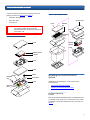
Unpack and remove the following components from the
packing materials (see figure 2 and figure 3):
•
DX3000 or DX5000 chassis
•
Hard drive sleds
•
Accessory kit
Figure 3 Unpacking the DX5000
Accessory kit
Foam
WARNING: The DX3000 weighs 38 lbs (17.24 kg) and
the DX5000 weights 85 lbs (38.56 kg)
without hard drives. Two people are required
to lift either unit.
Antistatic
bag
Foam
Hard drive
sleds
Figure 2 Unpacking the DX3000
Lift point
Foam
DX5000
chassis
Foam
DX3000 chassis
Lift point
Foam
Foam
Rail kit
Antistatic
bag
Cables
Quick start
Foam
Hard drive
sleds
Installing the DX3000/DX5000
System
0
Installing the DX3000/5000 in a rack consists of the
following steps:
•
Locating the Mounting Position
•
Installing the DX3000/DX5000 Chassis
Locating the Mounting
Position
0
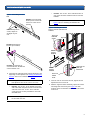
Both the DX3000 and DX5000 systems are designed to fit in
a standard 19 inch wide rack. It is important to the chassis
installation to locate the hole pattern in the rack rails (see
figure 4).
3