1
DAT 320
Required Tools
The following is a list of the tools you will need. You may need additional items,
depending on your installation requirements.
• Flat blade, Phillips or TORX screwdriver, depending on the type of screws used by
your computer
Installing the Internal DAT 320 Tape Drive in Your Server
Installing the internal DAT 320 tape drive consists of the following major steps:
• Preparing Mounting Bay
• Attaching Mounting Hardware
• Installing the Tape Drive
• Attaching the USB Cable
• Connecting the USB Cable from the Tape Drive to the Server
• Attaching the Power and USB Cables to the Tape Drive
• Securing the Drive
Preparing Mounting
Bay
Caution: To avoid personal injury or damage to the server or tape drive, ensure that
the server is disconnected from the main power supply while you install the
drive.
1 Assemble the necessary tools and materials:
• Phillips screwdriver
2 Perform a normal system shutdown and turn off the server and any connected
peripherals.
3 Remove the cover and front panel from the server, as detailed in your server’s
documentation.
As you work inside the server, you may have to disconnect other signal cables or
power cables from other devices to maneuver the new drive into place. If you have
to do this, make a note of their position and connections so you can put them back
correctly later.
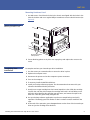
4 You are now ready to install your tape drive.
Attaching Mounting
Hardware
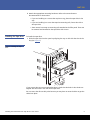
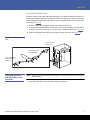
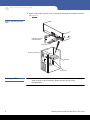
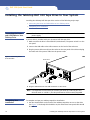
If your server requires special rails or other hardware to install the tape drive, mount
them on the tape drive now. If your server does not require special mounting hardware,
proceed to Installing the Tape Drive.
Installing the Internal DAT 320 Tape Drive in Your Server
3