1
DAT 320
To an External USB 2.0 Port
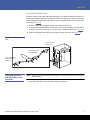
Purchase a special USB cable and Cable Routing Kit. The Cable Routing Kit consists of a
bracket with attached cable on one side that connects to the server’s external port and a
Type A USB socket on the other side. Make sure you orientate the bracket correctly when
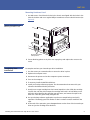
you fit it (see Figure 4).
1 Remove a spare blanking plate from the rear panel of the server.
2 Fit the bracket with attached the cable and fix it to the server. Make sure the cable is
outside of the server and connect it to the server’s external USB port (see Figure 4).
3 Attach the standard USB cable to the bracket (type A connector) (see Figure 4).
Figure 4 Connecting the USB
Cable
Type B connector
to tape drive
Type A connector on
inside of bracket
Type A connector to
server’s external
USB port
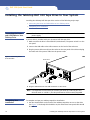
Attaching the Power
and USB Cables to the
Tape Drive
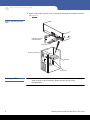
Note: The drive is not powered from the USB bus. It must be connected to the server's
power supply.
1 Attach the USB cable to the tape drive (Type B connector).
Installing the Internal DAT 320 Tape Drive in Your Server
7