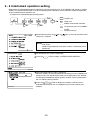
1
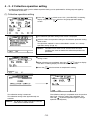
5 - 3 Function setting
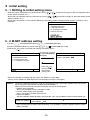
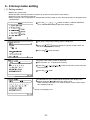
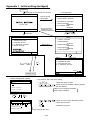
• The functions of this controller are set according to the function settings.
• The functions selects are set to OFF when the controller is shipped from the factory.
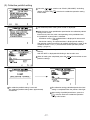
(1) Select
"7.FUNCTION SETTING"(or
7
2
"2. FUNCTION SETTING").
(2) Switch the function by pressing the function No. you want to change, or the
of the same number.
1
to
8
switch
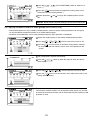
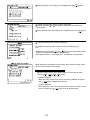
Each time the switch is pressed, the ON/OFF state of that No. is switched. (NO. 1 and NO. 2 cannot be changed.)
<Operation example>
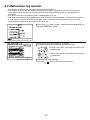
1)When Input 3
switch was pressed.
3
3
ON
OFF
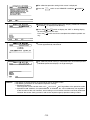
(3) When the
ON
OFF
BACK
SCREEN
: Active
switch is pressed at the end of function switching, the screen returns.
MENU
WED 15:29
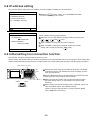
6 ADDRESS SETTING
7 FUNCTION SETTING
8 IP ADDRESS SETTING
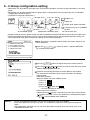
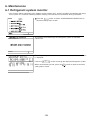
Press the 7
switch
to select"7FUNCTION FUNCTION SETTING
SELECT"
1 2 3 4 5 6 7 8
ON
OFF
BACK
SCREEN
Press the
switch to go back
to the initial
setting menu.
BACK
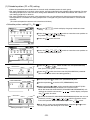
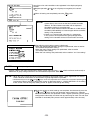
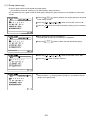
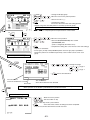
<Function selects>
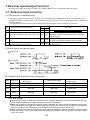
No. 1
No. 2
No. 3
No. 4
No. 5
No. 6
No. 7
No. 8
Reserved for future use (Leave this switch set to OFF)
Reserved for future use (Leave this switch set to OFF)
ON : K transmission converter installed
OFF : No K transmission converter installed
OFF : Operation prohibit setting valid
ON : Operation prohibit setting invalid
OFF : Emergency stop broadcast enabled (Be sure to use)
ON : Emergency stop broadcast disabled
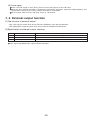
External input changeover (refer to section "7 External input/output function")
The range of a controller which the operation is prohibited
OFF : Both of the system controller and the local remote controller ON : Only the local remote controller
-26-