1
5
Connecting the Keyboard
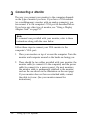
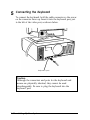
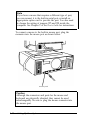
To connect the keyboard, hold the cable connector so the arrow
on the connector faces up. Insert it into the keyboard port, just
to the left of the video port, as shown below.
keyboard port
Caution
Although the connectors and ports for the keyboard and
mouse are physically identical, they cannot be used
interchangeably. Be sure to plug the keyboard into the
keyboard port.
1-12
Setting Up Your System