1
Phone Adapter with 2 Ports for Voice-over-IP
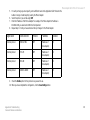
8. Repeat steps 5-7 until you have entered all four port ranges for the Phone Adapter.
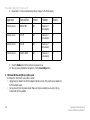
Application
Start and End
Protocol
IP Address
Enable
Internet phone 1
5060 to 5061
UDP
(IP address of
Phone Adapter)
X
Internet phone 2
53 to 53
UDP
(IP address of
Phone Adapter)
X
Internet phone 3
69 to 69
UDP
(IP address of
Phone Adapter)
X
Internet phone 4
10000 to 20000
UDP
(IP address of
Phone Adapter)
X
9. Check the Enable option for the port services you want to use.
10. When you have completed the configuration, click the Save Settings button.
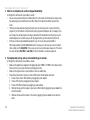
2. When I make a telephone call, the call doesn’t go through; instead, I hear a fast busy signal.
Go through this checklist until your problem is solved:
• Vonage supports 7-, 10-, and 11-digit dialing. Use 7-, 10-, or 11-digit dialing for calls within the same
area code as your Vonage phone number. Use 10- or 11-digit dialing for calls outside of your area code.
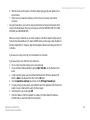
• Follow these instructions to reboot your cable or DSL modem, Phone Adapter, and router:
1. Power off your cable or DSL modem by unplugging its power adapter.
2. Power off the router by unplugging its power adapter.
3. Power off the Phone Adapter by unplugging its power adapter.
Appendix A: Troubleshooting
Common Problems and Solutions
17