1
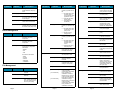
Command
Options
Description
[ -s softlimit ]
Warning limit for the number of
media allocated in the policy
class.
[ -t mediatype ]
Defines the media type to use.
[ -a affinity ]
Lists disk affinities that the files
in the policy class will traverse
in their lifecycle.
[ -v drivepool ]
[ -x maxcopies ]
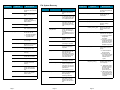
Command
Options
[ -t e | p | i ]
Media Manager drive pool
used to store / retrieve data.
[ -s e | p ]
Maximum number of copies
(including the primary) allowed
for each file in the policy class.
Options
fschstate
Description
[ -r e | p ]
Modifies the state of storage
subsystems and drive
components.
[ componentalias ]
Alias used for storage
subsystems and drive
components.
[ -s state ]
Desired state of drive
components or subsystems.
Valid values:
[ -a class ]
•
•
•
•
•
FREE
IN USE
FAILED
DELAYED
CLEANING
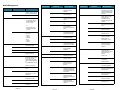
File Management
Command
Options
fschfiat
Description
Modifies the class attributes
of the file.
filename
File having changed
attributes.
[ -c copies ]
Number of file copies to
store, including the primary.
This value cannot exceed
the maxcopies setting.
Page 4
fspolicy
Percentage of used disk
space at which a truncation
policy ceases to be applied.
• e - Excludes the file from
truncation when a
store or cleanup policy
application occurs.
• p - Truncates the file by
cleanup policy.
• i - Truncates the file
immediately.
[ -t ]
Invokes the cleanup
(truncation) policy.
[ -v drivepool ]
Specifies the drivepool from
which to allocate drives
when storing files.
[ -b ]
Scans file system for
candidate files to store,
relocate or truncate and
rebuilds the candidate lists.
[ -y filesystem ]
File system to which the
policy will be applied.
[ -r ]
Invokes the relocation
policy.
[ -z minsize ]
Minimum file size (in bytes)
to relocate or truncate.
Indicates how storage
policies (-s) operate on the
file:
Indicates how relocation
policies (-r) operate on the
file.
fsretrieve
Specifies an alternate
policy class that can be
associated with the file.
Policy class associated with
data to be stored or
truncated.
[ -e ]
Invokes a high priority for
immediate action on file
storage in a file system.
[ -s ]
Invokes the storage policy.
[ -m minreloctime ]
Minimum time (in minutes)
a file must reside
unaccessed on disk before
being considered a
candidate for relocation.
[ -m minstoretime ]
[ -m mintrunctime ]
Minimum time (in minutes)
a file must reside on disk
before being considered a
candidate for storage.
Minimum time (in days) that
a file must reside
unaccessed on disk before
being considered a
candidate for truncation.
Page 5
Description
[ -o goal ]
Manages disk data / space
via file system or class.
[ -c class ]
Options
Indicates how truncation
policies (-t) operate on the
file:
• e - Excludes the file from
relocation when a
relocation policy
occurs.
• p - Relocates the file by
relocation policy.
• MAINT
• ON
• OFF
Drive status. Valid values:
Command
• e - Excludes the file from
storage when a store
policy occurs.
• p - Stores the file by
storage policy.
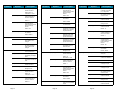
Device Management
Command
Description
Retrieves or recovers files
from media and places the
files on disk.
filename
Full path and name of the
file to retrieve.
[ -c ]
Retrieves a secondary copy
of the file (if a second copy
exists).
[ -n newfilename ]
New path and name into
which to retrieve the file.
-R directory
Directory from which to
start recursive retrieval.
[ -b startbyte endbyte ]
Specifies a byte range to
retrieve. The value of
startbyte must be less than
the endbyte value. Both
values must be within the
file’s byte range.
[ -a ]
Updates the access time of
the requested files.
fsrmcopy
Removes a copy/copies of
a file from disk or media.
filename
File or files to remove from
disk or media.
[ -c copynum | a ]
Deletes either a specific
number (copynum) of file
copies or all file copies (a)
from the media.
[ -m mediaID ]
Deletes all files on media
which reside on disk.
Page 6