1
Part I
Flex Fundamentals
In this chapter, I describe the nature of Flex applications, the relationship between Flex applications
and the Flash Player, and how Flex leverages the nearly ubiquitous distribution of Flash Player on
multiple operating systems. I also describe how Flex applications can be packaged for deployment
as desktop applications using the Adobe Integrated Runtime (AIR), formerly known as Apollo.
Learning the Fundamentals of Flex
The Flex product line allows developers to deploy applications that run on the Flash Player as Web
applications and on the Adobe Integrated Runtime (AIR) as desktop applications. The compiled
applications that you create with Flex are the same as those produced by the Adobe Flash authoring
environment (such as Adobe Flash CS3), but the process of creating the applications is very different.
Getting to know Flex applications
A Flex application is software that you create using the various pieces of the Adobe Flex 3 product
line, which includes the following:
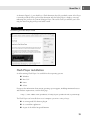
The Flex 3 Software Developers Kit (SDK)
Flex Builder 3
One major difference between the SDK and Flex Builder is that the SDK is free, while Flex Builder
is available only through a license that you purchase from Adobe Systems. But in addition to the
Flex SDK that’s at the core of Flex Builder, the complete development environment includes many
tools that will make your application development more productive and less error-prone than
working with the SDK and another editing environment.
Flex Builder 3 Professional (the more complete and expensive of the available Flex Builder licenses)
also includes a set of components known as the Data Visualization Toolkit that aren’t included in
the SDK. The Data Visualization Toolkit includes the Flex Charting components for presenting data
as interactive visual charts and a new component called the AdvancedDataGrid that presents
relational data with groups, summaries, multi-column sorting, and other advanced features.
The Flex Charting Controls were available as a separately licensed product in the Flex 2
product line. With Flex 3, the Charting Controls, the AdvancedDataGrid component,
and other advanced controls are now available only as part of a Flex Builder 3 Professional license.
NEW FEATURE
Flex programming languages
Flex 3 applications are written using two programming languages — ActionScript 3 and MXML:
ActionScript 3 is the most recent version of the ActionScript language to evolve in the
Flash authoring environment over the lifetime of the product. A complete object-oriented
language, ActionScript 3 is based on the ECMAScript edition 4 draft language specification. It includes most of the elements of object-oriented languages, including class
definition syntax, class package structuring, strong data typing of variables, and class
inheritance.
4