1
22
Part I: Getting Started on BlackBerry Apps
✓ Compiling the code into an application: This is one of the most powerhungry operations you will be performing again and again. Compiling
Java code is very CPU- and memory-intensive, so you want a machine
that has good processor speed, and as much memory as you can give it.
As mentioned previously, only 32-bit versions of Java and the Windows
operating system can be used for BlackBerry development with RIM’s
tools.
✓ Executing and debugging the application using a simulator: The
device simulators are Windows applications that completely mimic
the operations of a real BlackBerry device. The service simulators
provide functionality that you use to enable your simulated BlackBerry
to access the Internet and send or receive e-mail messages. This
requires a machine that has good processor speed and a lot of memory.
A good midrange computer with a large amount of memory, as much as it
can use, will support your needs for BlackBerry application development.
Table 1-1 shows the requirements for a bare-bones development PC and for a
development PC with power to spare.
Table 1-1
Requirements for a Development PC
Equipment
Minimum Requirements
Optimum Requirements
Processor
2.0 GHz processor
3.0 GHz multi-code CPU
RAM
2GB
4GB
Operating system
Windows XP (Service Pack 3)
Windows 7/32-bit
Java version
Java 1.5.0
Java 1.6.0
Network connection
DSL
Cable
Choosing a BlackBerry device
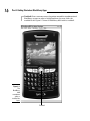
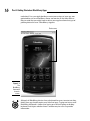
The BlackBerry models available as of this writing are
✓ Bold (9000, 9650, and 9700)
✓ Curve (83xx, 85xx, and 89xx)
✓ Pearl and Pearl Flip (81xx and 82xx)
✓ Storm and Storm2 (95xx)
✓ Tour (9630)
✓ 8800 series