1
12
Part I: Getting Started on BlackBerry Apps
✓ Calculator
✓ Alarm Clock
Each one of these applications, written by RIM, contains the basic interactions
that BlackBerry users expect to see in your application. BlackBerry users will
be using the standard applications often, and so you should become familiar
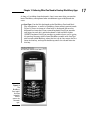
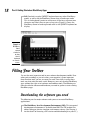
with how users get things done with them. Figure 1-3 shows the BlackBerry
Email application as I check my mail account.
Figure 1-3:
The
BlackBerry
Email app.
BlackBerry
Email
lets you
connect to
any e-mail
service
provider,
such as
Gmail.
Understanding how users navigate and
use their BlackBerry smartphones
Most users get most of what they need from a BlackBerry application by
using just one hand, and often, just by using their thumbs on the trackpad (or
trackwheel/trackball for older devices).
The primary input mechanism for a BlackBerry is the pointing device, which
can take one of several forms, depending on which model BlackBerry your
user has.
✓ Trackwheel: Users move the wheel on the side of the BlackBerry
to make the selection highlight move back and forth; users select a
highlighted item by pressing in the trackwheel. Figure 1-4 shows a
BlackBerry 8700 and its trackwheel.