1
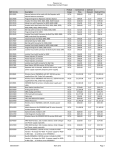
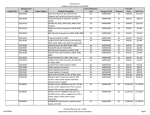
ID
Name
Description
Notes
3.21
Initiate call to a Hunt
Group
Pass
3.22
Initiate call to a
Workgroup
3.23
Hunt Group Member
3.24
Workgroup Agent
3.25
Call Forward – “FindMe”
3.26
ShoreTel Converged
Conferencing Server
3.27
Bridged Call Appearance
(BCA) extension
Initiate a call from DUT and verify that calls route to the
proper Hunt Group and are answered by an available
hunt group member with audio in both directions using
G.729 and G.711 codecs.
Initiate a call from DUT and verify that calls route to the
proper Workgroup and are answered successfully by an
available workgroup agent with audio in both directions
using G.729 and G.711 codecs.
Verify that incoming calls to a hunt group can be
answered properly when DUT is a member of the hunt
group.
Verify that incoming calls to a workgroup can be
answered properly when DUT is an agent of the
workgroup.
Verify that calls are forwarded to DUT’s “FindMe”
destination. Verify that DUT works properly when it’s a
“FindMe” destination
Verify that calls are properly forwarded to the ShoreTel
Converged Conferencing Server and it properly accepts
the access code and you’re able to participate in the
conference.
Verify that DUT can initiate calls properly to a BCA
extension and the call is presented to all of the phones
that have BCA configured. Verify that the call can be
answered, placed on-hold and then transferred.
Pass
Pass
Pass
Pass
Pass
Pass
Note-2: The Spectralink phones continue to generate a ring signal even though the call has been
answered (by a WG agent or HG member) when attempting to Consultatively Transfer a call to a
Workgroup or Hunt group. The Spectralink user does not hear anything but ringback tone, the
answering user can hear the Spectralink user. The attended transfer does succeed, just experience oneway audio with ringback. Issue to be addressed in a future release by Polycom.
Note-3: The Spectralink phones do not have the DSP resources to support a 3-way conference on the
phone itself. They can be participants of a conference call, initiated by ShoreTel IP phones, but cannot
initiate one.
Note-4: The Spectralink phones only display the Caller Name, but are capable of also displaying the
number if the calling party only sends the number.
Note-5: The Spectralink phones can generate calls to emergency numbers (911), but we did not test
calling an actual emergency services center, calls were made in a controlled environment to verify call
placement.
960 Stewart Drive Sunnyvale, CA 94085 USA Phone +1.408.331.3300 +1.877.80SHORE Fax +1.408.331.3333 www.ShoreTel.com
-9-