1
personal
Table of Contents
Introduction.............................................................................................................................. 4
Package contents...................................................................................................................... 4
Layout....................................................................................................................................... 5
LED indicators and their actions............................................................................................... 5
Customer delivery..................................................................................................................... 5
How to change the User PIN..................................................................................................... 6
How to create a New User PIN - when all cryptographic parameters have been zeroed............. 6
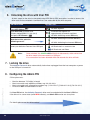
Unlocking the drive with the User PIN....................................................................................... 8
Locking the drive...................................................................................................................... 8
Configuring the Admin PIN....................................................................................................... 8
How to unlock the drive with the Admin PIN............................................................................. 10
Changing the Admin PIN.......................................................................................................... 11
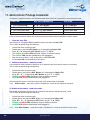
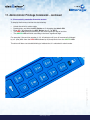
Administrator Privilege Commands.......................................................................................... 12
i. Clear the User PIN:...................................................................................................... 12
ii. Enable write protect - read only mode:........................................................................ 12
iii. Disable write protect - read only mode:....................................................................... 12
iv. Show security controller firmware version:................................................................. 13
www.istorage-uk.com
iStorage datAshur Personal ® Manual – v 31
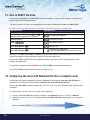
How to reset the drive...................................................................................................... 14
Configuring the drive with Windows OS after a complete reset........................................ 14
Configure the drive with Mac OS..................................................................................... 20
Brute Force Hacking Detection......................................................................................... 22
Booting from the datAshur Personal................................................................................ 22
FAQ’s - Frequently Asked Questions................................................................................ 23
Technical support & Warranty.......................................................................................... 27
#3