1
personal
1.Layout
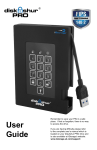
LOCK LED, stand by while the drive is locked
UNLOCK LED, drive is unlocked when flashing
Keypad
Key Button, used to activate the drive and to enter PIN codes
BLUE LED, when solid, the drive is connected to the computer, when
flashing data is being transferred.
2. LED indicators and their actions
When all LEDs are OFF the datAshur Personal
is locked and secure.
blink
Drive is locked and secure
blink
Drive is unlocked in User Mode
solid
No User PIN is configured
double
blink
Drive is unlocked in Admin Mode
blink
together
Accepting User PIN verification when
setting / changing the PIN
solid
Drive is connected to a powered
USB port
double
blink
Accepting Admin PIN verification when
setting / changing the PIN
solid
Drive is connected to host computer
and is idle
illuminate
together
Accepting new PIN
blink
Data exchange with host computer
blink
alternately
Error
3. Customer delivery
datAshur Personal® is shipped with a default User PIN 1-1-2-2-3-3-4-4
Rechargeable battery installed and charged
Admin PIN is not set
www.istorage-uk.com
iStorage datAshur Personal ® Manual – v 31
•
•
•
#5