1
personal
The following table depicts the possible actions when the drive is in different states:
User PIN
Admin PIN
NOT SET
NOT SET
Possible Actions
Can set either User or Admin PIN
Cannot access drive until User or Admin PIN is defined
Can change User PIN when unlocked as User
SET
NOT SET
Can set Admin PIN when unlocked with User PIN
Can access data when unlocked as User
Can set User PIN when drive is locked
NOT SET
SET
Can unlock drive with Admin PIN
Can change Admin PIN when unlocked as Administrator
Can perform Administrator commands
Can unlock drive with either User or Admin PIN
SET
SET
Can change User PIN when unlocked as User
Can change Admin PIN when unlocked as Administrator
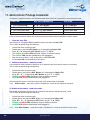
The drive has to be unlocked in user mode in order to proceed with configuring an Admin PIN.
It is set by following the instructions below:
INSTRUCTIONS
LED ACTIVITY
will double blink once and then turn solid
Enter the New Admin PIN
and press KEY Button
will double blink if correct PIN entry or
will blink alternately if PIN entry incorrect
Re - Enter the New Admin PIN
and press KEY Button
will illuminate together for approximately
2 seconds and then:
will double blink indicating correct PIN entry
will double blink if 1st and 2nd entries match
Note that at this point the
following occurs:
will blink alternately if PIN entry incorrect
Insert your datAshur Personal into USB port
Note:
iStorage datAshur Personal ® Manual – v 31
Double press the KEY Button
and hold on the 2nd press for 3 seconds
will illuminate in a constant state
will illuminate and flicker
A double blink indicates the drive is unlocked in Admin mode.
A single blink indicates the drive is unlocked in User mode.
www.istorage-uk.com
#9