1
Contents
10
10.1
10.2
10.3
10.4
Operating Your Video Matrix Switcher
Startup Display
Using the Front Panel Buttons
Toggling Between the AT ONCE and CONFIRM Modes
Switching
30
30
31
32
32
10.4.1 Switching One Input to One Output
10.4.2 Switching Several Inputs to Several Outputs
10.4.3 Switching One Input to All Outputs
32
33
34
10.5
35
Clearing
10.5.1 Clearing an Output
10.5.2 Clearing Several Outputs
10.5.3 Clearing All Outputs
35
36
37
10.6
37
Storing and Recalling Setups
10.6.1 Storing Setups
10.6.2 Recalling Setups
37
38
11
11.1
11.2
11.3
11.4
MENU Commands
Locking and Unlocking the Front Panel
Choosing the Follow or Breakaway from System Mode
Choosing the Video Format Setting
Setting the MACHINE ADDRESS
39
41
42
43
44
11.4.1 Changing the Standalone MACHINE ADDRESS to a Large Matrix
11.4.2 Changing the Large Matrix MACHINE ADDRESS to Standalone
11.4.3 Changing to a Different Large Matrix MACHINE ADDRESS
45
46
47
11.5
48
Choosing the SWITCHING METHOD Setting
11.5.1 Understanding the SWITCHING METHOD Settings
11.5.2 Configuring a SWITCHING METHOD
48
50
11.6
11.7
11.8
11.9
11.10
11.11
11.12
11.13
12
12.1
12.2
13
14
50
51
51
52
53
54
55
55
56
56
57
59
59
ii
Choosing the Extended Keyboard Setting
Setting the STORE/RECALL KEYBOARD Mode
Choosing the INDICATE Setting
Choosing the COMMUNICATION Setting
Setting the IR REMOTE Control
Choosing the AUTO STORE Current SETUP
Identifying the MACHINE
Choosing the Initial RESET
Upgrading the Flash Memory
Connecting the PC to the RS-232 Port
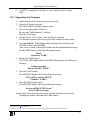
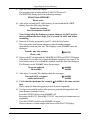
Upgrading the Firmware
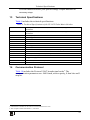
Technical Specifications
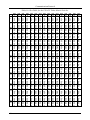
Communication Protocol
KRAMER: SIMPLE CREATIVE TECHNOLOGY