1
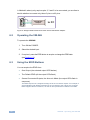
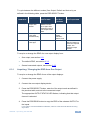
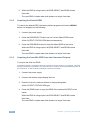
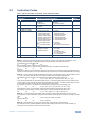
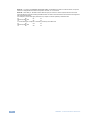
in Method A above) only requires pins 2, 3 and 5 to be connected, you are free to decide whether to connect only these 3 pins or all 9 pins. 9 8 7 6 5 4 3 2 1 Null-Modem Adapter to PC Figure 5: Straight Cable RS-232 Connection with a Null Modem Adapter 6.2 Operating the VM-24H To operate the VM-24H: 1. Turn ON the POWER. 2. Select the desired input. 3. If required, press the EDID button to acquire or change the EDID data (see Section 6.3). 6.3 Using the EDID Buttons You can acquire the EDID from: One Output (the selected output LED flashes) The Default EDID (all the output LEDs flash) Several Connected Outputs, the Auto-mix Mode (the output LEDs flash in sequence) The EDID acquired is a weighted average of all the connected outputs. For example, if several displays with different resolutions are connected to the outputs, the acquired EDID supports all the resolutions, as well as other parameters included in the EDID. 12 VM-24H - Operating the VM-24H