1
Programming your telephone
7
Forward your calls to the associated number
7.16
7.18
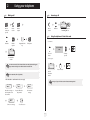
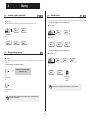
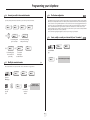
This configuration lets you group two sets under a single call number. Your set is then the main set and the second set, usually a
DECT set, is the secondary set. Each set has its own directory number, but the tandem number is that of the main set. When you
receive a call, the two sets ring simultaneously. When one of the sets answers, the other set stops ringing. When all the lines of
the main set are busy, the secondary (DECT) set does not ring. The secondary set can still be called by its own number, but in
this case, the tandem function will no longer be taken into account. Most of the functions are common to the two sets, for
example: forwarding, meet-me reminder, the various messages, etc., while others are specific to each set, for example: individual
directory, last number redial, out of service, set padlock, etc.
For more information regarding this configuration, contact the person in charge of your installation.
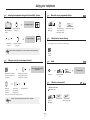
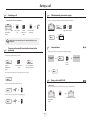
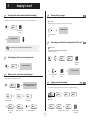
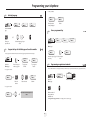
If you have previously defined an associated number, you can forward your calls to this number.
Services
Custo
Associate servic
Consultation
Overflow to
Overflow if bus
OR
associate
For forwarding when
you do not answer
The Tandem configuration
to associate
7.19
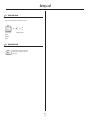
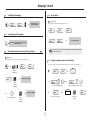
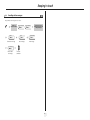
Create, modify or consult your intercom list (max. 10 numbers)
For immediate forwarding
when your line is busy
Custo
Ovflow busy/no
OR
to assoc
For forwarding if you
do not answer or if
you are busy
OR
to associate
reach the 'Menu'
page
To cancel the
forwarding to
associate function
Interphone
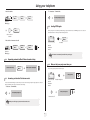
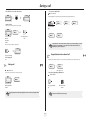
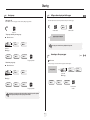
Modify the associated number
7.17
The associated number can be a phone set number, the voice mail number or the pager number.
My parameters
associated
Services
Reach the
'Menu' page
5
ef
bc
3d
jkl
6
2a
o
mn
Enter your
personal
code
Services
Apply
Deact overflow
Modify
5
ef
bc
3d
jkl
6
2a
o
mn
acceptance of the
programming is displayed
Enter the new
associated
number
28
follow instructions given on display