1
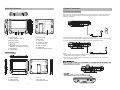
Connecting with external Speaker
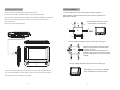
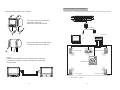
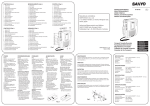
2. Fitting the Headrest Mount to the headrest
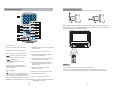
The unit can be connected with external speaker. Please see the following illustration.
AV OUT
Fit the straps around the headrest and
engage the 2 trident clips.
Ensure clips are securely fastened.
DC OUT
AV CABLE
Not supplied
AUDIO IN
VIDEO IN
AMPLIFIER
TV
Pull the straps tight using the adjustment.
Tuck the loose ends into the strap tidy.
Center speaker
Left front speaker
NOTE:
For SDV48-AM installation it is recommended that the DVD Player
is on the LEFT headrest, to ensure a neat cable run to the monitor,
as shown below.
Right front speaker
SUBWOOFER
Left rear speaker
A
Right rear speaker
B
Notice:There is no 5.1 channel in the unit, however, after connecting to APM it is available to
output audio in 5.1 channel.
8
9