1
make sure that the scanner is installed as instructed in this manual and that all cables are
properly connected. If the problem remains, contact your dealer.
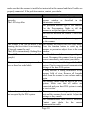
Problem
Diagnostic Tips
The scanner is on but cannot read The scanner window is dirty. Clean the
barcodes.
scanner window as described in the
The LED stays blue
Maintenance section.
The presented barcode type is not enabled.
Use the Programming Guide to tell the
scanner to accept that type of barcode.
The host has disabled the scanner. Check host
setup.
The barcode type presented is not supported
by the scanner.
The scanner is on, but the motor is not The scanner has entered into the sleep mode.
running; the facet wheel is not rotating. Press the function button to wake up the
A barcode cannot be read.
scanner, or present an object close to the scan
The LED is intermittently flashing blue. window.
The LED remains red and blue Possible failure of the scanning safeguard
(purple).
circuit. Disconnect the scanner from its power
source immediately and contact your dealer.
The scanner does not accept more than There is no proper handshaking with the POS
two or three bar-code labels.
system. Check connection and communication
settings of the host POS system.
A stray barcode is sitting somewhere in the
scanner field of view. Remove all barcode
labels from the scanner’s scan volume and try
again.
The scanner cannot send the data to the POS
system. Make sure that all cables are
connected and your host POS system is ready
to receive data.
A barcode is read by the scanner but The communication settings of the system
not accepted by the POS system.
port and the scanner do not match. Adjust the
settings so they match.
The communication cable used is incorrect.
Contact your dealer for the correct
communication cable.
Page 10