1
FUNDAMENTAL INFORMATION
MODEL NAME: LS-1000
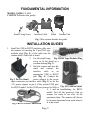
CONTENT (Besides this guide):
Stand Fixing Screw
Interface Cable
Stand
Scanner Unit
Fig. 1 Box content besides this guide
INSTALLATION GUIDES
1.
Install the USB or RS232 interface cable onto
the scanner by inserting the 8 pin RJ45 type
modular plug (Fig. 2) of the cable into the
scanner until a firm click is heard.
Fig. 2 RJ45 Type Modular Plug
2. Use the stand fixing
screw to fit the stand on a
wooden desktop (Fig. 3).
3. Seat the scanner unit into the
stand and connect the
interface
cable
to
an
appropriate USB or RS232
port (Fig. 4). Connect the
power adaptor to the power
Fig. 3 Fix The Stand
input connector on interface cable (Fig. 5) or set the
+5V power support in pin 9 of the system COM port
for RS232 model. Set the COM port protocol to 9600, n, Fig. 4 LS-1000 in Stand
Fig. 5 RS232 Power Connection
8, 1 and no handshaking for RS232
model. Peel off the protective film on
scanner for ready to use after all the
operations done. The scanner will always
be in omni-directional scan mode when it
is in the stand.
Page 2