1
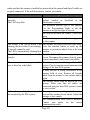
Function Button
Wake up scanner
(Embedded with the LED When the scanner enters the sleep mode, pressing this
Indicator)
switch can wake the scanner up. The sleep mode
feature can be programmed using the menu labels
from the Programming Guide.
NOTE: The default time-out value is set to 10
minutes after laser slept, 30 minutes after motor slept.
When the scanner is in sleep mode, the LED inside
function button is intermittently flashing Blue.
Single -line mode
Press and release the button will activate single line
scan mode if the scanner is not seated in the stand.
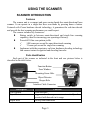
Mounting Screw Holes
To fix the scanner onto the bracket of SK-200 kit.
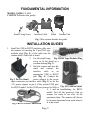
Interface Cable Connector For USB interface cable connection.
Operation Status
When the scanner powers up, the buzzer gives four beeps and the LED indicator
in function button glows.
Present a known-good test barcode to the scanner. The scanner should issue a
short beep and the LED should flash red momentarily.
Note: Refer to LED Indications and Beeper Indications sections for operation status or
refer to the section on Troubleshooting Guide for diagnostic tips.
Supported Bar Code Types
Supported Bar Code (Symbol) Type Default Status
UPC, EAN, JAN
Enabled
ITF 2 of 5
Disabled
Code 39
Enabled
Codabar
Disabled
Chinese Post Code
Disabled
MSI / PLESSY
Disabled
Code 93
Disabled
Code 128
Disabled
Code 32 (Italian Pharmacode)
Disabled
ISSN / ISBN
Disabled
EAN-128
Disabled
Page 4