1
Appendix A: Useful Information
The appendix covers the following topics:
•
SNMP MIB Files (below)
•
Adding a Second RAID Controller (page 445)
•
Installing a Second RAID Controller (page 446)
SNMP MIB Files
PROMISE supplies two MIB files to integrate the VTrak E830f, E630f, or E330f
subsystem into your SNMP system. These files are in the SNMP folder on the
Software CD.
The MIB files are:
•
FCMGMT-MIB.mib
•
raidv4.mib
For help loading the MIB files, see the instructions that came with your MIB
browser.
Adding a Second RAID Controller
If your VTrak E-Class subsystem shipped with one RAID controller, you can add
a second RAID controller. The second controller must have:
•
The same firmware version as the currently installed controller
•
The same amount of SDRAM as the currently installed controller
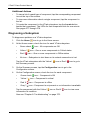
To obtain information for the currently installed RAID controller:
1.
Click the Device tab.
2.
Click the Component List icon.
3.
Click the Controller and click the View button.
4.
On the Information tab, note the Firmware Version.
5.
Click the Advanced information tab.
6.
Note the Slot 1 and Slot 2 Memory Size.
7.
Contact contact PROMISE Technical Support to order your second RAID
controller.
PROMISE Technical Support prepares the new RAID controller with f‘irmware
and SDRAM to match the existing RAID controller in your VTrak subsystem.
445