1
Access Instructions by Draper
page 4 of 4
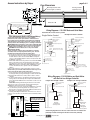
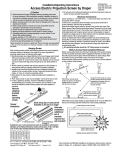
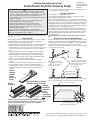
Built-in Low Voltage Motor: Switch-to-Motor—Dry Contacts or Data Cable connection
Please Note: 5V DC must be
connected to be able to set
limits using the wall switch.
Please Note: This Splitter/
Jack is located inside the
junction box of your Access
screen.
Motor Data Cable
plugged in here
Back of wall switch.
UD
P O
W
N
C 5V
O
M
M
O
N
Please Note: Although both
Dry Contact and Data Cable
connections are shown, you
should only use one connection type per motor.
UP 5V COM DWN
Two-Way Serial Communication (RS232) with MC1
the +5V
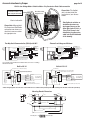
External Low Voltage and Wireless
Internal Screen Wiring
White-Common to screen & 110-120V AC Neutral
Red-to Screen (directional)
Brown-to Screen (directional)
Black-Hot to 110-120V AC
Green/Yellow-Ground
Program LED
Data Cables to switches or
to additional motors can
be plugged into any of the
three open jacks. If this is a
"Case First, Screen Later"
installation, plug the motor
cable into the jack indicated
in the drawing.
White (Common)
Red (Up)
Black (Down)
Green/Yellow (Gnd)
Internal Screen Wiring
Low Voltage Wiring by others
AC Wiring by electrician
Fuse
STOP
Eye Port for IR Eye. For RF Receiver or LED
Wall Switch, a Splitter and a Power Supply
is required. Plug RF Receiver or LED Wall
Switch and Power Supply into splitter, then
run cable from Splitter to MC1 Eye Port.
MC1
Dashed wiring by electrician
Low voltage wiring by others
Eye Port for IR Eye, RF Receiver or LED
Wall Switch. For more than one of
these, a splitter is required.
3 Button Wall Switch
DOWN - Black
COM - White
UP - Red
To
110-120V
Line
RS232 Data FROM Control System
RS232 Data TO Control System
Signal Ground & Manual Switch Common
Manual Switch Down
Manual Switch Up
Location of key
operated on-off
switch if furnished
STOP
White/Blue (Common)
Red 110/Black 220 (Up)
Black 110/Brown 220 (Down)
Green/Yellow
(Motor Ground)
White or Blue-Common to screen & 110/220V AC Neutral
Red-to screen (directional)
Brown-to screen (directional)
Yellow-to 110/220V AC-Hot
Black-to 110/220V AC-Hot
Green/Yellow (Ground)
Control
Switches
24v DC
To
110/220V
Line
STOP
STOP
Location of key
operated on-off
switch if furnished
Control
Switches
24v DC
Aux Port for connecting additional LVC-III
modules (up to six total can be linkedconnect from Aux to Eye).
See separate Serial Communication-RS232 Instruction sheet for enabling
RS232 with the MC1.
Built-In VIC-12*
Built-In VIC-115*
115 Volt Relay
12 Volt (VIC-12) or 6 Volt (VIC-6) Relay
Ring Terminal on each Ground Wire
with Star Washer screwed to Spine
:: : :
Black
HSG. Cap
3
1
: : ::
: : ::
Green
HSG. Plug
Red
Black
Wire soldered to terminal
Wire connected with Quick Disconnect
Green
Red
Black
White
Ground
#2 Up
#1 Down
Common
110-120 VAC
Screen Motor
Jacketed Motor Cable
White
Jacketed Motor Cable
White Lead
110-120 VAC
Screen Motor
7
5
Green/Yellow
6
4
2
Black Lead
HSG. Plug
White
White
Black
Green/Yellow
Orange (+)
Brown (-)
Ground
#2 Up
#1 Down
Common
: : ::
Black
8
Green
Red
Black
: : ::
Red
: : ::
Green
14 13
9 :: : :
5 :: : :
1 :: : :
HSG. Cap
Ring Terminal on ground wire
riveted to J-Box with Star Washer
:: : :
Wire connected with Quick Disconnect
*These wiring diagrams are for Access screens with motor on audience left (standard), and fabric unrolling from the back of the roller (standard).
Mounting Bracket Dimensions
/8"
3
13/8"
11/2"
/2"
R1/4"
1
/8"
3
/16" 3
5
/16"
/16"
1
11/8"
/4"
1
R1/8"
5
41/2"
/16"
11/4"
413/16"
7 /4"
3
9"
www.draperinc.com
(765) 987-7999
1
/4"