1
Basic operations
Turn power on and play music
1.
Connect earphone to earphone jack.
2.
Insert the card into Micro SD/T-Flash card slot in power off mode.
3.
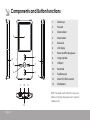
Press and hold 【Play】 button to turn on and enter main menu.
4.
To return main menu: Press and hold 【M】 button.
To Pause/Play: Short press 【Play】 button.
To change tracks: Short press 【Forward/Backward】 button.
To turn unit off: Press and hold 【Play】 button.
NOTE: Please reset your player by pressing the RESET hole while failing to power on or hanging up in
power on mode.
Volume Adjustment
In Audio playing or tuning FM radio mode, short press 【+/-】 button to turn up/turn down the volume.
Page 5