1
1
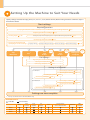
Preface
2
Installing the Machine
3
Configuring and Connecting the Fax
4
Connecting to a Computer and
Installing the Drivers
Appendix
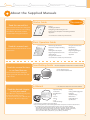
About the Supplied Manuals
This manual
Starter Guide
Read this manual first.
• Preface
• Installing the Machine
• Configuring and Connecting the Fax*
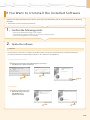
• Connecting to a Computer and Installing the Drivers
• Appendix
This manual describes the settings for
setting up the machine and installing
the software. Be sure to read this
manual before using the machine.
* The fax function is available only for D1370/D1350.
Basic Operation Guide
• Before Using the Machine
• Document and Paper Handling
• Copying
• Printing from a Computer
• Registering Destinations in the
Read this manual next.
This manual describes the basic use of
the machine.
Address Book*
• Using the Fax Functions*
• Using the Scan Functions
• Maintenance
• Troubleshooting
• Registering/Setting the
Various Functions
• Appendix
* The fax function is available only for D1370/D1350.
Send Setting Guide
Read this manual for how
to set Send features.
• Send to E-mail Function
• tore to Shared Folder Function
This manual describes setting for
sending scanned data to E-mail and/
or file servers.
e-Manual
Read the desired chapter
to suit your needs.
The e-Manual is categorized by subject to
find desired information easily.
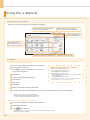
For details about using the e-Manual, refer
to “Using the e-Manual“ in “Appendix.”
*The Send Setting Guide is included in the User Software CD-ROM.
* The e-Manual is included in the User Software CD-ROM.
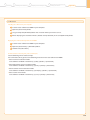
• Important Safety
Instructions
• Basic Operation
• Copy
• Fax*1*2
• Print*2
• Scan*2
• Network Settings
• Security
• Setting and Managing from
Computer
• Troubleshooting
• Maintenance
• Setting Menu List
• Specifications
*1 The fax function is available only for D1370/D1350.
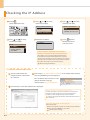
*2 I f you are using Macintosh, see the following Driver Guides or Help for more details on these functions.
You can find the driver guides in the following locations on the User Software CD-ROM.
• Mac UFR II Printer Driver Installation Guide → [Documents] - [Print] - [Guide] - [index.html]
• Mac PS Printer Driver Installation Guide → [Documents] - [Print(PS)] - [Guide] - [index.html]
• Mac Fax Driver Installation Guide → [Documents] - [FAX] - [Guide] - [index.html]
• Mac Scanner Driver Guide → [Documents] - [Scan] - [Guide] - [index.html]
5