1
Table of Contents
1. Introduction
1.1 Overview .....................................................................................................................................3
1.2 Capacity and Transfer Rate........................................................................................................4
1.3 Supported Media ........................................................................................................................4
1.4 Supported Operating Systems ...................................................................................................5
1.5 Software......................................................................................................................................5
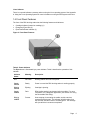
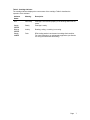
1.6 Front Panel Features ..................................................................................................................6
2. Quick Start Installation
2.1 Installing the RDX Internal (SATA or USB) Docking Station (Customer Kit) .............................8
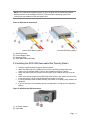
2.2 Installing the RDX USB Removable Docking Station .................................................................9
2.3 Installing Utility Software for Windows .....................................................................................10
3. Using the Quantum RDX Removable Hard Disk Storage System
3.1 Operating the RDX Docking station .........................................................................................11
3.2 Handling the RDX Cartridges ...................................................................................................11
3.3 Loading and Unloading Cartridges ...........................................................................................11
4. Using the Quantum RDX Removable Disk Utility
4.1 Overview ...................................................................................................................................14
4.2 Using the Removable Disk Utility .............................................................................................14
5. Troubleshooting
5.1 Power Indicator is OFF .............................................................................................................15
5.2 Power Indicator is Steady AMBER ...........................................................................................15
5.3 Power Indicator is Blinking AMBER, and the Cartridge Does Not Eject ..................................16
5.4 Cartridge Indicator is Steady AMBER ......................................................................................16
5.5 Cartridge Does Not Eject ..........................................................................................................16
5.6 Docking Station Does Not Appear in the Device Manager (Windows) ....................................17
5.7 Docking Station Performance Seems Slow..............................................................................17
5.8 Write Error ................................................................................................................................18
5.9 Firmware Download Fails with Windows Server 2003 .............................................................18
5.10 System Will Not Complete Boot Process with RDX External .................................................18
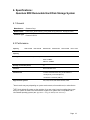
6. Specifications
6.1 General .....................................................................................................................................19
6.2 Performance .............................................................................................................................19
6.3 Reliability ..................................................................................................................................20
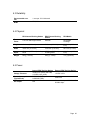
6.4 Physical ....................................................................................................................................20
6.5 Power........................................................................................................................................20
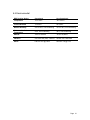
6.6 Environmental ...........................................................................................................................21
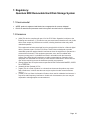
7. Regulatory
7.1 Environmental ...........................................................................................................................22
7.2 Emissions .................................................................................................................................22
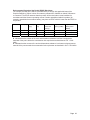
Appendix A: Using the Linux Operating System
A.1 Overview ..................................................................................................................................24
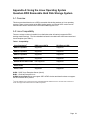
A.2 Linux Compatibility ...................................................................................................................24
A.3 Using the RDX Docking Station with Linux ..............................................................................25
A.4 Troubleshooting .......................................................................................................................26
Page
2