1
Windows USB Printer Server
Standard USB 1.1 and 2.0 printers can easily be shared between Windows
users on the network with the built-in USB printer server. Note: Some or all
functions of multi-function printers may not work depending on the driver
support by the respective printer manufacturers.
Please make sure the hard disk has been initialized. (The RAID status is
Active)
Connect a USB Printer to the USB port on the back of the NAS and turn it on.
•Windows Neighborhood
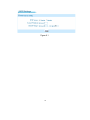
Locate the NAS device in My Network Places and select it by double
clicking on the icon.
Enter a valid user name and
password when prompted.
You will now see the printer port
next to the shares for the device.
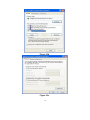
Double click on the PortA printer
icon and follow the instructions
to install the printer driver at the
local station. You may need to
select ‘Have Disk’ and insert
your printer’s driver CD during the installation process.
Once the driver installation is completed, you should be able to select the
printer from the printer list in any Windows application. You can manage
69