1
Adaptec Storage Manager
User’s Guide
For Direct Attached Storage
●
2
Copyright
Copyright © 2011 PMC-Sierra, Inc. All rights reserved.
The information in this document is proprietary and confidential to PMC-Sierra, Inc., and for its customers’ internal use. In any
event, no part of this document may be reproduced or redistributed in any form without the express written consent of PMCSierra, Inc.
Trademarks
PMC, PMC-Sierra, and Adaptec are registered trademarks of PMC-Sierra, Inc. “Adaptec by PMC” is a trademark of PMC-Sierra,
Inc. Other product and company names mentioned herein may be trademarks of their respective owners. For a complete list of
PMC-Sierra trademarks, see www.pmc-sierra.com/legal.
Disclaimer
None of the information contained in this document constitutes an express or implied warranty by PMC-Sierra, Inc. as to the
sufficiency, fitness or suitability for a particular purpose of any such information or the fitness, or suitability for a particular
purpose, merchantability, performance, compatibility with other parts or systems, of any of the products of PMC-Sierra, Inc., or
any portion thereof, referred to in this document. PMC-Sierra, Inc. expressly disclaims all representations and warranties of any
kind regarding the contents or use of the information, including, but not limited to, express and implied warranties of accuracy,
completeness, merchantability, fitness for a particular use, or non-infringement. In no event will PMC-Sierra, Inc. be liable for any
direct, indirect, special, incidental or consequential damages, including, but not limited to, lost profits, lost business or lost data
resulting from any use of or reliance upon the information, whether or not PMC-Sierra, Inc. has been advised of the possibility of
such damage.
Patents
The technology discussed in this document may be protected by one or more patent grants.
●
3
Adaptec by PMC Product Support
If you have questions about installing or using your Adaptec by PMC product, check this document first—you will find answers to
most of your questions. If you need further assistance, use the support options listed below. To expedite your service, have your
computer in front of you.
Technical Support Identification (TSID) Number
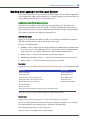
● Before contacting Technical Support, you need your product unique TSID number. The TSID number identifies your product
and support status.
●
The TSID number is included on a white, bar-coded label, like this example:
●
It's recommended that you register your product so that you have easy access to your TSID when contacting product support.
Note: The phone numbers below are subject to change. Please visit the Support section of www.adaptec.com for the
most up to date contact information.
North America
Visit our Web site at www.adaptec.com.
●
●
Search the Adaptec Support Knowledgebase (ASK) at ask.adaptec.com for articles, troubleshooting tips, and frequently asked
questions for your product.
●
For information about Adaptec by PMC support options, call +1 408-957-2550, 24 hours per day, 7 days per week.
To speak with a Technical Support Specialist, call +1 408-934-7274.
●
For support via e-mail, submit your question at ask.adaptec.com.
●
You can order Adaptec by PMC products, including accessories and cables, by calling +1 408-957-7274. Or, you can order cables
online at www.adaptec.com/en-us-/cables.
Europe
● Visit our Web site at www.adaptec-europe.com.
●
German: Call +49 89 43 66 55 22. For support via e-mail, submit your question at ask-de.adaptec.com.
●
French: Call +49 89 43 66 55 33. For support via e-mail, submit your question at ask-fr.adaptec.com.
●
English: Call +49 89 43 66 55 44. For support via e-mail, submit your question at ask.adaptec.com.
●
You can order Adaptec cables online at www.adaptec.com/en-us-/cables.
Japan
● Visit our Web site at www.adaptec.co.jp.
●
Call +0066-3313-2601.
Australia
Call +61-2-9503-1555.
●
●
4
Software License Agreement
PLEASE READ CAREFULLY: THE USE OF THIS SOFTWARE IS SUBJECT TO THE SOFTWARE LICENSE TERMS OF PMCSIERRA, INC. AND OTHER LICENSORS WHOSE SOFTWARE MAY BE BUNDLED WITH THIS PRODUCT.
BY YOUR USE OF THE SOFTWARE INCLUDED WITH THIS PRODUCT YOU AGREE TO THE LICENSE TERMS REQUIRED
BY THE LICENSOR OF THAT SOFTWARE, AS SET FORTH DURING THE INSTALLATION PROCESS. IF YOU DO NOT
AGREE TO THE LICENSE TERMS APPLICABLE TO THE SOFTWARE, YOU MAY RETURN THE ENTIRE UNUSED
PRODUCT FOR A FULL REFUND.
In return for acquiring a license to use the PMC-Sierra software, which may include software from third party licensors and patches
made available by PMC-Sierra (“Software”), and the related documentation, you agree to the following terms and conditions:
1. License. This Agreement grants you, the Licensee, a license to:
a. Use the Software on a single computer system, which is not intended for use by more than five (5) users; and:
b. Make one copy of the Software in machine readable form solely for back-up purposes, provided you reproduce PMCSierra's copyright proprietary legends. Notwithstanding the foregoing, the Software may be used on the home, laptop or
other secondary computer of the principal user of the Software, and an additional copy of the Software may be made to
support such use. As used in this license, the Software is “in use” when it is either loaded into RAM or installed on a hard
disk or other permanent memory device. The Software may be “in use” on only one computer at any given time. (Different
license terms and fees are applicable for networked or multiple user applications.) As a specific condition of this license, you
agree to use the Software in compliance with all applicable laws, including copyright laws, and that you will not copy,
transmit, perform or distribute any audio or other content using the Software without obtaining all necessary licenses or
permissions from the owner of the content.
2. Restrictions. You may not distribute copies of the Software to others or electronically transfer the Software from one computer
to another over a network. You may not post or otherwise make available the Software, or any portion thereof, in any form, on
the Internet. You may not use the Software in a computer service business, including in time sharing applications. The Software
contains trade secrets and, in order to protect them, you may not decompile, reverse engineer, disassemble, or otherwise reduce
the Software to a human-perceivable form. YOU MAY NOT MODIFY, ADAPT, TRANSLATE, RENT, LEASE, LOAN, RESELL
FOR PROFIT, DISTRIBUTE, NETWORK OR CREATE DERIVATIVE WORKS BASED UPON THE SOFTWARE OR ANY
PART THEREOF.
3. Ownership of Software. As Licensee, you own the media upon which the software is recorded or fixed, but PMC-Sierra and its
licensors retain title and ownership of the Software recorded on the original media and all subsequent copies of the Software,
regardless of the form or media in which or on which the original and other copies may exist. This license is not a sale of the
Software or any copy.
4. Confidentiality. You agree to maintain the Software in confidence and that you will not disclose the Software to any third party
without the express written consent of PMC-Sierra. You further agree to take all reasonable precautions to preclude access of
unauthorized persons to the Software.
5. Term. This license is effective until January 1, 2045, unless terminated earlier. You may terminate the license at any time by
destroying the Software (including the related documentation) together with all copies or modifications in any form. PMCSierra will have the right to terminate our license immediately if you fail to comply with any term or condition of this
Agreement. Upon any termination, including termination by you, you must destroy the Software (including the related
documentation), together with all copies or modifications in any form.
6. Special Terms Applicable to Databases. Where a database is included with the Software, you acknowledge that it is licensed only
in connection with the use of the Software to perform disc creation, and that the database and all data derived therefrom must
be maintained in confidence in accordance with the provisions of Section 4. This license does not grant you any rights to
distribute or disclose such database or data.
7. Limited Warranty. PMC-Sierra and its Licensor warrant only that the media upon which the Software is furnished will be free
from defects in material or workmanship under normal use and service for a period of thirty (30) days from the date of delivery
to you. PMC-SIERRA AND ITS LICENSORS DO NOT AND CANNOT WARRANT THE PERFORMANCE OR RESULTS
YOU MAY OBTAIN BY USING THE SOFTWARE OR DOCUMENTATION. THE FOREGOING STATES THE SOLE AND
EXCLUSIVE REMEDIES PMC-SIERRA AND ITS LICENSORS WILL PROVIDE FOR BREACH OF WARRANTY. EXCEPT
FOR THE FOREGOING LIMITED WARRANTY, PMC-SIERRA AND ITS LICENSORS MAKE NO WARRANTIES,
EXPRESSED OR IMPLIED, INCLUDING, BUT NOT LIMITED, AS TO NON-INFRINGEMENT OF THIRD PARTY RIGHTS,
MERCHANTABILITY OR FITNESS FOR A PARTICULAR PURPOSE. Some states do not allow the exclusion of implied
warranties or limitations on how long an implied warranty may last, so the above limitations may not apply to you. This
warranty gives you specific legal rights and you may also have other rights which vary from state to state.
●
5
8. The entire liability of PMC-Sierra and its licensors, and your exclusive remedy for a breach of this warranty, shall be:
a. The replacement of any media not meeting the above limited warranty which is returned to PMC-Sierra; or:
b. if PMC-Sierra or its distributor is unable to deliver replacement media which is free from defects in materials or
workmanship, you may terminate this Agreement by returning the Software and your money will be refunded.
9. Limitation of Liability. IN NO EVENT WILL PMC-SIERRA OR ITS LICENSORS BE LIABLE TO YOU FOR ANY
INCIDENTAL, CONSEQUENTIAL OR INDIRECT DAMAGES, INCLUDING ANY LOST PROFITS, LOST SAVINGS, OR
LOSS OF DATA, EVEN IF PMC-SIERRA OR A LICENSOR HAS BEEN ADVISED OF THE POSSIBILITY OF SUCH
DAMAGES, OR FOR ANY CLAIM BY ANY OTHER PARTY. Some states do not allow the exclusion or limitation of special,
incidental, or consequential damages, so the above limitation or exclusion may not apply to you.
10. Export. You acknowledge that the laws and regulations of the United States and other countries may restrict the export and reexport of the Software. You agree that you will not export or re-export the Software or documentation in any form in violation
of applicable United States and foreign law.
11. Government Restricted Rights. The Software is subject to restricted rights as follows. If the Software is acquired under the terms
of a GSA contract: use, reproduction or disclosure is subject to the restrictions set forth in the applicable ADP Schedule
contract. If the Software is acquired under the terms of a DoD or civilian agency contract, use, duplication or disclosure by the
Government is subject to the restrictions of this Agreement in accordance with 48 C.F.R. 12.212 of the Federal Acquisition
Regulations and its successors and 49 C.F.R. 227.7202-1 of the DoD FAR Supplement and its successors.
12. General. You acknowledge that you have read this Agreement, understand it, and that by using the Software you agree to be
bound by its terms and conditions. You further agree that it is the complete and exclusive statement of the agreement between
PMC-Sierra and you, and supersedes any proposal or prior agreement, oral or written, and any other communication between
PMC-Sierra and you relating to the subject matter of this Agreement. No additional or any different terms will be enforceable
against PMC-Sierra unless PMC-Sierra gives its express consent, including an express waiver of the terms of this Agreement, in
writing signed by an officer of PMC-Sierra. You assume full responsibility for the use of the Software and agree to use the
Software legally and responsibly. This Agreement shall be governed by California law, except as to copyright matters, which are
covered by Federal law. This Agreement is deemed entered into at Sunnyvale, California by both parties. Should any provision
of this Agreement be declared unenforceable in any jurisdiction, then such provision shall be deemed severable from this
Agreement and shall not affect the remainder hereof. All rights in the Software not specifically granted in this Agreement are
reserved by PMC-Sierra.
Should you have any questions concerning this license, contact:
PMC-Sierra, Inc.
Legal Department
1380 Bordeaux Drive
Sunnyvale, CA 94089
(408) 239-8000
Contents
About This Guide
How This Guide is Organized .......................................................................... 11
What You Need to Know Before You Begin ................................................... 11
Terminology Used in this Guide ...................................................................... 11
Part I: Getting Started
1
Introduction to Adaptec Storage Manager
Getting Started Checklist .................................................................................. 14
About Adaptec Storage Manager .................................................................... 14
About the Adaptec Storage Manager Agent ................................................... 14
Growing Your Storage Space with Adaptec Storage Manager........................ 15
System Requirements........................................................................................ 17
Controller Support............................................................................................ 17
2
Installing Adaptec Storage Manager
Installing on Windows...................................................................................... 19
Installing on Red Hat, SuSE, or Fedora Linux ................................................ 20
Installing on Debian or Ubuntu Linux ............................................................ 20
Installing on UnixWare or OpenServer ........................................................... 21
Installing on Solaris........................................................................................... 22
Installing on FreeBSD ....................................................................................... 22
Installing on VMware ....................................................................................... 23
Using Adaptec Storage Manager with a Firewall............................................. 23
Running Adaptec Storage Manager from the DVD ........................................ 23
Contents
3
●
7
Building Your Storage Space
Overview............................................................................................................ 27
Choosing a Management System ..................................................................... 27
Starting and Logging In on the Local System .................................................. 28
Starting Adaptec Storage Manager on Remote Systems ................................. 32
Logging into Remote Systems from the Local System .................................... 33
Creating Logical Drives..................................................................................... 35
Managing Your Storage Space.......................................................................... 42
Part II: Monitoring and Modifying Your Storage Space
4
Exploring Adaptec Storage Manager
Working in Adaptec Storage Manager............................................................. 45
Overview of the Main Window ........................................................................ 45
Revealing More Device Information................................................................ 50
Checking System Status from the Main Window ........................................... 51
Getting Help ...................................................................................................... 51
Logging Out of Adaptec Storage Manager....................................................... 52
Uninstalling Adaptec Storage Manager ........................................................... 52
5
Protecting Your Data
Creating and Managing Hot Spares ................................................................. 55
Enabling Copyback ........................................................................................... 58
6
Modifying Your Direct Attached Storage
Understanding Logical Drives.......................................................................... 60
Creating and Modifying Logical Drives........................................................... 61
Fine-tuning Logical Drives ............................................................................... 64
Optimizing Logical Drive Performance........................................................... 67
Verifying Logical Drives ................................................................................... 68
Increasing the Capacity of a Logical Drive ...................................................... 70
Changing the RAID Level of a Logical Drive................................................... 71
Deleting a Logical Drive.................................................................................... 72
Creating a RAID Volume ................................................................................. 72
Creating a JBOD Disk ....................................................................................... 74
Maintaining an Energy-Efficient Storage Space .............................................. 76
Configuring the MaxIQ Cache......................................................................... 79
7
Scheduling Recurring or Resource-Intensive Jobs
Scheduling a Task.............................................................................................. 82
Opening the Task Manager .............................................................................. 83
Contents
●
8
Monitoring Tasks.............................................................................................. 84
Modifying a Task............................................................................................... 85
Deleting a Task .................................................................................................. 85
Disabling the Task Manager ............................................................................. 85
8
Maintaining Physical Devices
Viewing Component Properties....................................................................... 88
Blinking a Component...................................................................................... 88
Working with Failed or Failing Disk Drives .................................................... 89
Initializing and Erasing Disk Drives................................................................. 89
Working with Solid State Drives ...................................................................... 91
Working with Controllers ................................................................................ 92
Testing and Silencing System and Enclosure Alarms...................................... 95
Updating the Controller BIOS and Firmware ................................................. 98
Updating the Disk Drive Firmware.................................................................. 99
9
Monitoring Status and Activity
Monitoring Options........................................................................................ 104
Checking Status from the Main Window ..................................................... 104
Notifying Users by Event Log Message About Status and Activity .............. 107
Notifying Users by Email About Status and Activity ................................... 112
Notifying Users by SNMP Trap About Status and Activity.......................... 117
Notifying All Users About Status and Activity .............................................. 118
Changing an Operating System’s Event Log Setting ..................................... 119
Logging Statistics for Remote Analysis .......................................................... 120
10 Updating and Customizing Adaptec Storage Manager
Updating Adaptec Storage Manager .............................................................. 126
Adding Enhanced Features ............................................................................ 126
Setting Preferences and Changing Views....................................................... 126
Managing Remote Systems............................................................................. 128
Working with Display Groups ....................................................................... 132
11 Solving Problems
General Troubleshooting Tips ....................................................................... 137
Identifying a Failed or Failing Component ................................................... 137
Stopping the Creation of a New Logical Drive.............................................. 138
Recovering from a Disk Drive Failure ........................................................... 138
Rebuilding Logical Drives............................................................................... 141
Solving Notification Problems ....................................................................... 142
Creating a Support Archive File ..................................................................... 142
Understanding Error and Warning Messages ............................................... 143
Contents
●
9
Part III: Appendices
A
Completing a Silent Windows Installation
Completing a Silent Installation..................................................................... 151
Available Properties and Values ..................................................................... 152
Example Command Line Installations .......................................................... 152
B
Selecting the Best RAID Level
Comparing RAID Levels................................................................................. 154
Understanding Drive Segments ..................................................................... 154
Non-redundant Logical Drives (RAID 0)...................................................... 155
RAID 1 Logical Drives .................................................................................... 156
RAID 1 Enhanced Logical Drives................................................................... 156
RAID 10 Logical Drives .................................................................................. 157
RAID 5 Logical Drives .................................................................................... 158
RAID 5EE Logical Drives................................................................................ 159
RAID 50 Logical Drives .................................................................................. 160
RAID 6 Logical Drives .................................................................................... 161
RAID 60 Logical Drives .................................................................................. 161
C
Quick Answers to Common Questions...
How do I...? ..................................................................................................... 163
What’s the difference between...? ................................................................... 165
What options are on the Actions menu? ...................................................... 165
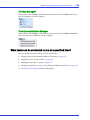
What tasks can be scheduled to run at a specified time? .............................. 168
D
Buttons and Icons At-a-Glance
Enterprise View Icons .................................................................................... 170
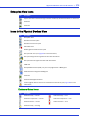
Icons in the Physical Devices View ................................................................ 170
Icons in the Logical Devices View ................................................................ 171
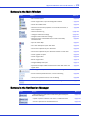
Buttons in the Main Window ........................................................................ 172
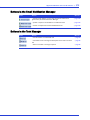
Buttons in the Notification Manager ............................................................ 172
Buttons in the Email Notification Manager ................................................. 173
Buttons in the Task Manager ........................................................................ 173
Glossary
Index
About This Guide
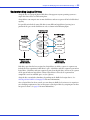
Adaptec® Storage Manager™ is a software application that helps you build a storage space using
Adaptec by PMC™ RAID controllers, disk drives, and enclosures, and then manage your stored
data, whether you have a single RAID controller installed in a server or a complex Storage Area
Network (SAN) with multiple RAID controllers, servers, and enclosures.
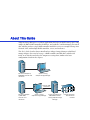
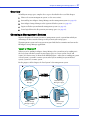
This User’s Guide describes how to install and use Adaptec Storage Manager to build and
manage Adaptec direct attached storage—a RAID controller and disk drives which reside
inside, or are directly attached to, the computer accessing them, similar to the basic
configurations shown in these figures:
Server with Adaptec by
PMC RAID controller and
disk drives
System running
Adaptec Storage Manager
Network (SAN)
Connection
Server with Adaptec
by PMC RAID
controller and
disk drives
System running
Adaptec Storage Manager
Server with Adaptec by
PMC RAID controller,
running Adaptec Storage
Manager
Storage enclosures
with disk drives
installed
●
11
How This Guide is Organized
This User’s Guide is divided into three sections:
●
Part I: Getting Started—Follow the instructions in this section to install Adaptec Storage
Manager and build your storage space. (For a definition of ‘storage space’ and other terms
used in this User’s Guide, see page 11.)
●
Part II: Using Adaptec Storage Manager—Once your storage space is built, refer to this
section for help protecting, modifying, monitoring, and troubleshooting your storage
space and its components.
●
Part III: Quick Reference—Refer to this section for quick answers to common questions
about Adaptec Storage Manager. A comparison of RAID levels is also included.
What You Need to Know Before You Begin
This User’s Guide is written for advanced computer users who want to create a storage space
for their data. Advanced knowledge of storage networks is not required, but you should be
familiar with computer hardware, data storage, and DAS and Redundant Array of
Independent Disks (RAID) technology.
If you are using Adaptec Storage Manager as part of a complex storage system, such as a SAN,
you should be familiar with network administration terminology and tasks, have knowledge of
Local Area Network (LAN) and SAN technology, and be familiar with the input/output (I/O)
technology—such as Serial ATA (SATA) or Serial Attached SCSI (SAS)—that you are using on
your network.
Note: Because this User’s Guide covers multiple Adaptec RAID products, some of the features and
functions described may not be available for your controller or enclosure.
Terminology Used in this Guide
Because this User’s Guide provides information that can be used to manage multiple Adaptec
RAID products in a variety of configurations from DAS to SAN, the generic term “storage
space” is used to refer to the controller(s) and disk drives being managed with Adaptec Storage
Manager.
For efficiency, the term “components” or “component” is used when referring generically to
the physical and virtual parts of your storage space, such as systems, disk drives, controllers,
and logical drives.
Many of the terms and concepts referred to in this User’s Guide are known to computer users
by multiple names. In this User’s Guide, this terminology is used:
●
Controller (also known as adapter, HBA, board, or card)
●
Disk drive (also known as hard disk, hard drive, or hard disk drive)
●
Logical drive (also known as logical device)
●
System (also known as a server, workstation, or computer)
●
Enclosure (also known as a JBOD, storage enclosure, or disk enclosure)
Note: For more terminology information, see the Glossary on page 174.
Part I:
Getting Started
In this part:
Introduction to Adaptec Storage Manager ..................... 13
Installing Adaptec Storage Manager ............................. 18
Building Your Storage Space........................................ 26
Introduction to Adaptec Storage
Manager
1
In this chapter...
Getting Started Checklist ....................................................................................................... 14
About Adaptec Storage Manager........................................................................................... 14
About the Adaptec Storage Manager Agent .......................................................................... 14
Growing Your Storage Space with Adaptec Storage Manager.............................................. 15
System Requirements ............................................................................................................. 17
Controller Support................................................................................................................. 17
This chapter describes Adaptec Storage Manager and the Adaptec Storage Manager Agent,
explains the concept of a “storage space” and provides a checklist of getting-started tasks.
Chapter 1: Introduction to Adaptec Storage Manager
●
14
Getting Started Checklist
Part I of this User’s Guide includes three special Getting Started chapters to help you install,
start, and begin to use Adaptec Storage Manager.
D Step 1: Familiarize yourself with Adaptec Storage Manager and the Adaptec Storage
Manager Agent (see the remainder of this chapter).
D Step 2: Install Adaptec Storage Manager on every system that will be part of your storage
spaces (see page 18).
D Step 3: Build your storage space (see page 26).
About Adaptec Storage Manager
Adaptec Storage Manager is a software application that helps you build a storage space for your
online data, using Adaptec RAID controllers, disk drives, and enclosures.
With Adaptec Storage Manager, you can group disk drives into logical drives and build in
redundancy to protect your data and improve system performance. You can also use Adaptec
Storage Manager to monitor and maintain all the controllers, enclosures, and disk drives in
your storage space from a single location.
About the Adaptec Storage Manager Agent
When Adaptec Storage Manager is installed on a system, the Adaptec Storage Manager Agent is
also installed automatically. The Agent is like a service that keeps your storage space running.
It’s designed to run in the background, without user intervention, and its job is to monitor and
manage system health, event notifications, tasks schedules, and other on-going processes on
that system. It sends notices when tasks are completed successfully, and sounds an alarm when
errors or failures occur on that system.
The Agent uses less memory than the full application. If your storage space includes systems
that won’t be connected to monitors (and therefore won’t require the user interface described
in this User’s Guide), you can choose to run the Agent only on those systems instead of the full
application (see page 14). You may want to do this if system resources are limited, or if you
want more system resources available for other tasks.
Note: Linux or Unix users only—If your storage space includes systems without X-Windows installed or
running, you can run the Agent, even though you can’t run the full Adaptec Storage Manager application.
You can manage and monitor systems running the Agent only by logging into them as remote
systems (see page 32).
You can also customize the Agent settings to suit your storage space requirements.
Chapter 1: Introduction to Adaptec Storage Manager
●
15
Growing Your Storage Space with Adaptec Storage Manager
As your requirements change, Adaptec Storage Manager grows with your storage space as you
add more controllers, more disk drives, more logical drives, and more data protection.
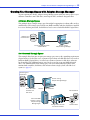
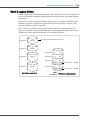
A Simple Storage Space
This example shows a simple storage space that might be appropriate in a home office or for a
small business. This storage space includes one RAID controller and three disk drives installed
in a server. For data protection, the disk drives have been used to build a RAID 5 logical drive.
Business and
Customer Data
Local
System
RAID 5
Server with RAID Controller
and Disk Drives
System running
Adaptec Storage Manager
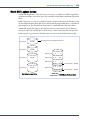
An Advanced Storage Space
This example shows how you can grow your storage space to meet the expanding requirements
of your business. On the first server, segments of space from each disk drive have been used to
build two RAID 5 logical drives. A second server connected to two 12-disk-drive enclosures
has been added. The additional storage space has been used to create two RAID 50 logical
drives. The Administrator of this storage space can create and modify logical drives and
monitor both controllers, disk drives, and enclosures from a single system, called the local
system (see page 27).
Accounting and
Payroll Data
RAID 5
Local
System
System running
Adaptec Storage Manager
RAID 5
Server with RAID
controller and
disk drives
Network (SAN) Connection
Server with RAID
controller, running
Adaptec Storage
Manager Agent
Personnel Data
RAID
50
Storage enclosures with
disk drives installed
RAID
50
Customer Data
Chapter 1: Introduction to Adaptec Storage Manager
●
16
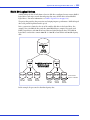
Continuing to Grow Your Storage Space
As your needs change, Adaptec Storage Manager will help you grow your storage space to
include multiple controllers, storage enclosures, and disk drives in multiple locations.
In this example, multiple systems, servers, disk drives, and enclosures have been added to the
storage space. The Administrator can create and modify logical drives and monitor all the
controllers, enclosures, and disk drives in the storage space from the local system (see page 27).
RAID
50
Server running Adaptec
Storage Manager Agent
Storage enclosures with
disk drives installed
Network (SAN) Connection
Local
System
System running
Adaptec Storage Manager
RAID 5
RAID 5
Server with RAID
controller and disk
drives installed
RAID 60
Server running Adaptec
Storage Manager Agent
RAID
5EE
Server running Adaptec
Storage Manager Agent
RAI
5E
RAID
5EE
Storage enclosures with
disk drives installed
Chapter 1: Introduction to Adaptec Storage Manager
●
17
System Requirements
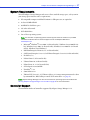
To install Adaptec Storage Manager and create a direct attached storage space, each system in
your storage space must meet these requirements:
●
PC-compatible computer with Intel Pentium 1.2 GHz processor, or equivalent
●
At least 256 MB of RAM
●
80 MB of free disk drive space
●
256-color video mode
●
DVD-ROM drive
●
One of these operating systems:
Note: For the latest on operating system version support check the readme on your RAID
Controller Installation DVD or visit the Support area of the Adaptec Web Site at
www.adaptec.com.
●
Microsoft® Windows® Server 2008 (32-bit and 64-bit), Windows Server 2008 R2 (64bit), Windows Server 2003 (32-bit and 64-bit), Windows Server 2003 R2 (32-bit and
64-bit), Windows Vista, Windows 7
Red Hat® Enterprise Linux 6.0, 5.5 (32-bit and 64-bit)
SuSE Linux Enterprise Server 11, SuSE Linux Enterprise Server 10 (32-bit and 64-bit)
FreeBSD 8, 7.x,
●
Debian Linux 5 (32-bit and 64-bit)
●
Ubuntu Linux 10 (32-bit and 64-bit)
●
Fedora Linux 11, 12 (32-bit and 64-bit)
SCO® OpenServer® 6.0 MP4
UnixWare® 7.1.4
Sun® SolarisTM 10
VMware ESX Server 4.1, 3.5, VMware vSphere 4.1 (storage management must be done
by command-line, BIOS utility, or remote GUI connection—see page 23)
●
●
●
●
●
●
●
Note: Adaptec Storage Manager can also be used before an operating system is installed. See
Running Adaptec Storage Manager from the DVD on page 23 for more information.
Controller Support
The maximum number of controllers supported by Adaptec Storage Manager is 16.
Installing Adaptec Storage Manager
In this chapter...
2
Installing on Windows ........................................................................................................... 19
Installing on Red Hat, SuSE, or Fedora Linux ...................................................................... 20
Installing on Debian or Ubuntu Linux ................................................................................. 20
Installing on UnixWare or OpenServer................................................................................. 21
Installing on Solaris................................................................................................................ 22
Installing on FreeBSD ............................................................................................................ 22
Installing on VMware............................................................................................................. 23
Using Adaptec Storage Manager with a Firewall .................................................................. 23
Running Adaptec Storage Manager from the DVD.............................................................. 23
Adaptec Storage Manager must be installed on every system that will be part of your storage
space. This chapter describes how to install Adaptec Storage Manager on different operating
systems, and explains how to use Adaptec Storage Manager with a firewall.
Note: To use Adaptec Storage Manager to configure a RAID controller before you install your
operating system, see Running Adaptec Storage Manager from the DVD on page 23.
Chapter 2: Installing Adaptec Storage Manager
●
19
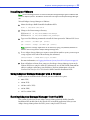
Installing on Windows
This section describes how to install Adaptec Storage Manager on systems running Windows.
See System Requirements on page 17 for a list of supported operating systems.
Note: You need administrator or root privileges to install Adaptec Storage Manager. For details on
verifying privileges, refer to your operating system documentation.
If a previous version of Adaptec Storage Manager is installed on your system, you must remove
it before beginning this installation. To uninstall Adaptec Storage Manager, use the Add/
Remove Programs option in your Windows Control Panel.
Note: Advanced users only—To perform a silent installation, follow the instructions in Appendix A.
To install Adaptec Storage Manager on a Windows system:
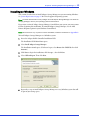
1
Insert the Adaptec RAID Controller Installation DVD.
The Installation DVD Main Menu opens.
2
Select Install Adaptec Storage Manager.
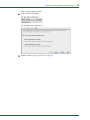
The Installation wizard opens. (If it doesn’t open, select Browse the CD/DVD, then click
Autorun.)
3
Click Next to begin the installation, click I accept..., then click Next.
4
Select GUI and Agent. Then click Next.
5
Repeat these steps to install Adaptec Storage Manager on every Windows system that will
be part of your storage space.
Chapter 2: Installing Adaptec Storage Manager
●
20
Installing on Red Hat, SuSE, or Fedora Linux
This section describes how to install Adaptec Storage Manager on systems running Red Hat
Linux, SuSE Linux, or Fedora Linux. For information on installing Adaptec Storage Manager
on Debian and Ubuntu Linux, see next section. For a list of supported Linux operating
systems, see System Requirements on page 17.
Adaptec Storage Manager includes the Java Runtime Environment (JRE).
Note: If a previous version of Adaptec Storage Manager is installed on your system, you must
remove it before beginning this installation. Any customization files you created with the previous
version are saved and used in the upgrade. To remove Adaptec Storage Manager, type the rpm
--erase StorMan command.
To install Adaptec Storage Manager on Linux:
1
Insert the Adaptec RAID Controller Installation DVD.
2
Mount the Adaptec RAID Controller Installation DVD:
Red Hat: mount /dev/cdrom /mnt/cdrom
SuSE:
Fedora:
3
mount /dev/cdrom /media/cdrom
mount /dev/hdc /mnt/cdrom
Change to the manager directory:
Red Hat/Fedora: cd /mnt/cdrom/ASMCD/linux/manager
SuSE:
4
cd /media/cdrom/ASMCD/linux/manager
Extract the RPM package and install it:
rpm --install ./StorMan*.rpm
5
Unmount the RAID Controller Installation DVD:
Red Hat/Fedora: umount /mnt/cdrom
SuSE:
6
umount /media/cdrom
Repeat these Steps to install Adaptec Storage Manager on every Linux system that will be
part of your storage space.
Installing on Debian or Ubuntu Linux
This section describes how to install Adaptec Storage Manager on systems running Debian or
Ubuntu Linux. For a list of supported Linux operating systems, see System Requirements on
page 17.
Adaptec Storage Manager includes the Java Runtime Environment (JRE).
Note: Before you can install Adaptec Storage Manager on Ubuntu systems, you must install the
Ubuntu desktop package. See your operating system documentation for details.
To install Adaptec Storage Manager on Debian or Ubuntu Linux:
1
Insert the Adaptec RAID Controller Installation DVD.
Chapter 2: Installing Adaptec Storage Manager
2
●
21
Mount the Adaptec RAID Controller Installation DVD:
mount /dev/cdrom /mnt/cdrom
3
Change to the Debian manager directory:
cd /mnt/cdrom/ASMCD/debian_x86_64/manager
Note: The distribution includes a 32-bit and 64-bit installation package.
4
Install the .deb package:
dpkg -i storman_6.50-15653_amd64.deb (for 64-bit systems)
5
Unmount the RAID Controller Installation DVD:
umount /mnt/cdrom
6
Repeat these Steps to install Adaptec Storage Manager on every Debian and Ubuntu Linux
system that will be part of your storage space.
Installing on UnixWare or OpenServer
Note: If a previous version of Adaptec Storage Manager is installed on your system, you must
remove it before beginning this installation. Any customization files you created with the previous
version are saved and used in the upgrade. To remove Adaptec Storage Manager, type the pkgrm
RaidMan command.
To install Adaptec Storage Manager on UnixWare or OpenServer:
1
Insert the Adaptec RAID Controller Installation DVD.
2
Mount the Adaptec RAID Controller Installation DVD:
mount -r -F cdfs /dev/cdrom/cdromdevicefile /mnt
where cdromdevicefile is the device file name (for example, c0b0t010 for a DVD-ROM
block device). To find the device file name, look in the /dev/cdrom directory.
3
Install Adaptec Storage Manager:
For UnixWare pkgadd -d /mnt/ASMCD/unixware/manager/RaidMan.ds
For OpenServer pkgadd -d /mnt/ASMCD/openserv6/manager/RaidMan.ds
4
Follow the on-screen instructions to complete the installation.
5
Unmount the Adaptec RAID Controller Installation DVD:
umount /mnt
Chapter 2: Installing Adaptec Storage Manager
●
22
Installing on Solaris
Note: If a previous version of Adaptec Storage Manager is installed on your system, you must
remove it before beginning this installation. Any customization files you created with the previous
version are saved and used in the upgrade. To remove Adaptec Storage Manager, type the pkgrm
RaidMan command.
To install Adaptec Storage Manager on Solaris:
1
Insert the Adaptec RAID Controller Installation DVD.
The DVD mounts automatically. (If it doesn’t, manually mount the DVD using a
command similar to the one shown below. Refer to your operating system documentation
for detailed instructions.)
mount -F hsfs -o ro/dev/dsk/c1t0d0s2/mnt
2
Install Adaptec Storage Manager:
pkgadd -d/<mount point>/ASMCD/solaris_x86/manager/StorMan.pkg
3
Follow the on-screen instructions to complete the installation.
4
Eject or unmount the Adaptec RAID Controller Installation DVD. Refer to your operating
system documentation for detailed instructions.
Installing on FreeBSD
To install Adaptec Storage Manager on FreeBSD:
1
Insert the Adaptec RAID Controller Installation DVD.
2
Mount the Adaptec RAID Controller Installation DVD:
mount -F cd9660 -o ro /dev/acd0 /<mount point>
where mount point is the mount point of the DVD-ROM.
3
Install Adaptec Storage Manager:
For FreeBSD for x86 (32-bit):
pkg_add /<mount point>/ASMCD/freebsd7/manager/StorMan-x86.pkg.tbz
For FreeBSD for amd64 (64-bit):
pkg_add /<mount point>/ASMCD/freebsd7_x86_64/manager/StorMan-amd64.pkg.tbz
where mount point is the DVD-ROM mount point.
Note: The installation DVD also includes packages for FreeBSD 8.
4
Follow the on-screen instructions to complete the installation.
5
Unmount the Adaptec RAID Controller Installation DVD:
umount /<mount point>
Chapter 2: Installing Adaptec Storage Manager
●
23
Installing on VMware
Note: Use the following procedure to install the Adaptec Storage Manager Agent on VMware ESX
Server or vSphere systems. The VMware console does not support the Adaptec Storage Manager
GUI.
To install Adaptec Storage Manager on VMware:
1
Mount the Adaptec RAID Controller Installation DVD:
mount -r /dev/cdrom /mnt/cdrom
2
Change to the Linux manager directory:
ESX Server 3.5: cd /mnt/cdrom/ASMCD/linux/manager
ESX Server 4.x: cd /mnt/cdrom/ASMCD/linux_64/manager
3
Type one of the following commands to install the Linux rpm on the VMware ESX Server:
rpm --install ./StorMan*.rpm
(32-bit)
rpm --install --nodeps ./StorMan*.rpm
(64-bit)
Note: Ignore the message "Application can be started by typing /usr/StorMan/StorMan.sh".
VMware does not support the Adaptec Storage Manager GUI.
4
To use Adaptec Storage Manager to connect remotely from another system, you must open
a range of ports in the built-in firewall using this command:
esxcfg-firewall -o 34570:34581,tcp,in,”StorMan”
For more information, see Logging into Remote Systems from the Local System on page 33.
5
From a Windows or Linux client, connect to the Adaptec Storage Manager Agent on the
VMware ESX Server using the ASM GUI. Alternatively, use the ARCCONF command line
utility to configure and manage your disk drives. For more information, refer to the
Command Line Interface User’s Guide on the RAID Controller Installation DVD.
Using Adaptec Storage Manager with a Firewall
If your system or network includes a firewall, you must unblock these ports:
●
8003 (TCP)
●
34580 (TCP)
●
34570 to 34579 (TCP)
●
34570 (UDP)
●
34577 to 34580 (UDP)
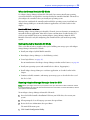
Running Adaptec Storage Manager from the DVD
This section describes how to run Adaptec Storage Manager from the RAID Controller
Installation DVD included in the kit, instead of as an installed application. When you run
Adaptec Storage Manager from the DVD, you are using bootable-CD mode.
Chapter 2: Installing Adaptec Storage Manager
●
24
When to Choose Bootable-CD Mode
Use Adaptec Storage Manager in bootable-CD mode if you want to install your operating
system on a disk drive or logical drive associated with your controller. Bootable-CD mode lets
you configure the controller before you install your operating system.
After you have configured the controller and installed the operating system, install and run
Adaptec Storage Manager as an installed software application, as described earlier in this
chapter.
Bootable-CD Mode Limitations
Running Adaptec Storage Manager in bootable-CD mode is not an alternative to running it as
an installed software application. Most of the features and functions described in this User’s
Guide are not available when you are running Adaptec Storage Manager from the DVD.
Bootable-CD mode is only for configuring your controller before you install an operating
system.
Getting Started in Bootable-CD Mode
This is a checklist of tasks to complete when you’re building your storage space with Adaptec
Storage Manager in bootable-CD mode.
D Install your Adaptec by PMC RAID controller.
D Run Adaptec Storage Manager (see the following section).
D Create logical drives (see page 35).
For an introduction to the Adaptec Storage Manager window and its features, see page 44.
D Install your operating system (and controller device drivers, if appropriate).
D Install Adaptec Storage Manager as a software application, as described earlier in this
chapter.
D Continue to build, customize, and manage your storage space as described in the rest of
this User’s Guide.
Running Adaptec Storage Manager from the DVD
Note: Before you begin, ensure that your system is set up to boot from a DVD or CD drive. Check
the system BIOS to see if the CD drive is listed first in the boot order. For more information, refer to
your system’s documentation.
To run Adaptec Storage Manager in bootable-CD mode:
1
Insert the RAID Controller Installation DVD into your DVD drive, then restart your
system.
2
When prompted, select the language you want, then press Enter.
3
Review the license information, then press Enter.
The main DVD menu opens.
4
Click Launch Configuration Utility.
Chapter 2: Installing Adaptec Storage Manager
Adaptec Storage Manager opens.
5
In the tool bar, click Create.
The Configuration wizard opens.
6
Continue with Creating Logical Drives on page 35.
●
25
Building Your Storage Space
In this chapter...
3
Overview ................................................................................................................................. 27
Choosing a Management System........................................................................................... 27
Starting and Logging In on the Local System ....................................................................... 28
Starting Adaptec Storage Manager on Remote Systems....................................................... 32
Logging into Remote Systems from the Local System.......................................................... 33
Creating Logical Drives.......................................................................................................... 35
Managing Your Storage Space ............................................................................................... 42
Follow the instructions in this chapter to start Adaptec Storage Manager, log in to each system
in your storage space, and create logical drives. (For more information, see Understanding
Logical Drives on page 60.)
Note: Before beginning the tasks in this chapter, ensure that Adaptec Storage Manager is installed
on every system that will be part of your storage space.
Chapter 3: Building Your Storage Space
●
27
Overview
To build your storage space, complete these steps as described in the rest of this chapter:
1
Choose at least one management system (see the next section).
2
Start and log in to Adaptec Storage Manager on the management system (see page 28).
3
Start Adaptec Storage Manager or the Agent on all other systems (see page 32).
4
Log in to all other systems from the management system (see page 33).
5
Create logical drives for all systems in your storage space (see page 35).
Choosing a Management System
You must designate at least one system as a ‘management system’, a system from which you
will manage the direct attached storage on all systems in your storage space.
The management system can be any system on your LAN that has a monitor and can run the
full Adaptec Storage Manager application.
‘Local’ or ‘Remote’?
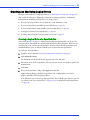
Whenever you’re working in Adaptec Storage Manager, the system that you’re working on is
the local system. All other systems in your storage space are remote systems. ‘Local’ and
‘remote’ are relative terms, as shown in the following figure—when you are working on system
A (local system), system B is a remote system; when you are working on system B (local
system), system A is a remote system.
For the purposes of this chapter, the ‘local system’ is the management system.
A
B
Local logged
in to remote
Adaptec Storage
Manager
Adaptec Storage
Manager or Agent
A
B
Local logged
in to remote
Adaptec Storage
Manager or Agent
Adaptec Storage
Manager
Chapter 3: Building Your Storage Space
●
28
Starting and Logging In on the Local System
This section describes how to start and log in to the full Adaptec Storage Manager application.
It also explains how Adaptec Storage Manager uses existing operating system permission levels
to grant different amounts of access to your storage space.
Understanding Permission Levels
When you log in to Adaptec Storage Manager, your permission level is identical to your
operating system permission level. For example, if you have Administrator permissions on
your operating system, you also have Administrator permissions in Adaptec Storage Manager.
This section describes the three different permission levels.
Administrator Level
Logging in as an Administrator allows you full access to manage and modify the controllers,
disk drives, and logical drives that are part of your storage space.
To log in as an Administrator:
●
Windows—Enter a valid user name and password for the Administrator or Administrative
User on the system. (The Administrative User is any member of the local Administrators
group, which can, in a Domain configuration, include Domain Administrators.)
●
Linux—Enter root for the user name and enter the root password.
●
UnixWare or OpenServer—Enter root for the user name and enter the root password.
●
Solaris—Enter root for the user name and enter the root password.
User Level
Logging in as a User partially restricts your access to the storage space, as described in this table.
Users can...
User’s can’t...
Rescan controllers
Create logical drives
Save activity logs
Modify logical drives
Verify disk drives (with and without fix)
Delete logical drives
Verify logical drives (with and without fix)
Delete hot spares
Identify disk drives and enclosures
Perform data migrations
Rebuild disk drives
Create hot spares
Access the same information as Guests (see the following section)
To log in as a User, use your normal network user name and password.
Guest Level
Logging in as a Guest restricts your access to the storage space to “view-only”.
You can see all local and remote systems and view their properties windows, view event logs,
save configuration files and support archives, and browse the online Help.
You cannot make any changes to the storage space.
To log in as Guest, click Cancel on the Login window.
Chapter 3: Building Your Storage Space
●
29
Starting and Logging In
Note: You need root privileges to run Adaptec Storage Manager.
To start Adaptec Storage Manager and log in on the local system, follow the instructions for
your operating system:
●
For Windows, see the following section.
●
For Linux, see page 30.
●
For UnixWare or OpenServer, see page 30.
●
For Solaris, see page 30.
●
For FreeBSD, see page 30.
Windows
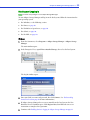
1
From the Start menu, select Programs > Adaptec Storage Manager > Adaptec Storage
Manager.
The main window opens.
2
In the Enterprise View, expand Direct Attached Storage, then select the local system.
The Log In window opens.
3
Enter your LAN user name and password, then click Connect. (See Understanding
Permission Levels on page 28 for more information.)
4
If Adaptec Storage Manager detects a new controller on the local system, the New
Hardware Detected window opens. Click Register Now, then follow the on-screen
instructions to complete the registration.
5
Continue with Enabling Statistics Logging in Adaptec Storage Manager on page 31.
Chapter 3: Building Your Storage Space
●
30
Linux
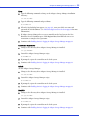
1
Type the following command to change to the Adaptec Storage Manager installation
directory:
cd /usr/StorMan
2
Type the following command and press Enter:
sh StorMan.sh
3
When the Log In dialog box appears (see page 29), enter your LAN user name and
password, then click Connect. (See Understanding Permission Levels on page 28 for more
information.)
4
If Adaptec Storage Manager detects a new controller on the local system, the New
Hardware Detected window opens. Click Register Now, then follow the on-screen
instructions to complete the registration.
5
Continue with Enabling Statistics Logging in Adaptec Storage Manager on page 31.
UnixWare or OpenServer
1
Change to the directory where Adaptec Storage Manager is installed:
cd /opt/RaidMan
2
Launch the Adaptec Storage Manager script:
sh RaidMan.sh
3
If prompted, register the controllers on the local system.
4
Continue with Enabling Statistics Logging in Adaptec Storage Manager on page 31.
Solaris
To start Adaptec Storage Manager:
1
Change to the directory where Adaptec Storage Manager is installed:
cd /usr/StorMan
2
Launch the Adaptec Storage Manager script:
sh StorMan.sh
3
If prompted, register the controllers on the local system.
4
Continue with Enabling Statistics Logging in Adaptec Storage Manager on page 31.
FreeBSD
1
Change to the directory where Adaptec Storage Manager is installed:
cd /opt/StorMan
2
Launch the Adaptec Storage Manager script:
sh StorMan.sh
3
If prompted, register the controllers on the local system.
4
Continue with Enabling Statistics Logging in Adaptec Storage Manager on page 31.
Chapter 3: Building Your Storage Space
●
31
Enabling Statistics Logging in Adaptec Storage Manager
When you log in for the first time, Adaptec Storage Manager prompts you to enable statistics
logging on your system. If you enable statistics logging, Adaptec Storage Manager periodically
“calls home,” and sends the data to Adaptec by PMC Product Support, or other designated
contact, for analysis. (See Logging Statistics for Remote Analysis on page 120 for more
information.)
Click Yes to enable statistics logging. (If you change your mind, you can turn off statistics
logging later.) The Advanced Statistics Manager window opens and you are prompted to enter
your proxy server settings.
Enter your proxy server name and port number (if your network uses a proxy server), then
click Send Call Home test message. A message appears indicating either that the test message
was sent successfully or that the test failed. (Click OK to clear the message.)
Click OK to close the Call Home connection settings window. Then close the Advanced
Statistics Manager window.
Continue with Starting Adaptec Storage Manager on Remote Systems on page 32.
Chapter 3: Building Your Storage Space
●
32
Starting Adaptec Storage Manager on Remote Systems
The next step is to start Adaptec Storage Manager on all the remote systems in your storage
space. (For more information about ‘remote’ systems, see page 27.)
You can run the full application on each system. Alternatively, if your storage space includes
systems that aren’t connected to monitors (and therefore won’t require the user interface
described in this User’s Guide), you can run the Agent only. You may want to do this if system
resources are limited, or if you want more system resources available for other tasks. (For more
information, see About the Adaptec Storage Manager Agent on page 14.)
To start:
●
The full application, see Starting and Logging In on the Local System on page 28.
●
The Agent only, see page 32.
Starting the Full Application
To start the full Adaptec Storage Manager application, follow the instructions in Starting and
Logging In on the Local System on page 28.
Starting the Agent Only
To start the Adaptec Storage Manager Agent only, follow the instructions for your operating
system:
●
For Windows, see the following section.
●
For Linux or VMware, see page 32.
●
For UnixWare or OpenServer, see page 33.
●
For Solaris, see page 33.
Windows
On systems running Windows, the Adaptec Storage Manager Agent starts automatically when
the system is powered on.
To verify that the Agent is running:
1
Open the Windows Control Panel.
2
Double-click Administrative Tools, then double-click Services.
3
In the list of services, check that the Adaptec Storage Manager Agent is installed and
running. If it’s not, you can choose to restart it.
Linux or VMware
On systems running Linux or VMware, the Adaptec Storage Manager Agent starts
automatically when the system is powered on.
To verify that the Agent is running:
1
Open a shell window.
2
Enter this command: ps -ef | grep StorAgnt.sh
If the Agent is running, it’s listed as sh StorAgnt.sh.
Chapter 3: Building Your Storage Space
●
33
UnixWare or OpenServer
To start the Agent, enter this command:
sh /opt/RaidMan/RaidAgnt.sh
When the Agent has started, a copyright message appears.
Note: To have the Agent run automatically at system start-up, add this line to the /etc/inittab and
/etc/conf/init.d/kernel files: nfra:12346:once:sh opt/RaidMan/RaidAgnt.sh
Solaris
To start the Agent, enter this command:
svcadm enable ADPTstor_agent
Logging into Remote Systems from the Local System
Once Adaptec Storage Manager or the Adaptec Storage Manager Agent (see page 14) is running
on all systems in your storage space, the next step is to log in to the remote systems from the
local system.
Once you have logged in to a remote system, it automatically appears in the Enterprise View
each time you start Adaptec Storage Manager on the local system. You can work with a remote
system’s controllers, disk drives, and logical drives as if they were part of your local system.
Note: Adaptec Storage Manager has a wizard to help you manage the remote systems in your
storage space. The wizard simplifies the process of connecting to remote systems and adding them
to the Enterprise View. For more information, see Managing Remote Systems on page 128.
To log in to a remote system:
1
In the Enterprise View, select either Direct Attached Storage or the Local System.
2
From the Actions menu, select Add managed system.
The Add Managed System window opens.
Chapter 3: Building Your Storage Space
●
34
3
Enter the host name or TCP/IP address of the remote system. Or select a system from the
drop-down list.
4
Enter the startup port number of the remote system. The default port number is 34571.
5
Click Connect.
Adaptec Storage Manager connects to the remote system and adds it to the list of managed
systems in the Enterprise View.
Note: You must log in to a remote system with the proper permission level to complete the
tasks you wish to perform. See Understanding Permission Levels on page 28 for more
information.
6
If Adaptec Storage Manager detects a new controller on the local system, the New
Hardware Detected window opens. Click Register Now, then follow the on-screen
instructions to complete the registration.
7
Continue with Creating Logical Drives on page 35.
Removing a Remote System
If you no longer want to monitor a remote system, you can remove it from the Enterprise View
of Adaptec Storage Manager.
Removing a remote system does not take it off-line.
Note: Adaptec Storage Manager has a wizard to help you manage the remote systems in your
storage space. The wizard simplifies the process of a removing remote systems from the Enterprise
View. For more information, see Managing Remote Systems on page 128.
To remove a remote system:
1
In the menu bar of the main window, select Remote, select Remove managed system, then
click the system you want to remove.
The Remove Managed System window opens.
2
If you want to continue receiving events from the remote system after it’s been removed
from the local system, select Continue to receive events from the remote system from the
drop-down menu.
3
Click OK.
The remote system is removed from the Enterprise View of Adaptec Storage Manager.
Chapter 3: Building Your Storage Space
●
35
Creating Logical Drives
Adaptec Storage Manager has a wizard to help you create (or configure) logical drives, and
offers two configuration methods to choose from, depending on your needs:
●
Express configuration (basic)—Automatically creates logical drives by grouping together
same-sized physical drives, and assigns RAID levels based on the number of physical disk
drives in the logical drive.
Use the express method when you want to use all available disk drives in the most efficient
manner. For instructions, see page 35.
●
Custom configuration (advanced)—Helps you group disk drives, set RAID levels,
determine logical drive size, and configure advanced settings manually.
Use the custom method when you want to create specific logical drives with any or all
available disk drives. For instructions, see page 38.
Note: Adaptec recommends that you not combine SAS and SATA disk drives within the same
logical drive. Adaptec Storage Manager generates a warning if you try to create a logical drive using
a combination of SAS and SATA disk drives.
Express Configuration: The Easy Way
When you use express configuration, Adaptec Storage Manager automatically creates logical
drives by grouping together same-sized physical disk drives, and assigns RAID levels based on
the number of physical disk drives in a logical drive:
●
A logical drive with three or more physical disk drives is assigned RAID 5.
●
A logical drive with two physical disk drives is assigned RAID 1.
●
A logical drive with only a single physical disk drive becomes a simple volume, which does
not offer redundancy.
Note: To create a logical drive with any other RAID level, you must use the custom method, as
described on page 38. See Selecting the Best RAID Level on page 153 for more information about
RAID levels.
By default, logical drive size is set by Adaptec Storage Manager and automatically maximizes
the capacity of the disk drives. However, you can choose to specify a size for a logical drive, if
required.
To build your storage space with the express method:
1
In the Enterprise View, select the system you want, then select the controller you want.
2
On the toolbar, click Create.
Chapter 3: Building Your Storage Space
●
36
3
When the wizard opens, ensure that Express configuration... is selected, then click Next.
4
Review the information that is displayed.
To exclude specific disk drives, specify a size for the logical drives, or to make other
changes to the configuration, click Modify logical devices. See Step 7 on page 39 for more
information.
Note: Some operating systems have size limitations for logical drives. Before you save the
configuration, verify that the size of the logical drive is appropriate for your operating system.
Chapter 3: Building Your Storage Space
5
●
37
Click Apply, then click Yes.
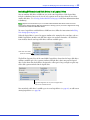
Adaptec Storage Manager builds the logical drive(s), indicated by a magnifying glass
moving across the new logical drive icon in the Logical Devices View. The configuration is
saved on the Adaptec controller and on the physical drives.
A magnifying glass means that a logical drive is being built.
It disappears once the logical drive has been created.
Note: To stop the creation of a new logical drive, right-click on the magnifying glass icon
(shown in the figure above), then select Stop current task. You can also change the priority of
the build task to High, Medium, or Low by selecting Change background task priority from the
same right-click menu.
6
Repeat Steps 1 to 5 for each controller in your storage space, as required.
7
Continue with Partitioning and Formatting Your Logical Drives on page 37.
Partitioning and Formatting Your Logical Drives
The logical drives you create appear as physical disk drives on your operating system. You must
partition and format these logical drives before you can use them to store data.
Note: Logical drives that have not been partitioned and formatted cannot be used to store data.
Refer to your operating system documentation for more information.
Including More Systems in Your Storage Space
Note: Adaptec Storage Manager must be installed on every system that will be part of your storage
space.
If you have installed Adaptec RAID controllers on more than one system, to continue building
your storage space:
●
From each individual system, log in to Adaptec Storage Manager and repeat Steps 1 to 7 to
continue building your storage space, or
●
From your local system (the system you’re working on), log in to all other systems in your
storage space as remote systems (see page 27), then repeat Steps 1 to 7 to continue building
your storage space.
Chapter 3: Building Your Storage Space
●
38
The maximum number of supported RAID controllers varies depending on your operating
system. See Controller Support on page 17 for more information.
To continue, see Managing Your Storage Space on page 42.
Custom Configuration (Advanced)
Custom configuration helps you build your storage space manually by stepping you through
the process of creating logical drives, setting RAID levels, and configuring other settings.
To build your storage space with custom configuration:
1
In the Enterprise View, select the system you want, then select the controller you want.
Note how many available disk drives are connected to the controller; this information will
be helpful as you create logical drives.
2
On the toolbar, click Create.
3
When the wizard opens, select Custom configuration..., then click Next.
Chapter 3: Building Your Storage Space
4
●
39
Select a RAID level.
The most common RAID levels are listed first; advanced RAID levels are available by
clicking Advanced settings.
Note: To build a RAID Volume, see page 72. To build a JBOD disk, see page 74. See Selecting
the Best RAID Level on page 153 for more information about RAID levels.
5
Click Next.
6
On the left side of the window, enter a name for the logical drive. Names can include any
combination of letters and numbers, but cannot include spaces.
7
On the right side of the window, select the disk drives you want to use in the logical drive.
Adaptec Storage Manager prompts you to select the correct number of disk drives.
Note: Adaptec recommends that you not combine SAS and SATA disk drives within the same
logical drive. Adaptec Storage Manager generates a warning if you try to create a logical drive
using a combination of SAS and SATA disk drives.
Number of disk drives required
Chapter 3: Building Your Storage Space
●
40
By default, Adaptec Storage Manager automatically sets the size of the logical drive and
maximizes the capacity of the disk drives you select. (To set a custom size for the logical
drive, see Step 9.)
8
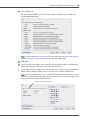
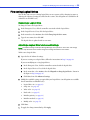
(Optional) Create a global hot spare by clicking the Create Global Hot Spare button, then
clicking on an available disk drive. (Alternatively, Ctrl+click an available disk drive.)
Available disk drives are represented by light blue icons.
A plus sign (+) appears to indicate that the selected disk drive will be a hot spare. (To
remove a hot-spare designation from a disk drive, Ctrl+click it.)
Create Global Hot Spare button
Available disk drives are light-blue
A global hot spare has a plus
sign beside it
See Creating and Managing Hot Spares on page 55 for more information.
9
(Optional) To set a smaller logical drive size or modify other settings for this logical drive
click Advanced Settings, then customize the settings as required. See Fine-tuning Logical
Drives on page 64 for more information.
Chapter 3: Building Your Storage Space
●
41
10 If you have no other available disk drives, skip to Step 12.
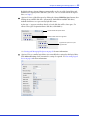
If you have available disk drives and want to create additional logical drives, click Add
logical device to open a new tab in the wizard.
Tab for second logical drive
11 Repeat Steps 4 to 10 for each logical drive that you want to create on the controller.
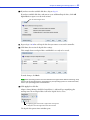
12 Click Next, then review the logical drive settings.
This example shows two logical drives with RAID 5 are ready to be created.
To make changes, click Back.
Note: Some operating systems have size limitations for logical drives. Before continuing, verify
that the size of the logical drive is appropriate for your operating system. For more information,
refer to your operating system documentation.
13 Click Apply, then click Yes.
Adaptec Storage Manager builds the logical drive(s), indicated by a magnifying glass
moving across the new logical drive icon in the Logical Devices View.
A magnifying glass means that a logical drive is being built.
It disappears once the logical drive has been created.
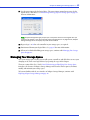
The logical drive power timers window opens.
Chapter 3: Building Your Storage Space
●
42
14 Set the power timers for the logical drive. The power timers control power usage by the
logical device’s disk drives. See Maintaining an Energy-Efficient Storage Space on page 76
for more information.
Note: Adaptec Storage Manager prompts you to set power timers for each logical drive you
created in the wizard. If you did not enable power management for any logical drive, Adaptec
Storage Manager does not display the power timers window.
15 Repeat Steps 1 to 14 for each controller in your storage space, as required.
16 Partition and format your logical drives. See page 37 for more information.
17 When you’ve finished building your storage space, continue with Managing Your Storage
Space on page 42.
Managing Your Storage Space
Once your storage space is built, you can add systems, controllers, and disk drives to meet your
changing needs, then create logical drives by repeating the steps in this chapter.
The next section of this User’s Guide, Part II: Monitoring and Modifying Your Storage Space,
introduces the features of Adaptec Storage Manager and describes how to protect, monitor,
modify, and maintain your storage space.
To become familiar with the user interface of Adaptec Storage Manager, continue with
Exploring Adaptec Storage Manager on page 44.
Part II:
Monitoring and Modifying Your
Storage Space
In this part:
Exploring Adaptec Storage Manager ............................. 44
Protecting Your Data ................................................... 54
Modifying Your Direct Attached Storage ........................ 59
Scheduling Recurring or Resource-Intensive Jobs .......... 81
Maintaining Physical Devices....................................... 87
Monitoring Status and Activity ................................... 103
Updating and Customizing Adaptec Storage Manager .. 125
Solving Problems...................................................... 136
Exploring Adaptec Storage Manager
In this chapter...
4
Working in Adaptec Storage Manager .................................................................................. 45
Overview of the Main Window ............................................................................................. 45
Revealing More Device Information ..................................................................................... 50
Checking System Status from the Main Window ................................................................. 51
Getting Help ........................................................................................................................... 51
Logging Out of Adaptec Storage Manager ............................................................................ 52
Uninstalling Adaptec Storage Manager................................................................................. 52
Before you build your storage space, familiarize yourself with the main features of Adaptec
Storage Manager and learn to navigate to the information you need.
Chapter 4: Exploring Adaptec Storage Manager
●
45
Working in Adaptec Storage Manager
Adaptec Storage Manager provides multiple ways to work with its menus and windows.
Most menu options are available by:
●
Selecting items from the menu bar.
●
Clicking buttons on the tool bar.
●
Right-clicking on components in the main window. (Only tasks and windows associated
with a specific component are available on right-click menus.)
For simplicity, the tasks in this User’s Guide are explained mainly using menu bar options.
About the Actions Menu
Most of the main tasks in Adaptec Storage Manager are available from the Actions menu on
the menu bar. Options that appear on the Actions menu vary, depending on which type of
component is selected in the main window. For instance, managed systems, disk drives, and
hot spares each have specialized Actions menus.
For an overview of all Actions menu options, see What options are on the Actions menu? on
page 165.
Overview of the Main Window
The main window of Adaptec Storage Manager has three main panels—left, right, and
bottom—in addition to the other features shown in this figure.
The left panel always shows the Enterprise View; the bottom panel always shows the event log.
Different information, or views, appear in the right panel depending on which component is
selected in the Enterprise View. (In this example, a controller is selected in the Enterprise View,
and the right panel displays the Physical Devices and Logical Devices Views.)
Enterprise
View
Menu Bar
Tool Bar
Direct
Attached
Storage
branch
Event Log
Physical Devices
View
Logical Devices
View
Chapter 4: Exploring Adaptec Storage Manager
●
46
Resize the panels and scroll horizontally or vertically as required, to view more or less
information.
The Enterprise View
The Enterprise View is an expandable tree with one main branch, the Direct Attached Storage
branch, which displays automatically if you selected Direct Attached Storage when you
installed Adaptec Storage Manager.
Under Direct Attached Storage, the Enterprise View lists the local system (the system you’re
working on) and any remote systems with direct attached storage that you have logged in to
from the local system. (See ‘Local’ or ‘Remote’? on page 27 for more information.)
Expand a system in the Enterprise View to the see its controllers.
When you select a component in the Enterprise View, the controllers, disk drives, or logical
drives (“devices”) associated with it appear in the right-hand panel of the window, as shown in
these figures.
By selecting a controller in the
Enterprise View...
...the disk drives (shown above) or enclosures and disk drives
(shown below) connected to it and the logical drives created with
those disk drives appear in the Physical and Logical Devices Views.
You can perform most tasks by selecting a controller in the Enterprise View and working with
its associated devices in the Physical and Logical Devices Views.
Chapter 4: Exploring Adaptec Storage Manager
●
47
What do the Enterprise View icons mean?
Icon
Description
System with direct attached storage controller and directly attached disk drives or enclosures
Enclosure
Controller
The Physical Devices View
When you select a controller in the Enterprise View, information about the physical devices
connected to that controller appear in the Physical Devices View. Disk drives designated as hot
spares have plus signs (+) beside them.
Controller 1...
...has six connectors and one
onboard expander, and is
connected to 28 disk drives.
Hold your cursor over any disk drive to see its status, connector/ID number, and
maximum speed. You can also click the arrow, shown at right, to see this same
information. See Revealing More Device Information on page 50 to change how disk drives
are represented.
To view the logical drives associated with a particular disk drive, see The Logical Devices View
on page 48.
Chapter 4: Exploring Adaptec Storage Manager
●
48
What do the icons in the Physical Devices View mean?
Icon
Description
Ready disk drive, not part of any logical drive
Disk drive with some space allocated to a logical drive, and some space available
Disk drive with no free space
Failed disk drive
Healthy global or dedicated hot spare protecting at least one logical drive (See Creating and
Managing Hot Spares on page 55 for more information.)
Hot spare with error (see page 56 for more information)
Hot spare being built into logical drive after disk drive failure
Hot spare built into logical drive after disk drive failure
Ready Solid State Drive (SSD), not part of any logical drive or MaxIQ pool
Solid State Drive assigned to MaxIQ pool
Controller
Enclosure Management Device (represents an enclosure connected to your controller)
The Logical Devices View
When you select a controller in the Enterprise View, information about the logical drives and
arrays associated with that controller appear in the Logical Devices View. (A logical drive is a
group of physical disk drives that your operating system recognizes as a single drive. For more
information, see Understanding Logical Drives on page 60.)
Controller 1 is connected to...
...28 disk drives (some not shown
here)...
...from which two logical
drives have been created.
The RAID level of a logical drive is indicated by the number inside the logical drive’s
icon. For instance, the logical drive shown at right has RAID 1. Logical drives protected
by hot spares have plus signs (+) beside them, as shown at right.
Hold your cursor over any logical drive to see its name, status, and size. You can also click
the arrow, shown at right, to view this same information for all the logical drives at once.
Chapter 4: Exploring Adaptec Storage Manager
●
49
Click on a logical drive to highlight the disk drives that comprise it in the Physical Devices
View.
Five disk drives (plus one hot spare)
comprise the selected RAID 6 logical
drive.
You can also click on any disk drive to see which (if any) logical drive it belongs to. A disk drive
shaded in light blue is not part of any logical drive.
What do the icons in the Logical Devices View mean?
Icon
Description
Logical drive
Logical drive with healthy hot spare
Logical drive being initialized
Logical drive being modified
Logical drive being rebuilt after disk drive failure
Chapter 4: Exploring Adaptec Storage Manager
Revealing More Device Information
You can reveal more information about disk drives and logical drives by using the View
buttons (circled below) to change what information displays.
Note: Not all views are available for all components.
Default View
(Text View)
Click the arrows to expand list
and reveal basic information.
Click this button to see the size capacities of your disk
drives. Disk drives or segments of disk drives that are
included in logical devices are shaded brown.
Click this button to see the size capacities of your disk drives
relative to each other.
If your controller is connected to an enclosure, click this
button to see all the disk drives in the enclosure.
Note: Not all enclosures are supported by Adaptec Storage
Manager. Unsupported enclosures do not appear in
Enclosure View.
●
50
Chapter 4: Exploring Adaptec Storage Manager
●
51
Checking System Status from the Main Window
Adaptec Storage Manager includes an event log for at-a-glance system status and activity
information. The event log provides status information and messages about activity (or events)
occurring in your storage space. Double-click any event to see more information in an easierto-read format.
Warning- and Error-level icons, shown at right, appear next to components
(such as systems and logical drives) affected by a failure or error, creating a
trail, or rapid fault isolation, that helps you identify the source of a problem
when it occurs. See Identifying a Failed or Failing Component on page 137 for
more information.
Enclosure
Warning
Disk Drive
Error
If your storage space includes a controller with a temperature sensor, or an enclosure with an
enclosure management device, such as a SCSI Accessed Fault-Tolerant Enclosure (SAF-TE)
processor, temperature, fan, and power module status is displayed by status icons in the
Physical Device view, as shown in the next figure. These status icons change color to indicate
status (see page 106).
Status Icons
Power Module Status
Temperature Status
Fan Status
For more information, see Monitoring Status and Activity on page 103.
Note: By default, all Warning- and Error-level events activate an audible alarm. See Testing and
Silencing System and Enclosure Alarms on page 95 for more information.
Getting Help
Adaptec Storage Manager online Help includes conceptual information, glossary definitions,
and descriptions of on-screen menus and items, in addition to step-by-step instructions for
completing tasks.
To open the online Help, click the Help button (shown at right). Alternatively, press
the F1 key, or in the menu bar select Help, then click Search or Contents.
Press the Help button in a dialog box or wizard for help with that specific dialog box, window,
or procedure.
Additionally, you can find the most commonly asked-about information in Quick Answers to
Common Questions... on page 162 of this User’s Guide.
Chapter 4: Exploring Adaptec Storage Manager
●
52
Logging Out of Adaptec Storage Manager
To log out of Adaptec Storage Manager:
1
In the Enterprise View, click on the local system.
2
In the menu bar, select Actions, then click Log out.
You are logged out of Adaptec Storage Manager.
Logging Back In
To log in to Adaptec Storage Manager:
1
In the Enterprise View, click on the local system.
2
In the menu bar, select Actions, then click Log in.
3
Enter your user name and password, then click Connect.
Uninstalling Adaptec Storage Manager
To uninstall Adaptec Storage Manager, follow the instructions for your operating system.
Uninstalling From Windows Systems
To uninstall Adaptec Storage Manager from a Windows system, use the Add or Remove
Programs tool in the Control Panel. All Adaptec Storage Manager components are uninstalled.
Uninstalling From Linux Systems
To uninstall Adaptec Storage Manager from a Linux system, type this command:
rpm --erase StorMan
Adaptec Storage Manager is uninstalled.
Uninstalling From UnixWare or OpenServer Systems
To uninstall Adaptec Storage Manager from a UnixWare or OpenServer system, type this
command:
pkgrm StorMan
Adaptec Storage Manager is uninstalled.
Chapter 4: Exploring Adaptec Storage Manager
Uninstalling From Solaris Systems
To uninstall Adaptec Storage Manager from a Solaris system, type this command:
pkgrm StorMan
Adaptec Storage Manager is uninstalled.
Uninstalling From FreeBSD Systems
To uninstall Adaptec Storage Manager from a FreeBSD system, type this command:
pkg_delete Storman-x.x.x-x86 or pkg_delete Storman-x.x.x-amd64
where x.x.x is the package version.
Adaptec Storage Manager is uninstalled.
Uninstalling From VMware Systems
To uninstall Adaptec Storage Manager from a VMware system, type this command:
rpm --erase StorMan
Adaptec Storage Manager is uninstalled.
●
53
Protecting Your Data
In this chapter...
5
Creating and Managing Hot Spares ...................................................................................... 55
Enabling Copyback ................................................................................................................ 58
In addition to the standard (RAID 0, RAID 1, RAID 5, RAID 10, RAID 50) and enhanced
(RAID 1E, RAID 5EE, RAID 6, RAID 60) RAID levels, controllers with the Adaptec Advanced
Data Protection Suite include additional methods of protecting the data on your storage space.
This chapter describes how to use hot spares and copyback to protect your stored data.
Chapter 5: Protecting Your Data
●
55
Creating and Managing Hot Spares
A hot spare is a disk drive that automatically replaces any failed drive in a logical drive, and can
subsequently be used to rebuild that logical drive. (For more information on recovering from a
disk drive failure, see page 138.)
Hot Spare Limitations
●
You can’t create a hot spare for RAID 0 logical drives, simple volumes, or spanned volumes.
●
You can’t create a hot spare from a disk drive that is already part of a logical drive.
●
You should select a disk drive that is at least as big as the largest disk drive it might replace.
●
Adaptec recommends that you not designate a SAS hot spare for a logical drive comprising
SATA disk drives, or a SATA hot spare for a logical drive comprising SAS disk drives.
Dedicated Spare or Global Spare?
A global hot spare is not assigned to a specific logical drive and will protect any logical drive on
the controller (except RAID 0 logical drives). You can designate a global hot spare before or
after you build logical drives on a controller; you can also designate a global hot spare while
you’re creating a logical drive. To designate a global hot spare, see page 55.
A dedicated hot spare is assigned to one or more specific logical drives and will only protect
those logical drives. (A dedicated hot spare that has been assigned to protect more than one
logical drive is called a pool spare.) You must create the logical drive before you can assign a
dedicated hot spare. To assign a dedicated hot spare or pool hot spare, see page 56.
Designating a Global Hot Spare
This section describes how to designate a global hot spare before or after you build a logical drive.
Note: To designate a global hot spare while you’re creating a logical drive, see Step 7 on page 39.
To designate a global hot spare:
1
In the Enterprise View, click the controller on which you want a global hot spare.
2
In the Physical Devices View, click the disk drive you want to designate as a hot spare. (See
Hot Spare Limitations for help selecting a disk drive.)
3
Click the Create global hot-spare drive button.
A plus sign appears beside the selected disk drive, indicating that it’s designated as a hot
spare. (A yellow plus sign indicates an error. See What Do the Hot Spare Icons Mean? on page
56 for help solving the problem.) A plus sign also appears beside each existing logical drive.
Any other logical drives created on the controller will automatically be protected by that
global hot spare.
Chapter 5: Protecting Your Data
●
56
Assigning a Dedicated Hot Spare or Pool Hot Spare
A dedicated hot spare is assigned to one or more specific logical drives. (A dedicated hot spare
that has been assigned to protect more than one logical drive is called a pool hot spare.)
Note: You must create the logical drive before you can assign a dedicated hot spare.
To assign a dedicated or pool hot spare:
1
In the Enterprise View, click the controller on which you want a dedicated hot spare.
2
In the Physical Devices View, click the disk drive you want to designate as a hot spare. (See
Hot Spare Limitations on page 55 for help selecting a disk drive.)
3
In the menu bar, select Actions, then click Create dedicated hot-spare drive for, then click
the name of the logical drive (in this example, Device 1).
A plus sign appears beside the selected disk drive, indicating that it’s designated as a
dedicated hot spare. (A yellow plus sign indicates an error. See What Do the Hot Spare Icons
Mean? on page 56 for help solving the problem.)
4
To use the same dedicated hot spare to protect another logical drive (create a pool hot
spare), repeat Step 2 and Step 3.
What Do the Hot Spare Icons Mean?
Icon
Explanation
Action
Healthy global or dedicated hot spare
No action required.
Error on hot spare:
● Hot spare is not assigned to any logical
drives
●
Create at least one logical drive on the same
controller
●
Hot spare is too small to protect the
logical drive(s) it’s assigned to
●
Designate larger disk drive as hot spare
●
Global hot spare was designated before
any logical drives were built
●
Create at least one logical drive on the same
controller
Hot spare has been built into a logical drive
after disk drive failure
Designate replacement or other available disk
drive as new hot spare; remove ‘hot spare’
designation from disk drive (see Removing or
Deleting a Dedicated Hot Spare)
Chapter 5: Protecting Your Data
●
57
Removing or Deleting a Dedicated Hot Spare
You can delete a dedicated hot spare or remove it from a logical drive. You may want to do this to:
●
Make disk drive space available for another logical drive.
●
Make a dedicated hot spare into a global hot spare.
●
Remove the ‘hot spare’ designation from a disk drive that is no longer being used as a hot
spare. (When a hot spare is built into a logical drive after a disk drive failure, it retains its
‘hot spare’ designation even though it can no longer protect the logical drives it’s assigned
to. See Recovering from a Disk Drive Failure on page 138 for more information.)
To remove or delete a dedicated hot spare:
1
In the Enterprise View, click the controller associated with the hot spare.
2
In the Physical Devices View, click the hot spare.
3
In the menu bar, select Actions, then click Delete dedicated hot-spare drive, or click
Remove dedicated hot-spare drive from, then select the logical drive you want (in this
example, Device 1).
The hot spare is deleted or removed, and the disk drive becomes available for other uses in
your storage space.
Deleting a Global Hot Spare
You can delete a global hot spare. You may want to do this to:
●
Make disk drive space available for another logical drive.
●
Make a global hot spare into a dedicated hot spare.
●
Remove the ‘hot spare’ designation from a disk drive that is no longer being used as a hot
spare. (When a hot spare is built into a logical drive after a disk drive failure, it retains its
‘hot spare’ designation even though it can no longer protect the logical drives it’s assigned
to. See Recovering from a Disk Drive Failure on page 138 for more information.)
To remove or delete a dedicated hot spare:
1
In the Enterprise View, click the controller associated with the hot spare.
2
In the Physical Devices View, click the hot spare.
Chapter 5: Protecting Your Data
3
●
58
In the menu bar, select Actions, then click Delete hot-spare drive.
The hot spare is deleted and the disk drive becomes available for other uses in your storage
space.
Enabling Copyback
When a logical drive is rebuilt using a hot spare (see page 138), data from the failed drive is
transferred to the hot spare. When copyback is enabled, data is moved back to its original
location once the controller detects that the failed drive has been replaced. Once the data is
copied back, the hot spare becomes available again.
To enable or disable copyback, in the Enterprise View, right-click the controller, then click
Enable or Disable copy back mode. (The copyback setting is a toggle switch.)
Modifying Your Direct Attached
Storage
6
In this chapter...
Understanding Logical Drives ............................................................................................... 60
Creating and Modifying Logical Drives ................................................................................ 61
Fine-tuning Logical Drives .................................................................................................... 64
Optimizing Logical Drive Performance ................................................................................ 67
Verifying Logical Drives ......................................................................................................... 68
Increasing the Capacity of a Logical Drive............................................................................ 70
Changing the RAID Level of a Logical Drive........................................................................ 71
Deleting a Logical Drive......................................................................................................... 72
Creating a RAID Volume ....................................................................................................... 72
Creating a JBOD Disk ............................................................................................................ 74
Maintaining an Energy-Efficient Storage Space ................................................................... 76
Configuring the MaxIQ Cache .............................................................................................. 79
This chapter explains how to create and modify logical drives, optimize logical drive
performance, and use Adaptec Storage Manager’s power management features to maintain an
energy-efficient storage space.
Chapter 6: Modifying Your Direct Attached Storage
●
60
Understanding Logical Drives
A logical drive is a group of physical disk drives that appears to your operating system as a
single drive that can be used for storing data.
A logical drive can comprise one or more disk drives and can use part or all of each disk drive’s
capacity.
It is possible to include the same disk drive in two different logical drives by using just a
portion of the space on the disk drive in each, as shown in the following figure.
Three Disk Drives
(500 MB Each)
One RAID 1
Logical Drive
One RAID 5 Logical
Drive
250 MB 250 MB
250 MB
250 MB
250 MB
Available 250 MB
Space
250 MB
250 MB
250 MB 250 MB
Appears to Operating
System as one
250 MB disk drive
Appears to Operating
System as one
500 MB disk drive
Disk drive space that has been assigned to a logical drive is called a segment. A segment can
include all or just a portion of a disk drive’s space. A disk drive with one segment is part of one
logical drive, a disk drive with two segments is part of two logical drives, and so on. A segment
can be part of only one logical drive. When a logical drive is deleted, the segments that
comprised it revert to available space (or free segments).
A logical drive can include redundancy, depending on the RAID level assigned to it. (See
Selecting the Best RAID Level on page 153 for more information.)
Once a logical drive has been created, you can change its RAID level or increase its capacity to
meet changing requirements. You can also protect your logical drives by assigning one or more
hot spares to them. (See page 55 for more information.)
Chapter 6: Modifying Your Direct Attached Storage
●
61
Creating and Modifying Logical Drives
For basic instructions for creating logical drives, see Building Your Storage Space on page 26.
This section describes three additional scenarios for creating logical drives, and provides
instructions for modifying a logical drive as it’s being created.
●
To create a new logical drive of a specified size, see the following section.
●
To create a logical drive from different-sized disk drives, see page 62.
●
To create a logical drive using available segments of disk drives, see page 63.
●
To stop the creation of a new logical drive, see page 63.
●
To change the priority of a new logical drive’s creation, see page 63.
Creating a Logical Drive of a Specified Size
As described in Step 7 on page 39, Adaptec Storage Manager automatically sets the size of a
new logical drive to maximize the capacity of the disk drives that it comprises. However, you
can choose to set the size for a new logical drive. You may want to do this to maximize your
available disk drive space, or allocate available space to more than one logical drive.
To set the size of a logical drive:
1
Complete Steps 1 through 7 in Custom Configuration (Advanced) on page 38.
2
Click Advanced Settings.
The maximum size of the logical drive appears in the Size (GB) box.
3
Enter the new size for the logical drive. The size you enter must be less than or equal to the
maximum size.
4
Click Next.
5
Review the logical drive settings, click Apply, then click Yes.
Adaptec Storage Manager builds the logical drive. The configuration is saved in the
Adaptec controller and in the physical drives.
If the disk drives you used to create this logical drive have available space left over, you can
use them to create a new logical drive (see page 63), or to expand an existing logical drive
(see page 70).
Chapter 6: Modifying Your Direct Attached Storage
●
62
Including Different-sized Disk Drives in a Logical Drive
You can combine disk drives of different sizes in the same logical drive. If the logical drive
includes redundancy, however, the size of each segment can be no larger than the size of the
smallest disk drive. (See Selecting the Best RAID Level on page 153 for more information about
redundancy.)
Note: Adaptec recommends that you not combine SAS and SATA disk drives within the same
logical drive. Adaptec Storage Manager generates a warning if you try to create a logical drive using
a combination of SAS and SATA disk drives.
To create a logical drive with disk drives of different sizes, follow the instructions in Building
Your Storage Space on page 26.
When the logical drive is created, it appears similar to the example in the next figure, where a
RAID 5 logical drive includes two disk drives of one size and two of another—the disk drive
icons indicate that the two larger disk drives still have available space.
Disk drive icons show
space still available
The Full Size Capacity View of the same RAID 5 logical drive shows that the larger disk drives
still have available space (free segments, indicated in light-blue) that is not part of a logical
drive. It also shows that the disk drive designated as a hot spare is large enough to replace any
of the disk segments included in the logical drive.
Light-blue segments are not part of a logical drive
and are still available for use.
You can include a disk drive’s available space in a new logical drive (see page 63), or add it to an
existing logical drive (see page 70).
Chapter 6: Modifying Your Direct Attached Storage
●
63
Creating a Logical Drive Using Available Segments
Free segments on a disk drive can be used to create a new logical drive. (Each segment can only
be used in one logical drive at a time.)
To create a logical drive using free segments on disk drives:
1
Complete Steps 1 through 5 in Custom Configuration (Advanced) on page 38.
2
In the Physical Devices panel, select the disk drives and/or free disk drive segments you
want to use in the logical drive.
Note: Adaptec recommends that you not combine SAS and SATA disk drives within the same
logical drive. Adaptec Storage Manager generates a warning if you try to create a logical drive
using a combination of SAS and SATA disk drives.
In this example, two free segments of larger disk drives are combined with smaller disk
drives to create a RAID 5 logical drive.
Free segments of
larger disk drives
used in logical
drive
3
Click Next.
4
Review the logical drive settings.
5
Click Apply, then click Yes.
Adaptec Storage Manager builds the logical drive. The configuration is saved in the
Adaptec controller and in the physical drives.
Stopping the Creation of a Logical Drive
To stop the creation of a new logical drive, right-click the magnifying glass icon (shown
at right), then select Stop current task.
Changing the Priority of the Creation of a Logical Drive
To change the priority of the creation of a logical drive to High, Medium, or Low, right-click
the magnifying glass icon, then select Change background task priority.
Note: To set the default priority for all tasks on the same controller, see Setting a Controller’s
Default Task Priority on page 94.
Chapter 6: Modifying Your Direct Attached Storage
●
64
Fine-tuning Logical Drives
You can fine-tune a new or existing logical drive to meet your needs by changing its name or
adjusting the Advanced settings described in this section. (Not all options are available for all
controllers or all RAID levels.)
Renaming a Logical Drive
To change the name of a logical drive:
1
In the Enterprise View, click the controller associated with the logical drive.
2
In the Logical Devices View, click the logical drive.
3
In the menu bar, select Actions, then click Change logical device name.
4
Type the new name, then click OK.
The logical drive is updated with its new name.
Adjusting a Logical Drive’s Advanced Settings
Note: The default settings in Adaptec Storage Manager are optimal for most users and storage
spaces. Only advanced users should change the settings described in this section.
To fine-tune a logical drive:
1
Open the list of Advanced settings.
If you are creating a new logical drive, follow the instructions in Step 7 on page 39.
If you are modifying an existing logical drive:
2
a
In the Enterprise View, click the controller associated with the logical drive.
b
In the Logical Devices View, click the logical drive.
c
In the menu bar, select Actions, then click Expand or change logical device (shown in
the figure in Step 3 on page 64.
d
Click Next, then click Advanced settings.
Modify the available settings as required for your logical drive (not all options are available
for all controllers or all RAID levels):
●
Logical drive size (see page 61)
●
Stripe size (see page 65)
●
Write cache (see page 65)
●
Read cache (see page 65)
●
Initialize priority (see page 66)
●
Initialize method (see page 66)
●
MaxIQ cache (see page 79)
3
Click Next.
4
To apply the changes immediately, click Apply.
Chapter 6: Modifying Your Direct Attached Storage
●
65
To schedule the changes for later, click Schedule, then set the date and time. (For more
information, see Scheduling a Task on page 82.)
Changing the Stripe Size
The stripe size is the amount of data (in KB) written to one partition before the controller
moves to the next partition in a logical drive.
Stripe size options vary, depending on your controller. Normally, the default stripe size
provides the best performance.
For RAID 6 and RAID 60 logical drives, the more disk drives there are in the logical drive, the
fewer the stripe size options.
Changing the Write Cache Setting
The write cache setting determines when data is stored on a disk drive and when the controller
communicates with the operating system.
●
Disabled (write-through)—The controller sends (or writes) the data to a disk drive, then
sends confirmation to the operating system that the data was received. Use this setting
when performance is less important than data protection.
●
Enabled (write-back)—The controller sends confirmation to the operating system that the
data was received, then writes the data to a disk drive. Use this setting when performance is
more important than data protection and you aren’t using a battery-backup cache or zeromaintenance cache protection module. Enabled is the default setting.
Note: (RAID 10, 50, and 60 only) All logical drives within a RAID 10/50/60 logical drive must have
the same write cache setting—either all write-through or all write-back.
To quickly change the write cache setting:
1
Click the logical drive you want.
2
In the menu bar, select Actions, click Configure write cache, then select Enabled or
Disabled as required.
The write cache setting is changed.
Changing the Read Cache Setting
When read caching is enabled, the controller monitors the read access to a logical drive and, if it
sees a pattern, pre-loads the cache with data that seems most likely to be read next, increasing
performance.
●
Enabled—The controller transfers data from the logical drive to its local cache in portions
equal to the stripe size. Use this setting for the best performance when workloads are
steady and sequential. Enabled is the default setting.
●
Disabled—The controller transfers data from the logical drive to its local cache in portions
equal to the system I/O request size. Use this setting for the best performance when
workloads are random or the system I/O requests are smaller than the stripe size. (For more
information about system I/O requests, refer to your operating system documentation.)
Note: To improve performance in read-intensive applications, use the MaxIQ-compatible Solid
State Drives (SSD) in your system as a global read cache pool. For more information, see
Configuring the MaxIQ Cache on page 79.
Chapter 6: Modifying Your Direct Attached Storage
●
66
To quickly change the read cache setting:
1
Click the logical drive you want.
2
In the menu bar, select Actions, click Configure read cache, then select Enabled or
Disabled as required.
The read cache setting is changed.
Changing the Initialize Priority
The Initialize Priority setting determines the priority for the initialization of the logical drive.
The default setting is High, which means that the logical drive is initialized as quickly as possible.
Changing the Initialize Method
The Initialize Method setting determines how a logical drive is initialized (prepared for reading
and writing), and how long initialization will take. The settings are presented in order of
slowest to fastest method.
●
Build—(slowest) For RAID 1 logical drives, data is copied from the primary drive to the
mirror drive; for RAID 5 logical drives, parity is computed and written. Build is the default
setting for most logical drives (see Quick method below).
Adaptec Storage Manager performs build initializations in the background; you can use
the logical drive immediately.
●
Clear—Every block in the logical drive is overwritten with zeros, removing all existing
data. You can’t use the logical drive until the initialization is complete.
●
Quick—(fastest) The logical drive is made available immediately. Quick is the default
setting for RAID 1, RAID 1EE, and RAID 10 logical drives. It is recommended for use only
with new drives.
●
Skip Init—Reconstructs logical drive metadata without modifying or destroying other
data on the disks. Useful for recovering data when multiple drives fail in the same logical
drive. See page 140 for more information.
Chapter 6: Modifying Your Direct Attached Storage
●
67
Optimizing Logical Drive Performance
To ensure optimal performance of the logical drives in your storage space, you can select a
performance mode to improve I/O throughput based on the needs of your application. (This
feature is not supported on all controllers.) The following application-specific performance
modes are supported by Adaptec Storage Manager.
Performance Mode
Performance Criteria
Dynamic (default)
●
Automatically adjusts
criteria based on
controller usage, RAID
level, and disk drive
type
—
Online Transaction
Process (OLTP)/
Database—a system that
facilitates and manages
transaction-oriented
applications, such as
data entry and retrieval
applications.
●
100% Random
60%--80% Read
20%--40% Write
8Kb Blocks
SAS:
● R0 Sequential writes (all request sizes)
● R0 File server and Web server
● R5 Sequential writes (all request sizes)
● R5 Web server
● R6 Web server
● R10 Sequential writes
● R10 Web server
SATA:
● R0 Sequential reads (all request sizes)
● R0 Sequential writes (all request sizes)
● R0 File/print server
● R5 Sequential writes (256Kb request size)
● R5 Random writes
● R6 Sequential writes (all request sizes)
● R10 Sequential writes (all request sizes)
● R10 Workstation:
●
●
●
Best Performance
To select a performance mode for the logical drives on a controller:
1
In the Enterprise View, select the controller you want.
2
In the menu bar, select Actions, click Change performance mode, then select an
application type.
3
Shutdown Adaptec Storage Manager and reboot the system.
Note: You must reboot the system before the performance mode setting takes effect.
Chapter 6: Modifying Your Direct Attached Storage
●
68
Verifying Logical Drives
To ensure that there are no data problems on your logical drives, it is important to verify them.
When you verify a logical drive, Adaptec Storage Manager checks it for inconsistent or bad data
and then fixes any problems. (You can also choose to verify a logical drive without fixing it.)
Logical drives without redundancy (for instance, RAID 0 logical drives) do not need to be verified.
In Adaptec Storage Manager, logical drive verification can occur in different ways, depending
on your controller:
●
Automatic verification—If your controller supports build initialization, Adaptec Storage
Manager automatically verifies all new redundant logical drives. No manual verification is
required.
To see if your controller supports build initialization, right-click the controller in the
Enterprise View and click Properties.
●
Manual verification—If your controller doesn’t support build initialization, a Warninglevel event notice appears in the event log prompting you to verify a logical drive before
you begin to use it. To verify a logical drive manually, see Verifying and Fixing a Logical
Drive on page 68.
●
Background verification—If your controller supports background consistency check,
Adaptec Storage Manager continually and automatically checks your logical drives once
they’re in use.
To see if your controller supports background consistency check, right-click the controller
in the Enterprise View, then click Properties. To enable or disable background consistency
check or to set the checking period, see page 69.
Note: If your controller doesn’t support background consistency check, Adaptec highly
recommends that you verify your logical drives weekly, following the instructions in Verifying
and Fixing a Logical Drive on page 68.
Verifying and Fixing a Logical Drive
Note: To verify a logical drive without fixing it, see page 69.
While Adaptec Storage Manager verifies and fixes a logical drive, you can’t complete any other
tasks on the controller. Because the verification can take a long time to complete, you may
want to schedule it as a task to be completed overnight or on a weekend.
To verify and fix a logical drive:
1
Ensure that no activity is taking place on the controller associated with the logical drive
you want to verify and fix.
2
In the Enterprise View, click the controller.
3
In the Logical Devices View, click the logical drive.
4
In the menu bar, select Actions, then click Verify with fix.
5
To begin the verification immediately, click Yes.
To schedule the verification, click Schedule, then set the date and time. You can also
choose to set the verification as a recurring task. (For more information on scheduling
tasks, see page 82.)
Chapter 6: Modifying Your Direct Attached Storage
●
69
Note: Don’t power off the system while the verification is in progress. If you do, the verification
will stop.
While the verification is in progress, the logical drive is shown as an animated icon
(as shown at right) to indicate that the task is in progress.
When the verification is complete, an event notice is generated in the local system’s event
log (and broadcast to other systems, if you have event notification set up—see Notifying
Users by Event Log Message About Status and Activity on page 107).
You can now continue working on the controller.
Verifying a Logical Drive (Without Fix)
Note: To verify and fix a logical drive, see page 68.
While Adaptec Storage Manager verifies a logical drive, you can’t complete any other tasks on
the controller associated with that logical drive. Because verification takes a long time to
complete, you may want to schedule it as a task to be completed overnight or on a weekend.
To verify a logical drive:
1
Ensure that no activity is taking place on the controller associated with the logical drive
you want to verify and fix.
2
In the Enterprise View, click the controller.
3
In the Logical Devices View, click the logical drive.
4
In the menu bar, select Actions, then click Verify.
5
To begin the verification immediately, click Yes.
To schedule the verification for later, click Schedule, set the date and time, then click
Apply. You can also set the verification to recur. (For more information on scheduling
tasks, see page 82.)
Note: Don’t power off the system while the verification is in progress. If you do, the verification
will stop.
While the verification is in progress, the logical drive is shown as an animated icon
(as shown at right) to indicate that the task is in progress.
When the verification is complete, an event notice is generated in the local system’s event
log (and broadcast to other systems, if you have event notification set up—see Notifying
Users by Event Log Message About Status and Activity on page 107).
You can now continue working on the controller.
Enabling/Disabling Background Consistency Check
If your controller supports background consistency check, Adaptec Storage Manager
continually and automatically checks your logical drives once they’re in use. (To see if your
controller supports background consistency check, right-click the controller in the Enterprise
View, then click Properties.)
To enable or disable background consistency check:
1
In the Enterprise View, click the controller.
Chapter 6: Modifying Your Direct Attached Storage
2
●
70
In the menu bar, select Actions, then click Enable (Disable) background consistency check.
The controller is updated with the new setting.
Setting the Background Consistency Check Period
You can choose how often Adaptec Storage Manager checks for inconsistent or bad data on
your logical drives and hot-spares.
To change the background consistency check period:
1
In the Enterprise view, select a controller.
2
Right-click Background Consistency Check, then select Change period.
The Change background consistency check period window opens.
3
Adjust the slider control from Very Slow (365 days) to Fast (10 days). Alternatively, in the
New Period field, use the arrow keys to increase or decrease the setting.
4
Click OK.
Increasing the Capacity of a Logical Drive
You can add more disk drive space to a logical drive to increase its capacity (or expand it).
Note: The maximum size of a logical drive varies by controller. Refer to your controller’s
documentation for more information.
The expanded logical drive must have a capacity that’s greater than or equal to the original
logical drive.
To increase the capacity of a logical drive:
1
In the Enterprise View, click the controller associated with the logical drive.
2
In the Logical Devices View, click the logical drive.
3
In the menu bar, select Actions, then click Expand or change logical device (shown in the
figure in Step 4 on page 68).
A wizard opens to help you modify the logical drive.
4
Click Next.
5
Click on the disk drive(s) or disk drive segments you want to add to the logical drive.
Note: Adaptec recommends that you not combine SAS and SATA disk drives within the same
logical drive. Adaptec Storage Manager generates a warning if you try to create a logical drive
using a combination of SAS and SATA disk drives.
If you want to remove a specific disk drive or segment and replace it with another one (for
instance, replace a smaller disk drive with a larger one), click on the disk drive you want to
remove.
Chapter 6: Modifying Your Direct Attached Storage
●
71
An X indicates that the selected disk drive will be removed from the logical drive, and you
are prompted to select another disk drive (of greater or equal size) to replace it.
Flashing arrow
prompts you to
replace the
deselected disk
drives
6
Modify the Advanced Settings, if required. (See Fine-tuning Logical Drives on page 64.)
7
Click Next.
8
Review the new logical drive settings. To make changes, click Back.
Note: Some operating systems have size limitations for logical drives. Before you save the
configuration, verify that the size of the logical drive is appropriate for your operating system.
9
To update your logical drive immediately, click Apply, then click Yes.
To schedule the changes for later, click Schedule, set the date and time, then click Apply.
(For more information on scheduling tasks, see page 82.)
Extending a Partition on a Logical Drive
(Windows 2003 only) If you have expanded a logical drive, you can extend the partition on that
logical drive to use the newly added space. Refer to your operating system instructions for
more information.
Changing the RAID Level of a Logical Drive
As your requirements change, you can change the RAID level of your logical drives to suit your
needs. You may want to do this to add redundancy to protect your data, or improve data
availability for speedier access to your data. See Selecting the Best RAID Level on page 153 for
more information.
Changing the RAID level normally requires one or more disk drives to be added to or removed
from the logical drive. Adaptec Storage Manager won’t allow you to continue unless you have
the right number of disk drives available.
To change the RAID level of a logical drive:
1
In the Enterprise View, click the controller associated with the logical drive.
2
In the Logical Devices View, click the logical drive.
3
In the menu bar, select Actions, then click Expand or change logical device (see page 70).
A wizard opens to help you change the RAID level.
4
Select a new RAID level, then click Next. Only valid options are offered.
Chapter 6: Modifying Your Direct Attached Storage
5
●
72
In the Logical Devices panel, select the disk drives you want to use in the modified logical drive.
Note: Adaptec recommends that you not combine SAS and SATA disk drives within the same
logical drive. Adaptec Storage Manager generates a warning if you try to create a logical drive
using a combination of SAS and SATA disk drives.
Adaptec Storage Manager prompts you to select the correct number of disk drives.
If you want to remove a specific disk drive and replace it with another one (for instance,
replace a smaller disk drive with a larger one), click on the disk drive you want to remove.
An X indicates that the selected disk drive will be removed from the logical drive. (See the
figure on page 71 for an example.)
6
Modify the Advanced Settings, if required. (See Fine-tuning Logical Drives on page 64.)
7
Click Next.
8
Review the new logical drive settings. To make changes, click Back.
Note: Some operating systems have size limitations for logical drives. Before you save the
configuration, verify that the size of the logical drive is appropriate for your operating system.
9
To update your logical drive immediately, click Apply, then click Yes.
To schedule the changes for later, click Schedule, set the date and time, then click Apply.
(For more information, see page 82.)
Deleting a Logical Drive
! Caution: When you delete a logical drive, you lose all data stored on that logical drive.
To delete a logical drive:
Ensure that you no longer need the data stored on the logical drive.
1
In the Enterprise View, click on the controller associated with the logical drive.
2
In the Logical Devices View, click the logical drive.
3
In the menu bar, select Actions, then click Delete logical device.
4
When prompted, click Yes to delete the device, or No to cancel the deletion.
If you click Yes, the logical drive is deleted. The disk drives or drive segments included in the
logical drive become available, and can be used to create a new logical drive (see page 63), or
to expand an existing logical drive (see page 70).
Creating a RAID Volume
A RAID Volume comprises two or more logical drives connected end-to-end. The logical
drives in a RAID Volume:
●
Must be built using disk drives connected to the same controller.
●
Must have the same RAID level assigned.
●
Must not be striped together.
●
May have equal or different capacities.
Chapter 6: Modifying Your Direct Attached Storage
●
73
To build a RAID Volume:
1
Create two or more logical drives that meet the requirements listed at the beginning of this
section, and wait for them to build and initialize. For instructions, see Express
Configuration: The Easy Way on page 35 or Custom Configuration (Advanced) on page 38.
This example shows two RAID 5 logical drives, which can be used to build a RAID volume.
2
On the toolbar, click Create.
3
When the configuration wizard opens, select Custom configuration..., then click Next.
4
Click Advanced settings, select RAID Volume, then click Next.
5
In the Logical Devices panel, select the logical drives you want to use in the RAID Volume.
Adaptec Storage Manager prompts you to select the correct number of logical drives.
Number of disk drives required
6
Modify the Advanced Settings, if required. (See Fine-tuning Logical Drives on page 64 for
more information.)
7
Click Next to review the RAID Volume settings. To make changes, click Back.
This example shows one RAID Volume ready to be created.
Chapter 6: Modifying Your Direct Attached Storage
8
●
74
Click Apply, then click Yes.
Adaptec Storage Manager builds the RAID Volume. The configuration is saved on the
Adaptec controller and on the physical drives. Adaptec Storage Manager replaces the
individual logical drives with a single RAID Volume in the Logical Devices View.
RAID Volume replaces the two RAID
5 logical drives shown in Step 1
9
Partition and format your RAID Volume. See page 37 for more information.
Creating a JBOD Disk
You can create a JBOD disk from any Ready disk drive. A JBOD disk:
●
Appears as a physical disk drive to the operating system.
●
Is not redundant.
●
Comprises all available disk space.
●
Is not bootable (that is, you cannot boot the operating system from a JBOD).
To create a JBOD disk:
1
In the Physical Devices View, click a Ready disk drive.
2
In the menu bar, select Actions, then click Create JBOD disk.
Adaptec Storage Manager creates the JBOD disk.
Creating multiple JBOD Disks in the Wizard
To make it easier to create multiple JBODs, you can use the wizard.
To create multiple JBODs in the wizard:
1
On the toolbar, click Create.
2
When the configuration wizard opens, select Custom configuration..., then click Next.
3
Click Advanced settings, select JBOD disk, then click Next.
Chapter 6: Modifying Your Direct Attached Storage
●
4
In the Physical Devices panel, select the drives you want to use to create the individual
JBOD disks.
5
Click Next to review the JBOD disk settings. To make changes, click Back.
75
This example shows three JBOD disks ready to be created.
6
Click Apply, then click Yes.
Adaptec Storage Manager creates the JBOD disks.
Converting a JBOD Disk to a Simple Volume
You can convert a JBOD disk to a simple volume. Unlike a JBOD, a simple volume is a true
logical device. It comprises a single physical disk and is not redundant.
To convert a JBOD to a simple volume:
1
In the Physical Devices View, select a JBOD disk.
2
In the menu bar, select Actions, then click Create simple volume.
Adaptec Storage Manager converts the JBOD to a simple volume and displays the logical
drive in the Logical Devices View.
Chapter 6: Modifying Your Direct Attached Storage
●
76
Deleting a JBOD Disk
! Caution: When you delete a JBOD disk, you lose all data stored on that disk.
To delete a JBOD disk:
1
In the Physical Devices View, click the JBOD disk.
2
In the menu bar, select Actions, then click Delete JBOD disk.
The disk drive becomes available, and can be used to create a new JBOD, logical drive (see
page 63), or to expand an existing logical drive (see page 70).
Maintaining an Energy-Efficient Storage Space
You can use power management in Adaptec Storage Manager to maintain an energy-efficient
storage space. Power management of your storage space reduces cooling and electricity costs. It
increases system stability due to lower heat dissipation. And it improves the quality of your
work environment by reducing noise levels in your computer rooms and data centers.
This section describes how to configure power management for the logical drives and RAID
controllers in your storage space. You can configure power management for an individual
logical drive or for all logical drives on a controller.
●
To configure power management for a logical drive, see the following section.
●
To configure power management for a controller, see page 77.
●
To disable power management on a logical drive, see page 78.
●
To show devices under power management, see page 79.
Note: Power management is not available on all controllers.To see if your controller supports
power management, right-click the controller in the Enterprise View, then click Properties. The
Power tab shows the power status of the device. (If the tab is not present, the device does not
support power management.) You can check the power status in the Properties panel for
controllers, logical drives, and physical drives. In the following example, a logical drive under power
management is running at full power, indicating that its drives are operating at their peak spin rate.
Configuring Power Management for a Logical Drive
This section describes how to configure power management for an existing logical drive. You
can also configure power management when you create a logical drive in the wizard (see page
42).
Chapter 6: Modifying Your Direct Attached Storage
●
77
For each logical drive in your storage space, you can a set a timer to lower disk drive spin rate
(RPM), turn disk drives off, and check an inactive drive to verify its health.
! Caution: Adaptec does not recommend putting logical drives with common physical drives
under power management (although it is supported). Putting such drives under power
management may limit power savings in your storage space.
To configure power management for a logical drive:
1
In the Logical Devices View, select a logical drive.
2
In the menu bar, select Actions, click Power settings, then click Set timers.
The logical drive power timers window opens:
3
Select a value for each timer from the drop-down lists:
●
Slow down drives after—Period of inactivity, from 3 minutes to 3 hours, after which
the drives’ spin rate is lowered. The default is Never.
Note: For disk drives that do not support slow operation, set this timer to Never.
4
●
Power off drives after—Period of inactivity, from 3 minutes to 3 hours, after which
the disk drives are turned off. The default is Never.
●
Verify drives after—Period of inactivity, from 1 hour to 24 hours. after which an
inactive drive (a drive that’s already powered down) is restarted and checked to verify
its health. Once the check is completed, the drive is powered down and returns to its
inactive state. The default is Never.
Click OK.
Configuring Power Management for a Controller
The power management options for a controller affect all the logical drives on that controller.
You can choose a “stay awake” period during which time the disk drives on the controller
always spin at their peak rate. You can also set the spin-up limits for the controller—the
maximum number of drives that the controller may spin up at the same time.
Note: The time you set for the stay awake period is relative to your local system time and time
zone. To set the time zone for power management, you must use the controller BIOS utility. The
time zone does not adjust automatically for daylight savings time. To compensate, you must adjust
the stay awake period manually, either in the BIOS or with Adaptec Storage Manager. For more
information, see the Adaptec RAID Controller Installation and User’s Guide.
To set the stay awake period for disk drives:
1
In the Enterprise View, select a controller.
Chapter 6: Modifying Your Direct Attached Storage
2
●
78
In the menu bar, select Actions, click Power settings, then click Set stay awake settings.
The Stay awake settings window opens:
3
Select Enable stay awake period.
4
Enter the stay awake period start time and end time in 24-hour format; for example, 09:00
for 9AM, 14:00 for 2PM, and so on.
5
Select the days of the week to enforce the stay awake period. On days you do not select, the
stay awake period is disabled and the spin rate is controlled by the power timer settings
(see page 76).
6
Click OK.
To set the spin-up limits for disk drives:
1
In the Enterprise View, select a controller.
2
In the menu bar, select Actions, click Power settings, then click Set spinup limits.
The Adapter drive spinup limits window opens:
3
Enter the maximum number of internal disk drives that the controller may spin-up at the
same time.
4
Enter the maximum number of external disk drives (drives in an enclosure, such as a
JBOD) that the controller may spin-up at the same time.
5
Click OK.
Disabling Power Management for a Logical Drive
You can disable power management for a logical drive. For example, you may choose to
disable power management for the drives on a high-volume server, or a logical drive that needs
to be highly available.
Chapter 6: Modifying Your Direct Attached Storage
●
79
To disable power management for a logical drive:
1
In the Logical Devices View, click the logical drive.
2
In the menu bar, select Actions, click Power settings, then click Disable.
The logical drive is updated with the new setting.
Re-Enabling Power Management for a Logical Drive
To re-enable the power management for a logical drive, repeat the steps in Disabling Power
Management for a Logical Drive on page 78, selecting Enable during Step 2.
Showing Devices Under Power Management
You can highlight the physical and logical drives under power management in the Adaptec
Storage Manager GUI. Logical drives are shown in green if power management is enabled.
Physical drives are shown in green if they are powered down (off).
In the menu bar, select View, then click Show Power Management. Adaptec Storage Manager
highlights the devices under power management in the Physical Devices View and Logical
Devices View:
To stop showing devices under power management, select View on the menu bar, then click
Show Power Management again.
Configuring the MaxIQ Cache
The MaxIQ cache is a global read cache pool. It uses the Solid State Drives (SSDs) in your
system as fast cache memory for read-intensive operations.
You can configure the MaxIQ cache only if you have one or more MaxIQ-compatible Solid
State Drives installed on the RAID controllers in your system.
Note: For MaxIQ caching applications, you can use any Solid State Drive on the compatibility list,
including Adaptec MaxIQ SSDs and, with some controllers, select SSDs from other manufacturers.
See www.adaptec.com/compatibility for a list of MaxIQ-compatible Solid State Drives.
Adaptec Storage Manager assigns all compatible SSDs to the MaxIQ cache pool, by default. Use
the following procedures to add or remove SSDs, to configure the MaxIQ cache fetch rate, and
to enable MaxIQ caching for a logical drive.
To check the status of the SSDs in the MaxIQ pool, including wear-level and longevity
indicators, see Working with Solid State Drives on page 91. To check the MaxIQ cache statistics
for a logical drive, see Viewing Statistics on page 124.
Note: Before you can enable MaxIQ caching for a logical drive, you must enable read caching; see
page 65.
Chapter 6: Modifying Your Direct Attached Storage
●
80
To configure the MaxIQ cache pool:
1
In the Logical Devices View, click the Configure MaxIQ Cache Pool button.
The Configure MaxIQ cache pool window opens.
2
Select one or more SSDs in the Available SSDs list, then click SSD > .
The SSD is added to the MaxIQ cache pool and the icon changes to indicate that it’s
part of the cache.
To remove an SSD from the cache, select one or more SSDs from the MaxIQ Cache Pool
list, then click < Cache. The icon changes to indicate that the SSD is Ready.
3
Select the MaxIQ cache fetch rate from the drop-down list: Low, Medium, High. (The
default is Medium.)
4
Click Apply.
The Configure MaxIQ cache pool window closes and the cache configuration is saved.
To enable/disable the MaxIQ cache for a logical drive:
1
In the Logical Devices View, select a logical drive.
2
In the menu bar, select Actions, click Configure MaxIQ, then select Enable MaxIQ
Caching or Disable MaxIQ Caching.
Scheduling Recurring or ResourceIntensive Jobs
7
In this chapter...
Scheduling a Task ................................................................................................................... 82
Opening the Task Manager .................................................................................................... 83
Monitoring Tasks.................................................................................................................... 84
Modifying a Task .................................................................................................................... 85
Deleting a Task........................................................................................................................ 85
Disabling the Task Manager................................................................................................... 85
Adaptec Storage Manager allows you to schedule some types of jobs (or tasks) to complete at
convenient times. Additionally, you can schedule some tasks to recur at preset times.
A Task Manager utility helps you manage the tasks you schedule.
This chapter describes how to schedule, monitor, and manage tasks.
Chapter 7: Scheduling Recurring or Resource-Intensive Jobs
●
82
Scheduling a Task
If a task is lengthy and limits access to components on your storage space, you may want to set
a date and time for the task to complete, instead of running the task while there is activity on
your storage space.
If a task must be performed regularly, you can schedule it to recur at preset times.
You can schedule these Adaptec Storage Manager tasks:
●
Expanding a logical drive
●
Changing a logical drive’s RAID level
●
Modifying the stripe size of a logical drive
●
Verifying a logical drive
●
Verifying and fixing a logical drive
To schedule one of these tasks:
1
Complete each step of the task until you are prompted to click Apply. (Don’t click Apply.)
Schedule button
2
Click Schedule.
The schedule window opens. (The window you see may be different from the one shown
in this example, depending on which type of task you are scheduling.)
Chapter 7: Scheduling Recurring or Resource-Intensive Jobs
3
●
83
Set the date and time for the task.
Note: Keep geography in mind—If you are scheduling tasks on remote systems located in
other geographical areas, remember that the time you set for a scheduled task is that
system’s time, which may be different from local time. You will be prompted to select a new
time if the one you’ve set occurs in the past on the remote system.
4
Set the recurrence frequency from the drop-down menu, if the option is available for this
task and you want it to occur regularly. You can set a task to recur daily, weekly, or
monthly.
5
Click Apply.
The task is saved in the Task Manager, and the scheduled task is added to the Task List. For
more information about the Task Manager, see the following section.
Opening the Task Manager
You can use the Task Manager to monitor and modify the tasks you have scheduled. (To
schedule a task, see page 82.)
Tasks are associated with systems. When you open the Task Manager, you see the scheduled
tasks associated with that local or remote system only.
To open the Task Manager, in the tool bar, click Configure, point to the system, then click
Tasks.
The Task Manager opens on the Tasks tab of a new window. The Tasks tab has two main
panels, as shown in this figure. All scheduled tasks for the system appear in the task list; all
events related to scheduled tasks on that system appear in the event log.:
Tasks Tab
Task List
Task Event
Log
Note: From the Tasks tab, you can access other utilities in this window, such as the Email
Notification Manager (see page 112), by clicking their tabs.
Chapter 7: Scheduling Recurring or Resource-Intensive Jobs
●
84
Monitoring Tasks
Use the two main panels of the Task Manager—the task list and the task event log—to monitor
your tasks.
Monitoring Upcoming Tasks in the Task List
The Task List displays all scheduled tasks in order of creation, and includes basic information
about each task. Although you can’t sort the tasks in any other order, you can reorganize the
columns in the Task List by clicking and dragging the column heads.
The Status column of the Task List shows the current condition of each task:
●
Scheduled—The task is scheduled to be completed at a future date and time.
●
Executed—The task has been completed successfully.
●
Executed*—A recurring task has been completed once and will be repeated at the
scheduled time.
●
Error—The task has not been completed successfully. (For more information about an
error, double-click the task in the Task List to open the Task Properties window.)
In the menu bar, click View task for additional detail about any task in the Task List.
Checking Past Tasks and Events in the Event Log
The Event Log displays detailed information about the Task Manager itself, such as when
scheduled events were modified, deleted, or completed successfully.
By default, task events are listed in the order they occurred, with the most recent event first. To
make it easier to find a specific event, click on the column heads to sort task events. You can also
reorganize the columns by clicking and dragging the column heads.
The Event Log uses icons to show the status of past tasks:
Icon
Status
Explanation and Solution
Information
The task or event completed successfully. No action required.
Warning
The task missed its start time. Reschedule the task to clear the error, as
described in Modifying a Task on page 85.
Error
The task failed. Delete the task to clear the error. Schedule the task again, as
described in Scheduling a Task on page 82.)
Double-click on an event to see basic information about the event in the Task Properties
window. Click Next to see the next event in the list.
Chapter 7: Scheduling Recurring or Resource-Intensive Jobs
●
85
Modifying a Task
If your requirements change, you can reschedule a task to a different date or time. You can also
modify the task description that appears in the Task List. Creating a custom task description
makes it easier to find the task in the Task List.
To modify a scheduled task:
1
In the tool bar, click Configure, point to the system you want, then click Tasks (as shown
on page 83).
2
In the Task Manager, select the task you want to change, then click Modify task.
3
In the Modify Task window, make the required changes, then click OK.
The task and Task List are updated with the new information.
What if a task misses its start time?
Tasks scheduled in Adaptec Storage Manager include an automatic 30-minute grace period
following their start time, to accommodate temporary interruptions. For instance, if there’s a
brief power outage a task will run once normal conditions resume, if the interruption lasts no
longer than 30 minutes past the scheduled start time.
If a task misses its start time, it must be rescheduled. For instructions, see Modifying a Task.
If a recurring task misses its start time, it is automatically rescheduled to run at the next
scheduled interval.
Deleting a Task
If a scheduled task is no longer required, you can delete it from the Task Manager.
To delete a task:
1
In the tool bar, click Configure, point to the system associated with the task you want to
delete, then click Tasks (as shown on page 83).
2
In the Task Manager, select the task you want to delete, then click Delete task.
3
Click Yes to confirm the deletion.
The task is deleted.
Disabling the Task Manager
The Task Manager is enabled by default. If you do not wish to schedule tasks on a selected
system, you can disable it.
Note: If you disable the Task Manager, no scheduled tasks will run on that system. No other
systems are affected.
To disable the Task Manager:
1
In the tool bar, click Configure, point to the system whose Task Manager you want to disable,
then click Tasks (as shown on page 83).
Chapter 7: Scheduling Recurring or Resource-Intensive Jobs
2
●
86
In the menu bar, click Actions, then click Disable Task Scheduler.
The Task Manager is disabled. The Tasks tab (shown at right) shows the red
‘disabled’ icon.
Note: When the Task Manager is disabled, a brief three-tone alert sounds each time you open and
log in to Adaptec Storage Manager. Scheduled tasks in the Task List will not run while the Task
Manager is disabled.
Re-enabling the Task Manager
To re-enable the Task Manager, repeat the steps in Disabling the Task Manager on page 85,
selecting Enable Task Scheduler during Step 2.
Scheduled tasks that have missed their start times must be rescheduled if you want them to
run. See Modifying a Task on page 85 for instructions.
Scheduled tasks that did not miss their start time while the Task Manager was disabled will run
as scheduled.
Maintaining Physical Devices
In this chapter...
8
Viewing Component Properties ............................................................................................ 88
Blinking a Component........................................................................................................... 88
Working with Failed or Failing Disk Drives.......................................................................... 89
Initializing and Erasing Disk Drives...................................................................................... 89
Working with Solid State Drives............................................................................................ 91
Working with Controllers ...................................................................................................... 92
Testing and Silencing System and Enclosure Alarms ........................................................... 95
Updating the Controller BIOS and Firmware ...................................................................... 98
Updating the Disk Drive Firmware ....................................................................................... 99
This chapter describes how to manage the controllers, disk drives, solid state drives, and
enclosures in your storage space.
Chapter 8: Maintaining Physical Devices
●
88
Viewing Component Properties
Click on any component in the main window of Adaptec Storage Manager, then
click the Properties button (shown at right) to view version numbers, status,
model numbers, and other information about that component.
The properties listed vary, depending on which type of component you select. The examples
below show the Disk Drive (left) and Logical Drive (right) Properties windows.
Blinking a Component
You can blink the LEDs on enclosures, or disk drives inside enclosures, to identify where they
are physically located in your storage space. This table describes how to blink specific
enclosures and disk drives.
To Blink...
Right-click...
The disk drive
Disk Drive icon
All disk drives connected to that controller
Controller icon (in the Enterprise View or in the
Physical Devices View)
The enclosure
Enclosure Management Device icon
All disk drives included in a logical drive
Logical Drive icon
All disk drives included in all the logical
drives on a selected controller
Text—In the Logical Devices View of a
controller with multiple logical drives
All disk drives connected to selected
controller ports
Text—In the Physical Devices View of a
controller with multiple ports
All disk drives connected to a selected
controller channel
Text—In the Physical Devices View of a
controller with multiple channels
All disk drives connected to a selected
controller connector
Text—In the Physical Devices View of a
controller with multiple connectors
To blink a component:
1
In Adaptec Storage Manager, right-click the component, then click Blink....
Note: If the component you select (for instance, a controller) doesn’t support the blink
function, the Blink... option won’t appear in the menu.
The LEDs on the disk drives or enclosures begin to flash.
2
Click OK to stop blinking the component.
Chapter 8: Maintaining Physical Devices
●
89
Working with Failed or Failing Disk Drives
This section describes how to use Adaptec Storage Manager to manage failed or failing disk
drives in your storage space.
Replacing Disk Drives in a Logical Drive
You can replace one or more disk drives in a logical drive. You may want to do this to upgrade
to larger disk drives, or to make disk drive size uniform across the logical drive.
! Caution: If another disk drive in the logical drive fails during rebuild (see page 141), you may
lose data.
To replace a disk drive in a logical drive:
1
In the Physical Devices View, click the disk drive you want to replace.
2
Set the drive state to failed. (See page 89.)
3
Remove and replace the disk drive with one of equal or larger size.
4
Wait for the logical drive to rebuild. (See page 141.)
5
Repeat Steps 1 to 4 for all the disk drives you want to replace.
For help solving disk drive problems, see Recovering from a Disk Drive Failure on page 138.
Setting a Disk Drive to ‘Failed’
Before you can remove a disk drive, you should set it to a failed state to protect your data.
! Caution: You may lose data or damage your disk drive if you remove a disk drive without first
setting it to a failed state.
You can set a disk drive to a failed state if:
●
The disk drive is not part of a logical drive, or
●
The disk drive is part of a redundant, healthy logical drive
You can’t set a disk drive to a failed state if doing so will take a logical drive offline.
To set a disk drive to a failed state:
1
In the Physical Devices View, click the disk drive.
2
In the menu bar, select Actions, then click Set drive state to failed.
3
Click Yes to set the drive status to failed.
4
Remove and replace the disk drive.
5
If the logical drive that the disk drive belongs to is failed, see Recovering from a Disk Drive
Failure on page 138.
Initializing and Erasing Disk Drives
This section describes how to use Adaptec Storage Manager to erase data and metadata
(including logical drive information) from the disk drives in your storage space.
Chapter 8: Maintaining Physical Devices
●
90
Initializing Disk Drives
You can use Adaptec Storage Manager to initialize any disk drives that are in a Ready state, if
required. You may want to do this to erase all existing data and metadata (including all logical
drive information) before using the disk drive in a new logical device or as a hot spare.
! Caution: Do not initialize a disk drive that is part of a logical drive. Initializing a disk drive
that’s part of a logical drive may make the logical drive unusable. Back up all data from your
disk drive before you initialize it.
To initialize a single disk drive:
1
In the Physical Devices view, click the disk drive you want to initialize.
2
In the menu bar, select Actions, then click Initialize.
3
Click Yes to initialize the disk drive.
The initialization begins.
To initialize all ready disk drives on a controller:
1
In the Enterprise View, click the controller whose disk drives you want to initialize.
2
In the menu bar, select Actions, then click Initialize all ready drives.
3
Click Yes to initialize the disk drives.
The initialization begins.
Clearing Disk Drives
You can use Adaptec Storage Manager to erase all existing data on any disk drives that are in the
Ready state, if required. You can clear the drive, or clear the drive securely to completely destroy
any data on the disk. Secure erase amounts to electronic “data shredding.”
To clear a disk drive:
1
In the Physical Devices view, click the disk drive you want to clear.
2
In the menu bar, select Actions, then click Clear.
3
Click Yes to clear the disk drive.
To securely erase a disk drive:
1
In the Physical Devices view, click the disk drive you want to clear.
2
In the menu bar, select Actions, then click Secure erase.
3
Click Yes to securely erase the disk drive.
Chapter 8: Maintaining Physical Devices
●
91
Working with Solid State Drives
You can use Adaptec Storage Manager to check the status of the SSDs in your system. You can
use this information to verify the health of your SSDs and to predict drive failures.
For MaxIQ-compatible SSDs, Adaptec Storage Manager displays SMART statistics for the drive
using Self-Monitoring, Analysis and Reporting Technology. It also displays wear-level and
longevity indicators. For non-MaxIQ-compatible SSDs, Adaptec Storage Manager displays the
same statistics except for longevity.
Note: For more on using MaxIQ in Adaptec Storage Manager, see Configuring the MaxIQ Cache on
page 79 and Logging Statistics for Remote Analysis on page 120. For a list of MaxIQ-compatible
Solid State Drives, see www.adaptec.com/compatibility.
To view the SMART statistics for a SSD, select the drive in the Physical Devices View, click the
Properties button, then select the Smart tab. To view wear-level and longevity indicators for
the SSD, select the Status tab.
SSD wear-level and
longevity indicators
What do the SMART statistics and wear-level indicators mean?
Name
Description
Power-On Hours
Number of power-on hours over life of device.
Power Cycle Count
Number of power-cycle events over life of device.
Available Reserved Space
Number of remaining reserve blocks.
Reallocated Sector Count
Number of bad sectors.
Host Writes
Number of sectors written by the host (1 sector = 512
bytes); increases by 1 for every 65536 sectors written.
Chapter 8: Maintaining Physical Devices
●
92
Name
Description
Media Wear-Out Indicator
% wear remaining, based on number of NAND media
cycles. SSD will be marked as Failed if wear-level goes
below threshold value.
Longevity: Power-on Hours
Predicted SSD longevity based on remaining number of
power-on hours.
Longevity: Future Writes
Predicted SSD longevity based on remaining number of
writes.
Working with Controllers
This section describes how to use Adaptec Storage Manager to manage the controllers that are
part of your storage space:
●
To register a new controller, see the following section.
●
To test a controller alarm, see page 92.
●
To silence a controller alarm, see page 93.
●
To disable a controller alarm, see page 93.
●
To rescan a controller, see page 93.
●
To save your controller configuration, see page 94.
●
To set the controller’s default task priority, see page 94.
●
To enable Native Command Queuing (NCQ) on a controller, see page 94.
●
To disable statistics logging on a controller, see page 94.
Registering New Controllers
Each time you log in to Adaptec Storage Manager, it searches for new controllers in your
storage space. If it detects a new controller, the New Hardware Detected window opens and
prompts you to register it.
To stay informed about Adaptec products and special offers, register your controllers by
clicking Register Now in the New Hardware Detected window.
Follow the on-screen instructions to complete the registration.
Testing a Controller Alarm
Note: Not all controllers have alarms. Refer to your controller’s documentation for more
information.
If you controller has an alarm, that alarm is enabled by default. To test a controller alarm to
ensure that it’s working:
1
Ensure that the speakers on your local system aren’t muted.
2
In the Enterprise View, select the controller you want.
Chapter 8: Maintaining Physical Devices
3
●
93
In the menu bar, click Actions, select Alarm actions, then click Test alarm.
The alarm sounds.
4
To stop the test, click OK.
Silencing a Controller Alarm
You can silence the alarm on a controller while you fix the problem.
To silence the alarm, click the Silence button (shown at right) in the main Adaptec
Storage Manager window.
Disabling a Controller Alarm
You can disable the alarm for a selected controller, if required.
! Caution: If you disable the alarm, no audible signal will sound when an error occurs on the
controller.
To disable a controller’s alarm:
1
In the Enterprise View, select the controller you want.
2
In the menu bar, click Actions, select Alarm Actions, then click Disable (shown in the figure
in Step 3 on page 93).
The alarm is disabled for that system.
Rescanning a Controller
After you connect a disk drive to or remove a ‘Ready’ (non-failed) disk drive from a controller,
Adaptec Storage Manager may not recognize the change until it rescans the controller.
To rescan a controller:
1
In the Enterprise View, click the controller.
2
In the menu bar, select Actions, then click Rescan.
Adaptec Storage Manager scans all the channels or ports on the controller you selected.
When the scan is complete, a report appears.
3
Click Done after you have reviewed the scan report.
Chapter 8: Maintaining Physical Devices
●
94
Saving Your Controller Configuration
If you require a record of your controller configurations, you can use Adaptec Storage Manager
to create a text file with this information about all controllers on a selected system:
●
Controllers
●
Disk drives
●
Disk drives used in logical drives
●
Logical drives
To save a system’s controller configurations:
1
In the Enterprise View, click the local or remote system.
2
In the menu bar, select Actions, then click Save printable configuration.
3
In the Save window, browse to the directory you want, then enter a file name for the report.
(The default directory is the directory in which the Adaptec Storage Manager is installed.
The default file name is RaidCfg.log.)
A text-file report is saved.
Setting a Controller’s Default Task Priority
To set the default priority for all tasks running on the controller to High, Medium, or Low,
right-click the controller in the Enterprise View, then select Change default task priority.
Note: This setting applies to new tasks. It does not affect currently running tasks.
Enabling Native Command Queuing on a Controller
Native Command Queuing, or NCQ, lets SATA disk drives arrange commands into the most
efficient order for optimum performance.
To enable or disable NCQ for the drives on a controller:
1
In the Enterprise view, select a controller.
2
In the menu bar, select Actions, select NCQ, then click Enable or Disable.
Disabling Statistics Logging on a Controller
If you enabled statistics logging when you first logged in (see page 31), Adaptec Storage
Manager gathers IO and usage statistics for all the controllers on a system. If you prefer not to
gather statistics for a controller, you can disable statistics logging on that controller.
To disable statistics logging on a controller:
1
In the Enterprise view, select a controller.
2
In the menu bar, select Actions, select Advanced Statistics, then click Disable.
Re-Enabling Statistics Logging
To re-enable statistics logging, repeat steps 1 and 2 in Disabling Statistics Logging on a
Controller, selecting Enable in Step 2.
Chapter 8: Maintaining Physical Devices
●
95
Resetting the Statistics Logs on a Controller
Adaptec Storage Manager adds statistics to the statistics log for a controller (cumulatively)
until you reset the log.
To reset the statistics log for a controller:
1
In the Enterprise view, select a controller.
2
In the menu bar, select Actions, select Advanced Statistics, then click Reset.
Testing and Silencing System and Enclosure Alarms
Adaptec Storage Manager supports an audible alarm which is triggered on the local system
when a Warning- or Error-level event (see page 105) occurs on any system in your storage
space. Adaptec Storage Manager also supports audible alarms on enclosures.
This section describes how to work with the audible alarms in your storage space:
●
For system alarms, see the next section.
●
For enclosure alarms, see page 97.
Working with System Alarms
Warning- or Error-level events (see page 105) on a system trigger an audible alarm, a series of
beeps which sound every five minutes until the event is resolved.
The alarm is enabled by default, but can be disabled on any system, if required. You can also
change the frequency and duration of the alarm.
Note: A system alarm is not the same as a controller alarm. For controller alarm information, see
Working with Controllers on page 92.
This section describes how to work with your systems’ audible alarms.
Testing a System’s Alarm
To test the audible alarm to ensure that it’s working on your local system:
1
Ensure that the speakers on your local system aren’t muted.
2
In the Enterprise View, click on your local system.
3
In the menu bar, click Actions, then select Agent actions.
4
Select Alarm actions, then click Test alarm.
The alarm sounds.
5
To stop the test, click OK.
Chapter 8: Maintaining Physical Devices
●
96
Silencing a System’s Alarm
When a Warning- or Error-level event occurs, you can silence the alarm on your local system
while you fix the problem.
To silence the alarm, click the Silence button (shown at right) in the main Adaptec
Storage Manager window.
Alternatively, in the menu bar, click Actions, then select Agent actions. Select Alarm actions,
then click Test alarm.
Changing a System’s Alarm Settings
By default, an audible alarm sounds every five minutes (or 300 seconds) until silenced or until
the event is resolved. You can change the frequency of the alarm, if required.
To change alarm settings on a system:
1
In the Enterprise View, select the system.
2
In the tool bar, click Configure, point to the system, then click General Settings.
The Adaptec Storage Manager Agent General Settings window opens for the system you
selected. The alarm settings are circled in the next figure.
Note: You can access other utilities in this window, such as the Task Manager (see Scheduling
Recurring or Resource-Intensive Jobs on page 81), by clicking their tabs.
3
Edit the alarm settings as required.
Note: You can disable an alarm in this window by deselecting Sound alarm. Alternatively,
follow the instructions in Disabling a System’s Alarm on page 97.
The changes take effect immediately.
Chapter 8: Maintaining Physical Devices
●
97
Disabling a System’s Alarm
You can disable the alarm for a selected system, if required.
! Caution: When the alarm is disabled, no audible signal sounds when a Warning- or Error-level
event occurs on the system.
1
In the Enterprise View, select the system you want.
2
In the menu bar, click Actions, select Agent Actions, select Alarm Actions, then click
Disable.
The alarm is disabled for that system.
To enable an alarm, repeat Steps 1 and 2, selecting the alarm action Enable.
Working with Enclosure Alarms
This section describes how to work with the alarms of the enclosures in your storage space.
Testing an Enclosure Alarm
If an enclosure has an alarm, follow these instructions to ensure that the alarm is working:
1
Ensure that the speakers on your local system aren’t muted.
2
In the Enterprise View, select the controller that’s connected to the enclosure you want.
3
In the Physical Devices View, right-click the enclosure icon (shown at right) of the
enclosure that you want.
4
Select Alarm actions, then click Test alarm.
The alarm sounds.
5
To stop the test, click OK.
Silencing an Enclosure Alarm
You can silence the alarm on an enclosure while you fix the problem.
To silence the alarm, click the Silence button (shown at right) in the main Adaptec
Storage Manager window.
Disabling an Enclosure Alarm
You can disable the alarm for a selected enclosure, if required.
! Caution: If you disable the alarm, no audible signal will sound when an error occurs on the
enclosure.
Chapter 8: Maintaining Physical Devices
●
98
To disable an enclosure’s alarm:
1
In the Enterprise View, select the controller that’s connected to the enclosure you want.
2
In the Physical Devices View, right-click the enclosure icon (shown at right) of the
enclosure that you want.
3
Select Alarm actions, then click Disable.
The alarm is disabled for that system.
Updating the Controller BIOS and Firmware
Note: This task is recommended for advanced users only.
Adaptec Storage Manager provides a wizard to help you update the BIOS and firmware for the
controllers in your storage space. The ROM Update wizard updates the BIOS and firmware for
all controllers of the same type on local and remote systems. You can update one type of
controller at a time.
Before You Begin
Before you begin, download the latest firmware images from the Adaptec Web site at
www.adaptec.com. Image files typically come in sets of two or more and have a .ufi file extension.
Updating the Controller BIOS and Firmware
To update the controller firmware:
1
In the Enterprise View, right-click Direct Attached Storage, then click Update controller
images.
The ROM Update wizard opens.
2
Click Next.
3
Click Add to browse to the firmware image files you downloaded, select the files, then click
Open.
Chapter 8: Maintaining Physical Devices
4
In the wizard, select the image files you want, then click Next.
5
Select the controllers you want to update, then click Next.
●
99
Note: To force an update/downgrade of the firmware, hold down the Control key while
selecting the controller.
6
Review the update summary, then click Apply.
7
When prompted, click Yes to begin the update.
! Caution: Do not power down the controller(s) during the update.
8
When the update is complete, click OK. Then, restart the server(s) to activate the new
firmware images.
Updating the Disk Drive Firmware
Note: This task is recommended for advanced users only.
Adaptec Storage Manager provides a wizard to help you update the firmware for the disk drives
in your storage space. The wizard updates the firmware for all disks of the same type on local
and remote systems. You can update only one type of disk drive at a time.
Chapter 8: Maintaining Physical Devices
●
100
Before You Begin
Before you begin, download the latest firmware images from your vendor’s support site on the
World Wide Web. The image file name and extension vary by manufacturer.
Updating the Disk Drive Firmware
To update the disk drive firmware:
1
In the Enterprise View, right-click Direct Attached Storage, then click Update drive
firmware images.
The Drive Firmware Update wizard opens.
2
Click Next.
3
Click Add to browse to the firmware image file you downloaded, select the file, then click
Open.
Chapter 8: Maintaining Physical Devices
4
●
101
In the wizard, select the image file you want, choose the packet size (in bytes) from the
drop-down list, then click Next.
Note: For SATA drives, the packet size must be a multiple of 512.
5
Select the disk drives you want to update, then click Next.
Note: For SAS drives with “Mode 6” support, select Save Later to use the new firmware once,
during the current session, and to revert to the previous firmware the next time the drive is
started.
6
Review the update summary, then click Apply.
Chapter 8: Maintaining Physical Devices
7
●
102
When prompted, click Yes to begin the update.
! Caution: Do not power down the controller or remove the disk drives during the update.
8
When the update is complete, click OK.
Monitoring Status and Activity
In this chapter...
9
Monitoring Options............................................................................................................. 104
Checking Status from the Main Window............................................................................ 104
Notifying Users by Event Log Message About Status and Activity .................................... 107
Notifying Users by Email About Status and Activity.......................................................... 112
Notifying Users by SNMP Trap About Status and Activity................................................ 117
Notifying All Users About Status and Activity ................................................................... 118
Changing an Operating System’s Event Log Setting........................................................... 119
Logging Statistics for Remote Analysis................................................................................ 120
This chapter describes how Adaptec Storage Manager helps you monitor your storage space.
Chapter 9: Monitoring Status and Activity
●
104
Monitoring Options
Adaptec Storage Manager provides many ways to monitor the status of your storage space:
●
Event Log—The main window of Adaptec Storage Manager features an event log that
provides at-a-glance status information about activity occurring in your storage space.
(See the following section.)
●
Event Status Icons—Three basic icons (information, warning, and error) appear in the
event log and in the main Adaptec Storage Manager window to help you quickly identify
problems. (See page 105.)
●
Enclosure Status Icons—If your storage space includes an enclosure with an enclosure
management device, three icons appear in the Physical Devices View to help you monitor
temperature, fan, and power module status. (See page 106.)
●
Notifications—You can set Adaptec Storage Manager to broadcast status notifications in
your choice of format to help you monitor these activities on local and remote systems (see
pages 107–118):
●
Progress of scheduled tasks, such as logical drive verifications.
●
Changes in the status of the physical components of your storage space, such as disk drives.
●
Changes to the local system, such as the expansion of a logical drive or the creation of
a hot spare.
●
Statistics Logging—You can set Adaptec Storage Manager to collect I/O and usage
statistics for the RAID controllers in your system and periodically “call home” to send the
data to Adaptec or other contacts for analysis. (See page 120.)
●
Properties Button—You can check the status of any component in your storage space by
using the Properties button. (See Viewing Component Properties on page 88.)
●
Audible Alarm—A series of beeps sounds whenever a serious event occurs on your storage
space. (See Maintaining Physical Devices on page 87.)
Checking Status from the Main Window
From your local system, you can see status information and messages about the activity (or
events) occurring in your storage space by looking at the event log and status icons in the main
window of Adaptec Storage Manager. (You can also view all events for a system in its operating
system event log—see page 119.) You can also monitor any enclosure with an enclosure
management device from the main window.
Viewing Activity and Status in the Event Log
The event log lists activity occurring in your storage space, with the most recent event listed at
the top. Status is indicated by icons (see page 105) in the left-hand column, as shown in the
figure on page 105.
Double-click any event to open the Configuration Event Detail window to see more
information in an easier-to-read format. Use the up and down arrows to view previous or
following events.
Chapter 9: Monitoring Status and Activity
●
105
Double-click to view event
details
To open a full-screen version of the complete event log, click the Events button on the tool bar.
To make it easier to find a specific event, click on the column heads to sort the events. (Sorting
events by status icons helps you find specific Error- or Warning-level events quickly.) You can
also move the columns of the event log, if required.
What Do the Event Status Icons Mean?
Adaptec Storage Manager indicates event status with icons. This table lists the three categories,
or types, of events based on severity.
Icon
Status
Examples
Information
●
●
●
Warning
●
●
●
Error
●
●
●
●
●
●
The local system successfully connected to a remote system.
A logical drive was created.
A hot spare was deleted.
A logical drive is in a degraded state.
A disk drive is being rebuilt.
A controller is not responding to an enclosure.
A controller has failed.
A logical drive has failed.
A hot spare has failed.
An enclosure is overheating.
Multiple fans or power supplies within an enclosure have failed.
An enclosure is not responding.
Warning- and Error-level icons appear next to components (such as systems and logical
drives) affected by a failure or error, creating a trail that helps you quickly identify the source
of a problem. See Identifying a Failed or Failing Component on page 137 for more information.
Note: All Warning- and Error-level events also cause the audible alarm to sound. See page 106 for
more information.
Clearing the Event Log
To clear all event logs belonging to all controllers in a selected system:
1
In the Enterprise View, click on the system you want.
2
On the menu bar, select Actions, then select Clear logs on all controllers.
3
Click Yes to clear the log.
Chapter 9: Monitoring Status and Activity
●
106
Using Enclosure Icons to Monitor Enclosure Status
If your storage space includes an enclosure with an enclosure management device, such as a
SCSI Accessed Fault-Tolerant Enclosure (SAF-TE) processor, Adaptec Storage Manager
displays temperature, fan, and power module status in the Physical Device view, as shown in
the next figure. The icons change color to indicate status, as described in the table below.
Enclosure Status Icons
Enclosure Management
Device Icon
Icon
Enclosure Fans
Enclosure
Temperature
Enclosure Power
Power Module Status
Temperature Status
Fan Status
Status
Examples
Normal
Fans are working properly.
Warning
A fan has failed.
Error
Multiple fans have failed.
Normal
Enclosure temperature is normal.
Warning
Enclosure temperature is higher than normal.
Error
Enclosure is overheating.
Normal
Power supplies are working normally.
Warning
One power supply has failed.
Error
Multiple power supplies have failed.
Note: If your enclosure does not have an enclosure management device, the status icons appear
but do not indicate status.
Chapter 9: Monitoring Status and Activity
●
107
Notifying Users by Event Log Message About Status and Activity
You can set up Adaptec Storage Manager to send messages to the event log of selected remote
systems when activity, such as the creation of a logical drive or the failure of a disk drive, occurs
on the local system. (For more information about event types, see page 105.)
Logged notifications can help you monitor activity on your entire storage space from a single
local station, and are especially useful in storage spaces that include multiple systems running
the Adaptec Storage Manager Agent only.
Logged notifications include status information and identify which system (or source) an event
occurred on. For instance, in this example, the event log indicates that two logical drives were
added to a system named ‘gas1668b’.
Logged notifications are not sent to all systems in your storage space. In the Notifications
Manager, you can specify which systems will send and receive logged notifications; then, you
can add or delete systems as your storage space grows and changes.
Follow the instructions in this section to:
●
Set up logged notifications (see the next section).
●
Send a test notification (see page 109).
●
Modify a system’s information or remove a system (see page 110).
●
Disable logged notifications (see page 111).
●
Clear the notification event log (see page 111).
Setting up Logged Notifications
This section describes how to set up logged notifications for one system in your storage space.
You must complete the tasks in this section for each individual system that you want to
monitor with logged notifications.
To set up logged notifications for a system:
1
2
Note this information for each system that will receive event notifications about the
selected system:
●
Host name or TCP/IP address
●
TCP/IP port number (or the default, 34571)
In the Enterprise View, select the system you want.
Chapter 9: Monitoring Status and Activity
3
●
108
On the tool bar, click Configure, point to the system, then click Notifications.
The Notifications Manager opens. The local system is automatically included in the list of
systems receiving logged notifications. (By default, all local events are listed in the local
event log.)
Notifications Manager on Notifications Tab
Note: You can access other features in this window, such as the Task Manager (see
Scheduling Recurring or Resource-Intensive Jobs on page 81), by clicking their tabs.
4
In the tool bar, click Add system.
The Add System window opens.
5
Enter the host name or TCP/IP address of another system in your storage space that will
receive event notifications generated by the local system. (If you are not using the default
port number, 34571, enter the TCP/IP port.) Then, click Add.
Repeat this step to add other systems to Notifications Manager.
Chapter 9: Monitoring Status and Activity
6
●
109
When you’re done, click Cancel to close the Add System window.
The systems you added appear in the Notifications Manager.
7
Close the Notifications Manager when you’re done.
8
Repeat the steps in this section for each system you want to monitor with logged
notifications.
Sending a Test Event
To ensure that a system is receiving logged notifications, you can send a test event.
To send a test event:
1
In the Enterprise View, select the system you want.
2
On the tool bar, click Configure, point to the system, then click Notifications.
The Notifications Manager opens.
3
In the Notifications list, click on the system you want to send a test event to.
Note: You can only send a test event to one system at a time.
4
On the menu bar, select Actions, then click Send test event.
The test event is sent. A message appears indicating either that the test event was sent
successfully or that the test failed. (Click OK to clear the message.)
If the test is successful, the receiving system beeps once, and its event log shows that a test
event was received.
Chapter 9: Monitoring Status and Activity
●
110
If the test fails:
a
Ensure that the receiving system is powered on and running Adaptec Storage
Manager.
b
Open the receiving system’s System Properties window (see Step 4 on page 110) and
double-check the TCP/IP address and port number.
c
Try sending the test event again.
Modifying a System’s Information or Remove a System
Follow the instructions in this section to specify a notification level for a system, or change the
TCP/IP information or host name of a system.
Note: If the system receives notifications from more than one system, be sure you enter the
updated information on all affected systems.
To modify system information:
1
In the Enterprise View, select the system you want.
2
On the tool bar, click Configure, point to the system, then click Notifications.
The Notifications Manager opens.
3
Select the system you want to modify.
4
In the System Properties window, enter the new information or select a new notification
level in the Event Type drop-down menu, then click OK.
Or,
In the tool bar, click Delete system, then click Yes to confirm the deletion.
Modifications become effective immediately. If you have deleted a system but you still
want to be notified about status and activity by logged notifications, ensure that there is at
least one system on the Notifications list. (See page 107 to add a new system.)
Chapter 9: Monitoring Status and Activity
●
111
Disabling Logged Notifications
Logged notifications are enabled by default. You can choose disable them on a selected system,
if required.
Note: If you disable logged notifications, events will be generated for that system but not
broadcast—not even to the local Event Log.
To disable logged notifications:
1
In the Enterprise View, select the system you want.
2
On the tool bar, click Configure, point to the system, then click Notifications.
The Notifications Manager opens.
3
On the menu bar, click Actions, then click Disable notifications. (See the illustration in
Step 4 on page 109, if required.)
Event notifications are disabled. The Notifications tab (shown at right)
shows the red ‘disabled’ icon.
Re-enabling Logged Notifications
To re-enable logged notifications, repeat steps 1 and 3 in Disabling Logged Notifications,
selecting Enable Notifications during Step 3.
Clearing the Notifications Manager Log
The bottom panel of the Notifications Manager displays status information and messages
about the Notification Manager itself, such as whether notifications were sent successfully or
not. To make it easier to monitor recent events, you can clear the log on a selected system.
To clear the Notification Log:
1
In the Enterprise View, select the system you want.
2
On the tool bar, click Configure, point to the system, then click Notifications.
The Notifications Manager opens.
3
On the menu bar, click File, select Clear the event log, then click Notifications.
4
Click Yes to clear the log.
The log is cleared.
Chapter 9: Monitoring Status and Activity
●
112
Notifying Users by Email About Status and Activity
You can set up Adaptec Storage Manager to send email messages (or notifications) to a selected
email address when an event, such as the creation of a pool or the failure of a disk drive, occurs
on a system. Email notifications can help you monitor activity on your entire storage space
from any location, and are especially useful in storage spaces that include multiple systems
running the Adaptec Storage Manager Agent only.
Only the users you specify receive email notifications. You can specify which types of events
generate email messages (Error, Informational, Warning). You can also specify if you want to
be notified instantly when an event occurs to ensure that urgent issues receive immediate
attention from the right people. Alternatively, you can specify that you want events “coalesced”
and receive only one email message for each event type.
Follow the instructions in this section to:
●
Set up email notifications (see page 112).
●
Send a test email (see page 114).
●
Modify a recipient’s information or remove a recipient (see page 115).
●
Modify email settings (see page 115).
●
Disable email notifications (see page 116).
Setting Up Email Notifications
This section describes how to set up email notifications for one system. If you want to monitor
multiple systems by email, you must complete the tasks in this section for each one separately.
Before you begin, note this information:
●
The address of your Simple Mail Transfer Protocol (SMTP) server (host name and
domain, or TCP/IP address)
●
The name and email address of the person who will receive email notifications
To set up email notifications:
1
In the Enterprise View, select the system you want.
2
In the Adaptec Storage Manager tool bar, click Configure, point to the system, then click
Email Notifications.
Chapter 9: Monitoring Status and Activity
●
113
The Email Notifications Manager opens.
If you haven’t previously set up email notifications, the SMTP Server Settings window also
opens, as shown in the next Step. (If email notifications are already set up, the SMTP
Server Settings window doesn’t open. Skip to Step 5.)
3
Enter the address of your SMTP server and the server’s port number (or use the default
port). Then enter the “From” address to appear in email notifications. If an email recipient
will be replying to email notifications, be sure that the “From” address belongs to a system
that is actively monitored.
If authentication is enabled on your SMTP server (that is, the server requires
authentication details before it will send messages to users), select Use Secure Mail Server,
then enter the SMTP server user’s login credentials in the space provided.
4
Click OK to save the settings.
5
In the Email Notifications Manager tool bar, click Add email recipient.
The Add Email Recipient window opens.
Chapter 9: Monitoring Status and Activity
6
●
114
Enter the recipient’s name and email address, select the level of events for which the
recipient will receive an email, select the notification type—Instant or Coalesced—then
click Add. (For more information on event levels, see page 105.)
Note: With Coalesced notifications, you receive one email message for a group of events, not
for each event individually. The minimum interval between email messages is one minute.
Repeat this Step to add other recipients to the Email Notifications Manager.
7
When you’re done, click Cancel to close the Add Email Recipient window.
The email recipients you added appear in the Email Notifications Manager.
8
Repeat the steps in this section for each system you want to monitor with email
notifications.
9
Close the Email Notifications Manager, then continue by sending test messages to all
recipients, as described in the next section.
Sending a Test Message
To ensure that an email recipient is receiving event notifications, you can send them a test message.
To send a test message:
1
In the Enterprise View, select the system you want.
2
In the Adaptec Storage Manager tool bar, click Configure, point to the system, then click
Email Notifications.
The Email Notifications Manager opens.
3
Click on the email address you want to send the test message to.
Note: You can only send a test message to one email address at a time.
Chapter 9: Monitoring Status and Activity
4
●
115
On the menu bar, select Actions, then click Send test message.
The test message is sent.
If the test is successful, the email recipient receives the test message. If the test fails:
a
Ensure that the recipient’s email address is correct. (See Modifying a Recipient’s
Information or Removing a Recipient on page 115 to modify the address.)
b
Ensure that your SMTP server address is correct. (See Modifying Email Settings on page
115 to modify the address.)
c
Try sending the test message again.
Modifying a Recipient’s Information or Removing a Recipient
This section describes how to modify a recipient’s email address, change the types of event
notifications the recipient receives, or stop sending email notifications to a recipient from a
selected system.
To modify a recipient’s information:
1
In the Enterprise View, select the system you want.
2
In the Adaptec Storage Manager tool bar, click Configure, point to the system, then click
Email Notifications.
The Email Notifications Manager opens.
3
Select the recipient you want, then click Modify email recipient. Change the information
as required, then click OK.
Or,
Select the recipient you want, click Delete email recipient, then click Yes to confirm the
deletion.
Modifications become effective immediately.
Modifying Email Settings
You can modify these email settings as your needs change:
●
Address of your SMTP server
●
‘From’ address that will appear in email notifications
To modify email settings:
1
In the Enterprise View, select the system you want.
2
In the Adaptec Storage Manager tool bar, click Configure, point to the system, then click
Email Notifications.
Chapter 9: Monitoring Status and Activity
●
116
The Email Notifications Manager opens.
3
On the menu bar, select Actions, then click SMTP server settings.
The SMTP Server Settings window opens.
4
Edit the SMTP server settings as required, then click Add to save the settings.
Disabling Email Notifications
Email notifications are enabled by default. You can choose disable them on a selected system, if
required.
Note: If you disable email notifications, events will be generated but email messages won’t be
sent.
To disable email notifications on a selected system:
1
In the Enterprise View, select the system you want.
2
In the Adaptec Storage Manager tool bar, click Configure, point to the system, then click
Email Notifications.
The Email Notifications Manager opens.
3
On the menu bar, click Actions, then click Disable Email Notifications.
Email notifications are disabled. The Email Notifications tab (shown at
right) shows the red ‘disabled’ icon.
Re-enabling Email Notifications
To re-enable email notifications, repeat Steps 1 and 2 in Disabling Email Notifications, selecting
Enable Notifications during Step 2.
Clearing the Email Notifications Log
The Email Notifications log displays status information and messages about the Email
Notification Manager itself, such as whether email notifications were sent successfully or not.
To make it easier to monitor recent events, you can clear the Email Notifications log on a
selected system.
To clear the Email Notifications log:
1
In the Enterprise View, select the system you want.
2
On the tool bar, click Configure, point to the system, then click Email Notifications.
The Email Notifications Manager opens.
Chapter 9: Monitoring Status and Activity
●
117
3
On the menu bar, click File, select Clear the event log, then click Email Notifications.
4
Click Yes to clear the log.
The log is cleared.
Notifying Users by SNMP Trap About Status and Activity
Note: Before attempting the tasks in this section, you should be familiar with SNMP traps concepts
and technology.
If you are running Windows or Linux, you can use your operating system to monitor Simple
Network Management Protocol (SNMP) traps in your storage space, such as disk drive failures
and logical drive verifications. One system—typically the system where the GUI is installed—
can receive SNMP trap notifications.
To configure SNMP support on:
●
Windows, see the next section.
●
Linux, see page 118.
Setting Up SNMP Notifications on Windows
Note: Be sure your Windows installation includes SNMP support. Some older versions of Windows
do not install SNMP by default.
To install and configure SNMP support:
1
From your desktop, open the Windows Computer Management tool, then select Services
from the tree.
2
Double-click SNMP Service.
The SNMP Service Properties window opens.
Chapter 9: Monitoring Status and Activity
●
118
3
Click the Traps tab, then enter the IP address of each system on which you want to enable
traps.
4
Click OK.
5
Start the SNMP service.
Setting Up SNMP Notifications on Linux
For the Linux operating system, the Adaptec Storage Manager SNMP agent is a sub-agent that
interfaces with the UCD-SNMP agentx architecture. UCD-SNMP is a third-party package for
Linux; for information, documentation, and downloads, see www.net-snmp.org.
To configure SNMP support:
1
Install Adaptec Storage Manager (see page 20).
2
Add Adaptec OID information and agentx extension information to the snmp.conf.
3
Delete /var/agentx/master (socket file for agentx).
4
Start the snmpd daemon and agentx.
5
Start aus-snmp daemon.
Refer to your Linux documentation for information on configuring UCD-SNMP, agentx, and
setting up traps.
Notifying All Users About Status and Activity
You can set Adaptec Storage Manager to send status alerts about a specified system to all users
who are logged into your storage space. You might want to do this if your storage space isn’t
managed by a dedicated person, or if that particular system is off-site or not connected to a
monitor. Event alerts signal everyone working on the storage space that a system requires
technical assistance.
When you set Adaptec Storage Manager to broadcast event alerts, all logged-in users receive
messages about all types of events. In Windows, these alerts appear as pop-up messages; in all
other operating systems, these alerts appear as console messages.
When enabled, event alerts occur independent of event notifications (see page 107) and email
notifications (see page 112).
To enable event alerts:
1
In the Enterprise View, select the system you want.
1
On the tool bar, click Configure, point to the system you want, then click General Settings.
The Adaptec Storage Manager Agent General Settings window opens for that system. (See
the figure on page 132.)
Chapter 9: Monitoring Status and Activity
2
Select Broadcast events to logged-in users, then click Save changes.
3
Restart Adaptec Storage Manager to apply the change.
●
119
Changing an Operating System’s Event Log Setting
In addition to the Adaptec Storage Manager event log, all Warning- and Error-level events on a
system are recorded in its operating system event log. You can customize the level of events that
are recorded, or you can disable operating system event logging.
To change or disable operating system event logging on a system:
1
In the Enterprise View, select the system.
2
In the tool bar, click Configure, point to the system, then click General Settings.
The Adaptec Storage Manager Agent General Settings window opens for the system you
selected.
Note: You can access other utilities in this window, such as the Task Manager (see Scheduling
Recurring or Resource-Intensive Jobs on page 81), by clicking their tabs.
3
In the Save events in OS log drop-down menu, select the type of event logging that you
want, then click Save changes.
4
Restart Adaptec Storage Manager to apply the new setting.
Chapter 9: Monitoring Status and Activity
●
120
Logging Statistics for Remote Analysis
You can use Adaptec Storage Manager to gather advanced IO and usage statistics for the RAID
controllers in your system. Periodically, you can choose to send the data to Adaptec by PMC
Product Support, or other designated contact, for analysis. This feature is referred to as “call
home”.
The information gathered by Adaptec Storage Manager includes:
●
Advanced IO and usage statistics for the controllers on your system, including MaxIQ
cache statistics
Note: If you prefer not to gather statistics for a controller, you can disable statistics logging.
See Disabling Statistics Logging on a Controller on page 94.
●
Controller configuration data, such as the number of logical drives, their RAID levels, and
size
●
Error log files
Note: Adaptec Storage Manager does not gather proprietary site information when logging
statistics for remote analysis. In addition to logging I/O usage statistics, it gathers the same error
log files and controller configuration data as the ASM support archive. For more information, see
Creating a Call Home Support Archive on page 124 and Creating a Support Archive File on page
142.
Follow the instructions in this section to:
●
Set up the statistics logging frequency, reporting interval, and contact information (see
next section).
●
Configure proxy server settings (see page 122).
●
Send a test message (see page 122).
●
Disable/Enable call home messages (see page 123).
●
Clear the Advanced Statistics Manager event log (see page 123).
●
Create a call home support archive (see page 124).
●
View the statistics for a controller, hard drive, SSD, or logical drive (see page 124).
Setting Up Statistics Logging
This section describes how to set up advanced statistics logging, including the logging
frequency, reporting interval, and contact information. The logging frequency is the rate at
which I/O statistics are read from the controller. The reporting interval determines how often
Adaptec Storage Manager sends the data to your contacts.
Note: Typically, you enable statistics logging the first time you log in to Adaptec Storage Manager.
If you haven’t enabled statistics logging, follow the instructions on page 123, then continue with
the instructions below.
To set up statistics logging for a system:
1
In the Enterprise View, select the system you want.
Chapter 9: Monitoring Status and Activity
2
●
121
On the tool bar, click Configure, point to the system, then click Advanced Statistics.
The Advanced Statistics Manager opens.
Advanced Statistics Manager on Advanced Statistics Tab
3
Adjust the Statistics logging frequency slider. (The default is 15 minutes.) Select Save as
.CSV to save the statistics logs in both CSV and XML format; the default is XML only.
4
Adjust the Statistics transmission frequency slider. (The default is 1 day.)
5
In the Send statistics to field, select Adaptec and/or Others. If you select Others, enter the
datacenter URL in the text box.
6
Adjust the Days to keep statistics logs slider. (The default is 1 day.)
7
Enter the storage location for the statistics logs or use the default location. Click Browse to
select a location in your file system.
8
To send customer contact information along with the statistics logs, click Send customer
contact, then enter the contact’s email address and phone number.
9
Click Apply.
Note: To transmit the statistics immediately and to delete the statistics logs, click Clear all
logs, then click Yes to confirm.
Chapter 9: Monitoring Status and Activity
●
122
Configuring Proxy Server Settings
Adaptec Storage Manager uses the Internet to send statistics to your designated contacts. If
your network uses a proxy server to access the Internet, you must provide your proxy server
connection settings.
To configure your proxy server connection settings:
1
In the Enterprise View, select the system you want.
2
On the tool bar, click Configure, point to the system, then click Advanced Statistics.
The Advanced Statistics Manager opens.
3
On the menu bar, select Actions, then click Call Home connection settings.
The Call Home connection settings window opens.
4
Enter your HTTP proxy server name and port number.
5
Click OK.
Sending a Test Message
To ensure that your contacts are receiving logged statistics, you can send a test message.
1
In the Enterprise View, select the system you want.
2
On the tool bar, click Configure, point to the system, then click Advanced Statistics.
The Advanced Statistics Manager opens.
3
On the menu bar, select Actions, then click Call Home connection settings.
The Call Home connection settings window opens.
4
Click Send Call Home test message. A message appears indicating either that the test
message was sent successfully or that the test failed.
Chapter 9: Monitoring Status and Activity
●
123
Click OK to clear the message, then click Cancel to close the Call Home connection
settings window.
Note: If the test fails, try opening port 80. If the test continues to fail, your system
administrator may need to add the Adaptec Storage Manager Agent to your proxy server’s
white list.
Disabling Call Home Messages
If you prefer not to send statistics to Adaptec or other contacts, you can disable call home
messages. Adaptec Storage Manager will continue to collect statistics but will not send them to
your contacts for analysis.
To disable call home messages on a system:
1
In the Enterprise View, select the system you want.
2
On the tool bar, click Configure, point to the system, then click Advanced Statistics.
The Advanced Statistics Manager opens.
3
On the menu bar, click Actions, then click Disable Advanced Statistics.
Call home messages are disabled. The Advanced Statistics tab (shown
at right) shows the red ‘disabled’ icon.
Re-Enabling Call Home Messages
To re-enable call home messages, repeat steps 1 and 2 in Disabling Call Home Messages,
selecting Enable Advanced Statistics during Step 3.
Clearing the Advanced Statistics Manager Event Log
The bottom panel of the Advanced Statistics Manager displays status information and
messages about the Advanced Statistics Manager itself, such as whether call home messages
were sent successfully or not. To make it easier to monitor recent events, you can clear the log
on a selected system.
To clear the Advanced Statistics Manager event log:
1
In the Enterprise View, select the system you want.
2
On the tool bar, click Configure, point to the system, then click Advanced Statistics.
The Advanced Statistics Manager opens.
3
On the menu bar, click File, select Clear the event log, then click Advanced Statistics.
4
Click Yes to clear the log.
The log is cleared.
Chapter 9: Monitoring Status and Activity
●
124
Creating a Call Home Support Archive
You can create a Call Home Support Archive to gather IO and usage statistics without waiting
for the polling and transmission cycle to complete. Information saved in the archive includes
(but is not limited to) statistics logs, device logs, drive logs, event logs, error logs, controller
logs, and MaxIQ logs. The default name of the archive file is CallHomeSupport.zip.
To create the call home support archive:
1
In the Enterprise View, select the local or remote system.
2
In the menu bar, select Actions, then click Save call home support archive.
3
Enter a name for the archive file or accept the default name, then click Save.
Viewing Statistics
Use the Statistics Viewer to view IO and usage statistics for the controllers, hard drives, SSDs,
and logical drives in your system, including MaxIQ cache statistics. Click on the component in
the main window of Adaptec Storage Manager, select Actions, then:
●
For hard drives, SSDs, or logical drives, click View Statistics Data
●
For controllers, select Advanced Statistics, then click View Statistics Data
The statistics listed vary, depending on which type of component you select. The example
below shows the MaxIQ statistics for a logical drive, including cache hits and misses and a
histogram of cache hit distribution.
Updating and Customizing Adaptec
Storage Manager
10
In this chapter...
Updating Adaptec Storage Manager.................................................................................... 126
Adding Enhanced Features .................................................................................................. 126
Setting Preferences and Changing Views ............................................................................ 126
Managing Remote Systems .................................................................................................. 128
Working with Display Groups ............................................................................................. 132
This chapter explains how to customize Adaptec Storage Manager as your requirements
change and update it as new versions become available.
Chapter 10: Updating and Customizing Adaptec Storage Manager
●
126
Updating Adaptec Storage Manager
When newer versions of Adaptec Storage Manager become available, you can update your
storage space, if required.
Newer versions of Adaptec Storage Manager can be downloaded from the Adaptec Web site at
www.adaptec.com.
If a newer version of Adaptec Storage Manager includes features that are incompatible with an
earlier version and therefore isn’t “downgradeable” after installation, you will be notified by
Adaptec Storage Manager before the installation begins.
Note: If a previous version of Adaptec Storage Manager is installed on your system, you must
remove it before installing a new version.
Adding Enhanced Features
As you grow your storage space, you can enhance data protection and improve performance by
upgrading your Adaptec controller with extra features, then manage these enhanced features
with Adaptec Storage Manager.
For the most up-to-date information about available upgrade features, refer to the Adaptec
Web site at www.adaptec.com.
Locked features—features which are unavailable without a key— have a padlock icon
beside them, as shown in the figure at right. If you select a locked feature, you are
reminded that a key is required to unlock it.
To purchase a feature key (also known as a software license key), contact your Adaptec Reseller
or refer to the Adaptec Web site at www.adaptec.com.
To unlock enhanced features with a feature key, see page 126.
Unlocking the Enhanced Features
To unlock enhanced features with a feature key:
1
In the Enterprise View, right-click the controller you want, then click Add feature key.
The Add Feature Key window opens.
2
Enter the feature key, then click OK.
3
Click OK to confirm.
The enhanced features are unlocked and are now ready for use.
Setting Preferences and Changing Views
Change display settings, and add or remove features from the Adaptec Storage Manager main
window to make managing your IP SAN easier and more effective.
Note: The tasks described in this section are optional.
You can customize Adaptec Storage Manager by:
●
Reorganizing the Enterprise view tree (see the next section).
●
Selecting the standard unit of measure shown for disk drives (see page 128).
Chapter 10: Updating and Customizing Adaptec Storage Manager
●
●
127
Excluding the tool bar or status bar from the main window, or turning off the Tool Tips
(see page 128).
Reorganizing the Enterprise View
You can reorganize the Enterprise view tree to suit your needs.
You can set Adaptec Storage Manager to sort systems in the Enterprise View alphabetically or
chronologically. (By default, systems are listed in alphabetical order.)
To reorganize the Enterprise View:
1
In the menu bar of the main window, select File, then click Preferences.
The User Preferences window opens.
2
Click the Display options tab.
3
Change the System tree sorting or System tree orientation setting as required, then click
OK.
Note: The local system always appears first when you sort objects alphabetically.
The changes are applied immediately.
Chapter 10: Updating and Customizing Adaptec Storage Manager
●
128
Setting the Standard Unit of Measure
You can set Adaptec Storage Manager to show disk drive capacity in measures of megabytes
(MB), gigabytes (GB), or terabytes (TB).
You can choose the Auto-select setting to allow Adaptec Storage Manager to show the most
appropriate unit of measure based on disk drive size. This option allows different disk drives to
be shown in different units of measure. By default, disk drives are shown in GB.
To change the standard unit of measure:
1
In the menu bar of the main window, select File, then click Preferences.
2
Click the Display options tab.
3
In the Capacity display units drop-down menu, select the option you want.
4
Click OK.
The change is applied immediately.
Changing the Main Window Appearance
You can choose to remove the tool bar and status bar from the main Adaptec Storage Manager
window to save space on-screen. You can also choose to turn off the Tool Tips that
automatically appear when you place your cursor over on-screen items.
To change the appearance of the main window, in the menu bar select View. The options in the
View menu are toggle switches, which means they can be selected and deselected by clicking them.
Managing Remote Systems
Adaptec Storage Manager has a wizard to help you manage the remote systems in your storage
space. The wizard simplifies the process of connecting to remote systems from the local system
and adding them to the Enterprise View.
When you start Adaptec Storage Manager, an “auto-discovery” task runs in the background,
continuously searching your network for systems running the Adaptec Storage Manager Agent.
The wizard presents a list of discovered systems. You can select systems to add to the Enterprise
View when you start Adaptec Storage Manager. You can also remove systems you no longer
want to manage.
Chapter 10: Updating and Customizing Adaptec Storage Manager
●
129
Adding and Removing Remote Systems in the Wizard
This section describes how to add or remove discovered systems in the Remote systems wizard.
When you add systems, you can set up a group login to connect to all selected systems with a
single user name and password. You can also add discovered systems to the Enterprise View
without logging in.
To add or remove remote systems in the wizard:
1
In the Enterprise View, select Direct Attached Storage.
2
From the Actions menu, select Manage Remote Systems.
The wizard opens.
3
Select the discovered systems you want to add to the Enterprise View, then click Add. Click
Add All to select all discovered systems.
To remove a system from the Enterprise View that you no longer want to manage, select it
from the Managed systems list, then click Remove. Click Remove All to remove all
managed systems.
Chapter 10: Updating and Customizing Adaptec Storage Manager
●
130
4
Click Next, review the Managed systems summary, then click Apply.
5
If you removed systems that you no longer want to manage, the Removing systems
window opens. To continue receiving events from these systems, select Continue to
receive events from remote system(s) from the drop-down list; otherwise, select Do not
continue to receive events from remote system(s). Then, click OK.
Chapter 10: Updating and Customizing Adaptec Storage Manager
6
●
131
If you added systems, Adaptec Storage Manager prompts you to enter login credentials for
the selected systems. In the Login to managed system window, enter a user name and
password if security is enabled on the remote systems. Select Login to all selected systems
with this username and password to use the same username/password combination for all
selected systems. (You will be prompted to login to each remote system individually if you
do not choose this option.) Select Save username/password to use the same login
credentials each time you start Adaptec Storage Manager.
To add all selected systems to the Enterprise view without logging in, select Add all selected
systems to managed system view without logging in. Choosing this option causes all other
options to be grayed out.
7
Click Connect. The wizard closes and the selected systems are added to the Enterprise
View.
Note: Adaptec Storage Manager adds all selected systems to the Enterprise view even if login
fails on some systems. For those systems, try logging in again with different credentials.
Changing Auto-Discovery Settings
Auto-discovery, in Adaptec Storage Manager, is enabled by default. The auto-discovery task
runs in the background each time Adaptec Storage Manager is started. You can disable autodiscovery if desired, and configure the auto-discovery settings described below.
To change auto-discovery settings on a system:
1
In the Enterprise View, select the local system.
2
In the tool bar, click Configure, point to the system, then click General Settings.
Chapter 10: Updating and Customizing Adaptec Storage Manager
●
132
The Adaptec Storage Manager Agent General Settings window opens for the system you
selected. The auto-discovery settings appear at the bottom:
3
To enable/disable auto-discovery, select Enable auto-discovery. (This option toggles
between enabled and disabled.)
4
Update the auto-discovery settings, as required:
5
●
In the Auto discovery scopes field, enter a comma-separated list of scopes. To be
discovered by the auto-discovery task, the local system and remote system must have at
least one scope in common. The default scope for an Adaptec Storage Manager Agent
is Auto Discovery.
●
In the Auto discovery base port number field, enter the port’s TCP/IP address. You can
use any port for auto-discovery. However, to use an existing SLP infrastructure, you
must use port 427. The default port is 34570. If you change the port, you must restart
the Adaptec Storage Manager Agent for the change to take effect.
●
In the Auto discovery heartbeat interval field, enter the number of seconds between
each auto-discovery check. This number determines how often Adaptec Storage
Manager checks for changes in remote system resources. The default is 360 seconds.
●
In the SLP Directory Agent address field, enter the TCP/IP address of the SLP
Directory Agent. Applies only if you specified port 427 for an existing SLP
infrastructure.
Click Save Changes.
Working with Display Groups
You can organize related local and remote systems into display groups within the Enterprise
View to make monitoring and modifying your storage space faster, easier, and more efficient.
Once display groups are created, they’re sorted alphabetically and appear in the Enterprise
View below any systems that are not part of a display group.
A system can belong to only one display group at a time; you can’t include the same system in
multiple display groups.
Follow the instructions in this section to:
Chapter 10: Updating and Customizing Adaptec Storage Manager
●
Create display groups (see the next section).
●
View display group properties (see page 134).
●
Move a system from one group to another (see page 134).
●
Rename a display group (page 135).
●
Remove a system from a display group (page 135).
●
Delete a display group (page 135).
●
133
Creating Display Groups
You can organize related local and remote systems into display groups to make managing your
storage space easier and more effective.
Systems in a display group appear together in the Enterprise View under the group name.
To create a display group:
1
In the Enterprise View, right-click on a system that you want to add to a display group,
select Change display group, then click New group.
2
Enter a name for the new display group, then click OK.
The display group is created and the system you selected in Step 1 is added to it.
Chapter 10: Updating and Customizing Adaptec Storage Manager
3
●
134
To add another system to the display group, repeat right-click on that system in the
Enterprise View, select Change display group, then click the display group name.
The system is added to the display group.
Note: A system can belong to only one display group at a time; you can’t include the same
system in multiple display groups.
Viewing Display Group Status
To quickly view the status of systems within a display group, you can open the display group
Properties window.
In the Enterprise View, right-click on the display group, then click Properties. The Properties
window opens for that display group, summarizing the status of the systems that belong to that
group.
Moving a System from One Display Group to Another
To move a system from one display group to another:
1
In the Enterprise View, right-click the system you want to move.
2
Select Change display group, then click the name of the display group you want.
The system moves to its new display group.
Chapter 10: Updating and Customizing Adaptec Storage Manager
●
135
Renaming a Display Group
You can make managing your storage space easier and more efficient by giving your display
groups meaningful names. To rename a display group:
1
In the Enterprise View, right-click on the display group, then click Rename display group.
2
Enter a new name for the display group, then click OK.
The Enterprise View shows the new name of the display group.
Removing a System from a Display Group
To remove a system from a display group:
1
In the Enterprise View, right-click the system you want to remove.
2
Select Change display group, then click None.
The system is removed from the display group.
Note: Systems that are not part of display groups are listed at the top of the Enterprise View,
above any display groups.
Deleting a Display Group
If required, you can delete a display group. When you delete the display group, the systems that
belonged to it are listed at the top of the Enterprise View, above any remaining display groups.
To delete a display group:
1
In the Enterprise View, right-click on the display group.
2
Click Delete display group.
The display group is deleted and the systems that belonged to it are no longer grouped
together in the Enterprise View.
Solving Problems
In this chapter...
11
General Troubleshooting Tips ............................................................................................. 137
Identifying a Failed or Failing Component......................................................................... 137
Stopping the Creation of a New Logical Drive ................................................................... 138
Recovering from a Disk Drive Failure ................................................................................. 138
Rebuilding Logical Drives .................................................................................................... 141
Solving Notification Problems............................................................................................. 142
Creating a Support Archive File........................................................................................... 142
Understanding Error and Warning Messages ..................................................................... 143
Chapter 11: Solving Problems
●
137
General Troubleshooting Tips
If you experience problems installing or using Adaptec Storage Manager, follow these
suggestions:
●
Ensure that you are logged in to Adaptec Storage Manager at the permission level you need
to perform the tasks you want. (See page 28 for more information.)
●
Ensure that all managed systems are powered on and that you are logged in to any remote
systems you want to manage. (See page 33 for more information.)
●
Check all cable connections.
●
Try uninstalling and reinstalling Adaptec Storage Manager.
Identifying a Failed or Failing Component
When your are notified of a Warning- or Error-level event, use Adaptec Storage Manager’s
rapid fault isolation feature to quickly identify the source of the problem.
For instance, in this example, a disk drive has failed. To find the failed disk drive, follow the
yellow Error icons:
Error is on a remote system...
...on Controller 1...
...on Device 1.
Double-click Device 1 to open
the Properties window and
continue tracing the fault to its
source...
...a disk drive failure.
Chapter 11: Solving Problems
●
138
Stopping the Creation of a New Logical Drive
To stop the creation of a new logical drive, right-click on the magnifying glass icon, then select
Stop current task. You can also change the priority of the build task to High, Medium, or Low
by selecting Change background task priority from the same right-click menu.
Recovering from a Disk Drive Failure
When a disk drive fails for any reason, it is represented in Adaptec Storage
Manager with a red X, as shown at right.
This section explains how to recover when a disk drive fails:
●
If the logical drive was protected by a hot spare (see the following section).
●
If the logical drive was not protected by a hot spare (see page 139).
●
If there is a disk drive failure in more than one logical drive simultaneously (see page 139).
●
If it is a RAID 0 logical drive (see page 139).
●
If multiple disk drives fail within the same logical drive (see page 140).
●
If you want to force a logical drive with multiple drive failures back online (see page 141).
Failed Disk Drive Protected by a Hot Spare
When a logical drive is protected by a hot spare, if a disk drive in that logical drive fails the hot
spare is automatically incorporated into the logical drive and takes over for the failed drive.
For instance, when a disk drive fails in the RAID 5 logical drive shown in the next example, the
logical drive is automatically rebuilt (its data is reconstructed) using the hot spare in place of
the failed drive. You can access the logical drive while it’s rebuilding.
Hot spare takes over...
...Disk drive shows
Failed status...
...and logical
drive is rebuilt
with hot spare.
Chapter 11: Solving Problems
●
139
Note: A hot spare icon changes from light-blue to dark-blue when it becomes part of a logical drive.
To recover from the failure:
1
Remove and replace the failed disk drive (following manufacturer’s instructions).
2
If copyback is not enabled—Remove the ‘hot spare’ designation from the original hot spare
(the disk drive that was built into the logical drive). See page 57 for instructions. Then,
designate a new hot spare to protect the logical drives on that controller.
If copyback is enabled—Data is automatically moved back to its original location once the
controller detects that the failed drive has been replaced. No action is required. See
Enabling Copyback on page 58 for more information.
Failed Disk Drive Not Protected by a Hot Spare
When a logical drive is not protected by a hot spare, if a disk drive in that logical drive fails,
remove and replace the failed disk drive. The controller detects the new disk drive and begins
to rebuild the logical drive. You can access the logical drive while it’s rebuilding.
For instance, when one of the disk drives fails in the RAID 1 logical drive shown in the next
example, the logical drive is not automatically rebuilt. The failed disk drive must be removed
and replaced before the logical drive can be rebuilt.
If the controller fails to rebuild the logical drive, check that the cables, disk drives, and
controllers are properly installed and connected. Then, if necessary, follow the instructions in
Rebuilding Logical Drives on page 141.
Failure in Multiple Logical Drives Simultaneously
If there’s a disk drive failure in more than one logical drive at the same time (one failure per
logical drive), and the logical drives have hot spares protecting them, the controller rebuilds the
logical drives with these limitations:
●
A hot spare must be of equal or greater size than the failed disk drive it’s replacing.
●
Failed disk drives are replaced with hot spares in the order in which they failed. (The
logical drive that includes the disk drive that failed first is rebuilt first, assuming an
appropriate hot spare is available—see the previous bullet.)
If there are more disk drive failures than hot spares, see Failed Disk Drive Not Protected by a Hot
Spare on page 139.
If copyback is enabled, data is moved back to its original location once the controller detects
that the failed drive has been replaced. See Enabling Copyback on page 58 for more information.
Disk Drive Failure in a RAID 0 Logical Drive
Because RAID 0 volumes do not include redundancy, if a disk drive fails in a RAID 0 logical
drive, the data can’t be recovered.
Chapter 11: Solving Problems
●
140
Correct the cause of the failure or replace the failed disk drives. Then, restore your data (if
available).
Multiple Disk Drive Failures in the Same Logical Drive
If multiple disk drives fail in the same logical drive, you may be able to recover the data by
recreating the logical drive in the wizard without the initialization step. Omitting the
initialization step reconstructs the logical drive metadata without modifying or destroying any
other data on the disks.
Note: RAID 6 and RAID 60 logical drives support two simultaneous disk drive failures (see page
161). In some instances, RAID 10 and RAID 50 logical drives may survive multiple disk drive
failures, depending on which disk drives fail. See Selecting the Best RAID Level on page 153 for
more information.
Caution: This procedure is not guaranteed to successfully recover your logical drive. The
preferred and surest way to recover your data is to restore the failed logical drive from backup.
To recreate the logical drive after multiple drive failures:
1
Start the logical drive wizard, select Custom, then click Next.
2
Choose the same RAID level as the original logical drive, then click Next.
3
Select the same set of disk drives as the original logical drive.
4
Ensure that all Advanced settings are the same as the original logical drive, click Skip
initialization, then click Next.
5
Click Yes to confirm that you do not want to initialize the logical drive.
6
Click Apply, then click Yes.
Adaptec Storage Manager begins building the logical drive.
7
Check the logical drive for data and file system integrity. If you still cannot access the data,
initialize the physical drives (to erase the metadata), then rebuild the logical drive again
without initialization, selecting the disk drives in a different order in Step 3. You may need
to try several different “stripe orders” before you can recover the data.
Note: In the Properties panel, uninitialized logical drives have the status “created without
initialization”.
Chapter 11: Solving Problems
●
141
Forcing a Logical Drive with Multiple Drive Failures Back Online
If multiple disk drives fail in the same logical drive, you may be able to recover the data by
forcing the logical drive back online. For instance, if two drives fail in a RAID 5, forcing it
online may allow you to access the data, depending on which disk drives failed.
Caution: This procedure is not guaranteed to successfully recover your logical drive. The
preferred and surest way to recover your data is to restore the failed logical drive from backup.
Before using this procedure, check all connectors (cables, power, and so on), then try restoring
the logical drive by performing a bus rescan or restarting the server.
To force a logical drive online:
1
In the Logical Devices View, select the failed logical drive.
2
In the menu bar, select Actions, then click Force online.
3
Click Yes to confirm, then click OK.
4
If Adaptec Storage Manager successfully forces the logical drive online, check it for data
and file system integrity. If some disks are still missing from the logical drive, reinsert or
replace them and allow Adaptec Storage Manager to rebuild the logical drive. Then verify
that drive status has returned to Optimal.
Note: If the operation fails, follow the on-screen prompts to try the Advanced options for
forcing the logical drive online. Only expert users should try the Advanced options.
Removing a Failed Disk Drive’s Icon
Note: You can only complete this task on disk drives that are not included in any logical drive.
When a disk drive fails, it may still appear in Adaptec Storage Manager although it is no longer
available. To see an accurate representation of your storage space and make it easier to monitor
your disk drives, you can remove a failed disk drive from the Physical Devices View.
In the Physical Devices View, right-click the failed disk drive, then click Remove failed drive.
Rebuilding Logical Drives
A hot-swap rebuild occurs when a controller detects that a failed disk drive in a logical drive has
been removed and then reinserted.
To start a hot-swap rebuild:
1
Following manufacturer’s instructions, gently pull the failed disk drive from the server
without fully removing it, then wait for it to spin down fully before continuing.
2
If there is nothing wrong with the disk drive, reinstall it, following manufacturer’s
instructions.
If necessary, replace the failed disk drive with a new disk drive of equal or larger size.
3
The controller detects the reinserted (or new) disk drive and begins to rebuild the logical
drive.
Chapter 11: Solving Problems
●
142
Solving Notification Problems
To test notifications on your storage space, you can send test events or emails to ensure that
they’re being received properly.
If your test event fails:
1
Ensure that the remote system is powered on and running Adaptec Storage Manager.
2
Open the remote system’s System Properties window (see Step 4 on page 110) and doublecheck the TCP/IP address and port number.
3
Try sending the test event again.
If your test email fails:
1
Ensure that the recipient’s email address is correct. (See Modifying a Recipient’s Information
or Removing a Recipient on page 115 to modify the address.)
2
Ensure that your SMTP server address is correct. (See Modifying Email Settings on page 115
to modify the address.)
3
Try sending the test message again.
Creating a Support Archive File
Your Adaptec Storage Manager service representative might ask you to create a configuration
and status information archive file to help diagnose a problem with your system.
To create the archive file:
1
In the Enterprise View, click the local or remote system on which the problem is occurring.
2
In the menu bar, select Actions, then click Save support archive.
3
Enter a name for the archive file or accept the default name, then click Save.
Chapter 11: Solving Problems
●
Understanding Error and Warning Messages
This section provides detailed information about error and warning events that occur in Adaptec Storage Manager.
Warning Messages
Warning
Warning Message Text
ArrayCritical
Ready disk drives are still available
HotSpareTooSmall
The hot spare is too small to protect the specified array
HotSpareWontWork
At least one logical drive is not protected by the specified hot spare
InitLD
Hot spare is too small for use by at least one array
NoService
The specified logical drive was not initialized
SyncLD
Could not contact Adaptec Storage Manager Agent. Adaptec Storage Manager may not function correctly.
Please start the Agent.
Error Messages
Error
Error Message Text
AbortTask
Could not stop the specified currently running task
AccessControl
Could not write the logical drive access control list
AddToDiskSet
Could not add drives to the specified diskset
AgentRemoved
Could not remove the specified Agent
ArrayInUse
Could not delete the specified array. One or more initiators are logged into a logical drive(s)
contained within this array
ArraysInUse
Could not delete all of the specified arrays. One or more initiators are logged into a logical
drive(s) contained within this array
BreakRemoteMirror
Could not break the specified remote mirror facet
CalibrateBatteryController
Could not recalibrate the specified battery
ChangeArraylName
Could not change the name of the specified array
ChangeBIOSMode
Could not change the BIOS-compatibility mapping
ChangeDiskSetName
Could not change the name of diskset
ChangeLogicalLun
Could not change the LUN of the specified logical drive
143
Chapter 11: Solving Problems
Error
Error Message Text
ChangeLogicalName
Could not change the name of the specified logical drive
ChangeNtpServer
Could not update the specified NTP server
ChangeTimeDate
Could not change the date and time
ChgAlarm
Could not change the alarm setting
ChgDataScrubRate
Could not change the background consistency check rate
ChgRebuildRate
Could not change the rebuild rate
ChgSCSIXferSpeed
Could not change the SCSI transfer speed
ChgStripeSize
Could not change the specified stripe size
ChgTaskPriority
Could not change task priority
ClearAdapterLogsFail
Could not clear the event logs for the specified system
●
ClearEnclosureLogsFail
Could not clear the event logs for specified enclosure
ClearHardDrive
Clear failed to start for the specified disk drive
CommFailure
You must re-establish communication with specified system
CommFailure1
Restart the Adaptec Storage Manager Agent to establish communication with the local system
ControllerRescan
Could not rescan for the specified controller
ControllerRestart
Could not restart the specified controller
ControllerShutDown
Could not shut down the specified controller
CreateDiskSet
Could not create the diskset
CreateLDError
There was an error creating specified logical drive
CreateSimpleVolume
Could not create a simple volume
DataScrub
Could not change the background consistency check mode
DDDAdInternal
Failed drive—Controller internal failure
DDDDeviceNotFound
Failed drive—Device not found
DDDDeviceNotReady
Failed drive—Specified device will not come ready
DDDDriveAddedToSystem
Failed drive—Specified disk drive added to server
DDDDriveNotBelong1
Failed drive—Specified disk drive does not belong
DDDDriveNotBelong2
Failed drive—Specified disk drive does not belong
DDDDriveNotFound
Failed drive—Specified disk drive not found
DDDDriveNotPartOfCluster
Failed drive—Specified disk drive is not part of the cluster
144
Chapter 11: Solving Problems
Error
Error Message Text
DDDHardwareError
Failed drive—Internal hardware error
DDDInternalHW
Failed drive—Internal hardware error
DDDIOSubSystem1
Failed drive—I/O subsystem error
DDDIOSubSystem2
Failed drive—I/O subsystem error
DDDIOSubSystem3
Failed drive—I/O subsystem error
DDDSCSI1
Failed drive—SCSI error
DDDSCSI2
Failed drive—SCSI error
DDDSCSI3
Failed drive—SCSI error
DDDSCSIBusParity
Failed drive—SCSI bus parity error
DDDSCSIBusTest
Failed drive—SCSI bus test error
DDDSCSIChanNotOperational
Failed drive—SCSI channel is not operational
DDDSCSIErrUnknown
Failed drive—Unknown SCSI error
DDDUnknownDriveFound
Failed drive—Unknown disk drive on controller
DDDUnknownDriveInCluster
Failed drive—Unknown disk drive in cluster
DDDUnknownSASError
Failed drive—Unknown SAS error
DDDUserAcceptedInitChange
Failed drive—User accepted
DDDUserMarked
Failed drive—User marked 'failed'
DDDUserMarkedFailed
Failed drive—User marked 'failed'
DeleteArray
Could not delete the specified array
DeleteArrays
Could not delete all of the specified arrays
DeleteDiskSet
Could not delete the diskset
DeleteHArray
Could not delete the specified spanned array
DeleteLogDrive
Could not delete the specified logical drive
DisCopyBackMode
Could not disable copy back mode
DisReadCache
Could not disable read cache
DisUnattendedMode
Could not disable unattended mode
DisWriteCache
Could not disable write cache
EnclosureRestart
Could not restart the specified enclosure
EnclosureShutDown
Could not shut down the specified enclosure
●
145
Chapter 11: Solving Problems
Error
Error Message Text
EnCopyBackMode
Could not enable copy back mode
EnReadCache
Could not enable read cache
●
146
EnUnattendedMode
Could not enable unattended mode
EnWriteCache
Could not enable write cache
EventNotSent
Could not send the event to the system
ExportedArray
Could not export the specified array
FactoryDefault
Could not restore the configuration to the factory-default settings
FailbackDiskSet
Could not move diskset
FailedAtPort
Adaptec Storage Manager failed to start at specified port number
FailedSelfTest
Specified self-test problem code was returned from specified controller, channel, SCSI ID, S/N
FailedSelfTestStart
One or more of the selected disk drives failed to execute the self-test. View the RaidErrA.log file
on the Adaptec Storage Manager Agent for details
FailedToConnect
Failed to connect to specified host name at specified port number
FailedToReadNOT
Failed to read the notification list file
FailedToReadSEC
Failed to read the user accounts file
FailIncompatible
Failed to connect to the specified host name due to incompatible software versions
FailOver
Could not fail from the active device to the passive device
FailoverDiskSet
Could not move diskset
HostList
Could not write the host initiator list
HotSwap
Could not enable the automatic rebuild on replacement operation
ImageSelect
Could not change the firmware to the specified boot image
ImportConfig
Could not copy the configuration from the specified drives
ImportedArray
Could not import the specified array
IncreaseLogDrive
Could not increase the size of the specified logical drive
InitHardDrive
Could not initialize the specified disk drive
InitLogDrive
Could not initialize the specified logical drive
KillOtherController
Could not kill other controller
LDM
Could not start the specified logical drive reconfiguration
LogIn
The user could not be logged in
Chapter 11: Solving Problems
Error
Error Message Text
LogOut
The user could not be logged out
MaybeReadCache
Could not set read cache mode to 'enabled when protected by battery'
MaybeWriteCache
Could not set write cache mode to 'enabled when protected by battery'
MergeOwnNS
Could not copy the configuration from the non-shared logical drives
Rebuild
Could not set the drive to the specified rebuild state
RemoveAHS
Could not delete the dedicated hot spare drive
RemoveFromDiskSet
Could not remove drives from the specified diskset
RemoveHSP
Could not delete the specified hot spare drive
RemoveSHS
Could not delete the specified standby hot-spare drive
ReplaceDHS
Could not replace the specified failed drive
ScanDrives
Could not perform the bus rescan
SetArrayOnline
Could not send the Array Optimal command to the specified controller
SetChannelInitiatorId
Could not set the specified SCSI initiator ID
SetContDiskCachePolicy
Could not change the specified global drive cache policy
SetHostId
Could not set the specified controller name
SetITNexusLossTime
Could not change I_T nexus loss time
SetMergeGroup
Could not set the specified merge-group number
SetPartnerId
Could not set the specified partner controller name
SetSpareSet
Could not change the specified spare set attribute
SetToAHotSpare
Could not create a dedicated hot spare drive
SetToDefunct
Could not set the specified drive to failed
SetToEmpty
Could not remove the specified failed drive
SetToHotSpare
Could not create a hot-spare drive
SetToOnline
Could not set the specified failed drive to optimal
SetToSHotSpare
Could not create a standby hot-spare drive
SetWce
Could not change the write-cache mode
SyncArray
Could not start the array verify
SyncLogDrive
Could not start the logical drive verify
TargetInfo
Could not write the logical drive target information
●
147
Chapter 11: Solving Problems
●
148
Error
Error Message Text
Unblock
Could not unblock the specified logical drive
UnkillOtherController
Could not unkill other controller
UserAccounts
Could not write the target user account list
VerifyArray
Could not start the array verify
VerifyFixHardDrive
Verify with fix failed to start
VerifyHardDrive
Verify failed to start
VolumeInUse
Could not delete the specified logical drive. One or more initiators are logged into the logical drive.
Part III:
Appendices
In this part:
Completing a Silent Windows Installation ................... 150
Selecting the Best RAID Level ................................... 153
Quick Answers to Common Questions... ..................... 162
Buttons and Icons At-a-Glance ................................... 169
Completing a Silent Windows
Installation
In this appendix...
A
Completing a Silent Installation.......................................................................................... 151
Available Properties and Values........................................................................................... 152
Example Command Line Installations................................................................................ 152
This appendix describes for advanced users how to complete a silent Windows installation of
Adaptec Storage Manager instead of following the installation instructions provided in
Installing on Windows on page 19. A silent installation uses command line parameters to
complete an installation without messages or user interaction.
Note: If a previous version of Adaptec Storage Manager is installed on your system, you must remove
it before beginning this installation. Use the Add or Remove Programs tool in the Control Panel.
Appendix A: Completing a Silent Windows Installation
●
151
Completing a Silent Installation
You will need the Adaptec RAID Controller Installation DVD to complete this task.
To complete a silent installation:
1
Insert the DVD into your DVD drive.
2
Open a command prompt window and change to the DVD directory.
3
Run the silent installation from the command line using one of these files, as appropriate:
setup asm x64.exe or setup asm x86.exe. For example:
setup asm x86.exe /s /v" /qn <properties>"
where <properties> is one or more of the options listed in Available Properties and Values
on page 152.
Separate properties with spaces; separate feature names for the ADDLOCAL property with
commas (see examples on page 152).
Note: Synchronous Installation—To install Adaptec Storage Manager so that the .exe file does
not close until the installation is complete, add the /w parameter to the .exe file and run the
application with the start /WAIT command as shown in this example:
start /WAIT setup asm x64.exe /w /s /v" /qn <OPTIONS>"
You might want to do this for a batch file installation so that the setup will not return until
the installation is finished.
After a minute or two, the silent installation should be complete and the Adaptec Storage
Manager icon should be accessible. Continue with Building Your Storage Space on page 26.
Appendix A: Completing a Silent Windows Installation
●
152
Available Properties and Values
Property
Values
INSTALLDIR
(Not required)
Specifies the installation path. If you are specifying the installation path, it must be
set for a command line install, and must be enclosed in escaped quotation marks.
For example:
INSTALLDIR=\"C:\Program Files\Adaptec\Adaptec Storage Manager\"
Note: If you do not explicitly set the installation path, the default path is
"C:\Program Files\Adaptec\Adaptec Storage Manager"
ADDLOCAL
(Required)
REBOOT
(Not Required)
Note: Use commas to separate multiple values.
ALL—Installs all of the following features. If you specify ALL, do not also specify any
of the following values.
● Agent—Installs the Adaptec Storage Manager Direct Attached Storage Agent. If this
feature is installed, your system will reboot if RAID controllers that use the filter
driver are installed. If necessary, use the REBOOT property to suppress this.
● ASMReadme—Installs the Readme file in its Start menu shortcut.
● CLITools—Installs the Command Line Interface tool.
● Console—Installs the Adaptec Storage Manager GUI.
● SNMPSupport—Installs SNMP support for Adaptec Storage Manager. Requires the
Agent feature to be installed. If you select the SNMPSupport feature, the Agent
feature is automatically included, even if you don’t specify it.
●
Force—Forces a reboot at the end of the installation.
Suppress—Suppresses a reboot unless files were in use and could not be
overwritten during installation.
● ReallySuppress—Suppresses all reboots at the end of the installation.
NOTE: A reboot is only forced by the Adaptec installer if you have installed the DSM or
if any files can’t be overwritten.
●
●
Example Command Line Installations
●
To install all DAS options, which include the Console, Agent, Readme, and SNMP Support:
setup asm x86.exe /s /v”/qn ADDLOCAL=Console,Agent,,ASMReadme,SNMPSupport”
●
To install just the Agent and suppress a reboot at the end of installation:
setup asm x86.exe /s /v”/qn ADDLOCAL=Agent REBOOT=ReallySupress”
●
To install only the CLI Tools and suppress a reboot:
setup asm x86.exe /s /v”/qn ADDLOCAL=CLITools REBOOT=ReallySuppress”
●
To install the GUI feature to a different installation path:
setup asm x86.exe /s /v”/qn ADDLOCAL=Console INSTALLDIR=\”C:\Adaptec Storage
Manager\””
●
To install and have setup wait until the install finishes before it closes:
start /WAIT setup asm x86.exe /w /s /v”/qn ADDLOCAL=Console,Agent
REBOOT=ReallySupress”
Selecting the Best RAID Level
In this appendix...
B
Comparing RAID Levels ...................................................................................................... 154
Understanding Drive Segments........................................................................................... 154
Non-redundant Logical Drives (RAID 0) ........................................................................... 155
RAID 1 Logical Drives.......................................................................................................... 156
RAID 1 Enhanced Logical Drives ........................................................................................ 156
RAID 10 Logical Drives........................................................................................................ 157
RAID 5 Logical Drives.......................................................................................................... 158
RAID 5EE Logical Drives ..................................................................................................... 159
RAID 50 Logical Drives........................................................................................................ 160
RAID 6 Logical Drives.......................................................................................................... 161
RAID 60 Logical Drives........................................................................................................ 161
When you create logical drives in Adaptec Storage Manager, you can assign a RAID level to
protect your data.
Each RAID level offers a unique combination of performance and redundancy. RAID levels
also vary by the number of disk drives they support.
This chapter provides a comparison of all the RAID levels supported by Adaptec Storage
Manager, and provides a basic overview of each to help you select the best level of protection
for your storage system.
Appendix B: Selecting the Best RAID Level
●
154
Comparing RAID Levels
Use this table to select the RAID levels that are most appropriate for the logical drives on your storage space, based on the number of
available disk drives and your requirements for performance and reliability.
Redundancy
Disk Drive Usage
Read
Performance
Write
Performance
Built-in Hot
Spare
Minimum
Disk Drives
RAID 0
No
100%
✱✱✱
✱✱✱
No
2
RAID 1
Yes
50%
✱✱
✱✱
No
2
RAID 1E
Yes
50%
✱✱
✱✱
No
3
RAID 10
Yes
50%
✱✱
✱✱
No
4
RAID 5
Yes
67% – 94%
✱✱✱
✱
No
3
RAID 5EE
Yes
50% – 88%
✱✱✱
✱
Yes
4
RAID 50
Yes
67% – 94%
✱✱✱
✱
No
6
RAID 6
Yes
50% – 88%
✱✱
✱
No
4
RAID 60
Yes
50% – 88%
✱✱
✱
No
8
Spanned Volume
No
100%
✱✱✱
✱✱✱
No
2
RAID Volume
No
50% – 100%
✱✱✱
✱✱✱
No
4
RAID Level
Disk drive usage, read performance, and write performance depend on the number of drives in the logical drive. In general, the more
drives, the better the performance.
More information about each RAID level is available beginning on page 155.
Understanding Drive Segments
A drive segment is a disk drive or portion of a disk drive that is used to create a logical drive. A disk drive can include both RAID segments
(segments that are part of a logical drive) and available segments. Each segment can be part of only one logical drive at a time. If a disk
drive is not part of any logical drive, the entire disk is an available segment.
Appendix B: Selecting the Best RAID Level
●
155
Non-redundant Logical Drives (RAID 0)
A logical drive with RAID 0 includes two or more disk drives and provides data striping, where
data is distributed evenly across the disk drives in equal-sized sections. However, RAID 0
arrays do not maintain redundant data, so they offer no data protection.
Compared to an equal-sized group of independent disks, a RAID 0 array provides improved I/O
performance.
Drive segment size is limited to the size of the smallest disk drive in the logical drive. For
instance, a logical drive with two 250 GB disk drives and two 400 GB disk drives can create a
RAID 0 drive segment of 250 GB, for a total of 1000 GB for the volume, as shown in this figure.
Disk Drive 1
250 GB
Disk Drive 2
250 GB
Disk Drive 3
400 GB
Drive Segment Size (Smallest Disk Drive)
Disk Drive 1
1 5 ... 997
Disk Drive 2
2 6 ... 998
Disk Drive 3
3 7 ... 999
Unused Space = 150 GB
Disk Drive 4
400 GB
Disk Drives in Logical Drive
Disk Drive 4
4 8 ... 1000
Unused Space = 150 GB
RAID 0 Logical Drive = 1000 GB
Appendix B: Selecting the Best RAID Level
●
156
RAID 1 Logical Drives
A RAID 1 logical drive is built from two disk drives, where one disk drive is a mirror of the
other (the same data is stored on each disk drive). Compared to independent disk drives, RAID 1
logical drives provide improved performance, with twice the read rate and an equal write rate
of single disks. However, capacity is only 50 percent of independent disk drives.
If the RAID 1 logical drive is built from different-sized disk drives, drive segment size is the size
of the smaller disk drive, as shown in this figure.
Drive Segment Size (Smallest Disk Drive)
Disk Drive 1
Disk Drive 2
250 GB
400 GB
Disk Drive 1
1 – 250
Disk Drive 2
1 – 250
Unused Space = 150 GB
RAID 1 Logical Drive = 250 GB
Disk Drives in Logical Drive
RAID 1 Enhanced Logical Drives
A RAID 1 Enhanced (RAID 1E) logical drive—also referred to as a striped mirror—is similar to
a RAID 1 logical drive except that data is both mirrored and striped, and more disk drives can
be included. A RAID 1E logical drive can be built from three or more disk drives.
In this figure, the large bold numbers represent the striped data, and the smaller, non-bold
numbers represent the mirrored data stripes.
Disk Drive 1
400 GB
Disk Drive 2
400 GB
Disk Drive 3
400 GB
Disk Drives in Logical Drive
Disk Drive 1
1
3
4
6
Disk Drive 2
2
1
5
4
Disk Drive 3
3
2
6
5
RAID 1E Logical Drive = 600 GB
Appendix B: Selecting the Best RAID Level
●
157
RAID 10 Logical Drives
A RAID 10 logical drive is built from two or more equal-sized RAID 1 logical drives. Data in a
RAID 10 logical drive is both striped and mirrored. Mirroring provides data protection, and
striping improves performance.
Drive segment size is limited to the size of the smallest disk drive in the logical drive. For
instance, a logical drive with two 250 GB disk drives and two 400 GB disk drives can create two
mirrored drive segments of 250 GB, for a total of 500 GB for the logical drive, as shown in this
figure.
Disk Drive 1
250 GB
Disk Drive 2
250 GB
Disk Drive 3
400 GB
Drive Segment Size (Smallest Disk Drive)
Disk Drive 1
1 3 ... 499
Disk Drive 2
2 4 ... 500
Disk Drive 3
1 3 ... 499
Unused Space = 150 GB
Disk Drive 4
400 GB
Disk Drive 4
2 4 ... 500
Unused Space = 150 GB
Disk Drives in Logical Drive
RAID 10 Logical Drive = 500 GB
Appendix B: Selecting the Best RAID Level
●
158
RAID 5 Logical Drives
A RAID 5 logical drive is built from a minimum of three disk drives, and uses data striping and
parity data to provide redundancy. Parity data provides data protection, and striping improves
performance.
Parity data is an error-correcting redundancy that’s used to re-create data if a disk drive fails.
In RAID 5 logical drives, parity data (represented by Ps in the next figure) is striped evenly
across the disk drives with the stored data.
Drive segment size is limited to the size of the smallest disk drive in the logical drive. For
instance, a logical drive with two 250 GB disk drives and two 400 GB disk drives can contain
750 GB of stored data and 250 GB of parity data, as shown in this figure.
Disk Drive 1
250 GB
Disk Drive 2
250 GB
Disk Drive 3
400 GB
Drive Segment Size (Smallest Disk Drive)
Disk Drive 1
1 4 ...
P
Disk Drive 2
2 5 ... 748
Disk Drive 3
3 P ... 749
Unused Space = 150 GB
Disk Drive 4
400 GB
Disk Drive 4
P 6 ... 750
Unused Space = 150 GB
Disk Drives in Logical Drive
RAID 5
= 750 GB plus Parity and Spare
Logical Drive
Appendix B: Selecting the Best RAID Level
●
159
RAID 5EE Logical Drives
A RAID 5EE logical drive—also referred to as a hot space—is similar to a RAID 5 logical drive
except that it includes a distributed spare drive and must be built from a minimum of four disk
drives.
Unlike a hot spare (see page 55), a distributed spare is striped evenly across the disk drives with
the stored data and parity data, and can’t be shared with other logical disk drives. A distributed
spare improves the speed at which the logical drive is rebuilt following a disk drive failure.
A RAID 5EE logical drive protects your data and increases read and write speeds. However,
capacity is reduced by two disk drives’ worth of space, which is for parity data and spare data.
In this example, S represents the distributed spare, P represents the distributed parity data.
Disk Drive 1
250 GB
Disk Drive 2
250 GB
Disk Drive 3
400 GB
Drive Segment Size (Smallest Disk Drive)
Disk Drive 1
1 S ...
P
Disk Drive 2
2 P ... 449
Disk Drive 3
S 3 ...
S
Unused Space = 150 GB
Disk Drive 4
400 GB
Disk Drive 4
P 4 ... 500
Unused Space = 150 GB
Disk Drives in Logical Drive
RAID 5EE
= 500 GB plus Parity and Spare
Logical Drive
Appendix B: Selecting the Best RAID Level
●
160
RAID 50 Logical Drives
A RAID 50 logical drive is built from at least six disk drives configured as two or more RAID 5
logical drives, and stripes stored data and parity data across all disk drives in both RAID 5
logical drives. (For more information, see RAID 5 Logical Drives on page 158.)
The parity data provides data protection, and striping improves performance. RAID 50 logical
drives also provide high data transfer speeds.
Drive segment size is limited to the size of the smallest disk drive in the logical drive. For
example, three 250 GB disk drives and three 400 GB disk drives comprise two equal-sized
RAID 5 logical drives with 500 GB of stored data and 250 GB of parity data. The RAID 50
logical drive can therefore contain 1000 GB (2 x 500 GB) of stored data and 500 GB of parity
data.
RAID 50 Logical
Drive
=
1000 GB
plus Parity
RAID 5
A
Each RAID 5 Logical Drive has
500 GB Data Storage
250 GB Parity Data
1, 5, P
3, P, 9
P, 7, 11
Drive 1
250 GB
Drive 2
250 GB
Drive 3
250 GB
2, 6, P
RAID 5
B
4, P, 10
Drive 4
400 GB
In this example, P represents the distributed parity data.
Drive 5
400 GB
P, 8, 12
Drive 6
400 GB
Total Unused
Space = 150 GB
Appendix B: Selecting the Best RAID Level
●
161
RAID 6 Logical Drives
A RAID 6 logical drive—also referred to as dual drive failure protection—is similar to a RAID 5
logical drive because it uses data striping and parity data to provide redundancy. However,
RAID 6 logical drives include two independent sets of parity data instead of one. Both sets of
parity data are striped separately across all disk drives in the logical drive.
RAID 6 logical drives provide extra protection for your data because they can recover from two
simultaneous disk drive failures. However, the extra parity calculation slows performance
(compared to RAID 5 logical drives).
RAID 6 logical drives must be built from at least four disk drives. Maximum stripe size
depends on the number of disk drives in the logical drive.
Disk Drive 1
250 GB
Disk Drive 2
250 GB
Disk Drive 3
400 GB
Drive Segment Size (Smallest Disk Drive)
Disk Drive 1
1 P1 ... P2
Disk Drive 2
2 P2 ... 449
Disk Drive 3
P1 3 ... P1
Unused Space = 150 GB
Disk Drive 4
400 GB
Disk Drive 4
P2 4 ... 500
Unused Space = 150 GB
Disk Drives in Logical Drive
RAID 6 = 500 GB plus Parity (P1 & P2)
Logical Drive
RAID 60 Logical Drives
Similar to a RAID 50 logical drive (see page 160), a RAID 60 logical drive—also referred to as
dual drive failure protection— is built from at least eight disk drives configured as two or more
RAID 6 logical drives, and stripes stored data and two sets of parity data across all disk drives in
both RAID 6 logical drives.
Two sets of parity data provide enhanced data protection, and striping improves performance.
RAID 60 logical drives also provide high data transfer speeds.
Quick Answers to Common
Questions...
C
In this appendix...
How do I...?........................................................................................................................... 163
What’s the difference between...?......................................................................................... 165
What options are on the Actions menu?............................................................................. 165
What tasks can be scheduled to run at a specified time?.................................................... 168
This chapter provides quick references to frequently requested information about basic tasks,
functions, and concepts in Adaptec Storage Manager.
Note: For troubleshooting tips, see Solving Problems on page 136.
Appendix C: Quick Answers to Common Questions...
●
163
How do I...?
Set up my storage space?
Follow the five steps in the Getting Started Checklist on page 14.
Create or add a new logical drive?
In the Enterprise View, right-click the controller you want, then click Create logical device.
Or, click either of the buttons shown at right.
or
See Building Your Storage Space on page 26.
Open the Configuration wizard?
In the Enterprise View, right-click the controller you want, then click Create logical device.
Or, click either of the buttons shown at right.
or
See Building Your Storage Space on page 26.
Turn off the alarm?
Click the Silence button, shown at right.
Or, from the menu bar, click Actions, select Agent actions, select Alarm actions,
then click Silence alarm.
See If your enclosure does not have an enclosure management device, the status icons appear but
do not indicate status. on page 106.
Add a new user to Adaptec Storage Manager?
Any user with a valid network user name and password can log into Adaptec Storage Manager.
See Starting and Logging In on the Local System on page 28 and Understanding Permission Levels
on page 28.
Add a remote system?
Click the Add button, shown at right.
See Logging into Remote Systems from the Local System on page 33.
Prevent a user from changing my storage space?
See Understanding Permission Levels on page 28 for information on restricting access.
Check disk drive or logical drive status?
Hold your cursor over the disk drive or logical drive to reveal status information.
See also Revealing More Device Information on page 50.
Access a feature with a padlock icon beside it?
Enhanced features must be unlocked with a special feature key (sold separately).
See Adding Enhanced Features on page 126.
Appendix C: Quick Answers to Common Questions...
●
164
Log out of Adaptec Storage Manager?
In the Enterprise View, click on the local system. In the menu bar, select Actions, then click
Log out.
See Logging Out of Adaptec Storage Manager on page 52.
Schedule a task?
Complete each step of the task until you are prompted to click Apply. (Don’t click Apply.)
Click Schedule.
Note: The Schedule button won’t appear on tasks that can’t be scheduled.
See Scheduling a Task on page 82.
Find the Task Manager?
In the tool bar, click Configure, point to the system you want, then click Tasks. See Scheduling a
Task on page 82.
Find the Notification Manager?
In the tool bar, click Configure, point to the system you want, then click Notifications. See
Setting up Logged Notifications on page 107.
Find the Email Notification Manager?
In the tool bar, click Configure, point to the system you want, then click Email Notifications. See
Notifying Users by Email About Status and Activity on page 112.
Appendix C: Quick Answers to Common Questions...
●
165
What’s the difference between...?
Adaptec Storage Manager and the Agent?
Adaptec Storage Manager is the full software application, including the user interface
(windows, menus) described in this User’s Guide. It helps you build and maintain the logical
drives, controllers, and disk drives that make up your storage space.
The Agent is like a service that keeps your storage space running. Its job is to monitor system
health and manage event notifications, tasks schedules, and other on-going processes on each
system in your storage space. The Agent can run independently of the full application.
See About Adaptec Storage Manager on page 14 for more information.
Event notifications, email notifications, and event alerts?
Event notifications (also called logged notifications) are messages about events on one system
that are sent to the event log of another system in your storage space. (See page 107.)
Email notifications are email messages about events on a system in your storage space that are
sent to specified users. (See page 112.)
Event alerts are pop-up messages or console messages about all types of events on a specific system,
which are broadcast to all the users who are logged into your storage space. (See page 118.)
What options are on the Actions menu?
You can also access many Action menu options by right-clicking a component. For example,
right-click on a system to access most of the options shown in Local and remote systems below.
See About the Actions Menu on page 45 for more information.
Local and remote systems
In the Enterprise View, click on a system. In the menu bar, select Actions to view these options:
Then select Action actions to view these
options:
Appendix C: Quick Answers to Common Questions...
●
166
Controllers?
In the Enterprise View, click on a controller. In the menu bar, select Actions to view these
options:
Then select Alarm actions to view these
options:
Disk drives?
In the Physical Devices View, click on a disk drive. In the menu bar, select Actions to view
these options:
Enclosures?
In the Physical Devices View, click on an enclosure management device. In the menu bar,
select Actions to view these options:
Appendix C: Quick Answers to Common Questions...
●
167
Logical drives?
In the Logical Devices View, click on a logical drive. In the menu bar, select Actions to view
these options:
Direct Attached Storage?
In the Enterprise View, click Direct Attached Storage. In the menu bar, select Actions to view
these options:
The Notification Manager?
In the tool bar, click Configure, point to the system you want, then click Notifications. In the
menu bar, select Actions to view these options:
The Email Notification Manager?
In the tool bar, click Configure, point to the system you want, then click Email Notifications. In
the menu bar, select Actions to view these options:
Appendix C: Quick Answers to Common Questions...
●
168
The Task Manager?
In the tool bar, click Configure, point to the system you want, then click Tasks. In the menu
bar, select Actions to view these options:
The Advanced Statistics Manager
In the tool bar, click Configure, point to the system you want, then click Advanced Statistics.
In the menu bar, select Actions to view these options:
What tasks can be scheduled to run at a specified time?
You can schedule any of these tasks to run at a specified time:
●
Changing a logical drive from one RAID level to another (see page 71).
●
Expanding the size of a logical drive (see page 70).
●
Modifying a logical drives settings (see page 64).
●
Verifying a logical drive (see page 69) or verifying and fixing a logical drive (see page 68).
See Scheduling a Task on page 82 for more information.
Buttons and Icons At-a-Glance
In this appendix...
D
Enterprise View Icons .......................................................................................................... 170
Icons in the Physical Devices View...................................................................................... 170
Icons in the Logical Devices View ....................................................................................... 171
Buttons in the Main Window .............................................................................................. 172
Buttons in the Notification Manager .................................................................................. 172
Buttons in the Email Notification Manager........................................................................ 173
Buttons in the Task Manager ............................................................................................... 173
This chapter provides quick references to the icons and buttons that appear in Adaptec Storage
Manager.
Appendix D: Buttons and Icons At-a-Glance
●
170
Enterprise View Icons
Icon
Description
System with direct attached storage controller and directly attached disk drives or enclosures
Enclosure
Controller
Icons in the Physical Devices View
Icon
Description
Ready disk drive
Disk drive with free space
Disk drive with no free space
Failed disk drive
Healthy global or dedicated hot spare
Hot spare with error (see page 56 for more information)
Hot spare being built into logical drive after disk drive failure
Hot spare built into logical drive after disk drive failure
JBOD disk
Ready Solid State Drive (SSD), not part of any logical drive or MaxIQ pool
Solid State Drive assigned to MaxIQ pool
Controller
Enclosure Management Device
Locked upgrade feature that can be activated with a feature key (see page 126 for more
information)
Enclosure Status Icons
Icon
Description
Enclosure fan(s) — normal
Enclosure fan(s) — error
Enclosure temperature — normal
Enclosure temperature — error
Enclosure Power — normal
Enclosure Power — error
Enclosure fan(s) — warning
Appendix D: Buttons and Icons At-a-Glance
●
171
Enclosure temperature — warning
Enclosure Power — warning
Icons in the Logical Devices View
Icon
Description
Logical drive
Logical drive with healthy hot spare
Logical drive being initialized
Logical drive being modified
Logical drive being rebuilt after disk drive failure
Array with available space
Array with no available space
Locked upgrade feature that can be activated with a feature key (see page 126 for more
information)
Appendix D: Buttons and Icons At-a-Glance
●
172
Buttons in the Main Window
Button
Click to...
More on...
...add a remote system
...page 33
...create a logical drive; open the Configuration wizard
...page 26
...silence the audible alarm
...page 95
...check status and other properties of a controller, disk drive, or
other component
...page 88
...view the full Event log
...page 104
....configure notification settings
...configure email notification settings
...check the status of scheduled tasks; monitor and modify
scheduled tasks
...page 107
...page 112
...page 81
...open the online Help
...page 51
...see a text description of your disk drives
...page 50
...see the size capacities of your disk drives
...page 50
...see the size capacities of your disk drives relative to each other
...page 50
...create a global hot spare
...page 55
...create a logical drive
...page 26
...delete a logical drive
...page 72
...configure MaxIQ cache pool
...page 79
...expand and collapse additional information about disk drives and
logical drives
...page 50
...access logical drive-specific functions, such as deleting
...page 88
...access channel-specific functions, such as rescanning
...page 88
...access port-specific functions, such as blinking
...page 88
...access device-specific functions, such as initializing
...page 88
Buttons in the Notification Manager
Button
Click to...
More on...
...add a system that will receive notifications generated by the
Notification Manager
...page 107
...update a system’s address, host name, or notification level
...page 110
...remove a system from the Notification List
...page 110
Appendix D: Buttons and Icons At-a-Glance
●
173
Buttons in the Email Notification Manager
Button
Click to...
More on...
...add the email address of a user who will receive notifications
generated by the Email Notification Manager
...page 112
...update a recipient’s email address or notification level
...page 115
...remove a recipient from the Email Notification List
...page 115
Buttons in the Task Manager
Button
Click to...
More on...
...view the details of a scheduled task
...page 84
...reschedule a task or change the description of the task in the Task
List
...page 85
...delete a task that is no longer required
...page 85
Glossary
A
Adaptec Storage Manager Agent
Runs in the background on your system, monitoring and managing event notifications, tasks schedules,
and other on-going processes in your storage space. It requires no user intervention and includes no user
interface.
available space
Space on a disk drive that is not being used by a logical drive. When a logical drive is deleted, its space
becomes available. See also logical drive.
B
bad stripe
A stripe-level failure in a RAID array. Instead of taking the entire logical drive off-line, only the data within
the stripe becomes unavailable. A bad stripe entry is made in the Bad Stripe Table, which becomes part of
the array and logical drive configuration.
background consistency check
A controller function that continually and automatically verifies your logical drives once they’re in use.
bootable-CD mode
A way of running Adaptec Storage Manager, where the application is not installed but is run directly from a
CD.
C
cache
A temporary, fast storage area that holds data from a slower storage device for quick access. Cache storage
is normally transparent to the accessing device.
channel
Any path used for the transfer of data and the control of information between disk drives and a RAID
controller.
controller
A hardware device that interprets signals between a host and a disk drive. Also known as an adapter or card.
See also I/O.
Glossary
●
175
copyback
Adaptec RAID controller feature that allows data that has been moved to a hot spare to be returned to its
original location once the controller detects that the failed drive has been replaced.
D
DAS
Direct-attached Storage. Data storage that is physically connected to a server. See also LAN, SAN.
dedicated hot spare
A drive that can take the place of a failed drive only on the fault-tolerant array to which it is explicitly
assigned.
degraded array
A redundant array in which one or more members have failed, such that the data remains intact but
redundancy is compromised. The array, and all data, remain accessible but another drive failure will cause
the array to fail, resulting in data loss.
drive segment
See segment.
dual drive failure protection
Another name for a RAID 6 or RAID 60 logical drive.
E
Email Notification Manager
A utility within Adaptec Storage Manager that emails event messages to selected recipients. See also email
notifications, Notification Manager.
email notifications
Event messages about remote systems that are emailed to selected recipients.
event
Activity on your storage space, such as a disk drive failure or logical drive verification.
F
fault tolerance
The ability of a system to continue to perform its functions even when one or more disk drives have failed.
firmware
A combination of hardware and software; software written onto read-only memory (ROM).
format
See initialize.
G
GB
GigaByte. 1,024 MB. See also MB.
global hot spare
A drive that can replace a failed drive in any array on the same controller, provided that the available
capacity is at least equal to that of the failed drive. See also dedicated hot spare.
Glossary
●
176
H
host
A system that’s connected to a TCP/IP network. See also TCP/IP.
host bus adapter (HBA)
An adapter card that includes all of the I/O logic, software, and processing to manage the transfer of
information between the host and the devices it’s connected to.
hot space
A RAID 5EE logical drive. See page 159.
hot spare
A spare disk drive which will automatically replace a failed disk drive in a logical drive. See also dedicated
hot spare.
hot-swap
Remove and replace a failed disk drive in a logical drive without shutting down the server or disrupting
activity on the logical drive.
I
impacted array
An array in which the initial build did not complete successfully. All member drives are present and
operational, and all data written to the array is protected. The array can become Optimal by running a
Verify with Fix task.
initialize
Prepare a disk drive for reading and writing.
I/O
Input/Output. Data entering into or being extracted from a system.
L
LAN
Local Area Network. A network of interconnected workstations sharing the resources of a single server,
typically within the area of a small office building.
LED
Light-emitting Diode. An electronic device that lights up when powered.
local system
The computer (or system) that you’re working on. In Adaptec Storage Manager, ‘local’ and ‘remote’ are
relative terms. See also remote system.
logged events
Event messages about remote systems that appear in the event log of Adaptec Storage Manager. See also
Notification Manager.
logical drive
One or more disk drives grouped together to appear as a single device to an operating system. Also known
as a logical device or array.
Glossary
●
177
M
managed system
A computer (or system) in a storage space that’s being managed by Adaptec Storage Manager.
MB
MegaByte. Depending on context, 1,000,000 or 1,048,576 bytes. Also 1000 KB.
mirroring
Data protection that duplicates all data from one drive onto a second drive. See also RAID.
N
Notification Manager
A utility within Adaptec Storage Manager that broadcasts event messages to selected managed systems.
P
parity
A form of data protection used by some RAID levels to re-create the data of a failed disk drive in a logical
drive. See also RAID.
partition
Divides the space of a disk drive into isolated sections.
port
A connection point to a controller, disk drive, expander, enclosure, or other device.
R
RAID
Redundant Array of Independent Disks. For more information on RAID and all supported RAID levels, see
Selecting the Best RAID Level on page 153.
rapid fault isolation
The trail of yellow or red warning icons that leads from the high-level system view to the failed or failing
component.
rebuild
Re-create a logical drive after a disk drive failure.
recurring task
A scheduled task, such as logical drive verification, that occurs on a regular basis. See also Task Manager,
scheduled task.
redundancy
The capability of preventing data loss if a disk drive fails. See also mirroring, parity.
remote system
In Adaptec Storage Manager, all other systems in your storage space besides your local system are remote
systems. ‘Local’ and ‘remote’ are relative terms. See also local system.
ROM Update wizard
A program that updates the BIOS and firmware codes on the controller. See also firmware.
Glossary
●
178
S
SAN
Storage Area Network. A storage architecture that connects servers and disk drives across a network for
enhanced reliability, scalability, and performance.
scheduled task
Activity, such as logical drive verification, that is set to be completed at a specified date and time. See also
recurring task.
segment
Disk drive space that has been assigned to a logical drive. A segment can include all or just a portion of a
disk drive’s space.
SMTP
Simple Mail Transfer Protocol.
spare
See hot spare.
storage space
The controller(s) and disk drives being managed with Adaptec Storage Manager.
stripe size
Amount of data written to one partition before the controller moves to the next partition in a stripe set.
striped mirror
A RAID 1 Enhanced, or RAID 1E, logical drive. See page 156.
striping
A method of enhancing performance by spreading data evenly over multiple disk drives. Provides no data
protection.
T
Task Manager
A utility in Adaptec Storage Manager that allows you to schedule a specific activity, such as expanding a
logical drive, for a time that’s convenient. See also scheduled task, recurring task.
TB
TeraByte. Approximately one million-million bytes, or 1024 GB.
TCP/IP
Transmission Control Protocol/Internet Protocol. A set of communication protocols used to connect hosts
on the Internet.
V
verify
Check a logical drive for inconsistent or bad data. May also fix any data problems or parity errors.
Index
A
Actions menu 45
Add managed system 33, 129
Agent actions 96
alarm 95, 96, 97
Alarm actions 93, 95, 96, 97
Change logical device name 64
Clear logs on all controllers 105
Configure read cache 66
Configure write cache 65
controller-level options 166
Create dedicated hot-spare drive 56
Delete dedicated hot-spare drive 57
Delete hot-spare drive 58
Delete logical device 72, 76
Direct Attached Storage branch-level options 167
Disable email notifications 116
Disable notifications 111
Disable task scheduler 86
disk drive-level options 166
Email Notification Manager options 167
Enable (Disable) background consistency check 70
enclosure-level options 166
Expand or change logical device 64, 70, 71
Initialize 90
Initialize all ready drives 90
Log in 52
Log out 52
logical drive-level options 167
Notification Manager options 167
overview 45, 165 to 168
Remove dedicated hot-spare drive 57
Rescan 93
Save printable configuration 94
Save support archive 142
Send test event 109
Send test message 115
Set drive state to failed 89
SMTP server settings 116
system-level options 165
Task Manager options 168
Update controller images 98
Update drive firmware images 100
Verify 69
Verify with fix 68
activity in storage space
event log 51
activity on storage space. See monitoring
Adaptec Storage Manager
Actions menu 45
Actions menu overview 165 to 168
Agent 14
beginning steps 14
bootable-CD mode 24
Direct Attached Storage branch 46
display options 128
downloading newer versions 126
Email Notifications Manager 112
enhanced features 126
event log 104
feature keys 126
icons 47, 48, 49, 170 to 171
installing
Linux 20
OpenServer 21
Solaris 22
UnixWare 21
VMWare 22, 23
Windows 19
Index
Windows silent installation 150
introduction 14
locked features 126
logging into remote systems 33
main window overview 45
Notifications Manager 107
standard unit of measure 128
system requirements 17
Task Manager 83
uninstalling 52
Linux 52
Windows 52
unlocking enhanced features 126
updating 126
Adaptec Storage Manager vs Agent 165
adapters. See controllers
ADDLOCAL 152
Administrator permissions 28
advanced settings 40, 64
advanced statistics
see statistics logging
Agent 14
alarm settings 96
event log 119
introduction 14
starting
Linux 32
OpenServer 33
Solaris 33
UnixWare 33
Windows 32
alarm
changing settings 96
controllers
disabling 93
silencing 93
testing 92
disabling
controller-level 93
enclosure-level 97
system-level 97
enabling (system-level) 97
enclosures
disabling 97
silencing 97
testing 97
frequency 96
systems
disabling 97
enabling 97
silencing 96
testing 95
testing
controller-level 92
enclosure-level 97
system-level 95
archive file 142
audible alarm. See alarm
auto-discovery 128
automatic verification 68
B
background consistency check 68, 69
background verification 68
blinking components 88
boards. See controllers
bootable-CD mode 23 to 25
defined 23, 24
broadcasting event alerts 118
Build (initialize method) 66
building storage space 26 to 42
bootable-CD mode 24
custom configuration 38
express configuration 35
RAID Volumes 72
buttons
Configure 108, 112
Email Notification Manager 173
Events 105
main window 172 to 173
Notification Manager 172
Task Manager 173
C
call home
see statistics logging
call home support archive 124
cards. See controllers
CD mode. See bootable-CD mode
Clear (initialize method) 66
components
blinking 88
defined 11
identifying 88
viewing properties 88
Configuration Event Detail window 104
Configure button 83, 96, 108, 131
configuring 35
See also building storage space
controller support 17
controllers
Actions menu 166
blinking 88
●
180
Index
disabling alarm 93
identifying 88
properties 88
registering 92
rescanning 93
saving configurations 94
support by operating system 17
testing alarm 92
updating firmware 98
copyback 58
creating with the wizard 74
custom configuration 38
D
daemon 14
DAS
defined 10
dedicated hot spares 55
creating 56
deleting 57
removing 57
deleting logical drives 72
devices 46
blinking 88
Direct Attached Storage
Actions menu 167
direct attached storage
Actions menu introduction 45
Actions menu overview 165 to 168
Direct Attached Storage branch 46
disabling alarm
enclosure-level 97
system-level 97
disk drive segments 154
disk drives 88
Actions menu 166
available space 48
blinking 88
capacity 50
conceptual graphic 60
different sizes in same logical drive 62
failed state 89
failure recovery
multiple disk drives 140
multiple logical drives 139
RAID 0 logical drives 139
with hot spare 138
without hot spare 139
identifying 88
initializing 90
properties 88
relative capacity 50
replacing in logical drives 89
segments in logical drives 63
text descriptions 50
viewing logical drives 49
viewing status 47
within logical drives 39
display groups 133
creating 133
deleting 135
moving systems 134
removing systems 135
renaming display groups 135
system status 134
distributed spare drives 159
E
Email Notification Log
clearing 116
Email Notification Manager
Actions menu 167
buttons 173
clearing the log 116
email notifications 112
"from" address 113
changing "from" address 115
changing SMTP server 115
disabling 116
failed test emails 115
modifying recipient information 115
recipient addresses 112
re-enabling 116
removing recipients 115
setup 112
SMTP server settings 113
test emails 114
Email Notifications log 116
Email Notifications Manager 112
disabling 116
Email Notifications log 116
opening 112
re-enabling 116
test emails 114
Enclosure View 50
enclosures
Actions menu 166
blinking 88
disabling alarm 97
identifying 88
monitoring 106
silencing alarm 97
●
181
Index
status icons 51, 106
testing alarm 97
viewing disk drives 50
Enterprise View 45
Direct Attached Storage branch 46
icons 47, 170
Error (task status) 84
event alerts 118
event log 51, 104, 105
clearing 105
finding source of event 107
messages 107
event log (operating system) 119
event notifications
Email Notifications log 116
event viewer
finding source of event 107
events 51
Events button 105
events. See monitoring
Executed (task status) 84
Executed* (task status) 84
expanding logical drives 70
express configuration 35
RAID levels 35
F
failed disk drives
multiple disk drives 140
multiple logical drives 139
RAID 0 logical drives 139
without hot spare 139
fans status icon 106
FAQs 162
feature keys 126
unlocking 126
firmware 98
Force online 141
formatting logical drives 37
Full Size Capacity View 50
G
global hot spares 55
creating 40
deleting 57
glossary 174
Guest permissions 28
H
hard disk, hard disk drive, hard drive. See disk drive
HBAs. See controllers
help 51
hot spares 47, 48, 55 to 57
creating 40, 55
creating dedicated 56
creating pool 56
dedicated, defined 55
deleting 57
distributed spare drives 159
global, defined 55
limitations 55
removing 57
I
icons 47, 48, 49, 170 to 171
enclosure status icons 106
Enterprise View 47, 170
event status icons 105
Logical Devices View 49, 171
Physical Devices View 48, 170
identifying components 88
impacted array 176
initialize method 66
initialize priority 66
initializing disk drives 90
skipping 140
INSTALLDIR 152
installing Adaptec Storage Manager 18 to 22
Linux 20
OpenServer 21
Solaris 22
UnixWare 21
VMWare 22, 23
Windows 19
silent installation 150
J
JBODs 74
converting to simple volumes 75
creating 74
deleting 76
JBODs. See also enclosures
jobs. See tasks
L
Linux
installing Adaptec Storage Manager 20
SNMP support 118
starting Adaptec Storage Manager 30
starting the Agent 32
●
182
Index
uninstalling Adaptec Storage Manager 52
local systems 27
locked features 126
unlocking 126
log files, clearing 116
logged notifications 107
adding systems 107
disabling 111
failed test events 110
modifying systems 110
re-enabling 111
removing systems 110
test events 109
logging in
logging back in 52
permission levels 28
logging out 52
logging back in 52
Logical Devices View 45, 48
icons 49, 171
logical drives 48, 60 to 74
Actions menu 167
advanced settings 40, 64
automatic verification 68
available space on disk drives 62
background consistency check 68
background verification 68
building
advanced 38
basic 35
changing background task priority 37
stop building 37
changing RAID levels 71
custom configuration 38
defined 60
definition 139
deleting 72
different-sized disk drives 62
disabling background consistency check 69
disk drive segments 63, 154
distributed spare drives 159
enabling background consistency check 69
expanding 70
extending partitions 71
fine-tuning 64 to 66
forcing online 141
formatting 37
increasing capacity 70
initialize method 66
initialize priority 66
manual verification 68
maximum size 70
mirrored data 156
non-redundant 155
options for creating 35
parity 158
partitioning 37
properties 88
RAID 1 156
RAID 10 157
RAID 1E 156
RAID 5 158
RAID 50 160
RAID 5EE 159
RAID 6 161
RAID 60 161
RAID level 48
RAID segments 154
RAID Volumes 72
read cache 65
rebuilding 138, 141
remove disk drive or segment 70
renaming 64
replace disk drive or segment 70
replacing disk drives 89
selecting disk drives 39
selecting RAID levels 39
size 40
limitations 41
specifying size 61
stripe size 65
striping data 155
verifying 68, 69
verifying and fixing 68
verifying icon 69
viewing disk drives 49
viewing status 48
write cache setting 65
M
main window
buttons
Configure 114
Direct Attached Storage branch 45
display options 128
Enterprise View 45
event details 104
event log 104
event log messages 107
finding source of event 107
Logical Devices View 45
menu bar 45
●
183
Index
monitoring activity and status 104
notification types
enclosure status icons 106
event log 104
event status icons 105
overview 45
Physical Devices View 45
status icons 105
tool bar 45
manual verification 68
MaxIQ cache 79, 80
MaxIQ cache hits and misses 124
MaxIQ pool 48
MaxIQ statistics 120, 124
mirroring 156
monitoring 103 to 106, 112, 118 to 119
clearing event log 105
component properties 88
email notifications 112
"from" address 113
changing "from" address 115
changing SMTP server 115
disabling 116
failed test emails 115
modifying recipient information 115
recipient addresses 112
re-enabling 116
removing recipients 115
setup 112
SMTP server settings 113
test emails 114
Email Notifications Manager 112
event details 104
event log 51, 104
event log messages 107
full event log 105
logged notifications 107
adding systems 107
disabling 111
failed test events 110
modifying systems 110
re-enabling 111
removing systems 110
test events 109
notification types
logged notifications 107
Notifications Manager 107
options 104
status icons 105
tasks 84
N
Native Command Queuing 94
NCQ 94
non-redundant logical drives 155
Notification Manager
Actions menu 167
buttons 172
notification types
email notifications 112
notifications 107 to 119
event alerts 118
Notifications Manager 107 to 118
clearing the log 111
disabling 111
modifying systems 110
opening 107
re-enabling 111
removing systems 110
test events 109
O
online help 51
opening Adaptec Storage Manager
Linux 30
OpenServer 30
Solaris 30
UnixWare 30
OpenServer
installing Adaptec Storage Manager 21
starting Adaptec Storage Manager 30
starting the Agent 33
operating system event log 119
operating systems 17
P
parity 158
partitioning logical drives 37
partitions 71
permission levels 28
Physical Devices View 45, 47
icons 48, 170
pool hot spares 56
power management 76 to 79
disabling 78
spin-up limits 78
stay awake period 77
timers 42, 76
power status icon 106
properties 88
Properties button 88
●
184
Index
●
185
Q
S
Quick (initialize method) 66
Scheduled (task status) 84
scheduling tasks 82
rescheduling 85
supported tasks 82
changing RAID level 72
expanding logical drives 71
modifying logical drives 65
verifying 69
verifying with fix 68
See also tasks
Secure erase 90
segments 60, 154
Self-Monitoring, Analysis and Reporting Technology
(SMART) 91
silencing alarm
controller-level 93
enclosure-level 97
system-level 96
simple volumes 75
size limitations for logical drives 41
size of logical drives 61
Skip (initialzation method) 140
SMART statistics 91
SMTP server 115
SNMP support
Linux 118
Windows 117
software license keys 126
software upgrades 126
Solaris
installing Adaptec Storage Manager 22
starting Adaptec Storage Manager 30
starting the Agent 33
solid state drive (SSD) 48
spares. See hot spares
standard unit of measure 128
starting Adaptec Storage Manager
Linux 30
OpenServer 30
Solaris 30
UnixWare 30
startup port number 34
statistics logging 120 to 123
disabling 123
enabling 31
logging frequency 120, 121
proxy server 122
reporting interval 120, 121
viewing 124
status
R
RAID
distributed spare drives 159
mirrored data 156
non-redundant logical drives 155
parity 158
RAID 0 155
RAID 1 156
RAID 10 157
RAID 1E 156
RAID 5 158
RAID 50 160
RAID 5EE 159
RAID 6 161
stripe size 65
RAID 60 161
stripe size 65
striping data 155
RAID levels
changing 71
custom configuration 39
express configuration 35
selecting 39
RAID segments 154
RAID Volumes 72
RaidCfg.log file 94
read cache 65
REBOOT 152
rebuilding (defined) 138, 139
rebuilding logical drives 141
recurring tasks 82
registering new controllers 92
Relative Size Capacity View 50
remote systems 27
removing 34
startup port number 34
Remote systems wizard 129
renaming logical drives 64
rescanning controllers 93
ROM Update wizard 98
running Adaptec Storage Manager
Linux 30
OpenServer 30
Solaris 30
UnixWare 30
Index
components 88
disk drives 47, 48
display group systems 134
enclosures 51, 170
event log 51
logical drive properties 88
task events 84
tasks 84
View buttons 50
status icons
enclosure status icons 106
main window 105
Task Manager 84
status. See monitoring
storage space 11
examples 15
stripe size 65
striping 155
support archive file 142
system groups. See display groups
system requirements 17
systems
Actions menu 165
enabling alarm 97
local systems 27
properties 88
remote systems 27
testing alarm 95
T
Task Event Viewer 84
Task List 84
Task Manager
Actions menu 168
buttons 173
deleting tasks 85
disabling 85
missed start times 85
modifying tasks 85
monitoring tasks 84
opening 83
re-enabling 86
scheduling tasks
supported tasks 168
Task Event Viewer 84
Task List 84
Task Scheduler. See Task Manager
tasks
deleting 85
event status 84
missed start times 85
●
186
modifying 85
monitoring 84
recurring 82
scheduling 82
status 84
supported tasks 168
Tasks tab 83
TCP/IP port number (default) 107
Technical Support Identification (TSID) number 3
temperature status icon 106
terminology 11
test events
email notifications 114
failed 115
logged notifications 109
failed 110
testing alarm
controller-level 92
enclosure-level 97
system-level 95
Text Description View 50
tool bar buttons 172 to 173
TSID Number
See Technical Support Identification Number
U
uninstalling Adaptec Storage Manager 52
Linux 52
Windows 52
UnixWare
installing Adaptec Storage Manager 21
starting Adaptec Storage Manager 30
starting the Agent 33
updating Adaptec Storage Manager 126
upgrade features 126
unlocking 126
User permissions 28
user permissions 28
V
verifying and fixing logical drives 68
verifying logical drives 68, 69
automatic verification 68
background verification 68
icon 69
manual verification 68
View buttons 50
Views
enclosures 50
Full Size Capacity 50
Index
Relative Size Capacity 50
Text Description 50
VMWare
installing Adaptec Storage Manager 22, 23
W
Windows
installing Adaptec Storage Manager 19
silent installation 150
SNMP support 117
starting the Agent 32
uninstalling Adaptec Storage Manager 52
write cache 65
write-back 65
write-through 65
●
187
PMC-Sierra, Inc.
1380 Bordeaux Drive
Sunnyvale, CA 94089 USA
© Copyright PMC-Sierra, Inc. 2011
All rights reserved. Adaptec and the Adaptec by PMC logo
are trademarks of PMC-Sierra, Inc.
Part Number: CDP-00263-01-A Rev. A
JB 03/11